Upgrading laptop XP pro to WIn 7.Suggestion Needed

yasiradnan

New member
Local time
5:06 PM
Messages
6
Hello there,
I want to upgrade my Laptop XP to Win7.

My System INFO:
System Type-X86 Based PC.
BIOS VERSION:Toshiba V2.20
RAM-1GB
INTEL(r)CELERON(R) M
Processor 1.60 GHZ
ATI RADEON XPRESS 200M
REALTEK RTL8139/810x Family Fast Ethernet
Atheros AR5005G Wirless Network Adapter

Question 1)Which Version of WIndows 7 will suitable for my Laptop??
2)Is all driver is available?or somehow i can manage my the driver issue.

Please help me.:shock:
Sorry for my bad english.:(
 

My Computer My Computer

At a glance

Windows 7 Ultimate 32 bitIntel Celeron(M) 1.60GhzATI 200M
Computer Manufacturer/Model Number
Tohiba Satelite L20
OS
Windows 7 Ultimate 32 bit
CPU
Intel Celeron(M) 1.60Ghz
Graphics Card(s)
ATI 200M
Hard Drives
Hitachi 160GB
Download and run the win7 upgrade advisor, it'll scan the hardware and tell you whats lacking.

Download details: Windows 7 Upgrade Advisor

Win7 has inbuilt driver support for most hardware including a lot of older hardware. Plus, you can use vista and even XP drivers in compatibility mode. You should visit Toshiba's support site for your model and download all the latest drivers, you can also get the latest drivers from manufacturers' websites such as ATI, Realtek and Atheros.

You do have just 1 gig RAM, which is the bare minimum required. Maxing it would fetch you good performance gains.

All editions of win7 are hardware-equal so you can run any. But home premium suffices for most users unless you want to join a domain or need to use XP mode. Heres a comparison of editions.

Windows 7 editions - Wikipedia, the free encyclopedia

Dont get home basic though, its quite restricted and doesnt support aero.

Since you have XP, you'll need to clean install windows,you cant upgrade install. You can buy a cheap Upgrade (instead of full retail) copy, this also lets you clean install. Backup critical data before installing win7.
 

My Computer My Computer

At a glance

Windows 7 x64 pro/ Windows 7 x86 Pro/ XP SP3 x86
Computer Manufacturer/Model Number
Too many to describe...
OS
Windows 7 x64 pro/ Windows 7 x86 Pro/ XP SP3 x86
My gut reaction:

Celeron = No
1GB RAM = No
 

My Computer My Computer

At a glance

Windows 7 Ultimate RTM (Technet)3.00 gigahertz Intel Core2 Duo E84004GBATI Radeon X1950 Pro
Computer Manufacturer/Model Number
Custom
OS
Windows 7 Ultimate RTM (Technet)
CPU
3.00 gigahertz Intel Core2 Duo E8400
Motherboard
ASUSTeK Computer INC. P5K/EPU Rev 1.xx
Memory
4GB
Graphics Card(s)
ATI Radeon X1950 Pro
Sound Card
Built in HD Audio
Monitor(s) Displays
22" Gateway LCD
Screen Resolution
1920 x 1200
Hard Drives
ST3160023A [Hard drive] (160.04 GB) -- drive 0, rev 8.01, ST3500630AS [Hard drive] (500.11 GB) -- drive 2, rev 3.AAK
ST3500630AS [Hard drive] (500.11 GB) -- drive 1, rev 3.AAK
Keyboard
Logitech G11
Mouse
Microsoft Wireless Laser Mouse 5000
Internet Speed
13.44 Mbps
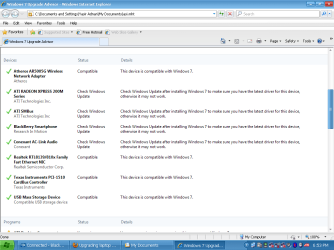
I got Several drivers Compatible/others "check for windows update".what actually compatible i can install that driver for win seven or win seven automatically take those drivers.
 

My Computer My Computer

At a glance

Windows 7 Ultimate 32 bitIntel Celeron(M) 1.60GhzATI 200M
Computer Manufacturer/Model Number
Tohiba Satelite L20
OS
Windows 7 Ultimate 32 bit
CPU
Intel Celeron(M) 1.60Ghz
Graphics Card(s)
ATI 200M
Hard Drives
Hitachi 160GB
My gut reaction:

Celeron = No
1GB RAM = No

I've had systems with the same hardware running Ultimate with no issues ;)

As Bill has mentioned, the OP just needs to run the Windows 7 Upgrade Advisor and that will give all the information required.


OS
 

My Computer My Computer

At a glance

Windows 7 Ultimate x64AMD Sempron Dual Core3GBNVIDIA GeForce 6150SE nForce 430
Computer Manufacturer/Model Number
Compaq Desktop
OS
Windows 7 Ultimate x64
CPU
AMD Sempron Dual Core
Memory
3GB
Graphics Card(s)
NVIDIA GeForce 6150SE nForce 430
Screen Resolution
1024x768
Hard Drives
150GB Sata

My Computer My Computer

At a glance

Windows 7 x64 pro/ Windows 7 x86 Pro/ XP SP3 x86
Computer Manufacturer/Model Number
Too many to describe...
OS
Windows 7 x64 pro/ Windows 7 x86 Pro/ XP SP3 x86
Have you checked on the Toshiba web site for Windows 7 drivers.
 

My Computer My Computer

At a glance

ME/XP/Vista/Win7
OS
ME/XP/Vista/Win7
The beauty of Windows 7 is that it finds 99.9% of drivers for you.
 

My Computer My Computer

At a glance

Windows 7 Ultimate x64AMD Phenom II x48GBNVIDIA GeForce HD
Computer Manufacturer/Model Number
Self build
OS
Windows 7 Ultimate x64
CPU
AMD Phenom II x4
Motherboard
Gigabyte 880
Memory
8GB
Graphics Card(s)
NVIDIA GeForce HD
Sound Card
Realtek HD Audio
Screen Resolution
1920 x 1080
Hard Drives
2 x 1TB
PSU
Thermalake 550w
Case
XCase
Internet Speed
8MB
This is Upgrade Advisor result.Please check and let me know that"m i go for Windows 7 or not":)
 

Attachments

  • png.PNG
    png.PNG
    35.8 KB · Views: 47

My Computer My Computer

At a glance

Windows 7 Ultimate 32 bitIntel Celeron(M) 1.60GhzATI 200M
Computer Manufacturer/Model Number
Tohiba Satelite L20
OS
Windows 7 Ultimate 32 bit
CPU
Intel Celeron(M) 1.60Ghz
Graphics Card(s)
ATI 200M
Hard Drives
Hitachi 160GB
Have you checked on the Toshiba web site for Windows 7 drivers.

Yes,i checked there.Toshiba didn't provide any support for this kind of old laptops.
 

My Computer My Computer

At a glance

Windows 7 Ultimate 32 bitIntel Celeron(M) 1.60GhzATI 200M
Computer Manufacturer/Model Number
Tohiba Satelite L20
OS
Windows 7 Ultimate 32 bit
CPU
Intel Celeron(M) 1.60Ghz
Graphics Card(s)
ATI 200M
Hard Drives
Hitachi 160GB
You are fine. I think you may not find win7 drivers for your video and audio cards but you can install older drivers in compatibility mode as pointed out earlier.
 

My Computer My Computer

At a glance

Windows 7 x64 pro/ Windows 7 x86 Pro/ XP SP3 x86
Computer Manufacturer/Model Number
Too many to describe...
OS
Windows 7 x64 pro/ Windows 7 x86 Pro/ XP SP3 x86
I would save a free Macrium Reflect or Paragon 11 backup image of XP so you can easily reimage it if you don't like Win7's performance. Wait for 30 days to activate so you can test it then easily move it to another computer without problems.

The Atheros wireless driver is likely in installer along with most all others, however put the Win7 or Vista driver for that model adpater on stick or CD so you can get online quickly to update drivers given by installer via optional Windows Updates.

Here are tips for getting a purrfect clean install - use the ones which apply: http://www.sevenforums.com/installation-setup/125874-re-install-windows-7-a.html#post1086729

Note that if you wipe the HD and are using an Upgrade version of Win7 (as you're entitled to do with XP), you'll need to leave the Product key box blank during install, then afterwards do the quick registry workaround given here to activate Upgrade version on cleaned HD: http://www.sevenforums.com/tutorials/31402-clean-install-upgrade-windows-7-version.html
 
Thank you everybody:-)
 

My Computer My Computer

At a glance

Windows 7 Ultimate 32 bitIntel Celeron(M) 1.60GhzATI 200M
Computer Manufacturer/Model Number
Tohiba Satelite L20
OS
Windows 7 Ultimate 32 bit
CPU
Intel Celeron(M) 1.60Ghz
Graphics Card(s)
ATI 200M
Hard Drives
Hitachi 160GB
Back
Top