Confusion - Install W7 on 2nd logical drive

spinifex

Pest from the West
Guru
VIP
Local time
3:36 AM
Messages
997
Location
Perth; Western Australia
G'day guys and girls.

Since i'm not a computer expert (self taught), i have been reading up on how to install Windows 7 on my notebook.
It has Vista Home Edition an C: and i wish to put Windows 7 Pro X64 on D:, which is a second HDD.
Everything i have read is written brilliantly, but the more i stress, the less sinks in.

The notebook has 2 physical HDD's, each being 160GB in size.
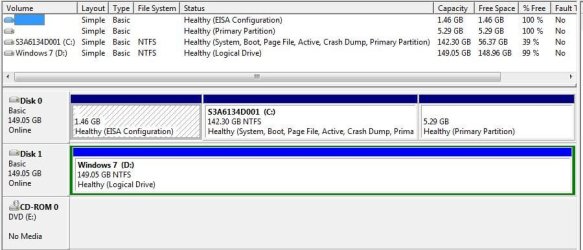
D: has been formatted this morning, but it shows up as a "logical" drive.:confused:
Reading about partitions has me totally bamboozled, never having done it.
I read about making a 50GB partition, but nothing is sinking in. Tried different tutorials, but i am confusing myself even more. Needing it set up with Windows 7 by monday afternoon, i'm really putting the pressure on myself. :o

I use this notebook for both home and work. At home i can live with Vista even though it has issues, but at my work, everything is set up with Windows 7.
I have not updated my specs as that is set up for my desktop comp.

If anyone with a bit of patience can run me through the required steps, i will be eternally grateful.:)

Attached is a shot of the HDD's in Computer Management.

Regards

Jon


Edit - Just realised, my post reminds me of a joke i read in a PC magazine.

Short version: "Best thing for me to do is put the notebook back in the box, cause i'm too stupid to own a computer". :D
 

Attachments

  • Toshiba partitions 12032011.jpg
    Toshiba partitions 12032011.jpg
    52.7 KB · Views: 44
Last edited:

My Computer My Computer

At a glance

Win7 Ultimate x64382012 GB kitXFX nVidia GeForce GTX 560
Computer Manufacturer/Model Number
Home build
OS
Win7 Ultimate x64
CPU
3820
Motherboard
Rampage IV formula
Memory
12 GB kit
Graphics Card(s)
XFX nVidia GeForce GTX 560
Sound Card
On board card
Monitor(s) Displays
LG 27" x 2
Screen Resolution
1920 x 1080
Hard Drives
1 x OCZ Vertex 4 , 256Gb
PSU
875W Thermal Take
Case
Antec P160W
Cooling
Noctua
Keyboard
Logitech Wave Pro
Mouse
Logitech
Internet Speed
1.5 Mb
Other Info
Logitech G25 steering wheel, Logitech Extreme 3D Pro joystick.
Logitech surround sound speaker system.
What did you use for a drive partitioning tool? You should be able to reuse that to delete the logical partition easy enough. Your best move however when going to install 7 depends on if you want to see the system reserved 100mb partition created by the 7 installer once the present partition is removed.

As for a dual boot with Vista you also have two options for that. The recommend first unplugging the Vista when going to install 7 as a stand alone OS in case you decide to remove Vista later or the first drive fails on you. The second drive 7 will go on will then have it's own boot information.

Now for simply cleaning the logical partition and not wanting to see the 100mb boot partition with BCD store placed there along with 7's boot files you can create the new primary and see it formatted to NTFS first. For that even you have two options for the gui method using a drive partitioning program or the use of command prompt running the DiskPart tool.

For using DiskPart to clean the drive go to the Start>Accessories command prompt icon and right click on that to "run as administrator". That will prevent any permissions problems from getting in the way.

Next you simply type the following commands at the dos looking command prompt. Note you can use upper or lower case and the commands will still work. After each one is typed in you press enter before the next.

diskpart

list disk

select disk 1 (Note that since the Vista drive being the first on the system will likely be seen a disk #0. To verify that you will be selecting the correct number you can label the volume "delete" so that is seen while at the command prompt. You shouldn't mistake which drive however especially if a different capacity.)

clean (generally works well. You may see the clean all command advised since there are only two drives and you are booted in one while seeing this done.)

create partition primary (creates new primary type partition)

select volume 1 (you now have selected the new primary)

active (marks new primary as active. required for next step of formatting)

format fs=ntfs

assign (Windows assigns drive letter)

exit

Once all that is seen to simply close the command prompt window and you are now ready to unplug the Vista drive to see a stand alone install of 7. Afterwards you can still see a boot entry in 7 for Vista and even see a boot entry for 7 in Vista since both versions use the same boot loader/BCD store.

That's the command prompt way while many work with a little 3rd party help using a program. If you are periodically setting up dual boots and repairing or reinstalling OSs for people GParted on a usb flash drive solves the partitioning for multiple OSs.

As for the 100mb system reserved MS intentionally geared 7 for this since it isolates the boot files and BCD store(boot configuration information) from bugs(malwares, viruses) and accidental deletion of files when someone decides to sweep the root of C. Recommended for the not so experienced users.
 

My Computers My Computers

  • At a glance

    W7 Ultimate x64/W10 Pro x64/W11 Pro Triple Bo...AMD Phenom II X4 975 Deneb 3.6ghz - 965 2nd r...Kingston Hyper X DDR3 1600 1.5v 16gb - Hyper ...MSI HD Radeon 5750 1gb - MSI HD Radeon 6450 o...
    Computer type
    PC/Desktop
    Computer Manufacturer/Model Number
    Custom builds = 2
    OS
    W7 Ultimate x64/W10 Pro x64/W11 Pro Triple Boot - Main PC W7 Remote PC Micro ATX W7 Pro x64/W11 Pro
    CPU
    AMD Phenom II X4 975 Deneb 3.6ghz - 965 2nd remote pc
    Motherboard
    Gigabyte GA-790XTA-UD4-Gigabyte GA-880GM-D2H remote pc
    Memory
    Kingston Hyper X DDR3 1600 1.5v 16gb - Hyper X Fury 8gb 2nd
    Graphics Card(s)
    MSI HD Radeon 5750 1gb - MSI HD Radeon 6450 on mini tower
    Sound Card
    Creative Labs X-Fi Xtreme Audio P - Realtek onooard 2nd case
    Monitor(s) Displays
    ASUS VW199T-P 19" HP 2082a Main-HP 2082a 20" remote pc
    Screen Resolution
    Asus 1440x900 - HP 1600x900
    Hard Drives
    WD Black 1TB HD per OS W7, W10, and pending W11 presently on 500gb OS Drive - Pending Triple 1TB HDs for Spanned Storage/backup volume
    Single 2TB external USB enclosure, single 1TB System 7 Host/Boot drive, Pending 8TB external HD for system image b
    PSU
    Corsair 750TX - primary / Corsair CX600 - second
    Case
    Antec 900-2 - SSD compatible / NZXT Vulcan mini tower
    Cooling
    Zalman CNPS9900A
    Keyboard
    AZIO L70 Backlit Letters Gaming - ONN Cordless/USB
    Mouse
    MSI DS200 Programmable, Logitech Cordless
    Internet Speed
    30mbps upgrade - primary hard wired - mini tower usb WiFi
    Antivirus
    GFI VIPRE Internet Security 2014 on W7 2016 beta on W10,
    Browser
    Cyberfox, WaterFox 64bit FF variants, FireFox x64, Pale Moon
    Other Info
    Accomdata fan cooled usb 2.0 PIDE/Sata II, III external enclosure.
    Sambient usb/eSata PATA/Sata II, III external enclosure.
  • At a glance

    W7 Pro x64/W11 ProAMD Deneb 3.6ghz - 965Kingston Hyper X Fury 8gbMSI HD Radeon 6450 DVI Output
    Computer type
    PC/Desktop
    System Manufacturer/Model Number
    CUSTOM ASSEMBLY
    OS
    W7 Pro x64/W11 Pro
    CPU
    AMD Deneb 3.6ghz - 965
    Motherboard
    Gigabyte GA-880GM-D2H remote pc
    Memory
    Kingston Hyper X Fury 8gb
    Graphics Card(s)
    MSI HD Radeon 6450 DVI Output
    Sound Card
    Realtek onooard Creative or Other separate PENDING
    Monitor(s) Displays
    VIZIO 32" LCD TV Separate LCD Pending
    Screen Resolution
    1600x1080
    Hard Drives
    WD 500GB OS Host/Boot WD Green 1TB Storage/Backup
    PSU
    Corsair 600W - THERMALTAKE 600W spare case
    Case
    NZXT Vulcan mini tower
    Cooling
    Twin 120mm Top Fans - 240mm Side Cover
    Keyboard
    ONN Cordless/USB Logitech Cordless
    Mouse
    ONN USB/Cordless - Logitech Cordless
    Internet Speed
    DSL 5G
    Browser
    MS Edge, FireFox, WaterFox x64, FireFox Nightly
    Other Info
    OS Testing-Remote Access to Main TeamViewer
Hello Jon.


Just boot the Windows 7 DVD and do the wipe, then creating, formating and marking active a single Primary partition for the install, have a look at the information below, have a look at Step Two #1 after the clean all completes.


After you have copied out or made back-ups of the data you need to save to external media, use Step One of this tutorial at the link below to do a wipe (secure erase) to the entire Hard Disk Drive / Solid State Drive.
  • Then if you do not want to create the new Windows 7 "System Reserved" partition use the outline in Step Two #2 to create, format and mark Active a single 100GB partition to do the installation to.
  • If you do want to create the "System Reserved" partition use the outline in Step Two #3 to create, format and mark Active the System Reserved partition and then create and format the 100GB partition to do the installation to.
Either way, running the "clean all" then creating and formatting the partition(s) using diskpart will get you the best possible space to do a clean install of Windows 7 to; you can always extend the Windows partition to include the remaining unallocated space on the HDD / SSD or create additional Primary partitions or an Extended partition after the installation completes if you choose.

SSD / HDD : Optimize for Windows Reinstallation

DISKPART : At PC Startup

Do a Clean Install with a Upgrade Windows 7 Version
 

My Computer My Computer

At a glance

W 7 64-bit UltimateIntel Q9550 Yorkfield8GB Dominator 8500C5DATI : XFX 5870
Computer Manufacturer/Model Number
* BFK Customs *
OS
W 7 64-bit Ultimate
CPU
Intel Q9550 Yorkfield
Motherboard
ASUS P5Q Pro
Memory
8GB Dominator 8500C5D
Graphics Card(s)
ATI : XFX 5870
Sound Card
Realtek HD Audio 7-1
Monitor(s) Displays
1x 47" LCD HDMI & 3x 26" LCD HDMI
Screen Resolution
1920x1080P & 1920x1200
Hard Drives
1x 80GB Intel X25-M G2 SSD : 1x 500GB & 1x 640GB WD Caviar Black(s)
PSU
Corsair 620HX
Case
Cooler Master RC-690
Cooling
Tuniq Tower 120, 2x 140mm and 3x 120mm case fans
Keyboard
Microsoft 500
Mouse
Razer Diamondback 3G
Internet Speed
14 Mb/s
Other Info
1x Koutech 3Gb/s SATA HDD Hot Swap Rack
Night Hawk,

Thank you very much for replying, especially with so much detail.
In regards to the D: i wish to use, i just formatted it, which took a while, then did a quick format, which flew through very quickly.
I then checked the drives via computer management and it stated D: is "Healthy (logical drive)".

Should not have any issues following your dos commands, as if my memory works back to the mid 80's, it should start coming back to me.

The C: drive may not be so easy to disconnect, this being a notebook.
I'll leave it connected and see how it goes. Should i have too many issues setting up D:, at least i still have a working machine, to take away.
Having a desktop as well, makes it easy to communicate, rather than having to rely on just the notebook.

Well, here goes nothing.

Thanks again.

Jon
 

My Computer My Computer

At a glance

Win7 Ultimate x64382012 GB kitXFX nVidia GeForce GTX 560
Computer Manufacturer/Model Number
Home build
OS
Win7 Ultimate x64
CPU
3820
Motherboard
Rampage IV formula
Memory
12 GB kit
Graphics Card(s)
XFX nVidia GeForce GTX 560
Sound Card
On board card
Monitor(s) Displays
LG 27" x 2
Screen Resolution
1920 x 1080
Hard Drives
1 x OCZ Vertex 4 , 256Gb
PSU
875W Thermal Take
Case
Antec P160W
Cooling
Noctua
Keyboard
Logitech Wave Pro
Mouse
Logitech
Internet Speed
1.5 Mb
Other Info
Logitech G25 steering wheel, Logitech Extreme 3D Pro joystick.
Logitech surround sound speaker system.
Thank you for another informative reply, Ted.
I love it when there are more than just 1 option.

Looks like i'll be busy for a while now.
Just remembered. The Handbrake has a Toshiba notebook she has not used in over a year.
Same size, 17", as mine. Should there be issues, i'll steal it for work, lol.:D
I am not a negative person (cup is half full), but with computers i have seen too many problems, so am preparing myself for the worst case scenario.

On the other hand, with the advise given here, how can i go wrong.;)

Thanks

Jon
 

My Computer My Computer

At a glance

Win7 Ultimate x64382012 GB kitXFX nVidia GeForce GTX 560
Computer Manufacturer/Model Number
Home build
OS
Win7 Ultimate x64
CPU
3820
Motherboard
Rampage IV formula
Memory
12 GB kit
Graphics Card(s)
XFX nVidia GeForce GTX 560
Sound Card
On board card
Monitor(s) Displays
LG 27" x 2
Screen Resolution
1920 x 1080
Hard Drives
1 x OCZ Vertex 4 , 256Gb
PSU
875W Thermal Take
Case
Antec P160W
Cooling
Noctua
Keyboard
Logitech Wave Pro
Mouse
Logitech
Internet Speed
1.5 Mb
Other Info
Logitech G25 steering wheel, Logitech Extreme 3D Pro joystick.
Logitech surround sound speaker system.
Running the clean all is best as formatting does nothing at all on its own.

The clean command does nothing more than a quick format.
   Note

Contrary to popular belief, doing a full format with Windows 7 does not remove any data at all, it just checks for sector errors and marks the space to be over-written as needed, all the data is still there including all the code from previous, failed installation attempts.


My Computer My Computer

At a glance

W 7 64-bit UltimateIntel Q9550 Yorkfield8GB Dominator 8500C5DATI : XFX 5870
Computer Manufacturer/Model Number
* BFK Customs *
OS
W 7 64-bit Ultimate
CPU
Intel Q9550 Yorkfield
Motherboard
ASUS P5Q Pro
Memory
8GB Dominator 8500C5D
Graphics Card(s)
ATI : XFX 5870
Sound Card
Realtek HD Audio 7-1
Monitor(s) Displays
1x 47" LCD HDMI & 3x 26" LCD HDMI
Screen Resolution
1920x1080P & 1920x1200
Hard Drives
1x 80GB Intel X25-M G2 SSD : 1x 500GB & 1x 640GB WD Caviar Black(s)
PSU
Corsair 620HX
Case
Cooler Master RC-690
Cooling
Tuniq Tower 120, 2x 140mm and 3x 120mm case fans
Keyboard
Microsoft 500
Mouse
Razer Diamondback 3G
Internet Speed
14 Mb/s
Other Info
1x Koutech 3Gb/s SATA HDD Hot Swap Rack
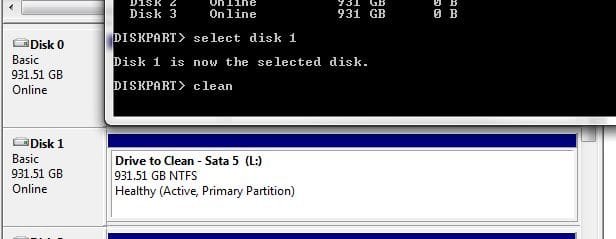
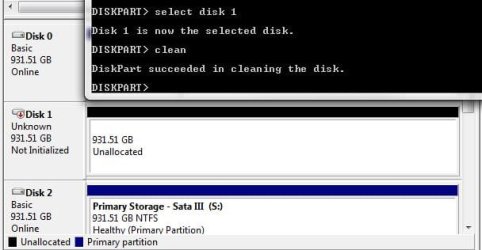
The clean command didn't reformat a 1tb drive here but saw that turned into a volume unallocated drive space as you can see in the two screens below. There's also the use of the "delete partition" and "delete volume" commands once you have entered the select disk 1 and select partition 1 commands to first select the drive and then the partition you intend to remove.
 

Attachments

  • DiskPart4 Target Drive RedE2Clean.jpg
    DiskPart4 Target Drive RedE2Clean.jpg
    25.8 KB · Views: 3
  • DiskPart5 Intended Drive Wiped.jpg
    DiskPart5 Intended Drive Wiped.jpg
    32.1 KB · Views: 4

My Computers My Computers

  • At a glance

    W7 Ultimate x64/W10 Pro x64/W11 Pro Triple Bo...AMD Phenom II X4 975 Deneb 3.6ghz - 965 2nd r...Kingston Hyper X DDR3 1600 1.5v 16gb - Hyper ...MSI HD Radeon 5750 1gb - MSI HD Radeon 6450 o...
    Computer type
    PC/Desktop
    Computer Manufacturer/Model Number
    Custom builds = 2
    OS
    W7 Ultimate x64/W10 Pro x64/W11 Pro Triple Boot - Main PC W7 Remote PC Micro ATX W7 Pro x64/W11 Pro
    CPU
    AMD Phenom II X4 975 Deneb 3.6ghz - 965 2nd remote pc
    Motherboard
    Gigabyte GA-790XTA-UD4-Gigabyte GA-880GM-D2H remote pc
    Memory
    Kingston Hyper X DDR3 1600 1.5v 16gb - Hyper X Fury 8gb 2nd
    Graphics Card(s)
    MSI HD Radeon 5750 1gb - MSI HD Radeon 6450 on mini tower
    Sound Card
    Creative Labs X-Fi Xtreme Audio P - Realtek onooard 2nd case
    Monitor(s) Displays
    ASUS VW199T-P 19" HP 2082a Main-HP 2082a 20" remote pc
    Screen Resolution
    Asus 1440x900 - HP 1600x900
    Hard Drives
    WD Black 1TB HD per OS W7, W10, and pending W11 presently on 500gb OS Drive - Pending Triple 1TB HDs for Spanned Storage/backup volume
    Single 2TB external USB enclosure, single 1TB System 7 Host/Boot drive, Pending 8TB external HD for system image b
    PSU
    Corsair 750TX - primary / Corsair CX600 - second
    Case
    Antec 900-2 - SSD compatible / NZXT Vulcan mini tower
    Cooling
    Zalman CNPS9900A
    Keyboard
    AZIO L70 Backlit Letters Gaming - ONN Cordless/USB
    Mouse
    MSI DS200 Programmable, Logitech Cordless
    Internet Speed
    30mbps upgrade - primary hard wired - mini tower usb WiFi
    Antivirus
    GFI VIPRE Internet Security 2014 on W7 2016 beta on W10,
    Browser
    Cyberfox, WaterFox 64bit FF variants, FireFox x64, Pale Moon
    Other Info
    Accomdata fan cooled usb 2.0 PIDE/Sata II, III external enclosure.
    Sambient usb/eSata PATA/Sata II, III external enclosure.
  • At a glance

    W7 Pro x64/W11 ProAMD Deneb 3.6ghz - 965Kingston Hyper X Fury 8gbMSI HD Radeon 6450 DVI Output
    Computer type
    PC/Desktop
    System Manufacturer/Model Number
    CUSTOM ASSEMBLY
    OS
    W7 Pro x64/W11 Pro
    CPU
    AMD Deneb 3.6ghz - 965
    Motherboard
    Gigabyte GA-880GM-D2H remote pc
    Memory
    Kingston Hyper X Fury 8gb
    Graphics Card(s)
    MSI HD Radeon 6450 DVI Output
    Sound Card
    Realtek onooard Creative or Other separate PENDING
    Monitor(s) Displays
    VIZIO 32" LCD TV Separate LCD Pending
    Screen Resolution
    1600x1080
    Hard Drives
    WD 500GB OS Host/Boot WD Green 1TB Storage/Backup
    PSU
    Corsair 600W - THERMALTAKE 600W spare case
    Case
    NZXT Vulcan mini tower
    Cooling
    Twin 120mm Top Fans - 240mm Side Cover
    Keyboard
    ONN Cordless/USB Logitech Cordless
    Mouse
    ONN USB/Cordless - Logitech Cordless
    Internet Speed
    DSL 5G
    Browser
    MS Edge, FireFox, WaterFox x64, FireFox Nightly
    Other Info
    OS Testing-Remote Access to Main TeamViewer
No one is disputing any of that, of course the clean command leaves a HDD as unallocated space but neither clean nor format, full or quick, or delete, over-writes data as a clean all does and that leaves room for errors to creep in and that does happen.

There have been many instances where the only way forward was a clean all, over-write all existing data, especially when Linux (not relevant in this case) has been installed to the HDD previously.
 

My Computer My Computer

At a glance

W 7 64-bit UltimateIntel Q9550 Yorkfield8GB Dominator 8500C5DATI : XFX 5870
Computer Manufacturer/Model Number
* BFK Customs *
OS
W 7 64-bit Ultimate
CPU
Intel Q9550 Yorkfield
Motherboard
ASUS P5Q Pro
Memory
8GB Dominator 8500C5D
Graphics Card(s)
ATI : XFX 5870
Sound Card
Realtek HD Audio 7-1
Monitor(s) Displays
1x 47" LCD HDMI & 3x 26" LCD HDMI
Screen Resolution
1920x1080P & 1920x1200
Hard Drives
1x 80GB Intel X25-M G2 SSD : 1x 500GB & 1x 640GB WD Caviar Black(s)
PSU
Corsair 620HX
Case
Cooler Master RC-690
Cooling
Tuniq Tower 120, 2x 140mm and 3x 120mm case fans
Keyboard
Microsoft 500
Mouse
Razer Diamondback 3G
Internet Speed
14 Mb/s
Other Info
1x Koutech 3Gb/s SATA HDD Hot Swap Rack
142136d1299438139-ssd-hdd-optimize-windows-reinstallation-two_3.1.jpg


Had some cd/dvd driver issues, like, could not find one. Had this been a desktop comp, i could use the mobo disk, but notebooks with the pre-installed OS confuse the hell out of me.
The copied pic above is what i successfully accomplished.
Did a reboot Below is the boot order.
First is cd/dvd.
Second is HDD #2, which has the Windows 7 partition. (D:/).
Third is HDD #1, which is the vista one. (C:/).
(Vista still works, than goodness.)

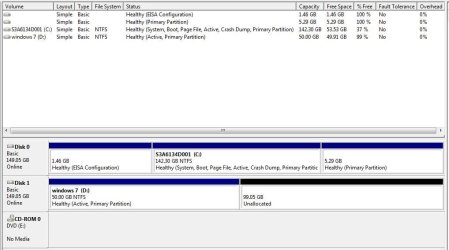
Attached is a shot of the computer management. Guess, sofar, so good.
Trying to get around the driver issue, i must have done something wrong, as now i get a (unwanted) message: "Bootmgr is missing".....gggrrrrrr.:mad:

Where to from here please???
 

Attachments

  • Toshiba partitions new 13032011.jpg
    Toshiba partitions new 13032011.jpg
    54 KB · Views: 9

My Computer My Computer

At a glance

Win7 Ultimate x64382012 GB kitXFX nVidia GeForce GTX 560
Computer Manufacturer/Model Number
Home build
OS
Win7 Ultimate x64
CPU
3820
Motherboard
Rampage IV formula
Memory
12 GB kit
Graphics Card(s)
XFX nVidia GeForce GTX 560
Sound Card
On board card
Monitor(s) Displays
LG 27" x 2
Screen Resolution
1920 x 1080
Hard Drives
1 x OCZ Vertex 4 , 256Gb
PSU
875W Thermal Take
Case
Antec P160W
Cooling
Noctua
Keyboard
Logitech Wave Pro
Mouse
Logitech
Internet Speed
1.5 Mb
Other Info
Logitech G25 steering wheel, Logitech Extreme 3D Pro joystick.
Logitech surround sound speaker system.
Have you got a USB thumbdrive you can use for the drivers? I'd guess it's the chipset driver you're actually going to need. :)
 

My Computer My Computer

At a glance

Main - Windows 7 Pro SP1 64-Bit; 2nd - Window...Main - Core i7 2600K; 2nd - Core i7 920Main - 16GB Corsair Vengeance; 2nd - 12GB Cor...Main - XFX Radeon 6870 1GB; 2nd - XFX Radeon ...
Computer Manufacturer/Model Number
Self
OS
Main - Windows 7 Pro SP1 64-Bit; 2nd - Windows Server 2008 R2
CPU
Main - Core i7 2600K; 2nd - Core i7 920
Motherboard
Main - Asus P8Z68-V Pro/Gen3; 2nd - Gigabyte GA-EX58-UDR3
Memory
Main - 16GB Corsair Vengeance; 2nd - 12GB Corsair Vengeance
Graphics Card(s)
Main - XFX Radeon 6870 1GB; 2nd - XFX Radeon 4870 1GB
Sound Card
Both: Onboard Realtek Azalia
Monitor(s) Displays
Main - Hann 25" + I-INC 25" + Acer 23"; 2nd - Upgrading Soon
Screen Resolution
Main - 1920x1080 (All Three Monitors); 2nd - Upgrading Soon
Hard Drives
Main - (1) Crucial M4 128GB (Boot)
Main - (1) Seagate 2TB 64MB Cache (Data)
Main - (1) Seagate 2TB 64MB Cache (Data Backup)
2nd - (1) Intel X25-M SSD 80GB (Boot)
2nd - (3) Seagate 1TB 32MB Cache (Data Backup)
2nd - (1) Seagate 320GB (Because)
PSU
Main - OCZ 600W Modular; 2nd - OCZ 600W
Case
Main - Thermaltake Element G; 2nd - NZXT something or other
Cooling
Main - Corsair H80; 2nd - Prolimatech Megahalems
Keyboard
Main - Razer Reclusa; 2nd - Old MS Keyboard
Mouse
Main - Logitech MX Revolution; 2nd - Old MS Mouse
Internet Speed
20Mbps Time-Warner Cable
No one is disputing any of that, of course the clean command leaves a HDD as unallocated space but neither clean nor format, full or quick, or delete, over-writes data as a clean all does and that leaves room for errors to creep in and that does happen.

There have been many instances where the only way forward was a clean all, over-write all existing data, especially when Linux (not relevant in this case) has been installed to the HDD previously.

As always when you want to insure nothing could be remaining the only option is to zero fill a drive nowadays done with something like the open source tool eraser. Binary 0s are written repeatedly to a drive. The absolute of a drive in that sense.

142136d1299438139-ssd-hdd-optimize-windows-reinstallation-two_3.1.jpg


Had some cd/dvd driver issues, like, could not find one. Had this been a desktop comp, i could use the mobo disk, but notebooks with the pre-installed OS confuse the hell out of me.
The copied pic above is what i successfully accomplished.
Did a reboot Below is the boot order.
First is cd/dvd.
Second is HDD #2, which has the Windows 7 partition. (D:/).
Third is HDD #1, which is the vista one. (C:/).
(Vista still works, than goodness.)

Attached is a shot of the computer management. Guess, sofar, so good.
Trying to get around the driver issue, i must have done something wrong, as now i get a (unwanted) message: "Bootmgr is missing".....gggrrrrrr.:mad:

Where to from here please???

When going to install 7 did you boot live from the dvd or run the installer while booted in Vista?

If you are now trying to boot from the second drive there won't be any mbr or boot files present since they went onto the first drive from the start. That's where the Windows installer always looks for.

This is why I had suggested unplugging the first to first see a clean install as a stand alone making the second drive bootable and then later having the option for adding a boot entry into the 7 BDC for Vista where you can set which will be the default OS as well.
 

My Computers My Computers

  • At a glance

    W7 Ultimate x64/W10 Pro x64/W11 Pro Triple Bo...AMD Phenom II X4 975 Deneb 3.6ghz - 965 2nd r...Kingston Hyper X DDR3 1600 1.5v 16gb - Hyper ...MSI HD Radeon 5750 1gb - MSI HD Radeon 6450 o...
    Computer type
    PC/Desktop
    Computer Manufacturer/Model Number
    Custom builds = 2
    OS
    W7 Ultimate x64/W10 Pro x64/W11 Pro Triple Boot - Main PC W7 Remote PC Micro ATX W7 Pro x64/W11 Pro
    CPU
    AMD Phenom II X4 975 Deneb 3.6ghz - 965 2nd remote pc
    Motherboard
    Gigabyte GA-790XTA-UD4-Gigabyte GA-880GM-D2H remote pc
    Memory
    Kingston Hyper X DDR3 1600 1.5v 16gb - Hyper X Fury 8gb 2nd
    Graphics Card(s)
    MSI HD Radeon 5750 1gb - MSI HD Radeon 6450 on mini tower
    Sound Card
    Creative Labs X-Fi Xtreme Audio P - Realtek onooard 2nd case
    Monitor(s) Displays
    ASUS VW199T-P 19" HP 2082a Main-HP 2082a 20" remote pc
    Screen Resolution
    Asus 1440x900 - HP 1600x900
    Hard Drives
    WD Black 1TB HD per OS W7, W10, and pending W11 presently on 500gb OS Drive - Pending Triple 1TB HDs for Spanned Storage/backup volume
    Single 2TB external USB enclosure, single 1TB System 7 Host/Boot drive, Pending 8TB external HD for system image b
    PSU
    Corsair 750TX - primary / Corsair CX600 - second
    Case
    Antec 900-2 - SSD compatible / NZXT Vulcan mini tower
    Cooling
    Zalman CNPS9900A
    Keyboard
    AZIO L70 Backlit Letters Gaming - ONN Cordless/USB
    Mouse
    MSI DS200 Programmable, Logitech Cordless
    Internet Speed
    30mbps upgrade - primary hard wired - mini tower usb WiFi
    Antivirus
    GFI VIPRE Internet Security 2014 on W7 2016 beta on W10,
    Browser
    Cyberfox, WaterFox 64bit FF variants, FireFox x64, Pale Moon
    Other Info
    Accomdata fan cooled usb 2.0 PIDE/Sata II, III external enclosure.
    Sambient usb/eSata PATA/Sata II, III external enclosure.
  • At a glance

    W7 Pro x64/W11 ProAMD Deneb 3.6ghz - 965Kingston Hyper X Fury 8gbMSI HD Radeon 6450 DVI Output
    Computer type
    PC/Desktop
    System Manufacturer/Model Number
    CUSTOM ASSEMBLY
    OS
    W7 Pro x64/W11 Pro
    CPU
    AMD Deneb 3.6ghz - 965
    Motherboard
    Gigabyte GA-880GM-D2H remote pc
    Memory
    Kingston Hyper X Fury 8gb
    Graphics Card(s)
    MSI HD Radeon 6450 DVI Output
    Sound Card
    Realtek onooard Creative or Other separate PENDING
    Monitor(s) Displays
    VIZIO 32" LCD TV Separate LCD Pending
    Screen Resolution
    1600x1080
    Hard Drives
    WD 500GB OS Host/Boot WD Green 1TB Storage/Backup
    PSU
    Corsair 600W - THERMALTAKE 600W spare case
    Case
    NZXT Vulcan mini tower
    Cooling
    Twin 120mm Top Fans - 240mm Side Cover
    Keyboard
    ONN Cordless/USB Logitech Cordless
    Mouse
    ONN USB/Cordless - Logitech Cordless
    Internet Speed
    DSL 5G
    Browser
    MS Edge, FireFox, WaterFox x64, FireFox Nightly
    Other Info
    OS Testing-Remote Access to Main TeamViewer
Hopefully you booted the Win7 DVD to install so that each OS will see itself as C when within it. If not Win7 will retain D while in Win7, not a problem unless you prefer C.

With a laptop it's harder for OP to unplug the HD so we try to avoid it. Configuring a Windows-managed Dual Boot is easiest here, although to later remove Vista you'll need to mark Win7 active and run Startup Repair from DVD up to 3 times with reboots to write the System boot files to Win7.

What makes you think you need drivers? Once in Win7, enable hardware auto-updating then check optional Updates for newer drivers. Any missing thereafter can be found on the Support Downloads webpage for your model computer or device.
 
Last edited:
As always when you want to insure nothing could be remaining the only option is to zero fill a drive nowadays done with something like the open source tool eraser. Binary 0s are written repeatedly to a drive. The absolute of a drive in that sense.

Had some cd/dvd driver issues, like, could not find one. Had this been a desktop comp, i could use the mobo disk, but notebooks with the pre-installed OS confuse the hell out of me.
Did a reboot Below is the boot order.
First is cd/dvd.
Second is HDD #2, which has the Windows 7 partition. (D:/).
Third is HDD #1, which is the vista one. (C:/).
(Vista still works, than goodness.)

Attached is a shot of the computer management. Guess, sofar, so good.
Trying to get around the driver issue, i must have done something wrong, as now i get a (unwanted) message: "Bootmgr is missing".....gggrrrrrr.:mad:

Where to from here please???

When going to install 7 did you boot live from the dvd or run the installer while booted in Vista?

If you are now trying to boot from the second drive there won't be any mbr or boot files present since they went onto the first drive from the start. That's where the Windows installer always looks for.

This is why I had suggested unplugging the first to first see a clean install as a stand alone making the second drive bootable and then later having the option for adding a boot entry into the 7 BDC for Vista where you can set which will be the default OS as well.

Set Vista HD as first HD to boot in BIOS setup (after DVD drive) as it should contain the System boot files for both OS's if Win7 installer configured Dual Boot correctly. If not, install EasyBCD 2.02 to Vista to Add Win7 on the Add OS tab.

Hopefully you booted the Win7 DVD to install so that each OS will see itself as C when within it. If not Win7 will retain D while in Win7, not a problem unless you prefer C.

With a laptop it's harder for OP to unplug the HD so we try to avoid it. Configuring a Windows-managed Dual Boot is easiest here, although to later remove Vista you'll need to mark Win7 active and run Startup Repair from DVD up to 3 times with reboots to write the System boot files to Win7.

What makes you think you need drivers? Once in Win7, enable hardware auto-updating then check optional Updates for newer drivers. Any missing thereafter can be found on the Support Downloads webpage for your model computer or device.

@Night Hawk

I booted from the DVD, trying not to interfere with Vista on C drive. (i was running scared, in case i made a mess of Vista).

@gregrocker

When trying to install the new OS onto D drive, the install stopped and stated i needed a CD/DVD driver. On the screen i had an option to search folders to find the "missing driver".

Since i could not find one, things went down hill from there.
The Handbrake has installed XP on quite a few comps, but has never done a dual boot set up, so she is a bit lost too. (She is self taught also).

We both have a lot to learn, reading the replies. Never had to deal with anything like this.

@profdlp

No shortage of memory sticks here, Steve.:D
Trying to find the correct drivers for this notebook, now that is another story.:rolleyes:
It is about 4 yrs old, and makes it a bit more difficult.:shock:

I will now spend time reading and clicking links in the replies, to see where to go from here.
So much to learn, so little time.:geek:

Thanks again to all who are putting time aside to help me with my problem, or at least, misunderstanding of how it needs to be done..

Jon
 

My Computer My Computer

At a glance

Win7 Ultimate x64382012 GB kitXFX nVidia GeForce GTX 560
Computer Manufacturer/Model Number
Home build
OS
Win7 Ultimate x64
CPU
3820
Motherboard
Rampage IV formula
Memory
12 GB kit
Graphics Card(s)
XFX nVidia GeForce GTX 560
Sound Card
On board card
Monitor(s) Displays
LG 27" x 2
Screen Resolution
1920 x 1080
Hard Drives
1 x OCZ Vertex 4 , 256Gb
PSU
875W Thermal Take
Case
Antec P160W
Cooling
Noctua
Keyboard
Logitech Wave Pro
Mouse
Logitech
Internet Speed
1.5 Mb
Other Info
Logitech G25 steering wheel, Logitech Extreme 3D Pro joystick.
Logitech surround sound speaker system.
Most of the time Windows will class, the 2nd HD on a Notebook as a Exterial HD
 

My Computer My Computer

At a glance

ME/XP/Vista/Win7
OS
ME/XP/Vista/Win7
Most of the time Windows will class, the 2nd HD on a Notebook as a Exterial HD

Was not aware of that, as to date, this has not happened to me.
Learn something new every day.:D

Problem at my age is, i learn one thing, but forget two.:cry:
 

My Computer My Computer

At a glance

Win7 Ultimate x64382012 GB kitXFX nVidia GeForce GTX 560
Computer Manufacturer/Model Number
Home build
OS
Win7 Ultimate x64
CPU
3820
Motherboard
Rampage IV formula
Memory
12 GB kit
Graphics Card(s)
XFX nVidia GeForce GTX 560
Sound Card
On board card
Monitor(s) Displays
LG 27" x 2
Screen Resolution
1920 x 1080
Hard Drives
1 x OCZ Vertex 4 , 256Gb
PSU
875W Thermal Take
Case
Antec P160W
Cooling
Noctua
Keyboard
Logitech Wave Pro
Mouse
Logitech
Internet Speed
1.5 Mb
Other Info
Logitech G25 steering wheel, Logitech Extreme 3D Pro joystick.
Logitech surround sound speaker system.
Hi Jon -

Are you booting the DVD to try install to D?

If so and you get the error message, can you try install from a flash stick? Easiest is to install UltraISO trial version, on File tab Open ISO, on Bootable tab Write Disk Image, Format, Write. Boot under USB or HD's on one-time BIOS Boot Menu.

If this fails as well, look in BIOS setup for a way to disable DISK0 during install, set DISK1 as first HD to boot in BIOS setup, after DVD or USB drive.

If as theog suggests, your second HD is being viewed as External it may block install for this reason alone. In that case, would you want to consider shrinking Vista to install Win7 on DISK0, then move your User folders to DISK1 where they can be shared by both OS's? http://www.sevenforums.com/tutorials/18629-user-folders-change-default-location.html

If the 5.29gb partition which is showing as empty in Disk Mgmt a Recovery Partition? If not you can consider deleting it to add that space to a new partition you shrink from C to try install.
 
With a laptop it's harder for OP to unplug the HD so we try to avoid it.

It depends on make and model more then anything. But that would isolate the preinstalled Vista from any 7 install mishaps. Later the boot entries could be decided on. Many have a large cover plate you remove from the bottom and the cables for the drives accessible.

If the second is being seen as an external drive as theog suggested the intended drive for 7 would need to be plugged into the first drive's data cable for the install. Then once the first drive is plugged back in with that you edit the BCD for the version that will be left set as default as well as which drive since both would be bootable.

The new entry for Vista on the 7 would be preferred since nothing would be added or changed on the preinstalled version.

@Night Hawk

I booted from the DVD, trying not to interfere with Vista on C drive. (i was running scared, in case i made a mess of Vista).

I will now spend time reading and clicking links in the replies, to see where to go from here.
So much to learn, so little time.:geek:

Thanks again to all who are putting time aside to help me with my problem, or at least, misunderstanding of how it needs to be done..

Jon

The make and model laptop might be a help. The drives themselves are likely a pair 5,400rpm 160gb sata drives by the sound of it.

Any actual need for drivers should be rare for either Vista or 7 when going to perform a clean install unlike XP since the two newers versions have their own updated driver base and should readily install to any sata.

Regarding the install problem the one thing not mentioned so far is a possibility that the Vista preinstall was done with the bios set for AHCI not Native ide mode. You might need to reset the bios defaults until 7 is on adjusting the Plug'n'Play and OS2 settings as well as seeing usb keyboard, virtualization features re-enabled manually.
 

My Computers My Computers

  • At a glance

    W7 Ultimate x64/W10 Pro x64/W11 Pro Triple Bo...AMD Phenom II X4 975 Deneb 3.6ghz - 965 2nd r...Kingston Hyper X DDR3 1600 1.5v 16gb - Hyper ...MSI HD Radeon 5750 1gb - MSI HD Radeon 6450 o...
    Computer type
    PC/Desktop
    Computer Manufacturer/Model Number
    Custom builds = 2
    OS
    W7 Ultimate x64/W10 Pro x64/W11 Pro Triple Boot - Main PC W7 Remote PC Micro ATX W7 Pro x64/W11 Pro
    CPU
    AMD Phenom II X4 975 Deneb 3.6ghz - 965 2nd remote pc
    Motherboard
    Gigabyte GA-790XTA-UD4-Gigabyte GA-880GM-D2H remote pc
    Memory
    Kingston Hyper X DDR3 1600 1.5v 16gb - Hyper X Fury 8gb 2nd
    Graphics Card(s)
    MSI HD Radeon 5750 1gb - MSI HD Radeon 6450 on mini tower
    Sound Card
    Creative Labs X-Fi Xtreme Audio P - Realtek onooard 2nd case
    Monitor(s) Displays
    ASUS VW199T-P 19" HP 2082a Main-HP 2082a 20" remote pc
    Screen Resolution
    Asus 1440x900 - HP 1600x900
    Hard Drives
    WD Black 1TB HD per OS W7, W10, and pending W11 presently on 500gb OS Drive - Pending Triple 1TB HDs for Spanned Storage/backup volume
    Single 2TB external USB enclosure, single 1TB System 7 Host/Boot drive, Pending 8TB external HD for system image b
    PSU
    Corsair 750TX - primary / Corsair CX600 - second
    Case
    Antec 900-2 - SSD compatible / NZXT Vulcan mini tower
    Cooling
    Zalman CNPS9900A
    Keyboard
    AZIO L70 Backlit Letters Gaming - ONN Cordless/USB
    Mouse
    MSI DS200 Programmable, Logitech Cordless
    Internet Speed
    30mbps upgrade - primary hard wired - mini tower usb WiFi
    Antivirus
    GFI VIPRE Internet Security 2014 on W7 2016 beta on W10,
    Browser
    Cyberfox, WaterFox 64bit FF variants, FireFox x64, Pale Moon
    Other Info
    Accomdata fan cooled usb 2.0 PIDE/Sata II, III external enclosure.
    Sambient usb/eSata PATA/Sata II, III external enclosure.
  • At a glance

    W7 Pro x64/W11 ProAMD Deneb 3.6ghz - 965Kingston Hyper X Fury 8gbMSI HD Radeon 6450 DVI Output
    Computer type
    PC/Desktop
    System Manufacturer/Model Number
    CUSTOM ASSEMBLY
    OS
    W7 Pro x64/W11 Pro
    CPU
    AMD Deneb 3.6ghz - 965
    Motherboard
    Gigabyte GA-880GM-D2H remote pc
    Memory
    Kingston Hyper X Fury 8gb
    Graphics Card(s)
    MSI HD Radeon 6450 DVI Output
    Sound Card
    Realtek onooard Creative or Other separate PENDING
    Monitor(s) Displays
    VIZIO 32" LCD TV Separate LCD Pending
    Screen Resolution
    1600x1080
    Hard Drives
    WD 500GB OS Host/Boot WD Green 1TB Storage/Backup
    PSU
    Corsair 600W - THERMALTAKE 600W spare case
    Case
    NZXT Vulcan mini tower
    Cooling
    Twin 120mm Top Fans - 240mm Side Cover
    Keyboard
    ONN Cordless/USB Logitech Cordless
    Mouse
    ONN USB/Cordless - Logitech Cordless
    Internet Speed
    DSL 5G
    Browser
    MS Edge, FireFox, WaterFox x64, FireFox Nightly
    Other Info
    OS Testing-Remote Access to Main TeamViewer
Night Hawk, Greg Rocker, et all,

I would like to thank you for the effort you guys have put in trying to help sort my problem.
As it stands, the Handbrake has been updating anything and everything on Vista, in case it might get rid of the "need a driver " for the dvd drive.
I am flying out early in the morning, going back to work on the mine site.
I doubt i will get time to have a go continuing with windows 7, till i get back home in 8 days.
That is the beauty of being on an 8/6 roster.

Whatever the end result, i will let you guys know of the outcome.

Thanks again.

Jon
 

My Computer My Computer

At a glance

Win7 Ultimate x64382012 GB kitXFX nVidia GeForce GTX 560
Computer Manufacturer/Model Number
Home build
OS
Win7 Ultimate x64
CPU
3820
Motherboard
Rampage IV formula
Memory
12 GB kit
Graphics Card(s)
XFX nVidia GeForce GTX 560
Sound Card
On board card
Monitor(s) Displays
LG 27" x 2
Screen Resolution
1920 x 1080
Hard Drives
1 x OCZ Vertex 4 , 256Gb
PSU
875W Thermal Take
Case
Antec P160W
Cooling
Noctua
Keyboard
Logitech Wave Pro
Mouse
Logitech
Internet Speed
1.5 Mb
Other Info
Logitech G25 steering wheel, Logitech Extreme 3D Pro joystick.
Logitech surround sound speaker system.
Hello Jon, too bad you're having such issues; do keep us informed upon your return.
 

My Computer My Computer

At a glance

W 7 64-bit UltimateIntel Q9550 Yorkfield8GB Dominator 8500C5DATI : XFX 5870
Computer Manufacturer/Model Number
* BFK Customs *
OS
W 7 64-bit Ultimate
CPU
Intel Q9550 Yorkfield
Motherboard
ASUS P5Q Pro
Memory
8GB Dominator 8500C5D
Graphics Card(s)
ATI : XFX 5870
Sound Card
Realtek HD Audio 7-1
Monitor(s) Displays
1x 47" LCD HDMI & 3x 26" LCD HDMI
Screen Resolution
1920x1080P & 1920x1200
Hard Drives
1x 80GB Intel X25-M G2 SSD : 1x 500GB & 1x 640GB WD Caviar Black(s)
PSU
Corsair 620HX
Case
Cooler Master RC-690
Cooling
Tuniq Tower 120, 2x 140mm and 3x 120mm case fans
Keyboard
Microsoft 500
Mouse
Razer Diamondback 3G
Internet Speed
14 Mb/s
Other Info
1x Koutech 3Gb/s SATA HDD Hot Swap Rack
Surprise, surprise. Here i am posting using Windows 7 in dual boot mode on my notebook.:D
After reading older posts, and a bit of other info, i found the slightest hint to try a 32 bit version of Windows 7.
To my surprise, it loaded straight up, not even a hint of requiring a CD/DVD driver.

I hereby would like to thank all you guys, Night Hawk, Bare Foot Kid, Greg Rocker, et all, for the immense time spent helping me through this problem.
Had i gone with a 32 bit version, the driver issue would never had raised it's ugly head.:(
Everything you suggested i do, worked a treat, and now i am online using Windows 7.

Still a lot of work ahead as i now have a lot of software to add.

Once again guys, A very BIG thank you.

Consider this case closed.:D
 

My Computer My Computer

At a glance

Win7 Ultimate x64382012 GB kitXFX nVidia GeForce GTX 560
Computer Manufacturer/Model Number
Home build
OS
Win7 Ultimate x64
CPU
3820
Motherboard
Rampage IV formula
Memory
12 GB kit
Graphics Card(s)
XFX nVidia GeForce GTX 560
Sound Card
On board card
Monitor(s) Displays
LG 27" x 2
Screen Resolution
1920 x 1080
Hard Drives
1 x OCZ Vertex 4 , 256Gb
PSU
875W Thermal Take
Case
Antec P160W
Cooling
Noctua
Keyboard
Logitech Wave Pro
Mouse
Logitech
Internet Speed
1.5 Mb
Other Info
Logitech G25 steering wheel, Logitech Extreme 3D Pro joystick.
Logitech surround sound speaker system.
Back
Top