Audio Driver for P5S- MX SE

crowO7

New member
Local time
11:10 PM
Messages
12
I installed Windows 7 on my computer having the said motherboard. I have installed almost all drivers except the Multimedia Audio Controller and Video Controller..during my past tries on XP i just downloaded the drivers from the ASUS Teck site but unfortunately there are no Windows 7 drivers for the said motherboard..where can i look for them..

uhm, there's also a problem with the Audio driver, though i successfuly installed a AC 97' Audio Codec from Realtek there are no sounds coming out of my speakers :( so i uninstall it and still continuing to find the right driver for it.

PLEASE HELP
 

My Computer My Computer

OS
Windows 7 Ultimate x32
crowO7, welcome to the Seven Forums.

According to the specs for your motherboard,

ASUSTeK Computer Inc. - Motherboards - ASUS P5S-MX SE

you need the Realtek HD driver, not the AC'97. You can find links to it here,

http://www.sevenforums.com/sound-audio/3756-latest-realtek-hd-audio-driver-version.html

Assuming you're using the onboard SIS video, I would try the Windows 7 "SiS UniVGA5 graphics driver" directly from SiS,

http://www.sis.com/download/download_step1.php

which looks like it should work with yours.
 

My Computer My Computer

Computer type
PC/Desktop
Computer Manufacturer/Model Number
Me
OS
Win 7 Ultimate x64
CPU
FX-8350 @ 4.6 GHz so far
Motherboard
Asus M5A97 EVO
Memory
ADATA XPG V1 Series Black 8GB DDR3 1600
Graphics Card(s)
Sapphire R9 270x Dual-X
Sound Card
Xonar DGX w/ Corsair Vengence 1300
Monitor(s) Displays
Acer S232HL Abid
Screen Resolution
1920x1080
Hard Drives
120 GB OCZ Vertex 3
500 GB Seagate 7200.12
PSU
Antec Earthwatts 650W Green
Case
Antec Three Hundred
Cooling
Cooler Master 212 EVO
Keyboard
Logitech G510
Mouse
Logitech G500s
Internet Speed
35000/3000
im gonna try your suggestion now..:) THANK YOU for your help
 

My Computer My Computer

OS
Windows 7 Ultimate x32
i've attached a print screen picture of the installation saying that it is complete but the audio icon on the lower right of the desktop does not agree with it
 

Attachments

  • audio error.png
    audio error.png
    75.5 KB · Views: 39

My Computer My Computer

OS
Windows 7 Ultimate x32
Does it change after the requested restart?
 

My Computer My Computer

Computer type
PC/Desktop
Computer Manufacturer/Model Number
Me
OS
Win 7 Ultimate x64
CPU
FX-8350 @ 4.6 GHz so far
Motherboard
Asus M5A97 EVO
Memory
ADATA XPG V1 Series Black 8GB DDR3 1600
Graphics Card(s)
Sapphire R9 270x Dual-X
Sound Card
Xonar DGX w/ Corsair Vengence 1300
Monitor(s) Displays
Acer S232HL Abid
Screen Resolution
1920x1080
Hard Drives
120 GB OCZ Vertex 3
500 GB Seagate 7200.12
PSU
Antec Earthwatts 650W Green
Case
Antec Three Hundred
Cooling
Cooler Master 212 EVO
Keyboard
Logitech G510
Mouse
Logitech G500s
Internet Speed
35000/3000
sadly not...nothing changed
 

My Computer My Computer

OS
Windows 7 Ultimate x32
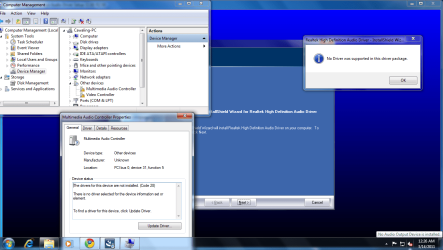
i've attached a picture. .in this picture ive restarted the computer after installing the driver using the ZIP file, and now ive tried installing the driver using the EXE file...but as the picture shows the there was an error, "No Driver was supported..." but ive checked the device manager and looked at the properties of the "unknown device(Audio controller)"..

PLEASE HELP up until now i still dont have the right driver for this hardware.:(
 

Attachments

  • error.png
    error.png
    74.5 KB · Views: 39

My Computer My Computer

OS
Windows 7 Ultimate x32
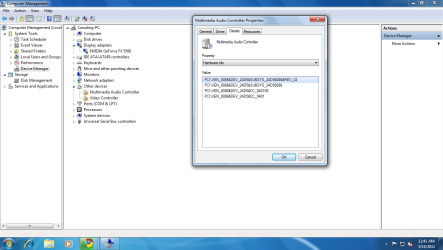
Can you pleases post what it shows for the hardware IDs for the multimedia controller, just to confirm what it has.

Also what does it show under "display adapters", as from that screen shot Aero is quite clearly working and yet Device Manager is showing an unknown video controller as well.
 

My Computer My Computer

Computer type
PC/Desktop
Computer Manufacturer/Model Number
Me
OS
Win 7 Ultimate x64
CPU
FX-8350 @ 4.6 GHz so far
Motherboard
Asus M5A97 EVO
Memory
ADATA XPG V1 Series Black 8GB DDR3 1600
Graphics Card(s)
Sapphire R9 270x Dual-X
Sound Card
Xonar DGX w/ Corsair Vengence 1300
Monitor(s) Displays
Acer S232HL Abid
Screen Resolution
1920x1080
Hard Drives
120 GB OCZ Vertex 3
500 GB Seagate 7200.12
PSU
Antec Earthwatts 650W Green
Case
Antec Three Hundred
Cooling
Cooler Master 212 EVO
Keyboard
Logitech G510
Mouse
Logitech G500s
Internet Speed
35000/3000
here are the requested pictures, as of now, im downloading the other EXE file from realteck which has around 83MB..
as for as display adapters, i have NVIDIA.
 

Attachments

  • error1.png
    error1.png
    59.1 KB · Views: 46

My Computer My Computer

OS
Windows 7 Ultimate x32

My Computer My Computer

Computer type
PC/Desktop
Computer Manufacturer/Model Number
Dwarf Dwf/11/2012 r09/2013
OS
Windows 8.1 Pro RTM x64
CPU
Intel Core-i5-3570K 4-core @ 3.4GHz (Ivy Bridge) (OC 4.4GHz)
Motherboard
ASRock Z77 Extreme4-M
Memory
4 x 4GB DDR3-1600 Corsair Vengeance CMZ8GX3M2A1600C9B (16GB)
Graphics Card(s)
MSI GeForce GTX770 Gaming OC 2GB
Sound Card
Realtek High Definition on board solution (ALC 898)
Monitor(s) Displays
ViewSonic VA1912w Widescreen (VGA)
Screen Resolution
1440x900
Hard Drives
OCZ Agility 3 SSD 120GB SATA III x2 (RAID 0)
Samsung HD501LJ 500GB SATA II x2
Hitachi HDS721010CLA332 1TB SATA II
Iomega 1.5TB Ext USB 2.0
WD 2.0TB Ext USB 3.0
PSU
XFX Pro Series 850W Semi-Modular
Case
Gigabyte IF233
Cooling
1 x 120mm Front Inlet 1 x 120mm Rear Exhaust
Keyboard
Microsoft Comfort Curve Keyboard 3000 (USB)
Mouse
Microsoft Comfort Mouse 3000 for Business (USB)
Internet Speed
NetGear DG834Gv3 ADSL Modem/Router (Ethernet) ~4.0 Mb/s (O2)
Antivirus
Avast! 8.0.1497
Browser
IE 11
Other Info
Optical Drive: HL-DT-ST BD-RE BH10LS30 SATA Bluray
Lexmark S305 Printer/Scanner/Copier (USB)
WEI Score: 8.1/8.1/8.5/8.5/8.25
Asus Eee PC 1011PX Netbook (Windows 7 x86 Starter)
Following the instructions here http://www.sevenforums.com/tutorials/73420-hardware-identification.html and using the values of 8086 for the vendor and 24D5 for the device reveals that you have SoundMAX audio on your motherboard.

Well isn't that nice. Asus lists it as Realtek HD and has drivers for it, and yet the IDs show it to be Soundmax. Now with that said using the IDs it looks like it is the Soundmax 1888 audio, which from what I can find at the moment there is not now and probably never will be a Windows 7 (or Vista for that matter) driver for it.

I did manage to find this Asus board,

http://www.asus.gr/product.aspx?P_ID=neVcvuSgEUZcO3rK&content=download

that has the same Soundmax audio on it, as well as a driver for it. I downloaded and checked the INF in it and it does have the same IDs as what crowO7 is showing in those screen shots. Short of getting a sound card that has Windows 7 support you can try it with the last XP driver from the above Asus link. Make sure to uninstall all the Realtek drivers first before installing.

It may also take compatibility mode,

http://www.sevenforums.com/tutorials/316-compatibility-mode.html

or manually installing the driver,

http://www.sevenforums.com/tutorials/97061-driver-install-device-manager.html

to get it to install.
 

My Computer My Computer

Computer type
PC/Desktop
Computer Manufacturer/Model Number
Me
OS
Win 7 Ultimate x64
CPU
FX-8350 @ 4.6 GHz so far
Motherboard
Asus M5A97 EVO
Memory
ADATA XPG V1 Series Black 8GB DDR3 1600
Graphics Card(s)
Sapphire R9 270x Dual-X
Sound Card
Xonar DGX w/ Corsair Vengence 1300
Monitor(s) Displays
Acer S232HL Abid
Screen Resolution
1920x1080
Hard Drives
120 GB OCZ Vertex 3
500 GB Seagate 7200.12
PSU
Antec Earthwatts 650W Green
Case
Antec Three Hundred
Cooling
Cooler Master 212 EVO
Keyboard
Logitech G510
Mouse
Logitech G500s
Internet Speed
35000/3000
our teacher taught that to us during one of his lectures. sadly there are no soundmax drivers in the internet which is compatible for my motherboard...as i recall, i can also use the HD Audio driver for my motherboard because before i reformatted my PC its driver was from the ASUSTek site and it is HD Audio Driver..
 

My Computer My Computer

OS
Windows 7 Ultimate x32
I've try uninstalling the 97' AC driver..but im not sure if it is completely Uninstall..how can i be sure that i have successfully uninstall it..are there files to be deleted in the SYSTEM32 folder?
 

My Computer My Computer

OS
Windows 7 Ultimate x32
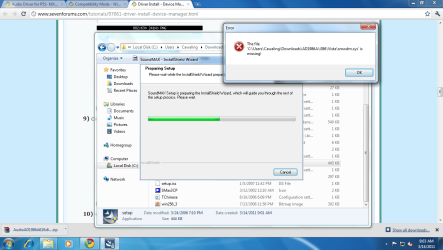
an error occurred during installing the soundmax driver...:(
 

Attachments

  • error2.png
    error2.png
    80.4 KB · Views: 19

My Computer My Computer

OS
Windows 7 Ultimate x32
Following the instructions here http://www.sevenforums.com/tutorials/73420-hardware-identification.html and using the values of 8086 for the vendor and 24D5 for the device reveals that you have SoundMAX audio on your motherboard.

Well isn't that nice. Asus lists it as Realtek HD and has drivers for it, and yet the IDs show it to be Soundmax. Now with that said using the IDs it looks like it is the Soundmax 1888 audio, which from what I can find at the moment there is not now and probably never will be a Windows 7 (or Vista for that matter) driver for it.

I did manage to find this Asus board,

http://www.asus.gr/product.aspx?P_ID=neVcvuSgEUZcO3rK&content=download

that has the same Soundmax audio on it, as well as a driver for it. I downloaded and checked the INF in it and it does have the same IDs as what crowO7 is showing in those screen shots. Short of getting a sound card that has Windows 7 support you can try it with the last XP driver from the above Asus link. Make sure to uninstall all the Realtek drivers first before installing.

It may also take compatibility mode,

http://www.sevenforums.com/tutorials/316-compatibility-mode.html

or manually installing the driver,

http://www.sevenforums.com/tutorials/97061-driver-install-device-manager.html

to get it to install.

I am fond of manually installing drivers, but for this problem it always shows that there is no present software in the source folder i specified. .i've also tried compatibility mode but it did not solve my problem...so as of now i still don't have a working sound driver :(
 

My Computer My Computer

OS
Windows 7 Ultimate x32
here are the requested pictures, as of now, im downloading the other EXE file from realteck which has around 83MB..
as for as display adapters, i have NVIDIA.

Hi crow.. i just want to help...

according to your Hardware ID (PCI\VEN_8086&DEV_24D5&SUBSYS_24D58086) in the picture, maybe your audio driver is:

Code:
"CMICHX.INF"

C-Media 9738 AC/97 Codec
%CMI9738.DeviceDesc%=AC97, PCI\VEN_8086&DEV_24D5&SUBSYS_24D58086

I found the driver in here: C-media CMI9739 Audio Driver UDA 039 or C-Media CMI973x/9761A Audio Driver (click on "Sound" section to download)

but i don't know if the driver is compatible with Win7.. ;)
 

My Computer My Computer

Computer Manufacturer/Model Number
ASUS
OS
Windows 7 Ultimate 32bit
CPU
Intel Pentium 4, 1400 MHz (P68, Willamette - Socket 423)
Motherboard
ASUS P4T Rev. 1.07 (BIOS Revision 1008 latest Beta BIOS)
Memory
Samsung MR18R 0828AN1-CK8 (128 MB x4 PC800 RDRAM)
Graphics Card(s)
NVIDIA RIVA TNT2 Model 64 (32 MB) - SAMSUNG
Sound Card
Creative Sound Blaster CT4810 - PCI
Monitor(s) Displays
LG FLATRON ez T530s (15")
Screen Resolution
1024 x 768
Hard Drives
Maxtor 4W030H2 (30 GB, 5400 RPM, Ultra-ATA/100)
PSU
350 Watt - SPC
Case
SPC
Cooling
Standard Case Fan
Keyboard
PS2
Mouse
PS2
Internet Speed
153 kbps
i've downloaded both files. the first one was installed but still a no for the driver. and the second one, an error occurred while i'm installing it, the error was like "no driver found..."

sadly i think im going back to windowsXP
 

My Computer My Computer

OS
Windows 7 Ultimate x32
How about the C-media drivers in this thread ..

The two previous driver version above:

UDA039_WDM.zip
DriverVer=11/04/2003,5.12.01.0039

cmedia973x.zip
DriverVer=08/26/2004,5.12.01.0046

version of the drivers mentioned by PeterBoard:

UDA051_build01_Logo51.3_Standard_.rar
DriverVer=06/22/2006,5.12.01.0051

"oem3.inf"
CMI97_5.12.01.0051.zip
DriverVer=06/22/2006,5.12.01.0051

Note: all versions of drivers have the same Hardware ID:
PCI\VEN_8086&DEV_24D5&SUBSYS_24D58086

Strange thing.. when i look up your mobo specifications,
i'ts say your audio is "High Definition Audio, Realtek ALC662 6 -Channel CODEC"
then the Hardware ID should be like this for example:

HDAUDIO\FUNC_01&VEN_10EC&DEV_XXXX&SUBSYS_XXXXXXXX

(X: numbers & letters)

but according to your Hardware ID in Device Manager on the picture before is
"PCI\VEN_8086&DEV_24D5&SUBSYS_24D58086" = C-Media CMI9738 AC97.

If you're still stuck, maybe you should go back to Windows XP & see Hardware ID once again to ensure that the Hardware ID is the same as in Windows 7 ..
if not, then I don't know what causes it .. :o
 

My Computer My Computer

Computer Manufacturer/Model Number
ASUS
OS
Windows 7 Ultimate 32bit
CPU
Intel Pentium 4, 1400 MHz (P68, Willamette - Socket 423)
Motherboard
ASUS P4T Rev. 1.07 (BIOS Revision 1008 latest Beta BIOS)
Memory
Samsung MR18R 0828AN1-CK8 (128 MB x4 PC800 RDRAM)
Graphics Card(s)
NVIDIA RIVA TNT2 Model 64 (32 MB) - SAMSUNG
Sound Card
Creative Sound Blaster CT4810 - PCI
Monitor(s) Displays
LG FLATRON ez T530s (15")
Screen Resolution
1024 x 768
Hard Drives
Maxtor 4W030H2 (30 GB, 5400 RPM, Ultra-ATA/100)
PSU
350 Watt - SPC
Case
SPC
Cooling
Standard Case Fan
Keyboard
PS2
Mouse
PS2
Internet Speed
153 kbps
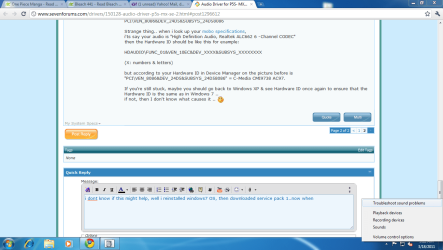
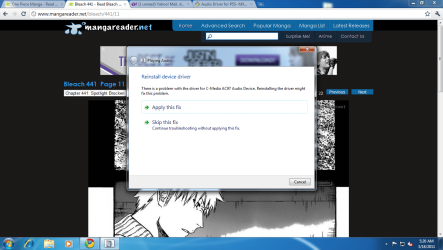
i dont know if this might help, well i reinstalled windows7 OS, then downloaded service pack 1..now when i troubleshoot my audio driver it says C-MEdia AC97'...should i go through with its installation or not?
 

Attachments

  • error1.png
    error1.png
    47.8 KB · Views: 11
  • error.png
    error.png
    135.7 KB · Views: 22

My Computer My Computer

OS
Windows 7 Ultimate x32
Based on what toshikijima posted above and with what Windows is now identifying it as, I would go with one of the C-media drivers that he linked too.
 

My Computer My Computer

Computer type
PC/Desktop
Computer Manufacturer/Model Number
Me
OS
Win 7 Ultimate x64
CPU
FX-8350 @ 4.6 GHz so far
Motherboard
Asus M5A97 EVO
Memory
ADATA XPG V1 Series Black 8GB DDR3 1600
Graphics Card(s)
Sapphire R9 270x Dual-X
Sound Card
Xonar DGX w/ Corsair Vengence 1300
Monitor(s) Displays
Acer S232HL Abid
Screen Resolution
1920x1080
Hard Drives
120 GB OCZ Vertex 3
500 GB Seagate 7200.12
PSU
Antec Earthwatts 650W Green
Case
Antec Three Hundred
Cooling
Cooler Master 212 EVO
Keyboard
Logitech G510
Mouse
Logitech G500s
Internet Speed
35000/3000
Back
Top