using all of raid5 disk space W7x64Pro

Darfyddi

New member
Local time
5:03 PM
Messages
13
Hi,

I have 4 HDD which should total 4TB and can not figure out how to use all the space that is available after setting them up in RAID5 form.

I currently have:

100.00MB > System Reserved
2047.90GB > 'C' Drive
746.54GB > Un-allocated

I know that it is not possible to have one C drive of above 2047.90GB but I would like to know how I can partition the 746.54GB as a seperate drive and also why the numbers only add up to about 3TB and not 4TB?

Many thanks for any help.
 

My Computer My Computer

At a glance

Windows 7 Ultimate x64AMD Phenom 9850 Quad8GB Cosair Twin2X4096-6400C5XFX GeForce GTX 280 * 3
Computer Manufacturer/Model Number
Manufactured by the muppet who wrote this :)
OS
Windows 7 Ultimate x64
CPU
AMD Phenom 9850 Quad
Motherboard
ASUS Crosshair F' II
Memory
8GB Cosair Twin2X4096-6400C5
Graphics Card(s)
XFX GeForce GTX 280 * 3
Sound Card
Asus Xonar D2X
Monitor(s) Displays
Panasonic TX-P42V10B & 21" sony trinitron *2
Hard Drives
3* WD Caviar Blk 1TB 32MB SATA II RAID5 (1862.93GB)
&
1* WD Caviar Blk 1TB 32MB SATA II (931.41GB)
PSU
Corsair HX 1000W
Case
I dunno, box of some kind i think
Cooling
Noctua fans
Keyboard
Logitech G11
Mouse
Logitech MX Revolution
Internet Speed
lucky to get 6.9Meg out of 20
Hi,

In a RAID5 configuration, one of the 4 disks is used as the parity data disk, leaving a total of 3 disks for the total volume available.

From http://en.wikipedia.org/wiki/Standard_RAID_levels
RAID 5 usable size
Parity data uses up the capacity of one drive in the array (this can be seen by comparing it with RAID 4: RAID 5 distributes the parity data across the disks, while RAID 4 centralizes it on one disk, but the amount of parity data is the same). If the drives vary in capacity, the smallest of them sets the limit. Therefore, the usable capacity of a RAID 5 array is
090ed30c589adf07ab49e66512251556.png
, where N is the total number of drives in the array and Smin is the capacity of the smallest drive in the array.
See this link as to how it works:

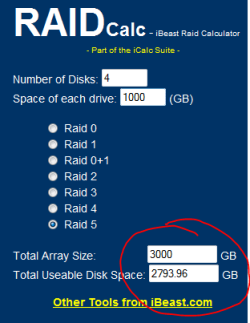
RaidCalc - Raid Disk Space Utilization Calculator - Raid, RAID, Redundancy, Performance - iBeast Business Solutions

Regards,
Golden
 

My Computer My Computer

At a glance

Windows 10 Pro x64 ; Xubuntu x64Intel i7 860 @ 2.80 GHz O/C'ed to 4.0GHz16GB Corsair Vengance DDR3 @ 661 MHz Dual Cha...EVGA NVidia GTX 560 1024MB
Computer type
PC/Desktop
Computer Manufacturer/Model Number
Golden Mk. I.4
OS
Windows 10 Pro x64 ; Xubuntu x64
CPU
Intel i7 860 @ 2.80 GHz O/C'ed to 4.0GHz
Motherboard
Gigabyte P55A-UD3R Rev.1. Award BIOS F13
Memory
16GB Corsair Vengance DDR3 @ 661 MHz Dual Channel (9-9-9-24)
Graphics Card(s)
EVGA NVidia GTX 560 1024MB
Sound Card
Realtek Integrated
Monitor(s) Displays
Dual Samsung SyncMaster 2494HS
Screen Resolution
1920*1080 and 1920*1080
Hard Drives
1*Samsung 840 EVO 120GB SSD;
1*OCZ Vertex 2 60GB SSD;
2*Samsung F3 SpinPoint 1TB in RAID0;
1*Samsung F1 SpinPoint 1TB;
2*Western Digital 1TB External USB 3.0
1*Western Digital 500GB External USB 3.0
1*Seagate 500GB External USB 2.0
PSU
Thermaltake ToughPower QFan 750W
Case
Thermaltake Element S VK60001W2Z
Cooling
Corsair H60 Water Cooling, 2*230mm and 2*80mm case fans
Keyboard
Logitech G110
Mouse
Logitech MX518
Cheers Golden,

I thought that was the case but am now wondering about the odd 277.46GB missing over the amount of the 1tb disk, seems a huge amount of space; though not as much as the 746.54GB that I can actually see and marked as un-allocated but wont let me touch it :confused:

[EDIT]

Sorry, just wanted to say thank you for the link to the RaidCalc site, it showed ~211GB would be used so that might be the 277GB I can't account for.
 
Last edited:

My Computer My Computer

At a glance

Windows 7 Ultimate x64AMD Phenom 9850 Quad8GB Cosair Twin2X4096-6400C5XFX GeForce GTX 280 * 3
Computer Manufacturer/Model Number
Manufactured by the muppet who wrote this :)
OS
Windows 7 Ultimate x64
CPU
AMD Phenom 9850 Quad
Motherboard
ASUS Crosshair F' II
Memory
8GB Cosair Twin2X4096-6400C5
Graphics Card(s)
XFX GeForce GTX 280 * 3
Sound Card
Asus Xonar D2X
Monitor(s) Displays
Panasonic TX-P42V10B & 21" sony trinitron *2
Hard Drives
3* WD Caviar Blk 1TB 32MB SATA II RAID5 (1862.93GB)
&
1* WD Caviar Blk 1TB 32MB SATA II (931.41GB)
PSU
Corsair HX 1000W
Case
I dunno, box of some kind i think
Cooling
Noctua fans
Keyboard
Logitech G11
Mouse
Logitech MX Revolution
Internet Speed
lucky to get 6.9Meg out of 20
Hi,

The "missing" 277GB is actually used in "creating" the RAID - that is normal, although the actual amount varies a little depending on the disks and RAID controller. See image below.

Can you post a maximised image/screen capture of your Disk management so we can see this unallocated 746GB?

Regards,
Golden
 

Attachments

  • Capture.PNG
    Capture.PNG
    6.8 KB · Views: 26

My Computer My Computer

At a glance

Windows 10 Pro x64 ; Xubuntu x64Intel i7 860 @ 2.80 GHz O/C'ed to 4.0GHz16GB Corsair Vengance DDR3 @ 661 MHz Dual Cha...EVGA NVidia GTX 560 1024MB
Computer type
PC/Desktop
Computer Manufacturer/Model Number
Golden Mk. I.4
OS
Windows 10 Pro x64 ; Xubuntu x64
CPU
Intel i7 860 @ 2.80 GHz O/C'ed to 4.0GHz
Motherboard
Gigabyte P55A-UD3R Rev.1. Award BIOS F13
Memory
16GB Corsair Vengance DDR3 @ 661 MHz Dual Channel (9-9-9-24)
Graphics Card(s)
EVGA NVidia GTX 560 1024MB
Sound Card
Realtek Integrated
Monitor(s) Displays
Dual Samsung SyncMaster 2494HS
Screen Resolution
1920*1080 and 1920*1080
Hard Drives
1*Samsung 840 EVO 120GB SSD;
1*OCZ Vertex 2 60GB SSD;
2*Samsung F3 SpinPoint 1TB in RAID0;
1*Samsung F1 SpinPoint 1TB;
2*Western Digital 1TB External USB 3.0
1*Western Digital 500GB External USB 3.0
1*Seagate 500GB External USB 2.0
PSU
Thermaltake ToughPower QFan 750W
Case
Thermaltake Element S VK60001W2Z
Cooling
Corsair H60 Water Cooling, 2*230mm and 2*80mm case fans
Keyboard
Logitech G110
Mouse
Logitech MX518
Hi,

In a RAID5 configuration, one of the 4 disks is used as the parity data disk, leaving a total of 3 disks for the total volume available.

From Standard RAID levels - Wikipedia, the free encyclopedia
RAID 5 usable size
Parity data uses up the capacity of one drive in the array (this can be seen by comparing it with RAID 4: RAID 5 distributes the parity data across the disks, while RAID 4 centralizes it on one disk, but the amount of parity data is the same). If the drives vary in capacity, the smallest of them sets the limit. Therefore, the usable capacity of a RAID 5 array is
090ed30c589adf07ab49e66512251556.png
, where N is the total number of drives in the array and Smin is the capacity of the smallest drive in the array.
See this link as to how it works:

RaidCalc - Raid Disk Space Utilization Calculator - Raid, RAID, Redundancy, Performance - iBeast Business Solutions

Regards,
Golden

Just to be clear. It doesn't use a single physical disk for parity. It stripes the data and parity across all four disks so that if one physical disk fails you lose no data.
 

My Computer My Computer

At a glance

Microsoft Windows 7 Home Premium 64-bit Servi...Intel(R) Core(TM) i3 CPU M 330 @ 2.13GHz8 GB DDR3Intel(R) HD Graphics
Computer type
Laptop
Computer Manufacturer/Model Number
Hewlett-Packard/G62-107SA Notebook
OS
Microsoft Windows 7 Home Premium 64-bit Service Pack 1
CPU
Intel(R) Core(TM) i3 CPU M 330 @ 2.13GHz
Motherboard
Hewlett-Packard 1425
Memory
8 GB DDR3
Graphics Card(s)
Intel(R) HD Graphics
Sound Card
Realtek High Definition Audio
Monitor(s) Displays
Builtin
Screen Resolution
1366 x 768 x 32 bits (4294967296 colors) @ 60 Hz
Hard Drives
250 GB SATA Hard Disk Drive 7200 rpm
2TB Seagate GoFlex USB 2 Drive
1TB Iomega Prestige USB 2 Drive
1.5TB Iomega Prestige USB 2 Drive (Samsung)
2TB WD MyBook Live NAS.
Mouse
Logitech Anywhere MX
Internet Speed
152 Mbs download 10 Mbs upload
Antivirus
Norton 360
Browser
Chrome
Just to be clear. It doesn't use a single physical disk for parity. It stripes the data and parity across all four disks so that if one physical disk fails you lose no data.

Thanks for clearing that up Kado :cool:
 

My Computer My Computer

At a glance

Windows 10 Pro x64 ; Xubuntu x64Intel i7 860 @ 2.80 GHz O/C'ed to 4.0GHz16GB Corsair Vengance DDR3 @ 661 MHz Dual Cha...EVGA NVidia GTX 560 1024MB
Computer type
PC/Desktop
Computer Manufacturer/Model Number
Golden Mk. I.4
OS
Windows 10 Pro x64 ; Xubuntu x64
CPU
Intel i7 860 @ 2.80 GHz O/C'ed to 4.0GHz
Motherboard
Gigabyte P55A-UD3R Rev.1. Award BIOS F13
Memory
16GB Corsair Vengance DDR3 @ 661 MHz Dual Channel (9-9-9-24)
Graphics Card(s)
EVGA NVidia GTX 560 1024MB
Sound Card
Realtek Integrated
Monitor(s) Displays
Dual Samsung SyncMaster 2494HS
Screen Resolution
1920*1080 and 1920*1080
Hard Drives
1*Samsung 840 EVO 120GB SSD;
1*OCZ Vertex 2 60GB SSD;
2*Samsung F3 SpinPoint 1TB in RAID0;
1*Samsung F1 SpinPoint 1TB;
2*Western Digital 1TB External USB 3.0
1*Western Digital 500GB External USB 3.0
1*Seagate 500GB External USB 2.0
PSU
Thermaltake ToughPower QFan 750W
Case
Thermaltake Element S VK60001W2Z
Cooling
Corsair H60 Water Cooling, 2*230mm and 2*80mm case fans
Keyboard
Logitech G110
Mouse
Logitech MX518
You are welcome.
 

My Computer My Computer

At a glance

Microsoft Windows 7 Home Premium 64-bit Servi...Intel(R) Core(TM) i3 CPU M 330 @ 2.13GHz8 GB DDR3Intel(R) HD Graphics
Computer type
Laptop
Computer Manufacturer/Model Number
Hewlett-Packard/G62-107SA Notebook
OS
Microsoft Windows 7 Home Premium 64-bit Service Pack 1
CPU
Intel(R) Core(TM) i3 CPU M 330 @ 2.13GHz
Motherboard
Hewlett-Packard 1425
Memory
8 GB DDR3
Graphics Card(s)
Intel(R) HD Graphics
Sound Card
Realtek High Definition Audio
Monitor(s) Displays
Builtin
Screen Resolution
1366 x 768 x 32 bits (4294967296 colors) @ 60 Hz
Hard Drives
250 GB SATA Hard Disk Drive 7200 rpm
2TB Seagate GoFlex USB 2 Drive
1TB Iomega Prestige USB 2 Drive
1.5TB Iomega Prestige USB 2 Drive (Samsung)
2TB WD MyBook Live NAS.
Mouse
Logitech Anywhere MX
Internet Speed
152 Mbs download 10 Mbs upload
Antivirus
Norton 360
Browser
Chrome
Thank you as well Kodo, that info' along with that about the raid itself taking up space helps alot.

Here is a pic, sorry about it's size. As you can see, I have right clicked on the un-allocated area to show the lack of options available.

DM.jpg
 

My Computer My Computer

At a glance

Windows 7 Ultimate x64AMD Phenom 9850 Quad8GB Cosair Twin2X4096-6400C5XFX GeForce GTX 280 * 3
Computer Manufacturer/Model Number
Manufactured by the muppet who wrote this :)
OS
Windows 7 Ultimate x64
CPU
AMD Phenom 9850 Quad
Motherboard
ASUS Crosshair F' II
Memory
8GB Cosair Twin2X4096-6400C5
Graphics Card(s)
XFX GeForce GTX 280 * 3
Sound Card
Asus Xonar D2X
Monitor(s) Displays
Panasonic TX-P42V10B & 21" sony trinitron *2
Hard Drives
3* WD Caviar Blk 1TB 32MB SATA II RAID5 (1862.93GB)
&
1* WD Caviar Blk 1TB 32MB SATA II (931.41GB)
PSU
Corsair HX 1000W
Case
I dunno, box of some kind i think
Cooling
Noctua fans
Keyboard
Logitech G11
Mouse
Logitech MX Revolution
Internet Speed
lucky to get 6.9Meg out of 20
Hello Darfy,

Try using Partition Wizard to create a new volume in that space. We'll see if a different program can get the job done.
 

My Computer My Computer

At a glance

Windows 7 Professional x64Intel i7 2600K OC'd @ 4620 MHz16GB GSkill Sniper 2133 Mhz (4x4GB)EVGA GeForce GTX 480 SuperClocked+
Computer Manufacturer/Model Number
Custom
OS
Windows 7 Professional x64
CPU
Intel i7 2600K OC'd @ 4620 MHz
Motherboard
Asus P8Z68-V Pro
Memory
16GB GSkill Sniper 2133 Mhz (4x4GB)
Graphics Card(s)
EVGA GeForce GTX 480 SuperClocked+
Sound Card
Realtek High Definition Audio
Monitor(s) Displays
2x Acer S273HLbmii 27"
Screen Resolution
2 x 1920x1080
Hard Drives
64GB Crucial M4 SSD

Storage: Hitachi 1TB 5400RPM, Samsung 1.5TB 5400RPM
PSU
Corsair HW Series 750w (modular)
Case
Cooler Master HAF 932 Advanced Blue Edition
Cooling
CM Hyper 212+ CPU cooler, 3x 230mm + 1x 140mm case fans
Keyboard
Logitech MK320 (wireless)
Mouse
Logitech MK320 (wireless)
Internet Speed
30 Mb/s : 2 Mb/s
Cheers, I will try it in a little later or tomorrow and will let you know how it goes :D
 

My Computer My Computer

At a glance

Windows 7 Ultimate x64AMD Phenom 9850 Quad8GB Cosair Twin2X4096-6400C5XFX GeForce GTX 280 * 3
Computer Manufacturer/Model Number
Manufactured by the muppet who wrote this :)
OS
Windows 7 Ultimate x64
CPU
AMD Phenom 9850 Quad
Motherboard
ASUS Crosshair F' II
Memory
8GB Cosair Twin2X4096-6400C5
Graphics Card(s)
XFX GeForce GTX 280 * 3
Sound Card
Asus Xonar D2X
Monitor(s) Displays
Panasonic TX-P42V10B & 21" sony trinitron *2
Hard Drives
3* WD Caviar Blk 1TB 32MB SATA II RAID5 (1862.93GB)
&
1* WD Caviar Blk 1TB 32MB SATA II (931.41GB)
PSU
Corsair HX 1000W
Case
I dunno, box of some kind i think
Cooling
Noctua fans
Keyboard
Logitech G11
Mouse
Logitech MX Revolution
Internet Speed
lucky to get 6.9Meg out of 20
Sorry J_K, I tried both home and demo_pro but both state "This disk uses MBR format, the disk space beyond 2 TB will be unusable." and that is all I can do :( I wish these programmes allowed copy and paste for their error messages :(

If there is programme to try that will be great, I am struggling to find anything and am surprised that my mobo doesn't have the software to do it.
 

My Computer My Computer

At a glance

Windows 7 Ultimate x64AMD Phenom 9850 Quad8GB Cosair Twin2X4096-6400C5XFX GeForce GTX 280 * 3
Computer Manufacturer/Model Number
Manufactured by the muppet who wrote this :)
OS
Windows 7 Ultimate x64
CPU
AMD Phenom 9850 Quad
Motherboard
ASUS Crosshair F' II
Memory
8GB Cosair Twin2X4096-6400C5
Graphics Card(s)
XFX GeForce GTX 280 * 3
Sound Card
Asus Xonar D2X
Monitor(s) Displays
Panasonic TX-P42V10B & 21" sony trinitron *2
Hard Drives
3* WD Caviar Blk 1TB 32MB SATA II RAID5 (1862.93GB)
&
1* WD Caviar Blk 1TB 32MB SATA II (931.41GB)
PSU
Corsair HX 1000W
Case
I dunno, box of some kind i think
Cooling
Noctua fans
Keyboard
Logitech G11
Mouse
Logitech MX Revolution
Internet Speed
lucky to get 6.9Meg out of 20
You need to use GPT partitions if you want to have partitions larger than 2TB, or a volume that can contain partitions farther out than the 2TB boundary. The MBR partition type has a maximum size of 2TB (which you've created), and on this system it would have been better to create a smaller volume in the RAID utility for the OS and application partition (150-200GB would have worked quite well) with another volume spanning the rest of the space to hold a GPT partition. You cannot mix MBR and GPT partitions on the same volume, hence you cannot use the space above the 2TB limit on that volume - MBR cannot address it, so Windows won't let you do anything with it and thus greys out the menu options in disk management. You need to create 2 volumes in your RAID array - let setup use the smaller one (as an MBR partition type volume), and then use diskmgmt.msc to create a GPT partition type volume on the second (larger) RAID volume. This is the only way you'll be able to use that space, period. It's a BIOS and MBR design/hardware limitation that no software is going to be able to get around, hence there's no software that can do it ;).

Also note that Windows 7 doesn't create a GPT partition as the boot or OS partition nor can it boot from one either on a BIOS-based PC (hence why setup created that partition as an MBR partition), although an UEFI-based machine could do it (you just have to use diskpart during setup to create the GPT partitions manually, amongst other things).
 

My Computer My Computer

At a glance

Windows 10 Pro x64Intel Core i7 4790K @ 4.5GHz32GB DDR3Nvidia GeForce GTX970
Computer type
PC/Desktop
Computer Manufacturer/Model Number
Custom
OS
Windows 10 Pro x64
CPU
Intel Core i7 4790K @ 4.5GHz
Motherboard
Asus Maximus Hero VII
Memory
32GB DDR3
Graphics Card(s)
Nvidia GeForce GTX970
Sound Card
Realtek HD Audio
Screen Resolution
1920x1200
Hard Drives
1x Samsung 250GB SSD
4x WD RE 2TB (RAIDZ)
PSU
Corsair AX760i
Case
Fractal Design Define R4
Cooling
Noctua NH-D15
Thank you cluberti, I thought that the 2TB limit was per partition and that I would be able to have the raid volume as:

¦100MB System Reserved¦2047.90GB C: Partition¦746.54GB D: Partition¦

I managed to screw it all up though (before reading your comments) when I tried to partition the unallocated space; I selected the unallocated space and format, the option of the same size came up and I thought 'great' but when it was done, the partition had been done in the middle of the 2049GB partition - 'Oh Bugger' I thought :(, worse to come though, I couldn't even get it to boot :cry:

I am so glad I screwed up in RAID 5 though, none of my spare disks would work (I think my one spare SATA disk is knackered and I can't get my mobo to recognise any IDE disks?) so I ended up taking a disk out the raid, formatting that to put win7 on and then getting the data back from the others, worked a treat - to look at windows folder tree on the raid volume I would never tell a disk was missing :D. I did use Easeus Partition Master to take the new partition out (not sure if that was necessary) and then I used it to assign a letter to the 2047.90GB partition.

I now have all my documents backed up again, including the ones from the last few days that weren't backed up (although backed up two days before, one was my fiancee's dissertation which had about six hours extra work on it and another was her course work with about four hours work on )

Thank you all for help and advice, I am going to ask about how to set my drives up but will do so in a new thread so not to change the topic of this one.
 

My Computer My Computer

At a glance

Windows 7 Ultimate x64AMD Phenom 9850 Quad8GB Cosair Twin2X4096-6400C5XFX GeForce GTX 280 * 3
Computer Manufacturer/Model Number
Manufactured by the muppet who wrote this :)
OS
Windows 7 Ultimate x64
CPU
AMD Phenom 9850 Quad
Motherboard
ASUS Crosshair F' II
Memory
8GB Cosair Twin2X4096-6400C5
Graphics Card(s)
XFX GeForce GTX 280 * 3
Sound Card
Asus Xonar D2X
Monitor(s) Displays
Panasonic TX-P42V10B & 21" sony trinitron *2
Hard Drives
3* WD Caviar Blk 1TB 32MB SATA II RAID5 (1862.93GB)
&
1* WD Caviar Blk 1TB 32MB SATA II (931.41GB)
PSU
Corsair HX 1000W
Case
I dunno, box of some kind i think
Cooling
Noctua fans
Keyboard
Logitech G11
Mouse
Logitech MX Revolution
Internet Speed
lucky to get 6.9Meg out of 20
Back
Top