Win7 "No Drives found" SATA drive

LDee

New member
Local time
1:38 PM
Messages
12
I have a custom built HTPC with a Seagate SATA drive. Media Center halted, and Win7 would not reboot. When I attempt to reinstall Win7 it cannot find the drive (C) - "No drives were found. Click Load Driver to provide a mass storage driver for installation."

My research tells me SATA drives don't have drivers, at least that's what Seagate says.
I've changed BIOS SATA controller from "Enhanced" to "Compatible" with no effect.
Don't know what to try next. Please don’t make me go to Geek Squad J
Any help?
 

My Computer My Computer

At a glance

Windows 7 Ultimate x64Intel Core 2 duo, @ 2.93ghz4 GB Crucial DDR2 RamXFX Radeon 4650 Dual DVI (using DVI to HDMI f...
Computer Manufacturer/Model Number
Custom
OS
Windows 7 Ultimate x64
CPU
Intel Core 2 duo, @ 2.93ghz
Motherboard
ECS G31T-m Micro Atx MB
Memory
4 GB Crucial DDR2 Ram
Graphics Card(s)
XFX Radeon 4650 Dual DVI (using DVI to HDMI for my TV)
Hard Drives
250 GB Seagate Sata Drive
Cooling
Cooler Master 400 watt PSU
May we get the make and model of your Motherboard?

Also the model of your SATA drive?
 

My Computer My Computer

At a glance

Windows 7 Ultimate x64AMD Phenom x6 1045t8 GBATI Radeon HD 5570
Computer Manufacturer/Model Number
HP Pavilion Elite HPE-410f
OS
Windows 7 Ultimate x64
CPU
AMD Phenom x6 1045t
Motherboard
N/A
Memory
8 GB
Graphics Card(s)
ATI Radeon HD 5570
Sound Card
Realtek Highdefinition Audio / 5.1 Dolby Setup
Monitor(s) Displays
HP w2207h Widescreen
Screen Resolution
1680*1050
Hard Drives
1 TB (fixed), 320 Portable maxtor, Server Hard drives
PSU
350 Watt
Case
HP CASE
Cooling
Bass
Keyboard
Logitech MX 5500
Mouse
Logitech MX 5500
Internet Speed
ROAD RUNNER 16MB D/512 U
First off, please don't go to Geek Squad. Not to diss their technicians, some of them do actually know what they're talking about and are very capable, but it's like Russian Roulette on getting someone competent to help. They don't train their "Agents" so it truly is luck of the draw.

If this was a system that was already set up and running as it sounds, and it all of a sudden is failing on finding your HD, it sounds to me like you may have had a hardware failure, possibly the HD itself.

Questions:

  • When you say the system would not reboot, what actually happened?
  • Were there any errors?
  • What did the system do after the halt/crash?
  • When you originally installed windows on this machine, did you have to load a specified driver at that time?
  • Does the hard drive show up in a different computer or external cradle/sled or even a bootable PE/LIVE disc?
  • What kind of mobo and hard drive is this?
  • What are all of your options for SATA operation on this mobo?
 

My Computer My Computer

At a glance

.
OS
.
May we get the make and model of your Motherboard?

Also the model of your SATA drive?

What info I have is.
Motherboard: ECS G31T-m Micro Atx MB
Processor: Intel Core 2 duo, @ 2.93ghz
Memory: 4 GB Crucial DDR2 Ram
Hard Drive: 250 GB Seagate Sata Drive - model – Barracuda ES.2

10-4
 
Last edited:

My Computer My Computer

At a glance

Windows 7 Ultimate x64Intel Core 2 duo, @ 2.93ghz4 GB Crucial DDR2 RamXFX Radeon 4650 Dual DVI (using DVI to HDMI f...
Computer Manufacturer/Model Number
Custom
OS
Windows 7 Ultimate x64
CPU
Intel Core 2 duo, @ 2.93ghz
Motherboard
ECS G31T-m Micro Atx MB
Memory
4 GB Crucial DDR2 Ram
Graphics Card(s)
XFX Radeon 4650 Dual DVI (using DVI to HDMI for my TV)
Hard Drives
250 GB Seagate Sata Drive
Cooling
Cooler Master 400 watt PSU
ECS Web Site

Just curious.. Can you check your BIOS version of your motherboard

There is the website for it.
That would be my guess. It has to be something with your SATA settings or maybe the motherboard needs a BIOS update (Last Resort!)
 

My Computer My Computer

At a glance

Windows 7 Ultimate x64AMD Phenom x6 1045t8 GBATI Radeon HD 5570
Computer Manufacturer/Model Number
HP Pavilion Elite HPE-410f
OS
Windows 7 Ultimate x64
CPU
AMD Phenom x6 1045t
Motherboard
N/A
Memory
8 GB
Graphics Card(s)
ATI Radeon HD 5570
Sound Card
Realtek Highdefinition Audio / 5.1 Dolby Setup
Monitor(s) Displays
HP w2207h Widescreen
Screen Resolution
1680*1050
Hard Drives
1 TB (fixed), 320 Portable maxtor, Server Hard drives
PSU
350 Watt
Case
HP CASE
Cooling
Bass
Keyboard
Logitech MX 5500
Mouse
Logitech MX 5500
Internet Speed
ROAD RUNNER 16MB D/512 U
removed. see reply later
 
Last edited:

My Computer My Computer

At a glance

Windows 7 Ultimate x64Intel Core 2 duo, @ 2.93ghz4 GB Crucial DDR2 RamXFX Radeon 4650 Dual DVI (using DVI to HDMI f...
Computer Manufacturer/Model Number
Custom
OS
Windows 7 Ultimate x64
CPU
Intel Core 2 duo, @ 2.93ghz
Motherboard
ECS G31T-m Micro Atx MB
Memory
4 GB Crucial DDR2 Ram
Graphics Card(s)
XFX Radeon 4650 Dual DVI (using DVI to HDMI for my TV)
Hard Drives
250 GB Seagate Sata Drive
Cooling
Cooler Master 400 watt PSU
ECS Web Site

Just curious.. Can you check your BIOS version of your motherboard

There is the website for it.
That would be my guess. It has to be something with your SATA settings or maybe the motherboard needs a BIOS update (Last Resort!)


And just how does one check the BIOS version of their motherboard?
The manual?
The website?
The computer BIOS has it somewhere?

Thx,
 

My Computer My Computer

At a glance

Windows 7 Ultimate x64Intel Core 2 duo, @ 2.93ghz4 GB Crucial DDR2 RamXFX Radeon 4650 Dual DVI (using DVI to HDMI f...
Computer Manufacturer/Model Number
Custom
OS
Windows 7 Ultimate x64
CPU
Intel Core 2 duo, @ 2.93ghz
Motherboard
ECS G31T-m Micro Atx MB
Memory
4 GB Crucial DDR2 Ram
Graphics Card(s)
XFX Radeon 4650 Dual DVI (using DVI to HDMI for my TV)
Hard Drives
250 GB Seagate Sata Drive
Cooling
Cooler Master 400 watt PSU
First off, please don't go to Geek Squad. Not to diss their technicians, some of them do actually know what they're talking about and are very capable, but it's like Russian Roulette on getting someone competent to help. They don't train their "Agents" so it truly is luck of the draw.

If this was a system that was already set up and running as it sounds, and it all of a sudden is failing on finding your HD, it sounds to me like you may have had a hardware failure, possibly the HD itself.

Questions:

  • When you say the system would not reboot, what actually happened?
  • Were there any errors?
  • What did the system do after the halt/crash?
  • When you originally installed windows on this machine, did you have to load a specified driver at that time?
  • Does the hard drive show up in a different computer or external cradle/sled or even a bootable PE/LIVE disc?
  • What kind of mobo and hard drive is this?
  • What are all of your options for SATA operation on this mobo?


Thanks TCG,

Just teasing about Geek Squad, not to diss them either.
I didn't build this HTPC. Bought from a builder.
Mobo is ECS G31T-m Micro Atx MB (posted in another reply.
I don't know the model of the Seagate SATA drive yet.
I haven't installed the drive on any other computer.
I have a manual on the mobo, but I don't know what I'd be looking for re "options for SATA operations"

While running Media Center, the screen froze. No errors noted, just no further response from mouse or keyboard.
I can't remember whether I just turned it off or pressed ctl,alt,del to reboot (without install CD).
Without Win7 CD, when restarted, it asks "Reboot and Select proper boot device or insert Boot Media in selected Boot device and press a key."

Pressed ctl,alt,del Then, on restart, F11 to select reboot device. Which gives me option of 1) 1st floppy drive (doesn't exist) 2) ATAPI iHOS104 (Blue ray drive I believe) or 3) Kingston DataTraveler (2g USB drive)

Of course, selected 2) ATAPI iHOS104 after inserting Win7 install disk.

"Windows is loading files..."
Windows blue background with little leaf and birdie graphics screen appears.
Been a few minutes, then...
"Install Windows" window appears.
I select English yada, yada and Next, Install Now. Then "Setup is starting..." and a few more minutes pass then...
Accept license term and...
Then option to "Upgrade" or "Custom". I choose "Custom"
Then " No drives were found. Click Load Driver to provide a mass storage device for installation"
When I click on the "Load Driver" and "Browse" the drives appearing under "Computer" include: 1) Floppy Disk Drive A, 2) CD Drive... and 3) "Boot" (X) which has a "Programs" folder and "Windows" folder
I don't know what this "Boot (X)" drive represents. but there aren't any compatible drivers there.
Of course, I have no other drivers from anywhere, or I would stick them on the USB.
At that point, I'm stuck and I must exit out of screen and it begins restart again.:confused:

That's the situation. Hope I didn't seem sarcastic there, I'm a little frustrated.
Thanks.

 

My Computer My Computer

At a glance

Windows 7 Ultimate x64Intel Core 2 duo, @ 2.93ghz4 GB Crucial DDR2 RamXFX Radeon 4650 Dual DVI (using DVI to HDMI f...
Computer Manufacturer/Model Number
Custom
OS
Windows 7 Ultimate x64
CPU
Intel Core 2 duo, @ 2.93ghz
Motherboard
ECS G31T-m Micro Atx MB
Memory
4 GB Crucial DDR2 Ram
Graphics Card(s)
XFX Radeon 4650 Dual DVI (using DVI to HDMI for my TV)
Hard Drives
250 GB Seagate Sata Drive
Cooling
Cooler Master 400 watt PSU
The "X" drive is the ramdisk that Windows loads its files into when it boots. If the drive does not detect automatically with included drivers, you won't find your driver there.

Looking at the specs on your mobo, the controller is Intel ICH7 which should be detected by Windows without the need for extra drivers on install. Based off of what you say happened, it sounds to me like either your hard drive took a dive, or your motherboard is having issues with the ICH7 controller. My suspicion would be the hard drive. Any chance you have another drive you could put into this system and run the install again as a test? This would omit your controller as the issue and further support the possibility of a failed hard drive without having to get into a BIOS flash quite yet.
 

My Computer My Computer

At a glance

.
OS
.
Here is something to check quickly:

Re-seat the SATA power cable & SATA Data cable on the Seagate HD & on the MB.

Does the HD show up in the bios setup ?
 

My Computer My Computer

At a glance

Win7 Enterprise, Win7 x86 (Ult 7600), Win7 x6...AMD fx8350 4ghz, AMD-32 2400mhz, AMD-64 3200m...2gb, 4gb on the Ult 7600, 4gb on Technet RTM,...Draw my own Graphics, several nVidia cards
Computer type
PC/Desktop
Computer Manufacturer/Model Number
Built them myself, Science Experiments !
OS
Win7 Enterprise, Win7 x86 (Ult 7600), Win7 x64 Ult 7600, TechNet RTM on AMD x64 (2.8Ghz)
CPU
AMD fx8350 4ghz, AMD-32 2400mhz, AMD-64 3200mhz, AMDx64 2.8G
Motherboard
SIS 755, ECS-K8M890M-M (Ult 7600), GigaByte & others
Memory
2gb, 4gb on the Ult 7600, 4gb on Technet RTM, 32gb on FX8350
Graphics Card(s)
Draw my own Graphics, several nVidia cards
Sound Card
on motherboard
Monitor(s) Displays
19" flat scr, 28" I-Inc widescr,22" Emprex Widescr, 23" Acer
Screen Resolution
1280 x 1024, 1440 x 900, 1920 x 1080
Hard Drives
6 pata Ide HD's & 2 Sata HD's
added 80gb external on Ult 7600 computer,
numerous extra 1tb, 2TB, 3Tb SATA HD's
A collection of ext HD Docks w/ HDs
PSU
430w, 550w, 600w, 700, 800, etc
Case
All Generic Full Towers
Cooling
Open Air & a few fans, some w/ colored LEDs
Keyboard
Compaq & Dell recycled from GoodWill
Mouse
Made in China Optical Wired Mouse
Internet Speed
Fast Cable InterNet
Antivirus
AVG Free on 24 different Desktops, NO Problems!
Browser
IE 8 is preferred, but use FireFox sometimes
Other Info
Linksys Routers, switches, & Hubs
Too Many USB Flash Drives to count, Biggest is 64GB !
Eight computers in my home network.
Sixteen computers at my business network.
Linked via TeamViewer !
Lots of old used spare computer parts everywhere!
  • Like
Reactions: TCG
Here is something to check quickly:

Re-seat the SATA power cable & SATA Data cable on the Seagate HD & on the MB.

Does the HD show up in the bios setup ?
Agreed, you could also go one step further with this and plug it into an alternate SATA header(if available) on the motherboard, then check bios to see if it is showing up.
 

My Computer My Computer

At a glance

.
OS
.
If you can get the HD to show up in BIOS after trying Doc's steps, then run Seatools extended diagnostics/repair CD scan: SeaTools Seagate

Let us know the results.
 
Here is something to check quickly:

Re-seat the SATA power cable & SATA Data cable on the Seagate HD & on the MB.

Does the HD show up in the bios setup ?


Excuse me, I had to go on a mission.

I have yet to re-seat cables.

I don't know where the HD shows up in the BIOS. Where do I look?
Standard CMOS shows no SATA, only Primary IDE = Not Detected
Integrated periperals? What line?
I got the feeling that means it's not showing up.
Where would it show up, so I can check after re-seating cables?
I'll get to that re-seating job.
Thx
10-4

Re-seated HD connections - no effect. Oops, didn't re-seat MB.
Back later.
 
Last edited:

My Computer My Computer

At a glance

Windows 7 Ultimate x64Intel Core 2 duo, @ 2.93ghz4 GB Crucial DDR2 RamXFX Radeon 4650 Dual DVI (using DVI to HDMI f...
Computer Manufacturer/Model Number
Custom
OS
Windows 7 Ultimate x64
CPU
Intel Core 2 duo, @ 2.93ghz
Motherboard
ECS G31T-m Micro Atx MB
Memory
4 GB Crucial DDR2 Ram
Graphics Card(s)
XFX Radeon 4650 Dual DVI (using DVI to HDMI for my TV)
Hard Drives
250 GB Seagate Sata Drive
Cooling
Cooler Master 400 watt PSU
Go to page 28 of the manual, Using BIOS.

You can download manual from acurasd link in post 5.
 

My Computer My Computer

At a glance

ME/XP/Vista/Win7
OS
ME/XP/Vista/Win7

My Computer My Computer

At a glance

Windows 7 Ultimate x64Intel Core 2 duo, @ 2.93ghz4 GB Crucial DDR2 RamXFX Radeon 4650 Dual DVI (using DVI to HDMI f...
Computer Manufacturer/Model Number
Custom
OS
Windows 7 Ultimate x64
CPU
Intel Core 2 duo, @ 2.93ghz
Motherboard
ECS G31T-m Micro Atx MB
Memory
4 GB Crucial DDR2 Ram
Graphics Card(s)
XFX Radeon 4650 Dual DVI (using DVI to HDMI for my TV)
Hard Drives
250 GB Seagate Sata Drive
Cooling
Cooler Master 400 watt PSU
While re-seating the HD connections, I noticed the signal wire on the HD seating was loose.

I could see a tiny nick in the plastic next to the connection, and it seems as though some plastic above or below the 7-prong connection may be missing, as the prongs were just exposed above and below.

I tried to secure the connection with a little shim to keep it tighter in the socket area. There was no change in drive recognition of course.

Any comments on whether this is enough to trash a drive and produce the results I have, i.e. no hd detection. Seems plausible to me.

I guess I'm in the market for a HD. Any suggestions. SATA vs IDE?

Any possibitlity to recover data from such a damaged drive? The damage seem so slight, I would think it repairable. Maybe not.

Thanks everyone for you help.
 

My Computer My Computer

At a glance

Windows 7 Ultimate x64Intel Core 2 duo, @ 2.93ghz4 GB Crucial DDR2 RamXFX Radeon 4650 Dual DVI (using DVI to HDMI f...
Computer Manufacturer/Model Number
Custom
OS
Windows 7 Ultimate x64
CPU
Intel Core 2 duo, @ 2.93ghz
Motherboard
ECS G31T-m Micro Atx MB
Memory
4 GB Crucial DDR2 Ram
Graphics Card(s)
XFX Radeon 4650 Dual DVI (using DVI to HDMI for my TV)
Hard Drives
250 GB Seagate Sata Drive
Cooling
Cooler Master 400 watt PSU
Do you have any spare / extra SATA Data cables you can swap out to see if your nicked cable is bad ?
 

My Computer My Computer

At a glance

Win7 Enterprise, Win7 x86 (Ult 7600), Win7 x6...AMD fx8350 4ghz, AMD-32 2400mhz, AMD-64 3200m...2gb, 4gb on the Ult 7600, 4gb on Technet RTM,...Draw my own Graphics, several nVidia cards
Computer type
PC/Desktop
Computer Manufacturer/Model Number
Built them myself, Science Experiments !
OS
Win7 Enterprise, Win7 x86 (Ult 7600), Win7 x64 Ult 7600, TechNet RTM on AMD x64 (2.8Ghz)
CPU
AMD fx8350 4ghz, AMD-32 2400mhz, AMD-64 3200mhz, AMDx64 2.8G
Motherboard
SIS 755, ECS-K8M890M-M (Ult 7600), GigaByte & others
Memory
2gb, 4gb on the Ult 7600, 4gb on Technet RTM, 32gb on FX8350
Graphics Card(s)
Draw my own Graphics, several nVidia cards
Sound Card
on motherboard
Monitor(s) Displays
19" flat scr, 28" I-Inc widescr,22" Emprex Widescr, 23" Acer
Screen Resolution
1280 x 1024, 1440 x 900, 1920 x 1080
Hard Drives
6 pata Ide HD's & 2 Sata HD's
added 80gb external on Ult 7600 computer,
numerous extra 1tb, 2TB, 3Tb SATA HD's
A collection of ext HD Docks w/ HDs
PSU
430w, 550w, 600w, 700, 800, etc
Case
All Generic Full Towers
Cooling
Open Air & a few fans, some w/ colored LEDs
Keyboard
Compaq & Dell recycled from GoodWill
Mouse
Made in China Optical Wired Mouse
Internet Speed
Fast Cable InterNet
Antivirus
AVG Free on 24 different Desktops, NO Problems!
Browser
IE 8 is preferred, but use FireFox sometimes
Other Info
Linksys Routers, switches, & Hubs
Too Many USB Flash Drives to count, Biggest is 64GB !
Eight computers in my home network.
Sixteen computers at my business network.
Linked via TeamViewer !
Lots of old used spare computer parts everywhere!
Do you have any spare / extra SATA Data cables you can swap out to see if your nicked cable is bad ?


It wasn't the cable that was nicked, it was the seating on the HD that showed a nick on the edge.
I don't have any cable anyway.
Thx
 

My Computer My Computer

At a glance

Windows 7 Ultimate x64Intel Core 2 duo, @ 2.93ghz4 GB Crucial DDR2 RamXFX Radeon 4650 Dual DVI (using DVI to HDMI f...
Computer Manufacturer/Model Number
Custom
OS
Windows 7 Ultimate x64
CPU
Intel Core 2 duo, @ 2.93ghz
Motherboard
ECS G31T-m Micro Atx MB
Memory
4 GB Crucial DDR2 Ram
Graphics Card(s)
XFX Radeon 4650 Dual DVI (using DVI to HDMI for my TV)
Hard Drives
250 GB Seagate Sata Drive
Cooling
Cooler Master 400 watt PSU
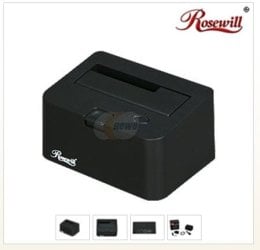
I had a student bring me a 80gb SATA HD that had all the plastic broken away from the 7 pin area on the HD. I think because they were trying to force the data cable onto the connection the wrong way. When putting a new data cable on the right way, it was too loose to make a solid connection. So I plugged the HD into a Rosewill HD docking unit. The fit was tight & secure for the data pins. Then connected it to the desktop to recover all the important data files.

Newegg.com - Rosewill RX-DUS100 2.5" & 3.5" SATA to USB2.0 & eSATA Hard Drive Docking Station


Not sure if your HD is in this bad of shape, so I would like to see some other members ideas as why it still might be detected. :confused:

If it comes down to a new HD, go with a SATA HD as that is the new standard. IDE HDs are slowly getting phased out.
 

Attachments

  • HD_Dock_Unit.JPG
    HD_Dock_Unit.JPG
    19.3 KB · Views: 6

My Computer My Computer

At a glance

Win7 Enterprise, Win7 x86 (Ult 7600), Win7 x6...AMD fx8350 4ghz, AMD-32 2400mhz, AMD-64 3200m...2gb, 4gb on the Ult 7600, 4gb on Technet RTM,...Draw my own Graphics, several nVidia cards
Computer type
PC/Desktop
Computer Manufacturer/Model Number
Built them myself, Science Experiments !
OS
Win7 Enterprise, Win7 x86 (Ult 7600), Win7 x64 Ult 7600, TechNet RTM on AMD x64 (2.8Ghz)
CPU
AMD fx8350 4ghz, AMD-32 2400mhz, AMD-64 3200mhz, AMDx64 2.8G
Motherboard
SIS 755, ECS-K8M890M-M (Ult 7600), GigaByte & others
Memory
2gb, 4gb on the Ult 7600, 4gb on Technet RTM, 32gb on FX8350
Graphics Card(s)
Draw my own Graphics, several nVidia cards
Sound Card
on motherboard
Monitor(s) Displays
19" flat scr, 28" I-Inc widescr,22" Emprex Widescr, 23" Acer
Screen Resolution
1280 x 1024, 1440 x 900, 1920 x 1080
Hard Drives
6 pata Ide HD's & 2 Sata HD's
added 80gb external on Ult 7600 computer,
numerous extra 1tb, 2TB, 3Tb SATA HD's
A collection of ext HD Docks w/ HDs
PSU
430w, 550w, 600w, 700, 800, etc
Case
All Generic Full Towers
Cooling
Open Air & a few fans, some w/ colored LEDs
Keyboard
Compaq & Dell recycled from GoodWill
Mouse
Made in China Optical Wired Mouse
Internet Speed
Fast Cable InterNet
Antivirus
AVG Free on 24 different Desktops, NO Problems!
Browser
IE 8 is preferred, but use FireFox sometimes
Other Info
Linksys Routers, switches, & Hubs
Too Many USB Flash Drives to count, Biggest is 64GB !
Eight computers in my home network.
Sixteen computers at my business network.
Linked via TeamViewer !
Lots of old used spare computer parts everywhere!
I had a student bring me a 80gb SATA HD that had all the plastic broken away from the 7 pin area on the HD. I think because they were trying to force the data cable onto the connection the wrong way. When putting a new data cable on the right way, it was too loose to make a solid connection. So I plugged the HD into a Rosewill HD docking unit. The fit was tight & secure for the data pins. Then connected it to the desktop to recover all the important data files.

Newegg.com - Rosewill RX-DUS100 2.5" & 3.5" SATA to USB2.0 & eSATA Hard Drive Docking Station


Not sure if your HD is in this bad of shape, so I would like to see some other members ideas as why it still might be detected. :confused:

If it comes down to a new HD, go with a SATA HD as that is the new standard. IDE HDs are slowly getting phased out.


Thanks for the docking unit suggestion. I don't have another SATA HD to compare it to, but I think is "that bad." I'm gonna run the HD&cable by a tech store to compare, to another.
Thank you again.
 

My Computer My Computer

At a glance

Windows 7 Ultimate x64Intel Core 2 duo, @ 2.93ghz4 GB Crucial DDR2 RamXFX Radeon 4650 Dual DVI (using DVI to HDMI f...
Computer Manufacturer/Model Number
Custom
OS
Windows 7 Ultimate x64
CPU
Intel Core 2 duo, @ 2.93ghz
Motherboard
ECS G31T-m Micro Atx MB
Memory
4 GB Crucial DDR2 Ram
Graphics Card(s)
XFX Radeon 4650 Dual DVI (using DVI to HDMI for my TV)
Hard Drives
250 GB Seagate Sata Drive
Cooling
Cooler Master 400 watt PSU
Back
Top