Solved My open windows on screen are moving against my will!

gatornuke

New member
Local time
1:08 PM
Messages
8
I have four windows on the screen, arranged just the way i want them in order to broadcast my desktop, and within a few minutes, windows 7 decides to move the two rightmost windows to the left, on top or behind the other two windows. There is a video of the issue here, right around 10:12, when it hapens, i fix it, and then it happens again!

I have windows 7 x64 home premium and already took the following steps:
  • disabled the "windows gadget platform"
  • switched to the basic theme
  • checked the "prevent windows from being automatically arranged when moved to the edge of the screen" box on ease of access
  • disabled sleep, hybernation, and screensaver.

Please let me know what I can do to keep this from happening. If you see the video you'll see why this behavior is completely disruptive and unacceptable. It's not just inconvenient, this has the potential to actually cost me money.
 

My Computer My Computer

At a glance

Windows 7 home premium x64
OS
Windows 7 home premium x64

My Computer My Computer

At a glance

Several, including Windows 7 x64 Ultimate
OS
Several, including Windows 7 x64 Ultimate
I'm using an adesso wireless mini keyboard. I do not have any indication of a malfunction. How would that result in the isssue on the video anyhow?
 

My Computer My Computer

At a glance

Windows 7 home premium x64
OS
Windows 7 home premium x64
Welcome to the Seven Forums
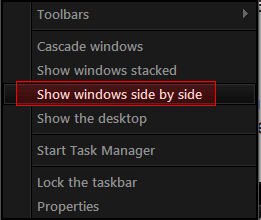
Have you tried to right click on the taskbar and choosing Show Windows side-by-side.
Jerry
 

Attachments

  • dd.png
    dd.png
    3.3 KB · Views: 206

My Computer My Computer

At a glance

Win 7 Pro x64 / Win 10 ProIntel(R) Core(TM) i7-3630QM CPU @ 2.40GHz12 GB(1) Intel(R) HD Graphics 4000 (2) NVIDIA GeFo...
Computer type
Laptop
Computer Manufacturer/Model Number
Sager NP9170
OS
Win 7 Pro x64 / Win 10 Pro
CPU
Intel(R) Core(TM) i7-3630QM CPU @ 2.40GHz
Motherboard
CLEVO P170EM
Memory
12 GB
Graphics Card(s)
(1) Intel(R) HD Graphics 4000 (2) NVIDIA GeForce GTX 675M
Sound Card
(1) Realtek High Definition Audio (2) Intel(R) Display Aud
Monitor(s) Displays
17.3
Screen Resolution
1920x1080
Hard Drives
(1) Samsung 860 EVO 500GB(OS) (1) Samsung 860 EVO 500GB(Data)
Keyboard
Backlite
Antivirus
MSE, Malwarebytes Pro
Browser
Firefox
Other Info
DESKTOP: Custom-built.
OS: Win 10 Pro x64.
CASE: Rosewill R5.
CPU: Intel I5 4670K CPU @ 3.40GHz.
CPU COOLER: Cool Master Hyper 212 EVO.
MOTHERBOARD: Asus Z87-A.
MEMORY: Kingston HyperX 2x4 GB.
GPU: Nvidia Geforce 650 TI.
PSU: Corsair TX750.
DRIVES: (1) Samsung 840 120 GB SSD (2) Western Digital blue 500 GB 7200 RPM.
I'm using an adesso wireless mini keyboard. I do not have any indication of a malfunction. How would that result in the isssue on the video anyhow?

Windows can not simply move of their own volition, something must trigger such an event. The most likely suspects are your keyboard or your mouse, or their drivers, because these are the components, ( apart from the software itself), which send commands to the system.

It is also possible that wireless interference is causing it.

Try hooking up a standard mouse and keyboard and see if the problem persists. If it does, then you most likely have a software fault of some description.

If it goes away, then you have found the GENERAL cause of the malfunction! :)

You still don't know the specific cause, ( the actual event which moves the windows), but you know where it is originating.

The main trick in diagnosing such faults is to narrow down and eliminate the POSSIBLE causes. Eventually you will find the fault. Once you have found it you can then go about eradicating it. But you have to find it first.

Regards....Mike Connor
 

My Computer My Computer

At a glance

Several, including Windows 7 x64 Ultimate
OS
Several, including Windows 7 x64 Ultimate
Furthermore, one of the events, which occurs between 10.11 and 10.12 on your video, blanks the screen momentarily, and then reopens with resized windows.

Normally, a specific series of commands would be required to do this, and so I think it is more than likely that you have a software fault. Or that your trigger configurations in the software are incorrectly set.

These comments are basically just informed surmise.

Regards....Mike Connor
 

My Computer My Computer

At a glance

Several, including Windows 7 x64 Ultimate
OS
Several, including Windows 7 x64 Ultimate
Something else you can try:

Place four windows on the screen, from Windows Explorer or whatever. See what happens. If nothing happens then your trader software is triggering the events.

Regards....Mike Connor
 

My Computer My Computer

At a glance

Several, including Windows 7 x64 Ultimate
OS
Several, including Windows 7 x64 Ultimate
Furthermore, one of the events, which occurs between 10.11 and 10.12 on your video, blanks the screen momentarily, and then reopens with resized windows.

Normally, a specific series of commands would be required to do this, and so I think it is more than likely that you have a software fault.

These comments are basically just informed surmise.

Regards....Mike Connor

I know, i saw the momentary blanking, which was why I made sure to disable the screensaver, hibernation and sleep, in case it was attempting to enter one of these states and exiting, but that wasn't it

I doubt it's the keyboard and mouse because after i remove the wireless usb dongle to put it back on my htpc the issue still occurs.

I know windows shouldn't move on their own, hence why this is so bizarre. I also noticed that not only are the windows moved to the left, but also whatever portions of the windows that were deliberately moved off-screen are moved back in, which is why it seemed like a win7 aberration to me.

The other reason i think this has to be a win7 thing is that this is a completely fresh build and installation. The only software i installed is Avast antivirus, adobe flash, and the motherboard chipset and optical drivers.

here are some relevant specs:
Intel Core i7-2600 Sandy Bridge 3.4GHz
mobo - GIGABYTE GA-H67MA-UD2H-B3 (H67 chipset)
RAM - G.SKILL Ripjaws Series 16GB (4 x 4GB) 240-Pin DDR3 SDRAM DDR3 1600
PSU - CORSAIR CMPSU-850TX 850W
optical - LG Black Blu-ray Disc Combo SATA Model UH10LS20
HDD - Western Digital Caviar Black WD1002FAEX 1TB 7200 RPM SATA 6.0Gb

The only things plugged into the computer are ethernet, power, hdmi and (sometimes) the keyboard receiver.
 
Last edited:

My Computer My Computer

At a glance

Windows 7 home premium x64
OS
Windows 7 home premium x64
Welcome to the Seven Forums
Have you tried to right click on the taskbar and choosing Show Windows side-by-side.
Jerry

No i haven't tried that. I can try it when I get home from work, though. Along with attempting to put up four windows from other software as Mike suggested, although one thing that makes it tricky to diagnose this is the fact that the issue happens rather sporadically.
 

My Computer My Computer

At a glance

Windows 7 home premium x64
OS
Windows 7 home premium x64
Furthermore, one of the events, which occurs between 10.11 and 10.12 on your video, blanks the screen momentarily, and then reopens with resized windows.

Normally, a specific series of commands would be required to do this, and so I think it is more than likely that you have a software fault.

These comments are basically just informed surmise.

Regards....Mike Connor

I know, i saw the momentary blanking, which was why I made sure to disable the screensaver, hibernation and sleep, in case it was attempting to enter one of these states and exiting, but that wasn't it

I doubt it's the keyboard and mouse because after i remove the wireless usb dongle to switch it back to my htpc and the issue still occurs.

I know windows shouldn't move on their own, hence why this is so bizarre. I also noticed that not only are the windows moved to the left, but also whatever portions of the windows that were deliberately moved off-screen are moved back in, which is why it seemed like a win7 aberration to me.

The other reason i think this has to be a win7 thing is that this is a completely fresh build and installation. The only software i installed is Avast antivirus, adobe flash, and the motherboard chipset and optical drivers.

here are some relevant specs:
Intel Core i7-2600 Sandy Bridge 3.4GHz
mobo - GIGABYTE GA-H67MA-UD2H-B3 (H67 chipset)
RAM - G.SKILL Ripjaws Series 16GB (4 x 4GB) 240-Pin DDR3 SDRAM DDR3 1600
PSU - CORSAIR CMPSU-850TX 850W
optical - LG Black Blu-ray Disc Combo SATA Model UH10LS20
HDD - Western Digital Caviar Black WD1002FAEX 1TB 7200 RPM SATA 6.0Gb


Based on that, and what we have discussed so far, I would take a closer look at the software itself.

These are pretty definitely triggered events, and the only things that can normally trigger such events are the mouse, the keyboard, or the software.

It is possible that something in the system itself is causing it, but that is extremely unlikely because system faults would cause random events and not blank the screen and then reopen with changed window sizes etc.

These events are almost certainly the result of specific commands, and these commands must be coming from somewhere.

I would tend to suspect the software itself.

Regards....Mike Connor
 

My Computer My Computer

At a glance

Several, including Windows 7 x64 Ultimate
OS
Several, including Windows 7 x64 Ultimate
SOLVED

I confirmed this behavior with other apps as well. I opened 4 IE windows, moved them to the edges and sure enough, the system moved the right ones back to the left after some time. After doing a remote login, i noticed that the resolution was set to 1024x768. I had been using the intel utility that comes with the H67 chipset drivers to set the screen resolution to 720p, since the primary display is currenlty a 720p hdtv connected via hdmi. I tried setting the screen to 1280x720 using the windows utility instead, and it no longer does this, although it still moves the windows' edges back into the screen after a period of time.

I believe I solved a big part of the problem, and to address the window edge issue, i just increased the resolution to 1920x1080, put the windows in the center of the screen and started broadcastingjust the part of the screen i'm interested in.
 

My Computer My Computer

At a glance

Windows 7 home premium x64
OS
Windows 7 home premium x64
Well, it's not really the answer, because the system should not move windows. But if it works for you then that's fine.

I would take a look at the power options, specifically the screen options, and then at the settings on the graphic card.

Good to hear you got it working as desired.

Regards....Mike Connor
 

My Computer My Computer

At a glance

Several, including Windows 7 x64 Ultimate
OS
Several, including Windows 7 x64 Ultimate
*sorta solved...

Yes, it's not really solved per say, I just found a workaround which I thought would work. But after viewing the broadcast again on another computer with the TV (display) off, I noticed the viewing area was again 1024x768 and the taskbar was showing, even though it's set to autohide. At least at the initial 1920x1080 resolution the resize is not such that it moves the windows into a 1024x768 area as it did when I had it set to 1280x720 via the intel utility.

When I turn the TV back on, the broadcast goes back to the intended resolution. It appears this has something to do with how the intel's integrated GPU/CPU on the core i7 2600 handles being hooked up to a TV via HDMI. I guess to finally fix it i might have to hook up a standard monitor to the computer instead, or I might also try disconnecting the hdmi cable altogether and see if that does it. For today, i just have to make sure someone is watching TV in that room to keep the resolution from resizing the broadcast until I get home from work and fix the issue.
 

My Computer My Computer

At a glance

Windows 7 home premium x64
OS
Windows 7 home premium x64
Good luck with it. Do please let us know if you find the (a) solution.

Regards....Mike Connor
 

My Computer My Computer

At a glance

Several, including Windows 7 x64 Ultimate
OS
Several, including Windows 7 x64 Ultimate
Unplugging the hdmi cable did not work. I wound up connecting a standard lcd via DVI and did it.
 

My Computer My Computer

At a glance

Windows 7 home premium x64
OS
Windows 7 home premium x64
Has that solved the problem?

Regards....Mike Connor
 

My Computer My Computer

At a glance

Several, including Windows 7 x64 Ultimate
OS
Several, including Windows 7 x64 Ultimate
Yes, leaving the lcd connected to the computer solved the problem, even with the monitor being turned off. It's the strangest thing.
 

My Computer My Computer

At a glance

Windows 7 home premium x64
OS
Windows 7 home premium x64
Good to hear. Glad you got it sorted out.

Regards....Mike Connor
 

My Computer My Computer

At a glance

Several, including Windows 7 x64 Ultimate
OS
Several, including Windows 7 x64 Ultimate
Back
Top