How do you change the highlight color?

StupidDude

New member
Member
Local time
4:02 PM
Messages
59
This is a specific highlight question, so some explanation is needed.

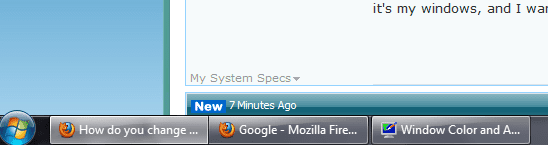
When you have 7-8 windows open you will see the multiple icons at the bottom representing them. The window you are currently using has a small shade of white on it. I want to change the color of that highlight. Does anyone know how? I looked in the advanced appearance settings, but I didn't see it, though I did play around with it a bunch.

for those interested, I usually have several spread sheets open at once with similar names, and it is a hassle for me to select another window down below only to find it you already have it selected. Small issue I know, but hey it's my windows, and I want the customization.
 

My Computer My Computer

Computer type
Laptop
Computer Manufacturer/Model Number
HP EliteBook 8730W
OS
Windows 7 Home (64bit)
Hard Drives
SSD Intel 520
You would like to have each spreadsheet as a different icon background? I agree, it can get confusing, but I don't think you will be able to achieve that.
 

My Computer My Computer

Computer Manufacturer/Model Number
Three desktops and one laptop with good specs..
OS
Vista and now 7 in 32 and 64 bit.
You would like to have each spreadsheet as a different icon background? I agree, it can get confusing, but I don't think you will be able to achieve that.

Look at the icons in the pic, notice that the "How do you change" icon is highlighted white, I want to make that white a different color, not every icon different, just the active one.
 

Attachments

  • Chart1.png
    Chart1.png
    7.7 KB · Views: 42

My Computer My Computer

Computer type
Laptop
Computer Manufacturer/Model Number
HP EliteBook 8730W
OS
Windows 7 Home (64bit)
Hard Drives
SSD Intel 520
If you are using the default aero theme I can change that for you.
If you are using a custom theme you will need to ask the
theme maker. It's not cool to change someone else work.
&
You will need to do 1 of these 2 ways of Enabling custom themes for it to work.
http://www.sevenforums.com/tutorials/34579-enabling-custom-themes-windows-7-a.html
Or
http://www.sevenforums.com/tutorials/28377-theme-how-apply-custom-themes.html?filter
I can make it a solid color or transparent color or I can tone down the white that's there now.
Let me know.
Jerry
 

My Computer My Computer

Computer type
Laptop
Computer Manufacturer/Model Number
Sager NP9170
OS
Win 7 Pro x64 / Win 10 Pro
CPU
Intel(R) Core(TM) i7-3630QM CPU @ 2.40GHz
Motherboard
CLEVO P170EM
Memory
12 GB
Graphics Card(s)
(1) Intel(R) HD Graphics 4000 (2) NVIDIA GeForce GTX 675M
Sound Card
(1) Realtek High Definition Audio (2) Intel(R) Display Aud
Monitor(s) Displays
17.3
Screen Resolution
1920x1080
Hard Drives
(1) Samsung 860 EVO 500GB(OS) (1) Samsung 860 EVO 500GB(Data)
Keyboard
Backlite
Antivirus
MSE, Malwarebytes Pro
Browser
Firefox
Other Info
DESKTOP: Custom-built.
OS: Win 10 Pro x64.
CASE: Rosewill R5.
CPU: Intel I5 4670K CPU @ 3.40GHz.
CPU COOLER: Cool Master Hyper 212 EVO.
MOTHERBOARD: Asus Z87-A.
MEMORY: Kingston HyperX 2x4 GB.
GPU: Nvidia Geforce 650 TI.
PSU: Corsair TX750.
DRIVES: (1) Samsung 840 120 GB SSD (2) Western Digital blue 500 GB 7200 RPM.
If you are using the default aero theme I can change that for you.
If you are using a custom theme you will need to ask the
theme maker. It's not cool to change someone else work.
&
You will need to do 1 of these 2 ways of Enabling custom themes for it to work.
http://www.sevenforums.com/tutorials/34579-enabling-custom-themes-windows-7-a.html
Or
http://www.sevenforums.com/tutorials/28377-theme-how-apply-custom-themes.html?filter
I can make it a solid color or transparent color or I can tone down the white that's there now.
Let me know.
Jerry

All I did to get my colors was go to Personalize, no one else custom work involved.

I would be very grateful if you could make the active bar dark transparent green, so I can make everything else a shade of blue.
 

My Computer My Computer

Computer type
Laptop
Computer Manufacturer/Model Number
HP EliteBook 8730W
OS
Windows 7 Home (64bit)
Hard Drives
SSD Intel 520
If you are using the default aero theme I can change that for you.
If you are using a custom theme you will need to ask the
theme maker. It's not cool to change someone else work.
&
You will need to do 1 of these 2 ways of Enabling custom themes for it to work.
http://www.sevenforums.com/tutorials/34579-enabling-custom-themes-windows-7-a.html
Or
http://www.sevenforums.com/tutorials/28377-theme-how-apply-custom-themes.html?filter
I can make it a solid color or transparent color or I can tone down the white that's there now.
Let me know.
Jerry

All I did to get my colors was go to Personalize, no one else custom work involved.

I would be very grateful if you could make the active bar dark transparent green, so I can make everything else a shade of blue.
OK give me a little bit of time (about an hour)and I will be back with it.
Jerry
 

My Computer My Computer

Computer type
Laptop
Computer Manufacturer/Model Number
Sager NP9170
OS
Win 7 Pro x64 / Win 10 Pro
CPU
Intel(R) Core(TM) i7-3630QM CPU @ 2.40GHz
Motherboard
CLEVO P170EM
Memory
12 GB
Graphics Card(s)
(1) Intel(R) HD Graphics 4000 (2) NVIDIA GeForce GTX 675M
Sound Card
(1) Realtek High Definition Audio (2) Intel(R) Display Aud
Monitor(s) Displays
17.3
Screen Resolution
1920x1080
Hard Drives
(1) Samsung 860 EVO 500GB(OS) (1) Samsung 860 EVO 500GB(Data)
Keyboard
Backlite
Antivirus
MSE, Malwarebytes Pro
Browser
Firefox
Other Info
DESKTOP: Custom-built.
OS: Win 10 Pro x64.
CASE: Rosewill R5.
CPU: Intel I5 4670K CPU @ 3.40GHz.
CPU COOLER: Cool Master Hyper 212 EVO.
MOTHERBOARD: Asus Z87-A.
MEMORY: Kingston HyperX 2x4 GB.
GPU: Nvidia Geforce 650 TI.
PSU: Corsair TX750.
DRIVES: (1) Samsung 840 120 GB SSD (2) Western Digital blue 500 GB 7200 RPM.
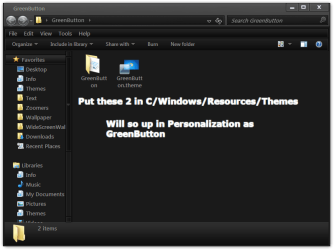
Here you go download and open the zip folder and open the folder inside of it and put the two in the screenshot in C/Windows/Resources/Themes
It will show up in the Personalization as GreenButton.
Make sure you did one of them 2 guides for it to work.
If the color is not right or if it's too transparent or not enough let me know and I will change it.
Jerry
 

Attachments

  • GreenButton.png
    GreenButton.png
    22.6 KB · Views: 49
  • GreenButton.zip
    GreenButton.zip
    883.5 KB · Views: 82

My Computer My Computer

Computer type
Laptop
Computer Manufacturer/Model Number
Sager NP9170
OS
Win 7 Pro x64 / Win 10 Pro
CPU
Intel(R) Core(TM) i7-3630QM CPU @ 2.40GHz
Motherboard
CLEVO P170EM
Memory
12 GB
Graphics Card(s)
(1) Intel(R) HD Graphics 4000 (2) NVIDIA GeForce GTX 675M
Sound Card
(1) Realtek High Definition Audio (2) Intel(R) Display Aud
Monitor(s) Displays
17.3
Screen Resolution
1920x1080
Hard Drives
(1) Samsung 860 EVO 500GB(OS) (1) Samsung 860 EVO 500GB(Data)
Keyboard
Backlite
Antivirus
MSE, Malwarebytes Pro
Browser
Firefox
Other Info
DESKTOP: Custom-built.
OS: Win 10 Pro x64.
CASE: Rosewill R5.
CPU: Intel I5 4670K CPU @ 3.40GHz.
CPU COOLER: Cool Master Hyper 212 EVO.
MOTHERBOARD: Asus Z87-A.
MEMORY: Kingston HyperX 2x4 GB.
GPU: Nvidia Geforce 650 TI.
PSU: Corsair TX750.
DRIVES: (1) Samsung 840 120 GB SSD (2) Western Digital blue 500 GB 7200 RPM.
Here you go download and open the zip folder and open the folder inside of it and put the two in the screenshot in C/Windows/Resources/Themes
It will show up in the Personalization as GreenButton.
Make sure you did one of them 2 guides for it to work.
If the color is not right or if it's too transparent or not enough let me know and I will change it.
Jerry


Thankyou. A question though, how do you learn how to do these things?
 

My Computer My Computer

Computer type
Laptop
Computer Manufacturer/Model Number
HP EliteBook 8730W
OS
Windows 7 Home (64bit)
Hard Drives
SSD Intel 520
Thankyou. A question though, how do you learn how to do these things?
Your Welcome
Most people use one of these two Ave's Windows7 Style Builder or Restorator - Bome Software - Restorator - the resource editor for customization, localization, and translation.
, I used the first one Windows Style Builder then you have to get a copy of the aero folder and use something like Photoshop or gimp or paint to edit the images. If you decide to start making themes there are lots of people that will help you get started.
Jerry
 

My Computer My Computer

Computer type
Laptop
Computer Manufacturer/Model Number
Sager NP9170
OS
Win 7 Pro x64 / Win 10 Pro
CPU
Intel(R) Core(TM) i7-3630QM CPU @ 2.40GHz
Motherboard
CLEVO P170EM
Memory
12 GB
Graphics Card(s)
(1) Intel(R) HD Graphics 4000 (2) NVIDIA GeForce GTX 675M
Sound Card
(1) Realtek High Definition Audio (2) Intel(R) Display Aud
Monitor(s) Displays
17.3
Screen Resolution
1920x1080
Hard Drives
(1) Samsung 860 EVO 500GB(OS) (1) Samsung 860 EVO 500GB(Data)
Keyboard
Backlite
Antivirus
MSE, Malwarebytes Pro
Browser
Firefox
Other Info
DESKTOP: Custom-built.
OS: Win 10 Pro x64.
CASE: Rosewill R5.
CPU: Intel I5 4670K CPU @ 3.40GHz.
CPU COOLER: Cool Master Hyper 212 EVO.
MOTHERBOARD: Asus Z87-A.
MEMORY: Kingston HyperX 2x4 GB.
GPU: Nvidia Geforce 650 TI.
PSU: Corsair TX750.
DRIVES: (1) Samsung 840 120 GB SSD (2) Western Digital blue 500 GB 7200 RPM.
Here you go download and open the zip folder and open the folder inside of it and put the two in the screenshot in C/Windows/Resources/Themes
It will show up in the Personalization as GreenButton.
Make sure you did one of them 2 guides for it to work.
If the color is not right or if it's too transparent or not enough let me know and I will change it.
Jerry

dude sorry for quoting u but i have a question.... what you did to change it all to black like this image of yours :O i want to do that T.T pls tell me

146670d1301586809t-how-do-you-change-highlight-color-greenbutton.png
 

My Computer My Computer

OS
windows ultimate 32bit
Here you go download and open the zip folder and open the folder inside of it and put the two in the screenshot in C/Windows/Resources/Themes
It will show up in the Personalization as GreenButton.
Make sure you did one of them 2 guides for it to work.
If the color is not right or if it's too transparent or not enough let me know and I will change it.
Jerry

dude sorry for quoting u but i have a question.... what you did to change it all to black like this image of yours :O i want to do that T.T pls tell me

146670d1301586809t-how-do-you-change-highlight-color-greenbutton.png
Welcome to the Seven Forums
1st
You will need to do 1 of these 2 ways of Enabling custom themes for it to work.
http://www.sevenforums.com/tutorials/34579-enabling-custom-themes-windows-7-a.html
Or
http://www.sevenforums.com/tutorials/28377-theme-how-apply-custom-themes.html?filter

Here is the theme charleston2378's deviantART gallery
Jerry
 

My Computer My Computer

Computer type
Laptop
Computer Manufacturer/Model Number
Sager NP9170
OS
Win 7 Pro x64 / Win 10 Pro
CPU
Intel(R) Core(TM) i7-3630QM CPU @ 2.40GHz
Motherboard
CLEVO P170EM
Memory
12 GB
Graphics Card(s)
(1) Intel(R) HD Graphics 4000 (2) NVIDIA GeForce GTX 675M
Sound Card
(1) Realtek High Definition Audio (2) Intel(R) Display Aud
Monitor(s) Displays
17.3
Screen Resolution
1920x1080
Hard Drives
(1) Samsung 860 EVO 500GB(OS) (1) Samsung 860 EVO 500GB(Data)
Keyboard
Backlite
Antivirus
MSE, Malwarebytes Pro
Browser
Firefox
Other Info
DESKTOP: Custom-built.
OS: Win 10 Pro x64.
CASE: Rosewill R5.
CPU: Intel I5 4670K CPU @ 3.40GHz.
CPU COOLER: Cool Master Hyper 212 EVO.
MOTHERBOARD: Asus Z87-A.
MEMORY: Kingston HyperX 2x4 GB.
GPU: Nvidia Geforce 650 TI.
PSU: Corsair TX750.
DRIVES: (1) Samsung 840 120 GB SSD (2) Western Digital blue 500 GB 7200 RPM.
Here you go download and open the zip folder and open the folder inside of it and put the two in the screenshot in C/Windows/Resources/Themes
It will show up in the Personalization as GreenButton.
Make sure you did one of them 2 guides for it to work.
If the color is not right or if it's too transparent or not enough let me know and I will change it.
Jerry

dude sorry for quoting u but i have a question.... what you did to change it all to black like this image of yours :O i want to do that T.T pls tell me

146670d1301586809t-how-do-you-change-highlight-color-greenbutton.png
Welcome to the Seven Forums
1st
You will need to do 1 of these 2 ways of Enabling custom themes for it to work.
http://www.sevenforums.com/tutorials/34579-enabling-custom-themes-windows-7-a.html
Or
http://www.sevenforums.com/tutorials/28377-theme-how-apply-custom-themes.html?filter

Here is the theme charleston2378's deviantART gallery
Jerry
thnx dude ive been looking for it since long time ago
 

My Computer My Computer

OS
windows ultimate 32bit
dude sorry for quoting u but i have a question.... what you did to change it all to black like this image of yours :O i want to do that T.T pls tell me

146670d1301586809t-how-do-you-change-highlight-color-greenbutton.png
Welcome to the Seven Forums
1st
You will need to do 1 of these 2 ways of Enabling custom themes for it to work.
http://www.sevenforums.com/tutorials/34579-enabling-custom-themes-windows-7-a.html
Or
http://www.sevenforums.com/tutorials/28377-theme-how-apply-custom-themes.html?filter

Here is the theme charleston2378's deviantART gallery
Jerry
thnx dude ive been looking for it since long time ago
You're Welcome enjoy it's a great theme.
Jerry
 

My Computer My Computer

Computer type
Laptop
Computer Manufacturer/Model Number
Sager NP9170
OS
Win 7 Pro x64 / Win 10 Pro
CPU
Intel(R) Core(TM) i7-3630QM CPU @ 2.40GHz
Motherboard
CLEVO P170EM
Memory
12 GB
Graphics Card(s)
(1) Intel(R) HD Graphics 4000 (2) NVIDIA GeForce GTX 675M
Sound Card
(1) Realtek High Definition Audio (2) Intel(R) Display Aud
Monitor(s) Displays
17.3
Screen Resolution
1920x1080
Hard Drives
(1) Samsung 860 EVO 500GB(OS) (1) Samsung 860 EVO 500GB(Data)
Keyboard
Backlite
Antivirus
MSE, Malwarebytes Pro
Browser
Firefox
Other Info
DESKTOP: Custom-built.
OS: Win 10 Pro x64.
CASE: Rosewill R5.
CPU: Intel I5 4670K CPU @ 3.40GHz.
CPU COOLER: Cool Master Hyper 212 EVO.
MOTHERBOARD: Asus Z87-A.
MEMORY: Kingston HyperX 2x4 GB.
GPU: Nvidia Geforce 650 TI.
PSU: Corsair TX750.
DRIVES: (1) Samsung 840 120 GB SSD (2) Western Digital blue 500 GB 7200 RPM.
thnx dude ive been looking for it since long time ago
You're Welcome enjoy it's a great theme.
Jerry
ig ot problems..i transfer it to the themes folder but nothing appears wheni got to look for it
 

My Computer My Computer

OS
windows ultimate 32bit
ig ot problems..i transfer it to the themes folder but nothing appears wheni got to look for it
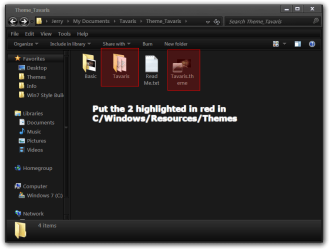
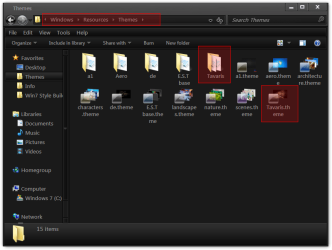
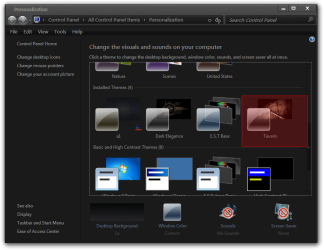
You need to put the two folders highlighted in red in C/Windows/Resources/Themes (screenshot)
Theme_Tavaris.png
It should look like this afterwards.
Themes.png
It should show up in Personalization then click on it that should started.
Personalization.png
Jerry
 

My Computer My Computer

Computer type
Laptop
Computer Manufacturer/Model Number
Sager NP9170
OS
Win 7 Pro x64 / Win 10 Pro
CPU
Intel(R) Core(TM) i7-3630QM CPU @ 2.40GHz
Motherboard
CLEVO P170EM
Memory
12 GB
Graphics Card(s)
(1) Intel(R) HD Graphics 4000 (2) NVIDIA GeForce GTX 675M
Sound Card
(1) Realtek High Definition Audio (2) Intel(R) Display Aud
Monitor(s) Displays
17.3
Screen Resolution
1920x1080
Hard Drives
(1) Samsung 860 EVO 500GB(OS) (1) Samsung 860 EVO 500GB(Data)
Keyboard
Backlite
Antivirus
MSE, Malwarebytes Pro
Browser
Firefox
Other Info
DESKTOP: Custom-built.
OS: Win 10 Pro x64.
CASE: Rosewill R5.
CPU: Intel I5 4670K CPU @ 3.40GHz.
CPU COOLER: Cool Master Hyper 212 EVO.
MOTHERBOARD: Asus Z87-A.
MEMORY: Kingston HyperX 2x4 GB.
GPU: Nvidia Geforce 650 TI.
PSU: Corsair TX750.
DRIVES: (1) Samsung 840 120 GB SSD (2) Western Digital blue 500 GB 7200 RPM.
Back
Top