Solved Upgraded RAM but not usable?

kbronski

New member
Power User
Local time
11:24 AM
Messages
287
So, I had 3GB RAM installed and 2.93 GB was usable, so I upgraded to 4GB. Just installed the new stick no more than 5 minutes ago. However, my computer is now saying, "4.00GB RAM, 2.93GB usable"

Can someone explain what's going on?
I have a 32 bit OS.
 

My Computer My Computer

Computer type
PC/Desktop
Computer Manufacturer/Model Number
Custom
OS
Windows 7 Pro x64
CPU
Intel Core i7-5820k
Motherboard
ASUS X99-PRO
Memory
32GB Kingston HyperX FURY DDR4-2400
Graphics Card(s)
EVGA Geforce GTX970
Monitor(s) Displays
ASUS VC239h
Screen Resolution
1920x1080
Hard Drives
Samsung 850 EVO SSD 250GB x2
750 GB HDD
3TB HDD
PSU
Corsair RM750
Case
Fractal Design Define R5
Cooling
Noctua NH-D15
Keyboard
Corsair Strafe RGB
Mouse
Logitech G502
Note that 32-bit systems are limited to 3.25Gb Max but the actual usable memory is often less due to chipset limitations and built-in GPUs ,you need a 64-bit version of windows 7 to use all your RAM.

The 0.07GB was most probably hardware reserved

Uncheck Max mem from msconfig (Windows Key+R>msconfig>Boot>Advanced options)

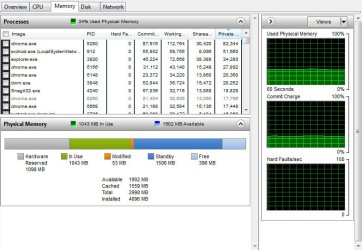
Post a screen shot of the Memory Tab in Resource Monitor
You can view this in Resource Monitor. Start > type "resource" > Open Resource Monitor > Memory Tab > Physical Memory.
 

My Computer My Computer

Computer type
PC/Desktop
Computer Manufacturer/Model Number
Custom Build
OS
Windows 10 Pro x64, Arch Linux
CPU
Intel Core 2 Quad Q8200 OC'd 3.08GHz
Motherboard
Asus Rampage formula LGA775
Memory
8GB DDR2 900Mhz
Graphics Card(s)
MSI GT730 2GB GDDR5 (Kepler)
Sound Card
Supreme FX2
Monitor(s) Displays
Samsung LS22F350 LED
Screen Resolution
1080P
Hard Drives
Kingston SSDNow UV400 120GB, 500GB Hitachi, 2TB Samsung, 500GB Seagate FreeAgent, 640GB Samsung, 160GB Toshiba (Arch)
PSU
AeroCool 500W Bronze
Cooling
Cooler Master V6 + 3X fans
Keyboard
Prolink keyboard
Mouse
Logitech M705
Internet Speed
1MiB/s
Browser
Chrome Beta
Your clue was that your PC could not use all of 3---let alone 4. If it had been able to use all of 3, then likely it would have been able to use some portion of the 4th gigabyte.
 

My Computer My Computer

Computer type
PC/Desktop
Computer Manufacturer/Model Number
Ignatz Special; 4 speed manual gearbox; factory air conditioning; one of one
OS
Windows 7 Home Premium SP1, 64-bit
CPU
Intel Skylake i5-6600K, not overclocked
Motherboard
AsRock Z170M Extreme 4, micro ATX
Memory
8 GB HyperX DDR4-2666 (2 x 4 GB)
Graphics Card(s)
none; graphics are integrated on CPU
Sound Card
onboard: Realtek ALC1150; external: USB Behringer UF0-202
Monitor(s) Displays
Dell S2340M 23 inch IPS
Screen Resolution
1600 x 900
Hard Drives
System: Crucial MX100 series SSD, 128 GB;
Data: Samsung Spinpoint 103SJ, 1 TB;
Backup: WD Caviar Green WD30EZRX-00D8PB0, 3 TB
PSU
Rosewill SilentNight 500 watt fanless, semi-modular
Case
Antec Solo II
Cooling
Noctua NH-U12S; Noctua F12 intake, Noctua S12A exhaust
Keyboard
Microsoft 200 6JH-00001 USB
Mouse
Dell or Microsoft optical wired; USB
Antivirus
Microsoft Security Essentials and Malwarebytes Premium
Browser
Pale Moon
Other Info
All fans PWM; speeds at idle: CPU circa 500 rpm; intake circa 600 rpm; exhaust circa 600 rpm; CPU temps 27 idle and 47 C load in a warm room (27 C/81 F) when running Intel Extreme Tuning Utility stress test.
Here is the memory tab. I'll try installing 64-bit (my processor handles 64 bit but was doing 32 bit instead)
 

Attachments

  • 4-4-2011 12-24-02 PM.jpg
    4-4-2011 12-24-02 PM.jpg
    67.2 KB · Views: 69

My Computer My Computer

Computer type
PC/Desktop
Computer Manufacturer/Model Number
Custom
OS
Windows 7 Pro x64
CPU
Intel Core i7-5820k
Motherboard
ASUS X99-PRO
Memory
32GB Kingston HyperX FURY DDR4-2400
Graphics Card(s)
EVGA Geforce GTX970
Monitor(s) Displays
ASUS VC239h
Screen Resolution
1920x1080
Hard Drives
Samsung 850 EVO SSD 250GB x2
750 GB HDD
3TB HDD
PSU
Corsair RM750
Case
Fractal Design Define R5
Cooling
Noctua NH-D15
Keyboard
Corsair Strafe RGB
Mouse
Logitech G502
Here is the memory tab. I'll try installing 64-bit (my processor handles 64 bit but was doing 32 bit instead)
1 GB is hardware reserved, you won't be able to use it unless you use 64-bit
 

My Computer My Computer

Computer type
PC/Desktop
Computer Manufacturer/Model Number
Custom Build
OS
Windows 10 Pro x64, Arch Linux
CPU
Intel Core 2 Quad Q8200 OC'd 3.08GHz
Motherboard
Asus Rampage formula LGA775
Memory
8GB DDR2 900Mhz
Graphics Card(s)
MSI GT730 2GB GDDR5 (Kepler)
Sound Card
Supreme FX2
Monitor(s) Displays
Samsung LS22F350 LED
Screen Resolution
1080P
Hard Drives
Kingston SSDNow UV400 120GB, 500GB Hitachi, 2TB Samsung, 500GB Seagate FreeAgent, 640GB Samsung, 160GB Toshiba (Arch)
PSU
AeroCool 500W Bronze
Cooling
Cooler Master V6 + 3X fans
Keyboard
Prolink keyboard
Mouse
Logitech M705
Internet Speed
1MiB/s
Browser
Chrome Beta
Win7 64bit will let you use all that RAM.
 

My Computer My Computer

Computer type
PC/Desktop
Computer Manufacturer/Model Number
76~2.0
OS
Windows 7 Ult x64 - SP1/ Windows 8 Pro x64
CPU
Intel Core i5-3570K 4.6GHz
Motherboard
Gigabyte GA-Z77X UD3H, f18
Memory
8GB (2X4GB) DDR3 1600 Corsair Vengeance CL8 1.5v
Graphics Card(s)
Sapphire HD 7770 Vapor-X OC 1GB DDR5
Sound Card
Onboard VIA VT2021
Monitor(s) Displays
22" LCD Dell
Screen Resolution
1680x1050
Hard Drives
Samsung 840Pro 128GB SSD,
Seagate Barracuda 500GB SATA2 7200rpm 32MB cache, Seagate Barracuda 1TB SATA2 7200rpm 32MB cache,
PSU
Corsair HX650W
Case
Cooler Master Storm Scout
Cooling
Corsair H80 2x12cm Noctua NF P12 , 2x14cm case fans
Keyboard
Logitech Wave
Mouse
CM Sentinel
Internet Speed
Dismal
Antivirus
Avast
Browser
Opera Next
Other Info
Haswell laptop: HP Envy 17t-j, i7-4700MQ, GeForce 740M 2GB DDR3, 17.3" Full HD 1920x1080, 16GB RAM, Samsung 840 Pro 128GB, 1TB Hitachi 7200 HDD,
Desktop: eSATA ports,
External eSATA Seagate 500GB SATA2 7200rpm,
External WD USB 500GB
Is there a way I can tweak my 32-bit to allow the RAM usage, or would lead to severe instability?
 

My Computer My Computer

Computer type
PC/Desktop
Computer Manufacturer/Model Number
Custom
OS
Windows 7 Pro x64
CPU
Intel Core i7-5820k
Motherboard
ASUS X99-PRO
Memory
32GB Kingston HyperX FURY DDR4-2400
Graphics Card(s)
EVGA Geforce GTX970
Monitor(s) Displays
ASUS VC239h
Screen Resolution
1920x1080
Hard Drives
Samsung 850 EVO SSD 250GB x2
750 GB HDD
3TB HDD
PSU
Corsair RM750
Case
Fractal Design Define R5
Cooling
Noctua NH-D15
Keyboard
Corsair Strafe RGB
Mouse
Logitech G502
Not possible, it's a pathway for communication to the CPU, only 4GB wide. RAM shares it with other devices, graphics, etc. leaving approx. 3.25GB or less for RAM.

Only way to overcome this limitation is to install a 64bit OS.
 

My Computer My Computer

Computer type
PC/Desktop
Computer Manufacturer/Model Number
76~2.0
OS
Windows 7 Ult x64 - SP1/ Windows 8 Pro x64
CPU
Intel Core i5-3570K 4.6GHz
Motherboard
Gigabyte GA-Z77X UD3H, f18
Memory
8GB (2X4GB) DDR3 1600 Corsair Vengeance CL8 1.5v
Graphics Card(s)
Sapphire HD 7770 Vapor-X OC 1GB DDR5
Sound Card
Onboard VIA VT2021
Monitor(s) Displays
22" LCD Dell
Screen Resolution
1680x1050
Hard Drives
Samsung 840Pro 128GB SSD,
Seagate Barracuda 500GB SATA2 7200rpm 32MB cache, Seagate Barracuda 1TB SATA2 7200rpm 32MB cache,
PSU
Corsair HX650W
Case
Cooler Master Storm Scout
Cooling
Corsair H80 2x12cm Noctua NF P12 , 2x14cm case fans
Keyboard
Logitech Wave
Mouse
CM Sentinel
Internet Speed
Dismal
Antivirus
Avast
Browser
Opera Next
Other Info
Haswell laptop: HP Envy 17t-j, i7-4700MQ, GeForce 740M 2GB DDR3, 17.3" Full HD 1920x1080, 16GB RAM, Samsung 840 Pro 128GB, 1TB Hitachi 7200 HDD,
Desktop: eSATA ports,
External eSATA Seagate 500GB SATA2 7200rpm,
External WD USB 500GB
Is there a way I can tweak my 32-bit to allow the RAM usage, or would lead to severe instability?
No there is no such tweak :)
 

My Computer My Computer

Computer type
PC/Desktop
Computer Manufacturer/Model Number
Custom Build
OS
Windows 10 Pro x64, Arch Linux
CPU
Intel Core 2 Quad Q8200 OC'd 3.08GHz
Motherboard
Asus Rampage formula LGA775
Memory
8GB DDR2 900Mhz
Graphics Card(s)
MSI GT730 2GB GDDR5 (Kepler)
Sound Card
Supreme FX2
Monitor(s) Displays
Samsung LS22F350 LED
Screen Resolution
1080P
Hard Drives
Kingston SSDNow UV400 120GB, 500GB Hitachi, 2TB Samsung, 500GB Seagate FreeAgent, 640GB Samsung, 160GB Toshiba (Arch)
PSU
AeroCool 500W Bronze
Cooling
Cooler Master V6 + 3X fans
Keyboard
Prolink keyboard
Mouse
Logitech M705
Internet Speed
1MiB/s
Browser
Chrome Beta
Okay. Thanks for the tips and help guys! GREATLY appreciated! :) I'm backing up my data right now to install 64-bit.
 

My Computer My Computer

Computer type
PC/Desktop
Computer Manufacturer/Model Number
Custom
OS
Windows 7 Pro x64
CPU
Intel Core i7-5820k
Motherboard
ASUS X99-PRO
Memory
32GB Kingston HyperX FURY DDR4-2400
Graphics Card(s)
EVGA Geforce GTX970
Monitor(s) Displays
ASUS VC239h
Screen Resolution
1920x1080
Hard Drives
Samsung 850 EVO SSD 250GB x2
750 GB HDD
3TB HDD
PSU
Corsair RM750
Case
Fractal Design Define R5
Cooling
Noctua NH-D15
Keyboard
Corsair Strafe RGB
Mouse
Logitech G502
Good choice, the 64bit OS is the best step to take.

Let us know if you have any questions.
 

My Computer My Computer

Computer type
PC/Desktop
Computer Manufacturer/Model Number
76~2.0
OS
Windows 7 Ult x64 - SP1/ Windows 8 Pro x64
CPU
Intel Core i5-3570K 4.6GHz
Motherboard
Gigabyte GA-Z77X UD3H, f18
Memory
8GB (2X4GB) DDR3 1600 Corsair Vengeance CL8 1.5v
Graphics Card(s)
Sapphire HD 7770 Vapor-X OC 1GB DDR5
Sound Card
Onboard VIA VT2021
Monitor(s) Displays
22" LCD Dell
Screen Resolution
1680x1050
Hard Drives
Samsung 840Pro 128GB SSD,
Seagate Barracuda 500GB SATA2 7200rpm 32MB cache, Seagate Barracuda 1TB SATA2 7200rpm 32MB cache,
PSU
Corsair HX650W
Case
Cooler Master Storm Scout
Cooling
Corsair H80 2x12cm Noctua NF P12 , 2x14cm case fans
Keyboard
Logitech Wave
Mouse
CM Sentinel
Internet Speed
Dismal
Antivirus
Avast
Browser
Opera Next
Other Info
Haswell laptop: HP Envy 17t-j, i7-4700MQ, GeForce 740M 2GB DDR3, 17.3" Full HD 1920x1080, 16GB RAM, Samsung 840 Pro 128GB, 1TB Hitachi 7200 HDD,
Desktop: eSATA ports,
External eSATA Seagate 500GB SATA2 7200rpm,
External WD USB 500GB
All is working well now. Thanks again everyone. I even got this Tron theme working right now. :)
 

My Computer My Computer

Computer type
PC/Desktop
Computer Manufacturer/Model Number
Custom
OS
Windows 7 Pro x64
CPU
Intel Core i7-5820k
Motherboard
ASUS X99-PRO
Memory
32GB Kingston HyperX FURY DDR4-2400
Graphics Card(s)
EVGA Geforce GTX970
Monitor(s) Displays
ASUS VC239h
Screen Resolution
1920x1080
Hard Drives
Samsung 850 EVO SSD 250GB x2
750 GB HDD
3TB HDD
PSU
Corsair RM750
Case
Fractal Design Define R5
Cooling
Noctua NH-D15
Keyboard
Corsair Strafe RGB
Mouse
Logitech G502
So I take it you installed the 64bit OS and everything is good?
 

My Computer My Computer

Computer type
PC/Desktop
Computer Manufacturer/Model Number
76~2.0
OS
Windows 7 Ult x64 - SP1/ Windows 8 Pro x64
CPU
Intel Core i5-3570K 4.6GHz
Motherboard
Gigabyte GA-Z77X UD3H, f18
Memory
8GB (2X4GB) DDR3 1600 Corsair Vengeance CL8 1.5v
Graphics Card(s)
Sapphire HD 7770 Vapor-X OC 1GB DDR5
Sound Card
Onboard VIA VT2021
Monitor(s) Displays
22" LCD Dell
Screen Resolution
1680x1050
Hard Drives
Samsung 840Pro 128GB SSD,
Seagate Barracuda 500GB SATA2 7200rpm 32MB cache, Seagate Barracuda 1TB SATA2 7200rpm 32MB cache,
PSU
Corsair HX650W
Case
Cooler Master Storm Scout
Cooling
Corsair H80 2x12cm Noctua NF P12 , 2x14cm case fans
Keyboard
Logitech Wave
Mouse
CM Sentinel
Internet Speed
Dismal
Antivirus
Avast
Browser
Opera Next
Other Info
Haswell laptop: HP Envy 17t-j, i7-4700MQ, GeForce 740M 2GB DDR3, 17.3" Full HD 1920x1080, 16GB RAM, Samsung 840 Pro 128GB, 1TB Hitachi 7200 HDD,
Desktop: eSATA ports,
External eSATA Seagate 500GB SATA2 7200rpm,
External WD USB 500GB
Yes, everything is working good. Although I'm wondering whether the 57 updates it did were really necessary. It ran SUPER fast when I installed, then it did updates and takes longer to boot up. Hmm.
 

My Computer My Computer

Computer type
PC/Desktop
Computer Manufacturer/Model Number
Custom
OS
Windows 7 Pro x64
CPU
Intel Core i7-5820k
Motherboard
ASUS X99-PRO
Memory
32GB Kingston HyperX FURY DDR4-2400
Graphics Card(s)
EVGA Geforce GTX970
Monitor(s) Displays
ASUS VC239h
Screen Resolution
1920x1080
Hard Drives
Samsung 850 EVO SSD 250GB x2
750 GB HDD
3TB HDD
PSU
Corsair RM750
Case
Fractal Design Define R5
Cooling
Noctua NH-D15
Keyboard
Corsair Strafe RGB
Mouse
Logitech G502
Glad to hear it's running better for you.

Haven't had any problems with updates, yet, hopefully it will re-gain it's speed.
 

My Computer My Computer

Computer type
PC/Desktop
Computer Manufacturer/Model Number
76~2.0
OS
Windows 7 Ult x64 - SP1/ Windows 8 Pro x64
CPU
Intel Core i5-3570K 4.6GHz
Motherboard
Gigabyte GA-Z77X UD3H, f18
Memory
8GB (2X4GB) DDR3 1600 Corsair Vengeance CL8 1.5v
Graphics Card(s)
Sapphire HD 7770 Vapor-X OC 1GB DDR5
Sound Card
Onboard VIA VT2021
Monitor(s) Displays
22" LCD Dell
Screen Resolution
1680x1050
Hard Drives
Samsung 840Pro 128GB SSD,
Seagate Barracuda 500GB SATA2 7200rpm 32MB cache, Seagate Barracuda 1TB SATA2 7200rpm 32MB cache,
PSU
Corsair HX650W
Case
Cooler Master Storm Scout
Cooling
Corsair H80 2x12cm Noctua NF P12 , 2x14cm case fans
Keyboard
Logitech Wave
Mouse
CM Sentinel
Internet Speed
Dismal
Antivirus
Avast
Browser
Opera Next
Other Info
Haswell laptop: HP Envy 17t-j, i7-4700MQ, GeForce 740M 2GB DDR3, 17.3" Full HD 1920x1080, 16GB RAM, Samsung 840 Pro 128GB, 1TB Hitachi 7200 HDD,
Desktop: eSATA ports,
External eSATA Seagate 500GB SATA2 7200rpm,
External WD USB 500GB
Back
Top