Shared folders not marked with hand icon

robilong

New member
Member
Local time
5:25 AM
Messages
87
Seems like W7 doesn't use hand icon to mark shared folder. The icon for shared folders in Explorer doesn't differ at all, is it correct?
How to check quickly which folders are shared?

Thanks!
 

My Computer My Computer

OS
Windows 7 Enterprise 64 bit
CPU
Intel I5-760
Motherboard
INTEL P55 S1156 DDR3 GLAN RAID BLKDP55WB
Memory
8 GB
Graphics Card(s)
CLUB 3D HD5450 1GB GDDR3 CGAX-54524LI
Hard Drives
WD150HFLS 150GB/10000rpm
WD10EALS Blue 1TB
Well it is different then a un-shared drive icon. But yes it is not the old Hand icon.
 

My Computer My Computer

Computer Manufacturer/Model Number
Built be Me
OS
Windows 7 Pro x64
CPU
i5 760
Motherboard
Asus P7P55D-E Pro
Memory
16GB
Graphics Card(s)
Nvidia GTS450
Sound Card
On board
Monitor(s) Displays
Dell 2007WFP Dell 1800FP
Screen Resolution
1680x1050 1280x1024
Hard Drives
Seagate 250GB & 750GB
WD 1TB
PSU
Antec 750
Case
In Win
Cooling
Cooler Master Hyper 212+
Keyboard
IBM
Mouse
MS
it should be displaying this overlay:

share.PNG

but i've just tried sharing some other folders, but it doesn't seem to be working...and it's an sp1 machine too...:rolleyes:
 

My Computer My Computer

Computer Manufacturer/Model Number
mickey megabyte 1234
OS
ultimate 64 sp1
CPU
i5 2500K [email protected]
Motherboard
MSI P67A-GD53
Memory
8 gigs GSkill Ripjaws 1600
Graphics Card(s)
amd hd6950
Sound Card
creative x-fi gamer
Monitor(s) Displays
samsung 24"
Screen Resolution
1920x1080
Hard Drives
ocz vertex 2e 60 gig, samsung f3 1tb, buffalo 2tb ext
PSU
antec 550
Case
antec three hundred
Cooling
i'm a cooling fan
Keyboard
saitek eclipse ii
Mouse
logitech g3
Internet Speed
about 4 Mbps
Other Info
i love win7
The short version:
"If you share a folder, then click the folder to select it, at the bottom of the screen in the details pane, you'll see "State:" and "Shared" with the appropriate "people" icon. It also shows "Shared with" and lists the users/groups."
The long version:
"One of the goals for the Windows 7 release is to reduce large cognitive loads on users by simplifying the user interface. With the investment in sharing for the Windows 7 release, and especially with HomeGroup in the consumer space, we believe that a majority of users’ content will be shared. The previous overlay model would have resulted in the sharing overlay appearing frequently in typical Explorer views, potentially distracting users with information that they might not use or need on a daily basis. A single sharing overlay can’t provide details about how an item is shared (for example, who it’s shared with, what privileges are assigned, etc.) and this results in a higher cognitive load for the end user. Prior to Windows 7, there were also scenarios in which the sharing overlay was shown inconsistently, which caused user confusion. As a result, based on the above, the sharing overlay was removed from the items view in Explorer. The sharing state information that the overlay provides isn’t gone but rather has been moved to the Details pane in Windows Explorer. This approach is an improvement over the overlay model, as it helps provide more relevant data related to sharing (for example, who the item is shared with). The Details pane is also where all other relevant properties for an item--such as ratings and author--are displayed, making the overall experience more consistent for end users by providing one location in which they can see all relevant state information for an item.

I hope this helps your understanding of why this changed in Windows 7.

Sincerely,
-Tony Mann"
My head hurts from the "cognitive load" of that explanation!
 

My Computer My Computer

Computer type
PC/Desktop
Computer Manufacturer/Model Number
Home Built - Jan 2013
OS
Windows 7 64 Bit Home Premium SP1
CPU
i7-3820
Motherboard
Asus P9X79-PRO - Bios 4608
Memory
GSkill F3-14900CL9Q - 16GB
Graphics Card(s)
EVGA GeForce GTX660 - Driver 352.86
Sound Card
On board Realtek ALC898
Monitor(s) Displays
Acer S271HL
Screen Resolution
1920 x 1080
Hard Drives
#1- Samsung 840 Pro Series
#2- Western Digital WD1002FAEX Sata3 Black
#3- Western Digital WD1002FAEX Sata3 Black
PSU
Corsair CMPSU-850TX-V2 - 850 watt (by Seasonic)
Case
Corsair Obsidian 550D
Cooling
Standard 3 120mm case fans, Cooler Master Hyper 212 EVO
Keyboard
MS KC-0405
Mouse
Intellimouse 5-button
Internet Speed
56 Mbits/Sec (on a good day)
Antivirus
Avast & Malwarebytes
Browser
Firefox
Other Info
Asus DVD - DRW-24B1ST 24X
Yes but.. in deference to the above explaination, removing the share overlay results in not being able to quickly manage or become aware of shares on the system. You now have to "hunt" for them by one of several other mechanisms. Not an improvement. If they were unreliable before, the reliability should have been fixed.

And worse, if you unshare the folder, it doesn't just put the folder back the way it was but puts it in a third state that then shows a "locked" overlay icon!

So in the end that entire thing was a bit of a misfire... Not using an overlay where it was very much needed and then using one in a situation where it shouldn't have had to have been.
 

My Computer My Computer

Computer Manufacturer/Model Number
Scratch built
OS
Windows 7 x64 Ultimate
CPU
i7 960
Motherboard
Asus P6X58D
Memory
12 Gig Corsair Dominator
Graphics Card(s)
Nvidia 480
Sound Card
Maudio Delta 44 + breakout box
Monitor(s) Displays
Dell UltraSharp U2410 24in and Samsung 21 dual monitors
Screen Resolution
1920x1200 and 1280x1024
Hard Drives
Primary: Intel X-25M G2 160G SSD
Secondary: Segate baracuda 1.0 TB
HDs in AHCI mode.
PSU
Corasair TX850
Case
Cooler Master HAF
Cooling
Corsair H50
Keyboard
Logitech G15 + N52 game pad
Mouse
Logitech MX518
Internet Speed
15kbs down 4.5kbps up
Other Info
WEI 7.6
CPU & RAM 7.6
Graphics 7.9
Hard disk 7.7
thanks for that TVeblen.

'reducing cognitive load' - what a load of tosh. if i wanted to reduce cognitive load, i would buy a tv.

anyway, back to the OP's second question:
How to check quickly which folders are shared?

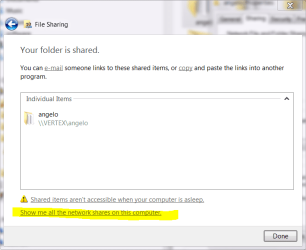
one way, is to right-click a folder >> properties >> sharing >> share >> share it with someone >> then a new window will come up with a link at the bottom 'show me all the network shares on this computer'.

showme.PNG

there's probably a quicker more elegant way, but i don't know it. :o


*edit* good points fseal - you posted while i was doing my screeny...
 

My Computer My Computer

Computer Manufacturer/Model Number
mickey megabyte 1234
OS
ultimate 64 sp1
CPU
i5 2500K [email protected]
Motherboard
MSI P67A-GD53
Memory
8 gigs GSkill Ripjaws 1600
Graphics Card(s)
amd hd6950
Sound Card
creative x-fi gamer
Monitor(s) Displays
samsung 24"
Screen Resolution
1920x1080
Hard Drives
ocz vertex 2e 60 gig, samsung f3 1tb, buffalo 2tb ext
PSU
antec 550
Case
antec three hundred
Cooling
i'm a cooling fan
Keyboard
saitek eclipse ii
Mouse
logitech g3
Internet Speed
about 4 Mbps
Other Info
i love win7
What a pity - shared folder really had a necessary notification icon, which now is missing in w7.
If I share a folder for some task, I may forgot it soon and the different icon was best notification, how to remember and have quick overview of shared resources.
 

My Computer My Computer

OS
Windows 7 Enterprise 64 bit
CPU
Intel I5-760
Motherboard
INTEL P55 S1156 DDR3 GLAN RAID BLKDP55WB
Memory
8 GB
Graphics Card(s)
CLUB 3D HD5450 1GB GDDR3 CGAX-54524LI
Hard Drives
WD150HFLS 150GB/10000rpm
WD10EALS Blue 1TB
another way of seeing which folders are shared is to access the machine from the network...

i agree that it's a crappy decision by microsoft, dumbing down (aka reducing cognitive load) our ui!
 

My Computer My Computer

Computer Manufacturer/Model Number
mickey megabyte 1234
OS
ultimate 64 sp1
CPU
i5 2500K [email protected]
Motherboard
MSI P67A-GD53
Memory
8 gigs GSkill Ripjaws 1600
Graphics Card(s)
amd hd6950
Sound Card
creative x-fi gamer
Monitor(s) Displays
samsung 24"
Screen Resolution
1920x1080
Hard Drives
ocz vertex 2e 60 gig, samsung f3 1tb, buffalo 2tb ext
PSU
antec 550
Case
antec three hundred
Cooling
i'm a cooling fan
Keyboard
saitek eclipse ii
Mouse
logitech g3
Internet Speed
about 4 Mbps
Other Info
i love win7
Well I don't share folders.
I share whole drives. In fact all my drives are shared and all folders in all drives are shared.
I live alone and have 3 to 5 PC on my LAN and if I'm at one and need to get to another I want full access to the other.
 

My Computer My Computer

Computer Manufacturer/Model Number
Built be Me
OS
Windows 7 Pro x64
CPU
i5 760
Motherboard
Asus P7P55D-E Pro
Memory
16GB
Graphics Card(s)
Nvidia GTS450
Sound Card
On board
Monitor(s) Displays
Dell 2007WFP Dell 1800FP
Screen Resolution
1680x1050 1280x1024
Hard Drives
Seagate 250GB & 750GB
WD 1TB
PSU
Antec 750
Case
In Win
Cooling
Cooler Master Hyper 212+
Keyboard
IBM
Mouse
MS
Well I don't share folders.
I share whole drives. In fact all my drives are shared and all folders in all drives are shared.
I live alone and have 3 to 5 PC on my LAN and if I'm at one and need to get to another I want full access to the other.

I see - then you need a notification not shared icon for folders lost it's sharing :mad:
 

My Computer My Computer

OS
Windows 7 Enterprise 64 bit
CPU
Intel I5-760
Motherboard
INTEL P55 S1156 DDR3 GLAN RAID BLKDP55WB
Memory
8 GB
Graphics Card(s)
CLUB 3D HD5450 1GB GDDR3 CGAX-54524LI
Hard Drives
WD150HFLS 150GB/10000rpm
WD10EALS Blue 1TB
I've used "cognitive load" twice now on my wife. Heh Heh.
It's now my new favorite expression!:rolleyes:
 

My Computer My Computer

Computer type
PC/Desktop
Computer Manufacturer/Model Number
Home Built - Jan 2013
OS
Windows 7 64 Bit Home Premium SP1
CPU
i7-3820
Motherboard
Asus P9X79-PRO - Bios 4608
Memory
GSkill F3-14900CL9Q - 16GB
Graphics Card(s)
EVGA GeForce GTX660 - Driver 352.86
Sound Card
On board Realtek ALC898
Monitor(s) Displays
Acer S271HL
Screen Resolution
1920 x 1080
Hard Drives
#1- Samsung 840 Pro Series
#2- Western Digital WD1002FAEX Sata3 Black
#3- Western Digital WD1002FAEX Sata3 Black
PSU
Corsair CMPSU-850TX-V2 - 850 watt (by Seasonic)
Case
Corsair Obsidian 550D
Cooling
Standard 3 120mm case fans, Cooler Master Hyper 212 EVO
Keyboard
MS KC-0405
Mouse
Intellimouse 5-button
Internet Speed
56 Mbits/Sec (on a good day)
Antivirus
Avast & Malwarebytes
Browser
Firefox
Other Info
Asus DVD - DRW-24B1ST 24X
simple solution

just customize the properties of the shared folder to change the icon (there's a standard one available with the share people image)
 

My Computer My Computer

Computer Manufacturer/Model Number
HP
OS
Windows 7 Pro x64
CPU
Pentium R G6950 @ 2.80 GHz
Motherboard
whatever
Memory
4.0 Gb
Graphics Card(s)
nothing fancy
Sound Card
don't use
Monitor(s) Displays
cheesey
Hard Drives
1 Tb
PSU
too many acronyms
Case
black
Cooling
fans
Back
Top