
Solved This Device Can Perform Faster

oreo27

New member
Guru
VIP
Local time
2:18 AM
Messages
521
Location
Philippines
Hi Everyone,

I've recently been getting errors about my USB devices. It shows "This device can perform faster..."

I'm pretty sure all the USB ports and both the devices I've tried are USB 2.0 compliant.

Prior to this, My Mom, who also uses my desktop was alerted of a possible infection by MSE, which is what I have for an Antivirus. She said, she chose no option and went on about her usual browsing.

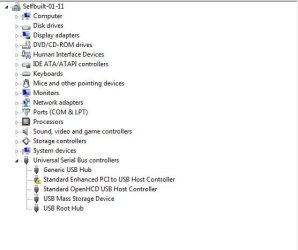
I've done some checking in device manager and I came up with these. :cry:
ss.JPG ss2.JPG

I've updated my definitions on both MSE and MBAM and I'm performing a full scan on both. I'll return here to let you guys know if there is a possible infection.

In the meantime, is there anything else that could be causing this? I don't remember installing anything new except IE9, which came with the Tuesday Windows Updates.

Also, I've tried two devices (thumb drive and mobile phone) on multiple ports (front and back).

I've also tried different cables for my mobile phone.
 

My Computer My Computer

Computer type
PC/Desktop
Computer Manufacturer/Model Number
Custom Build
OS
Windows 7 Ultimate x64 Service Pack 1
CPU
AMD Athlon II x4 Propus 2.9 GHz
Motherboard
ASRock N68C-GS FX
Memory
2 x 4GB Corsair XMS 3 DDR3 -1600 CL9
Graphics Card(s)
AMD Radeon HD 5850 1GB GDDR5
Sound Card
On-board 6-Channel HD Audio
Monitor(s) Displays
18' LG Flatron E1942TC-BN on DVI, 18' Chimei 95ND on HDMI
Screen Resolution
1366 x 768 x 2
Hard Drives
1 x 500 GB Seagate
1 x 1 TB Western Digital Caviar Green
1 x 1 TB Hitachi Touro Mobile USB 3
PSU
Seasonic S12II 520W
Case
Generic with Cable Management
Cooling
Deep Cool Gammaxx 200
Keyboard
Dragonwar Desert Eagle
Mouse
Logitech B85
Internet Speed
5Mb/s DL, 0.9Mb/s UL
Antivirus
ESET Nod32
Browser
Google Chrome 64 Bit
Other Info
LG G4 H818P - Rooted with Xposed Framework
Tried re-installing/updating the chipset drivers?

NVIDIA DRIVERS 15.49 WHQL

Been a while since my last Nvidia based motherboard, but pretty sure that with 10 USB ports available on the motherboard there should be more than what you have showing in Device Manager (hopefully someone with a Nvidia based board can confirm whether it should be showing more or not).
 

My Computer My Computer

Computer type
PC/Desktop
Computer Manufacturer/Model Number
Me
OS
Win 7 Ultimate x64
CPU
FX-8350 @ 4.6 GHz so far
Motherboard
Asus M5A97 EVO
Memory
ADATA XPG V1 Series Black 8GB DDR3 1600
Graphics Card(s)
Sapphire R9 270x Dual-X
Sound Card
Xonar DGX w/ Corsair Vengence 1300
Monitor(s) Displays
Acer S232HL Abid
Screen Resolution
1920x1080
Hard Drives
120 GB OCZ Vertex 3
500 GB Seagate 7200.12
PSU
Antec Earthwatts 650W Green
Case
Antec Three Hundred
Cooling
Cooler Master 212 EVO
Keyboard
Logitech G510
Mouse
Logitech G500s
Internet Speed
35000/3000
Have you tried uninstalling the faulty driver (the one with the yellow triangle) then rebooting and let Windows reinstall it?
 

My Computer My Computer

Computer type
PC/Desktop
Computer Manufacturer/Model Number
Custom Build
OS
Windows 7 Home Premium 64 bit SP1
CPU
Intel i7 4790k
Motherboard
MSI Z97-G55 SLI
Memory
16 GB Corsair 2400 MHz DDR3
Graphics Card(s)
Visiontek Radeon R9 285
Sound Card
None
Monitor(s) Displays
Gateway FHX2402L
Screen Resolution
1920 X 1080
Hard Drives
Samsung 840 EVO 500GB
PSU
Corsair 750 TX
Case
Fractal Design
Cooling
Stock fans
Keyboard
Logitech K800
Mouse
Logitech M510
Internet Speed
60.88 Mbps download 10.47 Mbps upload (Speedtest.net)
Antivirus
Norton
Browser
Opera
Other Info
First Computer used: A Commodore Pet of course
Love using Manjaro KDE Linux 64 bit and Windows 7/10 64 bit
Here's the Malwarebytes log.

Code:
Malwarebytes' Anti-Malware 1.50.1.1100
www.malwarebytes.org

Database version: 6303

Windows 6.1.7601 Service Pack 1
Internet Explorer 9.0.8112.16421

4/8/2011 6:16:01 AM
mbam-log-2011-04-08 (06-16-01).txt

Scan type: Full scan (C:\|D:\|E:\|)
Objects scanned: 395785
Time elapsed: 3 hour(s), 30 minute(s), 41 second(s)

Memory Processes Infected: 0
Memory Modules Infected: 0
Registry Keys Infected: 0
Registry Values Infected: 0
Registry Data Items Infected: 0
Folders Infected: 0
Files Infected: 0

Memory Processes Infected:
(No malicious items detected)

Memory Modules Infected:
(No malicious items detected)

Registry Keys Infected:
(No malicious items detected)

Registry Values Infected:
(No malicious items detected)

Registry Data Items Infected:
(No malicious items detected)

Folders Infected:
(No malicious items detected)

Files Infected:
(No malicious items detected)


Tried re-installing/updating the chipset drivers?

NVIDIA DRIVERS 15.49 WHQL

Been a while since my last Nvidia based motherboard, but pretty sure that with 10 USB ports available on the motherboard there should be more than what you have showing in Device Manager (hopefully someone with a Nvidia based board can confirm whether it should be showing more or not).

I have this installed. But I will try reinstalling it. I'm just waiting for MSE to finish. I guess running MSE and MBAM at the same time caused them to take a lot of time. I'll do this when I get home later from work. I'll let you know how it goes mate. Thanks for the tip :)

Have you tried uninstalling the faulty driver (the one with the yellow triangle) then rebooting and let Windows reinstall it?


I'll try installing Nforce drivers again and se if that resolves the issue. If not, I'll go to this step and see if Windows can fix itself by uninstalling and letting it reinstall. Thanks for the tip :)
 

My Computer My Computer

Computer type
PC/Desktop
Computer Manufacturer/Model Number
Custom Build
OS
Windows 7 Ultimate x64 Service Pack 1
CPU
AMD Athlon II x4 Propus 2.9 GHz
Motherboard
ASRock N68C-GS FX
Memory
2 x 4GB Corsair XMS 3 DDR3 -1600 CL9
Graphics Card(s)
AMD Radeon HD 5850 1GB GDDR5
Sound Card
On-board 6-Channel HD Audio
Monitor(s) Displays
18' LG Flatron E1942TC-BN on DVI, 18' Chimei 95ND on HDMI
Screen Resolution
1366 x 768 x 2
Hard Drives
1 x 500 GB Seagate
1 x 1 TB Western Digital Caviar Green
1 x 1 TB Hitachi Touro Mobile USB 3
PSU
Seasonic S12II 520W
Case
Generic with Cable Management
Cooling
Deep Cool Gammaxx 200
Keyboard
Dragonwar Desert Eagle
Mouse
Logitech B85
Internet Speed
5Mb/s DL, 0.9Mb/s UL
Antivirus
ESET Nod32
Browser
Google Chrome 64 Bit
Other Info
LG G4 H818P - Rooted with Xposed Framework
Here's the Malwarebytes log.


Tried re-installing/updating the chipset drivers?

NVIDIA DRIVERS 15.49 WHQL

Been a while since my last Nvidia based motherboard, but pretty sure that with 10 USB ports available on the motherboard there should be more than what you have showing in Device Manager (hopefully someone with a Nvidia based board can confirm whether it should be showing more or not).

I have this installed. But I will try reinstalling it. I'm just waiting for MSE to finish. I guess running MSE and MBAM at the same time caused them to take a lot of time. I'll do this when I get home later from work. I'll let you know how it goes mate. Thanks for the tip :)

Have you tried uninstalling the faulty driver (the one with the yellow triangle) then rebooting and let Windows reinstall it?


I'll try installing Nforce drivers again and se if that resolves the issue. If not, I'll go to this step and see if Windows can fix itself by uninstalling and letting it reinstall. Thanks for the tip :)

I've tried installing the Nforce drivers again to no avail.

I stopped the MSE scan because my 1TB hard disk didn't play so nicely on usb 1.1 speeds :sick:

Who would have thought that the simplest solution could fix it however.

I tried Commodore Pet's suggestion and it worked out nicely. In fact, I simply uninstalled the driver, scanned for hardware changes and voila! Everything was back in working order. Kudos to you and Rep Added! I'm one happy bloak right now :party:
 

My Computer My Computer

Computer type
PC/Desktop
Computer Manufacturer/Model Number
Custom Build
OS
Windows 7 Ultimate x64 Service Pack 1
CPU
AMD Athlon II x4 Propus 2.9 GHz
Motherboard
ASRock N68C-GS FX
Memory
2 x 4GB Corsair XMS 3 DDR3 -1600 CL9
Graphics Card(s)
AMD Radeon HD 5850 1GB GDDR5
Sound Card
On-board 6-Channel HD Audio
Monitor(s) Displays
18' LG Flatron E1942TC-BN on DVI, 18' Chimei 95ND on HDMI
Screen Resolution
1366 x 768 x 2
Hard Drives
1 x 500 GB Seagate
1 x 1 TB Western Digital Caviar Green
1 x 1 TB Hitachi Touro Mobile USB 3
PSU
Seasonic S12II 520W
Case
Generic with Cable Management
Cooling
Deep Cool Gammaxx 200
Keyboard
Dragonwar Desert Eagle
Mouse
Logitech B85
Internet Speed
5Mb/s DL, 0.9Mb/s UL
Antivirus
ESET Nod32
Browser
Google Chrome 64 Bit
Other Info
LG G4 H818P - Rooted with Xposed Framework
Have you tried uninstalling the faulty driver (the one with the yellow triangle) then rebooting and let Windows reinstall it?

Uninstalling the drivers worked for me for a similar issue although I didn't need to reboot. I just right-clicked on Universal Serial Bus controllers and clicked "scan for hardware changes". A couple of seconds later the problem was solved.
 

My Computer My Computer

OS
Windows 7 Home 64 bit
Have you tried uninstalling the faulty driver (the one with the yellow triangle) then rebooting and let Windows reinstall it?

Uninstalling the drivers worked for me for a similar issue although I didn't need to reboot. I just right-clicked on Universal Serial Bus controllers and clicked "scan for hardware changes". A couple of seconds later the problem was solved.

Yup. Same thing with me. I didn't need a restart. It's good to know that we have a working solution. But, it begs the question, where did the problem originate from anyway?
 

My Computer My Computer

Computer type
PC/Desktop
Computer Manufacturer/Model Number
Custom Build
OS
Windows 7 Ultimate x64 Service Pack 1
CPU
AMD Athlon II x4 Propus 2.9 GHz
Motherboard
ASRock N68C-GS FX
Memory
2 x 4GB Corsair XMS 3 DDR3 -1600 CL9
Graphics Card(s)
AMD Radeon HD 5850 1GB GDDR5
Sound Card
On-board 6-Channel HD Audio
Monitor(s) Displays
18' LG Flatron E1942TC-BN on DVI, 18' Chimei 95ND on HDMI
Screen Resolution
1366 x 768 x 2
Hard Drives
1 x 500 GB Seagate
1 x 1 TB Western Digital Caviar Green
1 x 1 TB Hitachi Touro Mobile USB 3
PSU
Seasonic S12II 520W
Case
Generic with Cable Management
Cooling
Deep Cool Gammaxx 200
Keyboard
Dragonwar Desert Eagle
Mouse
Logitech B85
Internet Speed
5Mb/s DL, 0.9Mb/s UL
Antivirus
ESET Nod32
Browser
Google Chrome 64 Bit
Other Info
LG G4 H818P - Rooted with Xposed Framework
Is there a BIOS setting that enables the highest USB speeds? I have some recollection of that...
 

My Computer My Computer

Computer Manufacturer/Model Number
Dell Studio XPS 435T/9000
OS
Windows 7 Professional 64-bit
CPU
Intel Core i7
Memory
12GB
Sound Card
Realtek HD Audio
Hard Drives
c: 186GB capacity, 156 used (system drive)
f: 465GB capacity, 109 used (backup service drive)
Internet Speed
12 MB/sec
Is there a BIOS setting that enables the highest USB speeds? I have some recollection of that...

Yes, there is. You can specify at what USB mode your ports will be running at.

E.g. USB 1.1, 2.0, 3.0.
 

My Computer My Computer

Computer type
PC/Desktop
Computer Manufacturer/Model Number
Custom Build
OS
Windows 7 Ultimate x64 Service Pack 1
CPU
AMD Athlon II x4 Propus 2.9 GHz
Motherboard
ASRock N68C-GS FX
Memory
2 x 4GB Corsair XMS 3 DDR3 -1600 CL9
Graphics Card(s)
AMD Radeon HD 5850 1GB GDDR5
Sound Card
On-board 6-Channel HD Audio
Monitor(s) Displays
18' LG Flatron E1942TC-BN on DVI, 18' Chimei 95ND on HDMI
Screen Resolution
1366 x 768 x 2
Hard Drives
1 x 500 GB Seagate
1 x 1 TB Western Digital Caviar Green
1 x 1 TB Hitachi Touro Mobile USB 3
PSU
Seasonic S12II 520W
Case
Generic with Cable Management
Cooling
Deep Cool Gammaxx 200
Keyboard
Dragonwar Desert Eagle
Mouse
Logitech B85
Internet Speed
5Mb/s DL, 0.9Mb/s UL
Antivirus
ESET Nod32
Browser
Google Chrome 64 Bit
Other Info
LG G4 H818P - Rooted with Xposed Framework
[SOLVED] this device can perform faster error???????????

Just solved this error and you can do also just follow the steps:-
STEP 1-Load your motherboard disk in CD-ROM.(driver cd)
STEP 2-Now connect your pendrive.
STEP 3-this will automaically ask you for installation.otherwise you can update from device manager.
it has worked for me.
if it worked for you just comment.
 

My Computer My Computer

Computer type
PC/Desktop
Computer Manufacturer/Model Number
intex
OS
windows 7 home premium 32bit
CPU
intex
Motherboard
biostar
Memory
2gb
Hard Drives
250gb
Antivirus
NPAV
Browser
CHROME
Back
Top