Windows 7 Lags when I play ANY game.

Quinnfap

New member
Local time
7:23 AM
Messages
18
Okay. I haven't played too many games on this computer yet, but the ones I have played play smooth for a few minutes then start lagging really hard. Before anyone says its a graphic card performance issue, both of the games that I've played were run on lower end computers than this on low settings and were perfectly smooth. I have the games on low but the lag still happens.
Here are my specs.

Windows 7 Home Premium 64bit SP1
AMD Athlon II x2 215 dual core
4gb RAM
640 GB HDD
NVIDIA GeForce 9200

The games I tried are the only few I own, Portal and World of Warcraft, both on lowest settings. The game would start lagging, while simultaneously lagging my whole computer until the game was closed. I've updated all my graphic drivers, got any other updates that I could, and ran a virus scan with clean results. Can anyone help?
 

My Computer My Computer

At a glance

Windows 7 Home Premium x64
OS
Windows 7 Home Premium x64
Have you checked system resources when playing one of the games, look at your performance and see what processors are using memory/cpu at the time? WoW certainly isn't the most demanding game out there, and you shouldn't have any problems playing it ( ignoring internet connection). Because you are experiencing problems in a local game as well can you make sure Direct X is up to date?

Because i am more experienced with WoW (2000 hours + :o) well start with that. What kind of FPS do you get in the game from when its smooth to when it starts to lag also (just curious) when you start to lag what is your latency?

Mainly i would just check services and programs running in the background to make sure they are not hogging your system.
 

My Computer My Computer

At a glance

Windows 7 Professional x64 Backtrack 4 R2Intel Core i5-6504 GB Geil PC3 12800HIS HD 4870 X2
OS
Windows 7 Professional x64 Backtrack 4 R2
CPU
Intel Core i5-650
Motherboard
Gigabyte P55-UD3
Memory
4 GB Geil PC3 12800
Graphics Card(s)
HIS HD 4870 X2
Sound Card
Sound Blaster X-Fi Titanium Fatal1ty Champion
Monitor(s) Displays
BenQ 22" G2220HD
Hard Drives
Seagate Barracuda 7200.12 500GB
PSU
Antec High Current Gamer 620W Power Supply
Case
Thermaltake Armor+ MX
Keyboard
Microsoft SideWinder X6
Mouse
Razer Abyssus
Did you try downloading and installing the latest Directx?:)
 

My Computer My Computer

At a glance

Seven ultimate 32bitCore2Duo E57003GB DDR2HD5670
Computer Manufacturer/Model Number
Asus
OS
Seven ultimate 32bit
CPU
Core2Duo E5700
Motherboard
Asus p5qlem
Memory
3GB DDR2
Graphics Card(s)
HD5670
Sound Card
Onboard
Monitor(s) Displays
Philips 18.5 widescreen
Screen Resolution
Depends
Hard Drives
500GB Samsung 7200RPM
PSU
500w Sparta
Case
Aerocool
Cooling
Standard + 2x 40's inserted
Keyboard
Multimedia
Mouse
Genius
Internet Speed
10meg.
I'd add check those background programs..... Run - msconfig.exe and use the Startup Tab to disable these.
 

My Computer My Computer

At a glance

Seven ultimate 32bitCore2Duo E57003GB DDR2HD5670
Computer Manufacturer/Model Number
Asus
OS
Seven ultimate 32bit
CPU
Core2Duo E5700
Motherboard
Asus p5qlem
Memory
3GB DDR2
Graphics Card(s)
HD5670
Sound Card
Onboard
Monitor(s) Displays
Philips 18.5 widescreen
Screen Resolution
Depends
Hard Drives
500GB Samsung 7200RPM
PSU
500w Sparta
Case
Aerocool
Cooling
Standard + 2x 40's inserted
Keyboard
Multimedia
Mouse
Genius
Internet Speed
10meg.

My Computer My Computer

At a glance

Seven ultimate 32bitCore2Duo E57003GB DDR2HD5670
Computer Manufacturer/Model Number
Asus
OS
Seven ultimate 32bit
CPU
Core2Duo E5700
Motherboard
Asus p5qlem
Memory
3GB DDR2
Graphics Card(s)
HD5670
Sound Card
Onboard
Monitor(s) Displays
Philips 18.5 widescreen
Screen Resolution
Depends
Hard Drives
500GB Samsung 7200RPM
PSU
500w Sparta
Case
Aerocool
Cooling
Standard + 2x 40's inserted
Keyboard
Multimedia
Mouse
Genius
Internet Speed
10meg.
DirectX is completely updated already, and it didn't solve the problem :(.
When I get home from work I'll check those background processes.
 

My Computer My Computer

At a glance

Windows 7 Home Premium x64
OS
Windows 7 Home Premium x64
I don't mean to nag or double post, but could anyone else offer any advice? I'd like to get this fixed ASAP :(
 

My Computer My Computer

At a glance

Windows 7 Home Premium x64
OS
Windows 7 Home Premium x64
Have you tried running the EXE in compatibility mode.?:p
 

My Computer My Computer

At a glance

Seven ultimate 32bitCore2Duo E57003GB DDR2HD5670
Computer Manufacturer/Model Number
Asus
OS
Seven ultimate 32bit
CPU
Core2Duo E5700
Motherboard
Asus p5qlem
Memory
3GB DDR2
Graphics Card(s)
HD5670
Sound Card
Onboard
Monitor(s) Displays
Philips 18.5 widescreen
Screen Resolution
Depends
Hard Drives
500GB Samsung 7200RPM
PSU
500w Sparta
Case
Aerocool
Cooling
Standard + 2x 40's inserted
Keyboard
Multimedia
Mouse
Genius
Internet Speed
10meg.
I didn't think it would matter because they are both newer games and still supported by the companies that make them and were therefore updated to work on Windows 7 (Atleast that was my though)
 

My Computer My Computer

At a glance

Windows 7 Home Premium x64
OS
Windows 7 Home Premium x64
DirectX is completely updated already, and it didn't solve the problem :(.
When I get home from work I'll check those background processes.

What do you mean by this? Did you update DX or do you mean Windows 7 already has DX11?

Also you might look through here for some tips - Tips on Troubleshooting Game Issues
 

My Computer My Computer

At a glance

Windows 10 ProIntel Core i7-4770K (3.5Ghz)32 gig Corsair Dominator Platinum (4x8Gig)Sapphire Tri-X R9 Fury
Computer type
PC/Desktop
Computer Manufacturer/Model Number
Custom built by me.
OS
Windows 10 Pro
CPU
Intel Core i7-4770K (3.5Ghz)
Motherboard
Gigabyte G1 Sniper 5 (F10 Bios)
Memory
32 gig Corsair Dominator Platinum (4x8Gig)
Graphics Card(s)
Sapphire Tri-X R9 Fury
Sound Card
Soundblaster ZXR
Monitor(s) Displays
NEC PA242W 24" LCD Monitor
Screen Resolution
1920 x 1200
Hard Drives
Primary - Samsung 850 Pro (512gig), Samsung 840 Pro (256gig), 2TB WD Caviar Black.
PSU
EVGA Supernova 1000 G2
Case
Cooler Master HAF X
Cooling
Corsair H100i with Corsair Air Series SP120 Quiet Fans
Keyboard
Logitech Wireless Wave
Mouse
Logitech Performance MX
Internet Speed
High Speed Cable
Antivirus
Norton Security
Browser
IE11
Other Info
Memory Timings - 1866MHz @ 9-9-9-27-1T @ 1.5 volts
DirectX is completely updated already, and it didn't solve the problem :(.
When I get home from work I'll check those background processes.

What do you mean by this? Did you update DX or do you mean Windows 7 already has DX11?

Also you might look through here for some tips - Tips on Troubleshooting Game Issues


I mean I went on DXs website or whatever and downloaded the updater (I'm at work right now so I can't remember the link, exactly)
 

My Computer My Computer

At a glance

Windows 7 Home Premium x64
OS
Windows 7 Home Premium x64
I mean I went on DXs website or whatever and downloaded the updater (I'm at work right now so I can't remember the link, exactly)

You answered my question - which is what I was hoping you meant. Good.

With that I suggest you look through my tips on troubleshooting game issues.

Good luck.
 

My Computer My Computer

At a glance

Windows 10 ProIntel Core i7-4770K (3.5Ghz)32 gig Corsair Dominator Platinum (4x8Gig)Sapphire Tri-X R9 Fury
Computer type
PC/Desktop
Computer Manufacturer/Model Number
Custom built by me.
OS
Windows 10 Pro
CPU
Intel Core i7-4770K (3.5Ghz)
Motherboard
Gigabyte G1 Sniper 5 (F10 Bios)
Memory
32 gig Corsair Dominator Platinum (4x8Gig)
Graphics Card(s)
Sapphire Tri-X R9 Fury
Sound Card
Soundblaster ZXR
Monitor(s) Displays
NEC PA242W 24" LCD Monitor
Screen Resolution
1920 x 1200
Hard Drives
Primary - Samsung 850 Pro (512gig), Samsung 840 Pro (256gig), 2TB WD Caviar Black.
PSU
EVGA Supernova 1000 G2
Case
Cooler Master HAF X
Cooling
Corsair H100i with Corsair Air Series SP120 Quiet Fans
Keyboard
Logitech Wireless Wave
Mouse
Logitech Performance MX
Internet Speed
High Speed Cable
Antivirus
Norton Security
Browser
IE11
Other Info
Memory Timings - 1866MHz @ 9-9-9-27-1T @ 1.5 volts
I've tried that guide before; it didn't seem to work :(. I think I'll try updating my sound drivers as I'm not sure if I recall doing it. I'll post the results soon.
 

My Computer My Computer

At a glance

Windows 7 Home Premium x64
OS
Windows 7 Home Premium x64
No results. I'm gonna cry :(
 

My Computer My Computer

At a glance

Windows 7 Home Premium x64
OS
Windows 7 Home Premium x64
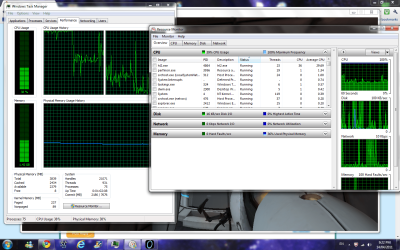
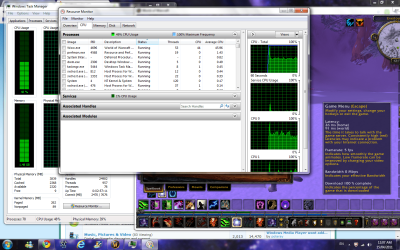
Just to confirm you have checked whats running in the background? Run WoW, or Portal ( at this point it doesn't matter). When it starts to lag, post a screen shot of the performance tab, which can be found in task manager.
 

My Computer My Computer

At a glance

Windows 7 Professional x64 Backtrack 4 R2Intel Core i5-6504 GB Geil PC3 12800HIS HD 4870 X2
OS
Windows 7 Professional x64 Backtrack 4 R2
CPU
Intel Core i5-650
Motherboard
Gigabyte P55-UD3
Memory
4 GB Geil PC3 12800
Graphics Card(s)
HIS HD 4870 X2
Sound Card
Sound Blaster X-Fi Titanium Fatal1ty Champion
Monitor(s) Displays
BenQ 22" G2220HD
Hard Drives
Seagate Barracuda 7200.12 500GB
PSU
Antec High Current Gamer 620W Power Supply
Case
Thermaltake Armor+ MX
Keyboard
Microsoft SideWinder X6
Mouse
Razer Abyssus
Just to confirm you have checked whats running in the background? Run WoW, or Portal ( at this point it doesn't matter). When it starts to lag, post a screen shot of the performance tab, which can be found in task manager.

See attached for Portal
 

Attachments

  • esfsgdsfg.png
    esfsgdsfg.png
    142.8 KB · Views: 51

My Computer My Computer

At a glance

Windows 7 Home Premium x64
OS
Windows 7 Home Premium x64
Here is the WoW window too, for additional reference, with its latency showing and the process window showing as well.

Dont mind my stupid ActionBars, i just got a trial on my account and I havent fixed my bars for cataclysm at all ^^;
 

Attachments

  • wowprocess.png
    wowprocess.png
    227.8 KB · Views: 19

My Computer My Computer

At a glance

Windows 7 Home Premium x64
OS
Windows 7 Home Premium x64
Right, thanks for posting those. Your system appears to be running at an acceptable level, so it leads me to think your GPU is to blame. Could you uninstall your Video card driver and re install the latest driver for your card, which i believe is this one.
 

My Computer My Computer

At a glance

Windows 7 Professional x64 Backtrack 4 R2Intel Core i5-6504 GB Geil PC3 12800HIS HD 4870 X2
OS
Windows 7 Professional x64 Backtrack 4 R2
CPU
Intel Core i5-650
Motherboard
Gigabyte P55-UD3
Memory
4 GB Geil PC3 12800
Graphics Card(s)
HIS HD 4870 X2
Sound Card
Sound Blaster X-Fi Titanium Fatal1ty Champion
Monitor(s) Displays
BenQ 22" G2220HD
Hard Drives
Seagate Barracuda 7200.12 500GB
PSU
Antec High Current Gamer 620W Power Supply
Case
Thermaltake Armor+ MX
Keyboard
Microsoft SideWinder X6
Mouse
Razer Abyssus
This was a triumph! Thanks so much, I havent noticed any lag yet!
 

My Computer My Computer

At a glance

Windows 7 Home Premium x64
OS
Windows 7 Home Premium x64
I am glad it is sorted, and you are welcome. :)
 

My Computer My Computer

At a glance

Windows 7 Professional x64 Backtrack 4 R2Intel Core i5-6504 GB Geil PC3 12800HIS HD 4870 X2
OS
Windows 7 Professional x64 Backtrack 4 R2
CPU
Intel Core i5-650
Motherboard
Gigabyte P55-UD3
Memory
4 GB Geil PC3 12800
Graphics Card(s)
HIS HD 4870 X2
Sound Card
Sound Blaster X-Fi Titanium Fatal1ty Champion
Monitor(s) Displays
BenQ 22" G2220HD
Hard Drives
Seagate Barracuda 7200.12 500GB
PSU
Antec High Current Gamer 620W Power Supply
Case
Thermaltake Armor+ MX
Keyboard
Microsoft SideWinder X6
Mouse
Razer Abyssus
Back
Top