
Patch Tuesday heads-up:17 bulletins, 64 vulnerabilities

Hope this is the right thread to post this.
I have one update that just will not install, i have turned off firewall & antivirus. It still will not install !

Security Update for Microsoft .NET Framework 4 on Windows XP, Windows Server 2003, Windows Vista, Windows 7, Windows Server 2008, Windows Server 2008 R2 for x64-based Systems (KB2446708)

Download size: 23.3 MB

You may need to restart your computer for this update to take effect.

kb2446708
Microsoft has released security bulletin MS11-028

Update type: Important

A security issue has been identified that could allow an attacker to compromise your Windows-based system that is running the Microsoft .NET Framework and gain complete control over it. You can help protect your computer by installing this update from Microsoft. After you install this item, you may have to restart your computer.

More information:
MS11-028: Description of the security update for the .NET Framework 4 on Windows XP, Windows Server 2003, Windows Vista, Windows Server 2008, Windows 7, and Windows Server 2008 R2: April 12, 2011

Help and Support:
Microsoft Support


Nothing seems to help !

Thanks
Chuck
Windows7 on a HP computer specs excellent !

- What error code are you getting?
- Can you post a screen shot of the error?
- Do you have SP1 installed?

Thanks

Edit: It seems to be a common issue - update KB2446708 keeps repeating after installation - Microsoft Answers
 

My Computer My Computer

At a glance

Windows 10 ProIntel Core i7-4770K (3.5Ghz)32 gig Corsair Dominator Platinum (4x8Gig)Sapphire Tri-X R9 Fury
Computer type
PC/Desktop
Computer Manufacturer/Model Number
Custom built by me.
OS
Windows 10 Pro
CPU
Intel Core i7-4770K (3.5Ghz)
Motherboard
Gigabyte G1 Sniper 5 (F10 Bios)
Memory
32 gig Corsair Dominator Platinum (4x8Gig)
Graphics Card(s)
Sapphire Tri-X R9 Fury
Sound Card
Soundblaster ZXR
Monitor(s) Displays
NEC PA242W 24" LCD Monitor
Screen Resolution
1920 x 1200
Hard Drives
Primary - Samsung 850 Pro (512gig), Samsung 840 Pro (256gig), 2TB WD Caviar Black.
PSU
EVGA Supernova 1000 G2
Case
Cooler Master HAF X
Cooling
Corsair H100i with Corsair Air Series SP120 Quiet Fans
Keyboard
Logitech Wireless Wave
Mouse
Logitech Performance MX
Internet Speed
High Speed Cable
Antivirus
Norton Security
Browser
IE11
Other Info
Memory Timings - 1866MHz @ 9-9-9-27-1T @ 1.5 volts
I had a weird one after applying the Patch Tuesday updates. My clock lost 18 hours! It manually updated the time OK though. Just wondered if anyone else had this?
 

My Computer My Computer

At a glance

windows 7 ultimate
OS
windows 7 ultimate

My Computer My Computer

At a glance

Windows 10 ProIntel Core i7-4770K (3.5Ghz)32 gig Corsair Dominator Platinum (4x8Gig)Sapphire Tri-X R9 Fury
Computer type
PC/Desktop
Computer Manufacturer/Model Number
Custom built by me.
OS
Windows 10 Pro
CPU
Intel Core i7-4770K (3.5Ghz)
Motherboard
Gigabyte G1 Sniper 5 (F10 Bios)
Memory
32 gig Corsair Dominator Platinum (4x8Gig)
Graphics Card(s)
Sapphire Tri-X R9 Fury
Sound Card
Soundblaster ZXR
Monitor(s) Displays
NEC PA242W 24" LCD Monitor
Screen Resolution
1920 x 1200
Hard Drives
Primary - Samsung 850 Pro (512gig), Samsung 840 Pro (256gig), 2TB WD Caviar Black.
PSU
EVGA Supernova 1000 G2
Case
Cooler Master HAF X
Cooling
Corsair H100i with Corsair Air Series SP120 Quiet Fans
Keyboard
Logitech Wireless Wave
Mouse
Logitech Performance MX
Internet Speed
High Speed Cable
Antivirus
Norton Security
Browser
IE11
Other Info
Memory Timings - 1866MHz @ 9-9-9-27-1T @ 1.5 volts
Windows update not installing

Sorry double post
 

My Computer My Computer

At a glance

Windows 7 Home Premium 64 bit.
OS
Windows 7 Home Premium 64 bit.
sygnus21, still no update, it always tells me my machine is not compatable or installation has failed.
Yes SP1 is installed
 

My Computer My Computer

At a glance

Windows 7 Home Premium 64 bit.
OS
Windows 7 Home Premium 64 bit.
sygnus21, still no update, it always tells me my machine is not compatable or installation has failed.
Yes SP1 is installed

Edit.... what isn't compatible - the Prerequisite, or kb2446708

Edit 2.... I have the update installed on my machine. Installed on 4/12/2011.

Don't know why you can't get it installed :confused:
 

My Computer My Computer

At a glance

Windows 10 ProIntel Core i7-4770K (3.5Ghz)32 gig Corsair Dominator Platinum (4x8Gig)Sapphire Tri-X R9 Fury
Computer type
PC/Desktop
Computer Manufacturer/Model Number
Custom built by me.
OS
Windows 10 Pro
CPU
Intel Core i7-4770K (3.5Ghz)
Motherboard
Gigabyte G1 Sniper 5 (F10 Bios)
Memory
32 gig Corsair Dominator Platinum (4x8Gig)
Graphics Card(s)
Sapphire Tri-X R9 Fury
Sound Card
Soundblaster ZXR
Monitor(s) Displays
NEC PA242W 24" LCD Monitor
Screen Resolution
1920 x 1200
Hard Drives
Primary - Samsung 850 Pro (512gig), Samsung 840 Pro (256gig), 2TB WD Caviar Black.
PSU
EVGA Supernova 1000 G2
Case
Cooler Master HAF X
Cooling
Corsair H100i with Corsair Air Series SP120 Quiet Fans
Keyboard
Logitech Wireless Wave
Mouse
Logitech Performance MX
Internet Speed
High Speed Cable
Antivirus
Norton Security
Browser
IE11
Other Info
Memory Timings - 1866MHz @ 9-9-9-27-1T @ 1.5 volts
kb2446708 is not installed. Is there a way to remove the update from the Windows update notification >>
 

My Computer My Computer

At a glance

Windows 7 Home Premium 64 bit.
OS
Windows 7 Home Premium 64 bit.
kb2446708 is not installed. Is there a way to remove the update from the Windows update notification >>

Right click it and click hide.

Sorry we can't get it installed :confused:
 

My Computer My Computer

At a glance

Windows 10 ProIntel Core i7-4770K (3.5Ghz)32 gig Corsair Dominator Platinum (4x8Gig)Sapphire Tri-X R9 Fury
Computer type
PC/Desktop
Computer Manufacturer/Model Number
Custom built by me.
OS
Windows 10 Pro
CPU
Intel Core i7-4770K (3.5Ghz)
Motherboard
Gigabyte G1 Sniper 5 (F10 Bios)
Memory
32 gig Corsair Dominator Platinum (4x8Gig)
Graphics Card(s)
Sapphire Tri-X R9 Fury
Sound Card
Soundblaster ZXR
Monitor(s) Displays
NEC PA242W 24" LCD Monitor
Screen Resolution
1920 x 1200
Hard Drives
Primary - Samsung 850 Pro (512gig), Samsung 840 Pro (256gig), 2TB WD Caviar Black.
PSU
EVGA Supernova 1000 G2
Case
Cooler Master HAF X
Cooling
Corsair H100i with Corsair Air Series SP120 Quiet Fans
Keyboard
Logitech Wireless Wave
Mouse
Logitech Performance MX
Internet Speed
High Speed Cable
Antivirus
Norton Security
Browser
IE11
Other Info
Memory Timings - 1866MHz @ 9-9-9-27-1T @ 1.5 volts
sygnus21, still no update, it always tells me my machine is not compatable or installation has failed.
Yes SP1 is installed

Have you check before in "Program & Features" that the .NET Framework 4.0 Client Profile is installed?

This is an update for that client profile...so that's maybe why, in case you have not it install, it fails....;)
 

My Computer My Computer

At a glance

Windows 7 Professional SP1 - x64 [Non-UEFI Boot]Ivy Bridge Core i5 3570K (Delidded)G.Skill "Ares" DDR3 PC3-12800 - 1600MHz (16Gb)Asus Dual-RX480-O4G
Computer type
PC/Desktop
Computer Manufacturer/Model Number
Custom Build
OS
Windows 7 Professional SP1 - x64 [Non-UEFI Boot]
CPU
Ivy Bridge Core i5 3570K (Delidded)
Motherboard
Asus P8Z77-V LE PLUS
Memory
G.Skill "Ares" DDR3 PC3-12800 - 1600MHz (16Gb)
Graphics Card(s)
Asus Dual-RX480-O4G
Sound Card
Creative Sound Blaster Z w/5.1 sound system
Monitor(s) Displays
Asus IPS 23"
Screen Resolution
16/9
Hard Drives
Internal:
500Go Sata 6Gb/s (x2)
500Go Sata 3Gb/s (x2)
SSD 60Go Sata 6Gb/s
PSU
In Win C 900W Series 80+ Platinum
Case
Thermaltake Chaser A71
Cooling
Custom Water Cooling Loop
Keyboard
Cooler Master QuickFire XTi
Mouse
Razer Imperator 2012 (4G)
Antivirus
MSE
Browser
IE 11.0.xxx Rtm
Other Info
"Raid0" with Intel Smart Response Technology (HDD/SSD)
sygnus21, still no update, it always tells me my machine is not compatable or installation has failed.
Yes SP1 is installed

Have you check before in "Program & Features" that the .NET Framework 4.0 Client Profile is installed?

This is an update for that client profile...so that's maybe why, in case you have not it install, it fails....;)

Good point.... however if it's not installed it should have been/be offered as an update as well.......

net 4 update.JPG
 

My Computer My Computer

At a glance

Windows 10 ProIntel Core i7-4770K (3.5Ghz)32 gig Corsair Dominator Platinum (4x8Gig)Sapphire Tri-X R9 Fury
Computer type
PC/Desktop
Computer Manufacturer/Model Number
Custom built by me.
OS
Windows 10 Pro
CPU
Intel Core i7-4770K (3.5Ghz)
Motherboard
Gigabyte G1 Sniper 5 (F10 Bios)
Memory
32 gig Corsair Dominator Platinum (4x8Gig)
Graphics Card(s)
Sapphire Tri-X R9 Fury
Sound Card
Soundblaster ZXR
Monitor(s) Displays
NEC PA242W 24" LCD Monitor
Screen Resolution
1920 x 1200
Hard Drives
Primary - Samsung 850 Pro (512gig), Samsung 840 Pro (256gig), 2TB WD Caviar Black.
PSU
EVGA Supernova 1000 G2
Case
Cooler Master HAF X
Cooling
Corsair H100i with Corsair Air Series SP120 Quiet Fans
Keyboard
Logitech Wireless Wave
Mouse
Logitech Performance MX
Internet Speed
High Speed Cable
Antivirus
Norton Security
Browser
IE11
Other Info
Memory Timings - 1866MHz @ 9-9-9-27-1T @ 1.5 volts
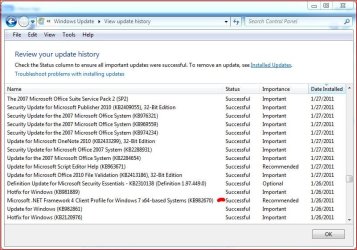
Hi guys, ok here is what i found !

When i tried to installed Microsoft .NET Framework 4 Client Profile (Standalone Installer) :
This is the message i got >>> Same or higher .NET Framework 4 client or higher has already been installled on this computer.

========================

This was in my Review Your Update History::
Microsoft .NET Framework 4 Client Profile for Windows 7 x64-based Systems (KB982670)

Installation date: ‎1/‎16/‎2011 8:22 AM

Installation status: Successful

Update type: Recommended

The Microsoft .NET Framework 4 Client Profile provides a subset of features from the .NET Framework 4. The Client Profile is designed to run client applications and to enable the fastest possible deployment for Windows Presentation Foundation (WPF) and Windows Forms technology.

More information:
The .NET Framework 4 Client Profile is available on Windows Update

Help and Support:
Microsoft Support
 

My Computer My Computer

At a glance

Windows 7 Home Premium 64 bit.
OS
Windows 7 Home Premium 64 bit.
Does this mean you still cannot install the update from W.U?
 

My Computer My Computer

At a glance

Windows 7 Professional SP1 - x64 [Non-UEFI Boot]Ivy Bridge Core i5 3570K (Delidded)G.Skill "Ares" DDR3 PC3-12800 - 1600MHz (16Gb)Asus Dual-RX480-O4G
Computer type
PC/Desktop
Computer Manufacturer/Model Number
Custom Build
OS
Windows 7 Professional SP1 - x64 [Non-UEFI Boot]
CPU
Ivy Bridge Core i5 3570K (Delidded)
Motherboard
Asus P8Z77-V LE PLUS
Memory
G.Skill "Ares" DDR3 PC3-12800 - 1600MHz (16Gb)
Graphics Card(s)
Asus Dual-RX480-O4G
Sound Card
Creative Sound Blaster Z w/5.1 sound system
Monitor(s) Displays
Asus IPS 23"
Screen Resolution
16/9
Hard Drives
Internal:
500Go Sata 6Gb/s (x2)
500Go Sata 3Gb/s (x2)
SSD 60Go Sata 6Gb/s
PSU
In Win C 900W Series 80+ Platinum
Case
Thermaltake Chaser A71
Cooling
Custom Water Cooling Loop
Keyboard
Cooler Master QuickFire XTi
Mouse
Razer Imperator 2012 (4G)
Antivirus
MSE
Browser
IE 11.0.xxx Rtm
Other Info
"Raid0" with Intel Smart Response Technology (HDD/SSD)
Back
Top