
Scandisk - Black screen/Safe Mode hanging

ConMac

New member
Member
Local time
9:09 AM
Messages
58
:sarc:I have have been having issues with my dual boot (Win7 & XP SP3) SB ASUS P8P67 Deluxe build (system freezing, black screen on cold boot/failed OC, Win 7 restore points being deleted by XP) and I made the following adjustments: updated the BIOS to v.1305 and made the required registry adjustments in XP for the restore point issue (which worked).

Now when I try to do a scandisk in Win7, it hangs after the reboot and I get a black screen. Also, when I try to go into Safe Mode with a command prompt, I see that Windows is loading files, then it hangs with the files listed on the screen. At this point Win7 no longer boots, and when I used the Repair Disk (and the OS DVD) to get into the Repair Console, Win7 was not listed so I could not locate any of my restore points. I restored a recent system image, and it seems to working now, with the restore points there again.

One other note, I upgraded the BIOS before I read where I had to make that my currrent BIOS was in its "failsafe default settings." Is this going to be a problem going forward? I would greatly appreciate for any help!
 

My Computer My Computer

At a glance

Windows 7 64-bit and Windows XP SP3Core i5-2500K Sandy Bridge 3.3GHz (Overclocke...Corsair Vengeance 8GB (2 x 4GB) DDR3 SDRAM DD...ATI Radeon 5870 1GB 256-bit DDR5 PCI Express ...
Computer Manufacturer/Model Number
Home Built
OS
Windows 7 64-bit and Windows XP SP3
CPU
Core i5-2500K Sandy Bridge 3.3GHz (Overclocked to 4.0GHz)
Motherboard
Asus P8P67 Deluxe Intel P67 ATX, Socket H2 (LGA 1155)
Memory
Corsair Vengeance 8GB (2 x 4GB) DDR3 SDRAM DDR3 1866
Graphics Card(s)
ATI Radeon 5870 1GB 256-bit DDR5 PCI Express 2.1 x 16
Sound Card
Creative Labs PCI Express Soundblaster X-Fi Titanium
Monitor(s) Displays
Gateway 21"
Screen Resolution
1680 x 1050
Hard Drives
(2) 1TB Western Digital Caviar Black 7200 RPM SATA III
PSU
Corsair 650W HX Series 80 Plus Bronze Certified Modular PSU
Case
Black NZXT M59 Classic Series ATX Mid Tower
Cooling
Noctua NH-U12P SE2 w/ 4 Cooler Master 120mm Blue LED Fans
Keyboard
Logitech G15 Gaming Keyboard
Mouse
Kensington 4-Button USB Expert Pro Trackball
Other Info
ASUS DRW-24 Black SATA 24X DVD Burner
If your reimage boots and runs fine, then there should be no problem with BIOS settings at default. You would worry about the SATA controller mode if either OS wouldn't start up as a result.

When Win7 cannot be detected by WinRE try opening a Command Line to run bootrec.exe /fixmbr and bootrec.exe /fixboot to see if it will show the OS after a reboot. While these commands are automated along with all others in Startup Repair, it sometimes takes running them to jumpstart Win7 to appear in list.
 
:) Thanks, I'll do that. Any thoughts as to what is causing the scandisk or going into Safe Mode to hang?
 

My Computer My Computer

At a glance

Windows 7 64-bit and Windows XP SP3Core i5-2500K Sandy Bridge 3.3GHz (Overclocke...Corsair Vengeance 8GB (2 x 4GB) DDR3 SDRAM DD...ATI Radeon 5870 1GB 256-bit DDR5 PCI Express ...
Computer Manufacturer/Model Number
Home Built
OS
Windows 7 64-bit and Windows XP SP3
CPU
Core i5-2500K Sandy Bridge 3.3GHz (Overclocked to 4.0GHz)
Motherboard
Asus P8P67 Deluxe Intel P67 ATX, Socket H2 (LGA 1155)
Memory
Corsair Vengeance 8GB (2 x 4GB) DDR3 SDRAM DDR3 1866
Graphics Card(s)
ATI Radeon 5870 1GB 256-bit DDR5 PCI Express 2.1 x 16
Sound Card
Creative Labs PCI Express Soundblaster X-Fi Titanium
Monitor(s) Displays
Gateway 21"
Screen Resolution
1680 x 1050
Hard Drives
(2) 1TB Western Digital Caviar Black 7200 RPM SATA III
PSU
Corsair 650W HX Series 80 Plus Bronze Certified Modular PSU
Case
Black NZXT M59 Classic Series ATX Mid Tower
Cooling
Noctua NH-U12P SE2 w/ 4 Cooler Master 120mm Blue LED Fans
Keyboard
Logitech G15 Gaming Keyboard
Mouse
Kensington 4-Button USB Expert Pro Trackball
Other Info
ASUS DRW-24 Black SATA 24X DVD Burner
It may be boot sector corruption or a driver hanging.

Is this still happening?

Please describe exactly what happens.
 
:sarc: I'm not in front of that PC right now. But I will do as you suggested and report back. Thanks again!
 

My Computer My Computer

At a glance

Windows 7 64-bit and Windows XP SP3Core i5-2500K Sandy Bridge 3.3GHz (Overclocke...Corsair Vengeance 8GB (2 x 4GB) DDR3 SDRAM DD...ATI Radeon 5870 1GB 256-bit DDR5 PCI Express ...
Computer Manufacturer/Model Number
Home Built
OS
Windows 7 64-bit and Windows XP SP3
CPU
Core i5-2500K Sandy Bridge 3.3GHz (Overclocked to 4.0GHz)
Motherboard
Asus P8P67 Deluxe Intel P67 ATX, Socket H2 (LGA 1155)
Memory
Corsair Vengeance 8GB (2 x 4GB) DDR3 SDRAM DDR3 1866
Graphics Card(s)
ATI Radeon 5870 1GB 256-bit DDR5 PCI Express 2.1 x 16
Sound Card
Creative Labs PCI Express Soundblaster X-Fi Titanium
Monitor(s) Displays
Gateway 21"
Screen Resolution
1680 x 1050
Hard Drives
(2) 1TB Western Digital Caviar Black 7200 RPM SATA III
PSU
Corsair 650W HX Series 80 Plus Bronze Certified Modular PSU
Case
Black NZXT M59 Classic Series ATX Mid Tower
Cooling
Noctua NH-U12P SE2 w/ 4 Cooler Master 120mm Blue LED Fans
Keyboard
Logitech G15 Gaming Keyboard
Mouse
Kensington 4-Button USB Expert Pro Trackball
Other Info
ASUS DRW-24 Black SATA 24X DVD Burner
:( I tried the bootrec.exe /fixmbr, and it said it was successful. But when I did the bootrec.exe /fixboot, I got a "Element not found" message. And Windows is still not being detected by WinRE. I also did a sfc /scannow from an elevated command prompt, but still nothing. What do are my options? Thanks for the input.

 

My Computer My Computer

At a glance

Windows 7 64-bit and Windows XP SP3Core i5-2500K Sandy Bridge 3.3GHz (Overclocke...Corsair Vengeance 8GB (2 x 4GB) DDR3 SDRAM DD...ATI Radeon 5870 1GB 256-bit DDR5 PCI Express ...
Computer Manufacturer/Model Number
Home Built
OS
Windows 7 64-bit and Windows XP SP3
CPU
Core i5-2500K Sandy Bridge 3.3GHz (Overclocked to 4.0GHz)
Motherboard
Asus P8P67 Deluxe Intel P67 ATX, Socket H2 (LGA 1155)
Memory
Corsair Vengeance 8GB (2 x 4GB) DDR3 SDRAM DDR3 1866
Graphics Card(s)
ATI Radeon 5870 1GB 256-bit DDR5 PCI Express 2.1 x 16
Sound Card
Creative Labs PCI Express Soundblaster X-Fi Titanium
Monitor(s) Displays
Gateway 21"
Screen Resolution
1680 x 1050
Hard Drives
(2) 1TB Western Digital Caviar Black 7200 RPM SATA III
PSU
Corsair 650W HX Series 80 Plus Bronze Certified Modular PSU
Case
Black NZXT M59 Classic Series ATX Mid Tower
Cooling
Noctua NH-U12P SE2 w/ 4 Cooler Master 120mm Blue LED Fans
Keyboard
Logitech G15 Gaming Keyboard
Mouse
Kensington 4-Button USB Expert Pro Trackball
Other Info
ASUS DRW-24 Black SATA 24X DVD Burner
How were you able to run SFC from elevated command prompt if Win7 won't boot?

In your first post you said you restored Win7 from Image and it's working now.
I restored a recent system image, and it seems to working now, with the restore points there again.

Please clear up this confusion. Which OS's can you boot into? What is the exact problem?

Are you referring to Disk Check hanging when you reboot to run it? If so, run it from the DVD or Repair CD Command Line: Disk Check - Windows 7 Forums

Likewise, run SFC from the DVD/CD Command Line: SFC -SCANNOW Run in Command Prompt at Boot - Windows 7 Forums
 
I was able to restore a Win7 image in WinRE. My current issue is this: When I boot to the system DVD or the Repair DVD, the WinRE does not see my Win7 and my restore points, however it will permit me to restore a Win7 system image. What brought this on was: I was unable to do a scandisk from Win7, it would hang at a black screen; and it would not let me go into Safe Mode with a command prompt, it got hung up loading the files. In addition, when I try to load SP1, I get an error message: "Trust_E_Nosignature(0x800b0100)."

I have run the SFC from the elevated command prompt, and it said it was successful. My system seems to be stable now, but I don't want to try the scandisk from Win7, or Safe Mode, until I can see the OS in WinRE, and I am able use a restore point, in lieu of restoring an entire system image. I can boot into XP no problem. I recently changed the XP registry to prevent it from deleting my restore points in Win7.

How can I solve these problems? My MOBO is an ASUS P8P67 Deluxe, i5-2500K, G. Skill Ripjaws (2x4GB) 1600 MHz RAM, with an ATI HD 5870 graphics board. Any help would be greatly appreciated!
 

My Computer My Computer

At a glance

Windows 7 64-bit and Windows XP SP3Core i5-2500K Sandy Bridge 3.3GHz (Overclocke...Corsair Vengeance 8GB (2 x 4GB) DDR3 SDRAM DD...ATI Radeon 5870 1GB 256-bit DDR5 PCI Express ...
Computer Manufacturer/Model Number
Home Built
OS
Windows 7 64-bit and Windows XP SP3
CPU
Core i5-2500K Sandy Bridge 3.3GHz (Overclocked to 4.0GHz)
Motherboard
Asus P8P67 Deluxe Intel P67 ATX, Socket H2 (LGA 1155)
Memory
Corsair Vengeance 8GB (2 x 4GB) DDR3 SDRAM DDR3 1866
Graphics Card(s)
ATI Radeon 5870 1GB 256-bit DDR5 PCI Express 2.1 x 16
Sound Card
Creative Labs PCI Express Soundblaster X-Fi Titanium
Monitor(s) Displays
Gateway 21"
Screen Resolution
1680 x 1050
Hard Drives
(2) 1TB Western Digital Caviar Black 7200 RPM SATA III
PSU
Corsair 650W HX Series 80 Plus Bronze Certified Modular PSU
Case
Black NZXT M59 Classic Series ATX Mid Tower
Cooling
Noctua NH-U12P SE2 w/ 4 Cooler Master 120mm Blue LED Fans
Keyboard
Logitech G15 Gaming Keyboard
Mouse
Kensington 4-Button USB Expert Pro Trackball
Other Info
ASUS DRW-24 Black SATA 24X DVD Burner
Please post back a screenshot of your Maximized full Win7 Disk Management drive map with listings, using Snipping Tool in Start Menu, attach file with paper clip in reply box.

Maybe there is something about your config which is obvious which can help correct the problem.

Was Win7 installed first? Is it a factory preinstall or in-place Upgrade from Vista? How was the Dual Boot set up exactly?
 
I'm new to Win7, how do I post that screenshot? The more details the better. XP was installed first on Disk 1, OEM Win7 was installed on Disk 0, and is the default OS. When my system is in POST, the screen flashes by quickly and I just see Disk 0, and not Disk 1. Should that be? I will post that screenshot as soon as I can. Thanks for the help.
 

My Computer My Computer

At a glance

Windows 7 64-bit and Windows XP SP3Core i5-2500K Sandy Bridge 3.3GHz (Overclocke...Corsair Vengeance 8GB (2 x 4GB) DDR3 SDRAM DD...ATI Radeon 5870 1GB 256-bit DDR5 PCI Express ...
Computer Manufacturer/Model Number
Home Built
OS
Windows 7 64-bit and Windows XP SP3
CPU
Core i5-2500K Sandy Bridge 3.3GHz (Overclocked to 4.0GHz)
Motherboard
Asus P8P67 Deluxe Intel P67 ATX, Socket H2 (LGA 1155)
Memory
Corsair Vengeance 8GB (2 x 4GB) DDR3 SDRAM DDR3 1866
Graphics Card(s)
ATI Radeon 5870 1GB 256-bit DDR5 PCI Express 2.1 x 16
Sound Card
Creative Labs PCI Express Soundblaster X-Fi Titanium
Monitor(s) Displays
Gateway 21"
Screen Resolution
1680 x 1050
Hard Drives
(2) 1TB Western Digital Caviar Black 7200 RPM SATA III
PSU
Corsair 650W HX Series 80 Plus Bronze Certified Modular PSU
Case
Black NZXT M59 Classic Series ATX Mid Tower
Cooling
Noctua NH-U12P SE2 w/ 4 Cooler Master 120mm Blue LED Fans
Keyboard
Logitech G15 Gaming Keyboard
Mouse
Kensington 4-Button USB Expert Pro Trackball
Other Info
ASUS DRW-24 Black SATA 24X DVD Burner
Boot into Win7, type Disk Management in Start Search box, maximize window.

Open Snipping Tool in Start Menu, choose Rectangular Snip, surround Disk mgmt drive map with listings, save Snip.

Attach file using Paper Clip in Reply Box.

Do you get a Win7 Dual Boot Menu to choose OS, or are you booting via BIOS Boot menu or Boot order?
 
Thanks for the instructions, I'll do that tonight when I get home from work. I choose from the Win7 dual boot menu the OS to boot into. If after 30 seconds an OS in not selected, Win7 boots by default.
 

My Computer My Computer

At a glance

Windows 7 64-bit and Windows XP SP3Core i5-2500K Sandy Bridge 3.3GHz (Overclocke...Corsair Vengeance 8GB (2 x 4GB) DDR3 SDRAM DD...ATI Radeon 5870 1GB 256-bit DDR5 PCI Express ...
Computer Manufacturer/Model Number
Home Built
OS
Windows 7 64-bit and Windows XP SP3
CPU
Core i5-2500K Sandy Bridge 3.3GHz (Overclocked to 4.0GHz)
Motherboard
Asus P8P67 Deluxe Intel P67 ATX, Socket H2 (LGA 1155)
Memory
Corsair Vengeance 8GB (2 x 4GB) DDR3 SDRAM DDR3 1866
Graphics Card(s)
ATI Radeon 5870 1GB 256-bit DDR5 PCI Express 2.1 x 16
Sound Card
Creative Labs PCI Express Soundblaster X-Fi Titanium
Monitor(s) Displays
Gateway 21"
Screen Resolution
1680 x 1050
Hard Drives
(2) 1TB Western Digital Caviar Black 7200 RPM SATA III
PSU
Corsair 650W HX Series 80 Plus Bronze Certified Modular PSU
Case
Black NZXT M59 Classic Series ATX Mid Tower
Cooling
Noctua NH-U12P SE2 w/ 4 Cooler Master 120mm Blue LED Fans
Keyboard
Logitech G15 Gaming Keyboard
Mouse
Kensington 4-Button USB Expert Pro Trackball
Other Info
ASUS DRW-24 Black SATA 24X DVD Burner
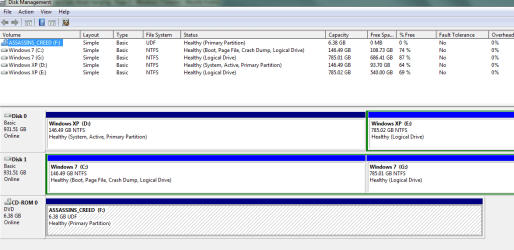
Disk Mgmt as Requested

:)My system hasn't frozen up recently, but I still can't see Win7 in the WinRE. What could be causing this? Something else I just recalled, I also can't install SP1, I got that TRUST_E_NOSIGNATURE (0x800b0100) error message. I tried the System Update Readiness Tool for Win7 forx64, but that didn't help. Last week while I was installing other Win7 updates, my internet connection went out and not all of the updates installed correctly (SP1 wasn't among them though), and I did a Restart instead of a Shutdown. Now I can't download and install any other updates as well (error code 800B0100). Could any of these be the cause of my problems? Thanks again!
 

Attachments

  • Disk Mgmt.PNG
    Disk Mgmt.PNG
    14.9 KB · Views: 16

My Computer My Computer

At a glance

Windows 7 64-bit and Windows XP SP3Core i5-2500K Sandy Bridge 3.3GHz (Overclocke...Corsair Vengeance 8GB (2 x 4GB) DDR3 SDRAM DD...ATI Radeon 5870 1GB 256-bit DDR5 PCI Express ...
Computer Manufacturer/Model Number
Home Built
OS
Windows 7 64-bit and Windows XP SP3
CPU
Core i5-2500K Sandy Bridge 3.3GHz (Overclocked to 4.0GHz)
Motherboard
Asus P8P67 Deluxe Intel P67 ATX, Socket H2 (LGA 1155)
Memory
Corsair Vengeance 8GB (2 x 4GB) DDR3 SDRAM DDR3 1866
Graphics Card(s)
ATI Radeon 5870 1GB 256-bit DDR5 PCI Express 2.1 x 16
Sound Card
Creative Labs PCI Express Soundblaster X-Fi Titanium
Monitor(s) Displays
Gateway 21"
Screen Resolution
1680 x 1050
Hard Drives
(2) 1TB Western Digital Caviar Black 7200 RPM SATA III
PSU
Corsair 650W HX Series 80 Plus Bronze Certified Modular PSU
Case
Black NZXT M59 Classic Series ATX Mid Tower
Cooling
Noctua NH-U12P SE2 w/ 4 Cooler Master 120mm Blue LED Fans
Keyboard
Logitech G15 Gaming Keyboard
Mouse
Kensington 4-Button USB Expert Pro Trackball
Other Info
ASUS DRW-24 Black SATA 24X DVD Burner
Drive map? I see only listings.

You have two XP's and two Win7's booting off of the XP D partition which could be problematic.

But we are unable to see the disk layout and number of HD's due to lack of the requested Drive map, so please post it back along with any discrepancies about it showing 2 XP's and 2 Win7's.
 
Drive Map

:) Sorry about that. My first time using the Snipping Tool. Win7 an XP are on the smaller 2 partitions.
 

Attachments

  • Disk Drive Map.PNG
    Disk Drive Map.PNG
    21.4 KB · Views: 16

My Computer My Computer

At a glance

Windows 7 64-bit and Windows XP SP3Core i5-2500K Sandy Bridge 3.3GHz (Overclocke...Corsair Vengeance 8GB (2 x 4GB) DDR3 SDRAM DD...ATI Radeon 5870 1GB 256-bit DDR5 PCI Express ...
Computer Manufacturer/Model Number
Home Built
OS
Windows 7 64-bit and Windows XP SP3
CPU
Core i5-2500K Sandy Bridge 3.3GHz (Overclocked to 4.0GHz)
Motherboard
Asus P8P67 Deluxe Intel P67 ATX, Socket H2 (LGA 1155)
Memory
Corsair Vengeance 8GB (2 x 4GB) DDR3 SDRAM DDR3 1866
Graphics Card(s)
ATI Radeon 5870 1GB 256-bit DDR5 PCI Express 2.1 x 16
Sound Card
Creative Labs PCI Express Soundblaster X-Fi Titanium
Monitor(s) Displays
Gateway 21"
Screen Resolution
1680 x 1050
Hard Drives
(2) 1TB Western Digital Caviar Black 7200 RPM SATA III
PSU
Corsair 650W HX Series 80 Plus Bronze Certified Modular PSU
Case
Black NZXT M59 Classic Series ATX Mid Tower
Cooling
Noctua NH-U12P SE2 w/ 4 Cooler Master 120mm Blue LED Fans
Keyboard
Logitech G15 Gaming Keyboard
Mouse
Kensington 4-Button USB Expert Pro Trackball
Other Info
ASUS DRW-24 Black SATA 24X DVD Burner
You are booted into the Win7 which shows in the screenshot as C. XP is showing as D, holding the System boot files for both OS's.

If you'll install EasyBCD 2.02 and post back a screenshot of it's front listings, we can see what partitions are actually on the Boot Menu, likely C and D. It's doubtful the smaller partitions are even added to the boot menu unless you did it pro-actively and see them now when you boot up.
EasyBCD 2.0.2 - NeoSmart Technologies

The cleanest method to boot when you have separate HD's is via the BIOS. This method keeps the HD's independent to come and go as you please.

You would need to mark Win7 Active in XP Disk Mgmt, then power down to unplug XP and set Win7 first HD to boot in BIOS, boot the Win7 DVD to run Startup Repair up to 3 separate times until Win7 boots on its own.

Then when you plug back in XP HD, boot it using Asus F8 one-time BIOS Boot menu key.
 
:geek: It's interesting, because before I started having these issues, I had to use the WinRE to bring back some restore points when my system was hanging up with some OC'ing issues, and I could see Win7 in the WinRE. I used two or three restore points only a few weeks ago, now I can't get them from WinRE, nor can I can see Win7.

So you're saying after I mark Win7 active in XP Disk Mgmt, power down and physically unplug the XP HD, power it up again, and set the Win7 HD to boot first after the DVD drive, then Startup Repair with Win7 install DVD 3 times until it boots on its own. Then plug the XP HD back in and boot into it with F8. Do I arrow down in the Boot Manager until XP is highlighted then hit F8?

Using F8 (Advanced Options), which option is the "one-time BIOS Boot menu key"? Is it "Start Windows Normally"?

When you say that the cleanest way to boot with 2 HD's is via the BIOS. Do you mean using the Boot Manager?

Do you still want to see the EasyBCD screenshot of the front listings before I do all these steps? Thanks, I really do appreciate the help!
 
Last edited:

My Computer My Computer

At a glance

Windows 7 64-bit and Windows XP SP3Core i5-2500K Sandy Bridge 3.3GHz (Overclocke...Corsair Vengeance 8GB (2 x 4GB) DDR3 SDRAM DD...ATI Radeon 5870 1GB 256-bit DDR5 PCI Express ...
Computer Manufacturer/Model Number
Home Built
OS
Windows 7 64-bit and Windows XP SP3
CPU
Core i5-2500K Sandy Bridge 3.3GHz (Overclocked to 4.0GHz)
Motherboard
Asus P8P67 Deluxe Intel P67 ATX, Socket H2 (LGA 1155)
Memory
Corsair Vengeance 8GB (2 x 4GB) DDR3 SDRAM DDR3 1866
Graphics Card(s)
ATI Radeon 5870 1GB 256-bit DDR5 PCI Express 2.1 x 16
Sound Card
Creative Labs PCI Express Soundblaster X-Fi Titanium
Monitor(s) Displays
Gateway 21"
Screen Resolution
1680 x 1050
Hard Drives
(2) 1TB Western Digital Caviar Black 7200 RPM SATA III
PSU
Corsair 650W HX Series 80 Plus Bronze Certified Modular PSU
Case
Black NZXT M59 Classic Series ATX Mid Tower
Cooling
Noctua NH-U12P SE2 w/ 4 Cooler Master 120mm Blue LED Fans
Keyboard
Logitech G15 Gaming Keyboard
Mouse
Kensington 4-Button USB Expert Pro Trackball
Other Info
ASUS DRW-24 Black SATA 24X DVD Burner
Yes, use the one-time BIOS Boot Menu which is F8 on most Asus', ESC or DEL on others.

Once you set it up to boot via the BIOS, if you still get a Win7 Dual Boot menu, remove it by deleting the other OS using EasyBCD 2.02 on Edit OS tab, or in msconfig>boot.
 
:sarc: So I select "Start Windows Normally" after hitting F8 to boot into XP the first time. If I remove the Win7 boot manager, how will I select which OS to boot into? Would it be possible to post a screenshot of what I will be looking at once I make these changes? Thanks again!
 

My Computer My Computer

At a glance

Windows 7 64-bit and Windows XP SP3Core i5-2500K Sandy Bridge 3.3GHz (Overclocke...Corsair Vengeance 8GB (2 x 4GB) DDR3 SDRAM DD...ATI Radeon 5870 1GB 256-bit DDR5 PCI Express ...
Computer Manufacturer/Model Number
Home Built
OS
Windows 7 64-bit and Windows XP SP3
CPU
Core i5-2500K Sandy Bridge 3.3GHz (Overclocked to 4.0GHz)
Motherboard
Asus P8P67 Deluxe Intel P67 ATX, Socket H2 (LGA 1155)
Memory
Corsair Vengeance 8GB (2 x 4GB) DDR3 SDRAM DDR3 1866
Graphics Card(s)
ATI Radeon 5870 1GB 256-bit DDR5 PCI Express 2.1 x 16
Sound Card
Creative Labs PCI Express Soundblaster X-Fi Titanium
Monitor(s) Displays
Gateway 21"
Screen Resolution
1680 x 1050
Hard Drives
(2) 1TB Western Digital Caviar Black 7200 RPM SATA III
PSU
Corsair 650W HX Series 80 Plus Bronze Certified Modular PSU
Case
Black NZXT M59 Classic Series ATX Mid Tower
Cooling
Noctua NH-U12P SE2 w/ 4 Cooler Master 120mm Blue LED Fans
Keyboard
Logitech G15 Gaming Keyboard
Mouse
Kensington 4-Button USB Expert Pro Trackball
Other Info
ASUS DRW-24 Black SATA 24X DVD Burner
You should have a menu of bootable hardware devices to choose from on F8, ESC or DEL keys at bootup.

First let's see which of the four installed OS's showing in your screenshot (you can see there are four, correct?) are booting. Install EasyBCD 2.02 and post back a screenshot of the front listings page.
EasyBCD 2.0.2 - NeoSmart Technologies
 
Back
Top