Show Us Your WEI (2)

Status
Not open for further replies.
- how come?
- does that 2hr. wait allow Win7's background services, TRIM, etc; time to complete the task..?

Yes, that is it exactly, this is recommended by manufacturers and many SSD sites.

Hey Dave - did what you said, left it sitting at logon for 2 hours..

View attachment 149769

- now that is amazing..!!:what:


- it's been bothering me for some time
- thanks ever so, for the tip - rep on the way..

- I'm also getting withdrawal symptoms, by the way..
- 2 hours, phew..!!:D

Glad it helped.

LOL, it can be difficult at the wrong time...

Have you been running benchmarks or lots of non-compressible files?

The OCZs will throttle down when hit with large loads too fast.

Do you let it sit at login for a couple of hours at least once a week?
This will supposedly let the drive clear all the garbage.
Wow Dave, I did not know this I have always been courious about how Trim works can't wait to give it a try. Anyways here my current score....Nothing overclocked.

Like us, it needs a little quality down time once in a while ;)

Nice scores.
As mentioned by Britton30, a little OC on the RAM and you should get a bump on the score.
 

My Computer My Computer

Computer type
PC/Desktop
Computer Manufacturer/Model Number
76~2.0
OS
Windows 7 Ult x64 - SP1/ Windows 8 Pro x64
CPU
Intel Core i5-3570K 4.6GHz
Motherboard
Gigabyte GA-Z77X UD3H, f18
Memory
8GB (2X4GB) DDR3 1600 Corsair Vengeance CL8 1.5v
Graphics Card(s)
Sapphire HD 7770 Vapor-X OC 1GB DDR5
Sound Card
Onboard VIA VT2021
Monitor(s) Displays
22" LCD Dell
Screen Resolution
1680x1050
Hard Drives
Samsung 840Pro 128GB SSD,
Seagate Barracuda 500GB SATA2 7200rpm 32MB cache, Seagate Barracuda 1TB SATA2 7200rpm 32MB cache,
PSU
Corsair HX650W
Case
Cooler Master Storm Scout
Cooling
Corsair H80 2x12cm Noctua NF P12 , 2x14cm case fans
Keyboard
Logitech Wave
Mouse
CM Sentinel
Internet Speed
Dismal
Antivirus
Avast
Browser
Opera Next
Other Info
Haswell laptop: HP Envy 17t-j, i7-4700MQ, GeForce 740M 2GB DDR3, 17.3" Full HD 1920x1080, 16GB RAM, Samsung 840 Pro 128GB, 1TB Hitachi 7200 HDD,
Desktop: eSATA ports,
External eSATA Seagate 500GB SATA2 7200rpm,
External WD USB 500GB
Hi Kellymac35, I suspect if you overclock your RAM, you'd help that score out.;)
Check with your Mushkin for info on that, too many variables for me to quote settings. with an i7 you maybe can get a 7.7.


If your at stock clocks, and want 1600 mem speed, set mem multaplier to 2:12, Uncore to 24X DimV to 1.65. should get you a 7.8, My mushkin will yeild a 7.9 at 1648, 6,7,6,24,88. If you want a little CPU boost, Try 160 clocks, with a 2:10 memory setting 20X uncore, DimV at 1.65, and everything else in auto, If you git a BSOD 101 add a little Vcore, and if you get a BSOD 124 add a little Vtt. Note Use real temp, or E-Leet ( EVGA ) to check core temps.
77.png
 
Last edited:

My Computer My Computer

Computer Manufacturer/Model Number
EVGA
OS
Windows 7
CPU
I-7 980X
Motherboard
EVGA X58
Memory
12 GB CORSEAIR XMS3
Graphics Card(s)
2 GTX295'S IN quad SLI
Sound Card
REALTECK ON BOARD
Monitor(s) Displays
LG HDTV, 35in 1080P
Screen Resolution
1920 X1080
Hard Drives
2 Seagate 7200 1TB SATAII IN RAID 0 for vista
3 Intel X25M-G80's Raid 0
PSU
CORSAIR HX1200W
Case
COOLER MASTER HAF-X
Cooling
H-70
Other Info
OC TO 4.0
Win 7 RC1 WEI 6.4
Nice OC :cool:

Good OC steps.

Like that SSD score.
 

My Computer My Computer

Computer type
PC/Desktop
Computer Manufacturer/Model Number
76~2.0
OS
Windows 7 Ult x64 - SP1/ Windows 8 Pro x64
CPU
Intel Core i5-3570K 4.6GHz
Motherboard
Gigabyte GA-Z77X UD3H, f18
Memory
8GB (2X4GB) DDR3 1600 Corsair Vengeance CL8 1.5v
Graphics Card(s)
Sapphire HD 7770 Vapor-X OC 1GB DDR5
Sound Card
Onboard VIA VT2021
Monitor(s) Displays
22" LCD Dell
Screen Resolution
1680x1050
Hard Drives
Samsung 840Pro 128GB SSD,
Seagate Barracuda 500GB SATA2 7200rpm 32MB cache, Seagate Barracuda 1TB SATA2 7200rpm 32MB cache,
PSU
Corsair HX650W
Case
Cooler Master Storm Scout
Cooling
Corsair H80 2x12cm Noctua NF P12 , 2x14cm case fans
Keyboard
Logitech Wave
Mouse
CM Sentinel
Internet Speed
Dismal
Antivirus
Avast
Browser
Opera Next
Other Info
Haswell laptop: HP Envy 17t-j, i7-4700MQ, GeForce 740M 2GB DDR3, 17.3" Full HD 1920x1080, 16GB RAM, Samsung 840 Pro 128GB, 1TB Hitachi 7200 HDD,
Desktop: eSATA ports,
External eSATA Seagate 500GB SATA2 7200rpm,
External WD USB 500GB
Great scores and good move to oc the ram.
 

My Computers My Computers

System One System Two

  • Computer type
    PC/Desktop
    Computer Manufacturer/Model Number
    ALWAYS UNDER CONSTRUCTION
    OS
    Windows 11 Pro
    CPU
    Ryzen 9 5900X
    Motherboard
    Asus X570 Crosshair Viii Hero
    Memory
    32GB G Skill DDR4-3600
    Graphics Card(s)
    EVGA RTX 3080 FTW 3 Ultra
    Sound Card
    On Board/Sennheiser PC37X Headset
    Monitor(s) Displays
    3 X Asus 27"
    Screen Resolution
    2560x1440
    Hard Drives
    2 X 1 TB NVME drives
    PSU
    EVGA 850
    Case
    Phanteks Eclipse P400A
    Cooling
    EVGA 280 AIO
    Keyboard
    Logitech G510s/ Logitech G13
    Mouse
    Logitech G502
    Internet Speed
    24/1
    Antivirus
    ESET/MBAM Pro/SAS Pro
    Browser
    Chrome/ Firefox/ Edge
  • Computer type
    Laptop
    System Manufacturer/Model Number
    Dell 16 Plus
    OS
    Windows 11 Pro
    CPU
    Intel Ultra 9 288V
    Memory
    32 GB LPDDR5X 8533
    Monitor(s) Displays
    16" Mini-LED HDR600 Touch 90 Hz
    Screen Resolution
    2560X1600
    Hard Drives
    1 TB NVME
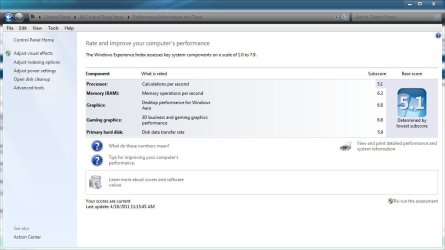
Anyone got a fix/workaround for the 4gb with WEI score of 5.9 limit?

I have an i3-550 processor on an H55N mb with a 5670 video card, but my system shows I have dedicated memory assigned anyway and makes my score go 5.9

I read somewhere you can disable integrated video in BIOS, but mine is Use PEG First, then next option is use Integrated If No PEG.

How can I get my lost memory back and my 7.0+ WEI score back?
-=Mark=-
ps. I have my 4gb ddr3-1600 running at ddr3-1750 currently. it's my only score under 7.0
 

My Computer My Computer

OS
Windows 7 Ultimate x64
CPU
i7 - 2600K
Motherboard
Intel P67 Extreme (DP67BG)
Memory
G.Skill Ripjaws 16B (4x4GB)
Graphics Card(s)
PowerColor 5870 LCS+
Sound Card
On-Board
Monitor(s) Displays
Asus 28" 1080p
Screen Resolution
1920 x 1080
Hard Drives
OCZ Vertex 3 240GB
PSU
Corsair TX850W
Case
Danger Den - Torture Rack
Cooling
Water
Keyboard
Microsoft Wireless System 1000
Mouse
same as above
Internet Speed
20MB w/turbo boost (2.6MB/s download avg)
Anyone got a fix/workaround for the 4gb with WEI score of 5.9 limit?

I have an i3-550 processor on an H55N mb with a 5670 video card, but my system shows I have dedicated memory assigned anyway and makes my score go 5.9

I read somewhere you can disable integrated video in BIOS, but mine is Use PEG First, then next option is use Integrated If No PEG.

How can I get my lost memory back and my 7.0+ WEI score back?
-=Mark=-
ps. I have my 4gb ddr3-1600 running at ddr3-1750 currently. it's my only score under 7.0

I have 4 gb of ram and mine is 6.3, nothing special on mine.
 

Attachments

  • Capture.JPG
    Capture.JPG
    68.4 KB · Views: 22

My Computer My Computer

Computer type
PC/Desktop
Computer Manufacturer/Model Number
Self Built
OS
Win 10 Pro x64
CPU
Intel I5-2500K @3.3GHz
Motherboard
Asrock P67 Extreme4
Memory
16GB G.Skill Ripjaws X (4x4GB)
Graphics Card(s)
EVGA GeForce 750 Ti SC 2GB
Sound Card
ASUS Xonar DG 5.1 Channels 24-bit 96KHz PCI Interface Sound
Monitor(s) Displays
auria eq2367
Screen Resolution
1920 x 1080
Hard Drives
250GB Samsung 850 EVO SSD
1TB WD Blue
1TB Hitachi
PSU
SeaSonic X 650W 80 Plus Gold
Case
Corsair Obsidian 750D
Cooling
Corsair H60, Three 140mm case fans
Keyboard
Logitech Wireless Keyboard K520
Mouse
Logitech Wireless Mouse M310
Internet Speed
Wave Broadband ~ 100 dn 5 up
Antivirus
Windows Defender, Malwarebytes Premium
Browser
Edge, IE11, Chrome
Other Info
Laptop specs: HP g7-1365dx /
CPU: AMD A6-3420M APU with Radeon(tm) HD Graphics /
RAM: Crucial 8Gb (2x4Gb) /
SSD: Crucial M4-CT128M4SSD2 ATA Device/ FW 000F /
GFX: AMD Radeon HD 6520G /
OS: Windows 10 Pro x64
Anyone got a fix/workaround for the 4gb with WEI score of 5.9 limit?

I have an i3-550 processor on an H55N mb with a 5670 video card, but my system shows I have dedicated memory assigned anyway and makes my score go 5.9

I read somewhere you can disable integrated video in BIOS, but mine is Use PEG First, then next option is use Integrated If No PEG.

How can I get my lost memory back and my 7.0+ WEI score back?
-=Mark=-
ps. I have my 4gb ddr3-1600 running at ddr3-1750 currently. it's my only score under 7.0
I didn't know there was a 5.9 WEI 4GB limit on Win 7 X64 for RAM Memory. In fact I have seen some people on here with 4GB and pass the 5.9, Perhaps it would be worth checking your motherboard specs to see if it is fully compatible with 1600Mhz RAM Modules, failing this check your bios and see what speeds your RAM is actually running at, some motherboard BIOS offer various modes for under/overclocking, perhaps your RAM is being limited by a simple setting.
p.s I just had a look and if this is your board (Gigabyte GA-H55N-USB3 SKT-1156 MINI-ITX Motherboard

) then this what it states as RAM Memory Specs
Support for DDR3 1666 (O.C.)/1333/1066/800 MHz memory modules
With it stating 1666Mhz O/C this may infer that your RAM is throttled down, I think than it can overclock slower memory up to 1666Mhz but not sure if your 1600MHz modules will get full effect. I think it means that you could overclock 1333Mhz RAM up to 1666MHz. I could be totally wrong but checking what speed your RAM is actually set to in your BIOS would confirm this.
 

My Computer My Computer

Computer Manufacturer/Model Number
Custom
OS
Windows 7 Ultimate X64
CPU
AMD Phenom II X6 1100T Black Edition @3.6GHz
Motherboard
ASUS AM3+ CROSSHAIR V FORMULA S/L 990FX
Memory
16GB (4 X 4GB) Corsair CMZ8GX3M2A1600C9 1600MHz CL9 DDR3 Ven
Graphics Card(s)
2 X ATI Sapphire HD 5770 1GB DDR5 @850/1200MHz in CrossfireX
Sound Card
Onboard 7.1 HD Audio/Bluetooth Stereo Audio/C-Media USB 5.1
Monitor(s) Displays
LGW2363D 23", HANNspreeXM-S HANNSverona22" & 42"Samsung HDTV
Screen Resolution
2880X900
Hard Drives
Seagate Barracuda LP 1.5TB
SAMSUNG HD154UI 1.5TB
SAMSUNG HD 204UI 2TB
PSU
Evo Labs 900W 80+ 80 plus Dual 12V ATX PC PSU
Case
Cooler Master Mystique 631
Cooling
Corsair H50 With 2X120mm Push/Pull,3X 120mm (FrX1,SideX2).
Keyboard
Accuratus Toughball 2.4GHz
Mouse
Microsoft Laser Mouse 5000/Emprex Cheetah 2000dpi Optical
Internet Speed
5500kbps
Other Info
LG BH10LS30.AUAU10B 10x Internal Blu-Ray BDRW
Corsair H50 Water Cooling With Push/Pull 120mm Fans vent out
Front 120mm Intake
Side Panel 2 X120mm Intake
90mm Extraction fan in top of case.
OCZ - Extreme Thermal Convection
Quiet PC AcoustiPack Lite 2 Ply Sound Deadening both side panels, front, rear, top and bottom.
Anyone got a fix/workaround for the 4gb with WEI score of 5.9 limit?

I have an i3-550 processor on an H55N mb with a 5670 video card, but my system shows I have dedicated memory assigned anyway and makes my score go 5.9

I read somewhere you can disable integrated video in BIOS, but mine is Use PEG First, then next option is use Integrated If No PEG.

How can I get my lost memory back and my 7.0+ WEI score back?
-=Mark=-
ps. I have my 4gb ddr3-1600 running at ddr3-1750 currently. it's my only score under 7.0[/QUOTE

See if this link helps any.
 

My Computers My Computers

System One System Two

  • Computer type
    PC/Desktop
    Computer Manufacturer/Model Number
    ALWAYS UNDER CONSTRUCTION
    OS
    Windows 11 Pro
    CPU
    Ryzen 9 5900X
    Motherboard
    Asus X570 Crosshair Viii Hero
    Memory
    32GB G Skill DDR4-3600
    Graphics Card(s)
    EVGA RTX 3080 FTW 3 Ultra
    Sound Card
    On Board/Sennheiser PC37X Headset
    Monitor(s) Displays
    3 X Asus 27"
    Screen Resolution
    2560x1440
    Hard Drives
    2 X 1 TB NVME drives
    PSU
    EVGA 850
    Case
    Phanteks Eclipse P400A
    Cooling
    EVGA 280 AIO
    Keyboard
    Logitech G510s/ Logitech G13
    Mouse
    Logitech G502
    Internet Speed
    24/1
    Antivirus
    ESET/MBAM Pro/SAS Pro
    Browser
    Chrome/ Firefox/ Edge
  • Computer type
    Laptop
    System Manufacturer/Model Number
    Dell 16 Plus
    OS
    Windows 11 Pro
    CPU
    Intel Ultra 9 288V
    Memory
    32 GB LPDDR5X 8533
    Monitor(s) Displays
    16" Mini-LED HDR600 Touch 90 Hz
    Screen Resolution
    2560X1600
    Hard Drives
    1 TB NVME
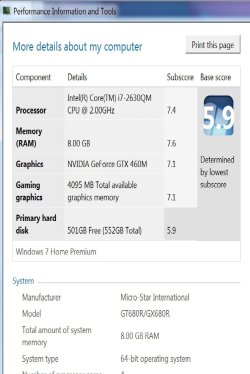
Low primary hard disk score, help?

Can anyone help me figure this out? I just got my new MSI Gt680R laptop but the hard disk speed is slow why is this?? And how can I speed it up??
 

Attachments

  • scorewin.jpg
    scorewin.jpg
    64.6 KB · Views: 11

My Computer My Computer

OS
windows 7 ultimate x64
Can anyone help me figure this out? I just got my new MSI Gt680R laptop but the hard disk speed is slow why is this?? And how can I speed it up??
That's not slow for a traditional hard disk....it's normal. To get much faster you'd need to replace it with a solid state drive (SSD).:geek:
 

My Computer My Computer

Computer type
PC/Desktop
Computer Manufacturer/Model Number
Gigabyte Technology Co., Ltd.
OS
Win 7 Ultimate 64-bit SP1 (desktop)
CPU
Intel Core 2 Duo E8400
Motherboard
Gigabyte GA-EP35-DS3R
Memory
2x 2GB OCZ DDR II SDRAM PC2-6400
Graphics Card(s)
NVIDIA GeForce 9400GT
Monitor(s) Displays
HP 2009m(primary), Acer P191W
Screen Resolution
1600x900, 1440x900
Hard Drives
Internal:WD Caviar Black 640GB 32MB cache 7200RPM
External:Samsung Story Station 1TB HDD desktop drive
500GB Toshiba portable drive
PSU
Antec Earthwatts EA500D
Case
Antec Sonata III
Cooling
4 fans
Keyboard
Logitech Wave
Mouse
Logitech M-SBF90
Internet Speed
Slow due to home Wireless-G router
Antivirus
MSE, Hitman Pro, Malwarebytes
Browser
Chrome and Palemoon
Other Info
Laptop....Acer 5750Z-4835
15.6" HD Widescreen CineCrystal™ LED-backlit LCD Display: (1366x768 resolution, 16:9 aspect ratio)
Intel® Pentium® Processor B940 (2.0GHz, 2MB L3 cache)
Windows® 7 Home Premium,500GB Hard Drive,4GB DDR3 RAM, Intel® HD Graphics,8X DVD-Super Multi Double-Layer Drive
Multi-in-1 Digital Media Card Reader,802.11b/g/n Wi-Fi
Chrome and Palemoon, MSE, Hitman Pro
Can anyone help me figure this out? I just got my new MSI Gt680R laptop but the hard disk speed is slow why is this?? And how can I speed it up??
That's not slow for a traditional hard disk....it's normal. To get much faster you'd need to replace it with a solid state drive (SSD).:geek:

Ok. I was just confused because I noticed that someone else with the exact specs as me got a 7+ for hard disk speed. And reading other reviews of this laptop the scores were also higher as well. I'm not knowledgable enough though to know why...
 

My Computer My Computer

OS
windows 7 ultimate x64
These are my specs:

CPU 2.0GHz i7-2630QM
Operating System MS Windows 7 Home Premium (64-bit)
RAM 8GB RAM Upgradable to 16GB
Hard Drive Size 1 TB
Hard Drive Speed 7,200rpm
Hard Drive Type SATA Dual Drive
Display Size 15.6
Native Resolution 1920x1080
Optical Drive DVD SuperMultiDrive
Optical Drive Speed 8X
NVIDIA Geforce GTX 460M
Video Memory1.5GB
 

My Computer My Computer

OS
windows 7 ultimate x64
Can anyone help me figure this out? I just got my new MSI Gt680R laptop but the hard disk speed is slow why is this?? And how can I speed it up??
That's not slow for a traditional hard disk....it's normal. To get much faster you'd need to replace it with a solid state drive (SSD).:geek:

Ok. I was just confused because I noticed that someone else with the exact specs as me got a 7+ for hard disk speed. And reading other reviews of this laptop the scores were also higher as well. I'm not knowledgable enough though to know why...
The other person almost definitely has a small SSD which has the OS on it....and then if they do have a 7,200RPM spinner like you, it is for the data only.
 

My Computer My Computer

Computer type
PC/Desktop
Computer Manufacturer/Model Number
Gigabyte Technology Co., Ltd.
OS
Win 7 Ultimate 64-bit SP1 (desktop)
CPU
Intel Core 2 Duo E8400
Motherboard
Gigabyte GA-EP35-DS3R
Memory
2x 2GB OCZ DDR II SDRAM PC2-6400
Graphics Card(s)
NVIDIA GeForce 9400GT
Monitor(s) Displays
HP 2009m(primary), Acer P191W
Screen Resolution
1600x900, 1440x900
Hard Drives
Internal:WD Caviar Black 640GB 32MB cache 7200RPM
External:Samsung Story Station 1TB HDD desktop drive
500GB Toshiba portable drive
PSU
Antec Earthwatts EA500D
Case
Antec Sonata III
Cooling
4 fans
Keyboard
Logitech Wave
Mouse
Logitech M-SBF90
Internet Speed
Slow due to home Wireless-G router
Antivirus
MSE, Hitman Pro, Malwarebytes
Browser
Chrome and Palemoon
Other Info
Laptop....Acer 5750Z-4835
15.6" HD Widescreen CineCrystal™ LED-backlit LCD Display: (1366x768 resolution, 16:9 aspect ratio)
Intel® Pentium® Processor B940 (2.0GHz, 2MB L3 cache)
Windows® 7 Home Premium,500GB Hard Drive,4GB DDR3 RAM, Intel® HD Graphics,8X DVD-Super Multi Double-Layer Drive
Multi-in-1 Digital Media Card Reader,802.11b/g/n Wi-Fi
Chrome and Palemoon, MSE, Hitman Pro
That's not slow for a traditional hard disk....it's normal. To get much faster you'd need to replace it with a solid state drive (SSD).:geek:

Ok. I was just confused because I noticed that someone else with the exact specs as me got a 7+ for hard disk speed. And reading other reviews of this laptop the scores were also higher as well. I'm not knowledgable enough though to know why...
The other person almost definitely has a small SSD which has the OS on it....and then if they do have a 7,200RPM spinner like you, it is for the data only.

So then the only way to speed it up is to get an SSD? Sorry I'm such a noob. :o
 

My Computer My Computer

OS
windows 7 ultimate x64
Ok. I was just confused because I noticed that someone else with the exact specs as me got a 7+ for hard disk speed. And reading other reviews of this laptop the scores were also higher as well. I'm not knowledgable enough though to know why...
The other person almost definitely has a small SSD which has the OS on it....and then if they do have a 7,200RPM spinner like you, it is for the data only.

So then the only way to speed it up is to get an SSD? Sorry I'm such a noob. :o
I don't think it's possible to get over a 6.0 without an SSD. That said, your computer looks like it should be a nice running unit.....so I wouldn't fret much over that one WEI score.

I've joked about people having "WEI envy" before......worrying more about how their specs compare to others' than how well the machine actually runs. ;)
 

My Computer My Computer

Computer type
PC/Desktop
Computer Manufacturer/Model Number
Gigabyte Technology Co., Ltd.
OS
Win 7 Ultimate 64-bit SP1 (desktop)
CPU
Intel Core 2 Duo E8400
Motherboard
Gigabyte GA-EP35-DS3R
Memory
2x 2GB OCZ DDR II SDRAM PC2-6400
Graphics Card(s)
NVIDIA GeForce 9400GT
Monitor(s) Displays
HP 2009m(primary), Acer P191W
Screen Resolution
1600x900, 1440x900
Hard Drives
Internal:WD Caviar Black 640GB 32MB cache 7200RPM
External:Samsung Story Station 1TB HDD desktop drive
500GB Toshiba portable drive
PSU
Antec Earthwatts EA500D
Case
Antec Sonata III
Cooling
4 fans
Keyboard
Logitech Wave
Mouse
Logitech M-SBF90
Internet Speed
Slow due to home Wireless-G router
Antivirus
MSE, Hitman Pro, Malwarebytes
Browser
Chrome and Palemoon
Other Info
Laptop....Acer 5750Z-4835
15.6" HD Widescreen CineCrystal™ LED-backlit LCD Display: (1366x768 resolution, 16:9 aspect ratio)
Intel® Pentium® Processor B940 (2.0GHz, 2MB L3 cache)
Windows® 7 Home Premium,500GB Hard Drive,4GB DDR3 RAM, Intel® HD Graphics,8X DVD-Super Multi Double-Layer Drive
Multi-in-1 Digital Media Card Reader,802.11b/g/n Wi-Fi
Chrome and Palemoon, MSE, Hitman Pro
I've joked about people having "WEI envy" before......worrying more about how their specs compare to others' than how well the machine actually runs. ;)
That is a good point there buddy.:geek:
 

My Computer My Computer

Computer type
PC/Desktop
Computer Manufacturer/Model Number
Home Built Desktop By DataTech
OS
Windows 7 Ultimate X64 SP1
CPU
Intel i5-2550K, Differing ~4.4-4.8GHz No built in GPU
Motherboard
ASUS P8Z68-V PRO/GEN3
Memory
16GB G.Skill Sniper 1866MHz @ 2133MHz 2x8GB
Graphics Card(s)
ASUS GTX650TIB-DC2OC-2GD5, (650TI Boost)
Sound Card
Onboard Realtek 5-1
Monitor(s) Displays
Samsung P2570HD
Screen Resolution
1920x1080
Hard Drives
Samsung 840 Pro 256GB SSD for OS, 500GB Seagate Constellation (Enterprise drive) for Data
PSU
Corsair HX650W
Case
Inwin Dragon Rider
Cooling
Hyper 212 EVO w/two Noctua fans, push-pull, @1300 RPM
Keyboard
E-Z Eyes, bright yellow keys with large characters
Mouse
steelseries SENSEI Laser Pro Gaming
Internet Speed
48-51Mbs Mbs down, 11 Mbs up Xfinity Cable
Antivirus
Norton Internet Security 2013
Browser
IE 10, Opera, Pale Moon if needed
Other Info
4 case fans, LG BluRay-RE, ASUS DVD-RW, Mr. Fusion power supply, 1.21 gigawatts.
Since I built my current machine back In end of October 2010, my RAM was downclocked by my motherboard to 1066MHz with 8-8-8-20 timings. So, yesterday, I asked over at the Gigabyte forum how should I run my RAM at default factory settings. So, after setting the Uncore at 20x, the Memory Multiplier to 10x, the DRAM Timing Selectable (SPD) to Expert and manually input all the timing for all 3 stick (set to 9-9-9-24)... I re-ran my WEI

OLD :
Capture-1.png


NEW :
wei2.png


Yep, the result is that my RAM gained a .2 in WEI XD Now, to see if it will be stable. If it isn't, I'll just revert everything.

*goes over and change his System Specs*
 

My Computer My Computer

Computer type
PC/Desktop
Computer Manufacturer/Model Number
Custom build
OS
Windows 10 Professional 64-bit
CPU
Ryzen 9 5900X
Motherboard
Gigabyte X570 Aorus Master
Memory
G.Skill 3600Mhz CL16 16GB × 4
Graphics Card(s)
EVGA GeForce RTX 3070 Ti FTW3 Ultra Gaming
Sound Card
On-board
Monitor(s) Displays
Dell Alienware AW3418DW
Screen Resolution
3440x1440
Hard Drives
1×Sabrent Rocket 4 Plus 2TB nvme SSD (System, internal)
2x4TB Western Digital Blue (Internal)
1x4TB HDST 7200RPM (Internal)
PSU
Seasonic Focus Plus 850W Platinum
Case
Corsair 680X
Cooling
Stock fans + 3× Corsair QL120, Corsair H100i Platinum
Keyboard
Logitech K350
Mouse
Logitech M510
Internet Speed
120Mbits dl - 20Mbits up
Antivirus
ESET NOD32 Antivirus
Browser
Firefox (latest version)
Other Info
Headphones : Audio-Technica ATH-M50x
Scanner : Canon Canoscan LiDE 220 + Plustek OptiBook 4800
Thats my new wei after the sli install
 

Attachments

  • Capture.PNG
    Capture.PNG
    17.4 KB · Views: 20

My Computer My Computer

Computer Manufacturer/Model Number
me
OS
windows 7 ultimate 64 bit
CPU
i7 4770k
Motherboard
asus z87-a
Memory
8gb corsair 7.7.7.20 2000hz
Graphics Card(s)
760 gtx
Sound Card
onboard 7.1
Monitor(s) Displays
22" samsung syncmaster 225bw
Screen Resolution
1680-1050
Hard Drives
ocz vert 4 256
PSU
coolermaster m850 modular
Case
coolermaster storm scout
Cooling
antec kuhler h20 cpu cooler and some fans lol
Keyboard
z board merc +cyborg v1 for a spare
Mouse
roccat kone+ and a roccat pyra wireless
Internet Speed
20meg broadband
Just thought I would share my new build, mostly because I was quite surprised by the increase. My old system was a Core 2 Duo E6750, with 4gig RAM and an MSI mobo. The previous score was 6.1 - 6.4 - 7.3 - 7.3 - 7.1. My new system is in my sig, but the difference in the motherboard alone really shows. My HD went from being a 7.1 up to a 7.6 (thanks to my old mobo pre-dating AHCI mode) and the graphics card gaining 0.1. I'm actually very surprised that a ~2 year old graphics card still put in a 7.4 performance...
 

Attachments

  • wei.png
    wei.png
    30.9 KB · Views: 32

My Computer My Computer

Computer Manufacturer/Model Number
User Built
OS
Windows 7 Ultimate x64
CPU
i5 2500K (no overclock)
Motherboard
Asus P8P67
Memory
Corsair 8GB 2x4GB CMZ8GX3M2A1866C9 (Vengeance) @ 1866MHz
Graphics Card(s)
Sapphire HD4850 Toxic (no overclock)
Sound Card
Onboard
Monitor(s) Displays
Asus PA246Q
Screen Resolution
1920 x 1200
Hard Drives
OCZ 60GB Vertex 2SE
WD20EARS
WD10EARS
PSU
SeaSonic X-650
Case
Fractal Design Define R1
Cooling
Scythe Ninja 3
Keyboard
Asda
Mouse
Microsoft Wheel Mouse Optical
Anyone got a fix/workaround for the 4gb with WEI score of 5.9 limit?

I have an i3-550 processor on an H55N mb with a 5670 video card, but my system shows I have dedicated memory assigned anyway and makes my score go 5.9

I read somewhere you can disable integrated video in BIOS, but mine is Use PEG First, then next option is use Integrated If No PEG.

How can I get my lost memory back and my 7.0+ WEI score back?
-=Mark=-
ps. I have my 4gb ddr3-1600 running at ddr3-1750 currently. it's my only score under 7.0[/QUOTE

See if this link helps any.

Thanks for the link. Unfortunately I don't have any of those options on my Gigabyte mini-ITX motherboard.

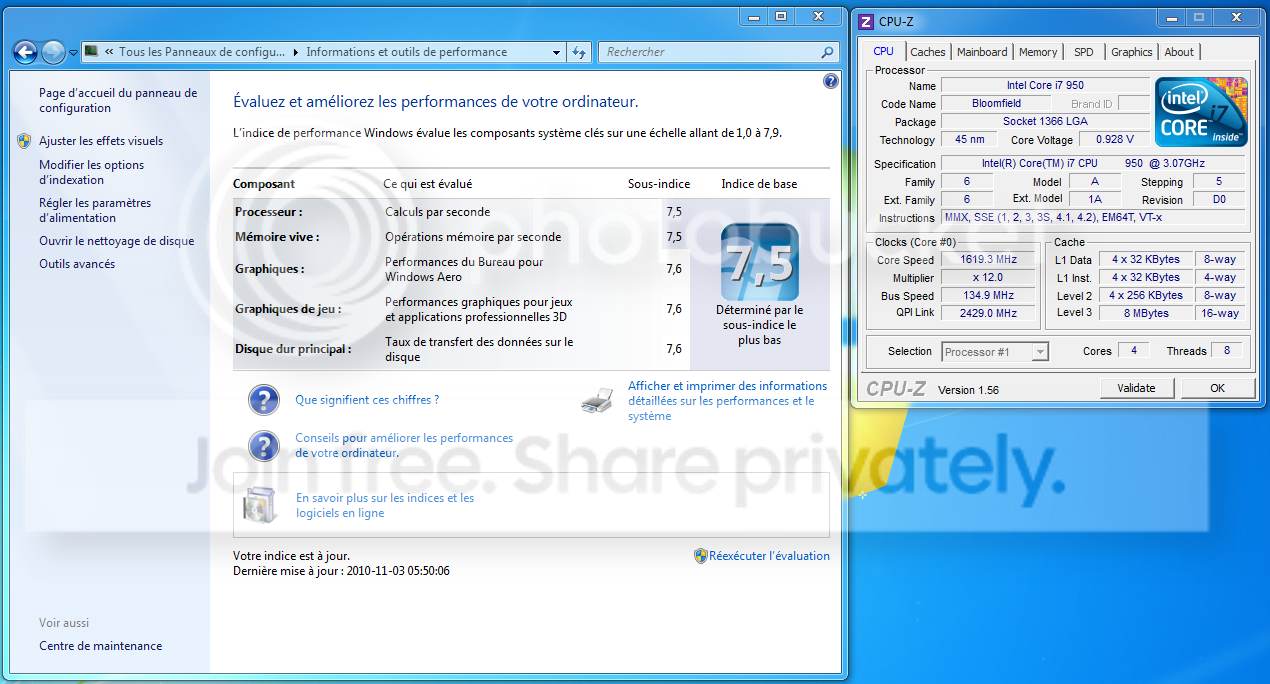
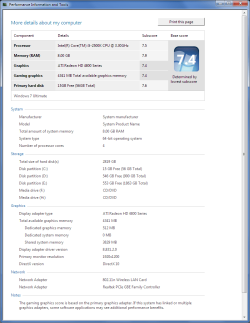
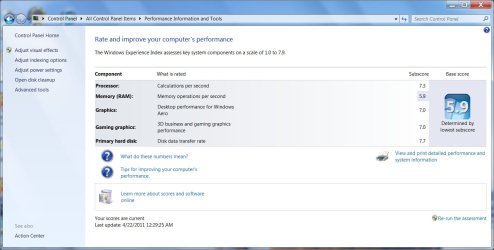
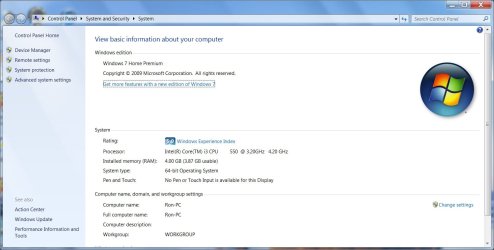
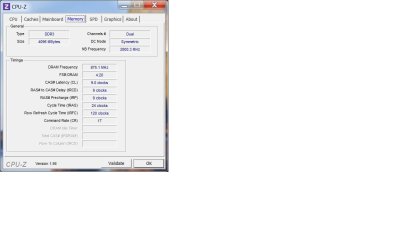
to others, the 4gb claims was being under 4gb ram auto gives you a 5.9 score, just like a traditional hard drives only give a 5.9 score. Unfortunately I still have a tiny bit reserved for my integrated video that isn't being used. at least I assume that is the case as it used to say it. I did chose pci-e as my primary display, but it still seems to reserve a small amount anyway.
 

Attachments

  • WEI.jpg
    WEI.jpg
    90 KB · Views: 20
  • system.jpg
    system.jpg
    85.2 KB · Views: 16
  • CPUZ.jpg
    CPUZ.jpg
    36.5 KB · Views: 12

My Computer My Computer

OS
Windows 7 Ultimate x64
CPU
i7 - 2600K
Motherboard
Intel P67 Extreme (DP67BG)
Memory
G.Skill Ripjaws 16B (4x4GB)
Graphics Card(s)
PowerColor 5870 LCS+
Sound Card
On-Board
Monitor(s) Displays
Asus 28" 1080p
Screen Resolution
1920 x 1080
Hard Drives
OCZ Vertex 3 240GB
PSU
Corsair TX850W
Case
Danger Den - Torture Rack
Cooling
Water
Keyboard
Microsoft Wireless System 1000
Mouse
same as above
Internet Speed
20MB w/turbo boost (2.6MB/s download avg)
Status
Not open for further replies.
Back
Top