
can I do anything to let the icon stay the same

Cov

Banned
Local time
8:29 PM
Messages
140
Location
Europe
Oh and another thing please.

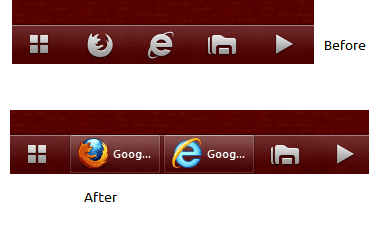
The icons that I have changed, are looking beautiful ... as long as I don't open them. After I do, they look different. Does it have to be like that, or can I do anything to let the icon stay the same, whether it's been closed or opened.

closed = before
opened = after
 

Attachments
  • 3.png
    3.png
    10.1 KB · Views: 2

My Computer My Computer

At a glance

Windos 7 x64i5 3570K2 x 8GB G.SkillHD4000
OS
Windos 7 x64
CPU
i5 3570K
Motherboard
Intel DH77DF
Memory
2 x 8GB G.Skill
Graphics Card(s)
HD4000
Sound Card
on board
Monitor(s) Displays
LG IPS236 x 2
Screen Resolution
1920 x 1200
Hard Drives
Samsung 840 Pro 256GB
PSU
BeQuiet 480 E9 CM Modular
Case
Lian Li PC-Q25 Silver
Cooling
Titan
Keyboard
Dell
Mouse
Microsoft Basic Optical Mouse
Internet Speed
6 MB
Other Info
Don't talk if you can't improve the silence.
Not sure if this will work for you, but it did for me in similar circumstances.,

Make the shortcut read only.
 

My Computer My Computer

At a glance

Microsoft Windows 7 Home Premium 64-bit Servi...Intel(R) Core(TM) i3 CPU M 330 @ 2.13GHz8 GB DDR3Intel(R) HD Graphics
Computer type
Laptop
Computer Manufacturer/Model Number
Hewlett-Packard/G62-107SA Notebook
OS
Microsoft Windows 7 Home Premium 64-bit Service Pack 1
CPU
Intel(R) Core(TM) i3 CPU M 330 @ 2.13GHz
Motherboard
Hewlett-Packard 1425
Memory
8 GB DDR3
Graphics Card(s)
Intel(R) HD Graphics
Sound Card
Realtek High Definition Audio
Monitor(s) Displays
Builtin
Screen Resolution
1366 x 768 x 32 bits (4294967296 colors) @ 60 Hz
Hard Drives
250 GB SATA Hard Disk Drive 7200 rpm
2TB Seagate GoFlex USB 2 Drive
1TB Iomega Prestige USB 2 Drive
1.5TB Iomega Prestige USB 2 Drive (Samsung)
2TB WD MyBook Live NAS.
Mouse
Logitech Anywhere MX
Internet Speed
152 Mbs download 10 Mbs upload
Antivirus
Norton 360
Browser
Chrome

My Computer My Computer

At a glance

Windos 7 x64i5 3570K2 x 8GB G.SkillHD4000
OS
Windos 7 x64
CPU
i5 3570K
Motherboard
Intel DH77DF
Memory
2 x 8GB G.Skill
Graphics Card(s)
HD4000
Sound Card
on board
Monitor(s) Displays
LG IPS236 x 2
Screen Resolution
1920 x 1200
Hard Drives
Samsung 840 Pro 256GB
PSU
BeQuiet 480 E9 CM Modular
Case
Lian Li PC-Q25 Silver
Cooling
Titan
Keyboard
Dell
Mouse
Microsoft Basic Optical Mouse
Internet Speed
6 MB
Other Info
Don't talk if you can't improve the silence.
Shame. Did you make it read only before putting it on the taskbar. That is sometimes necessary. Also I don't think it will affect the running icon, just the pinned one when the app is closed.
 

My Computer My Computer

At a glance

Microsoft Windows 7 Home Premium 64-bit Servi...Intel(R) Core(TM) i3 CPU M 330 @ 2.13GHz8 GB DDR3Intel(R) HD Graphics
Computer type
Laptop
Computer Manufacturer/Model Number
Hewlett-Packard/G62-107SA Notebook
OS
Microsoft Windows 7 Home Premium 64-bit Service Pack 1
CPU
Intel(R) Core(TM) i3 CPU M 330 @ 2.13GHz
Motherboard
Hewlett-Packard 1425
Memory
8 GB DDR3
Graphics Card(s)
Intel(R) HD Graphics
Sound Card
Realtek High Definition Audio
Monitor(s) Displays
Builtin
Screen Resolution
1366 x 768 x 32 bits (4294967296 colors) @ 60 Hz
Hard Drives
250 GB SATA Hard Disk Drive 7200 rpm
2TB Seagate GoFlex USB 2 Drive
1TB Iomega Prestige USB 2 Drive
1.5TB Iomega Prestige USB 2 Drive (Samsung)
2TB WD MyBook Live NAS.
Mouse
Logitech Anywhere MX
Internet Speed
152 Mbs download 10 Mbs upload
Antivirus
Norton 360
Browser
Chrome
Did you make it read only before putting it on the taskbar.
I did the following:

1. unpin the old shortcut from the task bar
2. go to start and type "replay media catcher"
3. right click the icon and select properties
4. go to the "general" tab and put a tick on "read-only"
5. go to start and find "replay media catcher" again
6. right click and select "properties"

The result is the picture from above.
"Change icon" is still grayed out ... strange
 

My Computer My Computer

At a glance

Windos 7 x64i5 3570K2 x 8GB G.SkillHD4000
OS
Windos 7 x64
CPU
i5 3570K
Motherboard
Intel DH77DF
Memory
2 x 8GB G.Skill
Graphics Card(s)
HD4000
Sound Card
on board
Monitor(s) Displays
LG IPS236 x 2
Screen Resolution
1920 x 1200
Hard Drives
Samsung 840 Pro 256GB
PSU
BeQuiet 480 E9 CM Modular
Case
Lian Li PC-Q25 Silver
Cooling
Titan
Keyboard
Dell
Mouse
Microsoft Basic Optical Mouse
Internet Speed
6 MB
Other Info
Don't talk if you can't improve the silence.
Oh well, perhaps someone else will have an idea.
 

My Computer My Computer

At a glance

Microsoft Windows 7 Home Premium 64-bit Servi...Intel(R) Core(TM) i3 CPU M 330 @ 2.13GHz8 GB DDR3Intel(R) HD Graphics
Computer type
Laptop
Computer Manufacturer/Model Number
Hewlett-Packard/G62-107SA Notebook
OS
Microsoft Windows 7 Home Premium 64-bit Service Pack 1
CPU
Intel(R) Core(TM) i3 CPU M 330 @ 2.13GHz
Motherboard
Hewlett-Packard 1425
Memory
8 GB DDR3
Graphics Card(s)
Intel(R) HD Graphics
Sound Card
Realtek High Definition Audio
Monitor(s) Displays
Builtin
Screen Resolution
1366 x 768 x 32 bits (4294967296 colors) @ 60 Hz
Hard Drives
250 GB SATA Hard Disk Drive 7200 rpm
2TB Seagate GoFlex USB 2 Drive
1TB Iomega Prestige USB 2 Drive
1.5TB Iomega Prestige USB 2 Drive (Samsung)
2TB WD MyBook Live NAS.
Mouse
Logitech Anywhere MX
Internet Speed
152 Mbs download 10 Mbs upload
Antivirus
Norton 360
Browser
Chrome
me: knock knock

admin: come in !!

me: oh hi, I just wanted to ask ...

admin: to ask whether someone has an answer for you yet ?

me: uhm, yes

admin: well, I'm gonna do a shout out for you, ok?

me: ah, yeah .. thank you so much ... uh

admin: OK GUYS AND GIRLS, ANYONE GOT AN IDEA ABOUT COV'S PROBLEM HERE ??

me: oh, uhm ... eh thanks

:o
 

My Computer My Computer

At a glance

Windos 7 x64i5 3570K2 x 8GB G.SkillHD4000
OS
Windos 7 x64
CPU
i5 3570K
Motherboard
Intel DH77DF
Memory
2 x 8GB G.Skill
Graphics Card(s)
HD4000
Sound Card
on board
Monitor(s) Displays
LG IPS236 x 2
Screen Resolution
1920 x 1200
Hard Drives
Samsung 840 Pro 256GB
PSU
BeQuiet 480 E9 CM Modular
Case
Lian Li PC-Q25 Silver
Cooling
Titan
Keyboard
Dell
Mouse
Microsoft Basic Optical Mouse
Internet Speed
6 MB
Other Info
Don't talk if you can't improve the silence.
Hi,

The sarcasm really is unnecessary :sarc:

You may want to try creating a shortcut to those programs then changing the icons for the shortcuts. You can then pin the shortcuts to the taskbar.

It's worth a try
 

My Computer My Computer

At a glance

Windows 7 Ultimate x64AMD Sempron Dual Core3GBNVIDIA GeForce 6150SE nForce 430
Computer Manufacturer/Model Number
Compaq Desktop
OS
Windows 7 Ultimate x64
CPU
AMD Sempron Dual Core
Memory
3GB
Graphics Card(s)
NVIDIA GeForce 6150SE nForce 430
Screen Resolution
1024x768
Hard Drives
150GB Sata
Ok, scrap that, just tried it and it didn't work :(
 

My Computer My Computer

At a glance

Windows 7 Ultimate x64AMD Sempron Dual Core3GBNVIDIA GeForce 6150SE nForce 430
Computer Manufacturer/Model Number
Compaq Desktop
OS
Windows 7 Ultimate x64
CPU
AMD Sempron Dual Core
Memory
3GB
Graphics Card(s)
NVIDIA GeForce 6150SE nForce 430
Screen Resolution
1024x768
Hard Drives
150GB Sata
Hi, The sarcasm really is unnecessary :sarc:

Hi sharky, that's not sarcasm, that was supposed to make you smile.
Every culture is different, and since the internet age, you might get in touch with people who don't live in the same country like you are. What's funny in your country, might not be funny at all at where I live - and the other way around.

You may want to try creating a shortcut to those programs then changing the icons for the shortcuts. You can then pin the shortcuts to the taskbar. It's worth a try
Yes, it's a good idea trying to pin shortcuts to the task bar instead, but sorry ... didn't work either.
 

My Computer My Computer

At a glance

Windos 7 x64i5 3570K2 x 8GB G.SkillHD4000
OS
Windos 7 x64
CPU
i5 3570K
Motherboard
Intel DH77DF
Memory
2 x 8GB G.Skill
Graphics Card(s)
HD4000
Sound Card
on board
Monitor(s) Displays
LG IPS236 x 2
Screen Resolution
1920 x 1200
Hard Drives
Samsung 840 Pro 256GB
PSU
BeQuiet 480 E9 CM Modular
Case
Lian Li PC-Q25 Silver
Cooling
Titan
Keyboard
Dell
Mouse
Microsoft Basic Optical Mouse
Internet Speed
6 MB
Other Info
Don't talk if you can't improve the silence.
1. Open the program and pin to the taskbar.

2. Right click and close the window.

3. Hold down shift, right click the icon, and select properties.

3. Navigate to your chosen icon via the change icon button (apply/ok).

edit...

4. Restart Explorer by typing "TSKILL EXPLORER" *without the quotes* in the start/search box and hit return.
 

My Computer My Computer

At a glance

Windows 7
Computer type
PC/Desktop
OS
Windows 7
1. Open the program and pin to the taskbar.

2. Right click and close the window.

3. Hold down shift, right click the icon, and select properties.

3. Navigate to your chosen icon via the change icon button (apply/ok).

edit...

4. Restart Explorer by typing "TSKILL EXPLORER" *without the quotes* in the start/search box and hit return.

Excellent advice, works like a charm :)
 

My Computer My Computer

At a glance

Windows 7 Ultimate x64AMD Sempron Dual Core3GBNVIDIA GeForce 6150SE nForce 430
Computer Manufacturer/Model Number
Compaq Desktop
OS
Windows 7 Ultimate x64
CPU
AMD Sempron Dual Core
Memory
3GB
Graphics Card(s)
NVIDIA GeForce 6150SE nForce 430
Screen Resolution
1024x768
Hard Drives
150GB Sata
My pleasure :thumbsup:
 

My Computer My Computer

At a glance

Windows 7
Computer type
PC/Desktop
OS
Windows 7
Hi, thanks but ...it didn't work for me.
Here is what I've done:

1. Open the program and pin to the taskbar.
First I unpinned the (old) windows explorer from the taskbar, then I opened it from the start menu and used the icon from the start menu to right click and pin to the taskbar while the explorer window was still open.

2. Right click and close the window.
The I right clicked the explorer in the task bar and closed it.

3. Hold down shift, right click the icon, and select properties.
Yeah, that worked very well.

3. Navigate to your chosen icon via the change icon button (apply/ok).
No problem here.

4. Restart Explorer by typing "TSKILL EXPLORER" *without the quotes* in the start/search box and hit return.
I did that and indeed there was a "TSKILL EXPLORER" ... but when I open windows explorer via the new icon in the task bar, it still changes back to the old explorer icon.

Hmm, strange ....
 

My Computer My Computer

At a glance

Windos 7 x64i5 3570K2 x 8GB G.SkillHD4000
OS
Windos 7 x64
CPU
i5 3570K
Motherboard
Intel DH77DF
Memory
2 x 8GB G.Skill
Graphics Card(s)
HD4000
Sound Card
on board
Monitor(s) Displays
LG IPS236 x 2
Screen Resolution
1920 x 1200
Hard Drives
Samsung 840 Pro 256GB
PSU
BeQuiet 480 E9 CM Modular
Case
Lian Li PC-Q25 Silver
Cooling
Titan
Keyboard
Dell
Mouse
Microsoft Basic Optical Mouse
Internet Speed
6 MB
Other Info
Don't talk if you can't improve the silence.
Try opening Explorer via Win Key + E and do the steps again?
 

My Computer My Computer

At a glance

Windows 7
Computer type
PC/Desktop
OS
Windows 7
Back
Top