
Looking for an External Hard Drive to be Connected Always!

IMAyNeed

New member
I have 2 internal 500GB Harddrives.
1 for Operating Systems.
1 for Library (seems enough for now).

I am using the Library one also to edit my videos.
But sometimes, I am having trouble with the space (after the library there is just over 100 GB left).

I am looking for an external hard disk that I can use as always connected to the computer, so I can edit my videos in there (editing videos usually means videos + sounds, and other related files).

I have Seagate Expansion 2 TB USB 2.0, WD My Book Essential 2 TB USB 3.0 (working with USB 2.0 port), and as portable external. I have Toshiba Canvio Plus 1 TB USB 2.0.

Do you have any suggestions about which one to use as always connected?

You can also suggest other hard drives too (doesn't necessarily needs to be using USB port, I have a router and e-sata, firewire - I hope that is the 1394 port, right - and also an express card slot connection also).

For some reason I am not able to feel right with leaving the hard drives connected always, but actually that is the reason I am buying them.

I have heard some bad reports on Seagate Expansion, luckily mine is still working without problems so far.

I mean should I just go with luck -usually what goes with electronics nowadays - and use a drive always connected, or are there specific and better choices out there or within the drives I own?

I don't own an unlimited power supply (where my computers are staying, there have been power cuts a few times), and time to time I am having blue screen problems, I hope these won't affect the drive being connected always.
 

My Computer

Computer Manufacturer/Model Number
ASUS G72 Notebook
OS
Windows 7 Ultimate 64-bit
CPU
Intel® Core™2 Duo mobile processor P8700 2.53 GHz
Memory
6GB DDRII
Graphics Card(s)
NVIDIA GeForce GTX 260M
Sound Card
EAX Advanced HD 4.0 + Logitech Wireless Headset G930
Monitor(s) Displays
17.3" LED-backlit LCD high-definition plus widescreen
Screen Resolution
1600 x 900
Hard Drives
2 x Seagate Momentus 500 GB 5400.6 SATA 3Gb/s
Cooling
Targus
Mouse
Logitech Wireless Trackball M570
Internet Speed
3 to 6 Mbps Download / .5 to 1 Mbps Upload
Other Info
Clear Modem with Wi-fi*
Comodo Internet Security Premium
You'd be better off installing a new, or another, bigger drive IN the system.
Cheaper, runs faster then any external, no need for add on power supply (wires and cables to and from the external HDD).
 

My Computer

Computer Manufacturer/Model Number
Built be Me
OS
Windows 7 Pro x64
CPU
i5 760
Motherboard
Asus P7P55D-E Pro
Memory
16GB
Graphics Card(s)
Nvidia GTS450
Sound Card
On board
Monitor(s) Displays
Dell 2007WFP Dell 1800FP
Screen Resolution
1680x1050 1280x1024
Hard Drives
Seagate 250GB & 750GB
WD 1TB
PSU
Antec 750
Case
In Win
Cooling
Cooler Master Hyper 212+
Keyboard
IBM
Mouse
MS
I have 4 WD My Books attached to my PC and they are always on (they do spin down when they are idle).
 

My Computer

Computer Manufacturer/Model Number
HAL-9000
OS
Windows 7 Ultimate 64bit
CPU
Intel i7 3770K
Motherboard
Asus Sabertooth Z77
Memory
16GB DDR3 1333 Corsair XMS3
Graphics Card(s)
XFX HD6950 2GB EyeFinity
Sound Card
Logitech G35 & Sennheiser PC135 & VIA HD
Monitor(s) Displays
23" HP 2310e, 23" Samsung B2230, 21.5" Viewsonic
Screen Resolution
5760x1080
Hard Drives
16TB of Storage
128GB & 256GB Crucial M4 SSD's, 2X 1TB WD Black, 3x 2TB WD, 3x 2TB Samsung F4, 1.5TB Seagate, WD 500GB,
PSU
Antec True Power New 650watt
Case
Cooler Master HAF-932
Cooling
Corsair H60 Hydro Cooler, 3x 230mm Fans, 2x120mm Fan
Keyboard
Logitech G15 and G13
Mouse
Logitech G700 Gaming Mouse
Internet Speed
50/10 Mbit
Other Info
Speakers : Alesis M1 Active Mk2 Studio Monitors , APC RS 1200 UPS, HP 4500DN Color Laser, HP P1006 mono Laser, Kodak 8500 Dye-Sub, Epson 1280 inkjet, Epson Worforce 610 MFC
You'd be better off installing a new, or another, bigger drive IN the system.
Cheaper, runs faster then any external, no need for add on power supply (wires and cables to and from the external HDD).

This is a notebook. I am lucky to have a second internal drive option.

Funny thing is I was thinking to install 2x1TB internal drives. I contacted with ASUS several times, and the replies I got was: "up to 1 TB". When I asked them is it for a single drive or total of both drives, the replies I got was - not my words, their official words in their e-mail or phone conversations - : "it should be total 1 TB", "I think it is total 1 TB". Noone did give me a specific answer about if I can install 2 internal 1 TB drives into ASUS G72. Does anyone know that if I can install 2 internal 1 TB drives into ASUS G72?


My Computer

Computer Manufacturer/Model Number
ASUS G72 Notebook
OS
Windows 7 Ultimate 64-bit
CPU
Intel® Core™2 Duo mobile processor P8700 2.53 GHz
Memory
6GB DDRII
Graphics Card(s)
NVIDIA GeForce GTX 260M
Sound Card
EAX Advanced HD 4.0 + Logitech Wireless Headset G930
Monitor(s) Displays
17.3" LED-backlit LCD high-definition plus widescreen
Screen Resolution
1600 x 900
Hard Drives
2 x Seagate Momentus 500 GB 5400.6 SATA 3Gb/s
Cooling
Targus
Mouse
Logitech Wireless Trackball M570
Internet Speed
3 to 6 Mbps Download / .5 to 1 Mbps Upload
Other Info
Clear Modem with Wi-fi*
Comodo Internet Security Premium
I have 4 WD My Books attached to my PC and they are always on (they do spin down when they are idle).

The thing is my drives won't be probably idle any time because of editing and creating the videos in the drive. (Creating a single video -after finishing editing- can take hours depending on the editing options, and I do it always - as long as I do not come across with a blue screen :mad::mad::mad: -

How long ( how many months, etc.) your drives have been running?

I know about the spin down thing. Actually, in WDs, probably other some other drives too, you cannot turn down that option, which is sometimes bad for sound and video editors - I am ok with that so far, but I heard about that problem -. They tried to turn off that thing, and WD said they couldn't.
 

My Computer

Computer Manufacturer/Model Number
ASUS G72 Notebook
OS
Windows 7 Ultimate 64-bit
CPU
Intel® Core™2 Duo mobile processor P8700 2.53 GHz
Memory
6GB DDRII
Graphics Card(s)
NVIDIA GeForce GTX 260M
Sound Card
EAX Advanced HD 4.0 + Logitech Wireless Headset G930
Monitor(s) Displays
17.3" LED-backlit LCD high-definition plus widescreen
Screen Resolution
1600 x 900
Hard Drives
2 x Seagate Momentus 500 GB 5400.6 SATA 3Gb/s
Cooling
Targus
Mouse
Logitech Wireless Trackball M570
Internet Speed
3 to 6 Mbps Download / .5 to 1 Mbps Upload
Other Info
Clear Modem with Wi-fi*
Comodo Internet Security Premium
Attaching the external to eSata would be my preferred solution. That will give you more speed (up to the capability of the drive). I have always a couple of drives permanently attached and some more that I attach when needed. They are all from different makes and I have not yet seen any difference.

Another alternative is an external enclosure. I have this one ( Newegg.com - Thermaltake BlacX Duet ABS Plastic 2.5" & 3.5" Black USB2.0 & eSATA Dual Hard Drives Docking Station ). Then you can buy cheaper internal hard drives and hotswap them. Both 2.5" and 3.5" work with eSata and USB2. I use another enclosure for USB3, but that works only with 2.5" disks.
 

My Computer

Computer Manufacturer/Model Number
HP, Dell, Gateway, Toshiba - 4 laptops and 2 desktops
OS
Vista, Windows7, Mint Mate, Zorin, Windows 8
CPU
from 1.6GHz Duo to i7
Monitor(s) Displays
2x HP w2207
Hard Drives
5x HDD, 7x SSD, 12x Externals
Keyboard
with trackball - no mices
Mouse
Trackball mice
Internet Speed
DSL 6000
Attaching the external to eSata would be my preferred solution. That will give you more speed (up to the capability of the drive). I have always a couple of drives permanently attached and some more that I attach when needed. They are all from different makes and I have not yet seen any difference.

Another alternative is an external enclosure. I have this one ( Newegg.com - Thermaltake BlacX Duet ABS Plastic 2.5" & 3.5" Black USB2.0 & eSATA Dual Hard Drives Docking Station ). Then you can buy cheaper internal hard drives and hotswap them. Both 2.5" and 3.5" work with eSata and USB2. I use another enclosure for USB3, but that works only with 2.5" disks.

Do you know what the speed will be if I put the SATAs to the dock and to the e-SATA? Faster/Slower than USB 2.0? How much?

Thanks for sharing the option. Will keep in mind.
 

My Computer

Computer Manufacturer/Model Number
ASUS G72 Notebook
OS
Windows 7 Ultimate 64-bit
CPU
Intel® Core™2 Duo mobile processor P8700 2.53 GHz
Memory
6GB DDRII
Graphics Card(s)
NVIDIA GeForce GTX 260M
Sound Card
EAX Advanced HD 4.0 + Logitech Wireless Headset G930
Monitor(s) Displays
17.3" LED-backlit LCD high-definition plus widescreen
Screen Resolution
1600 x 900
Hard Drives
2 x Seagate Momentus 500 GB 5400.6 SATA 3Gb/s
Cooling
Targus
Mouse
Logitech Wireless Trackball M570
Internet Speed
3 to 6 Mbps Download / .5 to 1 Mbps Upload
Other Info
Clear Modem with Wi-fi*
Comodo Internet Security Premium
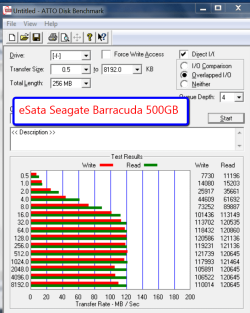
It will completely depend on the speed of the disk (in eSata). eSata can run at about 300GB/sec but the fastest spinning disks run only at max. 100MB/sec. USB2 has a max of about 50MB/sec (480Mb/sec). That means a fast spinner cannot run at it's full speed. There is, of course, also a dependency on the blocksize. Small blocksizes run a lot slower. Here is the speed I got with above enclosure with a 7200RPM spinner:
 

Attachments

  • 2011-04-16_1204.png
    2011-04-16_1204.png
    129.8 KB · Views: 8

My Computer

Computer Manufacturer/Model Number
HP, Dell, Gateway, Toshiba - 4 laptops and 2 desktops
OS
Vista, Windows7, Mint Mate, Zorin, Windows 8
CPU
from 1.6GHz Duo to i7
Monitor(s) Displays
2x HP w2207
Hard Drives
5x HDD, 7x SSD, 12x Externals
Keyboard
with trackball - no mices
Mouse
Trackball mice
Internet Speed
DSL 6000
Thanks for the speed info.
 

My Computer

Computer Manufacturer/Model Number
ASUS G72 Notebook
OS
Windows 7 Ultimate 64-bit
CPU
Intel® Core™2 Duo mobile processor P8700 2.53 GHz
Memory
6GB DDRII
Graphics Card(s)
NVIDIA GeForce GTX 260M
Sound Card
EAX Advanced HD 4.0 + Logitech Wireless Headset G930
Monitor(s) Displays
17.3" LED-backlit LCD high-definition plus widescreen
Screen Resolution
1600 x 900
Hard Drives
2 x Seagate Momentus 500 GB 5400.6 SATA 3Gb/s
Cooling
Targus
Mouse
Logitech Wireless Trackball M570
Internet Speed
3 to 6 Mbps Download / .5 to 1 Mbps Upload
Other Info
Clear Modem with Wi-fi*
Comodo Internet Security Premium
My 2 oldest drives are over 3 years old, my first one died so I replaced the drive in it with a 1TB Black (this is the one with the green round light), the newest one is a 2TB USB 3 and that is 3 weeks old.
In the picture below, the two right drives are the 500's, the left is a 2TB USB, which I traded 3 weeks ago for the USB version, and other is the 1TB black that used to have a 500GB drive that failed.
cube-drives.jpg
 

My Computer

Computer Manufacturer/Model Number
HAL-9000
OS
Windows 7 Ultimate 64bit
CPU
Intel i7 3770K
Motherboard
Asus Sabertooth Z77
Memory
16GB DDR3 1333 Corsair XMS3
Graphics Card(s)
XFX HD6950 2GB EyeFinity
Sound Card
Logitech G35 & Sennheiser PC135 & VIA HD
Monitor(s) Displays
23" HP 2310e, 23" Samsung B2230, 21.5" Viewsonic
Screen Resolution
5760x1080
Hard Drives
16TB of Storage
128GB & 256GB Crucial M4 SSD's, 2X 1TB WD Black, 3x 2TB WD, 3x 2TB Samsung F4, 1.5TB Seagate, WD 500GB,
PSU
Antec True Power New 650watt
Case
Cooler Master HAF-932
Cooling
Corsair H60 Hydro Cooler, 3x 230mm Fans, 2x120mm Fan
Keyboard
Logitech G15 and G13
Mouse
Logitech G700 Gaming Mouse
Internet Speed
50/10 Mbit
Other Info
Speakers : Alesis M1 Active Mk2 Studio Monitors , APC RS 1200 UPS, HP 4500DN Color Laser, HP P1006 mono Laser, Kodak 8500 Dye-Sub, Epson 1280 inkjet, Epson Worforce 610 MFC

My Computer

Computer type
PC/Desktop
Computer Manufacturer/Model Number
Built them myself, Science Experiments !
OS
Win7 Enterprise, Win7 x86 (Ult 7600), Win7 x64 Ult 7600, TechNet RTM on AMD x64 (2.8Ghz)
CPU
AMD fx8350 4ghz, AMD-32 2400mhz, AMD-64 3200mhz, AMDx64 2.8G
Motherboard
SIS 755, ECS-K8M890M-M (Ult 7600), GigaByte & others
Memory
2gb, 4gb on the Ult 7600, 4gb on Technet RTM, 32gb on FX8350
Graphics Card(s)
Draw my own Graphics, several nVidia cards
Sound Card
on motherboard
Monitor(s) Displays
19" flat scr, 28" I-Inc widescr,22" Emprex Widescr, 23" Acer
Screen Resolution
1280 x 1024, 1440 x 900, 1920 x 1080
Hard Drives
6 pata Ide HD's & 2 Sata HD's
added 80gb external on Ult 7600 computer,
numerous extra 1tb, 2TB, 3Tb SATA HD's
A collection of ext HD Docks w/ HDs
PSU
430w, 550w, 600w, 700, 800, etc
Case
All Generic Full Towers
Cooling
Open Air & a few fans, some w/ colored LEDs
Keyboard
Compaq & Dell recycled from GoodWill
Mouse
Made in China Optical Wired Mouse
Internet Speed
Fast Cable InterNet
Antivirus
AVG Free on 24 different Desktops, NO Problems!
Browser
IE 8 is preferred, but use FireFox sometimes
Other Info
Linksys Routers, switches, & Hubs
Too Many USB Flash Drives to count, Biggest is 64GB !
Eight computers in my home network.
Sixteen computers at my business network.
Linked via TeamViewer !
Lots of old used spare computer parts everywhere!

My Computer

Computer Manufacturer/Model Number
HAL-9000
OS
Windows 7 Ultimate 64bit
CPU
Intel i7 3770K
Motherboard
Asus Sabertooth Z77
Memory
16GB DDR3 1333 Corsair XMS3
Graphics Card(s)
XFX HD6950 2GB EyeFinity
Sound Card
Logitech G35 & Sennheiser PC135 & VIA HD
Monitor(s) Displays
23" HP 2310e, 23" Samsung B2230, 21.5" Viewsonic
Screen Resolution
5760x1080
Hard Drives
16TB of Storage
128GB & 256GB Crucial M4 SSD's, 2X 1TB WD Black, 3x 2TB WD, 3x 2TB Samsung F4, 1.5TB Seagate, WD 500GB,
PSU
Antec True Power New 650watt
Case
Cooler Master HAF-932
Cooling
Corsair H60 Hydro Cooler, 3x 230mm Fans, 2x120mm Fan
Keyboard
Logitech G15 and G13
Mouse
Logitech G700 Gaming Mouse
Internet Speed
50/10 Mbit
Other Info
Speakers : Alesis M1 Active Mk2 Studio Monitors , APC RS 1200 UPS, HP 4500DN Color Laser, HP P1006 mono Laser, Kodak 8500 Dye-Sub, Epson 1280 inkjet, Epson Worforce 610 MFC
Back
Top