
Increasing the length of time thumbnail previews on taskbar display

Hirroshi

New member
Local time
3:16 PM
Messages
4
Hello,

I've just got Windows 7. So far i've enjoyed it, but found one annoyance:

When I hover over application icons (that are open) on the taskbar the thumbnail preview only flashes up for 1 second, even if I leave my cursor hovering on the icon.

This is the case most of the time, but I find when I have certain windows open (e.g. the regeditor - random I know!) then the thumbnail previews for other applications will stay up as long as I hover over them.

Can anyone help?

Cheers,
 

My Computer My Computer

At a glance

Windows 7 Ultimate 32bit1 GB
Computer Manufacturer/Model Number
Dell
OS
Windows 7 Ultimate 32bit
Memory
1 GB
Hello,

I've just got Windows 7. So far i've enjoyed it, but found one annoyance:

When I hover over application icons (that are open) on the taskbar the thumbnail preview only flashes up for 1 second, even if I leave my cursor hovering on the icon.

This is the case most of the time, but I find when I have certain windows open (e.g. the regeditor - random I know!) then the thumbnail previews for other applications will stay up as long as I hover over them.

Can anyone help?

Cheers,

Hi Hirroshi and welcome to SF! :)
Just look here, follow all instructions as they are posted and enjoy! ;)
 

My Computer My Computer

At a glance

Windows 7 Ultimate x64 SP1AMD PHENOM II X6 1090T 3.2GHz8GB G.SKILL RIPJAWS - F3-10666CL7DSAPPHIRE ATI RADEON HD 5870 VAPOR X OC
Computer Manufacturer/Model Number
WALLONN7 / LIN BLACK SERIES II
OS
Windows 7 Ultimate x64 SP1
CPU
AMD PHENOM II X6 1090T 3.2GHz
Motherboard
GIGABYTE GA-890FXA-UD7
Memory
8GB G.SKILL RIPJAWS - F3-10666CL7D
Graphics Card(s)
SAPPHIRE ATI RADEON HD 5870 VAPOR X OC
Sound Card
REALTEK DOLBY HOME THEATER
Monitor(s) Displays
LED LG W2486L
Screen Resolution
1080p
Hard Drives
SEAGATE 1TB -ST31000528AS - AHCI MODE - AS SATA
PSU
ZALMAN ZM1000-HP 1000W
Case
THERMALTAKE XASER VI VG4000SWA
Cooling
140MM x3 / 120MM x1 AIR COOLING - THERMALTAKE
Keyboard
MICROSOFT DIGITAL MEDIA KEYBOARD 3000 - USB
Mouse
MICROSOFT BASIC OPTICAL MOUSE 2.0 - USB
Internet Speed
600KBPS
Other Info
MICROSOFT XBOX 360 CONTROLLER
Hello,

I've just got Windows 7. So far i've enjoyed it, but found one annoyance:

When I hover over application icons (that are open) on the taskbar the thumbnail preview only flashes up for 1 second, even if I leave my cursor hovering on the icon.

This is the case most of the time, but I find when I have certain windows open (e.g. the regeditor - random I know!) then the thumbnail previews for other applications will stay up as long as I hover over them.

Can anyone help?

Cheers,

Hi Hirroshi and welcome to SF! :)
Just look here, follow all instructions as they are posted and enjoy! ;)

Hello,

Thanks for the quick reply. Unfortunately this is not quite what I was looking for. The tutorial you have linked me to is described as doing this -

"This will show you how to change the delay time for how long it takes to open a Aero Peek live preview of a open window, that is behind another opened window on the desktop, when you hover the mouse pointer on the taskbar thumbnail preview of this window."

...and I want to do this -

Change the ammount of time an Aero Peek live preview of an open window , that is behind another opened window on the desktop, will stay open when you hover the mouse pointer on the taskbar thumbnail preview of this window.

Cheers,
 

My Computer My Computer

At a glance

Windows 7 Ultimate 32bit1 GB
Computer Manufacturer/Model Number
Dell
OS
Windows 7 Ultimate 32bit
Memory
1 GB
And this one? :)
 

My Computer My Computer

At a glance

Windows 7 Ultimate x64 SP1AMD PHENOM II X6 1090T 3.2GHz8GB G.SKILL RIPJAWS - F3-10666CL7DSAPPHIRE ATI RADEON HD 5870 VAPOR X OC
Computer Manufacturer/Model Number
WALLONN7 / LIN BLACK SERIES II
OS
Windows 7 Ultimate x64 SP1
CPU
AMD PHENOM II X6 1090T 3.2GHz
Motherboard
GIGABYTE GA-890FXA-UD7
Memory
8GB G.SKILL RIPJAWS - F3-10666CL7D
Graphics Card(s)
SAPPHIRE ATI RADEON HD 5870 VAPOR X OC
Sound Card
REALTEK DOLBY HOME THEATER
Monitor(s) Displays
LED LG W2486L
Screen Resolution
1080p
Hard Drives
SEAGATE 1TB -ST31000528AS - AHCI MODE - AS SATA
PSU
ZALMAN ZM1000-HP 1000W
Case
THERMALTAKE XASER VI VG4000SWA
Cooling
140MM x3 / 120MM x1 AIR COOLING - THERMALTAKE
Keyboard
MICROSOFT DIGITAL MEDIA KEYBOARD 3000 - USB
Mouse
MICROSOFT BASIC OPTICAL MOUSE 2.0 - USB
Internet Speed
600KBPS
Other Info
MICROSOFT XBOX 360 CONTROLLER

Its nothing to do with a delay in the thumbnail popping up.

I want to increase the time that the thumnail stays present while i'm hovering over it.

For some reason it disappears after a second.

Cheers,
 

My Computer My Computer

At a glance

Windows 7 Ultimate 32bit1 GB
Computer Manufacturer/Model Number
Dell
OS
Windows 7 Ultimate 32bit
Memory
1 GB
I think this will require more time than I imagined. :D But do not worry. I will continue to search for what you need. :)
 

My Computer My Computer

At a glance

Windows 7 Ultimate x64 SP1AMD PHENOM II X6 1090T 3.2GHz8GB G.SKILL RIPJAWS - F3-10666CL7DSAPPHIRE ATI RADEON HD 5870 VAPOR X OC
Computer Manufacturer/Model Number
WALLONN7 / LIN BLACK SERIES II
OS
Windows 7 Ultimate x64 SP1
CPU
AMD PHENOM II X6 1090T 3.2GHz
Motherboard
GIGABYTE GA-890FXA-UD7
Memory
8GB G.SKILL RIPJAWS - F3-10666CL7D
Graphics Card(s)
SAPPHIRE ATI RADEON HD 5870 VAPOR X OC
Sound Card
REALTEK DOLBY HOME THEATER
Monitor(s) Displays
LED LG W2486L
Screen Resolution
1080p
Hard Drives
SEAGATE 1TB -ST31000528AS - AHCI MODE - AS SATA
PSU
ZALMAN ZM1000-HP 1000W
Case
THERMALTAKE XASER VI VG4000SWA
Cooling
140MM x3 / 120MM x1 AIR COOLING - THERMALTAKE
Keyboard
MICROSOFT DIGITAL MEDIA KEYBOARD 3000 - USB
Mouse
MICROSOFT BASIC OPTICAL MOUSE 2.0 - USB
Internet Speed
600KBPS
Other Info
MICROSOFT XBOX 360 CONTROLLER
I think this will require more time than I imagined. :D But do not worry. I will continue to search for what you need. :)
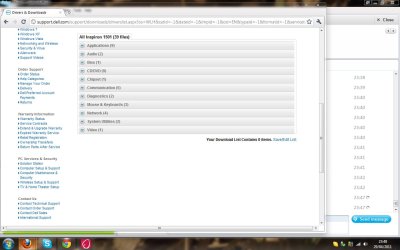
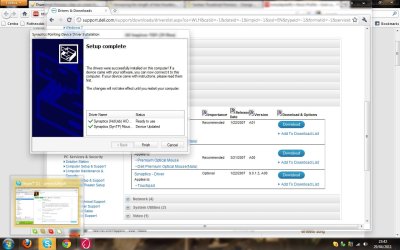
Thanks! Here are some screenshots to explain what is happening.

screen1.jpg
Screen1 - when the small installation window is in the foreground, I can hover over the background windows icon for as long as I want and the preview will stay up.

screen2.jpg
Screen2 - when the small installation window is minimized and the other windows are maximised, the thumbnail will not stay up despite me hovering over it.

Maybe this is just a feature of Windows 7? I would like the have the thumbnails come up all the time i'm hovering over them if possible!

Cheers,
 

My Computer My Computer

At a glance

Windows 7 Ultimate 32bit1 GB
Computer Manufacturer/Model Number
Dell
OS
Windows 7 Ultimate 32bit
Memory
1 GB
Back
Top