Word 2010 Portrait Orientation - Possible Bug

Techguy222

New member
Local time
6:02 AM
Messages
14
How can I change the orientation of a 2" wide by 1" high document to "Portrait" in Word 2010? The orientation wants to "auto correct" back to landscape every time.

Earlier versions of Word did not do this and I was able to print in portrait mode all the time.

Any assistance would be greatly appreciated.

Thanks!
 

My Computer My Computer

At a glance

Windows 7 Professional 32-Bit
OS
Windows 7 Professional 32-Bit
hi techguy222, and welcome to sevenforums,

if a document is wider than it's tall, then it's landscape, surely. :confused:
 

My Computer My Computer

At a glance

ultimate 64 sp1i5 2500K [email protected]8 gigs GSkill Ripjaws 1600amd hd6950
Computer Manufacturer/Model Number
mickey megabyte 1234
OS
ultimate 64 sp1
CPU
i5 2500K [email protected]
Motherboard
MSI P67A-GD53
Memory
8 gigs GSkill Ripjaws 1600
Graphics Card(s)
amd hd6950
Sound Card
creative x-fi gamer
Monitor(s) Displays
samsung 24"
Screen Resolution
1920x1080
Hard Drives
ocz vertex 2e 60 gig, samsung f3 1tb, buffalo 2tb ext
PSU
antec 550
Case
antec three hundred
Cooling
i'm a cooling fan
Keyboard
saitek eclipse ii
Mouse
logitech g3
Internet Speed
about 4 Mbps
Other Info
i love win7
Clarification

Let me give some more background here... Word 2003 does not do this. I'm assuming the folks at Microsoft think I am doing something wrong by trying to print this out in portrait mode in 2010. I have a label printer that takes various widths of tape for printing labels. The labels come in continuous rolls of 1",2",3", and 4" widths. I need to achieve a 1"x2" label and I only have 2" tape. Printing a 1" high by 2" wide label in landscape mode would require 1" tape to be loaded. Since I have only 2" tape I need to print in portrait mode so my label maker cuts after printing 1" thus giving me a portrait printed 1x2 label on 2" tape.


This doable on word 2003 but now 2010 wants to "auto correct" my decision to use portrait and it goes back to landscape every time.

Sine I have a new PC the good ol folks at Microsoft wont let me install 2003 to have both on my PC. The only solution I have come up with so far is to stop using microsoft and to start using Open Office. Open Office writer has no issues with me creating a 2in wide by 1in high portrait document.
 

My Computer My Computer

At a glance

Windows 7 Professional 32-Bit
OS
Windows 7 Professional 32-Bit
Also thanks for the quick response!!! I am hoping to find a way to continue using word because that is what I am used to using.
 

My Computer My Computer

At a glance

Windows 7 Professional 32-Bit
OS
Windows 7 Professional 32-Bit
sorry, i don't know - it was just that your original post confused me. :)

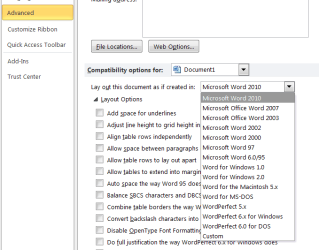
have you tried running your document in 2003 'compatibility mode'?

in advanced options:

wordopt.png

i really don't know if this'll work - just an idea.
 

My Computer My Computer

At a glance

ultimate 64 sp1i5 2500K [email protected]8 gigs GSkill Ripjaws 1600amd hd6950
Computer Manufacturer/Model Number
mickey megabyte 1234
OS
ultimate 64 sp1
CPU
i5 2500K [email protected]
Motherboard
MSI P67A-GD53
Memory
8 gigs GSkill Ripjaws 1600
Graphics Card(s)
amd hd6950
Sound Card
creative x-fi gamer
Monitor(s) Displays
samsung 24"
Screen Resolution
1920x1080
Hard Drives
ocz vertex 2e 60 gig, samsung f3 1tb, buffalo 2tb ext
PSU
antec 550
Case
antec three hundred
Cooling
i'm a cooling fan
Keyboard
saitek eclipse ii
Mouse
logitech g3
Internet Speed
about 4 Mbps
Other Info
i love win7
That was definitely something I haven't tried before. Good idea but it didn't work :confused:

Grr...
 

My Computer My Computer

At a glance

Windows 7 Professional 32-Bit
OS
Windows 7 Professional 32-Bit
sorry, that's all i've got to offer.

hopefully somebody will be along later with another suggestion.

good luck!
 

My Computer My Computer

At a glance

ultimate 64 sp1i5 2500K [email protected]8 gigs GSkill Ripjaws 1600amd hd6950
Computer Manufacturer/Model Number
mickey megabyte 1234
OS
ultimate 64 sp1
CPU
i5 2500K [email protected]
Motherboard
MSI P67A-GD53
Memory
8 gigs GSkill Ripjaws 1600
Graphics Card(s)
amd hd6950
Sound Card
creative x-fi gamer
Monitor(s) Displays
samsung 24"
Screen Resolution
1920x1080
Hard Drives
ocz vertex 2e 60 gig, samsung f3 1tb, buffalo 2tb ext
PSU
antec 550
Case
antec three hundred
Cooling
i'm a cooling fan
Keyboard
saitek eclipse ii
Mouse
logitech g3
Internet Speed
about 4 Mbps
Other Info
i love win7
I'm going to blame skynet for foolishly thinking computers can be smarter than people...
 

My Computer My Computer

At a glance

Windows 7 Professional 32-Bit
OS
Windows 7 Professional 32-Bit
Thanks for the suggestion mickey, have a great day!
 

My Computer My Computer

At a glance

Windows 7 Professional 32-Bit
OS
Windows 7 Professional 32-Bit
Presuming that you are printing from Word, select the 'Mailing' tab and choose 'labels' second one in from the left. Then if you press 'Options' you can select the label you are using. All should be good then - I usually try them on a blank page first to check the alignment.

Hope that helps. :)
 

My Computer My Computer

At a glance

Windows 7 Home Premium 64bitIntel(R) Core(TM) i3-2120 CPU @ 3.30GHz3.00 GB(1) Intel(R) HD Graphics (2) VNC Mirror Driver
Computer type
PC/Desktop
Computer Manufacturer/Model Number
Packard Bell
OS
Windows 7 Home Premium 64bit
CPU
Intel(R) Core(TM) i3-2120 CPU @ 3.30GHz
Motherboard
Packard Bell IPISB-AG
Memory
3.00 GB
Graphics Card(s)
(1) Intel(R) HD Graphics (2) VNC Mirror Driver
Sound Card
Realtek High Definition Audio
Monitor(s) Displays
AIO LCD
Screen Resolution
1920 x 1080
Hard Drives
WDC WD10EADX-22TDHB0 ATA Device
Fixed hard disk media
4 partitions
931.51 GB
Keyboard
Wireless
Mouse
Wireless
Antivirus
Microsoft Security Essentials
Browser
IE; Firefox
Other Info
Also:
Samsung N220 Plus Netbook - Windows 7 Home
HP laptop
iPad 5
I was able to find what you were talking about but it doesn't seem to allow me to adjust the orientation of my existing document.

I'll play around with it some more but It dosen't look like its going to work... thank you for the suggestion though!
 

My Computer My Computer

At a glance

Windows 7 Professional 32-Bit
OS
Windows 7 Professional 32-Bit
How can I change the orientation of a 2" wide by 1" high document to "Portrait" in Word 2010? The orientation wants to "auto correct" back to landscape every time.
See if this works:

Page Layout > Size

More Paper Sizes...

Paper Tab > set Width and Height

Margins Tab > reset to smaller margins (R, L, T, B)

Layout Tab > reset Header and Footer - From Edge to ZERO

Click OK button.

If error message appears click FIX.

Click OK.

Regards,
GEWB
 

My Computer My Computer

At a glance

Linux Mint / XP / Win7 Home, Pro, Ultimate / ...
Computer type
PC/Desktop
Computer Manufacturer/Model Number
(7 different computers booting up to 10 systems)
OS
Linux Mint / XP / Win7 Home, Pro, Ultimate / Win8.1 / Win10
Other Info
Four desktops, two laptops, one notebook and one tablet
Thanks for the suggestion! I followed your steps and it reverted back to landscape again...
 

My Computer My Computer

At a glance

Windows 7 Professional 32-Bit
OS
Windows 7 Professional 32-Bit
Hey Techguy,

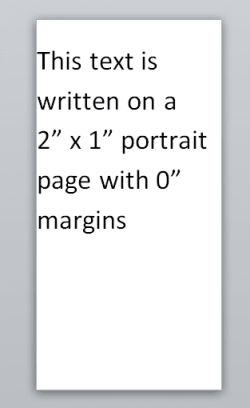
Is this what you are ultimately looking for? I created a 2"x1" page, then oriented it as Portrait.
 

Attachments

  • word2x1.PNG
    word2x1.PNG
    8.2 KB · Views: 3

My Computer My Computer

At a glance

Win7 Ultimate x64, Server 2008 R2AMD Phenom II X6 1055T Thuban 2.8GHz8GB G.SKILL Ripjaws Series DDR3 1600 (PC3 12800)2x HIS/Sapphire ATI Radeon HD 5830 in CrossfireX
Computer Manufacturer/Model Number
Myself
OS
Win7 Ultimate x64, Server 2008 R2
CPU
AMD Phenom II X6 1055T Thuban 2.8GHz
Motherboard
GIGABYTE GA-890FXA-UD5
Memory
8GB G.SKILL Ripjaws Series DDR3 1600 (PC3 12800)
Graphics Card(s)
2x HIS/Sapphire ATI Radeon HD 5830 in CrossfireX
Sound Card
Sound Blaster X-Fi Xtreme
Monitor(s) Displays
Dell 2407WFP 24", Dell 22"
Screen Resolution
1920x1200
Hard Drives
Patriot Torqx 128GB SSD
3TB other HD
PSU
CORSAIR HX Series CMPSU-750HX 750W
Case
Antec Nine Hundred
Cooling
Cooler Master Hyper 212 Plus CPU cooler
Keyboard
SteelSeries MercStealth
Mouse
Razer Lachesis
Internet Speed
HAHA NO MOAR COMCAST. Now, FiOS :D
Other Info
I am a virtualization enthusiast. I like Hyper-V. It's free.
I'm a Windows 7 fangirl. I will teach a class for you or write a custom course for you RIGHT NOW.
I love EVE Online. I'm Sayra Sainer. I play Starcraft II. My gamertag is Tal0nn. I'm trying not to play Minecraft.
I also like coffee. I'll take a basic triple grande extra-hot breve stirred ristretto caramel machiatto.
I need it to be 2"wide by 1"high set to Portrait :)
 

My Computer My Computer

At a glance

Windows 7 Professional 32-Bit
OS
Windows 7 Professional 32-Bit
Okay, let's ninja this.

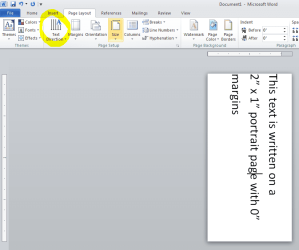
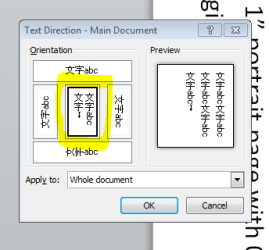
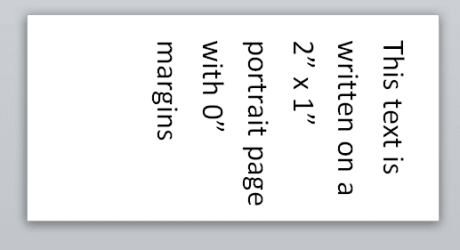
Try changing the text orientation. I think Word 2010 got a little "refined" and changed the whole idea of orientation--if you have a 2x1 page and orientate it portrait, now you have a 1x2 page, and you will always type left to right, top to bottom, regardless of orientation. It actually makes a bit of sense. Check out my screenshots (attached) and see if they help. :)
 

Attachments

  • word2x1.PNG
    word2x1.PNG
    25 KB · Views: 6
  • word2x1_2.PNG
    word2x1_2.PNG
    6.2 KB · Views: 3

My Computer My Computer

At a glance

Win7 Ultimate x64, Server 2008 R2AMD Phenom II X6 1055T Thuban 2.8GHz8GB G.SKILL Ripjaws Series DDR3 1600 (PC3 12800)2x HIS/Sapphire ATI Radeon HD 5830 in CrossfireX
Computer Manufacturer/Model Number
Myself
OS
Win7 Ultimate x64, Server 2008 R2
CPU
AMD Phenom II X6 1055T Thuban 2.8GHz
Motherboard
GIGABYTE GA-890FXA-UD5
Memory
8GB G.SKILL Ripjaws Series DDR3 1600 (PC3 12800)
Graphics Card(s)
2x HIS/Sapphire ATI Radeon HD 5830 in CrossfireX
Sound Card
Sound Blaster X-Fi Xtreme
Monitor(s) Displays
Dell 2407WFP 24", Dell 22"
Screen Resolution
1920x1200
Hard Drives
Patriot Torqx 128GB SSD
3TB other HD
PSU
CORSAIR HX Series CMPSU-750HX 750W
Case
Antec Nine Hundred
Cooling
Cooler Master Hyper 212 Plus CPU cooler
Keyboard
SteelSeries MercStealth
Mouse
Razer Lachesis
Internet Speed
HAHA NO MOAR COMCAST. Now, FiOS :D
Other Info
I am a virtualization enthusiast. I like Hyper-V. It's free.
I'm a Windows 7 fangirl. I will teach a class for you or write a custom course for you RIGHT NOW.
I love EVE Online. I'm Sayra Sainer. I play Starcraft II. My gamertag is Tal0nn. I'm trying not to play Minecraft.
I also like coffee. I'll take a basic triple grande extra-hot breve stirred ristretto caramel machiatto.
Or maybe like this? I'm a little confused now how you need it oriented. We can make this happen, for sure, but I need a little clarification. Can you make up a pretend doc like I did and post a screenshot?
 

Attachments

  • word2x1_3.PNG
    word2x1_3.PNG
    5.3 KB · Views: 3

My Computer My Computer

At a glance

Win7 Ultimate x64, Server 2008 R2AMD Phenom II X6 1055T Thuban 2.8GHz8GB G.SKILL Ripjaws Series DDR3 1600 (PC3 12800)2x HIS/Sapphire ATI Radeon HD 5830 in CrossfireX
Computer Manufacturer/Model Number
Myself
OS
Win7 Ultimate x64, Server 2008 R2
CPU
AMD Phenom II X6 1055T Thuban 2.8GHz
Motherboard
GIGABYTE GA-890FXA-UD5
Memory
8GB G.SKILL Ripjaws Series DDR3 1600 (PC3 12800)
Graphics Card(s)
2x HIS/Sapphire ATI Radeon HD 5830 in CrossfireX
Sound Card
Sound Blaster X-Fi Xtreme
Monitor(s) Displays
Dell 2407WFP 24", Dell 22"
Screen Resolution
1920x1200
Hard Drives
Patriot Torqx 128GB SSD
3TB other HD
PSU
CORSAIR HX Series CMPSU-750HX 750W
Case
Antec Nine Hundred
Cooling
Cooler Master Hyper 212 Plus CPU cooler
Keyboard
SteelSeries MercStealth
Mouse
Razer Lachesis
Internet Speed
HAHA NO MOAR COMCAST. Now, FiOS :D
Other Info
I am a virtualization enthusiast. I like Hyper-V. It's free.
I'm a Windows 7 fangirl. I will teach a class for you or write a custom course for you RIGHT NOW.
I love EVE Online. I'm Sayra Sainer. I play Starcraft II. My gamertag is Tal0nn. I'm trying not to play Minecraft.
I also like coffee. I'll take a basic triple grande extra-hot breve stirred ristretto caramel machiatto.
Thanks for the suggestion! I followed your steps and it reverted back to landscape again...

Must be an options setting as it worked on my system (that's how I got the navigation). I'll poke around some more.

Regards,
GEWB
 

My Computer My Computer

At a glance

Linux Mint / XP / Win7 Home, Pro, Ultimate / ...
Computer type
PC/Desktop
Computer Manufacturer/Model Number
(7 different computers booting up to 10 systems)
OS
Linux Mint / XP / Win7 Home, Pro, Ultimate / Win8.1 / Win10
Other Info
Four desktops, two laptops, one notebook and one tablet
I like where your headed with that but I'm still running into the same issue but reversed. I recreated the example in your first screen shot with the text direction rotated right 90° but now it is stuck at portrait and it wont let me change it to landscape :(
 

My Computer My Computer

At a glance

Windows 7 Professional 32-Bit
OS
Windows 7 Professional 32-Bit
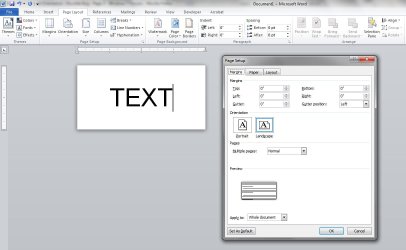
Ok, I tried an attachment showing how it always reverts back to landscape.
 

Attachments

  • Screen Shot 1.jpg
    Screen Shot 1.jpg
    63.5 KB · Views: 13

My Computer My Computer

At a glance

Windows 7 Professional 32-Bit
OS
Windows 7 Professional 32-Bit
Back
Top