Start Menu User Folder Buttons - Open to Users Instead of Libraries

How to Make Windows 7 Start Menu User Folder Buttons Open to Users Instead of Libraries Location

   Information
This will show you how to make the Windows 7 Start Menu My Documents, Pictures, Music, and Videos buttons open to the real C:\Users\(user-name) location instead of the default Libraries location for all users.

You must be logged in as an administrator to be able to do the steps in this tutorial.

   Note
Credit belongs to our member Foe for this.


EXAMPLE: Start Menu User Folder Buttons
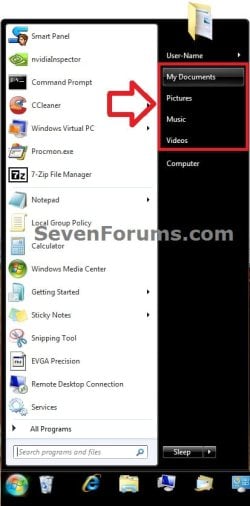
Start_Menu.jpg


OPTION ONE

Set Start Menu User Folder Buttons to Open to "Users" Location


1. Set Start Menu Documents Button to Open to Users Location
A) Click on the Download button below to download the file below.
Start_Menu_My_Documents_Open_to_Users.reg

Download


2. Set Start Menu Music Button to Open to Users Location
A) Click on the Download button below to download the file below.
Start_Menu_Music_Open_to_Users.reg

Download


3. Set Start Menu Pictures Button to Open to Users Location
A) Click on the Download button below to download the file below.
Start_Menu_Pictures_Open_to_Users.reg

Download


4. Set Start Menu Recorded TV Button to Open to Public Location
NOTE: Special thanks to Foe for this addition. :)
A) Click on the Download button below to download the file below.
Start_Menu_Recored_TV_Open_to_Public.bat

Download


5. Set Start Menu Videos Button to Open to Users Location
A) Click on the Download button below to download the file below.
Start_Menu_Videos_Open_to_Users.reg

Download


6. Save the .reg or. bat file to the desktop.

7. Double click on the downloaded .reg or .bat file.

8. Click on Run, Yes (UAC), Yes, and OK when prompted.

9. Log off and log on, or restart the computer to apply.

10. When done, you can delete the downloaded .reg file if you like.


OPTION TWO

Set Start Menu User Folder Buttons to Open to Default "Libraries" Location


1. Set Start Menu Documents Button back to Open to Default Libraries Location
A) Click on the Download button below to download the file below.
Default_Start_Menu_My_Documents_Open_to_Library.reg

Download


2. Set Start Menu Music Button back to Open to Default Libraries Location
A) Click on the Download button below to download the file below.
Default_Start_Menu_Music_Open_to_Library.reg

Download


3. Set Start Menu Pictures Button back to Open to Default Libraries Location
A) Click on the Download button below to download the file below.
Default_Start_Menu_Pictures_Open_to_Library.reg

Download


4. Set Start Menu Recorded TV Button back to Open to Default Public Libraries Location
NOTE: Special thanks to Foe for this addition. :)
A) Click on the Download button below to download the file below.
Start_Menu_Recored_TV_Open_to_Public_Library.reg

Download


5. Set Start Menu Videos Button back to Open to Default Libraries Location
A) Click on the Download button below to download the file below.
Default_Start_Menu_Videos_Open_to_Library.reg

Download


6. Save the .reg file to the desktop.

7. Double click on the downloaded .reg file.

8. Click on Run, Yes (UAC), Yes, and OK when prompted.

9. Log off and log on, or restart the computer to apply.

10. When done, you can delete the downloaded .reg file if you like.
That's it,
Shawn


Attachments

Last edited:
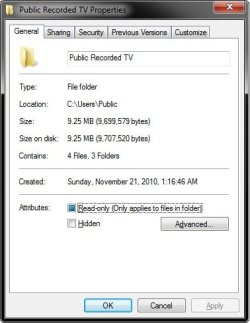
"C:\Users\Public\Recorded TV" is the correct path that Windows 7 uses when referenced, but it displays as below. That's all. You have it correct.

View attachment 152762

I'm not certain why it's not opening to the same location as it is for me. Since it still opens to show both included Recorderd TV locations though, I wouldn't worry about it. While different than mine, it's effectively the same.

Just updated the picture above my public recorded tv folder is named only recorded tv no public
 

My Computer My Computer

At a glance

Windows 7 Home Premium x64 SP1intel(R)core(TM)2 duo CPU T6600 @ 2.20GHz3 gb ddr3ati radeon hd4570/512mb
Computer Manufacturer/Model Number
acer aspire 5935g
OS
Windows 7 Home Premium x64 SP1
CPU
intel(R)core(TM)2 duo CPU T6600 @ 2.20GHz
Motherboard
intel gm45/gm47 revision 07
Memory
3 gb ddr3
Graphics Card(s)
ati radeon hd4570/512mb
Monitor(s) Displays
lop156wh2-tle1 15.3 flat
Screen Resolution
1366x768
Hard Drives
OCZ-Agility3 60gig ssd
320gig external hdd
500gig external hdd
Mouse
Optical
Internet Speed
30Mbps Down/30Mbps Up
Strange, that may be a why. If you like, you could test to see how it behaves if you rename it Public Recorded TV. If it messes up, just rename it back to Recorded TV.

Public.jpg
 

My Computer My Computer

At a glance

64-bit Windows 11 Pro for WorkstationsIntel i7-8700K OC'd to 5 GHz64 GB (4x16GB) G.SKILL TridentZ RGB DDR4 3600...ASUS ROG-STRIX-GTX1080TI-O11G-GAMING
Computer type
PC/Desktop
Computer Manufacturer/Model Number
Self built custom
OS
64-bit Windows 11 Pro for Workstations
CPU
Intel i7-8700K OC'd to 5 GHz
Motherboard
ASUS ROG Maximus XI Formula Z390
Memory
64 GB (4x16GB) G.SKILL TridentZ RGB DDR4 3600 MHz
Graphics Card(s)
ASUS ROG-STRIX-GTX1080TI-O11G-GAMING
Sound Card
Integrated
Monitor(s) Displays
2 x Samsung Odyssey G7 27"
Screen Resolution
2560x1440
Hard Drives
1TB Samsung 990 PRO M.2,
4TB Samsung 990 PRO PRO M.2,
TerraMaster F8 SSD Plus NAS
PSU
Seasonic Prime Titanium 850W
Case
Thermaltake Core P3
Cooling
Corsair Hydro H115i
Keyboard
Logitech wireless K800
Mouse
Logitech MX Master 4
Internet Speed
2 Gb/s Download and 100 Mb/s Upload
Antivirus
Malwarebyte Anti-Malware Premium
Browser
Google Chrome
Other Info
Logitech Z625 speaker system,
Logitech BRIO 4K Pro webcam,
HP Color LaserJet Pro MFP M477fdn,
APC SMART-UPS RT 1000 XL - SURT1000XLI,
Galaxy S23 Plus phone
Ok Shawn

I deleted all Recorded TV folders and all Recorded TV libraries and reset the start menu using the default reg file in this tutorial.Also named the c:\users\public TV folder to Public Recorded TV.So identical to yours.I relocated the desktop folder back to c: to count that out as well. So back to square 1. Rebooted and created a new Recorded TV folder but on c:\users\danny which is the same as yours so that rules out a location issue.

Right Clicked on c:\users\public\Public Recorded TV include in library\create new library.Renamed that library to Recorded TV (just removed public) Included the new c:\users\danny Recorded TV folder I created for this test.All fine to this point the library shows the 2 locations.Public on top and default save location.

Right clicked Recorded TV in the start menu\properties and included the C:\Users\danny\AppData\Roaming\Microsoft\Windows\Libraries\Recorded TV library which added the 2 locations c:\users\public recorded tv and c:\users\danny\recorded tv.

Ran the reg file from c:\desktop.Agreed yes yes and rebooted.

And STILL no location change.If that reads identical to what you did feel free to email me lots of expletives because i just dont know where im going wrong.I dont think theres anything else to try so I will thank you for all your time and patience and hope your still talking to me:o:o.

Thanks Shawn
Danny
 

My Computer My Computer

At a glance

Windows 7 Home Premium x64 SP1intel(R)core(TM)2 duo CPU T6600 @ 2.20GHz3 gb ddr3ati radeon hd4570/512mb
Computer Manufacturer/Model Number
acer aspire 5935g
OS
Windows 7 Home Premium x64 SP1
CPU
intel(R)core(TM)2 duo CPU T6600 @ 2.20GHz
Motherboard
intel gm45/gm47 revision 07
Memory
3 gb ddr3
Graphics Card(s)
ati radeon hd4570/512mb
Monitor(s) Displays
lop156wh2-tle1 15.3 flat
Screen Resolution
1366x768
Hard Drives
OCZ-Agility3 60gig ssd
320gig external hdd
500gig external hdd
Mouse
Optical
Internet Speed
30Mbps Down/30Mbps Up
I looks like you did it the same way I did. I don't know what else to suggest anymore either. :confused:
 

My Computer My Computer

At a glance

64-bit Windows 11 Pro for WorkstationsIntel i7-8700K OC'd to 5 GHz64 GB (4x16GB) G.SKILL TridentZ RGB DDR4 3600...ASUS ROG-STRIX-GTX1080TI-O11G-GAMING
Computer type
PC/Desktop
Computer Manufacturer/Model Number
Self built custom
OS
64-bit Windows 11 Pro for Workstations
CPU
Intel i7-8700K OC'd to 5 GHz
Motherboard
ASUS ROG Maximus XI Formula Z390
Memory
64 GB (4x16GB) G.SKILL TridentZ RGB DDR4 3600 MHz
Graphics Card(s)
ASUS ROG-STRIX-GTX1080TI-O11G-GAMING
Sound Card
Integrated
Monitor(s) Displays
2 x Samsung Odyssey G7 27"
Screen Resolution
2560x1440
Hard Drives
1TB Samsung 990 PRO M.2,
4TB Samsung 990 PRO PRO M.2,
TerraMaster F8 SSD Plus NAS
PSU
Seasonic Prime Titanium 850W
Case
Thermaltake Core P3
Cooling
Corsair Hydro H115i
Keyboard
Logitech wireless K800
Mouse
Logitech MX Master 4
Internet Speed
2 Gb/s Download and 100 Mb/s Upload
Antivirus
Malwarebyte Anti-Malware Premium
Browser
Google Chrome
Other Info
Logitech Z625 speaker system,
Logitech BRIO 4K Pro webcam,
HP Color LaserJet Pro MFP M477fdn,
APC SMART-UPS RT 1000 XL - SURT1000XLI,
Galaxy S23 Plus phone
I looks like you did it the same way I did. I don't know what else to suggest anymore either. :confused:

Will come back to it the next time I do a clean install.Maybe some setting corrupt.

Appreciate your help Shaun

Danny
 

My Computer My Computer

At a glance

Windows 7 Home Premium x64 SP1intel(R)core(TM)2 duo CPU T6600 @ 2.20GHz3 gb ddr3ati radeon hd4570/512mb
Computer Manufacturer/Model Number
acer aspire 5935g
OS
Windows 7 Home Premium x64 SP1
CPU
intel(R)core(TM)2 duo CPU T6600 @ 2.20GHz
Motherboard
intel gm45/gm47 revision 07
Memory
3 gb ddr3
Graphics Card(s)
ati radeon hd4570/512mb
Monitor(s) Displays
lop156wh2-tle1 15.3 flat
Screen Resolution
1366x768
Hard Drives
OCZ-Agility3 60gig ssd
320gig external hdd
500gig external hdd
Mouse
Optical
Internet Speed
30Mbps Down/30Mbps Up
LOL, you're welcome. I'll be here when the next time comes around to help if needed.
 

My Computer My Computer

At a glance

64-bit Windows 11 Pro for WorkstationsIntel i7-8700K OC'd to 5 GHz64 GB (4x16GB) G.SKILL TridentZ RGB DDR4 3600...ASUS ROG-STRIX-GTX1080TI-O11G-GAMING
Computer type
PC/Desktop
Computer Manufacturer/Model Number
Self built custom
OS
64-bit Windows 11 Pro for Workstations
CPU
Intel i7-8700K OC'd to 5 GHz
Motherboard
ASUS ROG Maximus XI Formula Z390
Memory
64 GB (4x16GB) G.SKILL TridentZ RGB DDR4 3600 MHz
Graphics Card(s)
ASUS ROG-STRIX-GTX1080TI-O11G-GAMING
Sound Card
Integrated
Monitor(s) Displays
2 x Samsung Odyssey G7 27"
Screen Resolution
2560x1440
Hard Drives
1TB Samsung 990 PRO M.2,
4TB Samsung 990 PRO PRO M.2,
TerraMaster F8 SSD Plus NAS
PSU
Seasonic Prime Titanium 850W
Case
Thermaltake Core P3
Cooling
Corsair Hydro H115i
Keyboard
Logitech wireless K800
Mouse
Logitech MX Master 4
Internet Speed
2 Gb/s Download and 100 Mb/s Upload
Antivirus
Malwarebyte Anti-Malware Premium
Browser
Google Chrome
Other Info
Logitech Z625 speaker system,
Logitech BRIO 4K Pro webcam,
HP Color LaserJet Pro MFP M477fdn,
APC SMART-UPS RT 1000 XL - SURT1000XLI,
Galaxy S23 Plus phone
Thought id have another look at this.
Wish I hadnt bothered lol. Still cant get the on screen location to change.Interestingly though It also doesnt change if I customise the Recorded TV start menu library like here http://www.sevenforums.com/customization/26716-add-custom-folder-library-start-menu.html and change the name to something else and point it to any file on my D drive.It still shows as pointing to public users instead of the D drive.


You managed to change the location of the library.Capture.PNG

Therefore You would be able to change the recorded tv name to anything you like and point it to any folder and it would show as above.

That is presuming you could get the damn thing to change in the first place.

Danny
 
Last edited by a moderator:

My Computer My Computer

At a glance

Windows 7 Home Premium x64 SP1intel(R)core(TM)2 duo CPU T6600 @ 2.20GHz3 gb ddr3ati radeon hd4570/512mb
Computer Manufacturer/Model Number
acer aspire 5935g
OS
Windows 7 Home Premium x64 SP1
CPU
intel(R)core(TM)2 duo CPU T6600 @ 2.20GHz
Motherboard
intel gm45/gm47 revision 07
Memory
3 gb ddr3
Graphics Card(s)
ati radeon hd4570/512mb
Monitor(s) Displays
lop156wh2-tle1 15.3 flat
Screen Resolution
1366x768
Hard Drives
OCZ-Agility3 60gig ssd
320gig external hdd
500gig external hdd
Mouse
Optical
Internet Speed
30Mbps Down/30Mbps Up
You may be able to right click on Recorded TV in the Start Menu, click on Rename, type in a new name, press Enter, give UAC approval to change the name.

Afterwards, right click on Recorded TV in the Start Menu, click on Properties, include the folder you want it to point to, set this folder as the new Save To folder. If you didn't want any other folder included in the library, then you could remove them to only have the new folder in it.
 

My Computer My Computer

At a glance

64-bit Windows 11 Pro for WorkstationsIntel i7-8700K OC'd to 5 GHz64 GB (4x16GB) G.SKILL TridentZ RGB DDR4 3600...ASUS ROG-STRIX-GTX1080TI-O11G-GAMING
Computer type
PC/Desktop
Computer Manufacturer/Model Number
Self built custom
OS
64-bit Windows 11 Pro for Workstations
CPU
Intel i7-8700K OC'd to 5 GHz
Motherboard
ASUS ROG Maximus XI Formula Z390
Memory
64 GB (4x16GB) G.SKILL TridentZ RGB DDR4 3600 MHz
Graphics Card(s)
ASUS ROG-STRIX-GTX1080TI-O11G-GAMING
Sound Card
Integrated
Monitor(s) Displays
2 x Samsung Odyssey G7 27"
Screen Resolution
2560x1440
Hard Drives
1TB Samsung 990 PRO M.2,
4TB Samsung 990 PRO PRO M.2,
TerraMaster F8 SSD Plus NAS
PSU
Seasonic Prime Titanium 850W
Case
Thermaltake Core P3
Cooling
Corsair Hydro H115i
Keyboard
Logitech wireless K800
Mouse
Logitech MX Master 4
Internet Speed
2 Gb/s Download and 100 Mb/s Upload
Antivirus
Malwarebyte Anti-Malware Premium
Browser
Google Chrome
Other Info
Logitech Z625 speaker system,
Logitech BRIO 4K Pro webcam,
HP Color LaserJet Pro MFP M477fdn,
APC SMART-UPS RT 1000 XL - SURT1000XLI,
Galaxy S23 Plus phone
Shaun that did work but its still pointing to the new public library not users library.Capture.PNG

That reg file will not change the library location no matter what I do even though its pointing to users libraries in the registry its still displaying as public in explorer.0.PNG
 

My Computer My Computer

At a glance

Windows 7 Home Premium x64 SP1intel(R)core(TM)2 duo CPU T6600 @ 2.20GHz3 gb ddr3ati radeon hd4570/512mb
Computer Manufacturer/Model Number
acer aspire 5935g
OS
Windows 7 Home Premium x64 SP1
CPU
intel(R)core(TM)2 duo CPU T6600 @ 2.20GHz
Motherboard
intel gm45/gm47 revision 07
Memory
3 gb ddr3
Graphics Card(s)
ati radeon hd4570/512mb
Monitor(s) Displays
lop156wh2-tle1 15.3 flat
Screen Resolution
1366x768
Hard Drives
OCZ-Agility3 60gig ssd
320gig external hdd
500gig external hdd
Mouse
Optical
Internet Speed
30Mbps Down/30Mbps Up
Hmm, ok. When you go to the first path below inside the Libraries folder, press and hold Shift key, right click on Recorded TV, click on Copy as path, and paste it into your post here, does it have a path like the second one below but with your username?

C:\Users\(user-name)\AppData\Roaming\Microsoft\Windows\Libraries


"C:\Users\(user-name)\AppData\Roaming\Microsoft\Windows\Libraries\Recorded TV.library-ms"
 

My Computer My Computer

At a glance

64-bit Windows 11 Pro for WorkstationsIntel i7-8700K OC'd to 5 GHz64 GB (4x16GB) G.SKILL TridentZ RGB DDR4 3600...ASUS ROG-STRIX-GTX1080TI-O11G-GAMING
Computer type
PC/Desktop
Computer Manufacturer/Model Number
Self built custom
OS
64-bit Windows 11 Pro for Workstations
CPU
Intel i7-8700K OC'd to 5 GHz
Motherboard
ASUS ROG Maximus XI Formula Z390
Memory
64 GB (4x16GB) G.SKILL TridentZ RGB DDR4 3600 MHz
Graphics Card(s)
ASUS ROG-STRIX-GTX1080TI-O11G-GAMING
Sound Card
Integrated
Monitor(s) Displays
2 x Samsung Odyssey G7 27"
Screen Resolution
2560x1440
Hard Drives
1TB Samsung 990 PRO M.2,
4TB Samsung 990 PRO PRO M.2,
TerraMaster F8 SSD Plus NAS
PSU
Seasonic Prime Titanium 850W
Case
Thermaltake Core P3
Cooling
Corsair Hydro H115i
Keyboard
Logitech wireless K800
Mouse
Logitech MX Master 4
Internet Speed
2 Gb/s Download and 100 Mb/s Upload
Antivirus
Malwarebyte Anti-Malware Premium
Browser
Google Chrome
Other Info
Logitech Z625 speaker system,
Logitech BRIO 4K Pro webcam,
HP Color LaserJet Pro MFP M477fdn,
APC SMART-UPS RT 1000 XL - SURT1000XLI,
Galaxy S23 Plus phone
Hi Shaun

Yes thats what I get

"C:\Users\danny\AppData\Roaming\Microsoft\Windows\Libraries\Recorded TV.library-ms"

This makes no sense at all.How can it be changed in the registry and not in explorer, wheres it gettin its information from lol.

Danny

Untitled.png
 

My Computer My Computer

At a glance

Windows 7 Home Premium x64 SP1intel(R)core(TM)2 duo CPU T6600 @ 2.20GHz3 gb ddr3ati radeon hd4570/512mb
Computer Manufacturer/Model Number
acer aspire 5935g
OS
Windows 7 Home Premium x64 SP1
CPU
intel(R)core(TM)2 duo CPU T6600 @ 2.20GHz
Motherboard
intel gm45/gm47 revision 07
Memory
3 gb ddr3
Graphics Card(s)
ati radeon hd4570/512mb
Monitor(s) Displays
lop156wh2-tle1 15.3 flat
Screen Resolution
1366x768
Hard Drives
OCZ-Agility3 60gig ssd
320gig external hdd
500gig external hdd
Mouse
Optical
Internet Speed
30Mbps Down/30Mbps Up
I just can't understand why it's not working for you either when it opens to the Users....Libraries for me using the same steps I outlined here. :huh:

I must admit that I'm stumped. :(
 

My Computer My Computer

At a glance

64-bit Windows 11 Pro for WorkstationsIntel i7-8700K OC'd to 5 GHz64 GB (4x16GB) G.SKILL TridentZ RGB DDR4 3600...ASUS ROG-STRIX-GTX1080TI-O11G-GAMING
Computer type
PC/Desktop
Computer Manufacturer/Model Number
Self built custom
OS
64-bit Windows 11 Pro for Workstations
CPU
Intel i7-8700K OC'd to 5 GHz
Motherboard
ASUS ROG Maximus XI Formula Z390
Memory
64 GB (4x16GB) G.SKILL TridentZ RGB DDR4 3600 MHz
Graphics Card(s)
ASUS ROG-STRIX-GTX1080TI-O11G-GAMING
Sound Card
Integrated
Monitor(s) Displays
2 x Samsung Odyssey G7 27"
Screen Resolution
2560x1440
Hard Drives
1TB Samsung 990 PRO M.2,
4TB Samsung 990 PRO PRO M.2,
TerraMaster F8 SSD Plus NAS
PSU
Seasonic Prime Titanium 850W
Case
Thermaltake Core P3
Cooling
Corsair Hydro H115i
Keyboard
Logitech wireless K800
Mouse
Logitech MX Master 4
Internet Speed
2 Gb/s Download and 100 Mb/s Upload
Antivirus
Malwarebyte Anti-Malware Premium
Browser
Google Chrome
Other Info
Logitech Z625 speaker system,
Logitech BRIO 4K Pro webcam,
HP Color LaserJet Pro MFP M477fdn,
APC SMART-UPS RT 1000 XL - SURT1000XLI,
Galaxy S23 Plus phone
Could it be a permissions issue.Is it worth taking ownership of the libraries and reg keys involved.Thanks for looking again Shaun, we will get it in the end

Danny
 

My Computer My Computer

At a glance

Windows 7 Home Premium x64 SP1intel(R)core(TM)2 duo CPU T6600 @ 2.20GHz3 gb ddr3ati radeon hd4570/512mb
Computer Manufacturer/Model Number
acer aspire 5935g
OS
Windows 7 Home Premium x64 SP1
CPU
intel(R)core(TM)2 duo CPU T6600 @ 2.20GHz
Motherboard
intel gm45/gm47 revision 07
Memory
3 gb ddr3
Graphics Card(s)
ati radeon hd4570/512mb
Monitor(s) Displays
lop156wh2-tle1 15.3 flat
Screen Resolution
1366x768
Hard Drives
OCZ-Agility3 60gig ssd
320gig external hdd
500gig external hdd
Mouse
Optical
Internet Speed
30Mbps Down/30Mbps Up
No, I wouldn't recommend it. Doing so could cause unknown issues.
 

My Computer My Computer

At a glance

64-bit Windows 11 Pro for WorkstationsIntel i7-8700K OC'd to 5 GHz64 GB (4x16GB) G.SKILL TridentZ RGB DDR4 3600...ASUS ROG-STRIX-GTX1080TI-O11G-GAMING
Computer type
PC/Desktop
Computer Manufacturer/Model Number
Self built custom
OS
64-bit Windows 11 Pro for Workstations
CPU
Intel i7-8700K OC'd to 5 GHz
Motherboard
ASUS ROG Maximus XI Formula Z390
Memory
64 GB (4x16GB) G.SKILL TridentZ RGB DDR4 3600 MHz
Graphics Card(s)
ASUS ROG-STRIX-GTX1080TI-O11G-GAMING
Sound Card
Integrated
Monitor(s) Displays
2 x Samsung Odyssey G7 27"
Screen Resolution
2560x1440
Hard Drives
1TB Samsung 990 PRO M.2,
4TB Samsung 990 PRO PRO M.2,
TerraMaster F8 SSD Plus NAS
PSU
Seasonic Prime Titanium 850W
Case
Thermaltake Core P3
Cooling
Corsair Hydro H115i
Keyboard
Logitech wireless K800
Mouse
Logitech MX Master 4
Internet Speed
2 Gb/s Download and 100 Mb/s Upload
Antivirus
Malwarebyte Anti-Malware Premium
Browser
Google Chrome
Other Info
Logitech Z625 speaker system,
Logitech BRIO 4K Pro webcam,
HP Color LaserJet Pro MFP M477fdn,
APC SMART-UPS RT 1000 XL - SURT1000XLI,
Galaxy S23 Plus phone
Ok Shaun will leave it be.

Just one thing I noticed which may be of interest.As I mentioned previous the Recorded tv folder in the public folders was labelled as "Recorded TV" not "Public Recorded TV" like in yours.I changed the name to mach yours but on reboot it re creates the "Recorded TV" folder and moves the temp rec folder to it.Also if I create a new user acc its also labelled as "Recorded TV".Not sure why but suppose it could be a version thing not sure.

Danny
 

My Computer My Computer

At a glance

Windows 7 Home Premium x64 SP1intel(R)core(TM)2 duo CPU T6600 @ 2.20GHz3 gb ddr3ati radeon hd4570/512mb
Computer Manufacturer/Model Number
acer aspire 5935g
OS
Windows 7 Home Premium x64 SP1
CPU
intel(R)core(TM)2 duo CPU T6600 @ 2.20GHz
Motherboard
intel gm45/gm47 revision 07
Memory
3 gb ddr3
Graphics Card(s)
ati radeon hd4570/512mb
Monitor(s) Displays
lop156wh2-tle1 15.3 flat
Screen Resolution
1366x768
Hard Drives
OCZ-Agility3 60gig ssd
320gig external hdd
500gig external hdd
Mouse
Optical
Internet Speed
30Mbps Down/30Mbps Up
I'm thinking that this may the issue or part of it since it should be named "Public Recorded TV".
 

My Computer My Computer

At a glance

64-bit Windows 11 Pro for WorkstationsIntel i7-8700K OC'd to 5 GHz64 GB (4x16GB) G.SKILL TridentZ RGB DDR4 3600...ASUS ROG-STRIX-GTX1080TI-O11G-GAMING
Computer type
PC/Desktop
Computer Manufacturer/Model Number
Self built custom
OS
64-bit Windows 11 Pro for Workstations
CPU
Intel i7-8700K OC'd to 5 GHz
Motherboard
ASUS ROG Maximus XI Formula Z390
Memory
64 GB (4x16GB) G.SKILL TridentZ RGB DDR4 3600 MHz
Graphics Card(s)
ASUS ROG-STRIX-GTX1080TI-O11G-GAMING
Sound Card
Integrated
Monitor(s) Displays
2 x Samsung Odyssey G7 27"
Screen Resolution
2560x1440
Hard Drives
1TB Samsung 990 PRO M.2,
4TB Samsung 990 PRO PRO M.2,
TerraMaster F8 SSD Plus NAS
PSU
Seasonic Prime Titanium 850W
Case
Thermaltake Core P3
Cooling
Corsair Hydro H115i
Keyboard
Logitech wireless K800
Mouse
Logitech MX Master 4
Internet Speed
2 Gb/s Download and 100 Mb/s Upload
Antivirus
Malwarebyte Anti-Malware Premium
Browser
Google Chrome
Other Info
Logitech Z625 speaker system,
Logitech BRIO 4K Pro webcam,
HP Color LaserJet Pro MFP M477fdn,
APC SMART-UPS RT 1000 XL - SURT1000XLI,
Galaxy S23 Plus phone
I would like to take a look into it, too, if you guys don't mind.

I can't say i fully understand the problem though: the default location of the 'Recorded TV' library is in the public folder (just did a clean install and can confirm that much). I guess you could change it, but it would change for all users, so you would still 'share' it, at least with other users on the same system. You would be better off making a sub folder in 'videos' I guess.

PS i read stuff about deleting and recreating the libraries? How are you doing that? A handmade library could behave different from a default one i guess. This is the content of my C:\users\Public\Libraries\RecordedTV.library-ms:
Code:
<?xml version="1.0" encoding="UTF-8"?>
<libraryDescription xmlns="http://schemas.microsoft.com/windows/2009/library">
  <name>@shell32.dll,-34615</name>
  <ownerSID>S-1-5-18</ownerSID>
  <isLibraryPinned>true</isLibraryPinned>
  <iconReference>imageres.dll,-1008</iconReference>
  <templateInfo>
    <folderType>{5fa96407-7e77-483c-ac93-691d05850de8}</folderType>
  </templateInfo>
  <searchConnectorDescriptionList>
    <searchConnectorDescription publisher="Microsoft" product="Windows">
      <description>@shell32.dll,-34617</description>
      <isDefaultSaveLocation>true</isDefaultSaveLocation>
      <isDefaultNonOwnerSaveLocation>true</isDefaultNonOwnerSaveLocation>
      <simpleLocation>
        <url>shell:public\Recorded TV</url>
      </simpleLocation>
    </searchConnectorDescription>
  </searchConnectorDescriptionList>
</libraryDescription>
As you can see the location 'public\Recorded TV' is mentioned within the file.
 

My Computer My Computer

At a glance

Windows 7 x64Intel dualcore P8400 @ 2.26 GHz4G DDR2 SDRAMATI Mobility Radeon HD 3400 Series
Computer Manufacturer/Model Number
Asus X70VR
OS
Windows 7 x64
CPU
Intel dualcore P8400 @ 2.26 GHz
Motherboard
64-0100-000001-00101111-072208-Cantiga$M70VX2
Memory
4G DDR2 SDRAM
Graphics Card(s)
ATI Mobility Radeon HD 3400 Series
Sound Card
Realtek ALC663 @ Intel 82801IB ICH9
Monitor(s) Displays
LG Philips LP171WP4-TLN1 (or television using HDMI Cable)
Screen Resolution
1440x900
Hard Drives
Hard Disk Name: Momentus 5400.5 320320
Interface: SATA-II
Formatted Capacity: 320 GB
Max. Internal Data Rate: 490.4 Mbit/s
Buffer Size: 8 MB
Hello Foe,

Not at all. The more the merrier. :)
 

My Computer My Computer

At a glance

64-bit Windows 11 Pro for WorkstationsIntel i7-8700K OC'd to 5 GHz64 GB (4x16GB) G.SKILL TridentZ RGB DDR4 3600...ASUS ROG-STRIX-GTX1080TI-O11G-GAMING
Computer type
PC/Desktop
Computer Manufacturer/Model Number
Self built custom
OS
64-bit Windows 11 Pro for Workstations
CPU
Intel i7-8700K OC'd to 5 GHz
Motherboard
ASUS ROG Maximus XI Formula Z390
Memory
64 GB (4x16GB) G.SKILL TridentZ RGB DDR4 3600 MHz
Graphics Card(s)
ASUS ROG-STRIX-GTX1080TI-O11G-GAMING
Sound Card
Integrated
Monitor(s) Displays
2 x Samsung Odyssey G7 27"
Screen Resolution
2560x1440
Hard Drives
1TB Samsung 990 PRO M.2,
4TB Samsung 990 PRO PRO M.2,
TerraMaster F8 SSD Plus NAS
PSU
Seasonic Prime Titanium 850W
Case
Thermaltake Core P3
Cooling
Corsair Hydro H115i
Keyboard
Logitech wireless K800
Mouse
Logitech MX Master 4
Internet Speed
2 Gb/s Download and 100 Mb/s Upload
Antivirus
Malwarebyte Anti-Malware Premium
Browser
Google Chrome
Other Info
Logitech Z625 speaker system,
Logitech BRIO 4K Pro webcam,
HP Color LaserJet Pro MFP M477fdn,
APC SMART-UPS RT 1000 XL - SURT1000XLI,
Galaxy S23 Plus phone
Just tested it, it seams like the url section in this, points at the location of the REAL files.

If i change it to <url>C:\</url> I get to see the files and folder located there (like the windows folder), when clicking on the recorded tv button in the start menu. So this determines the location of the included files/folders it seems...

*Edit*
Yes, i ran a test. I added the folder C:\windows and E:\root, my file now reeds:

Code:
<?xml version="1.0" encoding="UTF-8"?>
<libraryDescription xmlns="http://schemas.microsoft.com/windows/2009/library">
  <name>@shell32.dll,-34615</name>
  <ownerSID>S-1-5-18</ownerSID>
  <version>12</version>
  <isLibraryPinned>false</isLibraryPinned>
  <iconReference>imageres.dll,-1008</iconReference>
  <templateInfo>
    <folderType>{5fa96407-7e77-483c-ac93-691d05850de8}</folderType>
  </templateInfo>
  <propertyStore>
    <property name="HasModifiedLocations" type="boolean"><![CDATA[true]]></property>
  </propertyStore>
  <searchConnectorDescriptionList>
    <searchConnectorDescription publisher="Microsoft" product="Windows">
      <description>@shell32.dll,-34617</description>
      <isDefaultSaveLocation>true</isDefaultSaveLocation>
      <isDefaultNonOwnerSaveLocation>true</isDefaultNonOwnerSaveLocation>
      <simpleLocation>
        <url>shell:public\Recorded TV</url>
      </simpleLocation>
    </searchConnectorDescription>
    <searchConnectorDescription>
      <isDefaultNonOwnerSaveLocation>true</isDefaultNonOwnerSaveLocation>
      <isSupported>true</isSupported>
      <simpleLocation>
        <url>knownfolder:{F38BF404-1D43-42F2-9305-67DE0B28FC23}</url>
        <serialized>MBAAAEAFCAAAAAAAADAAAAAAAY0gAAQBQAAAAUEFZo/KEocAy99UEXfKMHgcfPFx1nCzBAAQAAAAAAAABAAAAAAAAAAAAAAAAAAAAwLAUAwHQB+TQDi66kGEiiNCAsCMw0ZGA8yQ6wFAAAAAAAAAAAAAAAAAAAAAAAAANCQMAAAAAAQz+YdkQAwVp5GZvd3cAwDAIAABA8uvurzoU0sPWHpKAAAANIAAAAAABAAAAAAAAAAAAAAAAAAAAcFApBgbAQGAvBwdAMHAAAgFAsDADAgDA8uvBAAFA8BUg/E0gouOpBhoYjAArADMdmBAvMkOcBAAAAAAAAAAAAAAAAAAAAAAAAAAAYBAAAQOAAAAcAAAAEAAAAAHAAAAtAAAAAAAAAAOAAAARAAAAMAAAAgU34PWQAAAAAwQ6w1Vp5GZvd3cAAAEAAAAFAAAgSCAAAguAAAAcAAAAsAAAAKB0v48D1h8CNZBn59Cow/I6CAAAkJAAAQCAAAoNCAAAEzUQNl4KilR8yEODtL/TMpJY2mzxBAAAQAAAAAAfAAAA8CAAAwUA0CAxAQLAUDAtAgMAEDAtAgMAYDAyAQOAcDAyAAOAEDAzAgMA0CAzAgNAEDAzAQMAMDA3AQMAkDAwAQLAQDAxAwNAkDAyAQMAMDAzAwMAMDAtAQMAADAwAAMAAAAAAAAAAAAAAAAAAGAAAwAAAAoYBAAAAAAAAQYzV3cfNnavVmckBAAAAAAIWdhG1zehGkg96To+Yl7motpsVY7ZCeESqHAiMkoJTIiVXoR9sXoBJYv+EqPW5uJabKbF2emgHhk6BgIDJayECAAAAA</serialized>
      </simpleLocation>
    </searchConnectorDescription>
    <searchConnectorDescription>
      <isSupported>true</isSupported>
      <simpleLocation>
        <url>E:\root</url>
        <serialized>MBAAAEAFCAAAAAAAADAAAAAAAY0gAAQBQAAAAQqwv3+ZjwcANdzzng2IMHQT388JoNCzBAAAAAAAAAAABAAAAAAAAAAAAAAAAAAAAQLAUAwHQB+TQDi66kGEiiNCAsCMw0ZGA8SR6wFAAAAAAAAAAAAAAAAAAAAAAAAAFCQMAAAAAAQx+sLUQAgcv9GdAAgNAgAAEAw7+WsPJCVx+sLUqAAAAsUAAAAAAEAAAAAAAAAAAAAAAAAAAAgcA8GAvBAdAAAAUAwOAIAAOAw7+GAAUAwHQB+TQDi66kGEiiNCAsCMw0ZGA8SR6wFAAAAAAAAAAAAAAAAAAAAAAAAAAAAFAAAA8AAAAwBAAAQAAAAAcAAAAMDAAAAAAAAA7AAAAcBAAAwAAAAA9/PAMABAAAgRpNGdpVGAFpDXy92b0BAAoAAAAkAAAAKHAAAAxMFUTJuiYZEvMhzQ7y/ETaCmt5MAAAAAAAAAAAGAAAwAAAAoYBAAAAAAAAQYzV3cfNnavVmckBAAAAAAwbucKucr990vUNES1xcY20tpsVY7ZCeESqHAiMkoJTI8mLniL3afP9LVDhUdMHmNdbKbF2emgHhk6BgIDJayECAAAAA</serialized>
      </simpleLocation>
    </searchConnectorDescription>
  </searchConnectorDescriptionList>
</libraryDescription>
trow knownfolder:{F38BF404-1D43-42F2-9305-67DE0B28FC23} in a run window, you will see it is an alias of the windows folder.

*EDIT2*

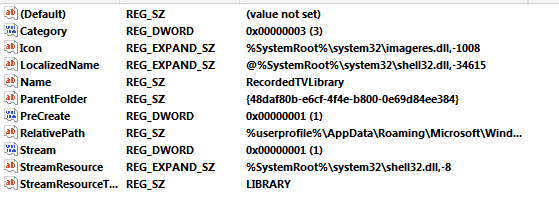
A search for "RecordedTV.library-ms" in the data of my registry lead me to believe that the displayed directory is read from "HKEY_LOCAL_MACHINE\SOFTWARE\Microsoft\Windows\CurrentVersion\Explorer\FolderDescriptions\{1A6FDBA2-F42D-4358-A798-B74D745926C5}"

from the string ParentFolder. It reads "{DFDF76A2-C82A-4D63-906A-5644AC457385}" which are the public libraries. Let me try playing with this...

*edit 3*
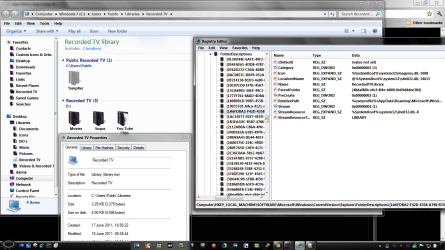
bingo, i changed the parent to {1B3EA5DC-B587-4786-B4EF-BD1DC332AEAE}, which is 'libraries'. It gave me this:
Untitled.png
Even though the library file itself is still located at the public folder. It seems like the system made a default one automatically. I deleted the file from the old location. It is not being recreated.

I think this should answer about all the questions i could think of...
 
Last edited:

My Computer My Computer

At a glance

Windows 7 x64Intel dualcore P8400 @ 2.26 GHz4G DDR2 SDRAMATI Mobility Radeon HD 3400 Series
Computer Manufacturer/Model Number
Asus X70VR
OS
Windows 7 x64
CPU
Intel dualcore P8400 @ 2.26 GHz
Motherboard
64-0100-000001-00101111-072208-Cantiga$M70VX2
Memory
4G DDR2 SDRAM
Graphics Card(s)
ATI Mobility Radeon HD 3400 Series
Sound Card
Realtek ALC663 @ Intel 82801IB ICH9
Monitor(s) Displays
LG Philips LP171WP4-TLN1 (or television using HDMI Cable)
Screen Resolution
1440x900
Hard Drives
Hard Disk Name: Momentus 5400.5 320320
Interface: SATA-II
Formatted Capacity: 320 GB
Max. Internal Data Rate: 490.4 Mbit/s
Buffer Size: 8 MB
Ok, i will put the instruction in a new post. I you would like to change the recorded tv library from public to personal, use this reg file:View attachment rectvnonpublic.reg

copy the file C:\users\Public\Libraries\RecordedTV.library-ms to %userprofile%\appdata\roaming\Microsoft\Windows\Libraries\RecordedTV.library-ms

if you want to keep the references in the old file that is.

Log off an back on.

I did not test this, but it seems plausible for the library to no longer be shared with other users on the same system as well, since the references are now kept in the %userprofile%\appdata sub-directory...
 
Last edited:

My Computer My Computer

At a glance

Windows 7 x64Intel dualcore P8400 @ 2.26 GHz4G DDR2 SDRAMATI Mobility Radeon HD 3400 Series
Computer Manufacturer/Model Number
Asus X70VR
OS
Windows 7 x64
CPU
Intel dualcore P8400 @ 2.26 GHz
Motherboard
64-0100-000001-00101111-072208-Cantiga$M70VX2
Memory
4G DDR2 SDRAM
Graphics Card(s)
ATI Mobility Radeon HD 3400 Series
Sound Card
Realtek ALC663 @ Intel 82801IB ICH9
Monitor(s) Displays
LG Philips LP171WP4-TLN1 (or television using HDMI Cable)
Screen Resolution
1440x900
Hard Drives
Hard Disk Name: Momentus 5400.5 320320
Interface: SATA-II
Formatted Capacity: 320 GB
Max. Internal Data Rate: 490.4 Mbit/s
Buffer Size: 8 MB
Back
Top