Solved Two External Hard Drives, Only One Shows

bmacleod

New member
Local time
4:36 AM
Messages
3
I have two 2TB Western Digital Elements hard drives (I just got the second one today), and I can't see both of them at the same time on my computer. Each one shows up and works fine individually, but if I put the other one in while one is already in there, the second one won't show up. I changed the letter of one of them, hoping that would work, but to no avail...
 

My Computer My Computer

OS
Windows 7 Home Premium x64
Here's a thought...

If you have two identical drives, perhaps Western Digital pre-formatted them identically at the factory. If they both have the same "volume label", then maybe that's what's confusing Windows when you connect the second one.

I recommend that you change the label on one or both external drives, to be unique. Maybe call one "BigDrive1" and the other "BigDrive2" or whatever you want.

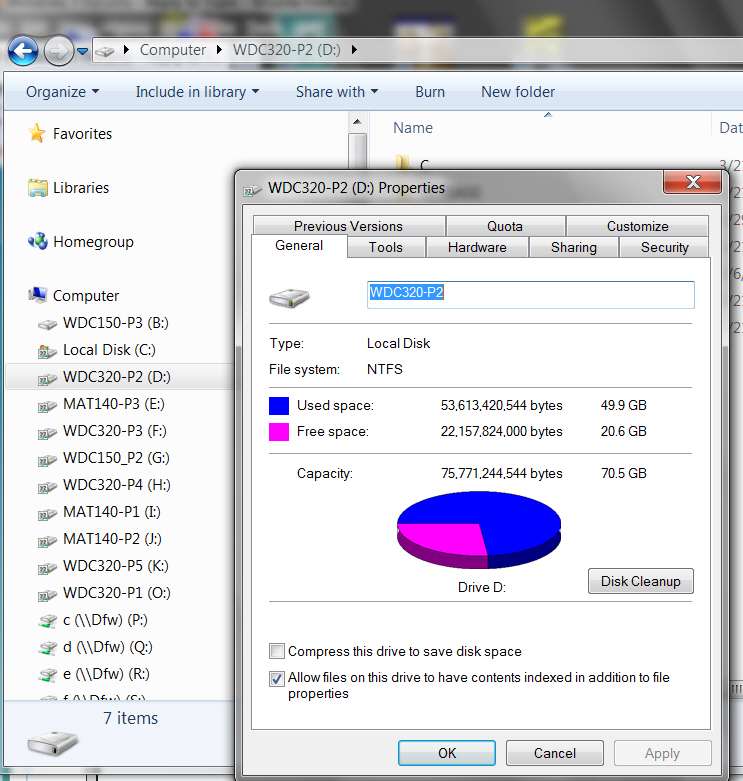
First connect one drive and let Windows assign a drive letter to it. Then open Windows Explorer or My Computer, right-click on the external drive, select Properties, and fill in the volume label for that drive.

For example:

volumelabel.jpg


Then "safely remove" the drive, disconnect it, and connect the second one. Then change its volume label the same way... but with a unique second label.

Now reconnect the first drive to a second USB port, and see if the drive is now accepted by Windows and assigned a second unique drive letter.


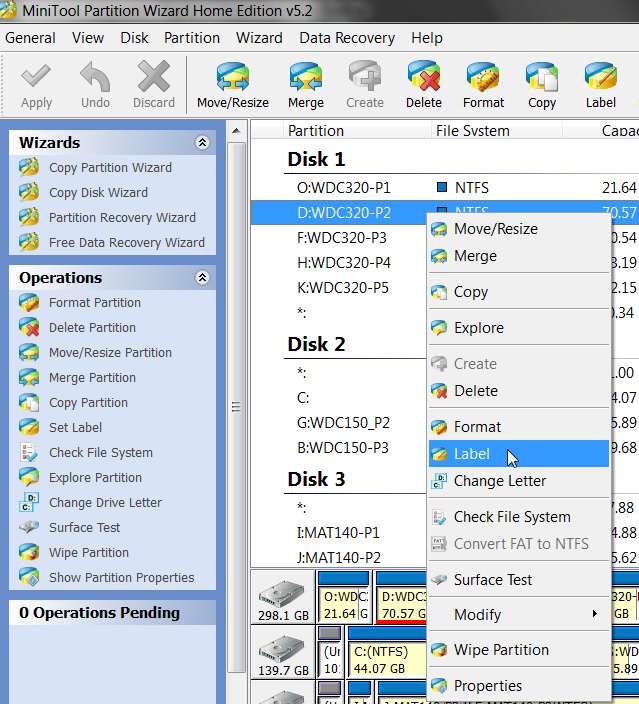
Note: if you have Partition Wizard installed, you can use it as well to plant a volume label.

Select the partition, right-click, and select "label" from the popup menu. Or, you can select the partition and select "set label" from the list of available operations on the left side.

volumelabel2.jpg


Anyway, my hunch is that it's a duplicate volume label issue, since these are identical drives from Western Digital.

My own personal habit is to assign volume labels to my partitions implying the hard drive manufacturer, the drive size, and then the partition number (P1, P2, etc.). For example:

volumelabel3.jpg


(just noticed I forgot to label my C partition the last time I installed Win7. It really should be WDC150-P1, which I will do as soon as I post this response.)

 

My Computer My Computer

Computer type
PC/Desktop
Computer Manufacturer/Model Number
Home-built, two systems (1) and (2)
OS
Windows 7 Pro x64 (1), Win7 Pro X64 (2)
CPU
i5-3350p 3.1Ghz/6MB-cache (1); E8400 3.0Ghz/6MB-cache (2)
Motherboard
ASUS P8Z77-V Pro (1); ASUS P5Q3 (2)
Memory
8GB PC3-12800 DDR3 (1); 4GB PC3-10600 DDR3 (2)
Graphics Card(s)
ATI HD7750 (1), (see TV cards); ATI R7 250 (2)
Sound Card
Realtek ALC892 HD Audio (1); Realtek ALC1200 HD Audio (2)
Monitor(s) Displays
Eizo HD2441W LCD, Eizo S2433W (1); Eizo 24" S2433W (2)
Screen Resolution
1920x1200, 1920x1200 (1); 1920x1200 (2)
Hard Drives
(1) 1TB SATA-II (7200RPM), 2x2TB SATA-III (7200RPM), 250GB SATA-III (10000RPM) for OS; 2x2TB external USB 3.0

(2) 320GB SATA-II (7200RPM), 750GB SATA-II (7200RPM), 150GB SATA-II (10000RPM) for OS; 2TB external USB 3.0
PSU
Nesteq ECS-6001 600W (1); Nesteq ECS-5001 500W (2)
Case
Acousti-Case 360 (1) and (2)
Cooling
Noctua NH-U12P SE2 for CPU, 2x120mm case fans (1) and (2)
Keyboard
IBM PS/2 (1) and (2)
Mouse
Logitech MX Revolution wireless (1); Microsoft wired (2)
Internet Speed
100mbps down / 10mbps up
Antivirus
Microsoft Security Essentials; Malwarebyte Anti-Malware Pro
Browser
Firefox
Other Info
Ceton InfiniTV 4-tuner cablecard-enabled TV card as well as Hauppauge HVR-2250 OTA/ATSC 2-tuner TV card in (1), running under Win7 WMC
You may also be overloading the USB's power on your comp. causing 1 to not work
 

My Computer My Computer

Computer type
PC/Desktop
Computer Manufacturer/Model Number
Custom Build
OS
Windows 7 Professional x64 Sp1
CPU
Intel Core i5 650 @ 3.2Ghz
Motherboard
Dell 33FF6 Motherboard
Memory
10GB
Graphics Card(s)
ASUS GTX 650Ti
Sound Card
Nvidia
Monitor(s) Displays
2 Monitors
Screen Resolution
1920 x 1080
Hard Drives
2 1TB 7200RPM
PSU
Thermaltake 600w
Keyboard
Logitech G110
Internet Speed
75Mbs
Here's a thought...

If you have two identical drives, perhaps Western Digital pre-formatted them identically at the factory. If they both have the same "volume label", then maybe that's what's confusing Windows when you connect the second one.

I recommend that you change the label on one or both external drives, to be unique. Maybe call one "BigDrive1" and the other "BigDrive2" or whatever you want.

First connect one drive and let Windows assign a drive letter to it. Then open Windows Explorer or My Computer, right-click on the external drive, select Properties, and fill in the volume label for that drive.

For example:

volumelabel.jpg


Then "safely remove" the drive, disconnect it, and connect the second one. Then change its volume label the same way... but with a unique second label.

Now reconnect the first drive to a second USB port, and see if the drive is now accepted by Windows and assigned a second unique drive letter.


Note: if you have Partition Wizard installed, you can use it as well to plant a volume label.

Select the partition, right-click, and select "label" from the popup menu. Or, you can select the partition and select "set label" from the list of available operations on the left side.

volumelabel2.jpg


Anyway, my hunch is that it's a duplicate volume label issue, since these are identical drives from Western Digital.

My own personal habit is to assign volume labels to my partitions implying the hard drive manufacturer, the drive size, and then the partition number (P1, P2, etc.). For example:

volumelabel3.jpg


(just noticed I forgot to label my C partition the last time I installed Win7. It really should be WDC150-P1, which I will do as soon as I post this response.)

I tried this (it's just the same as renaming them, right?), and that didn't work either. So now they have distinct names and distinct drive letters, but still nothing.

I'm pretty sure it's not a USB overload either, since I have another external HD (also Western Digital, but a different kind and size) that works fine when plugged in with one of these two.

Thanks for the help anyway, though!
 

My Computer My Computer

OS
Windows 7 Home Premium x64
Back
Top