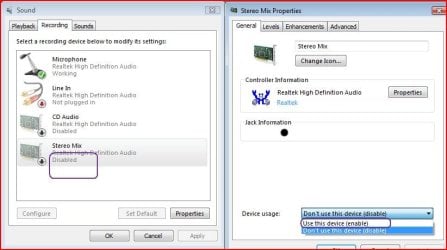
Okay, this one was beaten to death on this forum before I could even spell "Windows 7" let alone had installed it.
But today I wanted to invest 49 seconds or so to record a sound clip from the web, and one failure and lots of research later, I've discovered that my sound card (if that's what it's called on my computer) - "high definition audio device" - does not support the "stereo mix" option needed to record sound that's being fed to the speakers.
Looks like the only two options are to update the driver (just following the Windows prompts for this tells me my driver is up to date) or purchase i-Sound Recorder from i-Sound Recorder for Windows 7 and Windows Vista
So now that I've proved that I'm up to speed on "conventional wisdom" I am hoping against hope that a better solution exists. Ideas?
My Computer
At a glance
Win7 Professional 64Intel I3 550 (3.2 GHz)8 gig (2x4gig Kingston DDR 3)Intel HD graphics (from CPU)
Computer Manufacturer/Model Number
custom-built
OS
Win7 Professional 64
CPU
Intel I3 550 (3.2 GHz)
Motherboard
GIGABYTE|GA-H55M-S2V H55 1156 R
Memory
8 gig (2x4gig Kingston DDR 3)
Graphics Card(s)
Intel HD graphics (from CPU)
Sound Card
Realtek ALC888B
Monitor(s) Displays
ViewSonic
Screen Resolution
1280x1024
Hard Drives
Seagate ST3250310CS (250 gig C drive for OS and programs)
WDC WD5000AAKS-00V1A0 (2x500 gig drives, software mirrored in a RAID 1 configuration, as a D drive, for documents and data)
You can try different drivers to see if any work. e.g. if you have RealTek, try RealTek drivers from other vendors or maybe the RealTek web site.
But this is an issue (not available) with SOME integrated (0n the motherboard) audio systems. One option if it's not available and you MUST have it is to install a sound card that is Win 7 compatible and has the function.
I had an Acer Laptop that I upgraded from Vista to Win 7 and the RealTek in that did not have the System Mixer. I tried different RealTek drivers but could not find one that would either work or work properly.
My Computer
At a glance
Windows 10 64 bitIntel i7 6700K16GB Corsair DominatorIntel CPU Graphics
Computer type
PC/Desktop
Computer Manufacturer/Model Number
My Own Build
OS
Windows 10 64 bit
CPU
Intel i7 6700K
Motherboard
ASUS ROG Maximus VIII Hero
Memory
16GB Corsair Dominator
Graphics Card(s)
Intel CPU Graphics
Sound Card
RealTek
Monitor(s) Displays
27" Dell S2719dgf
Screen Resolution
2560X1440
Hard Drives
1 TB Samsung 850 EVO SSD for Win 10 Pro
500GB Samsung 850 EVO SSD for Win 10 Insider
2 TB drive for backup
PSU
EVGA Supernova 750G2
Case
BeQuiet Silent Base 600
Cooling
Deepcool Captain 120EX
Keyboard
Microsoft Wireless 2000
Mouse
Microsoft wireless
Internet Speed
100 MB/sec (Cable)
Antivirus
Microsoft Defender and Malwarebytes
Browser
Edge/Firefox
Other Info
Cakewalk (Sonar) by BandLab and Studio One 4.1 Pro recording studio software. MOTU 896Mk3 Hybrid recording interface, Frontier Tranzport wireless control unit, Behringer X-Touch Control Surface.
Five USB connected optical drives for CD Audio production using Nero BurningROM
Windows 11 Pro x64 [Latest Release and Releas...Ryzen 9 5950X, 3.8 - 5.2 MHz64GB [2 x 32GB] DDR4 3200MHz4GB NVIDIA GEFORCE GTX 1650 Ti
Computer type
PC/Desktop
Computer Manufacturer/Model Number
ChillBlast - Custom to my design
OS
Windows 11 Pro x64 [Latest Release and Release Preview]
CPU
Ryzen 9 5950X, 3.8 - 5.2 MHz
Motherboard
Asus Prime X570-Pro
Memory
64GB [2 x 32GB] DDR4 3200MHz
Graphics Card(s)
4GB NVIDIA GEFORCE GTX 1650 Ti
Sound Card
On-board SPDIF to 5.1 System + HDMI [5.1 system]
Monitor(s) Displays
32" UHD 32 Bit HDR Monitor + 43" UHD 4K 32Bit HDR TV
Screen Resolution
2 x 3840 x 2160 @60Hz
Hard Drives
1TB M2 SSD OS, 500GB Fast Access SSD, 2 x 8TB Data + Various Externals from 1TB to 4TB, 10TB NAS
PSU
NZXT C750 80 PLUS Gold 750W Modular PSU
Case
Workstation Case [Matt Black]
Cooling
NZXT Kraken X63 280mm CPU Cooler +2x Quiet Case fans
Keyboard
Logitech Wireless MX Keys & K400 + others
Mouse
Logitech Wireless MX Master 3S
Internet Speed
920 MB Down 50 MB Up
Antivirus
BitDefender Total Security Pro
Browser
Chrome (always run latest Non-Beta)
Other Info
Also run ...
Laptop - Quad 8GB - Windows 10 Pro x64
Nexus 7 Android tablet x2
Samsung 10.2" tablet
Blackview TAB 8 4G Android Tablet c/w Keyboard
Wacom Intuos Pro Medium Pen Pad
Wacom Intuos Pro Small Pen Pad
Wacom Expresskeys Remote
Loopdeck+ Graphics Controller
Shuttle Pro v2 Control
At a glance
Windows 11 Pro x64 Latest RPIntel I7 10750H 5.0GHz32GB [2x16GB] DDR4 2933 MHznVidia GTX1650Ti 4 GB GDDR6
Computer type
Laptop
System Manufacturer/Model Number
Dell XPS 17 10750H
OS
Windows 11 Pro x64 Latest RP
CPU
Intel I7 10750H 5.0GHz
Motherboard
Dell XPS
Memory
32GB [2x16GB] DDR4 2933 MHz
Graphics Card(s)
nVidia GTX1650Ti 4 GB GDDR6
Sound Card
Stock [Realtek] 4 Speaker
Monitor(s) Displays
17" IPS UHD+ Infinity Edge Touchscreen
Screen Resolution
3840 x 2400
Hard Drives
2TB M2 NVMe, 4TB External + various 500GB & 1TB External NVMe (also have access to spinner HDD from
PSU
Stock
Case
Stock XPS Aluminium & Carbon Fibre
Cooling
Stock - Active Fan Control
Keyboard
Backlit + Various Logitech
Mouse
Stock Track Pad + Logitech MX Trackball
Internet Speed
72 MB Down 18MB Up
Browser
Chrome
Other Info
Also run ...
Laptop - Quad 8GB - Windows 10 Pro x64
Nexus 7 Android tablet x2
10.2" tablet
Sony Z3 Android Smartphone
Wacom Intuos Pro Medium Pen Pad
Wacom Intuos Pro Small Pen Pad
Wacom Expresskeys Remote
Loopdeck+ Graphics Controller
Shuttle Pro v2 Control Pad
10TB NAS
Yeah, I tried that and no luck. The only available devices are two microphones and a line in, all of which are "enabled." Nothing hidden.
I had forgotten about Audacity as an option. Great program, and looks like it does what I'm trying to do - although I have not yet confirmed this.
My Computer
At a glance
Win7 Professional 64Intel I3 550 (3.2 GHz)8 gig (2x4gig Kingston DDR 3)Intel HD graphics (from CPU)
Computer Manufacturer/Model Number
custom-built
OS
Win7 Professional 64
CPU
Intel I3 550 (3.2 GHz)
Motherboard
GIGABYTE|GA-H55M-S2V H55 1156 R
Memory
8 gig (2x4gig Kingston DDR 3)
Graphics Card(s)
Intel HD graphics (from CPU)
Sound Card
Realtek ALC888B
Monitor(s) Displays
ViewSonic
Screen Resolution
1280x1024
Hard Drives
Seagate ST3250310CS (250 gig C drive for OS and programs)
WDC WD5000AAKS-00V1A0 (2x500 gig drives, software mirrored in a RAID 1 configuration, as a D drive, for documents and data)
My sense is that I need a new sound card - not a desired road to go - or a new driver that supports my sound card.
How/where would I find such a driver? Again, Windows tells me that the driver is up to date.
My Computer
At a glance
Win7 Professional 64Intel I3 550 (3.2 GHz)8 gig (2x4gig Kingston DDR 3)Intel HD graphics (from CPU)
Computer Manufacturer/Model Number
custom-built
OS
Win7 Professional 64
CPU
Intel I3 550 (3.2 GHz)
Motherboard
GIGABYTE|GA-H55M-S2V H55 1156 R
Memory
8 gig (2x4gig Kingston DDR 3)
Graphics Card(s)
Intel HD graphics (from CPU)
Sound Card
Realtek ALC888B
Monitor(s) Displays
ViewSonic
Screen Resolution
1280x1024
Hard Drives
Seagate ST3250310CS (250 gig C drive for OS and programs)
WDC WD5000AAKS-00V1A0 (2x500 gig drives, software mirrored in a RAID 1 configuration, as a D drive, for documents and data)
Do a google search for whatever sound device you have. "High Definition" as you have listed is NOT the full name of the device. It could be IDT HD, RealTek, etc.
My Computer
At a glance
Windows 10 64 bitIntel i7 6700K16GB Corsair DominatorIntel CPU Graphics
Computer type
PC/Desktop
Computer Manufacturer/Model Number
My Own Build
OS
Windows 10 64 bit
CPU
Intel i7 6700K
Motherboard
ASUS ROG Maximus VIII Hero
Memory
16GB Corsair Dominator
Graphics Card(s)
Intel CPU Graphics
Sound Card
RealTek
Monitor(s) Displays
27" Dell S2719dgf
Screen Resolution
2560X1440
Hard Drives
1 TB Samsung 850 EVO SSD for Win 10 Pro
500GB Samsung 850 EVO SSD for Win 10 Insider
2 TB drive for backup
PSU
EVGA Supernova 750G2
Case
BeQuiet Silent Base 600
Cooling
Deepcool Captain 120EX
Keyboard
Microsoft Wireless 2000
Mouse
Microsoft wireless
Internet Speed
100 MB/sec (Cable)
Antivirus
Microsoft Defender and Malwarebytes
Browser
Edge/Firefox
Other Info
Cakewalk (Sonar) by BandLab and Studio One 4.1 Pro recording studio software. MOTU 896Mk3 Hybrid recording interface, Frontier Tranzport wireless control unit, Behringer X-Touch Control Surface.
Five USB connected optical drives for CD Audio production using Nero BurningROM
Have you tried to install the driver in compatibility mode?
Have you tried a Vista driver?
Go to the sound card manufacturer's web site and get every possible driver and try them all. A lot of this is trial and error, but you may ultimately fail---in which case:
You might have luck by running an RCA cable from speaker outs to microphone in.
An external USB sound card is pretty cheap ($35).
My Computer
At a glance
Windows 7 Home Premium SP1, 64-bitIntel Skylake i5-6600K, not overclocked8 GB HyperX DDR4-2666 (2 x 4 GB)none; graphics are integrated on CPU
Computer type
PC/Desktop
Computer Manufacturer/Model Number
Ignatz Special; 4 speed manual gearbox; factory air conditioning; one of one
OS
Windows 7 Home Premium SP1, 64-bit
CPU
Intel Skylake i5-6600K, not overclocked
Motherboard
AsRock Z170M Extreme 4, micro ATX
Memory
8 GB HyperX DDR4-2666 (2 x 4 GB)
Graphics Card(s)
none; graphics are integrated on CPU
Sound Card
onboard: Realtek ALC1150; external: USB Behringer UF0-202
Monitor(s) Displays
Dell S2340M 23 inch IPS
Screen Resolution
1600 x 900
Hard Drives
System: Crucial MX100 series SSD, 128 GB;
Data: Samsung Spinpoint 103SJ, 1 TB;
Backup: WD Caviar Green WD30EZRX-00D8PB0, 3 TB
Microsoft Security Essentials and Malwarebytes Premium
Browser
Pale Moon
Other Info
All fans PWM; speeds at idle: CPU circa 500 rpm; intake circa 600 rpm; exhaust circa 600 rpm; CPU temps 27 idle and 47 C load in a warm room (27 C/81 F) when running Intel Extreme Tuning Utility stress test.
I've discovered that my sound card (if that's what it's called on my computer) - "high definition audio device" - does not support the "stereo mix" option needed to record sound that's being fed to the speakers.
Looks like the only two options are to update the driver (just following the Windows prompts for this tells me my driver is up to date)
It shows as that because you haven't installed the driver for it yet, and it is just using the default Windows sound driver. Also why it wouldn't update through Device Manager.
It shows as that because you haven't installed the driver for it yet, and it is just using the default Windows sound driver. Also why it wouldn't update through Device Manager.
The three links at the end all are javascript:void(0)
I click on each (they're all download mirrors) and nothing happens. This is in FF 4, with the adblock turned off. I cannot even get that far in IE.
So I'm at the page from which I ostensibly can download the driver, but it won't let me - which doesn't give me a lot of confidence in what will happen if I run it.
Any ideas what I'm missing or doing wrong?
My Computer
At a glance
Win7 Professional 64Intel I3 550 (3.2 GHz)8 gig (2x4gig Kingston DDR 3)Intel HD graphics (from CPU)
Computer Manufacturer/Model Number
custom-built
OS
Win7 Professional 64
CPU
Intel I3 550 (3.2 GHz)
Motherboard
GIGABYTE|GA-H55M-S2V H55 1156 R
Memory
8 gig (2x4gig Kingston DDR 3)
Graphics Card(s)
Intel HD graphics (from CPU)
Sound Card
Realtek ALC888B
Monitor(s) Displays
ViewSonic
Screen Resolution
1280x1024
Hard Drives
Seagate ST3250310CS (250 gig C drive for OS and programs)
WDC WD5000AAKS-00V1A0 (2x500 gig drives, software mirrored in a RAID 1 configuration, as a D drive, for documents and data)
Yeah the Realtek servers suck most of the time. One of these days they might upgrade from that dial up connection they use. That said you can get it from here as well,
Some sites are also setup for Internet Explorer and using any other browser may not work.
My Computer
At a glance
Windows 10 64 bitIntel i7 6700K16GB Corsair DominatorIntel CPU Graphics
Computer type
PC/Desktop
Computer Manufacturer/Model Number
My Own Build
OS
Windows 10 64 bit
CPU
Intel i7 6700K
Motherboard
ASUS ROG Maximus VIII Hero
Memory
16GB Corsair Dominator
Graphics Card(s)
Intel CPU Graphics
Sound Card
RealTek
Monitor(s) Displays
27" Dell S2719dgf
Screen Resolution
2560X1440
Hard Drives
1 TB Samsung 850 EVO SSD for Win 10 Pro
500GB Samsung 850 EVO SSD for Win 10 Insider
2 TB drive for backup
PSU
EVGA Supernova 750G2
Case
BeQuiet Silent Base 600
Cooling
Deepcool Captain 120EX
Keyboard
Microsoft Wireless 2000
Mouse
Microsoft wireless
Internet Speed
100 MB/sec (Cable)
Antivirus
Microsoft Defender and Malwarebytes
Browser
Edge/Firefox
Other Info
Cakewalk (Sonar) by BandLab and Studio One 4.1 Pro recording studio software. MOTU 896Mk3 Hybrid recording interface, Frontier Tranzport wireless control unit, Behringer X-Touch Control Surface.
Five USB connected optical drives for CD Audio production using Nero BurningROM
Yeah the Realtek servers suck most of the time. One of these days they might upgrade from that dial up connection they use. That said you can get it from here as well,
Oh my... that took not five minutes to download and install and now I can record from my speakers.
Thanks a lot.
My Computer
At a glance
Win7 Professional 64Intel I3 550 (3.2 GHz)8 gig (2x4gig Kingston DDR 3)Intel HD graphics (from CPU)
Computer Manufacturer/Model Number
custom-built
OS
Win7 Professional 64
CPU
Intel I3 550 (3.2 GHz)
Motherboard
GIGABYTE|GA-H55M-S2V H55 1156 R
Memory
8 gig (2x4gig Kingston DDR 3)
Graphics Card(s)
Intel HD graphics (from CPU)
Sound Card
Realtek ALC888B
Monitor(s) Displays
ViewSonic
Screen Resolution
1280x1024
Hard Drives
Seagate ST3250310CS (250 gig C drive for OS and programs)
WDC WD5000AAKS-00V1A0 (2x500 gig drives, software mirrored in a RAID 1 configuration, as a D drive, for documents and data)