Solved Restore under Free Macrium - To a different HDD?

Sesitos

New member
Local time
11:07 AM
Messages
19
So far as I know, I created a valid Macrium free image of my OS which sits on my 750 Gb HDD. (hopefully I will never have to use it.)

As part of this general task-set (getting my "recovery house" in order), I decided that I would resize the OS drive downwards and I created Macrium free images of the OS both before shrinking operation and afterwards.

Sitting on the shelf (but attachable via usb, for instance) was another HDD (2 TB), onto which several months ago I had cloned the OS of the 750 Gb drive. I decided to resize its OS similarly (so that the OS partitions on the two HDD's are essentially the same size), and have done so (having likewise made "safety" Macrium free images of the "2 TB OS" both before and after the resizing).

I further figured while I was at it, that I might as well replace the OS on the 2 TB drive, with the Macrium free image I had made for the 750 Gb HDD. (Which is why I called the 2 Macrium images made of the 2 TB HDD's OS only temporary or "safety images" -- since they were to be discarded once the OS for the 750 GB had replaced the 2 TB's OS).
Not only would that operation render the "on the shelf Clone" much more "current", but it would be a test of how good & unproblematic the Macrium image-and-restore process was. See, my post at http://www.sevenforums.com/backup-restore/161324-two-shrink-questions.html#post1389332
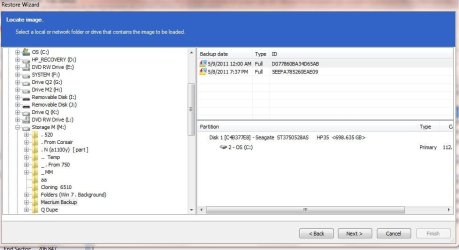
HOWEVER, whether I accessed the restore features of the Macrium free program under Windows (running on the 750 GB drive), or via the Macrium free rescue boot CD -- once I chose to apply the disc image created of the OS on the750 GB drive, the program would allow me to apply/restore it only to that 750 GB drive itself (and only to the partition which Macrium had imaged on that HDD). No "drive-changing" options appeared on the "select image" window, nor did any options appear on the following window, where one is to select the drive to restore to.

I assume that this is all normal and regular, but I hadn't read of any such limitation in the several posts which I perused on Macrium, both here and on the Macrium website.

WHEREFORE, the Questions:

1. Is this normal and regular under Macrium Free?
2. Is this different under Macrium retail? I.e., can I apply the image created of the 750's OS, to the OS partition on the 2 TB Drive if I purchase the full blown retail version of Macrium?
3. If I should be able to achieve the desired result [(2), above] using Macrium Free (i.e., if the answer to (1), above is "No"), does anyone have any suggestions/comments?
4. If the answers to (1) and (2), above are "No", what's the best (and cheapest way) to achieve the desired result?

Thanks much.
 

My Computer My Computer

Computer Manufacturer/Model Number
HP 6510-f
OS
Windows 7 Home Premium 64bit
CPU
AMD Athlon II x4 630 2.8 GH
Memory
4 gb
Not sure what you are asking.

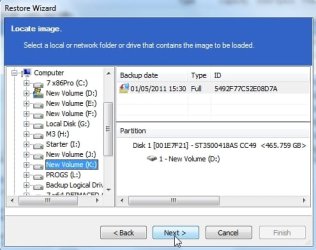
I have no trouble restoring a macrium image with the free version to any HD , or any partition I choose.

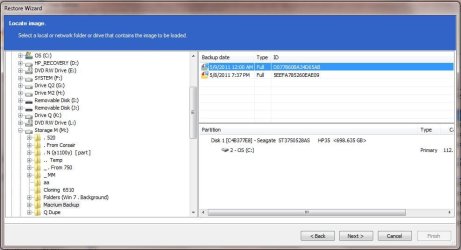
Select the image

mac1.jpg


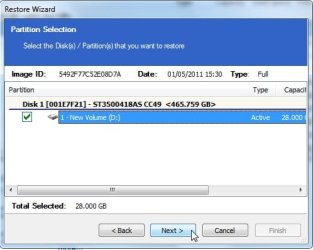
Select the partition backup you want to restore - because the image might contain more than one partition - select which you want to restore

mac2.jpg


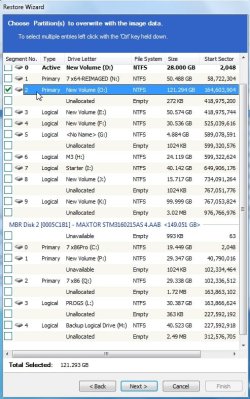
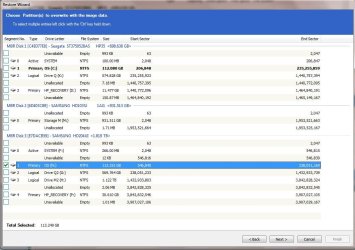
Tick the partition you want to restore it to

mac3.jpg
 
Last edited:

My Computers My Computers

System One System Two

  • Computer type
    PC/Desktop
    OS
    7 X64
    CPU
    i5 8400
    Motherboard
    gigabyte b365m ds3h
    Memory
    2x8gb 3200mhz
    Hard Drives
    various
    PSU
    pure power 11 400w cm
    Case
    Coolermaster
    Cooling
    cryorig m9i
  • Computer type
    PC/Desktop
    OS
    7x64
    CPU
    g5400
    Motherboard
    ga b365m ds3h
    Memory
    8gb ddr4 2400
    PSU
    xfx pro 450w
Not sure what you are asking.

I have no trouble restoring a macrium image with the free version to any HD , or any partition I choose.

(A) You are saying that you have no difficulty in restoring any Macrium free image to any HD or any partition (assuming that the target partition is at least as large as the image)?

(B) If so, then your answer to my question (1), above, is "no".

(C) I really don't believe I can be more explicit or clearer in expressing what my question/situation is, unfortunately.

(D) UPDATE: The two following links (from Macrium the forum) seem to clearly state that the desired result is achievable using Macrium retail, but they likewise seem to suggest that it is not available in Macrium free.
(E) If your answer to my question (A), above, is "Yes", do you or does anyone else have any sugggestions as to what I might do (e.g., to duplicate those capabilities)?

Thanks again.
 

My Computer My Computer

Computer Manufacturer/Model Number
HP 6510-f
OS
Windows 7 Home Premium 64bit
CPU
AMD Athlon II x4 630 2.8 GH
Memory
4 gb
Not sure what you are asking.

I have no trouble restoring a macrium image with the free version to any HD , or any partition I choose.

(A) You are saying that you have no difficulty in restoring any Macrium free image to any HD or any partition (assuming that the target partition is at least as large as the image)?

(B) If so, then your answer to my question (1), above, is "no".

(C) I really don't believe I can be more explicit or clearer in expressing what my question/situation is, unfortunately.

(D) UPDATE: The two following links (from Macrium the forum) seem to clearly state that the desired result is achievable using Macrium retail, but they likewise seem to suggest that it is not available in Macrium free.
(E) If your answer to my question (A), above, is "Yes", do you or does anyone else have any sugggestions as to what I might do (e.g., to duplicate those capabilities)?

Thanks again.

A workaround would be restore to the 2TB drive and let Macrium treat it as a 750MB partition then use partition wizard to resize the partition ?
 

My Computer My Computer

Computer Manufacturer/Model Number
built my own
OS
win7 ultimate / virtual box
CPU
Intel Core i7 3770K,1155, Ivy Bridge
Motherboard
MSI Z77A-G43
Memory
GSkill Ripjaws Z Series 1600 CL 9.0 16GB
Graphics Card(s)
KFA2 GeForce GTX 670 EX OC 2048MB GDDR5 PCI-E gfx card
Sound Card
onboard Nvidia HDMI audio
Monitor(s) Displays
ASUS VK222H 22" widescreen LCD monitor
Screen Resolution
1680x1050
Hard Drives
Kingston 128gb SSD
OCZ Vertex 90gb SSD
500GB WDCaviar 16mb 5000KS
320GB WDCaviar 16mb 3200AAKS sata 2
1TB Samsung 16mb HD103SJ sata 2
PSU
Corsair HX 750W ATX2.2 Modular
Cooling
Antec 25 Kuhler H2O 620
Keyboard
logitech
Mouse
logitech MX518
Internet Speed
7mb adsl
See the screenshots in my previous post.

It's very easy - that is why not sure what you are asking.

Unless there is an issue with a drive, so that macrium can't even see it ?

I believe there is a problem picking up some usb3.0 drives - but that is the restore disc - not the installed program.

Did you get to the 3rd screen above?


NOTE:

1. You do need to restore the partitions one at a time - if you are doing several.

2. Restore to a smaller partition is possible ( takes a while tho ) by using their free Roborestore
 

My Computers My Computers

System One System Two

  • Computer type
    PC/Desktop
    OS
    7 X64
    CPU
    i5 8400
    Motherboard
    gigabyte b365m ds3h
    Memory
    2x8gb 3200mhz
    Hard Drives
    various
    PSU
    pure power 11 400w cm
    Case
    Coolermaster
    Cooling
    cryorig m9i
  • Computer type
    PC/Desktop
    OS
    7x64
    CPU
    g5400
    Motherboard
    ga b365m ds3h
    Memory
    8gb ddr4 2400
    PSU
    xfx pro 450w
See the screenshots - it's very easy - that is why not sure what you are asking.

Unless there is an issue with a drive, so that macrium can't even see it ?

I believe there is a problem picking up some usb3.0 drives - but that is the restore disc - not the installed program.

I do not see any screenshots in your post.

Here are the relevant screenshots, from my end:

aa.JPG
bb.JPG
cc.JPG

I just now see your screenshots and will consider and comment on them presently. Thanks.
 

My Computer My Computer

Computer Manufacturer/Model Number
HP 6510-f
OS
Windows 7 Home Premium 64bit
CPU
AMD Athlon II x4 630 2.8 GH
Memory
4 gb
What a dolt am I!

I should have gone one more step! I was afraid to, 'cause it appeared to me as if that would over-write my operating OS - or try to at least.

Problem solved (or should be soon, eh?)

Thanks!
 

My Computer My Computer

Computer Manufacturer/Model Number
HP 6510-f
OS
Windows 7 Home Premium 64bit
CPU
AMD Athlon II x4 630 2.8 GH
Memory
4 gb
You're not the first person to do that - I am sure.:)

The wording could be better - if you only have one partition in the image - then "Select the partition you want to restore " ( in your 3rd screenie ) could lead you to think it meant restore to
 

My Computers My Computers

System One System Two

  • Computer type
    PC/Desktop
    OS
    7 X64
    CPU
    i5 8400
    Motherboard
    gigabyte b365m ds3h
    Memory
    2x8gb 3200mhz
    Hard Drives
    various
    PSU
    pure power 11 400w cm
    Case
    Coolermaster
    Cooling
    cryorig m9i
  • Computer type
    PC/Desktop
    OS
    7x64
    CPU
    g5400
    Motherboard
    ga b365m ds3h
    Memory
    8gb ddr4 2400
    PSU
    xfx pro 450w
* * *

The wording could be better [emph. added] - if you only have one partition in the image - then "Select the partition you want to restore " ( in your 3rd screenie ) could lead you to think it meant restore to

Exactly.

Thanks again. And fingers crossed, all will go well, and when I temporarily swap out the usb-attached 2 TB drive for the 750 GB drive to test whether it actually has gone well, I will be a happy camper.

Again, thanks.
 

My Computer My Computer

Computer Manufacturer/Model Number
HP 6510-f
OS
Windows 7 Home Premium 64bit
CPU
AMD Athlon II x4 630 2.8 GH
Memory
4 gb
Let us know how it goes.:)
 

My Computers My Computers

System One System Two

  • Computer type
    PC/Desktop
    OS
    7 X64
    CPU
    i5 8400
    Motherboard
    gigabyte b365m ds3h
    Memory
    2x8gb 3200mhz
    Hard Drives
    various
    PSU
    pure power 11 400w cm
    Case
    Coolermaster
    Cooling
    cryorig m9i
  • Computer type
    PC/Desktop
    OS
    7x64
    CPU
    g5400
    Motherboard
    ga b365m ds3h
    Memory
    8gb ddr4 2400
    PSU
    xfx pro 450w
Well, Macrium announced a successful restore onto the 2 Tb drive. Windows then wanted to run checkdisk on the OS on the 2TB ("OS N"), which I approved, and upon reboot (with the 750's OS still "operative") the computer wanted to run checkdisk again on "OS N" (prior to the "Windows Splash") which I again approved. After it ran, Windows started, and recognized the 2 TB just fine, and I shut 'er down.

I switched the two drives out, and upon reboot I got an error message:
0x000000e

Info: the boot selection failed because a required device is inaccessible.
I suppose I should replace the "system" partition (MBR) on the 2 TB HDD with the image of the system partition of the 750 gb drive. That's the only thing left that I can think to do.
(Actually, I should double check to make sure that "OS N" (2 TB HDD) is actually apparently mirroring "OS C" (750 GB HDD) - and that the files on OS N seem to be generally accessible - which is a step I failed to take in all honesty; but I am relatively confident that that will be the case . .

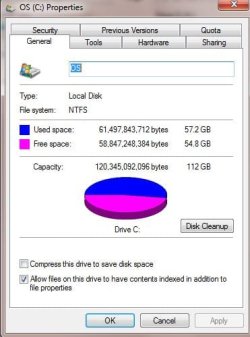
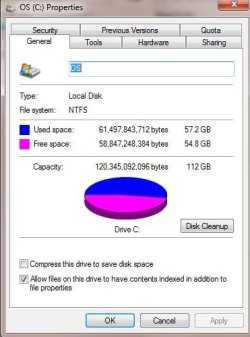
DID IT. While it appears that I can read the pdf's etc that are on OS N, the two OS partitions do not mirror each other as they should as far as used space: OS C has more used space than OS N. Huh?

os c.JPG

os n.JPG

Any suggestions are welcome, but before too long, I'll just try the MBR restore, and see if that doesn't clear things up. . . (though I sure wish I knew why there is a differential between the composition of "OS C" on the one hand and "OS N" on the other . . .

Feel free to make suggestions, but in any event, thanks for your help and for stopping by . . .
 
Last edited:

My Computer My Computer

Computer Manufacturer/Model Number
HP 6510-f
OS
Windows 7 Home Premium 64bit
CPU
AMD Athlon II x4 630 2.8 GH
Memory
4 gb
The mbr is fine.

Try running macrium boot corrector on the 2tb without the 750gb attached - see if that does the job - just out of interest.
 

My Computers My Computers

System One System Two

  • Computer type
    PC/Desktop
    OS
    7 X64
    CPU
    i5 8400
    Motherboard
    gigabyte b365m ds3h
    Memory
    2x8gb 3200mhz
    Hard Drives
    various
    PSU
    pure power 11 400w cm
    Case
    Coolermaster
    Cooling
    cryorig m9i
  • Computer type
    PC/Desktop
    OS
    7x64
    CPU
    g5400
    Motherboard
    ga b365m ds3h
    Memory
    8gb ddr4 2400
    PSU
    xfx pro 450w
The mbr is fine.

Try running macrium boot corrector on the 2tb without the 750gb attached - see if that does the job - just out of interest.

(See addition material in my last post)

Re; your comment, OK, I will do that - I'll disconnect the 750 keep the 2 TB attached, and run m boot corrector from the rescue disk.

That said, when you wrote "The mbr is fine", did you mean that I should not replace the 2 TB's mbr with the image of that of the 750 GB?
 

My Computer My Computer

Computer Manufacturer/Model Number
HP 6510-f
OS
Windows 7 Home Premium 64bit
CPU
AMD Athlon II x4 630 2.8 GH
Memory
4 gb
There is no macrium boot corrector on the rescue disc, so I've reattached the 2TB via usb dock, and will see if I can run macrium boot corrector on it from there . . .

I don't see any such tool in the free Macrium as-installed on "OS C", either . . .?
 

My Computer My Computer

Computer Manufacturer/Model Number
HP 6510-f
OS
Windows 7 Home Premium 64bit
CPU
AMD Athlon II x4 630 2.8 GH
Memory
4 gb
Additional Note:

I made two images of the mbr from the 2TB - one before I resized its OS partition and one after I resized it. Both are the same size: 11,052 kb.

I made two images of the mbr from the 750GB - one before and one after the resize of its OS partition. They were slightly different in size: 11,071 kb and 11,074, respectively.

Again, I am flummoxed as to why the occupied space on the two drives is different . . .oh no, I'm not! C drive has been changing, whilst its image of a couple of days ago (now installed on the 2 TB) has not! Duh!

OK. that's settled.

I still can only think to replace the mbr on the 2 TB with the last image taken of the mbr on the 750 . . .

So that's what I'll do in a bit, after waiting for someone to suggest something better . . .

Again. Many thanks.
 

My Computer My Computer

Computer Manufacturer/Model Number
HP 6510-f
OS
Windows 7 Home Premium 64bit
CPU
AMD Athlon II x4 630 2.8 GH
Memory
4 gb
One (?) Final (?) Additional Note:

While I successfully tested out the clone OS on the 2TB when I made it (it booted fine, etc.), I have not since.

There is one feature of the mbr as cloned onto the 2TB drive which I might mention but have not, since it seemed irrelevant. Perhaps it is not. When I cloned the 2TB several months ago, its mbr ("SYSTEM (F:)", as it shows up in its usb dock now) is sitting in a partition which is not the "standard" 100 mb, but rather 266mb.

And/However as noted earlier, the used space of the mbr on the two HDD's is different. (24.13 mb on 750, and 24.64 on the 2TB). It is this last factor which seems like it would be the culprit preventing the 750 from booting . . . (& I still think the actual partition size for the mbr on 2 TB is irrelevant.)
 

My Computer My Computer

Computer Manufacturer/Model Number
HP 6510-f
OS
Windows 7 Home Premium 64bit
CPU
AMD Athlon II x4 630 2.8 GH
Memory
4 gb
Trying to keep this simple ...

The mbr and the system partition are two different things, by the way.

If you had a separate system partition on the 750gb - you would need to restore that as well.

It contains the boot critical files.

One of those is the bcd store - which contains the location of the bootloader.

It needs to be updated to reflect the new location.

Macrium - and most imaging apps. will do that automatically at the end of restore.

As bcd is updated - there will be various other files created - bcd.log for example - that will probably account for the different used space on the system partition.

( Macrium Boot corrector might not be on the free one you have.)

If there is an issue booting a reimaged drive - then running startup repair from the win 7 dvd/repair disc should fix it.

Hope it helps.
 

My Computers My Computers

System One System Two

  • Computer type
    PC/Desktop
    OS
    7 X64
    CPU
    i5 8400
    Motherboard
    gigabyte b365m ds3h
    Memory
    2x8gb 3200mhz
    Hard Drives
    various
    PSU
    pure power 11 400w cm
    Case
    Coolermaster
    Cooling
    cryorig m9i
  • Computer type
    PC/Desktop
    OS
    7x64
    CPU
    g5400
    Motherboard
    ga b365m ds3h
    Memory
    8gb ddr4 2400
    PSU
    xfx pro 450w
* * *

Hope it helps.

It does, I think, if I'm understanding you correctly.

1. Bottom line is that I should mirror the 750 "System" onto the 2 TB, which is what I had figured I should do, but it's nice to get confirmation of that.

2. Re: my roughly equating the mbr to the files on the separate SYSTEM partition (yes there is one on both - but it's "strangely large" on the 2 TB, see above, and attached image, below), point taken.

dd.JPG


3. I separately imaged the system partition and the os partition of the 750, pursuant to 1 (or perhaps 2) sticky thread(s) in this sub-forum.

4. Hopefully "installing" the 750's system to the 2 TB will solve the problem.

I don't have a win 7 dvd, and unless one of the tools in the HP (Pavilion) "recovery schema" allows me to make the repairs in question, I'm out of luck.

But perhaps not actually out of luck wholly - HP has IMO terrific customer support. Just recently I had an outstanding and very successful (and lengthy) CS experience with a wholly competent, knowlegeable, polite etc. tech. (I bought this like 6 mos ago, so it's still under warranty)
Now whether they would take the time to fix not their actual machine, but a BU clone drive I created from that machine . . . who knows? HP is quite impressive in this regard, though, from my experience.
Again, thanks so much. I will report back later this evening or perhaps tomorrow.
 

My Computer My Computer

Computer Manufacturer/Model Number
HP 6510-f
OS
Windows 7 Home Premium 64bit
CPU
AMD Athlon II x4 630 2.8 GH
Memory
4 gb
You can find win 7 installation .iso's all over the place.

Otherwise ( or as well ) , you can run off a "repair disc " in windows 7 - that is sometimes disabled by oem's - so it may not work for you.

Worth trying it - type create in start search box - click create system repair disc - and see if it lets you do it.

You can't reinstall from a system repair disc - but it does have the automated startup repair functions - fits on a cd easily.

The same startup repair functions may well be on the HP discs you have run off - probably , in fact.

If you haven't already run of the HP recovery discs - do it now.

You might need it one day.

I think HP only let you do one set.

As always, there is a workaround to do it more than once.
 

My Computers My Computers

System One System Two

  • Computer type
    PC/Desktop
    OS
    7 X64
    CPU
    i5 8400
    Motherboard
    gigabyte b365m ds3h
    Memory
    2x8gb 3200mhz
    Hard Drives
    various
    PSU
    pure power 11 400w cm
    Case
    Coolermaster
    Cooling
    cryorig m9i
  • Computer type
    PC/Desktop
    OS
    7x64
    CPU
    g5400
    Motherboard
    ga b365m ds3h
    Memory
    8gb ddr4 2400
    PSU
    xfx pro 450w
Well, re-installing the 750's SYSTEM partition on the 2TB didn't do the trick.

But perhaps it was a necessary step.

After that "non-fixing event", I took SIW2's advice and went and found a boot "repair" disk called Windows Live 7 Maintenance posted on one of the boards I frequent, and I am now writing this post from the OS on the 2TB drive!

It was easy-peasy: I just started the program which looked most promising on the CD; it very shortly informed me that there were errors that it could correct and should it?; I said "youbetcha, fix'er", and Here We Are.

Thanks to all for their patience and help. Very much. Now I have to get back to work, I suppose.

Oh, wait - one final question, I guess:

If I leave this 2TB drive hooked up internally, and also re-hook up the original 750 GB HDD internally, I will have two internal drives, each with an OS on it.

Question 1: That won't cause any problems will it - being that they both have OS's on them?

Question 2 is a matter of pure curiosity (assuming that the anwer to (1) is "No")

Question 2: Am I correct in assuming that if I internally mount both drives, the question of which one will in fact boot up on any particular restart depends on which SATA connection the bios sees as the "first available HDD which is installed."?

Again. Thanks so very much.
 

My Computer My Computer

Computer Manufacturer/Model Number
HP 6510-f
OS
Windows 7 Home Premium 64bit
CPU
AMD Athlon II x4 630 2.8 GH
Memory
4 gb
Back
Top