World of Warcraft

FredeGail

It's full of stars
Guru
Gold Member
Local time
9:06 AM
Messages
2,360
Location
Denmark
Hello.

Okay, so I have these "Not Responding" just blinking in-game. The whole window doesn't shutdown or anything fancy, it's just blinking "Not Responding", and then it does and keeps doing like that.

I have reinstalled the game, but still the same.
The GPU is on 60C, which is normal I think.
I run 1680x1050, windowed maximized.
And dxdiag.exe tells me that I run DX11.

Notice that it only says not responding after I connected to the server as well.

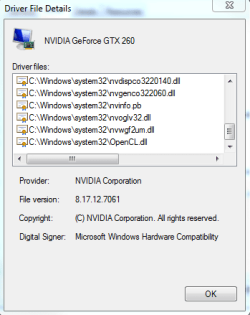
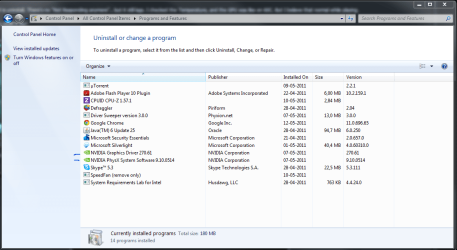
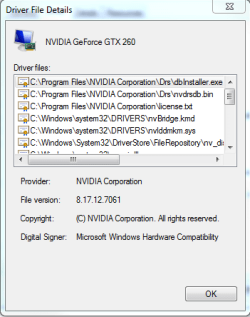
Here's a picture of my graphic drivers..
What kind of driver could this be? I'm quite sure it is a driver here.
Thanks.
 

Attachments
  • Capture2.PNG
    Capture2.PNG
    12.8 KB · Views: 4
  • Capture3.PNG
    Capture3.PNG
    11.4 KB · Views: 6
  • Capture4.PNG
    Capture4.PNG
    10.7 KB · Views: 5
  • Capture1.PNG
    Capture1.PNG
    50.9 KB · Views: 7

My Computer My Computer

Computer Manufacturer/Model Number
Brewed
OS
Microsoft Windows 7 Ultimate: x64 (SP1)
CPU
Intel® Core™ i5-2500K Processor
Motherboard
ASUS P8Z68-V PRO
Memory
Kingston DDR3 HyperX 1600MHz 8GB
Graphics Card(s)
ASUS GTX 560 TI DirectCU II 900MHz
Sound Card
Realtek® ALC892 8-Channel High Definition Audio CODEC
Monitor(s) Displays
ACER LCD P246HBD 1920x1080 (24") - Dell 1280x800
Screen Resolution
ACER LCD P246HBD ~ [1920X1080] - DELL ~ [1280x800]
Hard Drives
500 GB WD Caviar SE116 7200rpm SATA2
PSU
Corsair 750W Power Supply
Case
Coolermaster CM Scout
Cooling
Zalman FS-C77 Fatal1ty CPU Cooler
Keyboard
Logitech G15
Mouse
Coolermaster Sentinel Advanced
Internet Speed
[↓ 10 MB/s DL] [↑ 1 MB/s UL]
Other Info
- ROCCAT™ Kave – Solid 5.1 Surround Sound Gaming Headset
- Not overclocking
Update

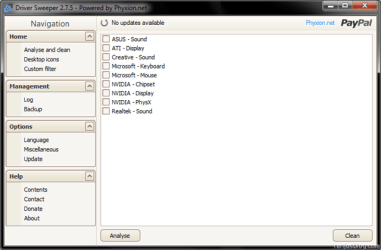
I was told to remove the Nvidia Graphic Driver from their manufacturer page. By that, I used Driver Sweeper, and selected the Nvidia - Display. Now am I wrong? I analyzed in the PhysX, but no files were detected, because I don't have it installed. Makes sense. There was some registry files in the Nvidia - Chipset. Should I have been cleaning those too?

Eitherway, I selected the Display and cleaned them up, and took the one from Windows Update as it appeared. Do I need more Graphic Drivers?, earlier when I didn't knew about Driver Sweeper, I uninstalled the drivers through control panel. But then, after I restarted, it said that in the explore.exe, that a driver has been downloaded, and it wanted to have a restart.
Is this the same driver as the one in Windows Update?

I also noticed in Nvidia Control Panel, it says both of my monitors is "Native" in the resolution, but the monitor config Windows has, says recommended.

Now what can fix this problem? It's like, every driver I install, there's an error.
 

Attachments

  • driver%20sweeper%202.7.5%5B4%5D.png
    driver%20sweeper%202.7.5%5B4%5D.png
    22.3 KB · Views: 7

My Computer My Computer

Computer Manufacturer/Model Number
Brewed
OS
Microsoft Windows 7 Ultimate: x64 (SP1)
CPU
Intel® Core™ i5-2500K Processor
Motherboard
ASUS P8Z68-V PRO
Memory
Kingston DDR3 HyperX 1600MHz 8GB
Graphics Card(s)
ASUS GTX 560 TI DirectCU II 900MHz
Sound Card
Realtek® ALC892 8-Channel High Definition Audio CODEC
Monitor(s) Displays
ACER LCD P246HBD 1920x1080 (24") - Dell 1280x800
Screen Resolution
ACER LCD P246HBD ~ [1920X1080] - DELL ~ [1280x800]
Hard Drives
500 GB WD Caviar SE116 7200rpm SATA2
PSU
Corsair 750W Power Supply
Case
Coolermaster CM Scout
Cooling
Zalman FS-C77 Fatal1ty CPU Cooler
Keyboard
Logitech G15
Mouse
Coolermaster Sentinel Advanced
Internet Speed
[↓ 10 MB/s DL] [↑ 1 MB/s UL]
Other Info
- ROCCAT™ Kave – Solid 5.1 Surround Sound Gaming Headset
- Not overclocking
Personally I would uninstall Driver Sweeper....Use add/remove to uninstall your GPU driver...use CCleaner to remove any residue and then download the drivers from the NVidia site and install...drivers from MS are mostly out of date anyways and they just install the new drivers over the top of the original....lazy and inherently troublesome.

You could also run the inbuilt Repair Tool to check for/repair any game file etc corruption...I have found that works for some WoW issues...
 
Last edited:

My Computer My Computer

Computer Manufacturer/Model Number
home built
OS
Windows 7 Professional 64 bit
CPU
930 i7 quad O/C 4ghz
Motherboard
Asus P6X58D premium
Memory
G Skill 3x2gb O/C to 1603mhz 1T timing
Graphics Card(s)
EVGA 570
Sound Card
creative titanium
Monitor(s) Displays
samsung s23a950d..120hz 3D
Screen Resolution
1920x1080
Hard Drives
Western Digital 3X150 Velocoraptors in Raid 5
PSU
Antec Quattro 1000 watt
Case
Xigmatek Elysium
Cooling
Custom Loop..Kryos block.360rad..BP comp fittings etc
Keyboard
Razor arcosa
Mouse
Razer Diamondback
Internet Speed
Wireless so w/e I get at the time
Personally I would uninstall Driver Sweeper....Use add/remove to uninstall your GPU driver...use CCleaner to remove any residue and then download the drivers from the NVidia site and install...drivers from MS are mostly out of date anyways and they just install the new drivers over the top of the original....lazy and inherently troublesome.

You could also run the inbuilt Repair Tool to check for/repair any game file etc corruption...I have found that works for some WoW issues...

I'll try that.

I did the repair, with no luck!

Thanks for your reply.
 

My Computer My Computer

Computer Manufacturer/Model Number
Brewed
OS
Microsoft Windows 7 Ultimate: x64 (SP1)
CPU
Intel® Core™ i5-2500K Processor
Motherboard
ASUS P8Z68-V PRO
Memory
Kingston DDR3 HyperX 1600MHz 8GB
Graphics Card(s)
ASUS GTX 560 TI DirectCU II 900MHz
Sound Card
Realtek® ALC892 8-Channel High Definition Audio CODEC
Monitor(s) Displays
ACER LCD P246HBD 1920x1080 (24") - Dell 1280x800
Screen Resolution
ACER LCD P246HBD ~ [1920X1080] - DELL ~ [1280x800]
Hard Drives
500 GB WD Caviar SE116 7200rpm SATA2
PSU
Corsair 750W Power Supply
Case
Coolermaster CM Scout
Cooling
Zalman FS-C77 Fatal1ty CPU Cooler
Keyboard
Logitech G15
Mouse
Coolermaster Sentinel Advanced
Internet Speed
[↓ 10 MB/s DL] [↑ 1 MB/s UL]
Other Info
- ROCCAT™ Kave – Solid 5.1 Surround Sound Gaming Headset
- Not overclocking
Doing the right this so far, having a look at the drivers would have been my first step. Also make sure your Direct X 9 files are up to date. Have you tried running the game in windowed mode and seeing if it crashes then? Also what are your vidio configuration settings in Warcraft.
 

My Computer My Computer

OS
Windows 7 Professional x64 Backtrack 4 R2
CPU
Intel Core i5-650
Motherboard
Gigabyte P55-UD3
Memory
4 GB Geil PC3 12800
Graphics Card(s)
HIS HD 4870 X2
Sound Card
Sound Blaster X-Fi Titanium Fatal1ty Champion
Monitor(s) Displays
BenQ 22" G2220HD
Hard Drives
Seagate Barracuda 7200.12 500GB
PSU
Antec High Current Gamer 620W Power Supply
Case
Thermaltake Armor+ MX
Keyboard
Microsoft SideWinder X6
Mouse
Razer Abyssus
Doing the right this so far, having a look at the drivers would have been my first step. Also make sure your Direct X 9 files are up to date. Have you tried running the game in windowed mode and seeing if it crashes then? Also what are your vidio configuration settings in Warcraft.

Okay, i'm probably gonna post a wall of text right now. Sorry.

Today I reinstalled Windows 7 because I was trying to see if it's was fixing the Not responding error. And yes, it did. But I still have this previous issue. When I run Windowed, and manually put the window on maximize, I will get fps spikes. It's mostly like it's going from 60fps to 58 or even lowered all the way to 50 fps. It's not a lot, but it's doing it every time I maximize in Widowed manually.
If I just run Windowed without maximize (so I can see a bit of my desktop), it won't lag.
If I run Windowed and put on maximize (in-game feature), it won't lag either.
After the Windows 7 install, it of course wanted a lot of drivers. I choose the one from Windows Update. The only trouble about it, is that some Aero effects (like fading when shut/boot-up) won't be there.

In-game, I run 1680x1050 (with the monitor I play World of Warcraft on - I have 2 monitors), having V-sync on, and Triple Buffering on, otherwise i'll lag even more with Windowed mode with manually maximize.
Either way, if I turn V-sync off, I have like 80-120fps (well that what it tells me) but it's definitely not!
Oh, and I run Ultra Settings, if you can take a quick look at my specs, unless you already did, I'm totally able to handle it.

Speaking about DirectX, I think it's all updated after a clear Windows 7 install. If it isn't, can you put the on a link with download? Microsoft kind-of confused me around that.

My Nvidia GeForce GTX 260, doesn't support DirectX itself, but my dxdiag.exe tells me I'm running DirectX v. 11. But again, Windows 7 run with DirectX v. 11, and it's backward compatible.

Thanks for your reply Clinkz & simmo, it's kindly appreciated.
 
Last edited:

My Computer My Computer

Computer Manufacturer/Model Number
Brewed
OS
Microsoft Windows 7 Ultimate: x64 (SP1)
CPU
Intel® Core™ i5-2500K Processor
Motherboard
ASUS P8Z68-V PRO
Memory
Kingston DDR3 HyperX 1600MHz 8GB
Graphics Card(s)
ASUS GTX 560 TI DirectCU II 900MHz
Sound Card
Realtek® ALC892 8-Channel High Definition Audio CODEC
Monitor(s) Displays
ACER LCD P246HBD 1920x1080 (24") - Dell 1280x800
Screen Resolution
ACER LCD P246HBD ~ [1920X1080] - DELL ~ [1280x800]
Hard Drives
500 GB WD Caviar SE116 7200rpm SATA2
PSU
Corsair 750W Power Supply
Case
Coolermaster CM Scout
Cooling
Zalman FS-C77 Fatal1ty CPU Cooler
Keyboard
Logitech G15
Mouse
Coolermaster Sentinel Advanced
Internet Speed
[↓ 10 MB/s DL] [↑ 1 MB/s UL]
Other Info
- ROCCAT™ Kave – Solid 5.1 Surround Sound Gaming Headset
- Not overclocking
If I run Windowed and put on maximize (in-game feature), it won't lag either.

Do you mean just running in normal full screen mode?

Ok, with graphics drivers especially, you really should get the drivers supplied by the hardware manufacturer. Direct X updates can be found here. And some fps fluctuation of 10 fps is quite normal, especially for WoW. though try getting these graphics drivers and see if they improve your frame-rate.

My Nvidia GeForce GTX 260, doesn't support DirectX itself
I don't know where you read this, but your GPU does support Direct X, a while ago it wouldn't support Direct X 11 on Vista but they have patched that since then.
 

My Computer My Computer

OS
Windows 7 Professional x64 Backtrack 4 R2
CPU
Intel Core i5-650
Motherboard
Gigabyte P55-UD3
Memory
4 GB Geil PC3 12800
Graphics Card(s)
HIS HD 4870 X2
Sound Card
Sound Blaster X-Fi Titanium Fatal1ty Champion
Monitor(s) Displays
BenQ 22" G2220HD
Hard Drives
Seagate Barracuda 7200.12 500GB
PSU
Antec High Current Gamer 620W Power Supply
Case
Thermaltake Armor+ MX
Keyboard
Microsoft SideWinder X6
Mouse
Razer Abyssus
Thanks for your reply.
What I mean by that, is, there is a feature in World of Warcraft. You can't enable the "Maximize" if you don't tick "Windowed Mode". It's not fullscreen! What it does is basically.. it removes the borders from your window. So if you click on your 2nd monitor, you'll see the toolbar (explore.exe) appears. So, it just removes your explore.exe and the 'Minimize - Maximize - Close' border. I hope you get the general idea. Full-screen is something different.

Sorry about my quote:
My Nvidia GeForce GTX 260, doesn't support DIrectX itself
This was a mistake.
What I mean is, it doesn't support DX 11.

About the driver, could I just follow this guide?
http://www.sevenforums.com/tutorials/24373-windows-update-uninstall-update.html
 

My Computer My Computer

Computer Manufacturer/Model Number
Brewed
OS
Microsoft Windows 7 Ultimate: x64 (SP1)
CPU
Intel® Core™ i5-2500K Processor
Motherboard
ASUS P8Z68-V PRO
Memory
Kingston DDR3 HyperX 1600MHz 8GB
Graphics Card(s)
ASUS GTX 560 TI DirectCU II 900MHz
Sound Card
Realtek® ALC892 8-Channel High Definition Audio CODEC
Monitor(s) Displays
ACER LCD P246HBD 1920x1080 (24") - Dell 1280x800
Screen Resolution
ACER LCD P246HBD ~ [1920X1080] - DELL ~ [1280x800]
Hard Drives
500 GB WD Caviar SE116 7200rpm SATA2
PSU
Corsair 750W Power Supply
Case
Coolermaster CM Scout
Cooling
Zalman FS-C77 Fatal1ty CPU Cooler
Keyboard
Logitech G15
Mouse
Coolermaster Sentinel Advanced
Internet Speed
[↓ 10 MB/s DL] [↑ 1 MB/s UL]
Other Info
- ROCCAT™ Kave – Solid 5.1 Surround Sound Gaming Headset
- Not overclocking
Thanks for your reply.
What I mean by that, is, there is a feature in World of Warcraft. You can't enable the "Maximize" if you don't tick "Windowed Mode". It's not fullscreen! What it does is basically.. it removes the borders from your window. So if you click on your 2nd monitor, you'll see the toolbar (explore.exe) appears. So, it just removes your explore.exe and the 'Minimize - Maximize - Close' border. I hope you get the general idea. Full-screen is something different.

About the driver, could I just follow this guide?
http://www.sevenforums.com/tutorials/24373-windows-update-uninstall-update.html

Long time WoW player myself actually :). I was just confirming thats what you were talking about, i don't have the game in front of me and wasn't exactly sure about the windowed mode options, sorry.

You could. Then go here and download the appropriate driver.
 

My Computer My Computer

OS
Windows 7 Professional x64 Backtrack 4 R2
CPU
Intel Core i5-650
Motherboard
Gigabyte P55-UD3
Memory
4 GB Geil PC3 12800
Graphics Card(s)
HIS HD 4870 X2
Sound Card
Sound Blaster X-Fi Titanium Fatal1ty Champion
Monitor(s) Displays
BenQ 22" G2220HD
Hard Drives
Seagate Barracuda 7200.12 500GB
PSU
Antec High Current Gamer 620W Power Supply
Case
Thermaltake Armor+ MX
Keyboard
Microsoft SideWinder X6
Mouse
Razer Abyssus
Thanks for your answers! So appreciated.

I gotta figure out a way to get that driver gone!
Also, I noticed Nvidia had a new page! This is what I'm looking for I think. But do I need 3D vision and all that? Or atleast.. do I need PhysX?

GeForce.com - Get the Most Out of Your GPU
 

My Computer My Computer

Computer Manufacturer/Model Number
Brewed
OS
Microsoft Windows 7 Ultimate: x64 (SP1)
CPU
Intel® Core™ i5-2500K Processor
Motherboard
ASUS P8Z68-V PRO
Memory
Kingston DDR3 HyperX 1600MHz 8GB
Graphics Card(s)
ASUS GTX 560 TI DirectCU II 900MHz
Sound Card
Realtek® ALC892 8-Channel High Definition Audio CODEC
Monitor(s) Displays
ACER LCD P246HBD 1920x1080 (24") - Dell 1280x800
Screen Resolution
ACER LCD P246HBD ~ [1920X1080] - DELL ~ [1280x800]
Hard Drives
500 GB WD Caviar SE116 7200rpm SATA2
PSU
Corsair 750W Power Supply
Case
Coolermaster CM Scout
Cooling
Zalman FS-C77 Fatal1ty CPU Cooler
Keyboard
Logitech G15
Mouse
Coolermaster Sentinel Advanced
Internet Speed
[↓ 10 MB/s DL] [↑ 1 MB/s UL]
Other Info
- ROCCAT™ Kave – Solid 5.1 Surround Sound Gaming Headset
- Not overclocking
I haven't read everything, sorry, but I just want to be informative because this might be related to your problem.

Ever since Patch 4.1, a lot of players were having driver issues with WoW. This is actually a known bug and Blizzard is working on it. I, for one, have a GTX 260m and have been having issues with WoW as well such as screen going blank and my OS having to recover my graphics driver. Other players have reported texture errors, permanent black screens, and many more.

As for your last question, you most likely don't need 3D vision unless you have a 3D capable monitor. PhysX is very good and I advise you get it, as a lot of games make use of it and getting it will provide better quality Physics with lesser resources from your GPU. :)
 

My Computer My Computer

Computer Manufacturer/Model Number
Asus G73SW-XN2
OS
Windows 2000 5.0 Build 2195
CPU
Intel Core i7-2630QM@2GHz(2.9GHz Turbo Boost) [Sandy Bridge]
Motherboard
Asus G73SW (Intel HM65 Chipset)
Memory
Kingston DDR3 1333 16GB (4GBx4)
Graphics Card(s)
nVidia GTX 460m 1.5GB
Sound Card
EAX Advanced HD 5.0, THX TruStudio
Monitor(s) Displays
17.3 in. primary & 23 in. secondary
Screen Resolution
1920x1080
Hard Drives
Seagate Momentus XT (SATA II) 500 GB @ 7200 RPM
Hitachi (SATA II) 500GB @ 7200 RPM

Non Raid because ASUS was crappy to choose an HM65 Chipset
Keyboard
Built-in 102-Key Backlit Keyboard
Other Info
It's a Laptop.
I haven't read everything, sorry, but I just want to be informative because this might be related to your problem.

Ever since Patch 4.1, a lot of players were having driver issues with WoW. This is actually a known bug and Blizzard is working on it. I, for one, have a GTX 260m and have been having issues with WoW as well such as screen going blank and my OS having to recover my graphics driver. Other players have reported texture errors, permanent black screens, and many more.

As for your last question, you most likely don't need 3D vision unless you have a 3D capable monitor. PhysX is very good and I advise you get it, as a lot of games make use of it and getting it will provide better quality Physics with lesser resources from your GPU. :)

Alrighty ! Thanks for your info. What is weird about this, is that I have not experienced any problems before I reinstalled Windows 7. And before that, I was running same patch as now, and I had no problems.

Is it possible to go into Device Manager and select my Graphic card, and choose "Disable"? Or should I say "Uninstall drivers"?

But I think it's going to install the driver by default after I disable them. I cannot find the driver in Windows Update for some reason.. Hmm..

But yes, I should get the Nvidia drivers, AND PhysX. Thanks for your reply!

Ough! Speaking about DirectX, is this the proper DX9?

http://www.microsoft.com/downloads/en/details.aspx?familyid=2da43d38-db71-4c1b-bc6a-9b6652cd92a3
 
Last edited:

My Computer My Computer

Computer Manufacturer/Model Number
Brewed
OS
Microsoft Windows 7 Ultimate: x64 (SP1)
CPU
Intel® Core™ i5-2500K Processor
Motherboard
ASUS P8Z68-V PRO
Memory
Kingston DDR3 HyperX 1600MHz 8GB
Graphics Card(s)
ASUS GTX 560 TI DirectCU II 900MHz
Sound Card
Realtek® ALC892 8-Channel High Definition Audio CODEC
Monitor(s) Displays
ACER LCD P246HBD 1920x1080 (24") - Dell 1280x800
Screen Resolution
ACER LCD P246HBD ~ [1920X1080] - DELL ~ [1280x800]
Hard Drives
500 GB WD Caviar SE116 7200rpm SATA2
PSU
Corsair 750W Power Supply
Case
Coolermaster CM Scout
Cooling
Zalman FS-C77 Fatal1ty CPU Cooler
Keyboard
Logitech G15
Mouse
Coolermaster Sentinel Advanced
Internet Speed
[↓ 10 MB/s DL] [↑ 1 MB/s UL]
Other Info
- ROCCAT™ Kave – Solid 5.1 Surround Sound Gaming Headset
- Not overclocking
I don't think not removing the driver would cause issues. Yeah and i would install all the features that come with the NVIDIA control panel.
 

My Computer My Computer

OS
Windows 7 Professional x64 Backtrack 4 R2
CPU
Intel Core i5-650
Motherboard
Gigabyte P55-UD3
Memory
4 GB Geil PC3 12800
Graphics Card(s)
HIS HD 4870 X2
Sound Card
Sound Blaster X-Fi Titanium Fatal1ty Champion
Monitor(s) Displays
BenQ 22" G2220HD
Hard Drives
Seagate Barracuda 7200.12 500GB
PSU
Antec High Current Gamer 620W Power Supply
Case
Thermaltake Armor+ MX
Keyboard
Microsoft SideWinder X6
Mouse
Razer Abyssus
I don't think not removing the driver would cause issues. Yeah and i would install all the features that come with the NVIDIA control panel.

Nah, not like that.
It's more like you'll need to remove your current driver, before you install the one from Nvidia's website.
 

My Computer My Computer

Computer Manufacturer/Model Number
Brewed
OS
Microsoft Windows 7 Ultimate: x64 (SP1)
CPU
Intel® Core™ i5-2500K Processor
Motherboard
ASUS P8Z68-V PRO
Memory
Kingston DDR3 HyperX 1600MHz 8GB
Graphics Card(s)
ASUS GTX 560 TI DirectCU II 900MHz
Sound Card
Realtek® ALC892 8-Channel High Definition Audio CODEC
Monitor(s) Displays
ACER LCD P246HBD 1920x1080 (24") - Dell 1280x800
Screen Resolution
ACER LCD P246HBD ~ [1920X1080] - DELL ~ [1280x800]
Hard Drives
500 GB WD Caviar SE116 7200rpm SATA2
PSU
Corsair 750W Power Supply
Case
Coolermaster CM Scout
Cooling
Zalman FS-C77 Fatal1ty CPU Cooler
Keyboard
Logitech G15
Mouse
Coolermaster Sentinel Advanced
Internet Speed
[↓ 10 MB/s DL] [↑ 1 MB/s UL]
Other Info
- ROCCAT™ Kave – Solid 5.1 Surround Sound Gaming Headset
- Not overclocking
Like you mentioned before, you could always go to device manager and uninstall the GPU driver there, then re-install yours.
 

My Computer My Computer

OS
Windows 7 Professional x64 Backtrack 4 R2
CPU
Intel Core i5-650
Motherboard
Gigabyte P55-UD3
Memory
4 GB Geil PC3 12800
Graphics Card(s)
HIS HD 4870 X2
Sound Card
Sound Blaster X-Fi Titanium Fatal1ty Champion
Monitor(s) Displays
BenQ 22" G2220HD
Hard Drives
Seagate Barracuda 7200.12 500GB
PSU
Antec High Current Gamer 620W Power Supply
Case
Thermaltake Armor+ MX
Keyboard
Microsoft SideWinder X6
Mouse
Razer Abyssus
Like you mentioned before, you could always go to device manager and uninstall the GPU driver there, then re-install yours.

Oh so it is possible! Thanks! :)
 

My Computer My Computer

Computer Manufacturer/Model Number
Brewed
OS
Microsoft Windows 7 Ultimate: x64 (SP1)
CPU
Intel® Core™ i5-2500K Processor
Motherboard
ASUS P8Z68-V PRO
Memory
Kingston DDR3 HyperX 1600MHz 8GB
Graphics Card(s)
ASUS GTX 560 TI DirectCU II 900MHz
Sound Card
Realtek® ALC892 8-Channel High Definition Audio CODEC
Monitor(s) Displays
ACER LCD P246HBD 1920x1080 (24") - Dell 1280x800
Screen Resolution
ACER LCD P246HBD ~ [1920X1080] - DELL ~ [1280x800]
Hard Drives
500 GB WD Caviar SE116 7200rpm SATA2
PSU
Corsair 750W Power Supply
Case
Coolermaster CM Scout
Cooling
Zalman FS-C77 Fatal1ty CPU Cooler
Keyboard
Logitech G15
Mouse
Coolermaster Sentinel Advanced
Internet Speed
[↓ 10 MB/s DL] [↑ 1 MB/s UL]
Other Info
- ROCCAT™ Kave – Solid 5.1 Surround Sound Gaming Headset
- Not overclocking

My Computer My Computer

Computer Manufacturer/Model Number
Asus G73SW-XN2
OS
Windows 2000 5.0 Build 2195
CPU
Intel Core i7-2630QM@2GHz(2.9GHz Turbo Boost) [Sandy Bridge]
Motherboard
Asus G73SW (Intel HM65 Chipset)
Memory
Kingston DDR3 1333 16GB (4GBx4)
Graphics Card(s)
nVidia GTX 460m 1.5GB
Sound Card
EAX Advanced HD 5.0, THX TruStudio
Monitor(s) Displays
17.3 in. primary & 23 in. secondary
Screen Resolution
1920x1080
Hard Drives
Seagate Momentus XT (SATA II) 500 GB @ 7200 RPM
Hitachi (SATA II) 500GB @ 7200 RPM

Non Raid because ASUS was crappy to choose an HM65 Chipset
Keyboard
Built-in 102-Key Backlit Keyboard
Other Info
It's a Laptop.
Thank you.

I'll report back with news!
 

My Computer My Computer

Computer Manufacturer/Model Number
Brewed
OS
Microsoft Windows 7 Ultimate: x64 (SP1)
CPU
Intel® Core™ i5-2500K Processor
Motherboard
ASUS P8Z68-V PRO
Memory
Kingston DDR3 HyperX 1600MHz 8GB
Graphics Card(s)
ASUS GTX 560 TI DirectCU II 900MHz
Sound Card
Realtek® ALC892 8-Channel High Definition Audio CODEC
Monitor(s) Displays
ACER LCD P246HBD 1920x1080 (24") - Dell 1280x800
Screen Resolution
ACER LCD P246HBD ~ [1920X1080] - DELL ~ [1280x800]
Hard Drives
500 GB WD Caviar SE116 7200rpm SATA2
PSU
Corsair 750W Power Supply
Case
Coolermaster CM Scout
Cooling
Zalman FS-C77 Fatal1ty CPU Cooler
Keyboard
Logitech G15
Mouse
Coolermaster Sentinel Advanced
Internet Speed
[↓ 10 MB/s DL] [↑ 1 MB/s UL]
Other Info
- ROCCAT™ Kave – Solid 5.1 Surround Sound Gaming Headset
- Not overclocking

My Computer My Computer

Computer Manufacturer/Model Number
Asus G73SW-XN2
OS
Windows 2000 5.0 Build 2195
CPU
Intel Core i7-2630QM@2GHz(2.9GHz Turbo Boost) [Sandy Bridge]
Motherboard
Asus G73SW (Intel HM65 Chipset)
Memory
Kingston DDR3 1333 16GB (4GBx4)
Graphics Card(s)
nVidia GTX 460m 1.5GB
Sound Card
EAX Advanced HD 5.0, THX TruStudio
Monitor(s) Displays
17.3 in. primary & 23 in. secondary
Screen Resolution
1920x1080
Hard Drives
Seagate Momentus XT (SATA II) 500 GB @ 7200 RPM
Hitachi (SATA II) 500GB @ 7200 RPM

Non Raid because ASUS was crappy to choose an HM65 Chipset
Keyboard
Built-in 102-Key Backlit Keyboard
Other Info
It's a Laptop.
Thans for your link!

I have the patch called 3.5.5a :)

- I still wonder why I don't lag in other modes. Makes no sense!
 

My Computer My Computer

Computer Manufacturer/Model Number
Brewed
OS
Microsoft Windows 7 Ultimate: x64 (SP1)
CPU
Intel® Core™ i5-2500K Processor
Motherboard
ASUS P8Z68-V PRO
Memory
Kingston DDR3 HyperX 1600MHz 8GB
Graphics Card(s)
ASUS GTX 560 TI DirectCU II 900MHz
Sound Card
Realtek® ALC892 8-Channel High Definition Audio CODEC
Monitor(s) Displays
ACER LCD P246HBD 1920x1080 (24") - Dell 1280x800
Screen Resolution
ACER LCD P246HBD ~ [1920X1080] - DELL ~ [1280x800]
Hard Drives
500 GB WD Caviar SE116 7200rpm SATA2
PSU
Corsair 750W Power Supply
Case
Coolermaster CM Scout
Cooling
Zalman FS-C77 Fatal1ty CPU Cooler
Keyboard
Logitech G15
Mouse
Coolermaster Sentinel Advanced
Internet Speed
[↓ 10 MB/s DL] [↑ 1 MB/s UL]
Other Info
- ROCCAT™ Kave – Solid 5.1 Surround Sound Gaming Headset
- Not overclocking
Back
Top