
drive space is full and file sizes are low

warped

New member
Local time
7:09 AM
Messages
4
computer is a HP Pavlion DV 7. Intel core i3. 6 gb ram. have two of the same computers. only difference is, one has a second hard drive (500gb) dedicated for My Documents.
The second hard disc gets full, yet adding up the files sizes, the total actual file size is low (~175 gb). The used space was ~450 gb. I have reformated this second disc and copied back all of My Documents. After this, the used space was ~175 gb. After two months time it is up to 285 gb used. still the actual files on this drive only add up to ~175 gb. The primary (system) disc is 280gb in size and has 113 gb used. this has NOT changed for a year. The primary disc has the system and other software ONLY on it.
The second computer without the second hard drive is full also.
It appears that the operating system bloats My Documents with something like Dark Matter, unseen stuff that fills the hard drive.
This has never happened using Windows XP over the many years and computers.
Any suggestions as to how to fix this issue?
 

My Computer My Computer

At a glance

windows 7 64 bitintel core i3 m330 2.13ghz6 gb?
Computer Manufacturer/Model Number
hp / pavilion dv7
OS
windows 7 64 bit
CPU
intel core i3 m330 2.13ghz
Motherboard
?
Memory
6 gb
Graphics Card(s)
?
Sound Card
/
Hard Drives
one operating system and one for my documents
Perhaps you have your "system restore" option set ON for you data partition. Since you're always updating your data, Windows is retaining what might be considered "silent recovery" versions of previous data, in case you have a problem or decide to restore to a "restore point" in time.

You probably need to adjust your settings for this type of "protection", either to disable it entirely for your data drive or at the very least to reduce its size.

(1) Start -> Control Panel -> System and Security -> System, and then click on the "Advanced System Settings" on the left side.

You'll then get a System Properties window, and you should select the "System Protection" tab. Select the second drive letter, which I'm guessing should say "ON" for its protection.

systemrestore.jpg


The "ON" results in data regularly going into the "System Volume Information" folder on the drive, which grows regularly over time and needs to be "constrained".

(2) Your choice is either (a) turn it OFF completely, or (b) limit its size before it starts deleting the oldest/obsolete "system restore point" versions, retaining only the most recent for your use in case you want to restore your data using one of these.

Of course you need to look at the date/time stamps on these when and if you ever do want to restore from these, but at least they're there if you need them, and they've been constrained in total accumulated size so that your second hard disk will not be "eaten up" as you've seen.

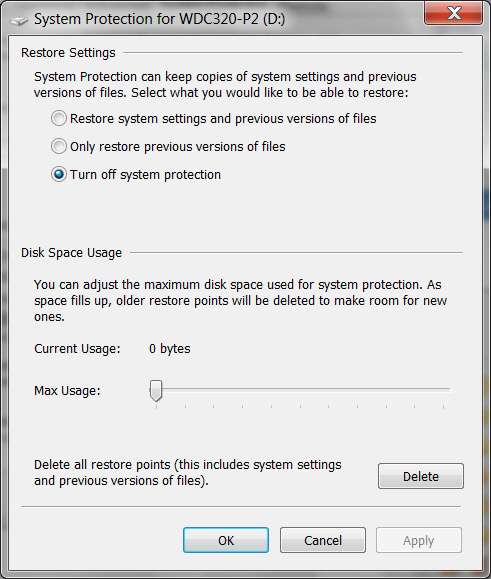
(a) to turn it off, just push the "configure" button and set it OFF:

restoreoff.jpg


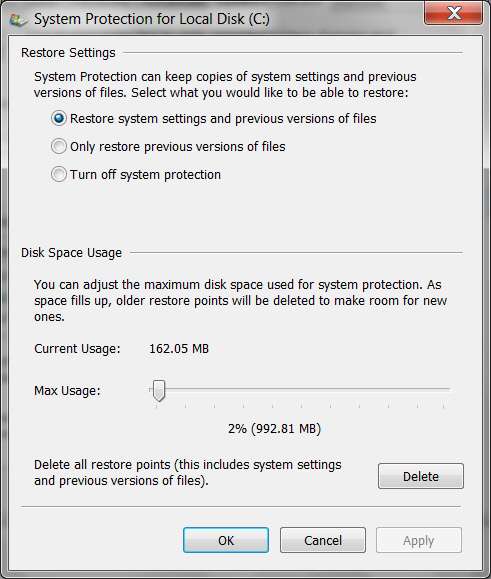
(b) to leave it on but constrain its total size, just push the "configure" button and move the "max usage" slider to the left from where it currently is, to some reasonable smaller size. You will see that max limit expresses as a percentage of your hard disk size, as well as a number of GB. Pick a small enough number so that it is reasonable, but also adequate. Maybe the 2-6% number is reasonable, depending on your disk partition size.

restoreon.jpg


Note that in my own situation, I have disabled this feature entirely on D, and constrained my restore point size to about 1GB on C. I have my own 3rd-party backup software scheme in place to perform my own "private backups" of everything anyway, from which I can recover data if I need to. I prefer this approach to the "restore point" feature of Windows, as a general rule... certainly for my non-C data partitions.

(1) C partition, showing non-zero "constrained" System Volume Information folder:

restorec.jpg


(2) D partition, showing ZERO size System Volume Information folder:

restored.jpg
 

My Computer My Computer

At a glance

Windows 7 Pro x64 (1), Win7 Pro X64 (2)i5-3350p 3.1Ghz/6MB-cache (1); E8400 3.0Ghz/6...8GB PC3-12800 DDR3 (1); 4GB PC3-10600 DDR3 (2)ATI HD7750 (1), (see TV cards); ATI R7 250 (2)
Computer type
PC/Desktop
Computer Manufacturer/Model Number
Home-built, two systems (1) and (2)
OS
Windows 7 Pro x64 (1), Win7 Pro X64 (2)
CPU
i5-3350p 3.1Ghz/6MB-cache (1); E8400 3.0Ghz/6MB-cache (2)
Motherboard
ASUS P8Z77-V Pro (1); ASUS P5Q3 (2)
Memory
8GB PC3-12800 DDR3 (1); 4GB PC3-10600 DDR3 (2)
Graphics Card(s)
ATI HD7750 (1), (see TV cards); ATI R7 250 (2)
Sound Card
Realtek ALC892 HD Audio (1); Realtek ALC1200 HD Audio (2)
Monitor(s) Displays
Eizo HD2441W LCD, Eizo S2433W (1); Eizo 24" S2433W (2)
Screen Resolution
1920x1200, 1920x1200 (1); 1920x1200 (2)
Hard Drives
(1) 1TB SATA-II (7200RPM), 2x2TB SATA-III (7200RPM), 250GB SATA-III (10000RPM) for OS; 2x2TB external USB 3.0

(2) 320GB SATA-II (7200RPM), 750GB SATA-II (7200RPM), 150GB SATA-II (10000RPM) for OS; 2TB external USB 3.0
PSU
Nesteq ECS-6001 600W (1); Nesteq ECS-5001 500W (2)
Case
Acousti-Case 360 (1) and (2)
Cooling
Noctua NH-U12P SE2 for CPU, 2x120mm case fans (1) and (2)
Keyboard
IBM PS/2 (1) and (2)
Mouse
Logitech MX Revolution wireless (1); Microsoft wired (2)
Internet Speed
100mbps down / 10mbps up
Antivirus
Microsoft Security Essentials; Malwarebyte Anti-Malware Pro
Browser
Firefox
Other Info
Ceton InfiniTV 4-tuner cablecard-enabled TV card as well as Hauppauge HVR-2250 OTA/ATSC 2-tuner TV card in (1), running under Win7 WMC
Also try to defrag. Start->accesories->system tools->defrag. Should give you some more space.
You can also try deleting temp files:
Start->accesories->system tools->Disk cleanup? (my os is in spanish, dunno what it is called in eng)
Clean up the temporary files, but nothing else.
Helped me once to get 60GB back after not having done those things in 3 years :)
 

My Computer My Computer

At a glance

W7i7 2600kG.Skill 8GB DDR3 1600Mhz CL9580 DCUII
OS
W7
CPU
i7 2600k
Motherboard
Sabertooth P67 B3
Memory
G.Skill 8GB DDR3 1600Mhz CL9
Graphics Card(s)
580 DCUII
Sound Card
onboard
PSU
tx850v2
Case
HAF X
Cooling
H70
the second hard drive (G) protection is off.
the drive is not fragmented it shows 0%
the primary drive (C) is on.
moz-screenshot.png
 

My Computer My Computer

At a glance

windows 7 64 bitintel core i3 m330 2.13ghz6 gb?
Computer Manufacturer/Model Number
hp / pavilion dv7
OS
windows 7 64 bit
CPU
intel core i3 m330 2.13ghz
Motherboard
?
Memory
6 gb
Graphics Card(s)
?
Sound Card
/
Hard Drives
one operating system and one for my documents
the second hard drive (G) protection is off.
the drive is not fragmented it shows 0%
the primary drive (C) is on.
moz-screenshot.png
You've got to upload your image to an image hosting site (e.g. Imageshack) if you want to imbed it between
, with the hosting site's "direct URL" in between.

Otherwise, just "attach" the screenshot to your post, using the paperclip ("attach") button.

Anyway, if you say that protection is off on the second drive then there's nothing more to show. You're saying the entire second drive is one partition, G. Yes?


Instead of sheer speculation, let's see what your G partition actually contains.

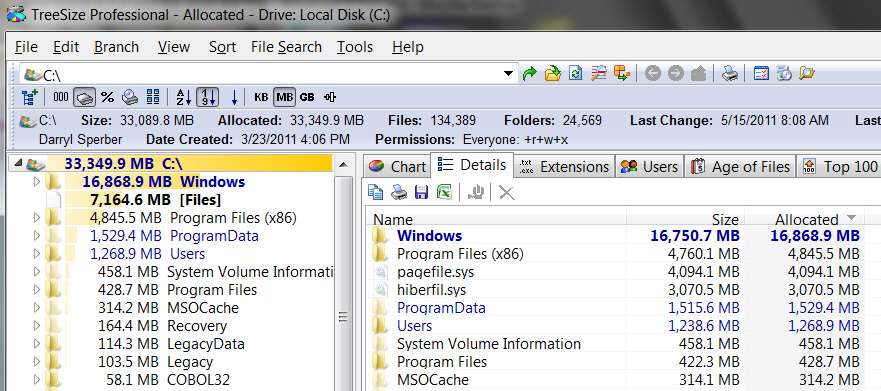
Please download and install one of the versions of Treesize. There's a basic Treesize Free, or a non-Free Treesize Personal, or a non-Free Treesize Professional. The latter two have 30-day free trials.

Then run Treesize on your G partition, selecting the "Details" tab as I've shown earlier in my own screenshots.

This will show you EXACTLY what your drive is currently being used by, with largest first and smallest last (unless you change the display sequence to something else).
 

My Computer My Computer

At a glance

Windows 7 Pro x64 (1), Win7 Pro X64 (2)i5-3350p 3.1Ghz/6MB-cache (1); E8400 3.0Ghz/6...8GB PC3-12800 DDR3 (1); 4GB PC3-10600 DDR3 (2)ATI HD7750 (1), (see TV cards); ATI R7 250 (2)
Computer type
PC/Desktop
Computer Manufacturer/Model Number
Home-built, two systems (1) and (2)
OS
Windows 7 Pro x64 (1), Win7 Pro X64 (2)
CPU
i5-3350p 3.1Ghz/6MB-cache (1); E8400 3.0Ghz/6MB-cache (2)
Motherboard
ASUS P8Z77-V Pro (1); ASUS P5Q3 (2)
Memory
8GB PC3-12800 DDR3 (1); 4GB PC3-10600 DDR3 (2)
Graphics Card(s)
ATI HD7750 (1), (see TV cards); ATI R7 250 (2)
Sound Card
Realtek ALC892 HD Audio (1); Realtek ALC1200 HD Audio (2)
Monitor(s) Displays
Eizo HD2441W LCD, Eizo S2433W (1); Eizo 24" S2433W (2)
Screen Resolution
1920x1200, 1920x1200 (1); 1920x1200 (2)
Hard Drives
(1) 1TB SATA-II (7200RPM), 2x2TB SATA-III (7200RPM), 250GB SATA-III (10000RPM) for OS; 2x2TB external USB 3.0

(2) 320GB SATA-II (7200RPM), 750GB SATA-II (7200RPM), 150GB SATA-II (10000RPM) for OS; 2TB external USB 3.0
PSU
Nesteq ECS-6001 600W (1); Nesteq ECS-5001 500W (2)
Case
Acousti-Case 360 (1) and (2)
Cooling
Noctua NH-U12P SE2 for CPU, 2x120mm case fans (1) and (2)
Keyboard
IBM PS/2 (1) and (2)
Mouse
Logitech MX Revolution wireless (1); Microsoft wired (2)
Internet Speed
100mbps down / 10mbps up
Antivirus
Microsoft Security Essentials; Malwarebyte Anti-Malware Pro
Browser
Firefox
Other Info
Ceton InfiniTV 4-tuner cablecard-enabled TV card as well as Hauppauge HVR-2250 OTA/ATSC 2-tuner TV card in (1), running under Win7 WMC
here is the screen shot of the two reports
 

Attachments

My Computer My Computer

At a glance

windows 7 64 bitintel core i3 m330 2.13ghz6 gb?
Computer Manufacturer/Model Number
hp / pavilion dv7
OS
windows 7 64 bit
CPU
intel core i3 m330 2.13ghz
Motherboard
?
Memory
6 gb
Graphics Card(s)
?
Sound Card
/
Hard Drives
one operating system and one for my documents
here is another screen shot using windows explorer
 

Attachments

My Computer My Computer

At a glance

windows 7 64 bitintel core i3 m330 2.13ghz6 gb?
Computer Manufacturer/Model Number
hp / pavilion dv7
OS
windows 7 64 bit
CPU
intel core i3 m330 2.13ghz
Motherboard
?
Memory
6 gb
Graphics Card(s)
?
Sound Card
/
Hard Drives
one operating system and one for my documents
here is the screen shot of the two reports
Well... you didn't give us all the information you needed to to "crack the case". Now that you've provided a picture (which is worth 1000 words), the explanation is clear.

You're using your G drive as the target for "Windows Image Backup". That's where you're placing your "system image" when you take a "system image" backup.

This "system image" (whose approximate size is revealed just before you actually begin the backup process) is about as big as your C-partition contents, plus your 100MB "system reserved", plus any other partitions you optionally also include in that "system image" backup.

And you're writing it to G. That's what is taking up the space on G labeled "WindowsImageBackup" folder... the current utilization on your C-drive.


Now... you'll notice that there are three folders on G which are "access denied". Apparently you are a different user than "administrator", because this shouldn't be the case. But the 0MB utilization is not real... it's just that Treesize couldn't peer inside the folders because of the authorization issue.

If you log on with the same userid that ran the "system image" backup, you'd then see the REAL size from Treesize.

Same story with "System Volume Information". You've stated that you have "restore point protection" set to OFF for G, so it's probably 0 for real. But you can't really tell yet, because "access is denied" prevents looking inside to get the true current usage for that folder.

Same story with "GREG-PC" folder. What's that? And why is it a different user so that again we see "access is denied"?


But in my opinion the vast majority of usage that you cannot account for is in the "system image" in the WindowsImageBackup folder.

Until you can see inside of those three "access is denied" folders, you can't actually see what they take up. But the Properties window shows it to be a total of about 304GB (used) - 161GB (free) = 143GB (in those three folders). If you look at the "used" on C-partition I think it will probably be close, maybe? Unless you really have a great deal in your System Volume Information "restore points for the drive" that got placed there before you set protection on G to OFF. Or, maybe it's really zero and all of that 143GB is from C's "system image" backup.
 

My Computer My Computer

At a glance

Windows 7 Pro x64 (1), Win7 Pro X64 (2)i5-3350p 3.1Ghz/6MB-cache (1); E8400 3.0Ghz/6...8GB PC3-12800 DDR3 (1); 4GB PC3-10600 DDR3 (2)ATI HD7750 (1), (see TV cards); ATI R7 250 (2)
Computer type
PC/Desktop
Computer Manufacturer/Model Number
Home-built, two systems (1) and (2)
OS
Windows 7 Pro x64 (1), Win7 Pro X64 (2)
CPU
i5-3350p 3.1Ghz/6MB-cache (1); E8400 3.0Ghz/6MB-cache (2)
Motherboard
ASUS P8Z77-V Pro (1); ASUS P5Q3 (2)
Memory
8GB PC3-12800 DDR3 (1); 4GB PC3-10600 DDR3 (2)
Graphics Card(s)
ATI HD7750 (1), (see TV cards); ATI R7 250 (2)
Sound Card
Realtek ALC892 HD Audio (1); Realtek ALC1200 HD Audio (2)
Monitor(s) Displays
Eizo HD2441W LCD, Eizo S2433W (1); Eizo 24" S2433W (2)
Screen Resolution
1920x1200, 1920x1200 (1); 1920x1200 (2)
Hard Drives
(1) 1TB SATA-II (7200RPM), 2x2TB SATA-III (7200RPM), 250GB SATA-III (10000RPM) for OS; 2x2TB external USB 3.0

(2) 320GB SATA-II (7200RPM), 750GB SATA-II (7200RPM), 150GB SATA-II (10000RPM) for OS; 2TB external USB 3.0
PSU
Nesteq ECS-6001 600W (1); Nesteq ECS-5001 500W (2)
Case
Acousti-Case 360 (1) and (2)
Cooling
Noctua NH-U12P SE2 for CPU, 2x120mm case fans (1) and (2)
Keyboard
IBM PS/2 (1) and (2)
Mouse
Logitech MX Revolution wireless (1); Microsoft wired (2)
Internet Speed
100mbps down / 10mbps up
Antivirus
Microsoft Security Essentials; Malwarebyte Anti-Malware Pro
Browser
Firefox
Other Info
Ceton InfiniTV 4-tuner cablecard-enabled TV card as well as Hauppauge HVR-2250 OTA/ATSC 2-tuner TV card in (1), running under Win7 WMC
Check how much is Allocated for shadowstorage (restore points). The command is:

vssadmin list shadowstorage
 

My Computer My Computer

At a glance

Vista, Windows7, Mint Mate, Zorin, Windows 8from 1.6GHz Duo to i7
Computer Manufacturer/Model Number
HP, Dell, Gateway, Toshiba - 4 laptops and 2 desktops
OS
Vista, Windows7, Mint Mate, Zorin, Windows 8
CPU
from 1.6GHz Duo to i7
Monitor(s) Displays
2x HP w2207
Hard Drives
5x HDD, 7x SSD, 12x Externals
Keyboard
with trackball - no mices
Mouse
Trackball mice
Internet Speed
DSL 6000
Back
Top