3.25G usable out of 4G RAM win7 64-bit

F0ICE

New member
Local time
8:11 AM
Messages
14
i am running windows 7 Home premium 64-bit and recently upgraded my RAM from 3GB to 4GB. win7 reports only 3.25 being usable.

  • i have a dedicated video card an my onboard one is definitely disabled.
  • my BIOS reports 4096MB RAM detected.
  • max memory and CPU are unchecked in msconfig.
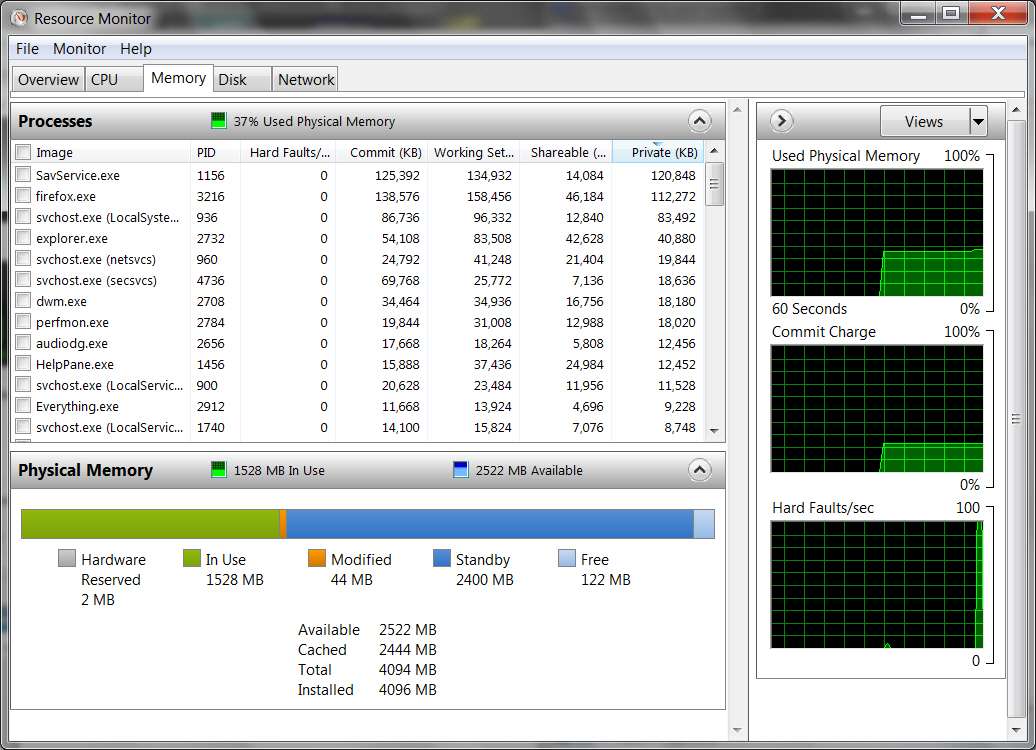
from looking at the resource monitor i see that 770MB of RAM is labeled as hardware reserved memory.

also i don't know if my BIOS supports a memory remap feature or not but even if it does its a locked HP BIOS so most setting are inaccessible.

is there any way to get my full memory? or does anyone know why this is happening on a 64-bit os?

Thanks in Advance.
 

My Computer My Computer

At a glance

Windows 7 Home Premium 64-bitAMD Athlon X2 3800+ Dual Core @ 2.00 GHz Toledo4x1GB Dual Channel DDR PC3200Gigabyte GV R435OC-512I Radeon HD 4350
OS
Windows 7 Home Premium 64-bit
CPU
AMD Athlon X2 3800+ Dual Core @ 2.00 GHz Toledo
Motherboard
ASUS A8R32-MVP Deluxe
Memory
4x1GB Dual Channel DDR PC3200
Graphics Card(s)
Gigabyte GV R435OC-512I Radeon HD 4350
Sound Card
Realtek HD Audio
Monitor(s) Displays
HP vs17 LCD VIZIO 32" LCD HDTV
Screen Resolution
1280x1024+1920x1080
Hard Drives
Hitachi Deskstar 250GB
Seagate Barracuda 1TB 7200RPM
Seagate 3TB External Drive
PSU
550W
F0ICE, welcome to the Seven Forums.

i don't know if my BIOS supports a memory remap feature or not but even if it does its a locked HP BIOS so most setting are inaccessible.

While the re-map is definitely needed (on newer boards it is enabled by default and the option may not be available), no idea if that is one that HP would hide or not if available. Another thing to consider is if the motherboard/chipset itself supports more than 4 GB. This should help explain what I mean by that,

The system memory that is reported in the System Information dialog box in Windows Vista is less than you expect if 4 GB of RAM is installed

Note When the physical RAM that is installed on a computer equals the address space that is supported by the chipset, the total system memory that is available to the operating system is always less than the physical RAM that is installed. For example, consider a computer that has an Intel 975X chipset that supports 8 GB of address space. If you install 8 GB of RAM, the system memory that is available to the operating system will be reduced by the PCI configuration requirements. In this scenario, PCI configuration requirements reduce the memory that is available to the operating system by an amount that is between approximately 200 MB and approximately 1 GB. The reduction depends on the configuration.

Just change the mentioned 8 GB to 4 GB if your motherboard is one that only supports up to 4 GB, and the same applies.
 

My Computer My Computer

At a glance

Win 7 Ultimate x64FX-8350 @ 4.6 GHz so farADATA XPG V1 Series Black 8GB DDR3 1600Sapphire R9 270x Dual-X
Computer type
PC/Desktop
Computer Manufacturer/Model Number
Me
OS
Win 7 Ultimate x64
CPU
FX-8350 @ 4.6 GHz so far
Motherboard
Asus M5A97 EVO
Memory
ADATA XPG V1 Series Black 8GB DDR3 1600
Graphics Card(s)
Sapphire R9 270x Dual-X
Sound Card
Xonar DGX w/ Corsair Vengence 1300
Monitor(s) Displays
Acer S232HL Abid
Screen Resolution
1920x1080
Hard Drives
120 GB OCZ Vertex 3
500 GB Seagate 7200.12
PSU
Antec Earthwatts 650W Green
Case
Antec Three Hundred
Cooling
Cooler Master 212 EVO
Keyboard
Logitech G510
Mouse
Logitech G500s
Internet Speed
35000/3000
Any 32 bit os can only map 4Gb of memory im total, so that includes motherboard and even hard drive requirements, but more importantly the memory on your graphics card, so if you have a 512Mb card Windows 32 bit will map that out of the total 'seen' memory of 4gb immediately leaving you with only 3.5 Gb avialable. Add up all the other mapped requirements and 3.25Gig is just about average. Which is more than enough for any application thusfore built (even 64 bit actually, but that's a whole other question).
 

My Computer My Computer

At a glance

Windows 7 home premium x64AMD FX-4100 AM3+ 3.6GHz 12MB Black EditionCrsair vengeance 12Gb DDR3 1600MHz CL9Asus GTX 560 1GB
Computer Manufacturer/Model Number
DIY
OS
Windows 7 home premium x64
CPU
AMD FX-4100 AM3+ 3.6GHz 12MB Black Edition
Motherboard
Asus M5A97 Pro
Memory
Crsair vengeance 12Gb DDR3 1600MHz CL9
Graphics Card(s)
Asus GTX 560 1GB
Sound Card
Realtek onboard
Monitor(s) Displays
Hanns G 1680x1050 native
Hard Drives
OCZ 128Gb Petrol ssd
2x500 Gb Samsung
PSU
OCZ StealthXstream II 500W
Internet Speed
8Mb or better
Note When the physical RAM that is installed on a computer equals the address space that is supported by the chipset, the total system memory that is available to the operating system is always less than the physical RAM that is installed. For example, consider a computer that has an Intel 975X chipset that supports 8 GB of address space. If you install 8 GB of RAM, the system memory that is available to the operating system will be reduced by the PCI configuration requirements. In this scenario, PCI configuration requirements reduce the memory that is available to the operating system by an amount that is between approximately 200 MB and approximately 1 GB. The reduction depends on the configuration.
so since i hit my motherboard's memory threshold it reserved the missing 0.75GB of ram for PCI devices. and the memory remapping feature that i either don't have or can't get to would bypass that allowing me full memory access. this would also explain why SIW reports so many memory address ranges assigned to the system board. am i right? either way i need to find a new motherboard if i want the rest of my memory.
thank you very much for explaining that. it helps to know why this is happening even though i can't fix it.
again thank you for your time.
 

My Computer My Computer

At a glance

Windows 7 Home Premium 64-bitAMD Athlon X2 3800+ Dual Core @ 2.00 GHz Toledo4x1GB Dual Channel DDR PC3200Gigabyte GV R435OC-512I Radeon HD 4350
OS
Windows 7 Home Premium 64-bit
CPU
AMD Athlon X2 3800+ Dual Core @ 2.00 GHz Toledo
Motherboard
ASUS A8R32-MVP Deluxe
Memory
4x1GB Dual Channel DDR PC3200
Graphics Card(s)
Gigabyte GV R435OC-512I Radeon HD 4350
Sound Card
Realtek HD Audio
Monitor(s) Displays
HP vs17 LCD VIZIO 32" LCD HDTV
Screen Resolution
1280x1024+1920x1080
Hard Drives
Hitachi Deskstar 250GB
Seagate Barracuda 1TB 7200RPM
Seagate 3TB External Drive
PSU
550W
What shows in your Task Manager>

Run TASKMGR -> Performance tab, push Resource Monitor button -> select Memory tab.

For example, on my 4GB 64-bit Win7 Pro system (ASUS P5Q3 board, P45 chipset, Intel Duo E8400 CPU, 2x2GB DDR3 memory, ATI HD4670 512MB GDDR3 video card:

memoryutilization.jpg


Note that my ATI HD4670 512MB video card apparently does not take any memory from my 4GB physical memory, which is all available to Win7. RMB on Computer -> Properties shows my full 4GB installed, there is no second qualifying line showing "available... " (something less). And Resource Monitor also confirms that all 4GB is available for use by Win7 and programs.

I have a similar story on my other machine, with a 1GB ATI HD4850 card. Again, all 4GB is available. Nothing's been carved out for hardware use.
 
Last edited:

My Computer My Computer

At a glance

Windows 7 Pro x64 (1), Win7 Pro X64 (2)i5-3350p 3.1Ghz/6MB-cache (1); E8400 3.0Ghz/6...8GB PC3-12800 DDR3 (1); 4GB PC3-10600 DDR3 (2)ATI HD7750 (1), (see TV cards); ATI R7 250 (2)
Computer type
PC/Desktop
Computer Manufacturer/Model Number
Home-built, two systems (1) and (2)
OS
Windows 7 Pro x64 (1), Win7 Pro X64 (2)
CPU
i5-3350p 3.1Ghz/6MB-cache (1); E8400 3.0Ghz/6MB-cache (2)
Motherboard
ASUS P8Z77-V Pro (1); ASUS P5Q3 (2)
Memory
8GB PC3-12800 DDR3 (1); 4GB PC3-10600 DDR3 (2)
Graphics Card(s)
ATI HD7750 (1), (see TV cards); ATI R7 250 (2)
Sound Card
Realtek ALC892 HD Audio (1); Realtek ALC1200 HD Audio (2)
Monitor(s) Displays
Eizo HD2441W LCD, Eizo S2433W (1); Eizo 24" S2433W (2)
Screen Resolution
1920x1200, 1920x1200 (1); 1920x1200 (2)
Hard Drives
(1) 1TB SATA-II (7200RPM), 2x2TB SATA-III (7200RPM), 250GB SATA-III (10000RPM) for OS; 2x2TB external USB 3.0

(2) 320GB SATA-II (7200RPM), 750GB SATA-II (7200RPM), 150GB SATA-II (10000RPM) for OS; 2TB external USB 3.0
PSU
Nesteq ECS-6001 600W (1); Nesteq ECS-5001 500W (2)
Case
Acousti-Case 360 (1) and (2)
Cooling
Noctua NH-U12P SE2 for CPU, 2x120mm case fans (1) and (2)
Keyboard
IBM PS/2 (1) and (2)
Mouse
Logitech MX Revolution wireless (1); Microsoft wired (2)
Internet Speed
100mbps down / 10mbps up
Antivirus
Microsoft Security Essentials; Malwarebyte Anti-Malware Pro
Browser
Firefox
Other Info
Ceton InfiniTV 4-tuner cablecard-enabled TV card as well as Hauppauge HVR-2250 OTA/ATSC 2-tuner TV card in (1), running under Win7 WMC


as you can see 770MB is marked as hardware reserved here is SIW's listing of memory ranges.


is it normal for that many system board instances?
 

My Computer My Computer

At a glance

Windows 7 Home Premium 64-bitAMD Athlon X2 3800+ Dual Core @ 2.00 GHz Toledo4x1GB Dual Channel DDR PC3200Gigabyte GV R435OC-512I Radeon HD 4350
OS
Windows 7 Home Premium 64-bit
CPU
AMD Athlon X2 3800+ Dual Core @ 2.00 GHz Toledo
Motherboard
ASUS A8R32-MVP Deluxe
Memory
4x1GB Dual Channel DDR PC3200
Graphics Card(s)
Gigabyte GV R435OC-512I Radeon HD 4350
Sound Card
Realtek HD Audio
Monitor(s) Displays
HP vs17 LCD VIZIO 32" LCD HDTV
Screen Resolution
1280x1024+1920x1080
Hard Drives
Hitachi Deskstar 250GB
Seagate Barracuda 1TB 7200RPM
Seagate 3TB External Drive
PSU
550W


as you can see 770MB is marked as hardware reserved
I do indeed.

You haven't provided specifics on your hardware setup. Easiest way is to give us three screenshots from CPU-Z, of the CPU, MAINBOARD and GRAPHICS tabs. I'm guessing this is an HP Pavillion laptop, but I don't think you've provided model details.

Knowing the details of your motherboard, chipset, CPU and video hardware as presented by CPU-Z is very useful. But if 770MB is reserved for hardware use (specifically, the video hardware), seems to me that there is nothing that can be done other than change the fundamental hardware (i.e. upgrade to a new video card if possible, which seems unlikely on a laptop).

But let's reserve judgment until we see your hardware details.
 

My Computer My Computer

At a glance

Windows 7 Pro x64 (1), Win7 Pro X64 (2)i5-3350p 3.1Ghz/6MB-cache (1); E8400 3.0Ghz/6...8GB PC3-12800 DDR3 (1); 4GB PC3-10600 DDR3 (2)ATI HD7750 (1), (see TV cards); ATI R7 250 (2)
Computer type
PC/Desktop
Computer Manufacturer/Model Number
Home-built, two systems (1) and (2)
OS
Windows 7 Pro x64 (1), Win7 Pro X64 (2)
CPU
i5-3350p 3.1Ghz/6MB-cache (1); E8400 3.0Ghz/6MB-cache (2)
Motherboard
ASUS P8Z77-V Pro (1); ASUS P5Q3 (2)
Memory
8GB PC3-12800 DDR3 (1); 4GB PC3-10600 DDR3 (2)
Graphics Card(s)
ATI HD7750 (1), (see TV cards); ATI R7 250 (2)
Sound Card
Realtek ALC892 HD Audio (1); Realtek ALC1200 HD Audio (2)
Monitor(s) Displays
Eizo HD2441W LCD, Eizo S2433W (1); Eizo 24" S2433W (2)
Screen Resolution
1920x1200, 1920x1200 (1); 1920x1200 (2)
Hard Drives
(1) 1TB SATA-II (7200RPM), 2x2TB SATA-III (7200RPM), 250GB SATA-III (10000RPM) for OS; 2x2TB external USB 3.0

(2) 320GB SATA-II (7200RPM), 750GB SATA-II (7200RPM), 150GB SATA-II (10000RPM) for OS; 2TB external USB 3.0
PSU
Nesteq ECS-6001 600W (1); Nesteq ECS-5001 500W (2)
Case
Acousti-Case 360 (1) and (2)
Cooling
Noctua NH-U12P SE2 for CPU, 2x120mm case fans (1) and (2)
Keyboard
IBM PS/2 (1) and (2)
Mouse
Logitech MX Revolution wireless (1); Microsoft wired (2)
Internet Speed
100mbps down / 10mbps up
Antivirus
Microsoft Security Essentials; Malwarebyte Anti-Malware Pro
Browser
Firefox
Other Info
Ceton InfiniTV 4-tuner cablecard-enabled TV card as well as Hauppauge HVR-2250 OTA/ATSC 2-tuner TV card in (1), running under Win7 WMC
If you cannot remap the memory, it looks like you are stuck. Your memory map is typical for this situation. Knowing the model of your computer will help us look up the chipset and motherboard fill in your system spec. But I expect there is nothing you can do.
 

My Computer My Computer

At a glance

Windows 10 Pro. EFI boot partition, full EFI ...i7 4770k 4.4GHz (44-44-43-43 turbo) @ 1.248V16GB (8GBx2) @2200 MHz G.skill Sniper 10-11-1...MSI GTX 970 Gaming 4G
Computer type
PC/Desktop
Computer Manufacturer/Model Number
Home built (GeneO industries)/Model 4
OS
Windows 10 Pro. EFI boot partition, full EFI boot
CPU
i7 4770k 4.4GHz (44-44-43-43 turbo) @ 1.248V
Motherboard
ASUS Maximus VI Hero
Memory
16GB (8GBx2) @2200 MHz G.skill Sniper 10-11-10-30-1, 1.6V
Graphics Card(s)
MSI GTX 970 Gaming 4G
Sound Card
Onboard SupremeFX Audio
Monitor(s) Displays
NEC Spectraview 2490WUXi-SV
Screen Resolution
1920 x 1200
Hard Drives
Samsung 850 Pro 256GB (OS), Samsung 2x 128GB 840 Pro SSD in RAID0, 3x WD Blue 6Gb/s 1TB RAID0, WD 2TB Black external USB 3.0, 2TB WD20EARS Green external USB 3.0, 2x 500GB Seagate and 1 750 GB external USB, 1x 350GB external USB3
PSU
Seasonic X-850 (2012 KM3 model)
Case
Fractal Design Define R4
Cooling
NH-D14, NF-F12, NF-A15; NF-P14, NF-P12,NF-A14, S12A PWM
Keyboard
Cooler Master Storm Quickfire Rapid - Brown
Mouse
Logitech G602
Internet Speed
126.4 Mb/s down, 24.3 Mb/s up
Other Info
USB 3.0 x8 , SATA III x8, eSATA, USB 2.0 x6. Samsung DVD R/W drive.

WEI: CPU 7.8, Memory 7.9, Graphics 7.9, Disk 7.9
nope not a laptop. hp pavilion a1250n

motherboard: ms-7184/Amethystm using radeon xpress 200 chipset
CPU: amd athlon x2 3800+ @ 2.0GHz Toledo Socket 939
GPU radeon hd 4350 from gigabyte 512M VRAM PCIE x16
memory:DDR PC3200 4x1GB Dual Channel

thats all i can provide right now.
the motherboard and CPU are original to the PC. the motherboard does have an onboard video adapter which is disabled via BIOS.
i have to get back to you on CPUZ but i can say this right now, when i was using 3GB of RAM that hardware reserved memory reading was around 2MB.

i will post CPUZ details tomorrow. thanks for the help.
 

My Computer My Computer

At a glance

Windows 7 Home Premium 64-bitAMD Athlon X2 3800+ Dual Core @ 2.00 GHz Toledo4x1GB Dual Channel DDR PC3200Gigabyte GV R435OC-512I Radeon HD 4350
OS
Windows 7 Home Premium 64-bit
CPU
AMD Athlon X2 3800+ Dual Core @ 2.00 GHz Toledo
Motherboard
ASUS A8R32-MVP Deluxe
Memory
4x1GB Dual Channel DDR PC3200
Graphics Card(s)
Gigabyte GV R435OC-512I Radeon HD 4350
Sound Card
Realtek HD Audio
Monitor(s) Displays
HP vs17 LCD VIZIO 32" LCD HDTV
Screen Resolution
1280x1024+1920x1080
Hard Drives
Hitachi Deskstar 250GB
Seagate Barracuda 1TB 7200RPM
Seagate 3TB External Drive
PSU
550W
Any 32 bit os can only map 4Gb of memory im total, so that includes motherboard and even hard drive requirements, but more importantly the memory on your graphics card, so if you have a 512Mb card Windows 32 bit will map that out of the total 'seen' memory of 4gb immediately leaving you with only 3.5 Gb avialable. Add up all the other mapped requirements and 3.25Gig is just about average. Which is more than enough for any application thusfore built (even 64 bit actually, but that's a whole other question).


Um he is running 64 bit
 

My Computer My Computer

At a glance

Win 8 Release candidate 8400[email protected]4 gigsNvidia 9600M
Computer Manufacturer/Model Number
HP Pavillion dv-7 1005 Tx
OS
Win 8 Release candidate 8400
CPU
[email protected]
Memory
4 gigs
Graphics Card(s)
Nvidia 9600M
Sound Card
HD built-in
Monitor(s) Displays
17" Wxga
Screen Resolution
1440x900
Cooling
none
Internet Speed
45Mb down 5Mb up
nope not a laptop. hp pavilion a1250n
Bad guess!!


motherboard: ms-7184/Amethystm using radeon xpress 200 chipset
CPU: amd athlon x2 3800+ @ 2.0GHz Toledo Socket 939
GPU radeon hd 4350 from gigabyte 512M VRAM PCIE x16
memory:DDR PC3200 4x1GB Dual Channel

thats all i can provide right now.
Nevertheless, informative.

I must admit I'm not personally familiar firsthand with any of the key components. Perhaps others who do will comment on your available options or BIOS settings possibilities.


the motherboard and CPU are original to the PC. the motherboard does have an onboard video adapter which is disabled via BIOS.
You're sure?

Did this machine come with XP or Vista installed, and you upgraded to Win7 yourself? Or was it purchased relatively recently with Win7 already on it?

Other than the memory upgrade, have you made any other changes to the original configuration?


i have to get back to you on CPUZ but i can say this right now, when i was using 3GB of RAM that hardware reserved memory reading was around 2MB.
Again, very interesting.

While you're about it, can you also please post screenshots from CPU-Z for all four of the memory slots in the SPD tab.


i will post CPUZ details tomorrow. thanks for the help.
This last comment of yours is interesting... as if something you did when you added that final 1GB of memory is VERY relevant to the story.
 

My Computer My Computer

At a glance

Windows 7 Pro x64 (1), Win7 Pro X64 (2)i5-3350p 3.1Ghz/6MB-cache (1); E8400 3.0Ghz/6...8GB PC3-12800 DDR3 (1); 4GB PC3-10600 DDR3 (2)ATI HD7750 (1), (see TV cards); ATI R7 250 (2)
Computer type
PC/Desktop
Computer Manufacturer/Model Number
Home-built, two systems (1) and (2)
OS
Windows 7 Pro x64 (1), Win7 Pro X64 (2)
CPU
i5-3350p 3.1Ghz/6MB-cache (1); E8400 3.0Ghz/6MB-cache (2)
Motherboard
ASUS P8Z77-V Pro (1); ASUS P5Q3 (2)
Memory
8GB PC3-12800 DDR3 (1); 4GB PC3-10600 DDR3 (2)
Graphics Card(s)
ATI HD7750 (1), (see TV cards); ATI R7 250 (2)
Sound Card
Realtek ALC892 HD Audio (1); Realtek ALC1200 HD Audio (2)
Monitor(s) Displays
Eizo HD2441W LCD, Eizo S2433W (1); Eizo 24" S2433W (2)
Screen Resolution
1920x1200, 1920x1200 (1); 1920x1200 (2)
Hard Drives
(1) 1TB SATA-II (7200RPM), 2x2TB SATA-III (7200RPM), 250GB SATA-III (10000RPM) for OS; 2x2TB external USB 3.0

(2) 320GB SATA-II (7200RPM), 750GB SATA-II (7200RPM), 150GB SATA-II (10000RPM) for OS; 2TB external USB 3.0
PSU
Nesteq ECS-6001 600W (1); Nesteq ECS-5001 500W (2)
Case
Acousti-Case 360 (1) and (2)
Cooling
Noctua NH-U12P SE2 for CPU, 2x120mm case fans (1) and (2)
Keyboard
IBM PS/2 (1) and (2)
Mouse
Logitech MX Revolution wireless (1); Microsoft wired (2)
Internet Speed
100mbps down / 10mbps up
Antivirus
Microsoft Security Essentials; Malwarebyte Anti-Malware Pro
Browser
Firefox
Other Info
Ceton InfiniTV 4-tuner cablecard-enabled TV card as well as Hauppauge HVR-2250 OTA/ATSC 2-tuner TV card in (1), running under Win7 WMC
Specs on that HP,

HP Pavilion a1250n Desktop PC Product Specifications HP Pavilion a1250n Desktop PC - HP Customer Care (United States - English)

and yes the motherboard does only support up to 4 GB or ram, probably due to it being the older DDR which pretty much topped out at 1 GB max per stick. The CPU on the other hand, old socket 939 Athlon 64 x2 3800+ does as the memory controller is in the CPU and not on the motherboard.

As for the memory re-map option, there is no reason for it to not be enabled by default whether the option is present or not. Unfortunately in your case I don't think that the option was present to begin with. The motherboard in it, MS-7184 which was made by MSI for HP also has a full retail version, the MSI MS-7093,

MSI USA – Computer, Laptop, Notebook, Desktop, Mainboard, Graphics and more

and from looking through the manual for it, it doesn't have the option either. Now as to whether MSI had the option enabled by default and just not present in the bios I don't know, but I wouldn't be surprised if it was off by default with no way of enabling it. Wouldn't be the first socket 939 motherboard I have come across that doesn't have the option in the bios or or any way to enable it.

Basically comes down to what you see for total memory is what you're going to get, at least until such a time as you get a new computer.
 

My Computer My Computer

At a glance

Win 7 Ultimate x64FX-8350 @ 4.6 GHz so farADATA XPG V1 Series Black 8GB DDR3 1600Sapphire R9 270x Dual-X
Computer type
PC/Desktop
Computer Manufacturer/Model Number
Me
OS
Win 7 Ultimate x64
CPU
FX-8350 @ 4.6 GHz so far
Motherboard
Asus M5A97 EVO
Memory
ADATA XPG V1 Series Black 8GB DDR3 1600
Graphics Card(s)
Sapphire R9 270x Dual-X
Sound Card
Xonar DGX w/ Corsair Vengence 1300
Monitor(s) Displays
Acer S232HL Abid
Screen Resolution
1920x1080
Hard Drives
120 GB OCZ Vertex 3
500 GB Seagate 7200.12
PSU
Antec Earthwatts 650W Green
Case
Antec Three Hundred
Cooling
Cooler Master 212 EVO
Keyboard
Logitech G510
Mouse
Logitech G500s
Internet Speed
35000/3000


here is my cpuz info.
Edit: didn't see the last 2 posts

@desperber

this PC was bought 5-6 years ago since then i

  • upgraded the RAM from 1GB to 3GB and then to 4GB
  • added a radeon hd 4350
  • added a diamond xs71 sound card
  • added a Linksys WMP54G wireless nic
  • moved it to a bigger case for better cooling
  • and added a 1TB HDD
that is all the upgrades i have made to date

[URL=http://imageshack.us/photo/my-images/851/spdp.jpg/]
[/URL]
cpuz SPD pages

also as for my BIOS it doesn't offer much.
all i can really do is

  • enable/disable onboard devices sound ide parallel etc
  • set boot order
  • view basic info some temp monitoring total ram installed drives
that is pretty much it for the BIOS

@Stormy13 i have been looking for a new Motherboard for some time now but socket 939 parts are hard to come by. if i find a new motherboard should i make sure it supports memory remapping?
 
Last edited:

My Computer My Computer

At a glance

Windows 7 Home Premium 64-bitAMD Athlon X2 3800+ Dual Core @ 2.00 GHz Toledo4x1GB Dual Channel DDR PC3200Gigabyte GV R435OC-512I Radeon HD 4350
OS
Windows 7 Home Premium 64-bit
CPU
AMD Athlon X2 3800+ Dual Core @ 2.00 GHz Toledo
Motherboard
ASUS A8R32-MVP Deluxe
Memory
4x1GB Dual Channel DDR PC3200
Graphics Card(s)
Gigabyte GV R435OC-512I Radeon HD 4350
Sound Card
Realtek HD Audio
Monitor(s) Displays
HP vs17 LCD VIZIO 32" LCD HDTV
Screen Resolution
1280x1024+1920x1080
Hard Drives
Hitachi Deskstar 250GB
Seagate Barracuda 1TB 7200RPM
Seagate 3TB External Drive
PSU
550W
Back
Top