Changing the icon of an attached network device?

dannymac63

New member
Local time
5:54 PM
Messages
4
Location
New Hampshire
I've managed to utilize the search feature to change almost every single icon in my system, this is one of the few that I'm certain I'd like to change but can not find a method to get it done.

I have 2 Desktops, 3 Notebooks, 2 Phones, 1 Printer-Scanner-Copier, 2 TV's that are normally in the network and I'd really love to utilize custom icons I've made specifically for them. They're not amazing, but I like my Antec 1200 icon better than the regular My Computer icon. :D

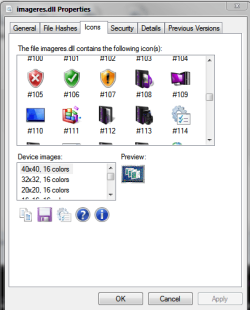
I've attempted searching the registry for every instance of "imageres.dll,-109" - The standard Computer icon in Windows 7. I've tried changing it to a different unused testing icon, though I haven't tried restarting the machine after every change. I'm not sure if the icon in the Network area is even listed in the registry or if it's using some random copy of the same Computer icon.

If anyone can help me figure this out, you will have my respect forever. If there's something in the tutorials section that I've overlooked, please forgive me...and point me in that direction!

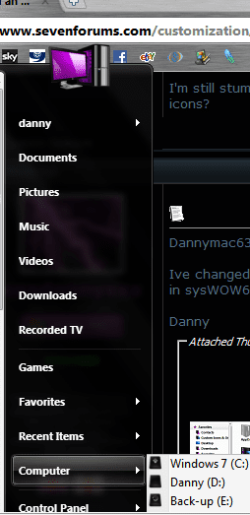
Picture very much related.
 

Attachments
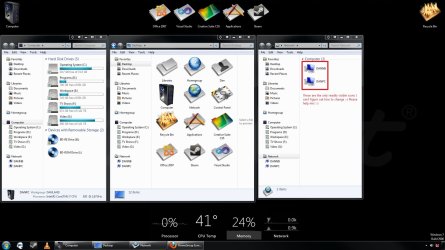
  • monitor4setup.jpg
    monitor4setup.jpg
    168 KB · Views: 133

My Computer My Computer

At a glance

7 Ultimate x64, 7 Professional x64, 7 Home Pr...Intel Core i7 920 @ 3.6 GhzOCZ Platinum 12GB @ 1443 Mhz2x Sapphire Radeon HD 5870 running 6 displays...
Computer Manufacturer/Model Number
DanBuilt
OS
7 Ultimate x64, 7 Professional x64, 7 Home Premium x64
CPU
Intel Core i7 920 @ 3.6 Ghz
Motherboard
Asus P6T Deluxe V2
Memory
OCZ Platinum 12GB @ 1443 Mhz
Graphics Card(s)
2x Sapphire Radeon HD 5870 running 6 displays or Eyefinity
Sound Card
Onboard Audio
Monitor(s) Displays
3x Samsung BX2231, 1x 2233SW, 1x LN40A750, 1x UN55C7000
Hard Drives
2x Western Digital Caviar Black 2TB
2x Western Digital Caviar Black 1TB
1x Intel X25M 80GB
PSU
Antec CP-850
Case
Antec 1200
Cooling
Corsair H50 /w Push-Pull
Keyboard
Logitech Mediaboard Pro
Mouse
Razer Copperhead/Microsoft Notebook Mouse 5000
Other Info
Crossfire/6 Screen setup with unlimited possibility. :-D
I am in pretty much the same situation! anyone that can help?
 

My Computer My Computer

At a glance

Windows 7 Home Premium 32bitAMD Athlon(tm) 64 X2 Dual Core PCorsair DDR-2 (2GB)NVIDIA GeForce 9800 GTX+
Computer Manufacturer/Model Number
Self-Built
OS
Windows 7 Home Premium 32bit
CPU
AMD Athlon(tm) 64 X2 Dual Core P
Motherboard
XFX MI-A78S-8209
Memory
Corsair DDR-2 (2GB)
Graphics Card(s)
NVIDIA GeForce 9800 GTX+
Sound Card
NVIDIA High Definition Audio
Monitor(s) Displays
Samsung 46" LED TV/Sceptre X24WG
Hi dannymac63 & lHarris73

The "My computer icon" is located in these .dll files
system32\imageres.109
system32\shell32.16

And if your running 64bit also

sysWOW64\imageres.109
sysWOW64\shell32.16

Replace these icons with your new one and that will get you to where you want to be

Danny

P.S You do need to reboot for the changes to take effect
 

My Computer My Computer

At a glance

Windows 7 Home Premium x64 SP1intel(R)core(TM)2 duo CPU T6600 @ 2.20GHz3 gb ddr3ati radeon hd4570/512mb
Computer Manufacturer/Model Number
acer aspire 5935g
OS
Windows 7 Home Premium x64 SP1
CPU
intel(R)core(TM)2 duo CPU T6600 @ 2.20GHz
Motherboard
intel gm45/gm47 revision 07
Memory
3 gb ddr3
Graphics Card(s)
ati radeon hd4570/512mb
Monitor(s) Displays
lop156wh2-tle1 15.3 flat
Screen Resolution
1366x768
Hard Drives
OCZ-Agility3 60gig ssd
320gig external hdd
500gig external hdd
Mouse
Optical
Internet Speed
30Mbps Down/30Mbps Up
how about with using RegEdit?
 

My Computer My Computer

At a glance

Windows 7 Home Premium 32bitAMD Athlon(tm) 64 X2 Dual Core PCorsair DDR-2 (2GB)NVIDIA GeForce 9800 GTX+
Computer Manufacturer/Model Number
Self-Built
OS
Windows 7 Home Premium 32bit
CPU
AMD Athlon(tm) 64 X2 Dual Core P
Motherboard
XFX MI-A78S-8209
Memory
Corsair DDR-2 (2GB)
Graphics Card(s)
NVIDIA GeForce 9800 GTX+
Sound Card
NVIDIA High Definition Audio
Monitor(s) Displays
Samsung 46" LED TV/Sceptre X24WG
Hi dannymac63 & lHarris73

The "My computer icon" is located in these .dll files
system32\imageres.109
system32\shell32.16

And if your running 64bit also

sysWOW64\imageres.109
sysWOW64\shell32.16

Replace these icons with your new one and that will get you to where you want to be

Danny

P.S You do need to reboot for the changes to take effect

I had already done the exact same thing with imageres.dll 109, but I went ahead and did the same for shell32.dll 16, rebooted, and nothing changed.

I went ahead and searched for the string "shell32.dll,-16" in the registry, and it doesn't look like it's utilized directly through a registry key anywhere in a standard Windows 7 install.

I'm still stumped by this one. xxxdannyxxx do you have a screenshot of modified networked computer icons?
 

My Computer My Computer

At a glance

7 Ultimate x64, 7 Professional x64, 7 Home Pr...Intel Core i7 920 @ 3.6 GhzOCZ Platinum 12GB @ 1443 Mhz2x Sapphire Radeon HD 5870 running 6 displays...
Computer Manufacturer/Model Number
DanBuilt
OS
7 Ultimate x64, 7 Professional x64, 7 Home Premium x64
CPU
Intel Core i7 920 @ 3.6 Ghz
Motherboard
Asus P6T Deluxe V2
Memory
OCZ Platinum 12GB @ 1443 Mhz
Graphics Card(s)
2x Sapphire Radeon HD 5870 running 6 displays or Eyefinity
Sound Card
Onboard Audio
Monitor(s) Displays
3x Samsung BX2231, 1x 2233SW, 1x LN40A750, 1x UN55C7000
Hard Drives
2x Western Digital Caviar Black 2TB
2x Western Digital Caviar Black 1TB
1x Intel X25M 80GB
PSU
Antec CP-850
Case
Antec 1200
Cooling
Corsair H50 /w Push-Pull
Keyboard
Logitech Mediaboard Pro
Mouse
Razer Copperhead/Microsoft Notebook Mouse 5000
Other Info
Crossfire/6 Screen setup with unlimited possibility. :-D
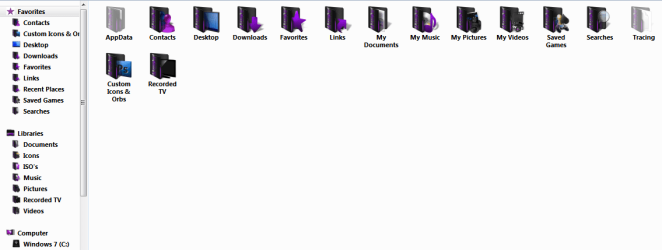
Dannymac63

Ive changed all my icons using the method above.What process are you using did you change the icons in sysWOW64 aswell. What program are you using to change them.

Danny
 

Attachments

  • Capture 2.PNG
    Capture 2.PNG
    21.9 KB · Views: 52
  • Capture.PNG
    Capture.PNG
    19.7 KB · Views: 55
  • Capture e.PNG
    Capture e.PNG
    20.8 KB · Views: 42
  • Capture t.PNG
    Capture t.PNG
    18.3 KB · Views: 53

My Computer My Computer

At a glance

Windows 7 Home Premium x64 SP1intel(R)core(TM)2 duo CPU T6600 @ 2.20GHz3 gb ddr3ati radeon hd4570/512mb
Computer Manufacturer/Model Number
acer aspire 5935g
OS
Windows 7 Home Premium x64 SP1
CPU
intel(R)core(TM)2 duo CPU T6600 @ 2.20GHz
Motherboard
intel gm45/gm47 revision 07
Memory
3 gb ddr3
Graphics Card(s)
ati radeon hd4570/512mb
Monitor(s) Displays
lop156wh2-tle1 15.3 flat
Screen Resolution
1366x768
Hard Drives
OCZ-Agility3 60gig ssd
320gig external hdd
500gig external hdd
Mouse
Optical
Internet Speed
30Mbps Down/30Mbps Up
how about with using RegEdit?

It would be much harder to find the icon locations in reg edit unless you know where they are.This is the best and easiest way to do them.

MAKE BACK UPS FIRST

Danny
 

My Computer My Computer

At a glance

Windows 7 Home Premium x64 SP1intel(R)core(TM)2 duo CPU T6600 @ 2.20GHz3 gb ddr3ati radeon hd4570/512mb
Computer Manufacturer/Model Number
acer aspire 5935g
OS
Windows 7 Home Premium x64 SP1
CPU
intel(R)core(TM)2 duo CPU T6600 @ 2.20GHz
Motherboard
intel gm45/gm47 revision 07
Memory
3 gb ddr3
Graphics Card(s)
ati radeon hd4570/512mb
Monitor(s) Displays
lop156wh2-tle1 15.3 flat
Screen Resolution
1366x768
Hard Drives
OCZ-Agility3 60gig ssd
320gig external hdd
500gig external hdd
Mouse
Optical
Internet Speed
30Mbps Down/30Mbps Up
xxxdannyxxx, I've been able to switch every other icon, every folder, device, location you name it, except for networked devices such as my file server or television.

I've used microangelo's suite of icon/dll editing software to modify/create my own icon sets. Like I said, I haven't had an issue with a single icon except these pesky network devices.

I appreciate the screen shots, is there a shot of your networked devices though?? I'm reading this on my iPhone so forgive me if I missed something, this screen is too damn tiny.
 

My Computer My Computer

At a glance

7 Ultimate x64, 7 Professional x64, 7 Home Pr...Intel Core i7 920 @ 3.6 GhzOCZ Platinum 12GB @ 1443 Mhz2x Sapphire Radeon HD 5870 running 6 displays...
Computer Manufacturer/Model Number
DanBuilt
OS
7 Ultimate x64, 7 Professional x64, 7 Home Premium x64
CPU
Intel Core i7 920 @ 3.6 Ghz
Motherboard
Asus P6T Deluxe V2
Memory
OCZ Platinum 12GB @ 1443 Mhz
Graphics Card(s)
2x Sapphire Radeon HD 5870 running 6 displays or Eyefinity
Sound Card
Onboard Audio
Monitor(s) Displays
3x Samsung BX2231, 1x 2233SW, 1x LN40A750, 1x UN55C7000
Hard Drives
2x Western Digital Caviar Black 2TB
2x Western Digital Caviar Black 1TB
1x Intel X25M 80GB
PSU
Antec CP-850
Case
Antec 1200
Cooling
Corsair H50 /w Push-Pull
Keyboard
Logitech Mediaboard Pro
Mouse
Razer Copperhead/Microsoft Notebook Mouse 5000
Other Info
Crossfire/6 Screen setup with unlimited possibility. :-D
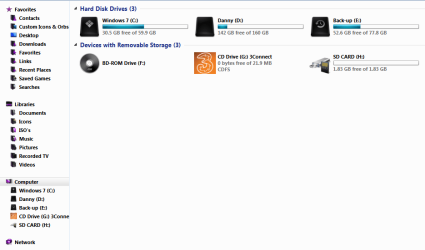
Im not on any network so I cant im afraid. Its possible those icons may be related to the devices and printers icons.If they show the same icon in devices and printers try looking on Ddores.dll in system32 and sysWOW64 as these dlls controll those icons.Will have a better look tonight when im home from work.If not im sure someone here will know.

Dont know if this will help http://www.sevenforums.com/tutorials/24683-network-name-icon-change.html

This may sound dumb but is there a right click on icon properties tab to do this with.I cant check because I dont have any or does that just open the device properties

Danny
 

My Computer My Computer

At a glance

Windows 7 Home Premium x64 SP1intel(R)core(TM)2 duo CPU T6600 @ 2.20GHz3 gb ddr3ati radeon hd4570/512mb
Computer Manufacturer/Model Number
acer aspire 5935g
OS
Windows 7 Home Premium x64 SP1
CPU
intel(R)core(TM)2 duo CPU T6600 @ 2.20GHz
Motherboard
intel gm45/gm47 revision 07
Memory
3 gb ddr3
Graphics Card(s)
ati radeon hd4570/512mb
Monitor(s) Displays
lop156wh2-tle1 15.3 flat
Screen Resolution
1366x768
Hard Drives
OCZ-Agility3 60gig ssd
320gig external hdd
500gig external hdd
Mouse
Optical
Internet Speed
30Mbps Down/30Mbps Up
Are you wanting to change individual icons or just the generic one?
 

My Computer My Computer

At a glance

Windows 7
Computer type
PC/Desktop
OS
Windows 7
I apologize for necro-posting here on a 4 year old topic, BUT the warning the forum gave me was to be sure that it is directly related to this discussion -- and it is.

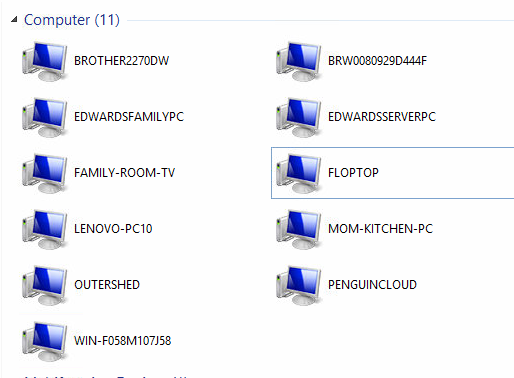
In response to the post before this one: I am also on this quest of changing the pesky network icons on a PER ICON basis. For example~

sJzEiWL.png


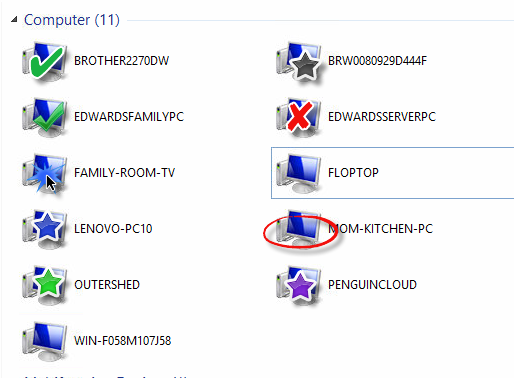
Is what it shows, but I'd like to be able to do the following:

3i7K9Jp.png


You get the idea. Is there no way to change the icons on an individual level? Or are they all automatically swooped into a "apply this one icon" rule?
 

My Computer My Computer

At a glance

Windows 7 x64
Computer Manufacturer/Model Number
Custom Build
OS
Windows 7 x64
Back
Top