Who do I believe - Windows or CPUZ

jimbo45

New member
Guru
Gold Member
VIP
Local time
8:43 PM
Messages
5,941
Location
Hafnarfjörður IS
Hi all

I put a 4GB module into my Acer netbook -- works just fine but :

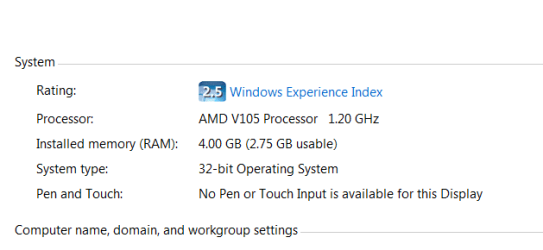
Windows 7 says I have 4 GB RAM in the computer

BIOS says I have 4 GB RAM in the computer


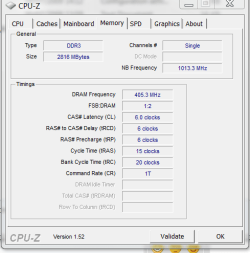
CPU-Z says I have 2 GB RAM in the computer

What gives ???


Judging by performance even on this farly low powered machine I can bring up 2 XP Virtual machines on it concurrently with reasonable performance !!!! which I couldn't do before upgrading the memory. I assume it IS using 4 GB.

However CPU_Z is usually reliable so is there an INFALLIBLE test to see how much Windows is actually seeing and using.

screenshots enc.
 

Attachments
  • cpuz.png
    cpuz.png
    13.4 KB · Views: 18
  • w7.png
    w7.png
    5.8 KB · Views: 9

My Computer My Computer

At a glance

Linux CENTOS 7 / various Windows OS'es and se...Intel i7 Intel i58GB, 16GBOn Motherboard
Computer type
PC/Desktop
Computer Manufacturer/Model Number
Custom built, several laptops HP/ASUS
OS
Linux CENTOS 7 / various Windows OS'es and servers
CPU
Intel i7 Intel i5
Memory
8GB, 16GB
Graphics Card(s)
On Motherboard
Sound Card
Realtek HD audio
Monitor(s) Displays
Apple Cinema display, Samsung LCD
Screen Resolution
1920 X 1080
Hard Drives
4 X 1TB SATA
Mouse
Toshiba wireless laser
Internet Speed
> 20MB up
Try SIW.
 

My Computer My Computer

At a glance

Windows 7 x64 pro/ Windows 7 x86 Pro/ XP SP3 x86
Computer Manufacturer/Model Number
Too many to describe...
OS
Windows 7 x64 pro/ Windows 7 x86 Pro/ XP SP3 x86

My Computer My Computer

At a glance

Windows 7 Ultimate x64 SP1Core i7 920 (D0) @ 4Ghz, *26c idle *65c full ...12GB DDR3 Corsair Dominator -CMD12GX3M6A1600C...Zotac Geforce GTX 770
Computer type
PC/Desktop
Computer Manufacturer/Model Number
Airbot 2.0
OS
Windows 7 Ultimate x64 SP1
CPU
Core i7 920 (D0) @ 4Ghz, *26c idle *65c full load on air
Motherboard
Asus P6X58D Premium - Sata 6Gb/s - USB 3.0
Memory
12GB DDR3 Corsair Dominator -CMD12GX3M6A1600C8 at 1600MHz
Graphics Card(s)
Zotac Geforce GTX 770
Sound Card
ASUS Xonar D2X
Monitor(s) Displays
1 LG 24" Flatron W2453V-PF 1 Samsung 24" P2450H both 2ms RT
Screen Resolution
1920x1080@60hz
Hard Drives
1 Samsung 250GB 840 Evo SSD
1 OCZ Vertex2 180GB SSD
1 TB Samsung Spinpoint F1 7200RPM 32MB cache
2 500GB WD Caviar Blacks 7200RPM 32MB cache (WD5001AALS)

Pioneer DVD Burner DVR-S18M
PSU
Corsair HX1000W
Case
Cooler Master HAF 932
Cooling
Case Fans *3 230mm, *1 140mm/CPU - *Tuniq Tower 120 Extreme
Keyboard
Logitech Wireless MK700
Mouse
Logitech Wireless MK700
Internet Speed
DL 15 Mbps UL 0.98 Mbps
Antivirus
None
Browser
Firefox Nightly
Other Info
Processor-7.7 *RAM- 7.9 *Graphics-7.9 *Gaming Graphics- 7.9 *SSD- 7.8 W.E.I final score= 7.7
*Phone- LG Nexus 5
Thanks


Cheers
jimbo
 

My Computer My Computer

At a glance

Linux CENTOS 7 / various Windows OS'es and se...Intel i7 Intel i58GB, 16GBOn Motherboard
Computer type
PC/Desktop
Computer Manufacturer/Model Number
Custom built, several laptops HP/ASUS
OS
Linux CENTOS 7 / various Windows OS'es and servers
CPU
Intel i7 Intel i5
Memory
8GB, 16GB
Graphics Card(s)
On Motherboard
Sound Card
Realtek HD audio
Monitor(s) Displays
Apple Cinema display, Samsung LCD
Screen Resolution
1920 X 1080
Hard Drives
4 X 1TB SATA
Mouse
Toshiba wireless laser
Internet Speed
> 20MB up
CPUZ and Windows aren't disagreeing. Notice that Windows says "2.75GB usable?"

If you look at the SPD info on the 4GB module, it probably says "4GB."

You can only address 2.75GB (which is something like 2816MB, if not exactly) of RAM in Windows for whatever reason. You may be using a 32-bit operating system. It could be anything.
 

My Computer My Computer

At a glance

Windows 7 Ultimate x64Intel Core i5 2500K8GB G.SKILL Ripjaws X DDR3 2133nVidia Geforce 9500GT
OS
Windows 7 Ultimate x64
CPU
Intel Core i5 2500K
Motherboard
Gigabyte GA-Z68A-D3-B3
Memory
8GB G.SKILL Ripjaws X DDR3 2133
Graphics Card(s)
nVidia Geforce 9500GT
Monitor(s) Displays
Acer H233H
Screen Resolution
1920x1080
Case
Antec Three Hundred
CPUZ and Windows aren't disagreeing. Notice that Windows says "2.75GB usable?"

I actually think they are disagreeing . . the only reason for the discrepancy I can think of is if you have on on-board graphics adapter and a portion of your system RAM is being used by the adapter . .
 

My Computer My Computer

At a glance

Windows 7 Ultimate x64AMD Phenom 95508GBNvidia Geforce GTS 450
OS
Windows 7 Ultimate x64
CPU
AMD Phenom 9550
Motherboard
Asus
Memory
8GB
Graphics Card(s)
Nvidia Geforce GTS 450
Sound Card
Tascam FW-1804
Monitor(s) Displays
Multiple
Screen Resolution
1920x1080
Hard Drives
Many
PSU
Coolermaster
Case
Antec 4u Rack
Keyboard
Microsoft Wireless
Mouse
Microsoft Wireless
Internet Speed
Fast
so is there an INFALLIBLE test to see how much Windows is actually seeing and using.


Yeah. It's called msinfo32.exe.

View attachment 156160

Yes. CPUz I believe. It is showing what windows is seeing. Cpuz is showing 2818MB of ram. If it was onlt\y showing 2GB it would be 2048MB. So, it is showing the amount windows is seeing as useable. Thats my opinion.
 

My Computers My Computers

  • At a glance

    Windows 11 ProRyzen 9 5900X32GB G Skill DDR4-3600EVGA RTX 3080 FTW 3 Ultra
    Computer type
    PC/Desktop
    Computer Manufacturer/Model Number
    ALWAYS UNDER CONSTRUCTION
    OS
    Windows 11 Pro
    CPU
    Ryzen 9 5900X
    Motherboard
    Asus X570 Crosshair Viii Hero
    Memory
    32GB G Skill DDR4-3600
    Graphics Card(s)
    EVGA RTX 3080 FTW 3 Ultra
    Sound Card
    On Board/Sennheiser PC37X Headset
    Monitor(s) Displays
    3 X Asus 27"
    Screen Resolution
    2560x1440
    Hard Drives
    2 X 1 TB NVME drives
    PSU
    EVGA 850
    Case
    Phanteks Eclipse P400A
    Cooling
    EVGA 280 AIO
    Keyboard
    Logitech G510s/ Logitech G13
    Mouse
    Logitech G502
    Internet Speed
    24/1
    Antivirus
    ESET/MBAM Pro/SAS Pro
    Browser
    Chrome/ Firefox/ Edge
  • At a glance

    Windows 11 ProIntel Ultra 9 288V32 GB LPDDR5X 8533
    Computer type
    Laptop
    System Manufacturer/Model Number
    Dell 16 Plus
    OS
    Windows 11 Pro
    CPU
    Intel Ultra 9 288V
    Memory
    32 GB LPDDR5X 8533
    Monitor(s) Displays
    16" Mini-LED HDR600 Touch 90 Hz
    Screen Resolution
    2560X1600
    Hard Drives
    1 TB NVME
I don't think they are disagreeing at all it's showing 2gb's single channel, not dual channel.
 

My Computer My Computer

At a glance

Windows 7 Home Premium 64 bitIntel Core 2 quad Extreme Q9770 @ 3.2 GHz4x2 GB Muskin 1600 MHz ramNVidia GTX 250
Computer Manufacturer/Model Number
Dell XPS 730
OS
Windows 7 Home Premium 64 bit
CPU
Intel Core 2 quad Extreme Q9770 @ 3.2 GHz
Memory
4x2 GB Muskin 1600 MHz ram
Graphics Card(s)
NVidia GTX 250
Sound Card
Soundblaster X-Fi Fatality Champion
Monitor(s) Displays
2 Dell 2007WFP Ultrascans
Screen Resolution
3360 x 1050
Hard Drives
WD Black 1TB sata, 2-WD Black 500 sata, 2-Seagate 500 Go external
PSU
1000 Watt
Cooling
air
Keyboard
MS Natrual Keyboard Pro
Mouse
Logitech Wireless Trackball
Internet Speed
DSL Elite
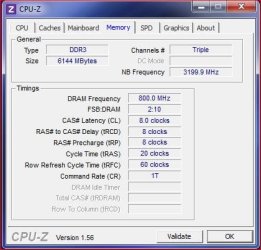
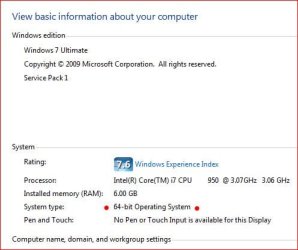
Actually CPU-Z is not correct. Why is the question??? Here's my CPU-Z showing my 6gig of memory installed.

Mem speed.JPG

Jimbo update to CPU-Z version 1.56. Notice you have v1.52

Also notice is says single channel. Don't know anything about notebook memory so it's possible CPU-Z could be confused? But that's just a guess as I can't see how CPU-Z wouldn't read a notebook correctly (again, a guess).

Anyway updating to the latest version should confirm.

My two cents.
 

My Computer My Computer

At a glance

Windows 10 ProIntel Core i7-4770K (3.5Ghz)32 gig Corsair Dominator Platinum (4x8Gig)Sapphire Tri-X R9 Fury
Computer type
PC/Desktop
Computer Manufacturer/Model Number
Custom built by me.
OS
Windows 10 Pro
CPU
Intel Core i7-4770K (3.5Ghz)
Motherboard
Gigabyte G1 Sniper 5 (F10 Bios)
Memory
32 gig Corsair Dominator Platinum (4x8Gig)
Graphics Card(s)
Sapphire Tri-X R9 Fury
Sound Card
Soundblaster ZXR
Monitor(s) Displays
NEC PA242W 24" LCD Monitor
Screen Resolution
1920 x 1200
Hard Drives
Primary - Samsung 850 Pro (512gig), Samsung 840 Pro (256gig), 2TB WD Caviar Black.
PSU
EVGA Supernova 1000 G2
Case
Cooler Master HAF X
Cooling
Corsair H100i with Corsair Air Series SP120 Quiet Fans
Keyboard
Logitech Wireless Wave
Mouse
Logitech Performance MX
Internet Speed
High Speed Cable
Antivirus
Norton Security
Browser
IE11
Other Info
Memory Timings - 1866MHz @ 9-9-9-27-1T @ 1.5 volts
Actually CPU-Z is NOT correct. Why is the question??? Here's my CPU-Z showing my 6gig of memory installed.

Exactly. That field in CPU-Z shows installed memory, not available memory . . . hence why I'm curious to know if you are using on on-board graphics adapter jimbo45?
 

My Computer My Computer

At a glance

Windows 7 Ultimate x64AMD Phenom 95508GBNvidia Geforce GTS 450
OS
Windows 7 Ultimate x64
CPU
AMD Phenom 9550
Motherboard
Asus
Memory
8GB
Graphics Card(s)
Nvidia Geforce GTS 450
Sound Card
Tascam FW-1804
Monitor(s) Displays
Multiple
Screen Resolution
1920x1080
Hard Drives
Many
PSU
Coolermaster
Case
Antec 4u Rack
Keyboard
Microsoft Wireless
Mouse
Microsoft Wireless
Internet Speed
Fast
On his screenshots, cpuz is reporting the exact amount that the OS shows is usable.
 

My Computers My Computers

  • At a glance

    Windows 11 ProRyzen 9 5900X32GB G Skill DDR4-3600EVGA RTX 3080 FTW 3 Ultra
    Computer type
    PC/Desktop
    Computer Manufacturer/Model Number
    ALWAYS UNDER CONSTRUCTION
    OS
    Windows 11 Pro
    CPU
    Ryzen 9 5900X
    Motherboard
    Asus X570 Crosshair Viii Hero
    Memory
    32GB G Skill DDR4-3600
    Graphics Card(s)
    EVGA RTX 3080 FTW 3 Ultra
    Sound Card
    On Board/Sennheiser PC37X Headset
    Monitor(s) Displays
    3 X Asus 27"
    Screen Resolution
    2560x1440
    Hard Drives
    2 X 1 TB NVME drives
    PSU
    EVGA 850
    Case
    Phanteks Eclipse P400A
    Cooling
    EVGA 280 AIO
    Keyboard
    Logitech G510s/ Logitech G13
    Mouse
    Logitech G502
    Internet Speed
    24/1
    Antivirus
    ESET/MBAM Pro/SAS Pro
    Browser
    Chrome/ Firefox/ Edge
  • At a glance

    Windows 11 ProIntel Ultra 9 288V32 GB LPDDR5X 8533
    Computer type
    Laptop
    System Manufacturer/Model Number
    Dell 16 Plus
    OS
    Windows 11 Pro
    CPU
    Intel Ultra 9 288V
    Memory
    32 GB LPDDR5X 8533
    Monitor(s) Displays
    16" Mini-LED HDR600 Touch 90 Hz
    Screen Resolution
    2560X1600
    Hard Drives
    1 TB NVME

My Computer My Computer

At a glance

Windows 10 ProIntel Core i7-4770K (3.5Ghz)32 gig Corsair Dominator Platinum (4x8Gig)Sapphire Tri-X R9 Fury
Computer type
PC/Desktop
Computer Manufacturer/Model Number
Custom built by me.
OS
Windows 10 Pro
CPU
Intel Core i7-4770K (3.5Ghz)
Motherboard
Gigabyte G1 Sniper 5 (F10 Bios)
Memory
32 gig Corsair Dominator Platinum (4x8Gig)
Graphics Card(s)
Sapphire Tri-X R9 Fury
Sound Card
Soundblaster ZXR
Monitor(s) Displays
NEC PA242W 24" LCD Monitor
Screen Resolution
1920 x 1200
Hard Drives
Primary - Samsung 850 Pro (512gig), Samsung 840 Pro (256gig), 2TB WD Caviar Black.
PSU
EVGA Supernova 1000 G2
Case
Cooler Master HAF X
Cooling
Corsair H100i with Corsair Air Series SP120 Quiet Fans
Keyboard
Logitech Wireless Wave
Mouse
Logitech Performance MX
Internet Speed
High Speed Cable
Antivirus
Norton Security
Browser
IE11
Other Info
Memory Timings - 1866MHz @ 9-9-9-27-1T @ 1.5 volts
Hi all
This is a small Netbook -- in theory it actually says in the Spec that maximum RAM is 2GB -- but I suspect that was before the single 4GB modules appeared.

BIOS and Windows seem to have no problem reading 4GB installed -- I'll try CPU_Z update and see what it says.

MSINFO32.EXE also reports 4GB installed RAM.

The netbook uses onboard graphics.

I'm sure I'm probably considered as Bonkers by inserting a 4GB RAM module into a netbook but it was REALLY CHEAP so what's the harm -- also it allowed me to run a useful XP VM on it without a problem -- For an old scanner not supported on W7 but hardware still 100% OK and a quick application to burn / copy Audio CD's to Minidiscs (I'll bet a load of readers don't even know what those are -- but the sound is zillions times better than a highly compressed mp3 file on an Ipod).

Actually I'm not worried about Useable RAM or whatever -=-it's just curious that CPU_Z shows a different value for INSTALLED RAM compared with MSINFO32.EXE or the Windows 7 computer properties.

W7 appears to yield the correct result.

Cheers
jimbo
 

My Computer My Computer

At a glance

Linux CENTOS 7 / various Windows OS'es and se...Intel i7 Intel i58GB, 16GBOn Motherboard
Computer type
PC/Desktop
Computer Manufacturer/Model Number
Custom built, several laptops HP/ASUS
OS
Linux CENTOS 7 / various Windows OS'es and servers
CPU
Intel i7 Intel i5
Memory
8GB, 16GB
Graphics Card(s)
On Motherboard
Sound Card
Realtek HD audio
Monitor(s) Displays
Apple Cinema display, Samsung LCD
Screen Resolution
1920 X 1080
Hard Drives
4 X 1TB SATA
Mouse
Toshiba wireless laser
Internet Speed
> 20MB up
a quick application to burn / copy Audio CD's to Minidiscs (I'll bet a load of readers don't even know what those are -- but the sound is zillions times better than a highly compressed mp3 file on an Ipod).

Hehe, not so fast - I just never used them myself :)

Anyway thanks for posting the info on the netbook. Perhaps that's why CPU-Z is confused? Don't know.
 

My Computer My Computer

At a glance

Windows 10 ProIntel Core i7-4770K (3.5Ghz)32 gig Corsair Dominator Platinum (4x8Gig)Sapphire Tri-X R9 Fury
Computer type
PC/Desktop
Computer Manufacturer/Model Number
Custom built by me.
OS
Windows 10 Pro
CPU
Intel Core i7-4770K (3.5Ghz)
Motherboard
Gigabyte G1 Sniper 5 (F10 Bios)
Memory
32 gig Corsair Dominator Platinum (4x8Gig)
Graphics Card(s)
Sapphire Tri-X R9 Fury
Sound Card
Soundblaster ZXR
Monitor(s) Displays
NEC PA242W 24" LCD Monitor
Screen Resolution
1920 x 1200
Hard Drives
Primary - Samsung 850 Pro (512gig), Samsung 840 Pro (256gig), 2TB WD Caviar Black.
PSU
EVGA Supernova 1000 G2
Case
Cooler Master HAF X
Cooling
Corsair H100i with Corsair Air Series SP120 Quiet Fans
Keyboard
Logitech Wireless Wave
Mouse
Logitech Performance MX
Internet Speed
High Speed Cable
Antivirus
Norton Security
Browser
IE11
Other Info
Memory Timings - 1866MHz @ 9-9-9-27-1T @ 1.5 volts
AFAIK, cpuz shows single channel memory!! means
2GB + 2GB each!! can you check if it has a drop down manu on Memory TAB
this might show each channel has 2 GB!!
 

My Computer My Computer

At a glance

Windows 7 Ultimate x64AMD PHENOM II X44GB DDR3 1333Sapphire Radeon 4770HD
Computer Manufacturer/Model Number
Self Built AMD Clone PC....
OS
Windows 7 Ultimate x64
CPU
AMD PHENOM II X4
Motherboard
MSI p33 740M
Memory
4GB DDR3 1333
Graphics Card(s)
Sapphire Radeon 4770HD
Sound Card
ViaTech HD Built in: with MICROLAB M-111 2.1 Speakers
Monitor(s) Displays
Greatwall 19" W & LG 15"W Parallel
Screen Resolution
1400X900 & 1280X720
Hard Drives
Hitachi 920GB[1TB] SATA
PSU
Delux
Case
Space + 2 Bluelight Cooling fan from side
Cooling
Builtin+ Extra coler fan
Keyboard
Delux Multimedia USB
Mouse
A4-tech x7 2x office
Internet Speed
60KB/s
Other Info
GAMING is my passion!
I think the real question is where does cpuz get its information. If it gets it directly from the dimm slots, it should show what is actually installed. If it gets its information from the OS, it will only show what is usable by the OS, what the OS can 'see'. In the graphics presented the only difference is the properties tab. One showed installed and usable the other only showed installed. CPuz agreed with both of those. So, IT may work different than most of us (me included) always thought it worked. CPUz's website provided no information on that, and maybe this discussion only applies to x86 systems because of their memory limitations. I really don't know.
 

My Computers My Computers

  • At a glance

    Windows 11 ProRyzen 9 5900X32GB G Skill DDR4-3600EVGA RTX 3080 FTW 3 Ultra
    Computer type
    PC/Desktop
    Computer Manufacturer/Model Number
    ALWAYS UNDER CONSTRUCTION
    OS
    Windows 11 Pro
    CPU
    Ryzen 9 5900X
    Motherboard
    Asus X570 Crosshair Viii Hero
    Memory
    32GB G Skill DDR4-3600
    Graphics Card(s)
    EVGA RTX 3080 FTW 3 Ultra
    Sound Card
    On Board/Sennheiser PC37X Headset
    Monitor(s) Displays
    3 X Asus 27"
    Screen Resolution
    2560x1440
    Hard Drives
    2 X 1 TB NVME drives
    PSU
    EVGA 850
    Case
    Phanteks Eclipse P400A
    Cooling
    EVGA 280 AIO
    Keyboard
    Logitech G510s/ Logitech G13
    Mouse
    Logitech G502
    Internet Speed
    24/1
    Antivirus
    ESET/MBAM Pro/SAS Pro
    Browser
    Chrome/ Firefox/ Edge
  • At a glance

    Windows 11 ProIntel Ultra 9 288V32 GB LPDDR5X 8533
    Computer type
    Laptop
    System Manufacturer/Model Number
    Dell 16 Plus
    OS
    Windows 11 Pro
    CPU
    Intel Ultra 9 288V
    Memory
    32 GB LPDDR5X 8533
    Monitor(s) Displays
    16" Mini-LED HDR600 Touch 90 Hz
    Screen Resolution
    2560X1600
    Hard Drives
    1 TB NVME
Perhaps I'm not getting what you guys are saying but I think you need to have a closer look at the images I posted as they clearly shows (should show) the installed memory under Windows (not usable memory) - which corresponds to the Properties page of Windows - which corresponds to what the BIOS gives/shows.

All you have to do is run a copy of CPU-Z and see for yourself ;)

BTW....

Memory

  • SDR, DDR, DDR2, FB-DDR2, DDR3, RDRAM (Rambus®)
  • EPP and XMP extended profiles
CPUID - System & hardware benchmark, monitoring, reporting

Now, why is it messed up on Jimbo's netbook? It could be that the netbook isn't supported. Again, see link above.
 

My Computer My Computer

At a glance

Windows 10 ProIntel Core i7-4770K (3.5Ghz)32 gig Corsair Dominator Platinum (4x8Gig)Sapphire Tri-X R9 Fury
Computer type
PC/Desktop
Computer Manufacturer/Model Number
Custom built by me.
OS
Windows 10 Pro
CPU
Intel Core i7-4770K (3.5Ghz)
Motherboard
Gigabyte G1 Sniper 5 (F10 Bios)
Memory
32 gig Corsair Dominator Platinum (4x8Gig)
Graphics Card(s)
Sapphire Tri-X R9 Fury
Sound Card
Soundblaster ZXR
Monitor(s) Displays
NEC PA242W 24" LCD Monitor
Screen Resolution
1920 x 1200
Hard Drives
Primary - Samsung 850 Pro (512gig), Samsung 840 Pro (256gig), 2TB WD Caviar Black.
PSU
EVGA Supernova 1000 G2
Case
Cooler Master HAF X
Cooling
Corsair H100i with Corsair Air Series SP120 Quiet Fans
Keyboard
Logitech Wireless Wave
Mouse
Logitech Performance MX
Internet Speed
High Speed Cable
Antivirus
Norton Security
Browser
IE11
Other Info
Memory Timings - 1866MHz @ 9-9-9-27-1T @ 1.5 volts
so is there an INFALLIBLE test to see how much Windows is actually seeing and using.


Yeah. It's called msinfo32.exe.

View attachment 156160

Yes. CPUz I believe. It is showing what windows is seeing. Cpuz is showing 2818MB of ram. If it was onlt\y showing 2GB it would be 2048MB. So, it is showing the amount windows is seeing as useable. Thats my opinion.

CPU-Z gets it from the hardware. I doesn;t knows what windows has mapped - it is supposed to show the physical memory. It's a bug.
 

My Computer My Computer

At a glance

Windows 10 Pro. EFI boot partition, full EFI ...i7 4770k 4.4GHz (44-44-43-43 turbo) @ 1.248V16GB (8GBx2) @2200 MHz G.skill Sniper 10-11-1...MSI GTX 970 Gaming 4G
Computer type
PC/Desktop
Computer Manufacturer/Model Number
Home built (GeneO industries)/Model 4
OS
Windows 10 Pro. EFI boot partition, full EFI boot
CPU
i7 4770k 4.4GHz (44-44-43-43 turbo) @ 1.248V
Motherboard
ASUS Maximus VI Hero
Memory
16GB (8GBx2) @2200 MHz G.skill Sniper 10-11-10-30-1, 1.6V
Graphics Card(s)
MSI GTX 970 Gaming 4G
Sound Card
Onboard SupremeFX Audio
Monitor(s) Displays
NEC Spectraview 2490WUXi-SV
Screen Resolution
1920 x 1200
Hard Drives
Samsung 850 Pro 256GB (OS), Samsung 2x 128GB 840 Pro SSD in RAID0, 3x WD Blue 6Gb/s 1TB RAID0, WD 2TB Black external USB 3.0, 2TB WD20EARS Green external USB 3.0, 2x 500GB Seagate and 1 750 GB external USB, 1x 350GB external USB3
PSU
Seasonic X-850 (2012 KM3 model)
Case
Fractal Design Define R4
Cooling
NH-D14, NF-F12, NF-A15; NF-P14, NF-P12,NF-A14, S12A PWM
Keyboard
Cooler Master Storm Quickfire Rapid - Brown
Mouse
Logitech G602
Internet Speed
126.4 Mb/s down, 24.3 Mb/s up
Other Info
USB 3.0 x8 , SATA III x8, eSATA, USB 2.0 x6. Samsung DVD R/W drive.

WEI: CPU 7.8, Memory 7.9, Graphics 7.9, Disk 7.9
GeneO, It may very well be a bug. I have always thought that cpuz got its info from the hardware also. But in the OP's original question, it is apparently not reading the hardware. My only point has been that it is either a bug or cpuz is getting its info from somewhere other than hardware. I am only saying, I don't know the answer.
 

My Computers My Computers

  • At a glance

    Windows 11 ProRyzen 9 5900X32GB G Skill DDR4-3600EVGA RTX 3080 FTW 3 Ultra
    Computer type
    PC/Desktop
    Computer Manufacturer/Model Number
    ALWAYS UNDER CONSTRUCTION
    OS
    Windows 11 Pro
    CPU
    Ryzen 9 5900X
    Motherboard
    Asus X570 Crosshair Viii Hero
    Memory
    32GB G Skill DDR4-3600
    Graphics Card(s)
    EVGA RTX 3080 FTW 3 Ultra
    Sound Card
    On Board/Sennheiser PC37X Headset
    Monitor(s) Displays
    3 X Asus 27"
    Screen Resolution
    2560x1440
    Hard Drives
    2 X 1 TB NVME drives
    PSU
    EVGA 850
    Case
    Phanteks Eclipse P400A
    Cooling
    EVGA 280 AIO
    Keyboard
    Logitech G510s/ Logitech G13
    Mouse
    Logitech G502
    Internet Speed
    24/1
    Antivirus
    ESET/MBAM Pro/SAS Pro
    Browser
    Chrome/ Firefox/ Edge
  • At a glance

    Windows 11 ProIntel Ultra 9 288V32 GB LPDDR5X 8533
    Computer type
    Laptop
    System Manufacturer/Model Number
    Dell 16 Plus
    OS
    Windows 11 Pro
    CPU
    Intel Ultra 9 288V
    Memory
    32 GB LPDDR5X 8533
    Monitor(s) Displays
    16" Mini-LED HDR600 Touch 90 Hz
    Screen Resolution
    2560X1600
    Hard Drives
    1 TB NVME
You, for whatever reason, have 1.25GB memory mapped to something else. CPUZ will read the module's SPD information as it should, and it will report that you are using a 4GB module.

Also, single channel vs. dual channel has absolutely nothing to do with this. 4GB single channel and 4GB dual channel are the same volume; dual channel just has twice the theoretical bandwidth.

Check the SPD tab. It will report the stick's correct information.
 

My Computer My Computer

At a glance

Windows 7 Ultimate x64Intel Core i5 2500K8GB G.SKILL Ripjaws X DDR3 2133nVidia Geforce 9500GT
OS
Windows 7 Ultimate x64
CPU
Intel Core i5 2500K
Motherboard
Gigabyte GA-Z68A-D3-B3
Memory
8GB G.SKILL Ripjaws X DDR3 2133
Graphics Card(s)
nVidia Geforce 9500GT
Monitor(s) Displays
Acer H233H
Screen Resolution
1920x1080
Case
Antec Three Hundred
Back
Top