ATI Radeon Xpress X1250 drivers make display purple

Tommog

New member
Local time
6:32 AM
Messages
3
Hello.

I have a ATI Radeon Xpress X1250 and use my LCDTV as my standard monitor throgh HDMI. It got a native resolution of 1366x768. When I had Vista, I had to stop update the graphical drivers and use the older versions because all the newer ones made my screen purple. I have no idea why. It looked kind of like the VGAcord was not properly inserted so everything turned purpleish. This problem followed me to Win 7. Maybe it is because of this: ATI Catalyst

When I have no drivers installed, the standard VgaSave drivers give me pretty normal colors, but not 1366x768 resolution. When I install any ATI driver, I get purpleish colors in 1366x768 resolution, which is unbearable. Is it possible to get the best from both, so I can use the VgaSave color table with the ATI drivers in 1366 resolution?

My TV is a 46" LCDTV named Viewpia LN-46IEB3. Not a very common TV, but it always worked very good as a monitor, and I never had any problem really, except for this problem with purple colors with ATI x1250.
 

My Computer My Computer

At a glance

Windows 7 Professional
OS
Windows 7 Professional
Hello Tommog, welcome to the forum

If the older drivers work for you I see no reason to install the newer ones. The only other advice I could give is to visit your MB manufacturers website and download drivers from there but they are almost certainly all old versions as well
 

My Computer My Computer

At a glance

Windows 7 Ultimate x64Intel Core i7-2600K16 GB G Skill F3-10666 CL9D-4GBRLATI Radeon HD 6870
Computer Manufacturer/Model Number
Something I threw together
OS
Windows 7 Ultimate x64
CPU
Intel Core i7-2600K
Motherboard
Asus P8P67
Memory
16 GB G Skill F3-10666 CL9D-4GBRL
Graphics Card(s)
ATI Radeon HD 6870
Sound Card
ATI Radeon HDMI / Realtek ALC892
Monitor(s) Displays
2 x 22" standard monitors / LG32LC56v TV to watch films
Screen Resolution
1920 x1080
Hard Drives
2 x OCZ Vertex2 111.79GB
3 x Samsung103SJ
1 x Samsung103UJ
1 x WD3200BEVT
1 x Hitachi5K320-160
PSU
Thermaltake Toughpower Cable Management 750W
Case
Antec 300
Cooling
Noctua NH-U12P SE2 and 5 120mm Case fans
Keyboard
Microsoft Comfort Curve Keyboard 2000
Mouse
Hama M3110 / Logitech M305
Internet Speed
16000
Other Info
I have also used Fedora, Suse, Ubuntu Linux
And all other Windows from 95 to date except ME
Tommog one possible reason for the problems you are having is that you are using the XP driver. For that chipset/GPU there is no Windows 7 driver but there is a Vista one that works very well in Windows 7,

ATI Catalyst
 

My Computer My Computer

At a glance

Win 7 Ultimate x64FX-8350 @ 4.6 GHz so farADATA XPG V1 Series Black 8GB DDR3 1600Sapphire R9 270x Dual-X
Computer type
PC/Desktop
Computer Manufacturer/Model Number
Me
OS
Win 7 Ultimate x64
CPU
FX-8350 @ 4.6 GHz so far
Motherboard
Asus M5A97 EVO
Memory
ADATA XPG V1 Series Black 8GB DDR3 1600
Graphics Card(s)
Sapphire R9 270x Dual-X
Sound Card
Xonar DGX w/ Corsair Vengence 1300
Monitor(s) Displays
Acer S232HL Abid
Screen Resolution
1920x1080
Hard Drives
120 GB OCZ Vertex 3
500 GB Seagate 7200.12
PSU
Antec Earthwatts 650W Green
Case
Antec Three Hundred
Cooling
Cooler Master 212 EVO
Keyboard
Logitech G510
Mouse
Logitech G500s
Internet Speed
35000/3000
Thanks for your responses! I tried those drivers now, but with the same results. I also tried downloading several drivers here before: Previous Catalyst™ Display Drivers for Windows Vista (64 bit)

I coldn't install them though. I got the message that I already got newer drivers or I couldn't find any drivers at all when running the install programs. If there were any drivers in there, it didn't show them to me. I also got the message that the install program was for another OS or something simular, but that might have been drivers from elsewhere that I tried, like the old Omega drivers and simular. Im not sure. Kind of annoying anyway.

Do yo have any idea how I can get rid of the drivers that get installed automaticly every time I search for new hardware after uninstalling the graphic? I dont want any trace left of these purple shit "legacy drivers" that apparently is kept on my PC to get installed even after I uninstalled them.
 

My Computer My Computer

At a glance

Windows 7 Professional
OS
Windows 7 Professional
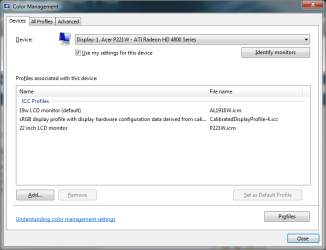
Sounds like something in the default color profile or the driver doesn't like each other. Have you tried a different color profile once the driver is installed to see if that fixes it? If not click on the Start orb and type color management in the search box. Once open on the Devices tab,

colortmanagement.png

if there is more than one in the list, try setting each as the default and see if the purple goes away. If it doesn't or there is only one showing click on add and add a couple of them, then try each as default.
 

My Computer My Computer

At a glance

Win 7 Ultimate x64FX-8350 @ 4.6 GHz so farADATA XPG V1 Series Black 8GB DDR3 1600Sapphire R9 270x Dual-X
Computer type
PC/Desktop
Computer Manufacturer/Model Number
Me
OS
Win 7 Ultimate x64
CPU
FX-8350 @ 4.6 GHz so far
Motherboard
Asus M5A97 EVO
Memory
ADATA XPG V1 Series Black 8GB DDR3 1600
Graphics Card(s)
Sapphire R9 270x Dual-X
Sound Card
Xonar DGX w/ Corsair Vengence 1300
Monitor(s) Displays
Acer S232HL Abid
Screen Resolution
1920x1080
Hard Drives
120 GB OCZ Vertex 3
500 GB Seagate 7200.12
PSU
Antec Earthwatts 650W Green
Case
Antec Three Hundred
Cooling
Cooler Master 212 EVO
Keyboard
Logitech G510
Mouse
Logitech G500s
Internet Speed
35000/3000
Do yo have any idea how I can get rid of the drivers that get installed automaticly every time I search for new hardware after uninstalling the graphic? I dont want any trace left of these purple shit "legacy drivers" that apparently is kept on my PC to get installed even after I uninstalled them.
Uninstall the drivers this way
Go to Device Manager, Click to open Display adapters,Right click on your graphic card and select Properties, Click on the driver tab, Click to unistall, Click to put a tick in the box "Delete the driver software for this device" Click OK
 

My Computer My Computer

At a glance

Windows 7 Ultimate x64Intel Core i7-2600K16 GB G Skill F3-10666 CL9D-4GBRLATI Radeon HD 6870
Computer Manufacturer/Model Number
Something I threw together
OS
Windows 7 Ultimate x64
CPU
Intel Core i7-2600K
Motherboard
Asus P8P67
Memory
16 GB G Skill F3-10666 CL9D-4GBRL
Graphics Card(s)
ATI Radeon HD 6870
Sound Card
ATI Radeon HDMI / Realtek ALC892
Monitor(s) Displays
2 x 22" standard monitors / LG32LC56v TV to watch films
Screen Resolution
1920 x1080
Hard Drives
2 x OCZ Vertex2 111.79GB
3 x Samsung103SJ
1 x Samsung103UJ
1 x WD3200BEVT
1 x Hitachi5K320-160
PSU
Thermaltake Toughpower Cable Management 750W
Case
Antec 300
Cooling
Noctua NH-U12P SE2 and 5 120mm Case fans
Keyboard
Microsoft Comfort Curve Keyboard 2000
Mouse
Hama M3110 / Logitech M305
Internet Speed
16000
Other Info
I have also used Fedora, Suse, Ubuntu Linux
And all other Windows from 95 to date except ME
Sounds like something in the default color profile or the driver doesn't like each other. Have you tried a different color profile once the driver is installed to see if that fixes it? If not click on the Start orb and type color management in the search box.
I had not tried that, but maybe we are on to something. The list for my display was empty the first time I looked there now. I had these to choose from when I pressed add:
WCS Device Profiles
sRGB virtual device model profile - wsRGB.cdmp
scRGB virtual device model profile - wscRGB.cdmp

ICC Profile
sRGB IEC619662.1 - sRGB Color Space Profile.icm
Agfa: Swop Standard - RSWOP.icm
Brother MFC-7820N/7420/7225N/7220 DCP-7025/7020/2010 Scanner - brms108f.icm

I couldn't choose the last two and the others didn't change anything that I noticed. I tried restarting the computer after changing standard file. I tried searching for other icm files to download somewhere, bur couldn't find any.

Uninstall the drivers this way
Go to Device Manager, Click to open Display adapters,Right click on your graphic card and select Properties, Click on the driver tab, Click to unistall, Click to put a tick in the box "Delete the driver software for this device" Click OK
Thanks. It worked to do that, but when I pressed "Scan for hardware changes" after that it found ATI Radeon Xpress 1200 Series (Microsoft Corporation - WDDM) and things turned purple again. I couldn't remove those microsoft ones the same way. :(

When I start my computer everything looks good until after the windows animation with "Starting Windows" has finished animating. Right after that the screen turns black for a milisecond, then everything is purple.

Here are two pictures I took with my mobile phone of what the purple looks like on some of the pics included in the standard picture library:
http://i216.photobucket.com/albums/cc9/brytaplanka/DSC00414.jpg
http://i216.photobucket.com/albums/cc9/brytaplanka/DSC00415.jpg
 

My Computer My Computer

At a glance

Windows 7 Professional
OS
Windows 7 Professional
Back
Top