Windows Media Player is playing slow.

RATEDRKO

Banned
Local time
4:40 AM
Messages
49
My windows media player is playing very slow. The audio and video are not in sync for most videos. It takes forever for the video to skip during the short videos. This problem started about a month ago.

My Norton virus protection stated that the player is using 65% CPU. I don't have a lot of other programs running.

I have no idea what the problem may be. Other programs are not running slowly. I doubt the videos are a problem because there are many of them. It's doubt 500 video files are broken. I did a virus scan and there are no viruses on my computer. Windows Media Player is up to date.


By the way I'm using Windows 7.
 

My Computer My Computer

OS
Windows 7
My windows media player is playing very slow. The audio and video are not in sync for most videos. It takes forever for the video to skip during the short videos. This problem started about a month ago.

My Norton virus protection stated that the player is using 65% CPU. I don't have a lot of other programs running.

I have no idea what the problem may be. Other programs are not running slowly. I doubt the videos are a problem because there are many of them. It's doubt 500 video files are broken. I did a virus scan and there are no viruses on my computer. Windows Media Player is up to date.


By the way I'm using Windows 7.

Hi RATEDRKO. :)
Go to WMP Options > Performance tab > DVD and video reproduction > check "
Drop frames to keep audio and video synchronized" box.
Now go to Privacy tab > History > press Clean History / Clean Cache. Then press Apply and OK.
Let us know the results. ;)
 

My Computer My Computer

Computer Manufacturer/Model Number
WALLONN7 / LIN BLACK SERIES II
OS
Windows 7 Ultimate x64 SP1
CPU
AMD PHENOM II X6 1090T 3.2GHz
Motherboard
GIGABYTE GA-890FXA-UD7
Memory
8GB G.SKILL RIPJAWS - F3-10666CL7D
Graphics Card(s)
SAPPHIRE ATI RADEON HD 5870 VAPOR X OC
Sound Card
REALTEK DOLBY HOME THEATER
Monitor(s) Displays
LED LG W2486L
Screen Resolution
1080p
Hard Drives
SEAGATE 1TB -ST31000528AS - AHCI MODE - AS SATA
PSU
ZALMAN ZM1000-HP 1000W
Case
THERMALTAKE XASER VI VG4000SWA
Cooling
140MM x3 / 120MM x1 AIR COOLING - THERMALTAKE
Keyboard
MICROSOFT DIGITAL MEDIA KEYBOARD 3000 - USB
Mouse
MICROSOFT BASIC OPTICAL MOUSE 2.0 - USB
Internet Speed
600KBPS
Other Info
MICROSOFT XBOX 360 CONTROLLER
The CU usage went from 65% to at least 48%. The videos appear to be in sync. I need to check more videos to be 100% sure. However, the skipping for some videos still takes at least 30 seconds to start.

Thanks for the advice.
 

My Computer My Computer

OS
Windows 7
The CU usage went from 65% to at least 48%. The videos appear to be in sync. I need to check more videos to be 100% sure. However, the skipping for some videos still takes at least 30 seconds to start.

Thanks for the advice.

You're welcome. :)
Are these videos in AVI and MP4 formats?
Some encodings and codec packages yield problems as you report.
 

My Computer My Computer

Computer Manufacturer/Model Number
WALLONN7 / LIN BLACK SERIES II
OS
Windows 7 Ultimate x64 SP1
CPU
AMD PHENOM II X6 1090T 3.2GHz
Motherboard
GIGABYTE GA-890FXA-UD7
Memory
8GB G.SKILL RIPJAWS - F3-10666CL7D
Graphics Card(s)
SAPPHIRE ATI RADEON HD 5870 VAPOR X OC
Sound Card
REALTEK DOLBY HOME THEATER
Monitor(s) Displays
LED LG W2486L
Screen Resolution
1080p
Hard Drives
SEAGATE 1TB -ST31000528AS - AHCI MODE - AS SATA
PSU
ZALMAN ZM1000-HP 1000W
Case
THERMALTAKE XASER VI VG4000SWA
Cooling
140MM x3 / 120MM x1 AIR COOLING - THERMALTAKE
Keyboard
MICROSOFT DIGITAL MEDIA KEYBOARD 3000 - USB
Mouse
MICROSOFT BASIC OPTICAL MOUSE 2.0 - USB
Internet Speed
600KBPS
Other Info
MICROSOFT XBOX 360 CONTROLLER
Any codec package installed?!...
 

My Computer My Computer

Computer Manufacturer/Model Number
WALLONN7 / LIN BLACK SERIES II
OS
Windows 7 Ultimate x64 SP1
CPU
AMD PHENOM II X6 1090T 3.2GHz
Motherboard
GIGABYTE GA-890FXA-UD7
Memory
8GB G.SKILL RIPJAWS - F3-10666CL7D
Graphics Card(s)
SAPPHIRE ATI RADEON HD 5870 VAPOR X OC
Sound Card
REALTEK DOLBY HOME THEATER
Monitor(s) Displays
LED LG W2486L
Screen Resolution
1080p
Hard Drives
SEAGATE 1TB -ST31000528AS - AHCI MODE - AS SATA
PSU
ZALMAN ZM1000-HP 1000W
Case
THERMALTAKE XASER VI VG4000SWA
Cooling
140MM x3 / 120MM x1 AIR COOLING - THERMALTAKE
Keyboard
MICROSOFT DIGITAL MEDIA KEYBOARD 3000 - USB
Mouse
MICROSOFT BASIC OPTICAL MOUSE 2.0 - USB
Internet Speed
600KBPS
Other Info
MICROSOFT XBOX 360 CONTROLLER
I have the K-Lite Codec pack installed.

EDIT: After testing it a bit more the problem has returned. The video files are in an external harddrive. If I pause a video for a few minutes then the harddrive will disconnect itself. This wasn't happening before I change Window Media Player's sitings.
 
Last edited:

My Computer My Computer

OS
Windows 7
Try VLC. WMP is rather useless.
 

My Computer My Computer

OS
Debian Squeeze Stable 64-bit
Try VLC. WMP is rather useless.

If you want to rant randomly instead of help, don't post at all!

EDIT: After testing it a bit more the problem has returned. The video files are in an external harddrive. If I pause a video for a few minutes then the harddrive will disconnect itself. This wasn't happening before I change Window Media Player's sitings.

It would definitely help if we knew your system specs, but it sounds to me like you need to change your power settings, because "USB selective suspend" is probably turned on. If you own a laptop, this might not be the best setting to change but it still might be the solution to your problem.

1. Start menu -> type into search "power" and choose Power Options under Control Panel results
2. Find your power plan and click "Change plan settings", then "change advanced power settings"
3. Scroll down until you find "USB settings", there change "USB selective suspend" to disabled
4. Apply -> OK -> close both windows
 

My Computer My Computer

Computer type
Laptop
Computer Manufacturer/Model Number
Custom
OS
Windows 7 Home Premium x64
CPU
Intel Core i5 2500K
Motherboard
MSI MS-7750
Memory
8GB DDR3
Graphics Card(s)
nVidia GeForce GTX650 Ti BOOST
Sound Card
Realtek
Monitor(s) Displays
21' Philips
Screen Resolution
Full HD
Hard Drives
1TB
PSU
500W
Try VLC. WMP is rather useless.

If you want to rant randomly instead of help, don't post at all!

EDIT: After testing it a bit more the problem has returned. The video files are in an external harddrive. If I pause a video for a few minutes then the harddrive will disconnect itself. This wasn't happening before I change Window Media Player's sitings.

It would definitely help if we knew your system specs, but it sounds to me like you need to change your power settings, because "USB selective suspend" is probably turned on. If you own a laptop, this might not be the best setting to change but it still might be the solution to your problem.

1. Start menu -> type into search "power" and choose Power Options under Control Panel results
2. Find your power plan and click "Change plan settings", then "change advanced power settings"
3. Scroll down until you find "USB settings", there change "USB selective suspend" to disabled
4. Apply -> OK -> close both windows

WMP IS useless. It doesn't even support matroska without codecs. To the OP, did VLC work?
 

My Computer My Computer

OS
Debian Squeeze Stable 64-bit

Attachments

  • Capturar.JPG
    Capturar.JPG
    89 KB · Views: 81

My Computer My Computer

Computer Manufacturer/Model Number
WALLONN7 / LIN BLACK SERIES II
OS
Windows 7 Ultimate x64 SP1
CPU
AMD PHENOM II X6 1090T 3.2GHz
Motherboard
GIGABYTE GA-890FXA-UD7
Memory
8GB G.SKILL RIPJAWS - F3-10666CL7D
Graphics Card(s)
SAPPHIRE ATI RADEON HD 5870 VAPOR X OC
Sound Card
REALTEK DOLBY HOME THEATER
Monitor(s) Displays
LED LG W2486L
Screen Resolution
1080p
Hard Drives
SEAGATE 1TB -ST31000528AS - AHCI MODE - AS SATA
PSU
ZALMAN ZM1000-HP 1000W
Case
THERMALTAKE XASER VI VG4000SWA
Cooling
140MM x3 / 120MM x1 AIR COOLING - THERMALTAKE
Keyboard
MICROSOFT DIGITAL MEDIA KEYBOARD 3000 - USB
Mouse
MICROSOFT BASIC OPTICAL MOUSE 2.0 - USB
Internet Speed
600KBPS
Other Info
MICROSOFT XBOX 360 CONTROLLER
Just out of curiosity,

If you pick a video your having trouble with and move it to your HD, off of the external, and try to play it, does the problem resolve itself?
 

My Computer My Computer

Computer Manufacturer/Model Number
Custom (Self Build)
OS
Windows 7 Home Premium 64bit
CPU
Intel Core i7 2700k
Motherboard
eVGA P67 SLI
Memory
8GB Mushkin Redline Ridgebacks @1866
Graphics Card(s)
EVGA GTX570 SC
Sound Card
XiFi Titanium HD
Monitor(s) Displays
LG W2453V
Screen Resolution
1920x1080
Hard Drives
Intel 320 80GB -- Intel X25-V 40GB --WD Black 1TB x2 -- WD Blue 640GB
PSU
Seasonic x750
Case
Corsair 600T SE White
Cooling
eVGA Superclocked CPU Cooler
Keyboard
Saitek Cyborg
Antivirus
Kaspersky
Browser
IE
Other Info
LG BD/DVD
WMP IS useless. It doesn't even support matroska without codecs. To the OP, did VLC work?
:sarc: Nonsense...

+1 to what Wishmaster said.
 

My Computer My Computer

Computer type
Laptop
Computer Manufacturer/Model Number
Custom
OS
Windows 7 Home Premium x64
CPU
Intel Core i5 2500K
Motherboard
MSI MS-7750
Memory
8GB DDR3
Graphics Card(s)
nVidia GeForce GTX650 Ti BOOST
Sound Card
Realtek
Monitor(s) Displays
21' Philips
Screen Resolution
Full HD
Hard Drives
1TB
PSU
500W
WMP IS useless. It doesn't even support matroska without codecs.

While this may be true, we must consider:

WMP does a very good job for what it is. And does support quite a few formats by default. Not everyone has, or even knows what a MKV is.
A large majority of Win7 users use WMV, MP4, or AVI for digital videos, all of which WMP does a fine job with.

Many user just want to use the software Windows has with it (WMP, Internet Explorer) and have no desire to use a 3rd party product.

But, in this case, what the OP is wanting out of WMP should be no issue for it.
Theres a obvious problem somewhere, and it may not be WMP at all. So we should strive to locate and resolve the issue.


For the record I am a User/Fan of Internet Explorer but rarely use WMP myself. I use Showtime and Zune instead.
We all have our preferences, and no one is wrong in thier choice.
 

My Computer My Computer

Computer Manufacturer/Model Number
Custom (Self Build)
OS
Windows 7 Home Premium 64bit
CPU
Intel Core i7 2700k
Motherboard
eVGA P67 SLI
Memory
8GB Mushkin Redline Ridgebacks @1866
Graphics Card(s)
EVGA GTX570 SC
Sound Card
XiFi Titanium HD
Monitor(s) Displays
LG W2453V
Screen Resolution
1920x1080
Hard Drives
Intel 320 80GB -- Intel X25-V 40GB --WD Black 1TB x2 -- WD Blue 640GB
PSU
Seasonic x750
Case
Corsair 600T SE White
Cooling
eVGA Superclocked CPU Cooler
Keyboard
Saitek Cyborg
Antivirus
Kaspersky
Browser
IE
Other Info
LG BD/DVD
It doesn't matter if it's mkv, mp4, m4v, mov, hdmov... those are just containers for the actual codec, which is h264, which IS natively supported in WMP... Though I agree, for what it's worth, WMP is as good as it gets.

Anyway, I hope we haven't scared the OP off by asking for system specs, lol :rolleyes:
 

My Computer My Computer

Computer type
Laptop
Computer Manufacturer/Model Number
Custom
OS
Windows 7 Home Premium x64
CPU
Intel Core i5 2500K
Motherboard
MSI MS-7750
Memory
8GB DDR3
Graphics Card(s)
nVidia GeForce GTX650 Ti BOOST
Sound Card
Realtek
Monitor(s) Displays
21' Philips
Screen Resolution
Full HD
Hard Drives
1TB
PSU
500W
WMP IS useless. It doesn't even support matroska without codecs.

While this may be true, we must consider:

WMP does a very good job for what it is. And does support quite a few formats by default. Not everyone has, or even knows what a MKV is.
A large majority of Win7 users use WMV, MP4, or AVI for digital videos, all of which WMP does a fine job with.

Many user just want to use the software Windows has with it (WMP, Internet Explorer) and have no desire to use a 3rd party product.

But, in this case, what the OP is wanting out of WMP should be no issue for it.
Theres a obvious problem somewhere, and it may not be WMP at all. So we should strive to locate and resolve the issue.


For the record I am a User/Fan of Internet Explorer but rarely use WMP myself. I use Showtime and Zune instead.
We all have our preferences, and no one is wrong in thier choice.

Most now know what matroska is with 720p HD videos and there is no excuse for having a built in player with lacking features.
 

My Computer My Computer

OS
Debian Squeeze Stable 64-bit
WMP IS useless. It doesn't even support matroska without codecs. To the OP, did VLC work?

i have many various formats of video files including many in matroska (few audio subtitle tracks etc.) and VLC generally is the most useless player
the only good thing about it that its all in one and can play very damaged (not complete) files.
but that is the only good things i can say about vlc
band things
random crashes, very bad seek (forward etc), very bad subtitles rendering.
not the best filters you can get better with player + filter. but in vlc its integrated.
i recommend MPC or WMP + choose codecs/filters etc that works best for you.
but really its user preference.. i dont like people who instead of helping say that program they use is better and everyone should change. it would be very nice to stop this offtopic please.
on topic
problem seems to be pc can not handle video, but until pc spec are known i can not confirm this.
or maybe broken codecs.
 

My Computer My Computer

Computer type
PC/Desktop
Computer Manufacturer/Model Number
Self Built PC
OS
Windows 7 pro 64bit. (SP1)
CPU
Intel core I5 2400
Motherboard
Gigabyte H61
Memory
8GB DDR3 Kingston
Graphics Card(s)
Gigabyte GF GTX650OC
Sound Card
Realtek HD audio
Monitor(s) Displays
LCD 20"
Screen Resolution
1600x900
Hard Drives
INTEL SSD 320 80GB +Seagate 7200.12 1TBx3
PSU
Coolermaster RX450W
Case
Coolermaster atx case
Cooling
stock cooler
Keyboard
logitech
Mouse
logitech
Internet Speed
FTTD 100mbps
WMP IS useless. It doesn't even support matroska without codecs. To the OP, did VLC work?

i have many various formats of video files including many in matroska (few audio subtitle tracks etc.) and VLC generally is the most useless player
the only good thing about it that its all in one and can play very damaged (not complete) files.
but that is the only good things i can say about vlc
band things
random crashes, very bad seek (forward etc), very bad subtitles rendering.
not the best filters you can get better with player + filter. but in vlc its integrated.
i recommend MPC or WMP + choose codecs/filters etc that works best for you.
but really its user preference.. i dont like people who instead of helping say that program they use is better and everyone should change. it would be very nice to stop this offtopic please.
on topic
problem seems to be pc can not handle video, but until pc spec are known i can not confirm this.
or maybe broken codecs.

I'd try v 1.1.9, not version 0.86. These problems were fixed a few years ago.
 

My Computer My Computer

OS
Debian Squeeze Stable 64-bit
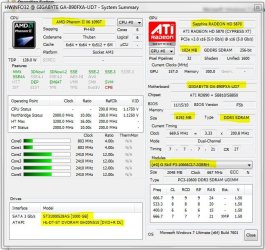
Here is a photo copy of the specs.

Just out of curiosity,

If you pick a video your having trouble with and move it to your HD, off of the external, and try to play it, does the problem resolve itself?

I tried it. The video had the same problems.
 

Attachments

  • specs.png
    specs.png
    30 KB · Views: 29

My Computer My Computer

OS
Windows 7
Back
Top