Can Win 7 Pro 64bit and Acronis HI work together on the same PC

trinaz

New member
Member
VIP
Local time
7:34 AM
Messages
477
Location
Phoenix
Every time I install Acronis 2011 Home Version, Update 2 (build 6857)...Acronis appears to disable the normal Windows Backup/Restore features. When I click in the Control Panel on "Backup and Restore"...nothing happens ?

Can Win 7 Backup & Acronis work on the same PC independent of each other...or is it just one or the other.

Anyone know how to re-enable the Windows Backup and Restore in Control Panel at the same time as Acronis is also installed ?

Thanks...TRinAZ
 

My Computer My Computer

At a glance

Windows 7 Pro 64bit SP1AMD FX-6100 Six-Core Processor2ea Corsair-1333MHz-PC3-10666-240-pin-CMX4GX3...NVIDIA GeForce GT 630 - 1023MB (EVGA)
Computer type
PC/Desktop
Computer Manufacturer/Model Number
Self built
OS
Windows 7 Pro 64bit SP1
CPU
AMD FX-6100 Six-Core Processor
Motherboard
M5A78L-M LX PLUS
Memory
2ea Corsair-1333MHz-PC3-10666-240-pin-CMX4GX3M1A1333C9
Graphics Card(s)
NVIDIA GeForce GT 630 - 1023MB (EVGA)
Sound Card
OnBoard Via High Def Audio
Monitor(s) Displays
Samsung 204B main - ASUS VS228 secondary
Screen Resolution
1920x1080 main - 1920x1080 secondary
Hard Drives
Samsung SSD 840 128GB Win7 Pro 64bit - Western Digital WDC 465GB - Seagate 640GB Sata B/U - Maxtor 500GB Sata B/U - Maxtor 200GB Sata
PSU
Antec 650 watt
Cooling
Multiple case fans
Keyboard
MS USB dual Wireless Keyboard - IntelliType Pro
Mouse
MS USB dual Wireless Mouse - IntelliPoint
Internet Speed
Cox Cable
Antivirus
Bitdefender IS 2014
Browser
FireFox Primary - IE 11
Other Info
Hauppaguge Win TV HVR-1250 (Model 22xxx, Hybrid ATSC/QAM)
Samsung HD103SI USB 1TB Desktop Drive - Backup & Disk Image storage
Every time I install Acronis 2011 Home Version, Update 2 (build 6857)...Acronis appears to disable the normal Windows Backup/Restore features. When I click in the Control Panel on "Backup and Restore"...nothing happens ?

Can Win 7 Backup & Acronis work on the same PC independent of each other...or is it just one or the other.

Anyone know how to re-enable the Windows Backup and Restore in Control Panel at the same time as Acronis is also installed ?

Thanks...TRinAZ

They can work IF you disable the acronis backup schedule service but that means no scheduled back ups.

Why would you want both? Acronis can convert back and forth, make restore points, etc. Reason you want both?
 

My Computer My Computer

At a glance

Win 8 Release candidate 8400[email protected]4 gigsNvidia 9600M
Computer Manufacturer/Model Number
HP Pavillion dv-7 1005 Tx
OS
Win 8 Release candidate 8400
CPU
[email protected]
Memory
4 gigs
Graphics Card(s)
Nvidia 9600M
Sound Card
HD built-in
Monitor(s) Displays
17" Wxga
Screen Resolution
1440x900
Cooling
none
Internet Speed
45Mb down 5Mb up
They can work IF you disable the Acronis backup schedule service but that means no scheduled back ups.

Why would you want both? Acronis can convert back and forth, make restore points, etc. Reason you want both?

Doesn't appear Acronis backup schedule service has anything to do with the issue. It's apparently a known issue which was supposed to be solved in the version released 6/1...but obviously it hasn't fixed it...at lease for 64 bit systems.

As for reasons....

I'm in the 2nd test period with Acronis...before I shell out $$$ for a replacement for Win B/R options I want to be sure the price justifies the advantages

There are numerous posts in SevenForums favorable to Acronis...but...there are also numerous other posts that are critcal...including the user forms on Acronis' site.

However...the forum and tech support so far has been very good

Since I'm testing Acronis...it makes sense to me to also have image/file b/u's (Win 7 version) of everything through Windows in case I have any issue restoring my system(s)/files thru Acronis' 'tib' files (lots of "can not restore" posts on Acronis forms)

With 5 PC's running here...want to be sure Acronis is the way to go before I buy...and that the costs are offset by the benefits of an outside image & b/u program instead of Windows built in systems.

Thanks...
 

My Computer My Computer

At a glance

Windows 7 Pro 64bit SP1AMD FX-6100 Six-Core Processor2ea Corsair-1333MHz-PC3-10666-240-pin-CMX4GX3...NVIDIA GeForce GT 630 - 1023MB (EVGA)
Computer type
PC/Desktop
Computer Manufacturer/Model Number
Self built
OS
Windows 7 Pro 64bit SP1
CPU
AMD FX-6100 Six-Core Processor
Motherboard
M5A78L-M LX PLUS
Memory
2ea Corsair-1333MHz-PC3-10666-240-pin-CMX4GX3M1A1333C9
Graphics Card(s)
NVIDIA GeForce GT 630 - 1023MB (EVGA)
Sound Card
OnBoard Via High Def Audio
Monitor(s) Displays
Samsung 204B main - ASUS VS228 secondary
Screen Resolution
1920x1080 main - 1920x1080 secondary
Hard Drives
Samsung SSD 840 128GB Win7 Pro 64bit - Western Digital WDC 465GB - Seagate 640GB Sata B/U - Maxtor 500GB Sata B/U - Maxtor 200GB Sata
PSU
Antec 650 watt
Cooling
Multiple case fans
Keyboard
MS USB dual Wireless Keyboard - IntelliType Pro
Mouse
MS USB dual Wireless Mouse - IntelliPoint
Internet Speed
Cox Cable
Antivirus
Bitdefender IS 2014
Browser
FireFox Primary - IE 11
Other Info
Hauppaguge Win TV HVR-1250 (Model 22xxx, Hybrid ATSC/QAM)
Samsung HD103SI USB 1TB Desktop Drive - Backup & Disk Image storage
I haven't used it but there is a choice next to back up in back up restore that says "turn on windows back up" It is meant to over ride Acronis's merge with Windows.
 

My Computer My Computer

At a glance

Win7 64 BitI-58 GBIntel 4000
Computer type
Laptop
Computer Manufacturer/Model Number
Dell Latitude 6530 Notebook ( 15.6 screen)
OS
Win7 64 Bit
CPU
I-5
Memory
8 GB
Graphics Card(s)
Intel 4000
Monitor(s) Displays
FHD 1980 x 1080
Screen Resolution
1980x1280
Hard Drives
Samsung 840 Pro 256 GB for OS Samsung Pro 840 256 GB for Storage.
Keyboard
Backlit Key's
Internet Speed
DSL 1.5 mbps
Anyone know how to re-enable the Windows Backup and Restore in Control Panel at the same time as Acronis is also installed ?

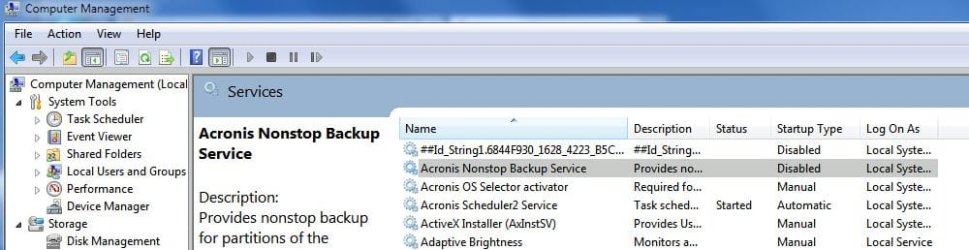
Don't know if it will work, but try disabling the Acroinis non-stop backup service:

Acronis NonStopBackup Service.JPG


With 5 PC's running here...want to be sure Acronis is the way to go before I buy...and that the costs are offset by the benefits of an outside image & b/u program instead of Windows built in systems.

Acronis can be a bit particular at times, especially if you are installing over a previous version. Some years are better skipped, but having used Acronis TI since early 2004, I can vouch for it. It's been completely reliable. Get it running on one machine. Once properly set up, I think you'll love it.

Windows B&R is disabled by the Acronis install on the machines I run it on, but it can easily be re-enabled in the Backup and Restore Control Panel applet (left pane, but see 1st paragraph in this post). But, given that you can schedule backups from within Acronis, I don't bother.

One feature I don't want or need is the 'Non-stop backup'. I simply disable the service in services.msc and all is well.

The interface in 2011 is a bit hokey, but under the hood, it is more responsive and is faster than previous versions. I'm happy, and that's saying much, as I'm quite particular when it comes to system security and data safety.

James
 

My Computer My Computer

At a glance

Win7U 64 RTMQ95508GB GskillASUS|EAH4850/HTDI/1GD3/A
OS
Win7U 64 RTM
CPU
Q9550
Motherboard
GA-EP45-UD3R
Memory
8GB Gskill
Graphics Card(s)
ASUS|EAH4850/HTDI/1GD3/A
Sound Card
xfi Plat
Monitor(s) Displays
Dell 2405fpw
Screen Resolution
1920x1200
Hard Drives
Seagate & WD sata Drives
PSU
Antec
Case
Antec
Keyboard
MS Natural Ergonomic 4000
Mouse
Logitech MX610 USB Cordless
Back
Top