Screen resolution problem always reverts back to 1280X1024 I am trying to set my desktop resolution to 1252x864 I found that if I restart my PC no problem happens. But if it was awaked from sleep or hibernation the resolution would revert back to 1280X1024. I tried other resolution such as 1024X768 but the problem stayed the same. So when I set my desktop resolution to anything other than 1280X1024, it would change back to this resolution.
So I downloaded and installed latest driver (ATI Radeon HD 5970 Catalyst Software Suite V11.5 May 9, 2011 Win7), then un installed old driver and used driver sweeper to remove the remaining files then installed new driver, but this did not solve the problem. Any advise will be appreciated My graphic card is ATI Radeon HD 5670,
Mother board is Gigabyte EP45-UD3R Rev 1.1. it has no built in video. i.e. my PC has only one video card which is ATI.
Operating system Win7 Pro RAM 4Gb CPU Core 2 Quad 2.66 GH Best regards
My Computer
At a glance
Windows 7 ultimate 64 bitCore 2 Quad 2.66 GHz4Gb Kingston DDRIIATI Radeon HD 5670
What is the native resolution of that 19 inch monitor? My "guess" would be that it's 1280x1024?
If so, that's probably why it keeps reverting back to it. I had an issue with my old Samsung 19" CRT monitor where it would sometimes change resolutions when switching users. Issue got slightly better with video card updates but never really went away. I've since retired the monitor when I went with an LCD.
Anyway If the native resolution is 1280x1024, that's what it's going to revert back to, how to get it to stick? Not sure? Your probably using the Windows driver for that monitor aren't you? You could try finding the "Phillips" drivers and see if they help.
You could also make sure the resolution you want is specified in the Catalyst Control Center.
It is probably because your monitor won't support a res of 1252x864, it's not a standard setting.
As suggested, use the Catalyst Control Panel to set it. If there is an option for it, make sure it is set to allow the CCC to control your display.
My Computer
At a glance
Windows 7 Ultimate X64 SP1Intel i5-2550K, Differing ~4.4-4.8GHz No buil...16GB G.Skill Sniper 1866MHz @ 2133MHz 2x8GBASUS GTX650TIB-DC2OC-2GD5, (650TI Boost)
Computer type
PC/Desktop
Computer Manufacturer/Model Number
Home Built Desktop By DataTech
OS
Windows 7 Ultimate X64 SP1
CPU
Intel i5-2550K, Differing ~4.4-4.8GHz No built in GPU
Motherboard
ASUS P8Z68-V PRO/GEN3
Memory
16GB G.Skill Sniper 1866MHz @ 2133MHz 2x8GB
Graphics Card(s)
ASUS GTX650TIB-DC2OC-2GD5, (650TI Boost)
Sound Card
Onboard Realtek 5-1
Monitor(s) Displays
Samsung P2570HD
Screen Resolution
1920x1080
Hard Drives
Samsung 840 Pro 256GB SSD for OS, 500GB Seagate Constellation (Enterprise drive) for Data
PSU
Corsair HX650W
Case
Inwin Dragon Rider
Cooling
Hyper 212 EVO w/two Noctua fans, push-pull, @1300 RPM
Keyboard
E-Z Eyes, bright yellow keys with large characters
Mouse
steelseries SENSEI Laser Pro Gaming
Internet Speed
48-51Mbs Mbs down, 11 Mbs up Xfinity Cable
Antivirus
Norton Internet Security 2013
Browser
IE 10, Opera, Pale Moon if needed
Other Info
4 case fans, LG BluRay-RE, ASUS DVD-RW, Mr. Fusion power supply, 1.21 gigawatts.
Actually you may do this as somethings might look better at the resolution, fonts for example, or the aspect ratio - 1280x1024 may not be to everyones liking.
I wouldn't do it but I'm not looking at what's on his monitor.
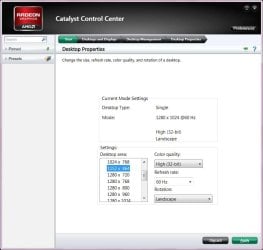
Dear all, Many thanks for your replies and very sorry for my delay, after I submitted my post I checked it after while and did not find answer yet, then I went out of town for few hours and just came back and was very surprised to the numbers of generous replies. Syhnus21 was absolutely right, I have Philips 19" CRT monitor, I have no handy document showing what is the native resolution of my monitor and I could not find Win7 driver for it so I am using Windows driver, but I found a topic published byBrinkhttp://www.sevenforums.com/tutorials/255-screen-resolution-display-settings.html stating that the native resolution of 19” monitor is 1280X1024, my problem started when I installed latest driver of my video card published on May 2011 to solve other problem- video play back issue} but it brought other problem , of course I contacted ATI but the response was {How to uninstall old driver, clean the remaining of old driver then install new driver} but this did not solve the problem, and yes the resolution I am selecting is specified in both the Catalyst Control Center as per the attached image and in Windows under screen resolution, in a matter of fact I am selecting it from the Catalyst Control Center, as I said any resolution other than 1280x1024 will revert back after awake from hibernation or sleep. I have dual operating system, the other one is windows XP SP3 and I can select any resolution and sleep or hibernate with no problem at all. As for Britton30 suggestion to use CCC to control my display I am not sure I do know how? Why I am trying to use lower resolution is because higher resolution makes icons, font etc, very small in addition to Windows7 pale interface which cause fatigue to my eyes after several hours of working, I can of course zoom word say to 120%, internet explorer to 125%, change icon size and font .. etc but I think this not the correct way. Best regards
Attachments
Screen resolution problem.jpg
50.2 KB
· Views: 22
My Computer
At a glance
Windows 7 ultimate 64 bitCore 2 Quad 2.66 GHz4Gb Kingston DDRIIATI Radeon HD 5670
Most 19 inch CRT monitors had a native resolution of 1280x1024 so if that's what yours is than that will be the automatic setting Windows 7 will use.
I suspect this comes down to a driver issue as Windows 7 has to use a "generic" driver as I'd imagine Phillips doesn't have any Windows 7 drivers. However being that you have a driver from Phillips for XP is probably why you're able to keep that specified resolution under XP without it reverting back to 1280x1024. If that makes sense.
In short it may be a driver issue in that Windows 7 will always want to revert back to the native (default) resolution of 1280x1024. Why is only happens when coming out of hibernation/sleep and not during a restart is a mystery though. Unfortunately I don't have an answer for that one other than it's probably a driver issue.
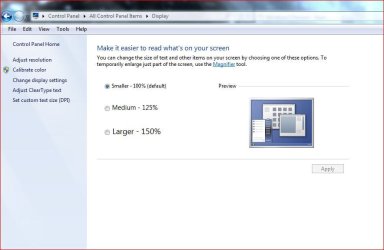
I can ofer you a suggestion to make things larger for your given resolution of 1280x1024......
Right click the desktop, choose Screen resolution, click Make text and other items larger or smaller and choose a size suitable for your liking......