Solved Windows Menu Context is too big for the menu...

La Grenouille

New member
Local time
10:54 AM
Messages
6
Not sure if this is the right section but here goes:

I've got a slight problem with my windows menus in that the content is too big for the actual menu box. There's no option to drag to make the box bigger, it's just that the actual content is way to big for the box as if the font/rendering size is just set too large.

How would I go about changing this? Here's a screenshot of an example of what I'm dealing with:
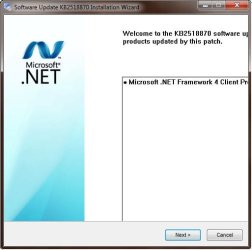
Snap_2011.06.14_16h58m03s_001.jpg

As I stated earlier, it's not giving me an option to drag the window to make it bigger so any input you guys can give me is greatly appreciated!

Thanks!
 

My Computer My Computer

OS
Windows 7 Home Premium 32 bit
Not sure if this is the right section but here goes:

I've got a slight problem with my windows menus in that the content is too big for the actual menu box. There's no option to drag to make the box bigger, it's just that the actual content is way to big for the box as if the font/rendering size is just set too large.

How would I go about changing this? Here's a screenshot of an example of what I'm dealing with:

View attachment 159703
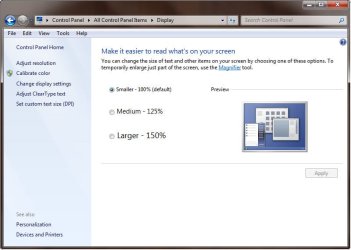
It doesn't appear from your screenshot that you've specified "medium - 125%" for your font size, but have you?

I've done that myself on my own systems, and deal with this same symptom of yours fairly often but with other application programs. I prefer the slightly larger text characters, as they are clearer and darker... like "more ink".

If you've specified "medium - 125%" then this is a common long-standing problem for many years (including back with WinXP), related to the software product but really tied to Microsoft's providing a way to enlarge things but not automatically increasing window sizes to match.

With WinXP it was "small fonts (96DPI)" vs. "large fonts (120DPI)" and with Win7 it's "normal - 100%" vs. "medium - 125%". Unfortunately, unless the application program is written to use certain standard API's or recognize that the large fonts are in effect and draw its own window correctly, this truncated text symptom is inevitably the result.

Right-click on desktop, select Screen Resolution, and then click on the "make text and other items larger or smaller". What do you show there?

fontsize.jpg
 

My Computer My Computer

Computer type
PC/Desktop
Computer Manufacturer/Model Number
Home-built, two systems (1) and (2)
OS
Windows 7 Pro x64 (1), Win7 Pro X64 (2)
CPU
i5-3350p 3.1Ghz/6MB-cache (1); E8400 3.0Ghz/6MB-cache (2)
Motherboard
ASUS P8Z77-V Pro (1); ASUS P5Q3 (2)
Memory
8GB PC3-12800 DDR3 (1); 4GB PC3-10600 DDR3 (2)
Graphics Card(s)
ATI HD7750 (1), (see TV cards); ATI R7 250 (2)
Sound Card
Realtek ALC892 HD Audio (1); Realtek ALC1200 HD Audio (2)
Monitor(s) Displays
Eizo HD2441W LCD, Eizo S2433W (1); Eizo 24" S2433W (2)
Screen Resolution
1920x1200, 1920x1200 (1); 1920x1200 (2)
Hard Drives
(1) 1TB SATA-II (7200RPM), 2x2TB SATA-III (7200RPM), 250GB SATA-III (10000RPM) for OS; 2x2TB external USB 3.0

(2) 320GB SATA-II (7200RPM), 750GB SATA-II (7200RPM), 150GB SATA-II (10000RPM) for OS; 2TB external USB 3.0
PSU
Nesteq ECS-6001 600W (1); Nesteq ECS-5001 500W (2)
Case
Acousti-Case 360 (1) and (2)
Cooling
Noctua NH-U12P SE2 for CPU, 2x120mm case fans (1) and (2)
Keyboard
IBM PS/2 (1) and (2)
Mouse
Logitech MX Revolution wireless (1); Microsoft wired (2)
Internet Speed
100mbps down / 10mbps up
Antivirus
Microsoft Security Essentials; Malwarebyte Anti-Malware Pro
Browser
Firefox
Other Info
Ceton InfiniTV 4-tuner cablecard-enabled TV card as well as Hauppauge HVR-2250 OTA/ATSC 2-tuner TV card in (1), running under Win7 WMC
This problem happens occasionally if you have your DPI setting on "larger scale." The solution is annoying, but easy. Just temporarily reset your DPI to "default scale" - reboot, go into the menu box and perform your functions. Then, when you're all done, reset your DPI setting and reboot. Voila!
 

My Computer My Computer

Computer Manufacturer/Model Number
HP Pavillion dv5t (generation 1)
OS
Vista 64 bit and 32 bit (SP2)
CPU
Intel(R) Core(TM)2 Duo Processor T9400 (2.53 GHz
Memory
4GB DDR2 System Memory (2 Dimm)
Graphics Card(s)
512 MB NVIDIA GeForce 9600M GT
Monitor(s) Displays
15.4" diagonal WSXGA+ High-Definition HP BrightView Widescre
Screen Resolution
1680 x 1050
Hard Drives
320GB 5400RPM SATA Hard Drive with HP ProtectSmart Hard Drive Protection
Keyboard
Built-in HP
Mouse
Built in - Synaptics TouchPad V6.5 on PS/2 Port
Internet Speed
Max
Other Info
~ Intel Next-Gen Wireless-N Mini-card w/Bluetooth ~ Blu-Ray ROM DVD+/-R/RW ~ Integ. HDTV Hybrid Tuner ~ 12 Cell Battery ~ MS Office (Home Premium) 2007 ~
This problem happens occasionally if you have your DPI setting on "larger scale." The solution is annoying, but easy. Just temporarily reset your DPI to "default scale" - reboot, go into the menu box and perform your functions. Then, when you're all done, reset your DPI setting and reboot. Voila!
Actually, they've made it easier to do this DPI reset under Win7.

With WinXP a re-boot was needed. With Win7, you only need to log off and then log on to pick up the font size change... with no actual re-boot required.
 

My Computer My Computer

Computer type
PC/Desktop
Computer Manufacturer/Model Number
Home-built, two systems (1) and (2)
OS
Windows 7 Pro x64 (1), Win7 Pro X64 (2)
CPU
i5-3350p 3.1Ghz/6MB-cache (1); E8400 3.0Ghz/6MB-cache (2)
Motherboard
ASUS P8Z77-V Pro (1); ASUS P5Q3 (2)
Memory
8GB PC3-12800 DDR3 (1); 4GB PC3-10600 DDR3 (2)
Graphics Card(s)
ATI HD7750 (1), (see TV cards); ATI R7 250 (2)
Sound Card
Realtek ALC892 HD Audio (1); Realtek ALC1200 HD Audio (2)
Monitor(s) Displays
Eizo HD2441W LCD, Eizo S2433W (1); Eizo 24" S2433W (2)
Screen Resolution
1920x1200, 1920x1200 (1); 1920x1200 (2)
Hard Drives
(1) 1TB SATA-II (7200RPM), 2x2TB SATA-III (7200RPM), 250GB SATA-III (10000RPM) for OS; 2x2TB external USB 3.0

(2) 320GB SATA-II (7200RPM), 750GB SATA-II (7200RPM), 150GB SATA-II (10000RPM) for OS; 2TB external USB 3.0
PSU
Nesteq ECS-6001 600W (1); Nesteq ECS-5001 500W (2)
Case
Acousti-Case 360 (1) and (2)
Cooling
Noctua NH-U12P SE2 for CPU, 2x120mm case fans (1) and (2)
Keyboard
IBM PS/2 (1) and (2)
Mouse
Logitech MX Revolution wireless (1); Microsoft wired (2)
Internet Speed
100mbps down / 10mbps up
Antivirus
Microsoft Security Essentials; Malwarebyte Anti-Malware Pro
Browser
Firefox
Other Info
Ceton InfiniTV 4-tuner cablecard-enabled TV card as well as Hauppauge HVR-2250 OTA/ATSC 2-tuner TV card in (1), running under Win7 WMC
First off, thanks for the replys!

@dsperber - I've checked that setting and, as I guessed, I was set at the "Small - 100%" setting. I tried switching to Medium and logging back in but it didn't change anything. So I switched it back.

Snap_2011.06.15_11h32m15s_002.jpg

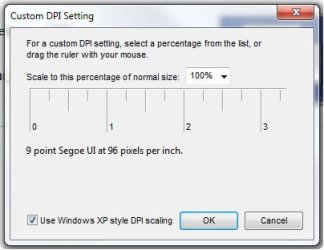
@Imperfect1 - I checked my DPI setting and it was set to the lowest possible setting. I tried un-checking the XP mode, but that didn't help at all either.

Snap_2011.06.15_11h32m59s_003.jpg

It's probably a deeply embedded setting somewhere that needs to be changed. LOL

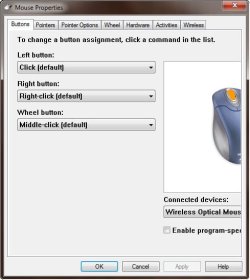
Until then, I'm stuck with windows like this:

Snap_2011.06.15_11h31m51s_001.jpg

Thanks for your help!
 

My Computer My Computer

OS
Windows 7 Home Premium 32 bit
Just an update:

I ended up just doing a clean reinstall of Windows 7. It had been two years so I was definitely due.

Thanks for the input and suggestions!
 

My Computer My Computer

OS
Windows 7 Home Premium 32 bit
Just an update:

I ended up just doing a clean reinstall of Windows 7. It had been two years so I was definitely due.
And... did it fix the problem??? Can you now see everything you expect to see in that window?
 

My Computer My Computer

Computer type
PC/Desktop
Computer Manufacturer/Model Number
Home-built, two systems (1) and (2)
OS
Windows 7 Pro x64 (1), Win7 Pro X64 (2)
CPU
i5-3350p 3.1Ghz/6MB-cache (1); E8400 3.0Ghz/6MB-cache (2)
Motherboard
ASUS P8Z77-V Pro (1); ASUS P5Q3 (2)
Memory
8GB PC3-12800 DDR3 (1); 4GB PC3-10600 DDR3 (2)
Graphics Card(s)
ATI HD7750 (1), (see TV cards); ATI R7 250 (2)
Sound Card
Realtek ALC892 HD Audio (1); Realtek ALC1200 HD Audio (2)
Monitor(s) Displays
Eizo HD2441W LCD, Eizo S2433W (1); Eizo 24" S2433W (2)
Screen Resolution
1920x1200, 1920x1200 (1); 1920x1200 (2)
Hard Drives
(1) 1TB SATA-II (7200RPM), 2x2TB SATA-III (7200RPM), 250GB SATA-III (10000RPM) for OS; 2x2TB external USB 3.0

(2) 320GB SATA-II (7200RPM), 750GB SATA-II (7200RPM), 150GB SATA-II (10000RPM) for OS; 2TB external USB 3.0
PSU
Nesteq ECS-6001 600W (1); Nesteq ECS-5001 500W (2)
Case
Acousti-Case 360 (1) and (2)
Cooling
Noctua NH-U12P SE2 for CPU, 2x120mm case fans (1) and (2)
Keyboard
IBM PS/2 (1) and (2)
Mouse
Logitech MX Revolution wireless (1); Microsoft wired (2)
Internet Speed
100mbps down / 10mbps up
Antivirus
Microsoft Security Essentials; Malwarebyte Anti-Malware Pro
Browser
Firefox
Other Info
Ceton InfiniTV 4-tuner cablecard-enabled TV card as well as Hauppauge HVR-2250 OTA/ATSC 2-tuner TV card in (1), running under Win7 WMC
Sorry..should have stated that YES, indeed, it fixed the problem. LOL

Thanks for the follow-up.

PS: It should be noted that I tried a reinstall first, and it DID NOT fix the problem, only the clean install did.
 

My Computer My Computer

OS
Windows 7 Home Premium 32 bit
Sorry..should have stated that YES, indeed, it fixed the problem.
I, too, have found that unlike with WinXP which seemed to always "gradually deteriorate over time" with more and more unrepairable anomalies starting to build up, justifying a total reinstall every 6-9 months or so, Win7 is MUCH MORE SOLID AND STABLE.

With Win7, one can certainly expect to go a year or more without some type of odd behavior creeping in that you just can't seem to cure no matter what well-known and usually reliable solutions you try... but which will 100% guaranteed disappear if you do a complete fresh reinstall.

I'm amazed you lasted for two years, but that just speaks to the remarkable stability of Win7.

Anyway, it really was about time for you for sure. And I'm glad it turned out to have a happy ending.
 

My Computer My Computer

Computer type
PC/Desktop
Computer Manufacturer/Model Number
Home-built, two systems (1) and (2)
OS
Windows 7 Pro x64 (1), Win7 Pro X64 (2)
CPU
i5-3350p 3.1Ghz/6MB-cache (1); E8400 3.0Ghz/6MB-cache (2)
Motherboard
ASUS P8Z77-V Pro (1); ASUS P5Q3 (2)
Memory
8GB PC3-12800 DDR3 (1); 4GB PC3-10600 DDR3 (2)
Graphics Card(s)
ATI HD7750 (1), (see TV cards); ATI R7 250 (2)
Sound Card
Realtek ALC892 HD Audio (1); Realtek ALC1200 HD Audio (2)
Monitor(s) Displays
Eizo HD2441W LCD, Eizo S2433W (1); Eizo 24" S2433W (2)
Screen Resolution
1920x1200, 1920x1200 (1); 1920x1200 (2)
Hard Drives
(1) 1TB SATA-II (7200RPM), 2x2TB SATA-III (7200RPM), 250GB SATA-III (10000RPM) for OS; 2x2TB external USB 3.0

(2) 320GB SATA-II (7200RPM), 750GB SATA-II (7200RPM), 150GB SATA-II (10000RPM) for OS; 2TB external USB 3.0
PSU
Nesteq ECS-6001 600W (1); Nesteq ECS-5001 500W (2)
Case
Acousti-Case 360 (1) and (2)
Cooling
Noctua NH-U12P SE2 for CPU, 2x120mm case fans (1) and (2)
Keyboard
IBM PS/2 (1) and (2)
Mouse
Logitech MX Revolution wireless (1); Microsoft wired (2)
Internet Speed
100mbps down / 10mbps up
Antivirus
Microsoft Security Essentials; Malwarebyte Anti-Malware Pro
Browser
Firefox
Other Info
Ceton InfiniTV 4-tuner cablecard-enabled TV card as well as Hauppauge HVR-2250 OTA/ATSC 2-tuner TV card in (1), running under Win7 WMC
Back
Top