Newbie Western Dig HDD issue, Wont recognize

automagp68

Banned
Local time
5:24 AM
Messages
29
Hi guys
Hopeing you can help out a total Newbie here

I have two WD 500 gig externals. Both names 500 backup1 and 500 backup2

For some reason with them both plugges into my machine explorer will only recognize one at a time. The odd part is that if you go to eject them on the taskbar you can pick which to eject. They are both named differently so why can we eject them one at a time but explorer will not show me both to transfer files from one to another? Thanks for any help!
 

My Computer My Computer

OS
Windows 7
HD issue

Hi guys
Hopeing you can help out a total Newbie here

I have two WD 500 gig externals. Both names 500 backup1 and 500 backup2

For some reason with them both plugges into my machine explorer will only recognize one at a time. The odd part is that if you go to eject them on the taskbar you can pick which to eject. They are both named differently so why can we eject them one at a time but explorer will not show me both to transfer files from one to another? Thanks for any help!

Its probably that they are either both set to primary or slave check the diagram on the drives and see if they have a cable select position and use that for both. Im assuming they are ide drives

BTW welcome to sevenforums

Ken
 

My Computer My Computer

Computer Manufacturer/Model Number
HP Pavillion dv-7 1005 Tx
OS
Win 8 Release candidate 8400
CPU
[email protected]
Memory
4 gigs
Graphics Card(s)
Nvidia 9600M
Sound Card
HD built-in
Monitor(s) Displays
17" Wxga
Screen Resolution
1440x900
Cooling
none
Internet Speed
45Mb down 5Mb up
perhaps one of them hasn't been formated yet?

check in disk management.

Win+R -> diskmgmt.msc
 

My Computer My Computer

Computer Manufacturer/Model Number
Too many to list.
OS
XP, Seven, 2008R2
CPU
AMD, Intel, VIA
Motherboard
Various
Memory
Corsair, Kingston, etc.
Graphics Card(s)
ATI, NVIDIA
Monitor(s) Displays
Samsung
Hard Drives
Maxtor, Western Digital
Keyboard
qwerty
Internet Speed
22 Mb/s @ home, 1 Gb/s @ server
Other Info
All of my systems still run fastest on XP 32-bit for the most part. Win7 is fun to play with, but I still prefer XP for raw speed, security, and functionality.
Its probably that they are either both set to primary or slave check the diagram on the drives and see if they have a cable select position and use that for both. Im assuming they are ide drives

BTW welcome to sevenforums

Ken

Ken

Thanks for your reply. Could you go in depth a little more on how to do this? What do you mean by diagram. Sorry for the dumb questions. The drives already both haves. But thanks for the idea sup3rsprt.

Bobby
 

My Computer My Computer

OS
Windows 7
I'm assuming they are USB right?

If you connect one at a time, do they work?

Try to plug one into the back of your computer and one in the front.
 

My Computer My Computer

Computer Manufacturer/Model Number
Too many to list.
OS
XP, Seven, 2008R2
CPU
AMD, Intel, VIA
Motherboard
Various
Memory
Corsair, Kingston, etc.
Graphics Card(s)
ATI, NVIDIA
Monitor(s) Displays
Samsung
Hard Drives
Maxtor, Western Digital
Keyboard
qwerty
Internet Speed
22 Mb/s @ home, 1 Gb/s @ server
Other Info
All of my systems still run fastest on XP 32-bit for the most part. Win7 is fun to play with, but I still prefer XP for raw speed, security, and functionality.
Its probably that they are either both set to primary or slave check the diagram on the drives and see if they have a cable select position and use that for both. Im assuming they are ide drives

BTW welcome to sevenforums

Ken

Ken

So i was just doing some homework here and i was trying to make sure these are IDE drives. So first me being a novice thought i might go figure out what IDE means. Which im still slightly confused about. These drives are both external usb 2.0 ESata drives with there own power supply. I did read somewhere that IDE drives will not funtion correctly while useing a cable that is longer then 18 inches. Is that correct. One of the USB cables i was useing is certianly longer then 18 inches. However i switched to a shorter one with no succcess. Maybe im going down the wrong path of troubleshooting here but thought i would add this bit of research in. Thanks for any additional help.


EDIT!

Ok i figured out waht IDE means. LOL no these are USB connectors. Sorry im a newbie.
 

My Computer My Computer

OS
Windows 7
I'm assuming they are USB right?

If you connect one at a time, do they work?

Try to plug one into the back of your computer and one in the front.


sup3rsprt

Thanks for the idea. My machine is just my Laptop so they only have 3 usbs on the side. I did try them one at a time and also swapped out different USB cables. Whatever one is recongized or plugged in first is visable and usable. The second one will show to eject it in the task bar but not in explorer. If you plug them in one after the other in reverse you get the same thing but backwords. So both drives are completly functional. Also went back to my xp machine and works no problem. Very odd.
 

My Computer My Computer

OS
Windows 7
HD

Ken

Thanks for your reply. Could you go in depth a little more on how to do this? What do you mean by diagram. Sorry for the dumb questions. The drives already both haves. But thanks for the idea sup3rsprt.

Bobby

Bobby we could give you more if we knew what kind of drives they are. Are they USB, IDE, internal external, etc.

Let me know

Ken
 

My Computer My Computer

Computer Manufacturer/Model Number
HP Pavillion dv-7 1005 Tx
OS
Win 8 Release candidate 8400
CPU
[email protected]
Memory
4 gigs
Graphics Card(s)
Nvidia 9600M
Sound Card
HD built-in
Monitor(s) Displays
17" Wxga
Screen Resolution
1440x900
Cooling
none
Internet Speed
45Mb down 5Mb up
Bobby we could give you more if we knew what kind of drives they are. Are they USB, IDE, internal external, etc.

Let me know

Ken


Sorry Ken

I edited one of the posts above after figureing out what IDE ment. They are not IDE. They are External USB Wester Digital 500 gig.

( the little black boxes from Best Buy :)
 

My Computer My Computer

OS
Windows 7
go to Start Orb thingy then in the search area type in: diskmgmt.msc and hit enter.
It will load the Disk Management console.
Look though the listing below (the area that will have stuff like Disk 0, Basic, 298.09GB, Online)... and look to see if both are listed there. If one says Offline or Inactive, try to right click on it and choose Activate, Reactivate disk, Connect, anything along those lines (sorry I forget the exact wording since I am not on that system right now, am at work).
 

My Computer My Computer

Computer Manufacturer/Model Number
Custom built desktops and a Compaq CQ60-211DX laptop
OS
Win7, XP, Vista x64, Ubuntu 9.04
CPU
Desktops: E6600, E2140, XP3000+; Laptop: Celeron 585
Motherboard
Desktops: GA-EP35-DS3P, GA-P965-DS3, A7N8X
Memory
Desktops: 4GB, 3GB, 1GB; Laptop: 2GB
Graphics Card(s)
Desktops: 320MB 8800GTS, 128MB 7300GTS, 128MB 9600XT
Sound Card
Creative or onboard
Monitor(s) Displays
19" widescreen, 17" CRT, 19" CRT, and 15.6" LCD on laptop.
Screen Resolution
1440x900, 1280x1024.... 1366x768
Hard Drives
Desktop 1: 320GB Seagate main, 500GB WD backup, 120GB WD testing
Desktop 2: 80GB server
Desktop 3: 160GB main, 250GB backup
Laptop: 160GB
PSU
varies, 350W to 550W
Internet Speed
8Mb+ cable
sata drive prob

Sorry Ken

I edited one of the posts above after figureing out what IDE ment. They are not IDE. They are ESATA drives with USB Wester Digital 500 gig.

( the little black boxes from Best Buy :)

OK esata external drives (connected via usb?) since connected via us the drives should function together. Are they both formatted the same? Is one of them a logical drive? Im just asking relevant questions.

edit... I didnt see the post abt disk management. If you could use the sniping tool to upload a pic it would help tons

Ken
 

My Computer My Computer

Computer Manufacturer/Model Number
HP Pavillion dv-7 1005 Tx
OS
Win 8 Release candidate 8400
CPU
[email protected]
Memory
4 gigs
Graphics Card(s)
Nvidia 9600M
Sound Card
HD built-in
Monitor(s) Displays
17" Wxga
Screen Resolution
1440x900
Cooling
none
Internet Speed
45Mb down 5Mb up
OK esata external drives (connected via usb?) since connected via us the drives should function together. Are they both formatted the same? Is one of them a logical drive? Im just asking relevant questions.

Ken

Sorry forget the Esata part. Lets just call them External MINI USB drives. They are both formated the same Fat 32.
No they are not logical drives. Neither have been partitioned which is what im assumeing your asking. Thanks again for trying to help me reason this all out
 

My Computer My Computer

OS
Windows 7
Here is quick update for you guys. I cant even get the HDD to show up in disk managment for some reason. Only whatever one is plugged in first will show up. Very odd
 

My Computer My Computer

OS
Windows 7
Yea, I'm stumped. It definitely seems like a hardware conflict. Maybe it's related to the USB driver in Windows 7 (since XP does work).
 

My Computer My Computer

Computer Manufacturer/Model Number
Too many to list.
OS
XP, Seven, 2008R2
CPU
AMD, Intel, VIA
Motherboard
Various
Memory
Corsair, Kingston, etc.
Graphics Card(s)
ATI, NVIDIA
Monitor(s) Displays
Samsung
Hard Drives
Maxtor, Western Digital
Keyboard
qwerty
Internet Speed
22 Mb/s @ home, 1 Gb/s @ server
Other Info
All of my systems still run fastest on XP 32-bit for the most part. Win7 is fun to play with, but I still prefer XP for raw speed, security, and functionality.
HDD

No thought hu guys?
Hmm
Is very odd

hey sorry

formatted to fat32? why? im not sure but i will have to check fat32 limitations.

dont worry we will worry this fixed soon I hope

Ken
 

My Computer My Computer

Computer Manufacturer/Model Number
HP Pavillion dv-7 1005 Tx
OS
Win 8 Release candidate 8400
CPU
[email protected]
Memory
4 gigs
Graphics Card(s)
Nvidia 9600M
Sound Card
HD built-in
Monitor(s) Displays
17" Wxga
Screen Resolution
1440x900
Cooling
none
Internet Speed
45Mb down 5Mb up
Thanks for any additional help guys i appreciate it
 

My Computer My Computer

OS
Windows 7
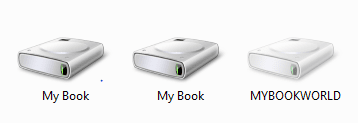
Ok here is what i wanted to show you

I think its a naming conflict.

Althought the drives are lettered diff and also now named apples and bananas for some reason 7 still sees them named as my book and i dont think it can figure out which is which. Which would also be why it isnt company up in disk managment right?

Im asking of course lol

P.S The worldbook is just my NAS device on my network
 

Attachments

  • Capture.PNG
    Capture.PNG
    4.1 KB · Views: 6

My Computer My Computer

OS
Windows 7
HD issue

Ok here is what i wanted to show you

I think its a naming conflict.

Althought the drives are lettered diff and also now named apples and bananas for some reason 7 still sees them named as my book and i dont think it can figure out which is which. Which would also be why it isnt company up in disk managment right?

Im asking of course lol

P.S The worldbook is just my NAS device on my network

Thats it. where did you change the drive names and how?
K
 

My Computer My Computer

Computer Manufacturer/Model Number
HP Pavillion dv-7 1005 Tx
OS
Win 8 Release candidate 8400
CPU
[email protected]
Memory
4 gigs
Graphics Card(s)
Nvidia 9600M
Sound Card
HD built-in
Monitor(s) Displays
17" Wxga
Screen Resolution
1440x900
Cooling
none
Internet Speed
45Mb down 5Mb up
and have you tried rebooting since you renamed them?
 

My Computer My Computer

Computer Manufacturer/Model Number
Too many to list.
OS
XP, Seven, 2008R2
CPU
AMD, Intel, VIA
Motherboard
Various
Memory
Corsair, Kingston, etc.
Graphics Card(s)
ATI, NVIDIA
Monitor(s) Displays
Samsung
Hard Drives
Maxtor, Western Digital
Keyboard
qwerty
Internet Speed
22 Mb/s @ home, 1 Gb/s @ server
Other Info
All of my systems still run fastest on XP 32-bit for the most part. Win7 is fun to play with, but I still prefer XP for raw speed, security, and functionality.
Back
Top