Solved Realtek HD Audio Manager not in Control Panel

MultiCat

New member
Member
Local time
4:57 PM
Messages
30
Location
Birmingham
Hi everyone,

I've just installed the latest Realtek driver and the installation goes fine but Realtek HD Audio Manager won't appear in the Control Panel or the System Tray (however, when I go to customize the notification icons, Realtek HD Audio Manager appears as "Show icon and notifications").

I've tried reinstalling time and time again. Also, Device Manager shows 4 instances of "High Definition Audio Device" as well as Realtek High Definition Audio. I've tried uninstalling these and installing Realtek but Windows automatically installs them upon restart.

Anyone got any ideas?
 

My Computer My Computer

Computer Manufacturer/Model Number
Medion Akoya E4015
OS
Windows 7 Home Premium 64bit
CPU
Pentium(R) Dual-Core E5400 @ 2.70 GHz
Memory
4096MB
Graphics Card(s)
NVIDIA GeForce GT 220
Monitor(s) Displays
18.5"
Screen Resolution
1366 x 768

My Computer My Computer

Computer Manufacturer/Model Number
Brewed
OS
Microsoft Windows 7 Ultimate: x64 (SP1)
CPU
Intel® Core™ i5-2500K Processor
Motherboard
ASUS P8Z68-V PRO
Memory
Kingston DDR3 HyperX 1600MHz 8GB
Graphics Card(s)
ASUS GTX 560 TI DirectCU II 900MHz
Sound Card
Realtek® ALC892 8-Channel High Definition Audio CODEC
Monitor(s) Displays
ACER LCD P246HBD 1920x1080 (24") - Dell 1280x800
Screen Resolution
ACER LCD P246HBD ~ [1920X1080] - DELL ~ [1280x800]
Hard Drives
500 GB WD Caviar SE116 7200rpm SATA2
PSU
Corsair 750W Power Supply
Case
Coolermaster CM Scout
Cooling
Zalman FS-C77 Fatal1ty CPU Cooler
Keyboard
Logitech G15
Mouse
Coolermaster Sentinel Advanced
Internet Speed
[↓ 10 MB/s DL] [↑ 1 MB/s UL]
Other Info
- ROCCAT™ Kave – Solid 5.1 Surround Sound Gaming Headset
- Not overclocking

My Computer My Computer

Computer Manufacturer/Model Number
Medion Akoya E4015
OS
Windows 7 Home Premium 64bit
CPU
Pentium(R) Dual-Core E5400 @ 2.70 GHz
Memory
4096MB
Graphics Card(s)
NVIDIA GeForce GT 220
Monitor(s) Displays
18.5"
Screen Resolution
1366 x 768
Hello MultiCat & Welcome to SevenForums!

Try following this fix (I've smashed up a #permalink for you):
Solved Realtek hd audio not showing up in control panel - Vista Forums

Best Regards,
FredeGail

Thanks FredeGail. However, the problem is Realtek HD Audio Manager isn't showing in the System Tray or in the Control Panel.

Have you been downloading the driver only, or the utility included?

Link for download: http://www.sevenforums.com/sound-audio/3756-latest-realtek-hd-audio-driver-version.html

Best Regards,
FredeGail
 
Last edited:

My Computer My Computer

Computer Manufacturer/Model Number
Brewed
OS
Microsoft Windows 7 Ultimate: x64 (SP1)
CPU
Intel® Core™ i5-2500K Processor
Motherboard
ASUS P8Z68-V PRO
Memory
Kingston DDR3 HyperX 1600MHz 8GB
Graphics Card(s)
ASUS GTX 560 TI DirectCU II 900MHz
Sound Card
Realtek® ALC892 8-Channel High Definition Audio CODEC
Monitor(s) Displays
ACER LCD P246HBD 1920x1080 (24") - Dell 1280x800
Screen Resolution
ACER LCD P246HBD ~ [1920X1080] - DELL ~ [1280x800]
Hard Drives
500 GB WD Caviar SE116 7200rpm SATA2
PSU
Corsair 750W Power Supply
Case
Coolermaster CM Scout
Cooling
Zalman FS-C77 Fatal1ty CPU Cooler
Keyboard
Logitech G15
Mouse
Coolermaster Sentinel Advanced
Internet Speed
[↓ 10 MB/s DL] [↑ 1 MB/s UL]
Other Info
- ROCCAT™ Kave – Solid 5.1 Surround Sound Gaming Headset
- Not overclocking
Hello MultiCat & Welcome to SevenForums!

Try following this fix (I've smashed up a #permalink for you):
Solved Realtek hd audio not showing up in control panel - Vista Forums

Best Regards,
FredeGail

Thanks FredeGail. However, the problem is Realtek HD Audio Manager isn't showing in the System Tray or in the Control Panel.

Have you been downloading the driver only, or the utility included?

Best Regards,
FredeGail

I've been downloading the latest drivers (which include the Audio Manager) from the Realtek website.

Realtek
 

My Computer My Computer

Computer Manufacturer/Model Number
Medion Akoya E4015
OS
Windows 7 Home Premium 64bit
CPU
Pentium(R) Dual-Core E5400 @ 2.70 GHz
Memory
4096MB
Graphics Card(s)
NVIDIA GeForce GT 220
Monitor(s) Displays
18.5"
Screen Resolution
1366 x 768
You may have another soundcard driver installed.
Look for it in Device Manager. My suggest is to uninstall the Realtek driver in Control Panel all normal, and then download Driver Sweeper, and clean the leftover files following your soundcard.

Best Regards,
FredeGail
 

My Computer My Computer

Computer Manufacturer/Model Number
Brewed
OS
Microsoft Windows 7 Ultimate: x64 (SP1)
CPU
Intel® Core™ i5-2500K Processor
Motherboard
ASUS P8Z68-V PRO
Memory
Kingston DDR3 HyperX 1600MHz 8GB
Graphics Card(s)
ASUS GTX 560 TI DirectCU II 900MHz
Sound Card
Realtek® ALC892 8-Channel High Definition Audio CODEC
Monitor(s) Displays
ACER LCD P246HBD 1920x1080 (24") - Dell 1280x800
Screen Resolution
ACER LCD P246HBD ~ [1920X1080] - DELL ~ [1280x800]
Hard Drives
500 GB WD Caviar SE116 7200rpm SATA2
PSU
Corsair 750W Power Supply
Case
Coolermaster CM Scout
Cooling
Zalman FS-C77 Fatal1ty CPU Cooler
Keyboard
Logitech G15
Mouse
Coolermaster Sentinel Advanced
Internet Speed
[↓ 10 MB/s DL] [↑ 1 MB/s UL]
Other Info
- ROCCAT™ Kave – Solid 5.1 Surround Sound Gaming Headset
- Not overclocking
You may have another soundcard driver installed.
Look for it in Device Manager. My suggest is to uninstall the Realtek driver in Control Panel all normal, and then download Driver Sweeper, and clean the leftover files following your soundcard.

Best Regards,
FredeGail

I'm trying that now.

Just something I noticed when I was using Task Manager is that RAVCpl64.exe (Realtek HD Audio Manager) is a running process. Strikes me as a little odd...
 

My Computer My Computer

Computer Manufacturer/Model Number
Medion Akoya E4015
OS
Windows 7 Home Premium 64bit
CPU
Pentium(R) Dual-Core E5400 @ 2.70 GHz
Memory
4096MB
Graphics Card(s)
NVIDIA GeForce GT 220
Monitor(s) Displays
18.5"
Screen Resolution
1366 x 768
Your RAVCpl64.exe should remove when uninstalling your driver. That's my guess.
And it'll probably be back when installing the driver back on :geek:

Best Regards,
FredeGail
 

My Computer My Computer

Computer Manufacturer/Model Number
Brewed
OS
Microsoft Windows 7 Ultimate: x64 (SP1)
CPU
Intel® Core™ i5-2500K Processor
Motherboard
ASUS P8Z68-V PRO
Memory
Kingston DDR3 HyperX 1600MHz 8GB
Graphics Card(s)
ASUS GTX 560 TI DirectCU II 900MHz
Sound Card
Realtek® ALC892 8-Channel High Definition Audio CODEC
Monitor(s) Displays
ACER LCD P246HBD 1920x1080 (24") - Dell 1280x800
Screen Resolution
ACER LCD P246HBD ~ [1920X1080] - DELL ~ [1280x800]
Hard Drives
500 GB WD Caviar SE116 7200rpm SATA2
PSU
Corsair 750W Power Supply
Case
Coolermaster CM Scout
Cooling
Zalman FS-C77 Fatal1ty CPU Cooler
Keyboard
Logitech G15
Mouse
Coolermaster Sentinel Advanced
Internet Speed
[↓ 10 MB/s DL] [↑ 1 MB/s UL]
Other Info
- ROCCAT™ Kave – Solid 5.1 Surround Sound Gaming Headset
- Not overclocking
Your RAVCpl64.exe should remove when uninstalling your driver. That's my guess.
And it'll probably be back when installing the driver back on :geek:

Best Regards,
FredeGail

Just tried using Driver Sweeper to remove the stray files and then install the drivers again and I'm still getting the same problem.
 

My Computer My Computer

Computer Manufacturer/Model Number
Medion Akoya E4015
OS
Windows 7 Home Premium 64bit
CPU
Pentium(R) Dual-Core E5400 @ 2.70 GHz
Memory
4096MB
Graphics Card(s)
NVIDIA GeForce GT 220
Monitor(s) Displays
18.5"
Screen Resolution
1366 x 768
You may use Revo Uninstaller Freeware in advanced mode to delete all the leftover files during uninstallation .

After that you may try installing realtek again !
 

My Computer My Computer

Computer type
PC/Desktop
Computer Manufacturer/Model Number
Self Assembled
OS
Microsoft Windows 10 Pro Insider Preview 64-bit
CPU
Intel(R) Core(TM) i3-4130 CPU @ 3.40GHz
Motherboard
Gigabyte Technology Co., Ltd. B85M-D3H
Memory
Corsair Vengence 4GB x2 (8.00GB Dual-Channel DDR3 @ 798MHz)
Graphics Card(s)
2047MB GeForce GTS 450 (ZOTAC International)
Sound Card
Onboard (Realtek High Definition Audio)
Monitor(s) Displays
LG Flatron E2040T
Screen Resolution
1600x900
Hard Drives
Western Digital 1 TB
Seagate 500 GB
PSU
Corsair VS550
Case
Cooler Master K380
Cooling
Cooler Master Seidon 120V Plus
Keyboard
Logitech MK260r
Mouse
Logitech MK260r
Internet Speed
PMPL Broadband
Antivirus
Windows Defender + MBAM
Browser
Firefox
Other Info
Dell Studio 15" Laptop
You may use Revo Uninstaller Freeware in advanced mode to delete all the leftover files during uninstallation .

After that you may try installing realtek again !

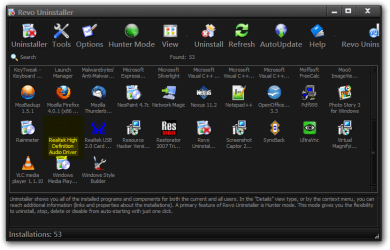
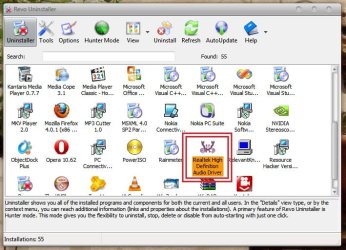
Realtek HD Audio Manager is not appearing in the Add or Remove Programs window so I can't do that.
 

My Computer My Computer

Computer Manufacturer/Model Number
Medion Akoya E4015
OS
Windows 7 Home Premium 64bit
CPU
Pentium(R) Dual-Core E5400 @ 2.70 GHz
Memory
4096MB
Graphics Card(s)
NVIDIA GeForce GT 220
Monitor(s) Displays
18.5"
Screen Resolution
1366 x 768

Attachments

  • Revo Uninstaller.png
    Revo Uninstaller.png
    34.7 KB · Views: 267

My Computer My Computer

Computer type
Laptop
Computer Manufacturer/Model Number
Sager NP9170
OS
Win 7 Pro x64 / Win 10 Pro
CPU
Intel(R) Core(TM) i7-3630QM CPU @ 2.40GHz
Motherboard
CLEVO P170EM
Memory
12 GB
Graphics Card(s)
(1) Intel(R) HD Graphics 4000 (2) NVIDIA GeForce GTX 675M
Sound Card
(1) Realtek High Definition Audio (2) Intel(R) Display Aud
Monitor(s) Displays
17.3
Screen Resolution
1920x1080
Hard Drives
(1) Samsung 860 EVO 500GB(OS) (1) Samsung 860 EVO 500GB(Data)
Keyboard
Backlite
Antivirus
MSE, Malwarebytes Pro
Browser
Firefox
Other Info
DESKTOP: Custom-built.
OS: Win 10 Pro x64.
CASE: Rosewill R5.
CPU: Intel I5 4670K CPU @ 3.40GHz.
CPU COOLER: Cool Master Hyper 212 EVO.
MOTHERBOARD: Asus Z87-A.
MEMORY: Kingston HyperX 2x4 GB.
GPU: Nvidia Geforce 650 TI.
PSU: Corsair TX750.
DRIVES: (1) Samsung 840 120 GB SSD (2) Western Digital blue 500 GB 7200 RPM.

My Computer My Computer

Computer Manufacturer/Model Number
Medion Akoya E4015
OS
Windows 7 Home Premium 64bit
CPU
Pentium(R) Dual-Core E5400 @ 2.70 GHz
Memory
4096MB
Graphics Card(s)
NVIDIA GeForce GT 220
Monitor(s) Displays
18.5"
Screen Resolution
1366 x 768

Attachments

  • Untitled.jpg
    Untitled.jpg
    67.9 KB · Views: 184

My Computer My Computer

Computer type
PC/Desktop
Computer Manufacturer/Model Number
Self Assembled
OS
Microsoft Windows 10 Pro Insider Preview 64-bit
CPU
Intel(R) Core(TM) i3-4130 CPU @ 3.40GHz
Motherboard
Gigabyte Technology Co., Ltd. B85M-D3H
Memory
Corsair Vengence 4GB x2 (8.00GB Dual-Channel DDR3 @ 798MHz)
Graphics Card(s)
2047MB GeForce GTS 450 (ZOTAC International)
Sound Card
Onboard (Realtek High Definition Audio)
Monitor(s) Displays
LG Flatron E2040T
Screen Resolution
1600x900
Hard Drives
Western Digital 1 TB
Seagate 500 GB
PSU
Corsair VS550
Case
Cooler Master K380
Cooling
Cooler Master Seidon 120V Plus
Keyboard
Logitech MK260r
Mouse
Logitech MK260r
Internet Speed
PMPL Broadband
Antivirus
Windows Defender + MBAM
Browser
Firefox
Other Info
Dell Studio 15" Laptop

My Computer My Computer

Computer Manufacturer/Model Number
Medion Akoya E4015
OS
Windows 7 Home Premium 64bit
CPU
Pentium(R) Dual-Core E5400 @ 2.70 GHz
Memory
4096MB
Graphics Card(s)
NVIDIA GeForce GT 220
Monitor(s) Displays
18.5"
Screen Resolution
1366 x 768
Now the Realtek HD Audio drivers are showing up in Add or Remove Programs and in Revo Uninstaller. Could this have something to do with my recent upgrade to 64bit?
 

My Computer My Computer

Computer Manufacturer/Model Number
Medion Akoya E4015
OS
Windows 7 Home Premium 64bit
CPU
Pentium(R) Dual-Core E5400 @ 2.70 GHz
Memory
4096MB
Graphics Card(s)
NVIDIA GeForce GT 220
Monitor(s) Displays
18.5"
Screen Resolution
1366 x 768
Now the Realtek HD Audio drivers are showing up in Add or Remove Programs and in Revo Uninstaller. Could this have something to do with my recent upgrade to 64bit?

Probably. Windows 7's driver base is huge now so in most cases Device Manager is fully populated without any action on the user's part.
 

My Computer My Computer

Computer Manufacturer/Model Number
HP Pavilion Elite 495UK
OS
Windows 7 Ultimate SP1 64-Bit
CPU
Intel Core i7 870 @ 2.93GHz
Motherboard
MSI 2A9C (CPU1)
Memory
8Gb Dual-Channel DDR3 @ 664MHz
Graphics Card(s)
nVidia GeForce GTX 460 1024MB dedicated RAM
Sound Card
Realtek HD Audio
Monitor(s) Displays
HP2310i
Screen Resolution
1920 x 1080
Hard Drives
1x1954GB Hitachi HDS22020ALA 330 (RAID), 1x1954GB Hitachi External for backup and storage
PSU
460W
Case
HP Elite
Cooling
Air cooled
Keyboard
Logitech K750 solar-powered keyboard
Mouse
Logitech Wireless M180 mouse
Internet Speed
2Mb
Other Info
Pure Avanti Flow Internet Radio with iPod Dock, 64Gb iPod, HP USB Speakers, Sony MDR-V500 Headphones, Sony Vaio F-Series Laptop
Now the Realtek HD Audio drivers are showing up in Add or Remove Programs and in Revo Uninstaller. Could this have something to do with my recent upgrade to 64bit?

Probably. Windows 7's driver base is huge now so in most cases Device Manager is fully populated without any action on the user's part.

But could that explain why I'm not able to access the HD Audio Manager?
 

My Computer My Computer

Computer Manufacturer/Model Number
Medion Akoya E4015
OS
Windows 7 Home Premium 64bit
CPU
Pentium(R) Dual-Core E5400 @ 2.70 GHz
Memory
4096MB
Graphics Card(s)
NVIDIA GeForce GT 220
Monitor(s) Displays
18.5"
Screen Resolution
1366 x 768
Now the Realtek HD Audio drivers are showing up in Add or Remove Programs and in Revo Uninstaller. Could this have something to do with my recent upgrade to 64bit?

Probably. Windows 7's driver base is huge now so in most cases Device Manager is fully populated without any action on the user's part.

But could that explain why I'm not able to access the HD Audio Manager?

I'm not sure, but it's quite possible.

You might want to uninstall your HD drivers using Revo and ask it to carry out a deep scan of your registry to remove any remnants and leftovers from previous installations, but do make sure you check carefully what you're deleting and backup the registry before you start.

Having done that you can then install Realtek's latest drivers to see whether you get your Audio Manager back.
 

My Computer My Computer

Computer Manufacturer/Model Number
HP Pavilion Elite 495UK
OS
Windows 7 Ultimate SP1 64-Bit
CPU
Intel Core i7 870 @ 2.93GHz
Motherboard
MSI 2A9C (CPU1)
Memory
8Gb Dual-Channel DDR3 @ 664MHz
Graphics Card(s)
nVidia GeForce GTX 460 1024MB dedicated RAM
Sound Card
Realtek HD Audio
Monitor(s) Displays
HP2310i
Screen Resolution
1920 x 1080
Hard Drives
1x1954GB Hitachi HDS22020ALA 330 (RAID), 1x1954GB Hitachi External for backup and storage
PSU
460W
Case
HP Elite
Cooling
Air cooled
Keyboard
Logitech K750 solar-powered keyboard
Mouse
Logitech Wireless M180 mouse
Internet Speed
2Mb
Other Info
Pure Avanti Flow Internet Radio with iPod Dock, 64Gb iPod, HP USB Speakers, Sony MDR-V500 Headphones, Sony Vaio F-Series Laptop
Probably. Windows 7's driver base is huge now so in most cases Device Manager is fully populated without any action on the user's part.

But could that explain why I'm not able to access the HD Audio Manager?

I'm not sure, but it's quite possible.

You might want to uninstall your HD drivers using Revo and ask it to carry out a deep scan of your registry to remove any remnants and leftovers from previous installations, but do make sure you check carefully what you're deleting and backup the registry before you start.

Having done that you can then install Realtek's latest drivers to see whether you get your Audio Manager back.

I've done that and there's still no Audio Manager in the System Tray or the Control Panel.
 

My Computer My Computer

Computer Manufacturer/Model Number
Medion Akoya E4015
OS
Windows 7 Home Premium 64bit
CPU
Pentium(R) Dual-Core E5400 @ 2.70 GHz
Memory
4096MB
Graphics Card(s)
NVIDIA GeForce GT 220
Monitor(s) Displays
18.5"
Screen Resolution
1366 x 768
Back
Top