
You are using an out of date browser. It may not display this or other websites correctly.
You should upgrade or use an alternative browser.
You should upgrade or use an alternative browser.
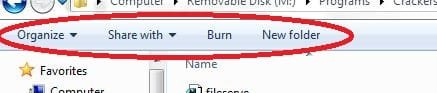
What we call this thing? Can we add our own shortcut?
- Thread starter Ninjaboyz
- Start date

Have a look at this http://www.sevenforums.com/tutorials/129401-windows-explorer-toolbar-buttons-customize.html
Jerry
Jerry
My Computer
At a glance
Win 7 Pro x64 / Win 10 ProIntel(R) Core(TM) i7-3630QM CPU @ 2.40GHz12 GB(1) Intel(R) HD Graphics 4000 (2) NVIDIA GeFo...
- Computer type
- Laptop
- Computer Manufacturer/Model Number
- Sager NP9170
- OS
- Win 7 Pro x64 / Win 10 Pro
- CPU
- Intel(R) Core(TM) i7-3630QM CPU @ 2.40GHz
- Motherboard
- CLEVO P170EM
- Memory
- 12 GB
- Graphics Card(s)
- (1) Intel(R) HD Graphics 4000 (2) NVIDIA GeForce GTX 675M
- Sound Card
- (1) Realtek High Definition Audio (2) Intel(R) Display Aud
- Monitor(s) Displays
- 17.3
- Screen Resolution
- 1920x1080
- Hard Drives
- (1) Samsung 860 EVO 500GB(OS) (1) Samsung 860 EVO 500GB(Data)
- Keyboard
- Backlite
- Antivirus
- MSE, Malwarebytes Pro
- Browser
- Firefox
- Other Info
- DESKTOP: Custom-built.
OS: Win 10 Pro x64.
CASE: Rosewill R5.
CPU: Intel I5 4670K CPU @ 3.40GHz.
CPU COOLER: Cool Master Hyper 212 EVO.
MOTHERBOARD: Asus Z87-A.
MEMORY: Kingston HyperX 2x4 GB.
GPU: Nvidia Geforce 650 TI.
PSU: Corsair TX750.
DRIVES: (1) Samsung 840 120 GB SSD (2) Western Digital blue 500 GB 7200 RPM.

Hello Ninjaboyz & Welcome to SevenForums!
This is the explore toolbar. The post above me has a link attached.
If you select a file or a folder, you'll get different possibilities.
Pressing Alt adds another bar for you.
Best Regards,
FredeGail
This is the explore toolbar. The post above me has a link attached.
If you select a file or a folder, you'll get different possibilities.
Pressing Alt adds another bar for you.
Best Regards,
FredeGail
My Computer
At a glance
Microsoft Windows 7 Ultimate: x64 (SP1)Intel® Core™ i5-2500K ProcessorKingston DDR3 HyperX 1600MHz 8GBASUS GTX 560 TI DirectCU II 900MHz
- Computer Manufacturer/Model Number
- Brewed
- OS
- Microsoft Windows 7 Ultimate: x64 (SP1)
- CPU
- Intel® Core™ i5-2500K Processor
- Motherboard
- ASUS P8Z68-V PRO
- Memory
- Kingston DDR3 HyperX 1600MHz 8GB
- Graphics Card(s)
- ASUS GTX 560 TI DirectCU II 900MHz
- Sound Card
- Realtek® ALC892 8-Channel High Definition Audio CODEC
- Monitor(s) Displays
- ACER LCD P246HBD 1920x1080 (24") - Dell 1280x800
- Screen Resolution
- ACER LCD P246HBD ~ [1920X1080] - DELL ~ [1280x800]
- Hard Drives
- 500 GB WD Caviar SE116 7200rpm SATA2
- PSU
- Corsair 750W Power Supply
- Case
- Coolermaster CM Scout
- Cooling
- Zalman FS-C77 Fatal1ty CPU Cooler
- Keyboard
- Logitech G15
- Mouse
- Coolermaster Sentinel Advanced
- Internet Speed
- [↓ 10 MB/s DL] [↑ 1 MB/s UL]
- Other Info
- - ROCCAT™ Kave – Solid 5.1 Surround Sound Gaming Headset
- Not overclocking

t-4-2
Banned
- Local time
- 7:11 PM
- Messages
- 997
View attachment 160956
Can we add additional shortcut to this bar like creating 'new text document'?
1.That one is called ...... toolbar.
2. Your screenshot shows that your Menu Bar is not present ( hidden ).
Here is how to keep menu bar on all the time...
on your toolbar, click Organize > click Layout > put a checkmark at Menu Bar.
That's it. You have now a Menu Bar on top and Toolbar underneath.
My Computer
At a glance
Windows 7 Home Premium 64-bit, SP1Intel Pentium P6200, Cores 2, 2.13 GHz4 GBIntel HD
- Computer Manufacturer/Model Number
- Acer Aspire 7741Z
- OS
- Windows 7 Home Premium 64-bit, SP1
- CPU
- Intel Pentium P6200, Cores 2, 2.13 GHz
- Memory
- 4 GB
- Graphics Card(s)
- Intel HD
- Sound Card
- unknown
- Monitor(s) Displays
- 17.3 inches
- Screen Resolution
- 1600 x 900
- Hard Drives
- 640 GB, 5400 PRM

This Windows Explorer toolbar is also called the Command Bar or Folder Band. Here's some help to customize it: Windows Explorer Toolbar Buttons - Customize
My Computer
At a glance
Vista 64 bit and 32 bit (SP2)Intel(R) Core(TM)2 Duo Processor T9400 (2.53 GHz4GB DDR2 System Memory (2 Dimm)512 MB NVIDIA GeForce 9600M GT
- Computer Manufacturer/Model Number
- HP Pavillion dv5t (generation 1)
- OS
- Vista 64 bit and 32 bit (SP2)
- CPU
- Intel(R) Core(TM)2 Duo Processor T9400 (2.53 GHz
- Memory
- 4GB DDR2 System Memory (2 Dimm)
- Graphics Card(s)
- 512 MB NVIDIA GeForce 9600M GT
- Monitor(s) Displays
- 15.4" diagonal WSXGA+ High-Definition HP BrightView Widescre
- Screen Resolution
- 1680 x 1050
- Hard Drives
- 320GB 5400RPM SATA Hard Drive with HP ProtectSmart Hard Drive Protection
- Keyboard
- Built-in HP
- Mouse
- Built in - Synaptics TouchPad V6.5 on PS/2 Port
- Internet Speed
- Max
- Other Info
- ~ Intel Next-Gen Wireless-N Mini-card w/Bluetooth ~ Blu-Ray ROM DVD+/-R/RW ~ Integ. HDTV Hybrid Tuner ~ 12 Cell Battery ~ MS Office (Home Premium) 2007 ~
My Computer
At a glance
Windows 7 Ultimate x32
- OS
- Windows 7 Ultimate x32


