Can view other PC's files in Homegroup, but no printer

02befree

New member
Local time
9:30 AM
Messages
11
Set up a Homegroup - simple except that the time on the two PC's was different which will prevent connection to a homegroup (Thank heavens for the tip on this forum). I checked the boxes to share Printers and Pictures on PC A, as it has an HP LaserJet 3030 that PC B needs access to. PC B can view the pictures on PC A, but no sign of a printer -- is there some way to add it or find it? In PC A I shared the printer. I've restarted, etc. and the Homegroup is working fine except for the printer.
 

My Computer My Computer

At a glance

Windows 7 Home Premium 32bit
OS
Windows 7 Home Premium 32bit
Set up a Homegroup - simple except that the time on the two PC's was different which will prevent connection to a homegroup (Thank heavens for the tip on this forum). I checked the boxes to share Printers and Pictures on PC A, as it has an HP LaserJet 3030 that PC B needs access to. PC B can view the pictures on PC A, but no sign of a printer -- is there some way to add it or find it? In PC A I shared the printer. I've restarted, etc. and the Homegroup is working fine except for the printer.

One of the first things I did when I installed windows 7 is turn off Homegroups. But I have had to share many printers in my time, so take this as purely speculative..

Have you gone into Devices and printers and actually installed the printer on PC B? This will copy over the drivers from PC A to PC B...

Forgive me if you have already done this.

hth
Tanya
 

My Computer My Computer

At a glance

Linux Mint 17 Cinnamon | Win 7 Ult x64Intel I7-3770K @ 4.2ghz32GB G-Skill C10QEVGA GTX 670 2GB SC
Computer type
PC/Desktop
Computer Manufacturer/Model Number
Home Made
OS
Linux Mint 17 Cinnamon | Win 7 Ult x64
CPU
Intel I7-3770K @ 4.2ghz
Motherboard
ASRock Extreme 4
Memory
32GB G-Skill C10Q
Graphics Card(s)
EVGA GTX 670 2GB SC
Sound Card
Creative Fatality ExtremeGamer
Monitor(s) Displays
LG E2742V x 2
Screen Resolution
1920x1080
Hard Drives
256GB Vertex 4 SSD
2TB Seagate ST2000DM001
1TB Seagate ST1000DM003
PSU
Corsair HX 650
Case
HAF 932 advanced
Cooling
Corsair H100i liquid cooler
Keyboard
Logitech Wireless
Mouse
Logitech Wireless
Internet Speed
OptusNet NBN 100/40
Antivirus
Malwarebytes
Browser
Firefox 30
Other Info
Router: Sagemcom F@st 3846 Crippled by Optus.
I tried to Add a Printer before I set up the Homegroup (never used it before - fairly new to Win 7), and other printers on our small business network would show up, but not the one USB connected and shared on PC A. So I went the Homegroup route thinking it would clear the runway. I must have gone brain dead, because I thought it would just show up in the Homegroup window. It makes sense (if this is what you're saying) to try to go back and try the Add a Printer route again and see if it is visible now. Correct?
 

My Computer My Computer

At a glance

Windows 7 Home Premium 32bit
OS
Windows 7 Home Premium 32bit
I tried to Add a Printer before I set up the Homegroup (never used it before - fairly new to Win 7), and other printers on our small business network would show up, but not the one USB connected and shared on PC A. So I went the Homegroup route thinking it would clear the runway. I must have gone brain dead, because I thought it would just show up in the Homegroup window. It makes sense (if this is what you're saying) to try to go back and try the Add a Printer route again and see if it is visible now. Correct?

Since the printer is not connected to PC-B it is a network printer.

Sharing printers doesn't require homegroups enabled per se. As long as the printer is shared on PC-A you should be able to install it on PC-B.

The add printer route I speak of is (Forgive me if you have already done this),

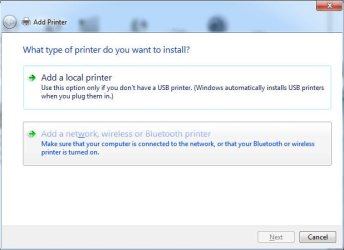
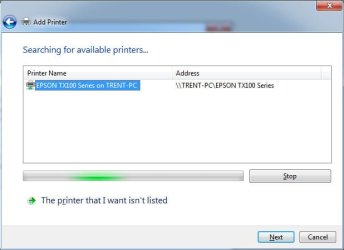
Start, Devices and Printers, Click Add printer. Then you should see the pciture as shown below. Click on network printer and it should find the shared printer in the list of printers (Make sure PC-A is booted up). See image #2. Select the printer and click next.

Windows will try to copy the drivers from PC-A to PC-B. Then you should see the third image. It is possible that you may get a security dialogue if you have UAC enabled.

theog also created an excellent turorial on setting up printers here...
http://www.sevenforums.com/tutorials/99983-driver-install-add-printer-wizard.html

Let me know how you go...
 

Attachments

  • wsf1.jpg
    wsf1.jpg
    45.2 KB · Views: 5
  • wsf2.jpg
    wsf2.jpg
    39.3 KB · Views: 5
  • wsf3.jpg
    wsf3.jpg
    39.3 KB · Views: 5

My Computer My Computer

At a glance

Linux Mint 17 Cinnamon | Win 7 Ult x64Intel I7-3770K @ 4.2ghz32GB G-Skill C10QEVGA GTX 670 2GB SC
Computer type
PC/Desktop
Computer Manufacturer/Model Number
Home Made
OS
Linux Mint 17 Cinnamon | Win 7 Ult x64
CPU
Intel I7-3770K @ 4.2ghz
Motherboard
ASRock Extreme 4
Memory
32GB G-Skill C10Q
Graphics Card(s)
EVGA GTX 670 2GB SC
Sound Card
Creative Fatality ExtremeGamer
Monitor(s) Displays
LG E2742V x 2
Screen Resolution
1920x1080
Hard Drives
256GB Vertex 4 SSD
2TB Seagate ST2000DM001
1TB Seagate ST1000DM003
PSU
Corsair HX 650
Case
HAF 932 advanced
Cooling
Corsair H100i liquid cooler
Keyboard
Logitech Wireless
Mouse
Logitech Wireless
Internet Speed
OptusNet NBN 100/40
Antivirus
Malwarebytes
Browser
Firefox 30
Other Info
Router: Sagemcom F@st 3846 Crippled by Optus.
No apologies needed - the more detail the better:) I went the Homegroup route because the method you mentioned wasn't working. I remember now that Norton Internet Security is on PC A, and the firewall on that beast has kept many things from not being shared, etc. Will play with it a bit - maybe I'll disable the firewall and see if that opens things up. Thanks.
 

My Computer My Computer

At a glance

Windows 7 Home Premium 32bit
OS
Windows 7 Home Premium 32bit
No apologies needed - the more detail the better:) I went the Homegroup route because the method you mentioned wasn't working. I remember now that Norton Internet Security is on PC A, and the firewall on that beast has kept many things from not being shared, etc. Will play with it a bit - maybe I'll disable the firewall and see if that opens things up. Thanks.

I've been working with PCs since the mid 80's. From my perspective Norton = Virus. It's one of the first things I reccomend people get rid of.

If you have to go this far - to uninstall Nortons you will also need to run the Norton removal tool, otherwise it still infects your system in various ways.
 

My Computer My Computer

At a glance

Linux Mint 17 Cinnamon | Win 7 Ult x64Intel I7-3770K @ 4.2ghz32GB G-Skill C10QEVGA GTX 670 2GB SC
Computer type
PC/Desktop
Computer Manufacturer/Model Number
Home Made
OS
Linux Mint 17 Cinnamon | Win 7 Ult x64
CPU
Intel I7-3770K @ 4.2ghz
Motherboard
ASRock Extreme 4
Memory
32GB G-Skill C10Q
Graphics Card(s)
EVGA GTX 670 2GB SC
Sound Card
Creative Fatality ExtremeGamer
Monitor(s) Displays
LG E2742V x 2
Screen Resolution
1920x1080
Hard Drives
256GB Vertex 4 SSD
2TB Seagate ST2000DM001
1TB Seagate ST1000DM003
PSU
Corsair HX 650
Case
HAF 932 advanced
Cooling
Corsair H100i liquid cooler
Keyboard
Logitech Wireless
Mouse
Logitech Wireless
Internet Speed
OptusNet NBN 100/40
Antivirus
Malwarebytes
Browser
Firefox 30
Other Info
Router: Sagemcom F@st 3846 Crippled by Optus.
I am with you on that, and I have the Norton and McAfee Removal tool on my Tech USB drive :)
 

My Computer My Computer

At a glance

Windows 7 Home Premium 32bit
OS
Windows 7 Home Premium 32bit
Back
Top