Windows Live Mail - Can Sent To Be Shown?

carwiz

New member
Guru
Gold Member
VIP
Local time
8:07 AM
Messages
4,148
Location
South Texas
I keep most of my Sent messages and the list is starting to get unmanageable in that it doesn't show who it was sent to in the index. Sure, I can click on one in the index and see but that takes forever to find the one I want.

Is there a way to show the recipient in the index other than changing it to one line. After all, the Inbox shows the subject and sender in the two-line mode. Why can't the Sent folder show the subject and recipient in two-line mode?

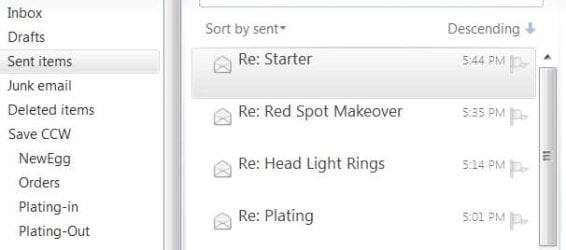
I've included a shot of the index area in two-line mode. Ya can't tell who it went to. :confused:


I
 

Attachments

  • LiveMail-WhoTo.JPG
    LiveMail-WhoTo.JPG
    23.2 KB · Views: 13

My Computer My Computer

At a glance

Windows 7 Pro-x64i7-2600 3.4GHz - 3.8GHz Turbo8Gb - 2x4GB, Muskin 991770 PC3-1333Integrated Intel HD 2000
Computer type
PC/Desktop
Computer Manufacturer/Model Number
Built 2/11/2011
OS
Windows 7 Pro-x64
CPU
i7-2600 3.4GHz - 3.8GHz Turbo
Motherboard
Intel DH67BL-B3
Memory
8Gb - 2x4GB, Muskin 991770 PC3-1333
Graphics Card(s)
Integrated Intel HD 2000
Sound Card
Integrated Intel 10.1 HD, RealTek ALC892
Monitor(s) Displays
Asus LCD VH222H, Haier HL24XSL2a
Screen Resolution
1920x1080, 1920x1080
Hard Drives
Crucial SSD C300-128Gb,
Western Digital WD5002AALX - 500Gb,
Western Digital WD7501AALS - 750Gb
PSU
Seasonic 650W 80+ Gold Modular
Case
Rosewill Defender
Cooling
Stock CPU, Four 120mm case fans, PCH fan added
Keyboard
Logitech EX100 Y-RBH94 Wireless
Mouse
Logitech EX100 M-RCE95 Wireless
Internet Speed
3.0/1.5 Mbs
Antivirus
Microsoft Security Essentials
Browser
Microsoft Internet Explorer 11
Other Info
Antec Veris Premier-Multimedia IR Station,
Cyber Accoustics-3602 Speakers,
AFT XM-5U Card Reader,
Hauppauge TV-HVR-2250,
Sony LX300 USB Turntable
I keep most of my Sent messages and the list is starting to get unmanageable in that it doesn't show who it was sent to in the index. Sure, I can click on one in the index and see but that takes forever to find the one I want.

Is there a way to show the recipient in the index other than changing it to one line. After all, the Inbox shows the subject and sender in the two-line mode. Why can't the Sent folder show the subject and recipient in two-line mode?

I've included a shot of the index area in two-line mode. Ya can't tell who it went to. :confused:


I

Your screenshot suggests Windows Live Mail.Yes ?

If so, what if you change your Layout ?

Highlight Sent Items folder > View > Layout > under Reading Pane (Mail) heading, select At the bottom of the message list > OK

Does that show who the messages were sent to ?

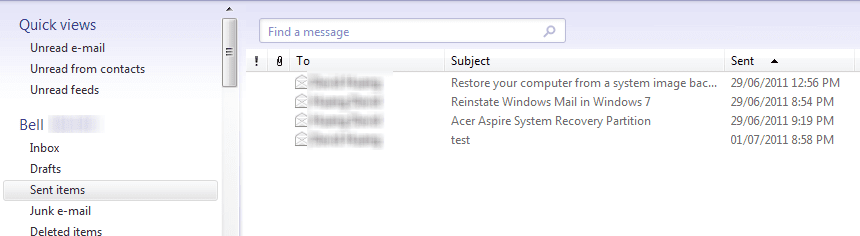
screen shot of my Sent Items :
01-07-2011 9-22-16 PM.png
 

My Computer My Computer

At a glance

Windows 7 Home Premium 64-bit, SP1Intel Pentium P6200, Cores 2, 2.13 GHz4 GBIntel HD
Computer Manufacturer/Model Number
Acer Aspire 7741Z
OS
Windows 7 Home Premium 64-bit, SP1
CPU
Intel Pentium P6200, Cores 2, 2.13 GHz
Memory
4 GB
Graphics Card(s)
Intel HD
Sound Card
unknown
Monitor(s) Displays
17.3 inches
Screen Resolution
1600 x 900
Hard Drives
640 GB, 5400 PRM
That just changes the reading panel. The index or Message Panel stays as one line or two line. When in two line mode, the To or recipient is not shown. I guess I can live with the one-line mode. It just makes the screen look busy and I have to increase the size of the window to make room for the one-line.
 

My Computer My Computer

At a glance

Windows 7 Pro-x64i7-2600 3.4GHz - 3.8GHz Turbo8Gb - 2x4GB, Muskin 991770 PC3-1333Integrated Intel HD 2000
Computer type
PC/Desktop
Computer Manufacturer/Model Number
Built 2/11/2011
OS
Windows 7 Pro-x64
CPU
i7-2600 3.4GHz - 3.8GHz Turbo
Motherboard
Intel DH67BL-B3
Memory
8Gb - 2x4GB, Muskin 991770 PC3-1333
Graphics Card(s)
Integrated Intel HD 2000
Sound Card
Integrated Intel 10.1 HD, RealTek ALC892
Monitor(s) Displays
Asus LCD VH222H, Haier HL24XSL2a
Screen Resolution
1920x1080, 1920x1080
Hard Drives
Crucial SSD C300-128Gb,
Western Digital WD5002AALX - 500Gb,
Western Digital WD7501AALS - 750Gb
PSU
Seasonic 650W 80+ Gold Modular
Case
Rosewill Defender
Cooling
Stock CPU, Four 120mm case fans, PCH fan added
Keyboard
Logitech EX100 Y-RBH94 Wireless
Mouse
Logitech EX100 M-RCE95 Wireless
Internet Speed
3.0/1.5 Mbs
Antivirus
Microsoft Security Essentials
Browser
Microsoft Internet Explorer 11
Other Info
Antec Veris Premier-Multimedia IR Station,
Cyber Accoustics-3602 Speakers,
AFT XM-5U Card Reader,
Hauppauge TV-HVR-2250,
Sony LX300 USB Turntable
That just changes the reading panel. The index or Message Panel stays as one line or two line. When in two line mode, the To or recipient is not shown. I guess I can live with the one-line mode. It just makes the screen look busy and I have to increase the size of the window to make room for the one-line.


Mine shows Recipients in both one line or two line mode.

Perhpas you should have a look at your Column options ...

First, change the Layout .....
Sent Items > View > Layout > Message list > check " choose view automatically ">OK

Then add the TO to the column.....
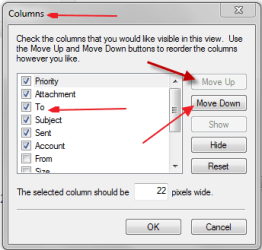
Sent Items > View > Column > find the To box, if it is not checked, check it > higlight To > click Move Up button and place it to the position you want > OK
 

My Computer My Computer

At a glance

Windows 7 Home Premium 64-bit, SP1Intel Pentium P6200, Cores 2, 2.13 GHz4 GBIntel HD
Computer Manufacturer/Model Number
Acer Aspire 7741Z
OS
Windows 7 Home Premium 64-bit, SP1
CPU
Intel Pentium P6200, Cores 2, 2.13 GHz
Memory
4 GB
Graphics Card(s)
Intel HD
Sound Card
unknown
Monitor(s) Displays
17.3 inches
Screen Resolution
1600 x 900
Hard Drives
640 GB, 5400 PRM
That just changes the reading panel. The index or Message Panel stays as one line or two line. When in two line mode, the To or recipient is not shown. I guess I can live with the one-line mode. It just makes the screen look busy and I have to increase the size of the window to make room for the one-line.

This is purely suggestion as it is none of my business.

Wouldn't it be better if you created sub-folders with Names, so that you could drag/drop the e-mails from Sent Items to their appropriate sub-folders ?
 

My Computer My Computer

At a glance

Windows 7 Home Premium 64-bit, SP1Intel Pentium P6200, Cores 2, 2.13 GHz4 GBIntel HD
Computer Manufacturer/Model Number
Acer Aspire 7741Z
OS
Windows 7 Home Premium 64-bit, SP1
CPU
Intel Pentium P6200, Cores 2, 2.13 GHz
Memory
4 GB
Graphics Card(s)
Intel HD
Sound Card
unknown
Monitor(s) Displays
17.3 inches
Screen Resolution
1600 x 900
Hard Drives
640 GB, 5400 PRM
Hmmmmmm. Columns can't be selected. Only "Customize View" which is nothing more than message rules.

Too many to assign a folder for every name. I also have three accounts but this is the most active.
 

My Computer My Computer

At a glance

Windows 7 Pro-x64i7-2600 3.4GHz - 3.8GHz Turbo8Gb - 2x4GB, Muskin 991770 PC3-1333Integrated Intel HD 2000
Computer type
PC/Desktop
Computer Manufacturer/Model Number
Built 2/11/2011
OS
Windows 7 Pro-x64
CPU
i7-2600 3.4GHz - 3.8GHz Turbo
Motherboard
Intel DH67BL-B3
Memory
8Gb - 2x4GB, Muskin 991770 PC3-1333
Graphics Card(s)
Integrated Intel HD 2000
Sound Card
Integrated Intel 10.1 HD, RealTek ALC892
Monitor(s) Displays
Asus LCD VH222H, Haier HL24XSL2a
Screen Resolution
1920x1080, 1920x1080
Hard Drives
Crucial SSD C300-128Gb,
Western Digital WD5002AALX - 500Gb,
Western Digital WD7501AALS - 750Gb
PSU
Seasonic 650W 80+ Gold Modular
Case
Rosewill Defender
Cooling
Stock CPU, Four 120mm case fans, PCH fan added
Keyboard
Logitech EX100 Y-RBH94 Wireless
Mouse
Logitech EX100 M-RCE95 Wireless
Internet Speed
3.0/1.5 Mbs
Antivirus
Microsoft Security Essentials
Browser
Microsoft Internet Explorer 11
Other Info
Antec Veris Premier-Multimedia IR Station,
Cyber Accoustics-3602 Speakers,
AFT XM-5U Card Reader,
Hauppauge TV-HVR-2250,
Sony LX300 USB Turntable
Hmmmmmm. Columns can't be selected. Only "Customize View" which is nothing more than message rules.

Too many to assign a folder for every name. I also have three accounts but this is the most active.

No, that is not the one I meant.

You must be using WLM 2011 version.
Mine is WLM 2009 version. My " buttons " for various options are not arranged the same way as your version.

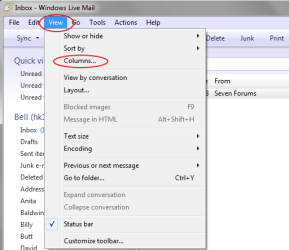
You'll have to find Column under View.
See screenshots......

View > Columns......
view - column.png

Columns window.....
Columns.png
 

My Computer My Computer

At a glance

Windows 7 Home Premium 64-bit, SP1Intel Pentium P6200, Cores 2, 2.13 GHz4 GBIntel HD
Computer Manufacturer/Model Number
Acer Aspire 7741Z
OS
Windows 7 Home Premium 64-bit, SP1
CPU
Intel Pentium P6200, Cores 2, 2.13 GHz
Memory
4 GB
Graphics Card(s)
Intel HD
Sound Card
unknown
Monitor(s) Displays
17.3 inches
Screen Resolution
1600 x 900
Hard Drives
640 GB, 5400 PRM
Yeah, I've got the "ribbon". :( - Version 2011 (Build 15.4.3508.1109) The column selection window looks about the same. But... I can only select the columns when the Message List is in single-line mode. I just found that out messing with it. When in two-line mode, the column button is disabled. Bummer!

Well, I put it in single-line mode. I can cope with that. I really appreciate the help.
 

My Computer My Computer

At a glance

Windows 7 Pro-x64i7-2600 3.4GHz - 3.8GHz Turbo8Gb - 2x4GB, Muskin 991770 PC3-1333Integrated Intel HD 2000
Computer type
PC/Desktop
Computer Manufacturer/Model Number
Built 2/11/2011
OS
Windows 7 Pro-x64
CPU
i7-2600 3.4GHz - 3.8GHz Turbo
Motherboard
Intel DH67BL-B3
Memory
8Gb - 2x4GB, Muskin 991770 PC3-1333
Graphics Card(s)
Integrated Intel HD 2000
Sound Card
Integrated Intel 10.1 HD, RealTek ALC892
Monitor(s) Displays
Asus LCD VH222H, Haier HL24XSL2a
Screen Resolution
1920x1080, 1920x1080
Hard Drives
Crucial SSD C300-128Gb,
Western Digital WD5002AALX - 500Gb,
Western Digital WD7501AALS - 750Gb
PSU
Seasonic 650W 80+ Gold Modular
Case
Rosewill Defender
Cooling
Stock CPU, Four 120mm case fans, PCH fan added
Keyboard
Logitech EX100 Y-RBH94 Wireless
Mouse
Logitech EX100 M-RCE95 Wireless
Internet Speed
3.0/1.5 Mbs
Antivirus
Microsoft Security Essentials
Browser
Microsoft Internet Explorer 11
Other Info
Antec Veris Premier-Multimedia IR Station,
Cyber Accoustics-3602 Speakers,
AFT XM-5U Card Reader,
Hauppauge TV-HVR-2250,
Sony LX300 USB Turntable
See whatchure missin'! :D
 

Attachments

  • LiveMail-View.JPG
    LiveMail-View.JPG
    39.2 KB · Views: 23

My Computer My Computer

At a glance

Windows 7 Pro-x64i7-2600 3.4GHz - 3.8GHz Turbo8Gb - 2x4GB, Muskin 991770 PC3-1333Integrated Intel HD 2000
Computer type
PC/Desktop
Computer Manufacturer/Model Number
Built 2/11/2011
OS
Windows 7 Pro-x64
CPU
i7-2600 3.4GHz - 3.8GHz Turbo
Motherboard
Intel DH67BL-B3
Memory
8Gb - 2x4GB, Muskin 991770 PC3-1333
Graphics Card(s)
Integrated Intel HD 2000
Sound Card
Integrated Intel 10.1 HD, RealTek ALC892
Monitor(s) Displays
Asus LCD VH222H, Haier HL24XSL2a
Screen Resolution
1920x1080, 1920x1080
Hard Drives
Crucial SSD C300-128Gb,
Western Digital WD5002AALX - 500Gb,
Western Digital WD7501AALS - 750Gb
PSU
Seasonic 650W 80+ Gold Modular
Case
Rosewill Defender
Cooling
Stock CPU, Four 120mm case fans, PCH fan added
Keyboard
Logitech EX100 Y-RBH94 Wireless
Mouse
Logitech EX100 M-RCE95 Wireless
Internet Speed
3.0/1.5 Mbs
Antivirus
Microsoft Security Essentials
Browser
Microsoft Internet Explorer 11
Other Info
Antec Veris Premier-Multimedia IR Station,
Cyber Accoustics-3602 Speakers,
AFT XM-5U Card Reader,
Hauppauge TV-HVR-2250,
Sony LX300 USB Turntable
See whatchure missin'! :D

Yours is WLM 2011.

I'd assume that you had to select New View ?

Anyway, going back to One Line and Two Line issue.

Why don't you go to One Line View > then Columns > then select To option > use Move Up button and move it up to where you want it > OK when done > Now, you can set it back to Two Line View and see if the To column is still there.
 

My Computer My Computer

At a glance

Windows 7 Home Premium 64-bit, SP1Intel Pentium P6200, Cores 2, 2.13 GHz4 GBIntel HD
Computer Manufacturer/Model Number
Acer Aspire 7741Z
OS
Windows 7 Home Premium 64-bit, SP1
CPU
Intel Pentium P6200, Cores 2, 2.13 GHz
Memory
4 GB
Graphics Card(s)
Intel HD
Sound Card
unknown
Monitor(s) Displays
17.3 inches
Screen Resolution
1600 x 900
Hard Drives
640 GB, 5400 PRM
Well, I just gave that a shot but it didn't work. When I put it back in two-line mode, everything goes away but Subject and Date. This must be a bug in the Sent Folder. It looks like two-line mode can't be changed. I tried it with the Inbox too. At least that shows the sender.
 

My Computer My Computer

At a glance

Windows 7 Pro-x64i7-2600 3.4GHz - 3.8GHz Turbo8Gb - 2x4GB, Muskin 991770 PC3-1333Integrated Intel HD 2000
Computer type
PC/Desktop
Computer Manufacturer/Model Number
Built 2/11/2011
OS
Windows 7 Pro-x64
CPU
i7-2600 3.4GHz - 3.8GHz Turbo
Motherboard
Intel DH67BL-B3
Memory
8Gb - 2x4GB, Muskin 991770 PC3-1333
Graphics Card(s)
Integrated Intel HD 2000
Sound Card
Integrated Intel 10.1 HD, RealTek ALC892
Monitor(s) Displays
Asus LCD VH222H, Haier HL24XSL2a
Screen Resolution
1920x1080, 1920x1080
Hard Drives
Crucial SSD C300-128Gb,
Western Digital WD5002AALX - 500Gb,
Western Digital WD7501AALS - 750Gb
PSU
Seasonic 650W 80+ Gold Modular
Case
Rosewill Defender
Cooling
Stock CPU, Four 120mm case fans, PCH fan added
Keyboard
Logitech EX100 Y-RBH94 Wireless
Mouse
Logitech EX100 M-RCE95 Wireless
Internet Speed
3.0/1.5 Mbs
Antivirus
Microsoft Security Essentials
Browser
Microsoft Internet Explorer 11
Other Info
Antec Veris Premier-Multimedia IR Station,
Cyber Accoustics-3602 Speakers,
AFT XM-5U Card Reader,
Hauppauge TV-HVR-2250,
Sony LX300 USB Turntable
Well, I just gave that a shot but it didn't work. When I put it back in two-line mode, everything goes away but Subject and Date. This must be a bug in the Sent Folder. It looks like two-line mode can't be changed. I tried it with the Inbox too. At least that shows the sender.


Weird.
Sorry I can't help.
I wonder if other WLM 2011 users have the same issue as yours.

I have a feeling yours is an isolated case.

Suggest that you run a system file check which is to look for corrupt files. It will try to repair if any found.
http://www.sevenforums.com/tutorials/1538-sfc-scannow-command-system-file-checker.html

When file checking is done, it will tell you either....
No intergrety violation is found, or
Found corrupt files but unable to repair.

If result is the latter .......
go to Option Three which shows you how to put a sfcdetails.txt on the desktop.
You can then open it from the desktop > copy/paste it back here > ask the experts in cbs log to analyse and recommend solutions.
 

My Computer My Computer

At a glance

Windows 7 Home Premium 64-bit, SP1Intel Pentium P6200, Cores 2, 2.13 GHz4 GBIntel HD
Computer Manufacturer/Model Number
Acer Aspire 7741Z
OS
Windows 7 Home Premium 64-bit, SP1
CPU
Intel Pentium P6200, Cores 2, 2.13 GHz
Memory
4 GB
Graphics Card(s)
Intel HD
Sound Card
unknown
Monitor(s) Displays
17.3 inches
Screen Resolution
1600 x 900
Hard Drives
640 GB, 5400 PRM
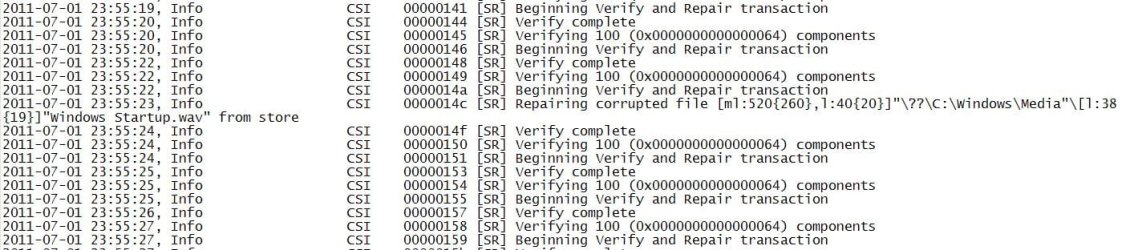
Well, nothing there either. One item did show up but I remember trying to change the startup sound back when I first installed Win7.
 

Attachments

  • SFCdetails.JPG
    SFCdetails.JPG
    104.9 KB · Views: 6

My Computer My Computer

At a glance

Windows 7 Pro-x64i7-2600 3.4GHz - 3.8GHz Turbo8Gb - 2x4GB, Muskin 991770 PC3-1333Integrated Intel HD 2000
Computer type
PC/Desktop
Computer Manufacturer/Model Number
Built 2/11/2011
OS
Windows 7 Pro-x64
CPU
i7-2600 3.4GHz - 3.8GHz Turbo
Motherboard
Intel DH67BL-B3
Memory
8Gb - 2x4GB, Muskin 991770 PC3-1333
Graphics Card(s)
Integrated Intel HD 2000
Sound Card
Integrated Intel 10.1 HD, RealTek ALC892
Monitor(s) Displays
Asus LCD VH222H, Haier HL24XSL2a
Screen Resolution
1920x1080, 1920x1080
Hard Drives
Crucial SSD C300-128Gb,
Western Digital WD5002AALX - 500Gb,
Western Digital WD7501AALS - 750Gb
PSU
Seasonic 650W 80+ Gold Modular
Case
Rosewill Defender
Cooling
Stock CPU, Four 120mm case fans, PCH fan added
Keyboard
Logitech EX100 Y-RBH94 Wireless
Mouse
Logitech EX100 M-RCE95 Wireless
Internet Speed
3.0/1.5 Mbs
Antivirus
Microsoft Security Essentials
Browser
Microsoft Internet Explorer 11
Other Info
Antec Veris Premier-Multimedia IR Station,
Cyber Accoustics-3602 Speakers,
AFT XM-5U Card Reader,
Hauppauge TV-HVR-2250,
Sony LX300 USB Turntable
Well, nothing there either. One item did show up but I remember trying to change the startup sound back when I first installed Win7.

I am out of ideas.
Too bad I don't have WLM 2011 to duplicate your scenario.
 

My Computer My Computer

At a glance

Windows 7 Home Premium 64-bit, SP1Intel Pentium P6200, Cores 2, 2.13 GHz4 GBIntel HD
Computer Manufacturer/Model Number
Acer Aspire 7741Z
OS
Windows 7 Home Premium 64-bit, SP1
CPU
Intel Pentium P6200, Cores 2, 2.13 GHz
Memory
4 GB
Graphics Card(s)
Intel HD
Sound Card
unknown
Monitor(s) Displays
17.3 inches
Screen Resolution
1600 x 900
Hard Drives
640 GB, 5400 PRM
Well, nothing there either. One item did show up but I remember trying to change the startup sound back when I first installed Win7.

Your Windows Live Mail issue has been bugging me.
So, I decided to switch from 2009 version to 2011 and see for myself.

Yes, once you switch to 2-line layout in Sent Items folder, you don't see the TO field anymore.
That is exactly what happend to my 2011 version as well.
 

My Computer My Computer

At a glance

Windows 7 Home Premium 64-bit, SP1Intel Pentium P6200, Cores 2, 2.13 GHz4 GBIntel HD
Computer Manufacturer/Model Number
Acer Aspire 7741Z
OS
Windows 7 Home Premium 64-bit, SP1
CPU
Intel Pentium P6200, Cores 2, 2.13 GHz
Memory
4 GB
Graphics Card(s)
Intel HD
Sound Card
unknown
Monitor(s) Displays
17.3 inches
Screen Resolution
1600 x 900
Hard Drives
640 GB, 5400 PRM
Did you also notice that when in two-line mode, you can't use the "column" button? I can sort of see the logic there but it seems you should be able to see the recipient of a Sent email. I still think it's a bug. I did some searches through the Registry for some keys but didn't find anything.
 

My Computer My Computer

At a glance

Windows 7 Pro-x64i7-2600 3.4GHz - 3.8GHz Turbo8Gb - 2x4GB, Muskin 991770 PC3-1333Integrated Intel HD 2000
Computer type
PC/Desktop
Computer Manufacturer/Model Number
Built 2/11/2011
OS
Windows 7 Pro-x64
CPU
i7-2600 3.4GHz - 3.8GHz Turbo
Motherboard
Intel DH67BL-B3
Memory
8Gb - 2x4GB, Muskin 991770 PC3-1333
Graphics Card(s)
Integrated Intel HD 2000
Sound Card
Integrated Intel 10.1 HD, RealTek ALC892
Monitor(s) Displays
Asus LCD VH222H, Haier HL24XSL2a
Screen Resolution
1920x1080, 1920x1080
Hard Drives
Crucial SSD C300-128Gb,
Western Digital WD5002AALX - 500Gb,
Western Digital WD7501AALS - 750Gb
PSU
Seasonic 650W 80+ Gold Modular
Case
Rosewill Defender
Cooling
Stock CPU, Four 120mm case fans, PCH fan added
Keyboard
Logitech EX100 Y-RBH94 Wireless
Mouse
Logitech EX100 M-RCE95 Wireless
Internet Speed
3.0/1.5 Mbs
Antivirus
Microsoft Security Essentials
Browser
Microsoft Internet Explorer 11
Other Info
Antec Veris Premier-Multimedia IR Station,
Cyber Accoustics-3602 Speakers,
AFT XM-5U Card Reader,
Hauppauge TV-HVR-2250,
Sony LX300 USB Turntable
Did you also notice that when in two-line mode, you can't use the "column" button? I can sort of see the logic there but it seems you should be able to see the recipient of a Sent email. I still think it's a bug. I did some searches through the Registry for some keys but didn't find anything.

Yes, just like you said before.
Damn if I know why !
 

My Computer My Computer

At a glance

Windows 7 Home Premium 64-bit, SP1Intel Pentium P6200, Cores 2, 2.13 GHz4 GBIntel HD
Computer Manufacturer/Model Number
Acer Aspire 7741Z
OS
Windows 7 Home Premium 64-bit, SP1
CPU
Intel Pentium P6200, Cores 2, 2.13 GHz
Memory
4 GB
Graphics Card(s)
Intel HD
Sound Card
unknown
Monitor(s) Displays
17.3 inches
Screen Resolution
1600 x 900
Hard Drives
640 GB, 5400 PRM
Back
Top