Solved Please help can't uninstall phantom drives, created by card reader, or

counterman2

New member
Local time
4:30 AM
Messages
12
My sister was using my pc a little while ago she has used a card reader and a blackberry with my pc.
Apparently, these extra drives were created f,i,j and k, I tried uninstalling the drivers for these removable drives but every time I turn the pc on they are reinstalled. I tried inserting the card reader last night and it created 4 more removable drives on top of the ones that were previously created, these extra drives j,k,l and m just disappeared when the card reader was removed, but the f,i,j and k removable drives always remain. Like I said, even when I remove the drivers for them, when I boot the pc back up the pc just reinstalls them, this doesn't seem right.

In device manager I seem to have 3 WPD filesystem drivers there all with exclamation marks saying windows can't load the drivers for the devices, my e/ drive has this message there too. I understand she had connected a blackberry into the pc at some point, so maybe this may also have something to do with it, can anyone help?
 

My Computer My Computer

At a glance

Windows 7 Home Premium 64bit
OS
Windows 7 Home Premium 64bit
Hello counterman2 and welcome to Seven Forums.

Try going into Device Manager and disable the drives. Reboot. Let us know if the drives are gone.
 

My Computer My Computer

At a glance

Win 7 Pro 64-bitIntel i5 2.4 Ghz8GB DDR3Intel HD 3000
Computer type
Laptop
Computer Manufacturer/Model Number
Sony Vaio VPCEB47GM Laptop
OS
Win 7 Pro 64-bit
CPU
Intel i5 2.4 Ghz
Memory
8GB DDR3
Graphics Card(s)
Intel HD 3000
Sound Card
IDT High Definition
Monitor(s) Displays
15.6 WGXA Anti-Glare LED
Screen Resolution
1280x800
Hard Drives
640Gb 7200rpm
Antivirus
MSE
Browser
Opera (primary) with IE9 backup
Hello counterman2 and welcome to Seven Forums.

Try going into Device Manager and disable the drives. Reboot. Let us know if the drives are gone.

I disabled the drives in device manager( E:/ and the 3 WPD filesystem drivers), but they are still displayed in the computer after restart and are still in device manager, just disabled, I presume disabling the driver would prevent me from having a card reader(at least the same one) workable in the pc.
I did choose to hide empty drives, so i don't have to see them, but it bugs me how these are still there even though the card reader isn't inserted. As I said when the card reader is inserted 4 more drives appear on top or these 4, which dissapear when its removed. So when the card reader is in there are like 8 removable drives, but I presumed the 4 that are already there should disappear when the card reader is removed. I wouldn't really care that much but having phantom drives that show as having problems in device manager can't be right, and I have no idea why it says drive E has a problem in device manager. My E drive seems to be working even with the driver disabled, I suspect the E drive in device manager is referring to the blackberry, that was connected or at least the card reader, I will enable the drivers pending further advice
 

My Computer My Computer

At a glance

Windows 7 Home Premium 64bit
OS
Windows 7 Home Premium 64bit

My Computer My Computer

At a glance

Win 7 Pro 64-bitIntel i5 2.4 Ghz8GB DDR3Intel HD 3000
Computer type
Laptop
Computer Manufacturer/Model Number
Sony Vaio VPCEB47GM Laptop
OS
Win 7 Pro 64-bit
CPU
Intel i5 2.4 Ghz
Memory
8GB DDR3
Graphics Card(s)
Intel HD 3000
Sound Card
IDT High Definition
Monitor(s) Displays
15.6 WGXA Anti-Glare LED
Screen Resolution
1280x800
Hard Drives
640Gb 7200rpm
Antivirus
MSE
Browser
Opera (primary) with IE9 backup
Do you have a system restore point going back to a date/time prior to your sister messing with your computer? (I'll bet she's younger, right?) :)

http://www.sevenforums.com/tutorials/700-system-restore.html

I presume there is a restore point I will check, however I have installed things after this happened so it could inconvenience me more to do that, and my sister is older then me, I was wary about letting her on the computer, seems I was right.

I'm not even sure how long ago it happened, not exactly, until I noticed all the extra drives.

More info on the drives:
generic compact flash usb device
generic ms/ms pro usb device
generic sd/mmc usb device
generic sm/xD picture USB device

The thing I don't get is when I uninstall the drivers for the drives they dissapear, but when I restart the pc they reinstall, I must be missing something here, I mean when I use my usb drive in the pc I only see it as a drive when its plugged into the usb, when its out of the pc, obviously no drive is displayed, surely this should be the same for this card reader.
 

My Computer My Computer

At a glance

Windows 7 Home Premium 64bit
OS
Windows 7 Home Premium 64bit

My Computer My Computer

At a glance

Win 7 Pro 64-bitIntel i5 2.4 Ghz8GB DDR3Intel HD 3000
Computer type
Laptop
Computer Manufacturer/Model Number
Sony Vaio VPCEB47GM Laptop
OS
Win 7 Pro 64-bit
CPU
Intel i5 2.4 Ghz
Memory
8GB DDR3
Graphics Card(s)
Intel HD 3000
Sound Card
IDT High Definition
Monitor(s) Displays
15.6 WGXA Anti-Glare LED
Screen Resolution
1280x800
Hard Drives
640Gb 7200rpm
Antivirus
MSE
Browser
Opera (primary) with IE9 backup
I/m feeling your frustration. Are these phantom drives showing up under Devices and Printers?

Install, view, and manage your devices and printers

Yes its showing as a mass storage device, with drives contained within, and allso hard drives on device manager.

In my haste to uninstall the unwanted drives I accidentally uninstalled my hitachi drive, the pc just shut down, its back on though now, its because I had very little sleep.

The mass storage device seems to be the memory card reader inside it has many divices showing, should I just uninstall them all? They all seem to relate to the card reader, there doesn't seem to be an option to uninstall the entire thing
 

My Computer My Computer

At a glance

Windows 7 Home Premium 64bit
OS
Windows 7 Home Premium 64bit
Uninstall any card reader you see in Device Manager

Uninstall any card reader drivers you see in Uninstall Programs.

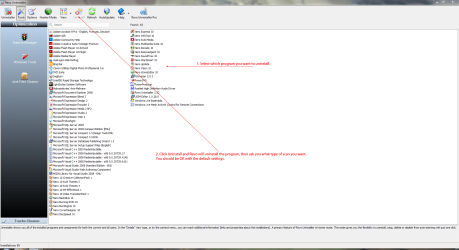
Revo Uninstaller should be able to shift them as you can choose to deep scan the registry to get rid of any leftovers.

If all else fails, choose system restore to a point before your sister installed the card reader.

Keep your sister off your computer! ;)
 

My Computer My Computer

At a glance

Windows 7 Ultimate SP1 64-BitIntel Core i7 870 @ 2.93GHz8Gb Dual-Channel DDR3 @ 664MHznVidia GeForce GTX 460 1024MB dedicated RAM
Computer Manufacturer/Model Number
HP Pavilion Elite 495UK
OS
Windows 7 Ultimate SP1 64-Bit
CPU
Intel Core i7 870 @ 2.93GHz
Motherboard
MSI 2A9C (CPU1)
Memory
8Gb Dual-Channel DDR3 @ 664MHz
Graphics Card(s)
nVidia GeForce GTX 460 1024MB dedicated RAM
Sound Card
Realtek HD Audio
Monitor(s) Displays
HP2310i
Screen Resolution
1920 x 1080
Hard Drives
1x1954GB Hitachi HDS22020ALA 330 (RAID), 1x1954GB Hitachi External for backup and storage
PSU
460W
Case
HP Elite
Cooling
Air cooled
Keyboard
Logitech K750 solar-powered keyboard
Mouse
Logitech Wireless M180 mouse
Internet Speed
2Mb
Other Info
Pure Avanti Flow Internet Radio with iPod Dock, 64Gb iPod, HP USB Speakers, Sony MDR-V500 Headphones, Sony Vaio F-Series Laptop
Thank you, I will have a break and then try that, If all else fails I'll look into a system restore.
Should I also uninstall them from device manager, they show up as disk drives there, as well as removable drives?
 

My Computer My Computer

At a glance

Windows 7 Home Premium 64bit
OS
Windows 7 Home Premium 64bit
I've had it with this, I thought I got it this time, I thought I uninstalled the entire thing, it even disappeared from devices and printers, however when I restarted the pc, it reinstalled the damn thing.
It seems the restore points only go back to when I installed the wireless network card, yesterday! I might have to live with these stupid phantom drives, I'll try one last time to get rid
 

My Computer My Computer

At a glance

Windows 7 Home Premium 64bit
OS
Windows 7 Home Premium 64bit
Uninstall any card reader you see in Device Manager

Uninstall any card reader drivers you see in Uninstall Programs.

Revo Uninstaller should be able to shift them as you can choose to deep scan the registry to get rid of any leftovers.

If all else fails, choose system restore to a point before your sister installed the card reader.

Keep your sister off your computer! ;)

I think the problem is that, some trace of the drive is remaining on the computer, after I uninstal the drives. I got revo but it has allot of options, i'm not sure where to start with it :confused:
 

My Computer My Computer

At a glance

Windows 7 Home Premium 64bit
OS
Windows 7 Home Premium 64bit
Just use it with the default settings. it should be enough.

Revo.PNG
 

My Computer My Computer

At a glance

Windows 7 Ultimate SP1 64-BitIntel Core i7 870 @ 2.93GHz8Gb Dual-Channel DDR3 @ 664MHznVidia GeForce GTX 460 1024MB dedicated RAM
Computer Manufacturer/Model Number
HP Pavilion Elite 495UK
OS
Windows 7 Ultimate SP1 64-Bit
CPU
Intel Core i7 870 @ 2.93GHz
Motherboard
MSI 2A9C (CPU1)
Memory
8Gb Dual-Channel DDR3 @ 664MHz
Graphics Card(s)
nVidia GeForce GTX 460 1024MB dedicated RAM
Sound Card
Realtek HD Audio
Monitor(s) Displays
HP2310i
Screen Resolution
1920 x 1080
Hard Drives
1x1954GB Hitachi HDS22020ALA 330 (RAID), 1x1954GB Hitachi External for backup and storage
PSU
460W
Case
HP Elite
Cooling
Air cooled
Keyboard
Logitech K750 solar-powered keyboard
Mouse
Logitech Wireless M180 mouse
Internet Speed
2Mb
Other Info
Pure Avanti Flow Internet Radio with iPod Dock, 64Gb iPod, HP USB Speakers, Sony MDR-V500 Headphones, Sony Vaio F-Series Laptop
The usb storage device doesn't appear anywhere on the uninstal list.
I fear the solution to this problem may have eluded me. I don't have a restore point back before 21/06/11 which is when the drives were created.
 

My Computer My Computer

At a glance

Windows 7 Home Premium 64bit
OS
Windows 7 Home Premium 64bit

My Computer My Computer

At a glance

Win 7 Pro 64-bitIntel i5 2.4 Ghz8GB DDR3Intel HD 3000
Computer type
Laptop
Computer Manufacturer/Model Number
Sony Vaio VPCEB47GM Laptop
OS
Win 7 Pro 64-bit
CPU
Intel i5 2.4 Ghz
Memory
8GB DDR3
Graphics Card(s)
Intel HD 3000
Sound Card
IDT High Definition
Monitor(s) Displays
15.6 WGXA Anti-Glare LED
Screen Resolution
1280x800
Hard Drives
640Gb 7200rpm
Antivirus
MSE
Browser
Opera (primary) with IE9 backup
If Windows reinstalled those devices on a reboot after removal, then it is showing actual devices currently attached to the computer. Do you not have a card reader built in?
 

My Computer My Computer

At a glance

Windows 7 Ultimate RTM (Technet)3.00 gigahertz Intel Core2 Duo E84004GBATI Radeon X1950 Pro
Computer Manufacturer/Model Number
Custom
OS
Windows 7 Ultimate RTM (Technet)
CPU
3.00 gigahertz Intel Core2 Duo E8400
Motherboard
ASUSTeK Computer INC. P5K/EPU Rev 1.xx
Memory
4GB
Graphics Card(s)
ATI Radeon X1950 Pro
Sound Card
Built in HD Audio
Monitor(s) Displays
22" Gateway LCD
Screen Resolution
1920 x 1200
Hard Drives
ST3160023A [Hard drive] (160.04 GB) -- drive 0, rev 8.01, ST3500630AS [Hard drive] (500.11 GB) -- drive 2, rev 3.AAK
ST3500630AS [Hard drive] (500.11 GB) -- drive 1, rev 3.AAK
Keyboard
Logitech G11
Mouse
Microsoft Wireless Laser Mouse 5000
Internet Speed
13.44 Mbps
This will probably be a wasted effort but I'm kinda reaching way out there for a possible reason why you can't get rid of those drives. Maybe your sister did something that damaged or corrupted some system files. Try running System File Checker. If any problems are noted run it 3-4 times.

http://www.sevenforums.com/tutorials/1538-sfc-scannow-command-system-file-checker.html

Thanks for that, I will dig out the windows disk some time, but I've had enough now, I'm losing the will to live. I think I'll just set windows to hide empty drives and so they don't show up in computer. Its funny I have the usb card reader here, and when I plug it in that device comes up separately to the mass storage device in hardware. As far as I can tell apart from having clone drives that have no function, my computer is uninfected by these drives, so I can live with hiding them, its nothing my sister did, she isn't like that, its a but in windows most likely, I think.
 

My Computer My Computer

At a glance

Windows 7 Home Premium 64bit
OS
Windows 7 Home Premium 64bit
The usb storage device doesn't appear anywhere on the uninstal list.
I fear the solution to this problem may have eluded me. I don't have a restore point back before 21/06/11 which is when the drives were created.

If you are confident enough to use the system registry, you could search for any reference to these unwanted card reader drives and delete the relevant registry key or dword.

You would need to back up the whole registry first so that it can be restored in the event things go pear-shaped.

Back up the registry

Windows Registry - Wikipedia, the free encyclopedia
 

My Computer My Computer

At a glance

Windows 7 Ultimate SP1 64-BitIntel Core i7 870 @ 2.93GHz8Gb Dual-Channel DDR3 @ 664MHznVidia GeForce GTX 460 1024MB dedicated RAM
Computer Manufacturer/Model Number
HP Pavilion Elite 495UK
OS
Windows 7 Ultimate SP1 64-Bit
CPU
Intel Core i7 870 @ 2.93GHz
Motherboard
MSI 2A9C (CPU1)
Memory
8Gb Dual-Channel DDR3 @ 664MHz
Graphics Card(s)
nVidia GeForce GTX 460 1024MB dedicated RAM
Sound Card
Realtek HD Audio
Monitor(s) Displays
HP2310i
Screen Resolution
1920 x 1080
Hard Drives
1x1954GB Hitachi HDS22020ALA 330 (RAID), 1x1954GB Hitachi External for backup and storage
PSU
460W
Case
HP Elite
Cooling
Air cooled
Keyboard
Logitech K750 solar-powered keyboard
Mouse
Logitech Wireless M180 mouse
Internet Speed
2Mb
Other Info
Pure Avanti Flow Internet Radio with iPod Dock, 64Gb iPod, HP USB Speakers, Sony MDR-V500 Headphones, Sony Vaio F-Series Laptop
Just to clarify ... in Win 7 you don't need the install disc like in previous versions to run SFC. (See post # 113 in the tutorial.)

One other thought about those drive letters. What happens if you rename them and then try to delete?
 

My Computer My Computer

At a glance

Win 7 Pro 64-bitIntel i5 2.4 Ghz8GB DDR3Intel HD 3000
Computer type
Laptop
Computer Manufacturer/Model Number
Sony Vaio VPCEB47GM Laptop
OS
Win 7 Pro 64-bit
CPU
Intel i5 2.4 Ghz
Memory
8GB DDR3
Graphics Card(s)
Intel HD 3000
Sound Card
IDT High Definition
Monitor(s) Displays
15.6 WGXA Anti-Glare LED
Screen Resolution
1280x800
Hard Drives
640Gb 7200rpm
Antivirus
MSE
Browser
Opera (primary) with IE9 backup
If Windows reinstalled those devices on a reboot after removal, then it is showing actual devices currently attached to the computer. Do you not have a card reader built in?

YES, I sincerely apologise for wasting time here, I didn't notice them before, and certainly never used them, just weird how they are identical to the external drives. Maybe they were hidden in windows by default for awhile I don't know. I tried an SD card in one and it reads it o.k. I still get this message however on all of the drives in device manager

"This device is not working properly because Windows cannot load the drivers required for this device. (Code 31)"

Strange how when I scan for new drivers it says they are up to date, just windows can't read them, but the SD slot is working, so I presume the other drives are aswell, I don't know if I should just leave them alone, I'm confident this is a registry problem though, since the errors probably started after I got pc specialist to help sort out my pc remotely, they messed with the registry, but at least the initial problem is solved:D, and again sorry for my stupidity on not realising I had drives already on the pc, very embarrassing.
 

My Computer My Computer

At a glance

Windows 7 Home Premium 64bit
OS
Windows 7 Home Premium 64bit
Hey, no apologies necessary! Just glad it got sorted out for you. :thumbsup:

And a lesson for the rest of us. ;)
 

My Computer My Computer

At a glance

Win 7 Pro 64-bitIntel i5 2.4 Ghz8GB DDR3Intel HD 3000
Computer type
Laptop
Computer Manufacturer/Model Number
Sony Vaio VPCEB47GM Laptop
OS
Win 7 Pro 64-bit
CPU
Intel i5 2.4 Ghz
Memory
8GB DDR3
Graphics Card(s)
Intel HD 3000
Sound Card
IDT High Definition
Monitor(s) Displays
15.6 WGXA Anti-Glare LED
Screen Resolution
1280x800
Hard Drives
640Gb 7200rpm
Antivirus
MSE
Browser
Opera (primary) with IE9 backup
Back
Top