
Solved No Working CD/DVD Drive on Laptop

John45

New member
Member
Local time
3:10 PM
Messages
32
Location
Thailand
Guys, you sorted me out with a problem that I had on my desktop. I am now just a tiny bit wiser and want to wipe the disk on my laptop and then re-install my copy of Win7 Ultimate. The CDRom Drive has died on the laptop and I really don’t want to replace it.

So I have the official Win7 Ultimate CD and Product key (the one installed on my laptop now) and I have a 16GB USB Thumb Drive. Can someone please point me in the direction of how to make a bootable USB from my CD if that is possible....Thanks...I have downloaded and installed the Win7 USB DVD Tool on my desktop.
 

My Computer My Computer

At a glance

Windows 7 Ultimate 64-bitIntel Core 2 Duo P8400 2.26GHz Penryn 45nm Te...3.0 GB Dual-Channel DDR2 @ 332MHz (5-5-5-15)Mobil Intel (R) Express Chipset Family
Computer type
Laptop
Computer Manufacturer/Model Number
HP Compaq CQ45 102TU Laptop
OS
Windows 7 Ultimate 64-bit
CPU
Intel Core 2 Duo P8400 2.26GHz Penryn 45nm Technology
Motherboard
Compal 30F7
Memory
3.0 GB Dual-Channel DDR2 @ 332MHz (5-5-5-15)
Graphics Card(s)
Mobil Intel (R) Express Chipset Family
Sound Card
High Definition Audio Device
Monitor(s) Displays
Generic PnP Monitor on Mobil Intel 4 Series Express Chipset
Screen Resolution
1280*800
Hard Drives
224GB Hitachi HTS542525K9A300 ATA (SATA)
Internet Speed
Fibre ... Paying for 30 down and 7 up and normally get more
Other Info
Desktop is a standard ACER M3920 (with 4GBs RAM and running Win7 Professional 64bit.

Dell Inspiration 6400 T2130 CPU, 2GB+0.5GB RAM W7Ult X86 256GB SSD

My Computer My Computer

At a glance

64-bit Windows 11 Pro for WorkstationsIntel i7-8700K OC'd to 5 GHz64 GB (4x16GB) G.SKILL TridentZ RGB DDR4 3600...ASUS ROG-STRIX-GTX1080TI-O11G-GAMING
Computer type
PC/Desktop
Computer Manufacturer/Model Number
Self built custom
OS
64-bit Windows 11 Pro for Workstations
CPU
Intel i7-8700K OC'd to 5 GHz
Motherboard
ASUS ROG Maximus XI Formula Z390
Memory
64 GB (4x16GB) G.SKILL TridentZ RGB DDR4 3600 MHz
Graphics Card(s)
ASUS ROG-STRIX-GTX1080TI-O11G-GAMING
Sound Card
Integrated
Monitor(s) Displays
2 x Samsung Odyssey G7 27"
Screen Resolution
2560x1440
Hard Drives
1TB Samsung 990 PRO M.2,
4TB Samsung 990 PRO PRO M.2,
TerraMaster F8 SSD Plus NAS
PSU
Seasonic Prime Titanium 850W
Case
Thermaltake Core P3
Cooling
Corsair Hydro H115i
Keyboard
Logitech wireless K800
Mouse
Logitech MX Master 4
Internet Speed
2 Gb/s Download and 100 Mb/s Upload
Antivirus
Malwarebyte Anti-Malware Premium
Browser
Google Chrome
Other Info
Logitech Z625 speaker system,
Logitech BRIO 4K Pro webcam,
HP Color LaserJet Pro MFP M477fdn,
APC SMART-UPS RT 1000 XL - SURT1000XLI,
Galaxy S23 Plus phone
Thanks Shawn..yep made one and did a custom install and it works! Now I just want to get the disk back to as new or near to it and then install again. My friend said just removing partions should be enough so I need to read how to do that.

Someone hacked my wifi a while back even though I had wpa2-personal. Anyway now more secure as have used MAC addressing as well as a huge User Name, Password, Pre Shared key and have disabled SSID. So just want to make sure that there is nothing on the disc that I don't want there to be...thanks
 

My Computer My Computer

At a glance

Windows 7 Ultimate 64-bitIntel Core 2 Duo P8400 2.26GHz Penryn 45nm Te...3.0 GB Dual-Channel DDR2 @ 332MHz (5-5-5-15)Mobil Intel (R) Express Chipset Family
Computer type
Laptop
Computer Manufacturer/Model Number
HP Compaq CQ45 102TU Laptop
OS
Windows 7 Ultimate 64-bit
CPU
Intel Core 2 Duo P8400 2.26GHz Penryn 45nm Technology
Motherboard
Compal 30F7
Memory
3.0 GB Dual-Channel DDR2 @ 332MHz (5-5-5-15)
Graphics Card(s)
Mobil Intel (R) Express Chipset Family
Sound Card
High Definition Audio Device
Monitor(s) Displays
Generic PnP Monitor on Mobil Intel 4 Series Express Chipset
Screen Resolution
1280*800
Hard Drives
224GB Hitachi HTS542525K9A300 ATA (SATA)
Internet Speed
Fibre ... Paying for 30 down and 7 up and normally get more
Other Info
Desktop is a standard ACER M3920 (with 4GBs RAM and running Win7 Professional 64bit.

Dell Inspiration 6400 T2130 CPU, 2GB+0.5GB RAM W7Ult X86 256GB SSD
John,

In addition, you could click on the Drive options (advanced) link while starting a clean install of Windows 7 to delete all partitions on the disk that you want to install Windows 7 on until it's unallocated space. Afterwards, select it, click on Next to finish installing Windows 7.

For you wireless issue, you might also set your wireless device to not broadcast itself. This way your wireless device will not be available to just be selected to connect to. Instead you would have to manually enter the name of the wireless connection to set it up and connect to.
 

My Computer My Computer

At a glance

64-bit Windows 11 Pro for WorkstationsIntel i7-8700K OC'd to 5 GHz64 GB (4x16GB) G.SKILL TridentZ RGB DDR4 3600...ASUS ROG-STRIX-GTX1080TI-O11G-GAMING
Computer type
PC/Desktop
Computer Manufacturer/Model Number
Self built custom
OS
64-bit Windows 11 Pro for Workstations
CPU
Intel i7-8700K OC'd to 5 GHz
Motherboard
ASUS ROG Maximus XI Formula Z390
Memory
64 GB (4x16GB) G.SKILL TridentZ RGB DDR4 3600 MHz
Graphics Card(s)
ASUS ROG-STRIX-GTX1080TI-O11G-GAMING
Sound Card
Integrated
Monitor(s) Displays
2 x Samsung Odyssey G7 27"
Screen Resolution
2560x1440
Hard Drives
1TB Samsung 990 PRO M.2,
4TB Samsung 990 PRO PRO M.2,
TerraMaster F8 SSD Plus NAS
PSU
Seasonic Prime Titanium 850W
Case
Thermaltake Core P3
Cooling
Corsair Hydro H115i
Keyboard
Logitech wireless K800
Mouse
Logitech MX Master 4
Internet Speed
2 Gb/s Download and 100 Mb/s Upload
Antivirus
Malwarebyte Anti-Malware Premium
Browser
Google Chrome
Other Info
Logitech Z625 speaker system,
Logitech BRIO 4K Pro webcam,
HP Color LaserJet Pro MFP M477fdn,
APC SMART-UPS RT 1000 XL - SURT1000XLI,
Galaxy S23 Plus phone
To clean your HD of all nasty's,
Do a full clean & full format in command prompt.

SSD / HDD : Optimize for Windows Reinstallation


Do backup your data, as all data will be lost.


Hello again John.


A complete wipe of the entire HDD does sound in order, here's some useful info in addition to this tutorial and be sure to post back with any further questions you may have and to keep us informed.
 

My Computer My Computer

At a glance

W 7 64-bit UltimateIntel Q9550 Yorkfield8GB Dominator 8500C5DATI : XFX 5870
Computer Manufacturer/Model Number
* BFK Customs *
OS
W 7 64-bit Ultimate
CPU
Intel Q9550 Yorkfield
Motherboard
ASUS P5Q Pro
Memory
8GB Dominator 8500C5D
Graphics Card(s)
ATI : XFX 5870
Sound Card
Realtek HD Audio 7-1
Monitor(s) Displays
1x 47" LCD HDMI & 3x 26" LCD HDMI
Screen Resolution
1920x1080P & 1920x1200
Hard Drives
1x 80GB Intel X25-M G2 SSD : 1x 500GB & 1x 640GB WD Caviar Black(s)
PSU
Corsair 620HX
Case
Cooler Master RC-690
Cooling
Tuniq Tower 120, 2x 140mm and 3x 120mm case fans
Keyboard
Microsoft 500
Mouse
Razer Diamondback 3G
Internet Speed
14 Mb/s
Other Info
1x Koutech 3Gb/s SATA HDD Hot Swap Rack
Thanks Shawn and Mr Bare Foot Kid...I actually have SSID disabled and think that I am OK there.
Now where now please?...

I worked through Optimize Disk Tutorial 91339

I set the bios to USB Diskette on Key/USB Hard Drive. Save and exit
Hit space bar and got Windows Setup [EMS Enabled]
Then pressed advanced option F8
Safe Mode with Command Prompt
Shift Key and F10
X:\Sources
Entered diskpart
I saw two discs...Disk 0 online 232Gb Free 1024KB Disk 1 online 14GB Free 0B
So I Select disk 0
clean all
and eventually it completed. Must have been close on two hours!

Then continued to install...it showed Disc 0 Unallocated Space 232.something GB and the same free space.

Then I did new and created a 100MB partition...don’t know why but I had seen one there before. I’m actually aiming for C: about 80GBs and D: the rest.

So now I had Disk 0 Partition 1 total size 100MB Free Space 100MB Primary and
Disc 0 Unallocated Space total size 232.8GB Free Space 232.8MB

I then wasn’t sure what to do! Go back and do a clean all on the 14GB bit? (Disk 1) And get that area back? and just a clean on Disk 0? Wondered if I would get my 250GBs back?

Anyway I carried on and made another partition of 80GBs? And installed

So I now have, looking at Disk Management
C: Simple Basic NTFS Healthy (Boot, Page File, Crash Dump, Primary Partition) 79.9GBs 69.73GBs free
D: Simple Basic RAW Healthy (Primary Partition) 100MB 100MB free
System Reserve Simple Basic NTFS Healthy (System, Active, Primary Partition) 100MB 72MB free.
And 152.79GB Unallocated and under properties 0bytes used and 0bytes free..and that needs formatting I guess.

SO YOU CAN SEE I don’t know much! If I start again can I get that 14GB back..if so how please.
Thanks
 

My Computer My Computer

At a glance

Windows 7 Ultimate 64-bitIntel Core 2 Duo P8400 2.26GHz Penryn 45nm Te...3.0 GB Dual-Channel DDR2 @ 332MHz (5-5-5-15)Mobil Intel (R) Express Chipset Family
Computer type
Laptop
Computer Manufacturer/Model Number
HP Compaq CQ45 102TU Laptop
OS
Windows 7 Ultimate 64-bit
CPU
Intel Core 2 Duo P8400 2.26GHz Penryn 45nm Technology
Motherboard
Compal 30F7
Memory
3.0 GB Dual-Channel DDR2 @ 332MHz (5-5-5-15)
Graphics Card(s)
Mobil Intel (R) Express Chipset Family
Sound Card
High Definition Audio Device
Monitor(s) Displays
Generic PnP Monitor on Mobil Intel 4 Series Express Chipset
Screen Resolution
1280*800
Hard Drives
224GB Hitachi HTS542525K9A300 ATA (SATA)
Internet Speed
Fibre ... Paying for 30 down and 7 up and normally get more
Other Info
Desktop is a standard ACER M3920 (with 4GBs RAM and running Win7 Professional 64bit.

Dell Inspiration 6400 T2130 CPU, 2GB+0.5GB RAM W7Ult X86 256GB SSD
Please read and use the tutorial given by the link in Theog's post.

That 14 GB was probably your 16 GB usb stick.

Disk 0 is your hard disk.
 

My Computer My Computer

At a glance

MS Windows 7 Ultimate SP1 64-bitAMD A10-4600M6.00 GB Dual-Channel DDR3 @ 798MHz (11-11-12-28)AMD Radeon HD 7660G
Computer Manufacturer/Model Number
Toshiba Satellite S875D-S7239 laptop
OS
MS Windows 7 Ultimate SP1 64-bit
CPU
AMD A10-4600M
Motherboard
AMD Pumori (Socket FT1)
Memory
6.00 GB Dual-Channel DDR3 @ 798MHz (11-11-12-28)
Graphics Card(s)
AMD Radeon HD 7660G
Sound Card
High Definition Audio Device
Monitor(s) Displays
Generic PnP Monitor (1600x900@60Hz)
Screen Resolution
1600x900@60Hz
Hard Drives
SSD 119GB Corsair CSSD-V128GB2 ATA Device
Keyboard
Standard PS/2 Keyboard
Mouse
HP Wireless Optical Mobile Mouse Model FHA-3410
Internet Speed
What the local pub, local coffee shop offers.
Other Info
Optical Drive:MATSHITA BD-CMB UJ160B ATA Device


Also have an Asus ha1002xp netbook with Win 7 Ultimate installed.
OK..I thought that I did that tutorial..guess I'll do it again and again and again until I get it right.

Thanks for pointing to the solution..good job that I didn't clean all on Drive 1 then!!

At least there is only one way for my computer skills to go.

Thanks...........John
 

My Computer My Computer

At a glance

Windows 7 Ultimate 64-bitIntel Core 2 Duo P8400 2.26GHz Penryn 45nm Te...3.0 GB Dual-Channel DDR2 @ 332MHz (5-5-5-15)Mobil Intel (R) Express Chipset Family
Computer type
Laptop
Computer Manufacturer/Model Number
HP Compaq CQ45 102TU Laptop
OS
Windows 7 Ultimate 64-bit
CPU
Intel Core 2 Duo P8400 2.26GHz Penryn 45nm Technology
Motherboard
Compal 30F7
Memory
3.0 GB Dual-Channel DDR2 @ 332MHz (5-5-5-15)
Graphics Card(s)
Mobil Intel (R) Express Chipset Family
Sound Card
High Definition Audio Device
Monitor(s) Displays
Generic PnP Monitor on Mobil Intel 4 Series Express Chipset
Screen Resolution
1280*800
Hard Drives
224GB Hitachi HTS542525K9A300 ATA (SATA)
Internet Speed
Fibre ... Paying for 30 down and 7 up and normally get more
Other Info
Desktop is a standard ACER M3920 (with 4GBs RAM and running Win7 Professional 64bit.

Dell Inspiration 6400 T2130 CPU, 2GB+0.5GB RAM W7Ult X86 256GB SSD
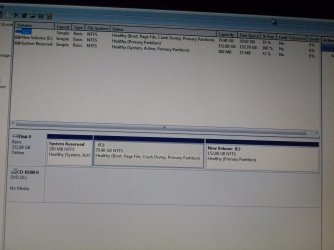
Good to see you starting to get it sorted but before we make any further specific recommendations will you please post a snip/screen-shot of the entire disk management drive map with a full description as to which drive/partition is which, so we can see what you have going.

In the Windows start menu right click computer and click manage, in the left pane of the "Computer Management" window that opens click disk management and post a maximized snip of that.


My Computer My Computer

At a glance

W 7 64-bit UltimateIntel Q9550 Yorkfield8GB Dominator 8500C5DATI : XFX 5870
Computer Manufacturer/Model Number
* BFK Customs *
OS
W 7 64-bit Ultimate
CPU
Intel Q9550 Yorkfield
Motherboard
ASUS P5Q Pro
Memory
8GB Dominator 8500C5D
Graphics Card(s)
ATI : XFX 5870
Sound Card
Realtek HD Audio 7-1
Monitor(s) Displays
1x 47" LCD HDMI & 3x 26" LCD HDMI
Screen Resolution
1920x1080P & 1920x1200
Hard Drives
1x 80GB Intel X25-M G2 SSD : 1x 500GB & 1x 640GB WD Caviar Black(s)
PSU
Corsair 620HX
Case
Cooler Master RC-690
Cooling
Tuniq Tower 120, 2x 140mm and 3x 120mm case fans
Keyboard
Microsoft 500
Mouse
Razer Diamondback 3G
Internet Speed
14 Mb/s
Other Info
1x Koutech 3Gb/s SATA HDD Hot Swap Rack
P1000239.jpg

Thanks...I took a photo of it...Somehow D: became my CD ROM drive. After installation I couldn't see what I expected to be the new D:drive of 152+GBs. There was just the C: and the D: (CD ROM.)

So obviously I did something wrong.

Sorry but I can't remember how I found the missing partition...think that I eventually clicked on the area in the Computer Management screen and maybe did a format or clicked on something like volume.

I'm learning bit by bit (bit slow)!! I do want to sort this out but at least I can use my wifes Desktop..which I'm on now. At least I know that there are no nasties on the disk.

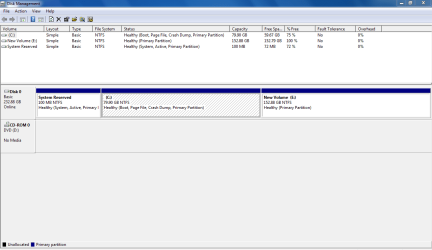
I haven't put anything on E: drive yet. Just done the windows updates, installed MSE and SKYPE. Everything seems to work.

Something strange is happening with my WIFI....I saw the strength bars get the orange asterisk as though connection lost...just for a couple of seconds. I then looked at Network Map and saw a ?mark and unknown between this computer and my WAG160N and the connection name had changed to the WIFI Router name. I have seen this unknown a few times. So I just rebooted the WIFI and changed the access USER and PASSWORD again as I'm not sure if it is an intruder or not. Maybe the WIFI router has an ocassional problem.

Thanks...........John
 
Last edited:

My Computer My Computer

At a glance

Windows 7 Ultimate 64-bitIntel Core 2 Duo P8400 2.26GHz Penryn 45nm Te...3.0 GB Dual-Channel DDR2 @ 332MHz (5-5-5-15)Mobil Intel (R) Express Chipset Family
Computer type
Laptop
Computer Manufacturer/Model Number
HP Compaq CQ45 102TU Laptop
OS
Windows 7 Ultimate 64-bit
CPU
Intel Core 2 Duo P8400 2.26GHz Penryn 45nm Technology
Motherboard
Compal 30F7
Memory
3.0 GB Dual-Channel DDR2 @ 332MHz (5-5-5-15)
Graphics Card(s)
Mobil Intel (R) Express Chipset Family
Sound Card
High Definition Audio Device
Monitor(s) Displays
Generic PnP Monitor on Mobil Intel 4 Series Express Chipset
Screen Resolution
1280*800
Hard Drives
224GB Hitachi HTS542525K9A300 ATA (SATA)
Internet Speed
Fibre ... Paying for 30 down and 7 up and normally get more
Other Info
Desktop is a standard ACER M3920 (with 4GBs RAM and running Win7 Professional 64bit.

Dell Inspiration 6400 T2130 CPU, 2GB+0.5GB RAM W7Ult X86 256GB SSD
Have you installed all the drivers from the OEM manufacturer's website.
 

My Computer My Computer

At a glance

ME/XP/Vista/Win7
OS
ME/XP/Vista/Win7
UPDATE YOUR SEVENFORUMS SYSTEM SPECS


User CP (3rd item in the top menu bar) |
in left-hand column, under Your Profile, Edit System Spec |


Use Speccy - System Information - Free Download
and/or SIW to gather info for filling in the blanks.

Do me a favor and add the word laptop or desktop to the “system manufacturer” block.

Use the “Other Info” block for Optical Reader, Mouse, touchpad, wifi adapter, speakers, monitor

Scroll down and click on the SAVE CHANGES button.
========================================
========================================
===========================================


HOW TO POST A SNAPSHOT OF DISK MANAGEMENT DISPLAY

Run disk management:
WIN | type DISKMGMT.MSC | ENTER
WIN is the key with the wavy flag.

Maximize the output of Disk Management:
ALT-Spacebar key combo (this pops up a menu) |
X key (selects Maximize) |
Drag the field separators (such as between Status and Capacity) to show entire field. This is very important, otherwise, needed info is not visible.

Make a snapshot:
WIN | type SNIPPING | ENTER
Click the New button.
Drag the cursor around the area you want to snip.
File | Save as | select save location and name | Save button

Post the snapshot:
· Click on the paperclip icon in that row of icons at the top of the message box.
· Click on a BROWSE button. There are 5 of them.
· Navigate to the folder containing the snapshot.
· Click on the snapshot.
· Click on the OPEN button.
· Click on the UPLOAD button adjacent to the 5th BROWSE button.
· Close the MANAGE ATTACHMENTS window.
· Position the cursor at the spot in the message where you want the
snapshot to appear.
· Click on the PaperClip again.
· Click on the file which you want to insert
· Attach code will be inserted into your message.


=======================================
===========================================
 

My Computer My Computer

At a glance

MS Windows 7 Ultimate SP1 64-bitAMD A10-4600M6.00 GB Dual-Channel DDR3 @ 798MHz (11-11-12-28)AMD Radeon HD 7660G
Computer Manufacturer/Model Number
Toshiba Satellite S875D-S7239 laptop
OS
MS Windows 7 Ultimate SP1 64-bit
CPU
AMD A10-4600M
Motherboard
AMD Pumori (Socket FT1)
Memory
6.00 GB Dual-Channel DDR3 @ 798MHz (11-11-12-28)
Graphics Card(s)
AMD Radeon HD 7660G
Sound Card
High Definition Audio Device
Monitor(s) Displays
Generic PnP Monitor (1600x900@60Hz)
Screen Resolution
1600x900@60Hz
Hard Drives
SSD 119GB Corsair CSSD-V128GB2 ATA Device
Keyboard
Standard PS/2 Keyboard
Mouse
HP Wireless Optical Mobile Mouse Model FHA-3410
Internet Speed
What the local pub, local coffee shop offers.
Other Info
Optical Drive:MATSHITA BD-CMB UJ160B ATA Device


Also have an Asus ha1002xp netbook with Win 7 Ultimate installed.
Capture.PNG

I followed that OK.

I had been to the HP Thailand drivers site and updated the chipset driver. I have since updated the Audio Driver and BIOS. My graphics driver is newer than the one on that site.

I have updated System Spec for this computer

Thanks.....................John
 

My Computer My Computer

At a glance

Windows 7 Ultimate 64-bitIntel Core 2 Duo P8400 2.26GHz Penryn 45nm Te...3.0 GB Dual-Channel DDR2 @ 332MHz (5-5-5-15)Mobil Intel (R) Express Chipset Family
Computer type
Laptop
Computer Manufacturer/Model Number
HP Compaq CQ45 102TU Laptop
OS
Windows 7 Ultimate 64-bit
CPU
Intel Core 2 Duo P8400 2.26GHz Penryn 45nm Technology
Motherboard
Compal 30F7
Memory
3.0 GB Dual-Channel DDR2 @ 332MHz (5-5-5-15)
Graphics Card(s)
Mobil Intel (R) Express Chipset Family
Sound Card
High Definition Audio Device
Monitor(s) Displays
Generic PnP Monitor on Mobil Intel 4 Series Express Chipset
Screen Resolution
1280*800
Hard Drives
224GB Hitachi HTS542525K9A300 ATA (SATA)
Internet Speed
Fibre ... Paying for 30 down and 7 up and normally get more
Other Info
Desktop is a standard ACER M3920 (with 4GBs RAM and running Win7 Professional 64bit.

Dell Inspiration 6400 T2130 CPU, 2GB+0.5GB RAM W7Ult X86 256GB SSD
That's great news John. I'm happy to hear that you got installed and running. :)
 

My Computer My Computer

At a glance

64-bit Windows 11 Pro for WorkstationsIntel i7-8700K OC'd to 5 GHz64 GB (4x16GB) G.SKILL TridentZ RGB DDR4 3600...ASUS ROG-STRIX-GTX1080TI-O11G-GAMING
Computer type
PC/Desktop
Computer Manufacturer/Model Number
Self built custom
OS
64-bit Windows 11 Pro for Workstations
CPU
Intel i7-8700K OC'd to 5 GHz
Motherboard
ASUS ROG Maximus XI Formula Z390
Memory
64 GB (4x16GB) G.SKILL TridentZ RGB DDR4 3600 MHz
Graphics Card(s)
ASUS ROG-STRIX-GTX1080TI-O11G-GAMING
Sound Card
Integrated
Monitor(s) Displays
2 x Samsung Odyssey G7 27"
Screen Resolution
2560x1440
Hard Drives
1TB Samsung 990 PRO M.2,
4TB Samsung 990 PRO PRO M.2,
TerraMaster F8 SSD Plus NAS
PSU
Seasonic Prime Titanium 850W
Case
Thermaltake Core P3
Cooling
Corsair Hydro H115i
Keyboard
Logitech wireless K800
Mouse
Logitech MX Master 4
Internet Speed
2 Gb/s Download and 100 Mb/s Upload
Antivirus
Malwarebyte Anti-Malware Premium
Browser
Google Chrome
Other Info
Logitech Z625 speaker system,
Logitech BRIO 4K Pro webcam,
HP Color LaserJet Pro MFP M477fdn,
APC SMART-UPS RT 1000 XL - SURT1000XLI,
Galaxy S23 Plus phone
Back
Top