Error Code 0xC004F063 during activation

TS631

New member
Member
Local time
7:17 AM
Messages
36
Hi all,

I am trying to activate the windows 7 Home premium 64 licence on an HP laptop i just formatted. Im using the original key from the original OS and trying to reactivate it but its giving me this error code. Saying software licensing service reported that the computer BIOS is missing a required license. Ive already installed chipset drivers so it should recognize the mobo. I haven't flashed the BIOS or anything.

Anyone have any ideas? thank you!
 

My Computer My Computer

At a glance

Windows 7 Pro 64 bitPhenom II x6 1090tCorsair Vengeance 8gb 1600ASUS 6950
Computer Manufacturer/Model Number
Custom Build
OS
Windows 7 Pro 64 bit
CPU
Phenom II x6 1090t
Motherboard
ASUS M4A89TD PRO/USB 3.0
Memory
Corsair Vengeance 8gb 1600
Graphics Card(s)
ASUS 6950
Monitor(s) Displays
ASUS 23" 1080
Screen Resolution
1920x1080
Hard Drives
WD Caviar Black
PSU
Corsair 750HX
Case
LianLi k63
Cooling
Cooler Master Hyper 212+
product is not under warranty by HP anymore so they will most likely not help me and windows support costs at least 50$. Any ideas anyone? Thank you
 

My Computer My Computer

At a glance

Windows 7 Pro 64 bitPhenom II x6 1090tCorsair Vengeance 8gb 1600ASUS 6950
Computer Manufacturer/Model Number
Custom Build
OS
Windows 7 Pro 64 bit
CPU
Phenom II x6 1090t
Motherboard
ASUS M4A89TD PRO/USB 3.0
Memory
Corsair Vengeance 8gb 1600
Graphics Card(s)
ASUS 6950
Monitor(s) Displays
ASUS 23" 1080
Screen Resolution
1920x1080
Hard Drives
WD Caviar Black
PSU
Corsair 750HX
Case
LianLi k63
Cooling
Cooler Master Hyper 212+
Have you tried the automated telephone activation service?

Click Start then type slui.exe 4 in the search field then press Enter.

When the Windows Activation window opens, use the drop down list to select your location then click Next.

Call the free number provided and comply with the automated instructions to give your Installation ID and receive your Activation ID.

If all goes to plan, write down the Activation ID and keep it, and then enter it into the Activation ID fields. Click Next when it is accepted.
 

My Computer My Computer

At a glance

Windows 7 Ultimate SP1 64-BitIntel Core i7 870 @ 2.93GHz8Gb Dual-Channel DDR3 @ 664MHznVidia GeForce GTX 460 1024MB dedicated RAM
Computer Manufacturer/Model Number
HP Pavilion Elite 495UK
OS
Windows 7 Ultimate SP1 64-Bit
CPU
Intel Core i7 870 @ 2.93GHz
Motherboard
MSI 2A9C (CPU1)
Memory
8Gb Dual-Channel DDR3 @ 664MHz
Graphics Card(s)
nVidia GeForce GTX 460 1024MB dedicated RAM
Sound Card
Realtek HD Audio
Monitor(s) Displays
HP2310i
Screen Resolution
1920 x 1080
Hard Drives
1x1954GB Hitachi HDS22020ALA 330 (RAID), 1x1954GB Hitachi External for backup and storage
PSU
460W
Case
HP Elite
Cooling
Air cooled
Keyboard
Logitech K750 solar-powered keyboard
Mouse
Logitech Wireless M180 mouse
Internet Speed
2Mb
Other Info
Pure Avanti Flow Internet Radio with iPod Dock, 64Gb iPod, HP USB Speakers, Sony MDR-V500 Headphones, Sony Vaio F-Series Laptop
Couple of things you need to tell us- did you change the motherboard? second, this "original" key- what kind of license do you have, oem or retail and what key are you inputting?
 

My Computer My Computer

At a glance

Windows 7 x64 pro/ Windows 7 x86 Pro/ XP SP3 x86
Computer Manufacturer/Model Number
Too many to describe...
OS
Windows 7 x64 pro/ Windows 7 x86 Pro/ XP SP3 x86
Have you tried the automated telephone activation service?

Click Start then type slui.exe 4 in the search field then press Enter.

When the Windows Activation window opens, use the drop down list to select your location then click Next.

Call the free number provided and comply with the automated instructions to give your Installation ID and receive your Activation ID.

If all goes to plan, write down the Activation ID and keep it, and then enter it into the Activation ID fields. Click Next when it is accepted.

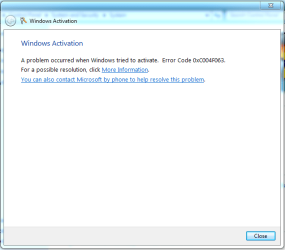
Ive tried this exact method a few times, when I go into system>>activation i am not given the option of activating that way. I followed the instructions exactly it takes me to the activation screen and says Error code occurred. and gives me links for more information and "you can also contact microsoft by phone to resolve this problem" which just takes me to the site to pay for help.

Thanks for the reply
 

My Computer My Computer

At a glance

Windows 7 Pro 64 bitPhenom II x6 1090tCorsair Vengeance 8gb 1600ASUS 6950
Computer Manufacturer/Model Number
Custom Build
OS
Windows 7 Pro 64 bit
CPU
Phenom II x6 1090t
Motherboard
ASUS M4A89TD PRO/USB 3.0
Memory
Corsair Vengeance 8gb 1600
Graphics Card(s)
ASUS 6950
Monitor(s) Displays
ASUS 23" 1080
Screen Resolution
1920x1080
Hard Drives
WD Caviar Black
PSU
Corsair 750HX
Case
LianLi k63
Cooling
Cooler Master Hyper 212+
Couple of things you need to tell us- did you change the motherboard? second, this "original" key- what kind of license do you have, oem or retail and what key are you inputting?

Did not change any hardware at all. Its the OEM windows version and key that came with the computer from the factory. Product key was taken from the sticker on the bottom of the laptop, if it makes a difference I downloaded what i believe to be a retail win 7 home premium ISO and burnt it to a disk since the original install CD was not included with the computer for some reason. Could that be an issue?

Thank you for the reply
 

My Computer My Computer

At a glance

Windows 7 Pro 64 bitPhenom II x6 1090tCorsair Vengeance 8gb 1600ASUS 6950
Computer Manufacturer/Model Number
Custom Build
OS
Windows 7 Pro 64 bit
CPU
Phenom II x6 1090t
Motherboard
ASUS M4A89TD PRO/USB 3.0
Memory
Corsair Vengeance 8gb 1600
Graphics Card(s)
ASUS 6950
Monitor(s) Displays
ASUS 23" 1080
Screen Resolution
1920x1080
Hard Drives
WD Caviar Black
PSU
Corsair 750HX
Case
LianLi k63
Cooling
Cooler Master Hyper 212+
Obviously, you'll get no help from Microsoft because the product key you're trying to use is for an OEM system.


As I see it, you have three choices:
  1. Borrow a set of recovery disks if you know anyone has an HP computer.
  2. Contact HP and see if they will sell you a set of recovery disks.
  3. Buy your own OEM version of Windows and use that.
 

My Computer My Computer

At a glance

Windows 7 Ultimate SP1 64-BitIntel Core i7 870 @ 2.93GHz8Gb Dual-Channel DDR3 @ 664MHznVidia GeForce GTX 460 1024MB dedicated RAM
Computer Manufacturer/Model Number
HP Pavilion Elite 495UK
OS
Windows 7 Ultimate SP1 64-Bit
CPU
Intel Core i7 870 @ 2.93GHz
Motherboard
MSI 2A9C (CPU1)
Memory
8Gb Dual-Channel DDR3 @ 664MHz
Graphics Card(s)
nVidia GeForce GTX 460 1024MB dedicated RAM
Sound Card
Realtek HD Audio
Monitor(s) Displays
HP2310i
Screen Resolution
1920 x 1080
Hard Drives
1x1954GB Hitachi HDS22020ALA 330 (RAID), 1x1954GB Hitachi External for backup and storage
PSU
460W
Case
HP Elite
Cooling
Air cooled
Keyboard
Logitech K750 solar-powered keyboard
Mouse
Logitech Wireless M180 mouse
Internet Speed
2Mb
Other Info
Pure Avanti Flow Internet Radio with iPod Dock, 64Gb iPod, HP USB Speakers, Sony MDR-V500 Headphones, Sony Vaio F-Series Laptop
Obviously, you'll get no help from Microsoft because the product key you're trying to use is for an OEM system.


As I see it, you have three choices:
  1. Borrow a set of recovery disks if you know anyone has an HP computer.
  2. Contact HP and see if they will sell you a set of recovery disks.
  3. Buy your own OEM version of Windows and use that.

I believe so, i will probably order a recovery disk since that will probably be the cheapest, thank you for your help
 

My Computer My Computer

At a glance

Windows 7 Pro 64 bitPhenom II x6 1090tCorsair Vengeance 8gb 1600ASUS 6950
Computer Manufacturer/Model Number
Custom Build
OS
Windows 7 Pro 64 bit
CPU
Phenom II x6 1090t
Motherboard
ASUS M4A89TD PRO/USB 3.0
Memory
Corsair Vengeance 8gb 1600
Graphics Card(s)
ASUS 6950
Monitor(s) Displays
ASUS 23" 1080
Screen Resolution
1920x1080
Hard Drives
WD Caviar Black
PSU
Corsair 750HX
Case
LianLi k63
Cooling
Cooler Master Hyper 212+
Are you still there? Paste the mgadiag report here, that'll help.

go.microsoft.com/fwlink/?linkid=52012
 

My Computer My Computer

At a glance

Windows 7 x64 pro/ Windows 7 x86 Pro/ XP SP3 x86
Computer Manufacturer/Model Number
Too many to describe...
OS
Windows 7 x64 pro/ Windows 7 x86 Pro/ XP SP3 x86
Are you still there? Paste the mgadiag report here, that'll help.

go.microsoft.com/fwlink/?linkid=52012


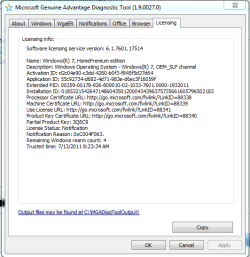
Here it is, I think this is the report part anyway, Thanks again
 

Attachments

  • Capture.PNG
    Capture.PNG
    13.4 KB · Views: 495

My Computer My Computer

At a glance

Windows 7 Pro 64 bitPhenom II x6 1090tCorsair Vengeance 8gb 1600ASUS 6950
Computer Manufacturer/Model Number
Custom Build
OS
Windows 7 Pro 64 bit
CPU
Phenom II x6 1090t
Motherboard
ASUS M4A89TD PRO/USB 3.0
Memory
Corsair Vengeance 8gb 1600
Graphics Card(s)
ASUS 6950
Monitor(s) Displays
ASUS 23" 1080
Screen Resolution
1920x1080
Hard Drives
WD Caviar Black
PSU
Corsair 750HX
Case
LianLi k63
Cooling
Cooler Master Hyper 212+
just in case
 

Attachments

  • 2.PNG
    2.PNG
    16.2 KB · Views: 68

My Computer My Computer

At a glance

Windows 7 Pro 64 bitPhenom II x6 1090tCorsair Vengeance 8gb 1600ASUS 6950
Computer Manufacturer/Model Number
Custom Build
OS
Windows 7 Pro 64 bit
CPU
Phenom II x6 1090t
Motherboard
ASUS M4A89TD PRO/USB 3.0
Memory
Corsair Vengeance 8gb 1600
Graphics Card(s)
ASUS 6950
Monitor(s) Displays
ASUS 23" 1080
Screen Resolution
1920x1080
Hard Drives
WD Caviar Black
PSU
Corsair 750HX
Case
LianLi k63
Cooling
Cooler Master Hyper 212+
the error code and doesnt give me option to activate by phone :cry:
 

Attachments

  • 3.PNG
    3.PNG
    14.7 KB · Views: 21

My Computer My Computer

At a glance

Windows 7 Pro 64 bitPhenom II x6 1090tCorsair Vengeance 8gb 1600ASUS 6950
Computer Manufacturer/Model Number
Custom Build
OS
Windows 7 Pro 64 bit
CPU
Phenom II x6 1090t
Motherboard
ASUS M4A89TD PRO/USB 3.0
Memory
Corsair Vengeance 8gb 1600
Graphics Card(s)
ASUS 6950
Monitor(s) Displays
ASUS 23" 1080
Screen Resolution
1920x1080
Hard Drives
WD Caviar Black
PSU
Corsair 750HX
Case
LianLi k63
Cooling
Cooler Master Hyper 212+
just in case
Theres your problem.

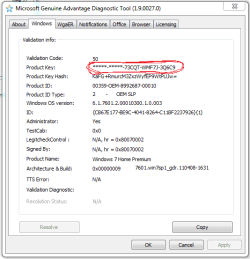
The installed key is the HP (hewlett packard) OEM SLP key for win7 home premium. This key will activate only in combination with a bios marker and an OEM certificate. Now, since you did a clean install, the OEM certificate is missing, so no activation.

You need to enter the COA key i.e. the STICKER key, that one will activate online or by phone activation.
 

My Computer My Computer

At a glance

Windows 7 x64 pro/ Windows 7 x86 Pro/ XP SP3 x86
Computer Manufacturer/Model Number
Too many to describe...
OS
Windows 7 x64 pro/ Windows 7 x86 Pro/ XP SP3 x86
just in case
Theres your problem.

The installed key is the HP (hewlett packard) OEM SLP key for win7 home premium. This key will activate only in combination with a bios marker and an OEM certificate. Now, since you did a clean install, the OEM certificate is missing, so no activation.

You need to enter the COA key i.e. the STICKER key, that one will activate online or by phone activation.

im not sure i follow the product key i try to activate with is from the windows sticker on the bottom. I extracted it from the old operating system using a program so i could activate the new install with it because the sticker is very worn and a few digits were missing but it matches perfectly. Isn't that the key you are referring to?
 

Attachments

  • 2.png
    2.png
    13.4 KB · Views: 41

My Computer My Computer

At a glance

Windows 7 Pro 64 bitPhenom II x6 1090tCorsair Vengeance 8gb 1600ASUS 6950
Computer Manufacturer/Model Number
Custom Build
OS
Windows 7 Pro 64 bit
CPU
Phenom II x6 1090t
Motherboard
ASUS M4A89TD PRO/USB 3.0
Memory
Corsair Vengeance 8gb 1600
Graphics Card(s)
ASUS 6950
Monitor(s) Displays
ASUS 23" 1080
Screen Resolution
1920x1080
Hard Drives
WD Caviar Black
PSU
Corsair 750HX
Case
LianLi k63
Cooling
Cooler Master Hyper 212+
The product key you extracted is different from the Sticker key. What you have right now is the standard SLP key that HP uses to activate win7 home premium on its computers, it needs a particular process (at the factory) to activate, this is something that all OEMs follow. This key works only in combo with certain elements that I mentioned earlier, it cannot be used to activate online or by phone.

The sticker key is unique to each computer, thats what you need. If you dont have it, order recovery disks from HP, those disks are preconfigured to activate with the SLP key.
 

My Computer My Computer

At a glance

Windows 7 x64 pro/ Windows 7 x86 Pro/ XP SP3 x86
Computer Manufacturer/Model Number
Too many to describe...
OS
Windows 7 x64 pro/ Windows 7 x86 Pro/ XP SP3 x86
Back
Top