
Solved On-Screen Keyboard (Win 7 Premium 32 bit)

Rockit

Space Cadet
Member
Local time
9:52 PM
Messages
93
Location
Space Station #5
Hi,
I am disabled but find the on-screen keyboard VERY usefull.
Does anyone know how to enable some transparency with out installing other software? Maybe a reg tweak or very noninvasive customizer program?

Your assistance is greatly appreciated
Thank You
 

My Computer My Computer

Computer type
PC/Desktop
Computer Manufacturer/Model Number
Master Control (25 plus year old custom build)
OS
Windows 7 Premium 64 Bit
CPU
Opteron 185
Motherboard
DFI Lanparty N4 Ultra-d
Memory
4 gig OCZ High Performance Dual Channel @ 500 Mhz
Graphics Card(s)
ATI Radeon HD 5450 (Direct X11)
Sound Card
Creative SB Audigy Audio 2 ZS
Monitor(s) Displays
Dell 2208WFP (Digital)
Screen Resolution
1680 x 1050
Hard Drives
Plextor M3 Pro 128 Gb Sata 6 SSD (Main)

Western Digital Blue 320 Gb IDE 7200 RPM Internal Daily (Backup Drive)

Western Digital 2 TB RE4 SATA 3 Gb/s 7200 RPM 64 MB Cache Enterprise Hard Drive (External Data & Backup Drive).
PSU
OCZ GameXStream 850 Watt PSU.
Case
Antec Performance Series
Cooling
Working on it.
Keyboard
Saitek Eclipse II
Mouse
Kensington SlimBlade
Internet Speed
50 Gb
Antivirus
Microsoft Security Essentials
Browser
From Netscape to Internet Explorer.
Other Info
Got a mix of old and new hardware. Sound card hooked up to a 250 watt per channel Harman Kardon Amp to a pair of Dak 5 way old school acoustically suspended speakers.
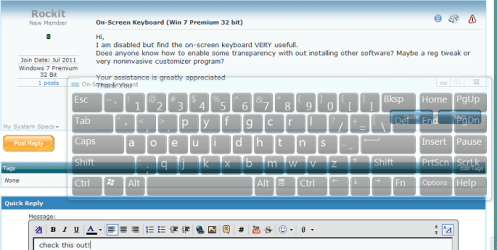
Feel the Wheel / Nattyware

Feel the Wheel (Feewhee) is a small free program which consists of one 6.5 KB file with no GUI.

addictivetips.com said:
The application is portable and works quietly in the background. Move the pointer to the title bar of the window and use mouse wheel to change the size of the window, with Shift key combination, it will change the windows transparency.
 

Attachments

  • OSK.png
    OSK.png
    42.6 KB · Views: 99

My Computer My Computer

Computer type
PC/Desktop
OS
Windows 8.1 ; Windows 7 x86 (Dec2008-Jan2013)
Other Info
"The scale icon at the top right of a post or tutorial is how you can give rep to the member."
Thank You Neutron16
I will give it a try ;)

Rockit
 

My Computer My Computer

Computer type
PC/Desktop
Computer Manufacturer/Model Number
Master Control (25 plus year old custom build)
OS
Windows 7 Premium 64 Bit
CPU
Opteron 185
Motherboard
DFI Lanparty N4 Ultra-d
Memory
4 gig OCZ High Performance Dual Channel @ 500 Mhz
Graphics Card(s)
ATI Radeon HD 5450 (Direct X11)
Sound Card
Creative SB Audigy Audio 2 ZS
Monitor(s) Displays
Dell 2208WFP (Digital)
Screen Resolution
1680 x 1050
Hard Drives
Plextor M3 Pro 128 Gb Sata 6 SSD (Main)

Western Digital Blue 320 Gb IDE 7200 RPM Internal Daily (Backup Drive)

Western Digital 2 TB RE4 SATA 3 Gb/s 7200 RPM 64 MB Cache Enterprise Hard Drive (External Data & Backup Drive).
PSU
OCZ GameXStream 850 Watt PSU.
Case
Antec Performance Series
Cooling
Working on it.
Keyboard
Saitek Eclipse II
Mouse
Kensington SlimBlade
Internet Speed
50 Gb
Antivirus
Microsoft Security Essentials
Browser
From Netscape to Internet Explorer.
Other Info
Got a mix of old and new hardware. Sound card hooked up to a 250 watt per channel Harman Kardon Amp to a pair of Dak 5 way old school acoustically suspended speakers.
It works great !!

Thanks Allot ;)
 

Attachments

  • Untitled.png
    Untitled.png
    149.2 KB · Views: 39

My Computer My Computer

Computer type
PC/Desktop
Computer Manufacturer/Model Number
Master Control (25 plus year old custom build)
OS
Windows 7 Premium 64 Bit
CPU
Opteron 185
Motherboard
DFI Lanparty N4 Ultra-d
Memory
4 gig OCZ High Performance Dual Channel @ 500 Mhz
Graphics Card(s)
ATI Radeon HD 5450 (Direct X11)
Sound Card
Creative SB Audigy Audio 2 ZS
Monitor(s) Displays
Dell 2208WFP (Digital)
Screen Resolution
1680 x 1050
Hard Drives
Plextor M3 Pro 128 Gb Sata 6 SSD (Main)

Western Digital Blue 320 Gb IDE 7200 RPM Internal Daily (Backup Drive)

Western Digital 2 TB RE4 SATA 3 Gb/s 7200 RPM 64 MB Cache Enterprise Hard Drive (External Data & Backup Drive).
PSU
OCZ GameXStream 850 Watt PSU.
Case
Antec Performance Series
Cooling
Working on it.
Keyboard
Saitek Eclipse II
Mouse
Kensington SlimBlade
Internet Speed
50 Gb
Antivirus
Microsoft Security Essentials
Browser
From Netscape to Internet Explorer.
Other Info
Got a mix of old and new hardware. Sound card hooked up to a 250 watt per channel Harman Kardon Amp to a pair of Dak 5 way old school acoustically suspended speakers.
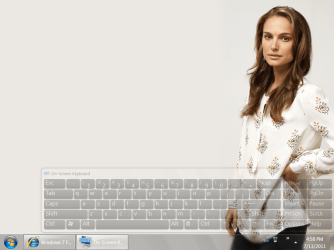
May I ask how you did this? I can make any window transparent, but not the on-screen keyboard. I think it has to do with the fact the OSK is never on top (does not have the focus)?
 

My Computer My Computer

Computer Manufacturer/Model Number
Asus T91MT
OS
Windows 7 Home Premium 32bit
CPU
Atom
Memory
2 GB
Graphics Card(s)
GMA500
OSK is never on top (does not have the focus)?
That is not quite true. To get it in focus, you just need to click on the titlebar of the application window or click it's icon in taskbar.
 

My Computer My Computer

Computer type
PC/Desktop
OS
Windows 8.1 ; Windows 7 x86 (Dec2008-Jan2013)
Other Info
"The scale icon at the top right of a post or tutorial is how you can give rep to the member."
I tried that, but if I then hold the shift key and roll the scroll wheel, nothing happens... Other windows do get transparent, not the OSK.
 

My Computer My Computer

Computer Manufacturer/Model Number
Asus T91MT
OS
Windows 7 Home Premium 32bit
CPU
Atom
Memory
2 GB
Graphics Card(s)
GMA500
Ok, we are talking about Microsoft Windows 7 On-Screen Keyboard (in Aero theme). I start the program first, then I start OSK. I get OSK window in focus by clicking inside letter O in "On-Screen" word, then I hold Shift key and turn mouse wheel down. It works.
 

My Computer My Computer

Computer type
PC/Desktop
OS
Windows 8.1 ; Windows 7 x86 (Dec2008-Jan2013)
Other Info
"The scale icon at the top right of a post or tutorial is how you can give rep to the member."
Yes, I'm using Windows 7 too (Aero theme). I tried your procedure, but no luck: the OSK does not get transparent. I can see in the OSK the shift key is pressed, the window has the focus, but nothing happens when I roll the wheel of my mouse. All other windows do get transparent (Firefox, Windows Live Mail, calculator etc.). Strange...
 

My Computer My Computer

Computer Manufacturer/Model Number
Asus T91MT
OS
Windows 7 Home Premium 32bit
CPU
Atom
Memory
2 GB
Graphics Card(s)
GMA500
Back
Top