
Laserjet 1200: "Windows could not find driver"

mjdamico

New member
Local time
4:34 AM
Messages
4
I've spent the last hour or so trying to get Windows 7 RC to recognize the HP Laserjet 1200 that I've connected to my PC via USB. I've downloaded the HP universal driver. I've downloaded Laserjet 1200 drivers from the Windows Catalog. But "HP Laserjet 1200 Printer" is still showing under "Other devices" in Device Manager, and the Driver tab shows that no drivers are installed.

I tried the Update Driver button, and directed it to look in the universal driver folder as well as the folders where I downloaded the Windows Catalog drivers, but each time it says that "Windows could not find driver software for your device."

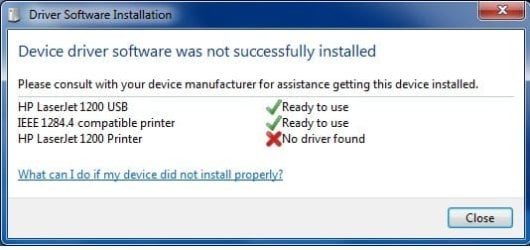
The automatic installation that occurs when I initially plug in the USB cable (screen shot attached) recognizes three devices, and automatically installs drivers for two of them. The third, "HP Laserjet 1200 Printer", gives an error.

Any advice? I'm really surprised that this is proving to be so difficult. Everything else with Window 7 has been a cinch.
 

Attachments
  • HP Laserjet 1200.jpg
    HP Laserjet 1200.jpg
    20.2 KB · Views: 110

My Computer My Computer

OS
Windows 7 RC
Have you installed the drivers you have downloaded? also have you tried running windows update?
 
When you say "install the drivers", do you mean running the install.exe setup wizard that's in the HP Universal Print driver archive? That's the only installation routine I've come across in regards to the drivers I've downloaded.

I've tried running install.exe in both Vista and XP compatibility modes, but each time I run it, the HP Universal Printing Installer then opens up the Windows Add Printer wizard... asks me if I want to add a local printer or a network/wireless/bluetooth printer. I choose Local Printer, and it asks me if I want to use an existing port or create a new port. I tried using an existing port, USB001 and USB002, but neither works.
 

My Computer My Computer

OS
Windows 7 RC
Here's how I got mine to work:

- go here: Microsoft Update Catalog (you will prolly have to install an ActiveX thingy)
- search: laserjet 1200 windows 7
- check the results you found with what Architecture you need (x86, amd64, ia64)
- add it to your basket, close popup info window
- click on "View Basket" at top right of results
- click "Download" button, select what drive or folder to save to
- click "Continue" .. wait for it to be done

- Once done unzip all files (mine where in "E:\Microsoft driver update for HP LaserJet 1200 Series PCL 5\AMD64-bg_zh-tw_cs_da_de_el_en_es_fi_fr_he_hu_it_ko_nl_no_pl_pt-br_ro_ru_hr_sk_sv_th_tr_sl_et_lv_lt_zh-cn_pt_ja-nec-4188_bacd1413e93b4a6362d9a2ca653c869f1c02f6f7"

- Startup Device Manager, right click "Other Device" LaserJet 1200
- update driver, goto folder where you unzipped files
- Update!
 

My Computer My Computer

Computer Manufacturer/Model Number
Asus V2-M3M8200 Barebones
OS
Windows 7 Professional x64
CPU
AMD Phenom II X4 925
Motherboard
V2-M3M8200 (basically a M3N78-VM)
Memory
4x1024mb Kingston HyperX DDR2-1066 KHX8500D2/1G
Graphics Card(s)
Asus GTS 450 OC
Sound Card
Creative Sound Blaster X-Fi Titanium PCIe
Monitor(s) Displays
Asus 24" LCD VH242H
Screen Resolution
1920x1080
Hard Drives
WDC WD5000AAKS
WDC WD5002ABYS
Seagate ST325062 USB-to-IDE
Fujitsu 160GB Pocket USB HDD
PSU
Antec Earthwatts EA-430D
Case
Asus V2-M3M8200
Cooling
120mm side fan & 80mm front & 92mm rear fan
Keyboard
Dell USB mini Multimedia
Mouse
Logitech MX518
Internet Speed
Comcast Xfinity
Other Info
Logitech Webcam Pro 9000
Accurian 40-1462 Speakers
little dot MKII Headphone Amp
Back
Top