IE8 IE7 do not have TABS. Why?

zapp22

New member
Power User
VIP
Local time
11:18 AM
Messages
730
Location
Tejas, northern Mexico
anyone dealt with this before?
I've repaired and refurbed MANY windows PC's and never seen this.
I on a rebuild I checked IE8 via windows updates, along with a few other security patches etc. I noticed when IE8 was installing, the onscreen progress indicator got stuck in a loop saying 'installing" or one of those messages, and it never blinked for like 40 minutes. I finally had to force it closed.
to my surprise, on a reboot, IE8 was "installed" but in using it, I noticed it had no Tab item on the context menu and no tab 'button' onscreen. tried to fix and could not, so I uninstalled it altogether and downloaded the whole IE7 install package.
Ran the install, it worked fine, but when I used it, no tabs.

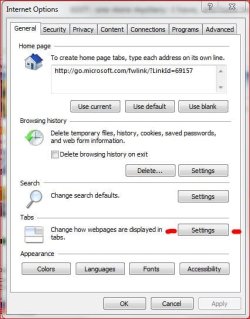
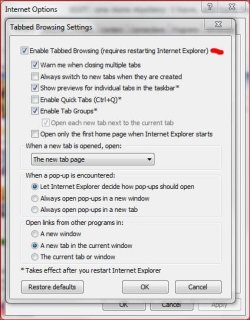
When I go to internet settings, General, there is no tab setting applet. it doesn't exist.

there are a LOT of posts in forums on this issue in both ie7 and ie8 but the 'advice' given usually results in the thread going zombie... never resolved. in fact I've yet to find one that truly looks like it was 'fixed', which is why I am posting.

clues?:huh:

otherwise, IE7 works great... way faster than the other IE's :zip:

EDIT: one more mystery: I have, and have had, no IE-No-Addons in the System Tools Menu.
 

My Computer My Computer

At a glance

Windows XP Pro SP3, Windows 7 Pro 32-bit, Win...Pentium 4 3.2GHz, Pentium 4 3.4GHz 64bit, Atom,4GB matched, 1GB, 2.5GB, 4.0 GBGeforce 8400 GS and others
Computer Manufacturer/Model Number
HP DC7600, HP DC7600[2], HP DC7100, Samsung NC10
OS
Windows XP Pro SP3, Windows 7 Pro 32-bit, Windows 7 Ultimate 64bit, Windows XP Home SP3
CPU
Pentium 4 3.2GHz, Pentium 4 3.4GHz 64bit, Atom,
Motherboard
Dunno
Memory
4GB matched, 1GB, 2.5GB, 4.0 GB
Graphics Card(s)
Geforce 8400 GS and others
Sound Card
RealteK ALC260 and others
Monitor(s) Displays
Asus HD
Screen Resolution
1920x1080
Hard Drives
WD Caviar 640gb SATA
Cooling
We Be Cool
Did you click on 'tools' under the address bar, then 'Internet options'?
 

My Computer My Computer

At a glance

Windows 7 Ultimate 32bit SP1Intel(R) Core(TM)2 Quad CPU @ 2.40GHz, 2400 MHz4 GBATI Radeon HD 2600 Pro
Computer type
PC/Desktop
Computer Manufacturer/Model Number
Bruce ... somewhere in his 40's
OS
Windows 7 Ultimate 32bit SP1
CPU
Intel(R) Core(TM)2 Quad CPU @ 2.40GHz, 2400 MHz
Motherboard
INTEL/D975XBX2
Memory
4 GB
Graphics Card(s)
ATI Radeon HD 2600 Pro
Monitor(s) Displays
Samsung SyncMaster 914v
Screen Resolution
1280 x 1024
Hard Drives
2/500GB each ... ST3500630AS ATA Device.
One is not connected
PSU
Rocketfish 700 W
Case
G.Skill Gigabyte Chassis
Keyboard
Standard PS/2 Keyboard
Mouse
Microsoft PS/2 Mouse
Internet Speed
DSL
Antivirus
Avira Internet Security
Browser
IE 11
Other Info
ATI HDMI Audio
I would love to know the technical 'why' behind all this, but here's what came to mind and I sorta proved it out...
The original install was what the COA on the machine calls for: MCE 2005. Tried to load that but it went like most if not all disc-based MCE installs - botched. It was limping when finally booted. I installed [re?] network services using WinXP SP3 disc, got rolling, updated as much as I could and was pretty coherent. It was after installing IE8 via Win Updates that the problem occurred: BUT, the minute I first had network access, I had installed Chrome [its installer is pretty tenacious] - worked well but I wondered if doing that had altered something about the User Acct that made trouble for IE7 and IE8.

So last night created a fresh new user acct with Admin privileges, logged on, and once again installed IE8. It had bugs, but it worked - tabs & all. for some reason there are pieces of IE loaded in Program Files folder, but the bulk is in \Windows\ie8

If you can explain the underlying 'why' of this I would be most happily a student....
 

My Computer My Computer

At a glance

Windows XP Pro SP3, Windows 7 Pro 32-bit, Win...Pentium 4 3.2GHz, Pentium 4 3.4GHz 64bit, Atom,4GB matched, 1GB, 2.5GB, 4.0 GBGeforce 8400 GS and others
Computer Manufacturer/Model Number
HP DC7600, HP DC7600[2], HP DC7100, Samsung NC10
OS
Windows XP Pro SP3, Windows 7 Pro 32-bit, Windows 7 Ultimate 64bit, Windows XP Home SP3
CPU
Pentium 4 3.2GHz, Pentium 4 3.4GHz 64bit, Atom,
Motherboard
Dunno
Memory
4GB matched, 1GB, 2.5GB, 4.0 GB
Graphics Card(s)
Geforce 8400 GS and others
Sound Card
RealteK ALC260 and others
Monitor(s) Displays
Asus HD
Screen Resolution
1920x1080
Hard Drives
WD Caviar 640gb SATA
Cooling
We Be Cool
Sorry but I'm a bit confused? What OS were you installing IE8 on? :confused:

I on a rebuild I checked IE8 via windows updates, along with a few other security patches etc. I noticed when IE8 was installing, the onscreen progress indicator got stuck in a loop saying 'installing" or one of those messages, and it never blinked for like 40 minutes.....

.....so I uninstalled it altogether and downloaded the whole IE7 install package.
Ran the install, it worked fine, but when I used it, no tabs.

I installed [re?] network services using WinXP SP3 disc, got rolling, updated as much as I could and was pretty coherent. It was after installing IE8 via Win Updates that the problem occurred...

Are we talking XP or Windows 7?

If we're taliking Windows 7, sorry but IE8 is native to Windows 7 - meaning it's automatically included/incorporated with the OS.

Sorry if I've misunderstood :confused:

BTW.....

Capture1.JPGCapture2.JPG
 

My Computer My Computer

At a glance

Windows 10 ProIntel Core i7-4770K (3.5Ghz)32 gig Corsair Dominator Platinum (4x8Gig)Sapphire Tri-X R9 Fury
Computer type
PC/Desktop
Computer Manufacturer/Model Number
Custom built by me.
OS
Windows 10 Pro
CPU
Intel Core i7-4770K (3.5Ghz)
Motherboard
Gigabyte G1 Sniper 5 (F10 Bios)
Memory
32 gig Corsair Dominator Platinum (4x8Gig)
Graphics Card(s)
Sapphire Tri-X R9 Fury
Sound Card
Soundblaster ZXR
Monitor(s) Displays
NEC PA242W 24" LCD Monitor
Screen Resolution
1920 x 1200
Hard Drives
Primary - Samsung 850 Pro (512gig), Samsung 840 Pro (256gig), 2TB WD Caviar Black.
PSU
EVGA Supernova 1000 G2
Case
Cooler Master HAF X
Cooling
Corsair H100i with Corsair Air Series SP120 Quiet Fans
Keyboard
Logitech Wireless Wave
Mouse
Logitech Performance MX
Internet Speed
High Speed Cable
Antivirus
Norton Security
Browser
IE11
Other Info
Memory Timings - 1866MHz @ 9-9-9-27-1T @ 1.5 volts
Back
Top