Solved How can I find my Restore files?

lilcarp87

Banned
Local time
5:47 PM
Messages
18
I just buy a new laptop but the market didn't give me any driver's disc or restore disc like I bought a desktop.

There is only 1 HDD (C:/) into my Window7 Home Premium, so how can I find my Restore files into my laptop? I read the Tutorials but daren't try yet.

P/s:
My laptop is Toshiba Satellite E205. Does anyone have the CD/DVD drivers or Window restore of its?
 

My Computer My Computer

At a glance

MS Windows 7 Home Premium 64-bitIntel Core i5 460M @ 2.53GHz, Arrandale 32nm ...4.0GB Dual-Channel DDR3 @ 533MHz (7-7-7-20)Generic PnP Monitor (1366x768@60Hz) 512MB GeF...
Computer Manufacturer/Model Number
Toshiba Satellite E205
OS
MS Windows 7 Home Premium 64-bit
CPU
Intel Core i5 460M @ 2.53GHz, Arrandale 32nm Technology
Motherboard
TOSHIBA Portable PC (CPU)
Memory
4.0GB Dual-Channel DDR3 @ 533MHz (7-7-7-20)
Graphics Card(s)
Generic PnP Monitor (1366x768@60Hz) 512MB GeForce 310M (Tosh
Sound Card
Realtek High Definition Audio Intel(R) Display Audio
Monitor(s) Displays
Generic PnP Monitor on Intel HD Graphics
Screen Resolution
1366x768 pixels
Hard Drives
TOSHIBA MK5065GSXN
I just buy a new laptop but the market didn't give me any driver's disc or restore disc like I bought a desktop.

There is only 1 HDD (C:/) into my Window7 Home Premium, so how can I find my Restore files into my laptop? I read the Tutorials but daren't try yet.

P/s:
My laptop is Toshiba Satellite E205. Does anyone have the CD/DVD drivers or Window restore of its?

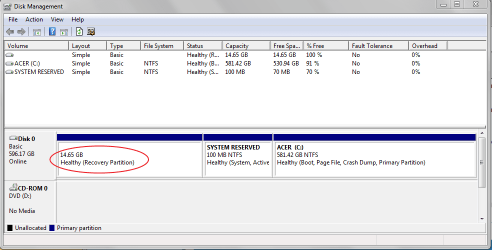
Go to Disk Management, and you'll see your Recovery Paritition.
Start > in the search box, type disk management > press Enter

You'll see something like this :

Image 4.png
 

My Computer My Computer

At a glance

Windows 7 Home Premium 64-bit, SP1Intel Pentium P6200, Cores 2, 2.13 GHz4 GBIntel HD
Computer Manufacturer/Model Number
Acer Aspire 7741Z
OS
Windows 7 Home Premium 64-bit, SP1
CPU
Intel Pentium P6200, Cores 2, 2.13 GHz
Memory
4 GB
Graphics Card(s)
Intel HD
Sound Card
unknown
Monitor(s) Displays
17.3 inches
Screen Resolution
1600 x 900
Hard Drives
640 GB, 5400 PRM
Thank you for replaying but it said: "100% Free" . Does it mean: "Have no files here" ?

What would I do in next step? I want to make a original recovery partition like when I restore in Desktop. ( use the Window restore disc and click restore - sometime I saw someone just need a window disc and he restore without the original restore window disc)

How can I do like that in my Laptop?
 

My Computer My Computer

At a glance

MS Windows 7 Home Premium 64-bitIntel Core i5 460M @ 2.53GHz, Arrandale 32nm ...4.0GB Dual-Channel DDR3 @ 533MHz (7-7-7-20)Generic PnP Monitor (1366x768@60Hz) 512MB GeF...
Computer Manufacturer/Model Number
Toshiba Satellite E205
OS
MS Windows 7 Home Premium 64-bit
CPU
Intel Core i5 460M @ 2.53GHz, Arrandale 32nm Technology
Motherboard
TOSHIBA Portable PC (CPU)
Memory
4.0GB Dual-Channel DDR3 @ 533MHz (7-7-7-20)
Graphics Card(s)
Generic PnP Monitor (1366x768@60Hz) 512MB GeForce 310M (Tosh
Sound Card
Realtek High Definition Audio Intel(R) Display Audio
Monitor(s) Displays
Generic PnP Monitor on Intel HD Graphics
Screen Resolution
1366x768 pixels
Hard Drives
TOSHIBA MK5065GSXN
I just buy a new laptop but the market didn't give me any driver's disc or restore disc like I bought a desktop.

There is only 1 HDD (C:/) into my Window7 Home Premium, so how can I find my Restore files into my laptop? I read the Tutorials but daren't try yet.

P/s:
My laptop is Toshiba Satellite E205. Does anyone have the CD/DVD drivers or Window restore of its?

lilcarp,

To correctly answer your question, I need you to carry out following:

UPDATE YOUR SEVENFORUMS SYSTEM SPECS


User CP (3rd item in the top menu bar) |
in left-hand column, under Your Profile, Edit System Spec |


Use Speccy - System Information - Free Download
and/or SIW to gather info for filling in the blanks.

Do me a favor and add the word laptop or desktop to the “system manufacturer” block.

Use the “Other Info” block for Optical Reader, Mouse, touchpad, wifi adapter, speakers, monitor

Scroll down and click on the SAVE CHANGES button.

======================================


Thanks, karl
 

My Computer My Computer

At a glance

MS Windows 7 Ultimate SP1 64-bitAMD A10-4600M6.00 GB Dual-Channel DDR3 @ 798MHz (11-11-12-28)AMD Radeon HD 7660G
Computer Manufacturer/Model Number
Toshiba Satellite S875D-S7239 laptop
OS
MS Windows 7 Ultimate SP1 64-bit
CPU
AMD A10-4600M
Motherboard
AMD Pumori (Socket FT1)
Memory
6.00 GB Dual-Channel DDR3 @ 798MHz (11-11-12-28)
Graphics Card(s)
AMD Radeon HD 7660G
Sound Card
High Definition Audio Device
Monitor(s) Displays
Generic PnP Monitor (1600x900@60Hz)
Screen Resolution
1600x900@60Hz
Hard Drives
SSD 119GB Corsair CSSD-V128GB2 ATA Device
Keyboard
Standard PS/2 Keyboard
Mouse
HP Wireless Optical Mobile Mouse Model FHA-3410
Internet Speed
What the local pub, local coffee shop offers.
Other Info
Optical Drive:MATSHITA BD-CMB UJ160B ATA Device


Also have an Asus ha1002xp netbook with Win 7 Ultimate installed.
Thank you for replaying but it said: "100% Free" . Does it mean: "Have no files here" ?

What would I do in next step? I want to make a original recovery partition like when I restore in Desktop. ( use the Window restore disc and click restore - sometime I saw someone just need a window disc and he restore without the original restore window disc)

How can I do like that in my Laptop?


To create a System Repair disc : You'll need a blank DVD
Start > Control Panel > Backup and Restore > left column, select Create a System Restore disc > follow the prompts.

To Create a System Image Backup : you'll need an external hard disk
Start > Control Panel > Backup and Restore > left column, select Create a System Image > follow the prompts ( make sure you select the backup copied to your external hd.)
Note : by default the " create system image " application is enabled. If you received " disable message ", use this tutorial to enable it :
http://www.sevenforums.com/tutorials/5455-create-system-image-enable-disable.html

To do a scheduled files backup : also use an external hard drive
Start > Control Panel > Backup and Restore > main column, Backup or Retore your files

To create a set of Factory Default discs ( recovery discs ). You'll need a few blank dvds. Mine needed 4.
I use this method on my Acer computer. It may varies from your Toshiba.

Start > All Programs > scroll to and select Acer > Acer eRecovery Management > the next window will give me the option of creating Factory Default discs as well as a Drivers and Applications disc.
see screenshot :

Image 5.png
 

My Computer My Computer

At a glance

Windows 7 Home Premium 64-bit, SP1Intel Pentium P6200, Cores 2, 2.13 GHz4 GBIntel HD
Computer Manufacturer/Model Number
Acer Aspire 7741Z
OS
Windows 7 Home Premium 64-bit, SP1
CPU
Intel Pentium P6200, Cores 2, 2.13 GHz
Memory
4 GB
Graphics Card(s)
Intel HD
Sound Card
unknown
Monitor(s) Displays
17.3 inches
Screen Resolution
1600 x 900
Hard Drives
640 GB, 5400 PRM
To correctly answer your question, I need you to carry out following:

UPDATE YOUR SEVENFORUMS SYSTEM SPECS

Thanks Karl! I've done by filling out in UserCP.

t-4-2 said:
Start > Control Panel > Backup and Restore > ...

Awesome post. Thank you very much!

But I don't have an external hard disk to create a System Image Backup because I installed many programs after I bought it.
11083026.png


Sound like I am asking many questions (excluding my content topic). Would you mind to support me to the end ( until I realize I have enough knowledge and Mark as Solved ), of course I will search anything else relative your replays.

Thank again! See ya next post.
 

My Computer My Computer

At a glance

MS Windows 7 Home Premium 64-bitIntel Core i5 460M @ 2.53GHz, Arrandale 32nm ...4.0GB Dual-Channel DDR3 @ 533MHz (7-7-7-20)Generic PnP Monitor (1366x768@60Hz) 512MB GeF...
Computer Manufacturer/Model Number
Toshiba Satellite E205
OS
MS Windows 7 Home Premium 64-bit
CPU
Intel Core i5 460M @ 2.53GHz, Arrandale 32nm Technology
Motherboard
TOSHIBA Portable PC (CPU)
Memory
4.0GB Dual-Channel DDR3 @ 533MHz (7-7-7-20)
Graphics Card(s)
Generic PnP Monitor (1366x768@60Hz) 512MB GeForce 310M (Tosh
Sound Card
Realtek High Definition Audio Intel(R) Display Audio
Monitor(s) Displays
Generic PnP Monitor on Intel HD Graphics
Screen Resolution
1366x768 pixels
Hard Drives
TOSHIBA MK5065GSXN
If you desire to make a system image, then you are going to be faced with a large handful of DVDs, which I do NOT recommend, or using an external USB drive.

External USB drives are quite economical. My backups are kept on an external usb drive.
 

My Computer My Computer

At a glance

MS Windows 7 Ultimate SP1 64-bitAMD A10-4600M6.00 GB Dual-Channel DDR3 @ 798MHz (11-11-12-28)AMD Radeon HD 7660G
Computer Manufacturer/Model Number
Toshiba Satellite S875D-S7239 laptop
OS
MS Windows 7 Ultimate SP1 64-bit
CPU
AMD A10-4600M
Motherboard
AMD Pumori (Socket FT1)
Memory
6.00 GB Dual-Channel DDR3 @ 798MHz (11-11-12-28)
Graphics Card(s)
AMD Radeon HD 7660G
Sound Card
High Definition Audio Device
Monitor(s) Displays
Generic PnP Monitor (1600x900@60Hz)
Screen Resolution
1600x900@60Hz
Hard Drives
SSD 119GB Corsair CSSD-V128GB2 ATA Device
Keyboard
Standard PS/2 Keyboard
Mouse
HP Wireless Optical Mobile Mouse Model FHA-3410
Internet Speed
What the local pub, local coffee shop offers.
Other Info
Optical Drive:MATSHITA BD-CMB UJ160B ATA Device


Also have an Asus ha1002xp netbook with Win 7 Ultimate installed.
To correctly answer your question, I need you to carry out following:

UPDATE YOUR SEVENFORUMS SYSTEM SPECS

Thanks Karl! I've done by filling out in UserCP.

t-4-2 said:
Start > Control Panel > Backup and Restore > ...

Awesome post. Thank you very much!

But I don't have an external hard disk to create a System Image Backup because I installed many programs after I bought it.
11083026.png


Sound like I am asking many questions (excluding my content topic). Would you mind to support me to the end ( until I realize I have enough knowledge and Mark as Solved ), of course I will search anything else relative your replays.

Thank again! See ya next post.

You MUST get yourself an external hard drive for files backup and most importantly for System Image Backup. It is useless to the point of silliness doing backups into the internal hard drive.
Why ?
What if you cannot boot the computer at all ?
What good is it if all your backups are inside the internal hard drive ? They don't do you any good, do they ?

They are many experts in this forum. As long as you post a question, someone will come alone and help you.
I only have less than 5 years of computer experience. I self-taught myself on how to use computer. My foundation, therefore, is not as solid as the experts.
 
Last edited:

My Computer My Computer

At a glance

Windows 7 Home Premium 64-bit, SP1Intel Pentium P6200, Cores 2, 2.13 GHz4 GBIntel HD
Computer Manufacturer/Model Number
Acer Aspire 7741Z
OS
Windows 7 Home Premium 64-bit, SP1
CPU
Intel Pentium P6200, Cores 2, 2.13 GHz
Memory
4 GB
Graphics Card(s)
Intel HD
Sound Card
unknown
Monitor(s) Displays
17.3 inches
Screen Resolution
1600 x 900
Hard Drives
640 GB, 5400 PRM
To correctly answer your question, I need you to carry out following:

UPDATE YOUR SEVENFORUMS SYSTEM SPECS

Thanks Karl! I've done by filling out in UserCP.

t-4-2 said:
Start > Control Panel > Backup and Restore > ...

Awesome post. Thank you very much!

But I don't have an external hard disk to create a System Image Backup because I installed many programs after I bought it.
11083026.png


Sound like I am asking many questions (excluding my content topic). Would you mind to support me to the end ( until I realize I have enough knowledge and Mark as Solved ), of course I will search anything else relative your replays.

Thank again! See ya next post.

>>>>
But I don't have an external hard disk to create a System Image Backup because I installed many programs after I bought it.

It does not matter. Go buy an Ext. HD, and start using it.
 

My Computer My Computer

At a glance

Windows 7 Home Premium 64-bit, SP1Intel Pentium P6200, Cores 2, 2.13 GHz4 GBIntel HD
Computer Manufacturer/Model Number
Acer Aspire 7741Z
OS
Windows 7 Home Premium 64-bit, SP1
CPU
Intel Pentium P6200, Cores 2, 2.13 GHz
Memory
4 GB
Graphics Card(s)
Intel HD
Sound Card
unknown
Monitor(s) Displays
17.3 inches
Screen Resolution
1600 x 900
Hard Drives
640 GB, 5400 PRM
another matter to consider is that Windows Backup and Restore will not let you back a partition to the same or even another partition which is located on the same physical drive.

You have only one physical drive.

You must have an external usb drive to perform a backup (unless you want a stack of dvds which is false economy).
 

My Computer My Computer

At a glance

MS Windows 7 Ultimate SP1 64-bitAMD A10-4600M6.00 GB Dual-Channel DDR3 @ 798MHz (11-11-12-28)AMD Radeon HD 7660G
Computer Manufacturer/Model Number
Toshiba Satellite S875D-S7239 laptop
OS
MS Windows 7 Ultimate SP1 64-bit
CPU
AMD A10-4600M
Motherboard
AMD Pumori (Socket FT1)
Memory
6.00 GB Dual-Channel DDR3 @ 798MHz (11-11-12-28)
Graphics Card(s)
AMD Radeon HD 7660G
Sound Card
High Definition Audio Device
Monitor(s) Displays
Generic PnP Monitor (1600x900@60Hz)
Screen Resolution
1600x900@60Hz
Hard Drives
SSD 119GB Corsair CSSD-V128GB2 ATA Device
Keyboard
Standard PS/2 Keyboard
Mouse
HP Wireless Optical Mobile Mouse Model FHA-3410
Internet Speed
What the local pub, local coffee shop offers.
Other Info
Optical Drive:MATSHITA BD-CMB UJ160B ATA Device


Also have an Asus ha1002xp netbook with Win 7 Ultimate installed.
Thank for suggest. Actually, I just installed many software and it just take my time to reinstall. So, I have an 8GB USB Flash Driver for document files such as Word; Excel; Power Point ...

Comeback with
t-4-2 said:
To create a set of Factory Default discs ( recovery discs ).
I also do that with my Toshiba Recovery Media Creator and got the error:
89520909.png


Then I was looking for the recovery support on Toshiba's website. They said there is a set of Recovery Media is sold ($30). And I have several questions about Disk Management


61623286.png

  1. What is the Volume which contain 1.46GB - Healthy ( Active Recovery Partition )?
  2. What is the Volume which contain 9.34GB - Healthy ( Primary Partition )?
  3. My (C:/) - I know it.

Does that 1.46GB Volume support for the set of Toshiba Recovery Media ? If I format and install a new OS with a Window disk, can I use that set after what I done?

What can I do with the 9.34GB Volume?

And why there is 3 Volumes on my laptop, but in fact, I just only see the 454.96GB Volume?
 

My Computer My Computer

At a glance

MS Windows 7 Home Premium 64-bitIntel Core i5 460M @ 2.53GHz, Arrandale 32nm ...4.0GB Dual-Channel DDR3 @ 533MHz (7-7-7-20)Generic PnP Monitor (1366x768@60Hz) 512MB GeF...
Computer Manufacturer/Model Number
Toshiba Satellite E205
OS
MS Windows 7 Home Premium 64-bit
CPU
Intel Core i5 460M @ 2.53GHz, Arrandale 32nm Technology
Motherboard
TOSHIBA Portable PC (CPU)
Memory
4.0GB Dual-Channel DDR3 @ 533MHz (7-7-7-20)
Graphics Card(s)
Generic PnP Monitor (1366x768@60Hz) 512MB GeForce 310M (Tosh
Sound Card
Realtek High Definition Audio Intel(R) Display Audio
Monitor(s) Displays
Generic PnP Monitor on Intel HD Graphics
Screen Resolution
1366x768 pixels
Hard Drives
TOSHIBA MK5065GSXN
Thank for suggest. Actually, I just installed many software and it just take my time to reinstall. So, I have an 8GB USB Flash Driver for document files such as Word; Excel; Power Point ...

Comeback with
t-4-2 said:
To create a set of Factory Default discs ( recovery discs ).
I also do that with my Toshiba Recovery Media Creator and got the error:
89520909.png


Then I was looking for the recovery support on Toshiba's website. They said there is a set of Recovery Media is sold ($30). And I have several questions about Disk Management


61623286.png
  1. What is the Volume which contain 1.46GB - Healthy ( Active Recovery Partition )?
  2. What is the Volume which contain 9.34GB - Healthy ( Primary Partition )?
  3. My (C:/) - I know it.
Does that 1.46GB Volume support for the set of Toshiba Recovery Media ? If I format and install a new OS with a Window disk, can I use that set after what I done?

What can I do with the 9.34GB Volume?

And why there is 3 Volumes on my laptop, but in fact, I just only see the 454.96GB Volume?

I don't have enough qualifications to answer those questions and your problem of creating Factory Default discs. Wait for the experts replies. Worse comes to worst, bite the bullet and cough up $30.:( It actually is a wise investment. It will save you from buying a new computer when disaster strikes.
One thing I can say ... 1.46 GB for Recovery Partition seems insufficient. There should be at least 10 - 15 GB.

Sorry I am of no help to you.
 

My Computer My Computer

At a glance

Windows 7 Home Premium 64-bit, SP1Intel Pentium P6200, Cores 2, 2.13 GHz4 GBIntel HD
Computer Manufacturer/Model Number
Acer Aspire 7741Z
OS
Windows 7 Home Premium 64-bit, SP1
CPU
Intel Pentium P6200, Cores 2, 2.13 GHz
Memory
4 GB
Graphics Card(s)
Intel HD
Sound Card
unknown
Monitor(s) Displays
17.3 inches
Screen Resolution
1600 x 900
Hard Drives
640 GB, 5400 PRM
It's ok. Thank for supporting me all time. :D
I gonna spend $ to buy that set Recovery Media but I need to look up several answers and maybe have several questions more :geek:
 

My Computer My Computer

At a glance

MS Windows 7 Home Premium 64-bitIntel Core i5 460M @ 2.53GHz, Arrandale 32nm ...4.0GB Dual-Channel DDR3 @ 533MHz (7-7-7-20)Generic PnP Monitor (1366x768@60Hz) 512MB GeF...
Computer Manufacturer/Model Number
Toshiba Satellite E205
OS
MS Windows 7 Home Premium 64-bit
CPU
Intel Core i5 460M @ 2.53GHz, Arrandale 32nm Technology
Motherboard
TOSHIBA Portable PC (CPU)
Memory
4.0GB Dual-Channel DDR3 @ 533MHz (7-7-7-20)
Graphics Card(s)
Generic PnP Monitor (1366x768@60Hz) 512MB GeForce 310M (Tosh
Sound Card
Realtek High Definition Audio Intel(R) Display Audio
Monitor(s) Displays
Generic PnP Monitor on Intel HD Graphics
Screen Resolution
1366x768 pixels
Hard Drives
TOSHIBA MK5065GSXN
It's ok. Thank for supporting me all time. :D
I gonna spend $ to buy that set Recovery Media but I need to look up several answers and maybe have several questions more :geek:

For you future reference, ( my own curiosity too )......
how about you asking the Toshiba tech about why the Recovery Partition is only 1.46GB, and what is the purpose of the other 9.34GB " primary partition ".
I have a feeling those are related to your failure to create factory default discs.
 

My Computer My Computer

At a glance

Windows 7 Home Premium 64-bit, SP1Intel Pentium P6200, Cores 2, 2.13 GHz4 GBIntel HD
Computer Manufacturer/Model Number
Acer Aspire 7741Z
OS
Windows 7 Home Premium 64-bit, SP1
CPU
Intel Pentium P6200, Cores 2, 2.13 GHz
Memory
4 GB
Graphics Card(s)
Intel HD
Sound Card
unknown
Monitor(s) Displays
17.3 inches
Screen Resolution
1600 x 900
Hard Drives
640 GB, 5400 PRM
Did you delete your Recovery Partition?
 

My Computer My Computer

At a glance

ME/XP/Vista/Win7
OS
ME/XP/Vista/Win7
The 1.46 & 9.43gb partitions is the Recovery.
 

My Computer My Computer

At a glance

ME/XP/Vista/Win7
OS
ME/XP/Vista/Win7

My Computer My Computer

At a glance

W 7 64-bit UltimateIntel Q9550 Yorkfield8GB Dominator 8500C5DATI : XFX 5870
Computer Manufacturer/Model Number
* BFK Customs *
OS
W 7 64-bit Ultimate
CPU
Intel Q9550 Yorkfield
Motherboard
ASUS P5Q Pro
Memory
8GB Dominator 8500C5D
Graphics Card(s)
ATI : XFX 5870
Sound Card
Realtek HD Audio 7-1
Monitor(s) Displays
1x 47" LCD HDMI & 3x 26" LCD HDMI
Screen Resolution
1920x1080P & 1920x1200
Hard Drives
1x 80GB Intel X25-M G2 SSD : 1x 500GB & 1x 640GB WD Caviar Black(s)
PSU
Corsair 620HX
Case
Cooler Master RC-690
Cooling
Tuniq Tower 120, 2x 140mm and 3x 120mm case fans
Keyboard
Microsoft 500
Mouse
Razer Diamondback 3G
Internet Speed
14 Mb/s
Other Info
1x Koutech 3Gb/s SATA HDD Hot Swap Rack
theog said:
Did you delete your Recovery Partition?
The 1.46 & 9.43gb partitions is the Recovery.
Thank for answering! No, I didn't. My systiem is fine now but I just want to learn more knowledge to solve in emergency cases future.

Hello.


Perhaps the information in this guide linked below will be a help to you.

Thank for suggesting. Actually, I just want to have a Recovery Disc which contain the Toshiba apps + OS + Market apps ( of course it has drivers too ) like the 1st time when I bought it.

Because sometime I need these app:
mytoshibaapps.png


BTW! Thank you guys all.
 

My Computer My Computer

At a glance

MS Windows 7 Home Premium 64-bitIntel Core i5 460M @ 2.53GHz, Arrandale 32nm ...4.0GB Dual-Channel DDR3 @ 533MHz (7-7-7-20)Generic PnP Monitor (1366x768@60Hz) 512MB GeF...
Computer Manufacturer/Model Number
Toshiba Satellite E205
OS
MS Windows 7 Home Premium 64-bit
CPU
Intel Core i5 460M @ 2.53GHz, Arrandale 32nm Technology
Motherboard
TOSHIBA Portable PC (CPU)
Memory
4.0GB Dual-Channel DDR3 @ 533MHz (7-7-7-20)
Graphics Card(s)
Generic PnP Monitor (1366x768@60Hz) 512MB GeForce 310M (Tosh
Sound Card
Realtek High Definition Audio Intel(R) Display Audio
Monitor(s) Displays
Generic PnP Monitor on Intel HD Graphics
Screen Resolution
1366x768 pixels
Hard Drives
TOSHIBA MK5065GSXN
It's ok. Thank for supporting me all time. :D
I gonna spend $ to buy that set Recovery Media but I need to look up several answers and maybe have several questions more :geek:

For you future reference, ( my own curiosity too )......
how about you asking the Toshiba tech about why the Recovery Partition is only 1.46GB, and what is the purpose of the other 9.34GB " primary partition ".
I have a feeling those are related to your failure to create factory default discs.

I would have a word Toshiba Support.
 

My Computer My Computer

At a glance

ME/XP/Vista/Win7
OS
ME/XP/Vista/Win7
I would have a word Toshiba Support.

The supporter from Toshiba said that I can restore to its original out-of-the-box content by using that set Toshiba Recovery Media EVEN if I format & install a new OS on my laptop.

I'll try to make a disc from Tutorials of Sevenforums.com

Now my questions are solved. Thank again & agian :)
 

My Computer My Computer

At a glance

MS Windows 7 Home Premium 64-bitIntel Core i5 460M @ 2.53GHz, Arrandale 32nm ...4.0GB Dual-Channel DDR3 @ 533MHz (7-7-7-20)Generic PnP Monitor (1366x768@60Hz) 512MB GeF...
Computer Manufacturer/Model Number
Toshiba Satellite E205
OS
MS Windows 7 Home Premium 64-bit
CPU
Intel Core i5 460M @ 2.53GHz, Arrandale 32nm Technology
Motherboard
TOSHIBA Portable PC (CPU)
Memory
4.0GB Dual-Channel DDR3 @ 533MHz (7-7-7-20)
Graphics Card(s)
Generic PnP Monitor (1366x768@60Hz) 512MB GeForce 310M (Tosh
Sound Card
Realtek High Definition Audio Intel(R) Display Audio
Monitor(s) Displays
Generic PnP Monitor on Intel HD Graphics
Screen Resolution
1366x768 pixels
Hard Drives
TOSHIBA MK5065GSXN
Back
Top