Shockwave games wont run on Windows 7 Ultimate

wr0ngf00t4ward

New member
Local time
5:23 AM
Messages
15
hello!

hi, im new! sorry if i do something wrong in this post xD please just let me know and i will remember for next time.

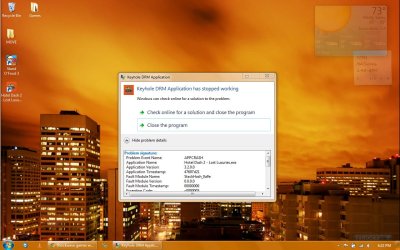
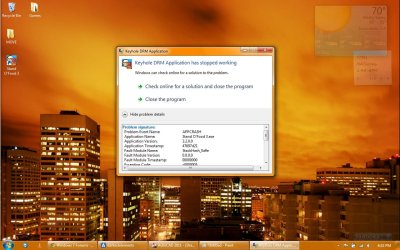
ok, so my issue is with Shockwave games downloaded and played with an Unlimited account. the download goes through fine and the install finishes cleanly (or so im assuming). but when i try to get the game running it crashes and shows this error message:
argh.jpg

i am on a laptop that is running Windows 7 Ultimate 32bit. im fairly sure its related to my OS since everything was fine before i upgraded from Vista Home Premium. however, im a basic user and i dont know anything about what goes on behind the screen :3


thanks in advanced for everyones help!
-wr0ngf00t4ward
 

My Computer My Computer

At a glance

Windows 7 Ultimate 32bitAMD Athlon(tm) 64 X2 Dual-Core Processor TK-5...2.87GBATI Radeon X1200 Series
Computer Manufacturer/Model Number
TOSINV SB600
OS
Windows 7 Ultimate 32bit
CPU
AMD Athlon(tm) 64 X2 Dual-Core Processor TK-55, 1800Mhz
Memory
2.87GB
Graphics Card(s)
ATI Radeon X1200 Series
Sound Card
Microsoft HD Audio Device
Monitor(s) Displays
ATI Radeon X1200 Series
Screen Resolution
1280x800x59 hertz
Hard Drives
74.53GB total/14GB free
volume serial number: E40F9319
Cooling
standard laptop fan; USB powered fan (under laptop)
Keyboard
Standard PS/2 Keyboard
Mouse
Logitech M305 wireless mouse
Uninstall Adobe Shockwave. Re-install it again.
 

My Computer My Computer

At a glance

Ubuntu 12.10Intel Core i7 720QM4GB RAMNVIDIA GeForce 230M
Computer Manufacturer/Model Number
HP Pavilion dv6-2020ev
OS
Ubuntu 12.10
CPU
Intel Core i7 720QM
Motherboard
Its a HP secret...
Memory
4GB RAM
Graphics Card(s)
NVIDIA GeForce 230M
Sound Card
IDT
Screen Resolution
1366x768
Hard Drives
500 GB
Mouse
HP
Internet Speed
4 Mbps
ah thanks for the reply, but unfortunately that didnt help :L
 

My Computer My Computer

At a glance

Windows 7 Ultimate 32bitAMD Athlon(tm) 64 X2 Dual-Core Processor TK-5...2.87GBATI Radeon X1200 Series
Computer Manufacturer/Model Number
TOSINV SB600
OS
Windows 7 Ultimate 32bit
CPU
AMD Athlon(tm) 64 X2 Dual-Core Processor TK-55, 1800Mhz
Memory
2.87GB
Graphics Card(s)
ATI Radeon X1200 Series
Sound Card
Microsoft HD Audio Device
Monitor(s) Displays
ATI Radeon X1200 Series
Screen Resolution
1280x800x59 hertz
Hard Drives
74.53GB total/14GB free
volume serial number: E40F9319
Cooling
standard laptop fan; USB powered fan (under laptop)
Keyboard
Standard PS/2 Keyboard
Mouse
Logitech M305 wireless mouse
The problem may lie with the Shockwave game you have and not Shockwave itself. Can you try another Shockwave program to see if you still get the error or not?

Slasher
 

My Computer My Computer

At a glance

Ubuntu 12.10Intel Core i7 720QM4GB RAMNVIDIA GeForce 230M
Computer Manufacturer/Model Number
HP Pavilion dv6-2020ev
OS
Ubuntu 12.10
CPU
Intel Core i7 720QM
Motherboard
Its a HP secret...
Memory
4GB RAM
Graphics Card(s)
NVIDIA GeForce 230M
Sound Card
IDT
Screen Resolution
1366x768
Hard Drives
500 GB
Mouse
HP
Internet Speed
4 Mbps
i was actually on the Shockwave forums for a while looking to see if anyone was having this issue... i didnt have much luck finding anything :L so yeah ive tried a couple other games as well and the same error comes up:

argh.jpg

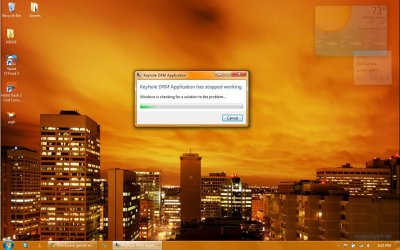
whats interesting is when i go with "check online for a solution" this little window pops up:

meh.jpg

when the bar clears, the window disappears... but then nothing else happens. when i try the game again the same error pops up.

i hope that was helpful?
 

My Computer My Computer

At a glance

Windows 7 Ultimate 32bitAMD Athlon(tm) 64 X2 Dual-Core Processor TK-5...2.87GBATI Radeon X1200 Series
Computer Manufacturer/Model Number
TOSINV SB600
OS
Windows 7 Ultimate 32bit
CPU
AMD Athlon(tm) 64 X2 Dual-Core Processor TK-55, 1800Mhz
Memory
2.87GB
Graphics Card(s)
ATI Radeon X1200 Series
Sound Card
Microsoft HD Audio Device
Monitor(s) Displays
ATI Radeon X1200 Series
Screen Resolution
1280x800x59 hertz
Hard Drives
74.53GB total/14GB free
volume serial number: E40F9319
Cooling
standard laptop fan; USB powered fan (under laptop)
Keyboard
Standard PS/2 Keyboard
Mouse
Logitech M305 wireless mouse

My Computer My Computer

At a glance

Windows 7 Ultimate x64/Windows 8 Consumer Pre...Intel Pentium Dual Core E6700 3.2GHzStrontium 8192MB DDR3 1333Mhzmsi GeForce N560GTX-M2D1GD5 1GB
Computer Manufacturer/Model Number
Custom Build
OS
Windows 7 Ultimate x64/Windows 8 Consumer Preview x64/Ubuntu 11.04
CPU
Intel Pentium Dual Core E6700 3.2GHz
Motherboard
ASUS P5G41T-M LX
Memory
Strontium 8192MB DDR3 1333Mhz
Graphics Card(s)
msi GeForce N560GTX-M2D1GD5 1GB
Sound Card
Realtek HD Audio
Monitor(s) Displays
CHIMEI CMV 221D 22"
Screen Resolution
1680x1050
Hard Drives
Seagate Barracuda LP Green 3.5'' 2TB Internal HDD 5900RPM + WD Elements Desktop 1TB External HDD 7200RPM
PSU
SHAW Viper-1500w Gaming PSU
Case
Black eMaxx ATX Mini Tower Case
Keyboard
Microsoft Wireless Keyboard 1000
Mouse
Microsoft Wireless Optical Mouse 2000
Internet Speed
100GB @ 4.76Mbps
Updating DirectX won't really help as its using the Shockwave runtime, not DirectX, but updating it won't hurt.

You can try updating the GPU, but I doubt that would fix it, again, updating won't hurt.

Can you try uninstalling Shockwave with Revo Uninstaller.

Download and install Revo Uninstaller Download Revo Uninstaller Freeware - Free and Full Download - Uninstall software, remove programs, solve uninstall problems (Check out this tutorial http://www.sevenforums.com/tutorials/106594-revo-uninstaller-freeware-uninstall-programs.html on how to uninstall with it).

After you uninstalled with Revo, try installing Shockwave again.
 

My Computer My Computer

At a glance

Ubuntu 12.10Intel Core i7 720QM4GB RAMNVIDIA GeForce 230M
Computer Manufacturer/Model Number
HP Pavilion dv6-2020ev
OS
Ubuntu 12.10
CPU
Intel Core i7 720QM
Motherboard
Its a HP secret...
Memory
4GB RAM
Graphics Card(s)
NVIDIA GeForce 230M
Sound Card
IDT
Screen Resolution
1366x768
Hard Drives
500 GB
Mouse
HP
Internet Speed
4 Mbps
im fairly sure its related to my OS since everything was fine before i upgraded from Vista Home Premium.

Are you absolutely sure you did an upgrade instead of a Clean Install? Because that may just be your problem. Ever since Win7 came out, I've been hearing about all sorts of problems people had with games and applications because they upgraded from Vista instead of wiping it and doing a clean install of WIn7. Actually doing a clean install after fixed most, if not all of their problems. So that may just be your problem, and the solution.
 

My Computer My Computer

At a glance

Windows 7 Home Premium x64Intel Core i5 2500K8GB DDR3nVidia GeForce GTX650 Ti BOOST
Computer type
Laptop
Computer Manufacturer/Model Number
Custom
OS
Windows 7 Home Premium x64
CPU
Intel Core i5 2500K
Motherboard
MSI MS-7750
Memory
8GB DDR3
Graphics Card(s)
nVidia GeForce GTX650 Ti BOOST
Sound Card
Realtek
Monitor(s) Displays
21' Philips
Screen Resolution
Full HD
Hard Drives
1TB
PSU
500W
sorry everyone, i had to step out for a little while...


JaidynM:

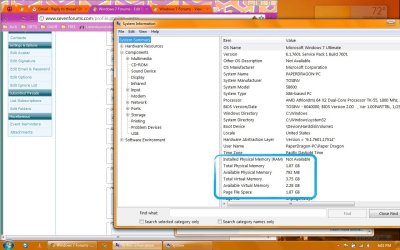
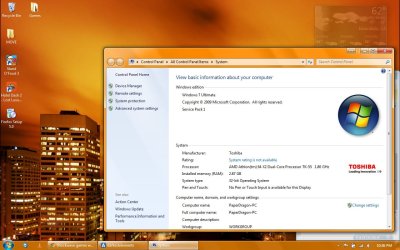
sorry about that, i totally forgot to add my specs. ive filled out the info to the best of my ability. however, i had a bit of a problem figuring out how much RAM i have:

ram2.jpg

as you can see it says 'not available' for installed RAM... i know the laptop was sold with 2GB or RAM. now im about to be very unhelpful, please bear with me xD about 5-6 months ago my boyfriend helped me add a new card and i cant remember if it was 1GB or 2GB. so the total RAM should be atleast 3GB. the guy at Fry's said my system wouldnt recognize anything over 3GB and i didnt really understand what he meant by that, my boyfriend did all the talking :P anyway, i would look but ive never opened the computer before and im hesitant to do it by myself... if its really necessary i could shutdown and try but i wont unless i really really have to xD
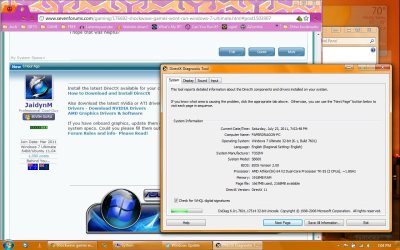
in regards to Direct X, i believe i have the latest version:

directx.jpg

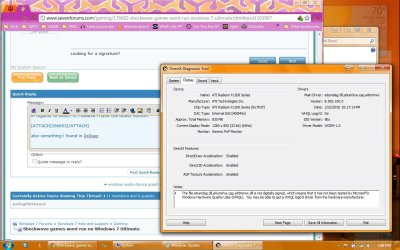
also something i found in DxDiag:

ati.jpg

when i was still using Vista, a friend showed me how to use the Catalyst Controller to make my screen brighter so i could see in super dark dungeons in Diablo II :D while playing a few weeks, ago i realized it was gone. after some snooping i learned that Windows 7 doesnt particularly like my Video Card. so i did some forum diving and found something marked for Windows XP that works alright for me. this is the Catalyst Controller i have now:
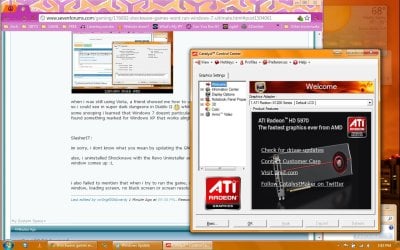
ati control.jpg


SlasherIT:

im sorry, i dont know what you mean by updating the GNU. could you clarify?

also, i uninstalled Shockwave with the Revo Uninstaller and then reinstalled Shockwave, but the same error window comes up :L


i also failed to mention that when i try to run the game, i see no signs of the game trying to boot up (game window, loading screen, no black screen or screen resolution change).
 
Last edited:

My Computer My Computer

At a glance

Windows 7 Ultimate 32bitAMD Athlon(tm) 64 X2 Dual-Core Processor TK-5...2.87GBATI Radeon X1200 Series
Computer Manufacturer/Model Number
TOSINV SB600
OS
Windows 7 Ultimate 32bit
CPU
AMD Athlon(tm) 64 X2 Dual-Core Processor TK-55, 1800Mhz
Memory
2.87GB
Graphics Card(s)
ATI Radeon X1200 Series
Sound Card
Microsoft HD Audio Device
Monitor(s) Displays
ATI Radeon X1200 Series
Screen Resolution
1280x800x59 hertz
Hard Drives
74.53GB total/14GB free
volume serial number: E40F9319
Cooling
standard laptop fan; USB powered fan (under laptop)
Keyboard
Standard PS/2 Keyboard
Mouse
Logitech M305 wireless mouse
Gornot:

actually i believe it was a clean install... after backing up everything important on my drive, my boyfriend emptied it out and started totally from scratch. i dont know the exact specifics involved, but all the Toshiba stuff that was preinstalled when i bought the laptop have been removed. i remember a boot disc being made and all the hassles involved with it... i also recall an issue involving a Service Pack, which required clearing it out and redoing everything...

i want to say im about 95% sure he cleaned Vista off before installing 7...

sorry i cant be more specific, my boyfriend did all of the actual work and hes out of town on business xD i try to be observant when he does all these things so i can do some stuff by myself, but i have trouble remembering all the small details...

ps: it was decided that updating to 7 would be best done after adding new RAM, so this was all done at the same time.
 
Last edited:

My Computer My Computer

At a glance

Windows 7 Ultimate 32bitAMD Athlon(tm) 64 X2 Dual-Core Processor TK-5...2.87GBATI Radeon X1200 Series
Computer Manufacturer/Model Number
TOSINV SB600
OS
Windows 7 Ultimate 32bit
CPU
AMD Athlon(tm) 64 X2 Dual-Core Processor TK-55, 1800Mhz
Memory
2.87GB
Graphics Card(s)
ATI Radeon X1200 Series
Sound Card
Microsoft HD Audio Device
Monitor(s) Displays
ATI Radeon X1200 Series
Screen Resolution
1280x800x59 hertz
Hard Drives
74.53GB total/14GB free
volume serial number: E40F9319
Cooling
standard laptop fan; USB powered fan (under laptop)
Keyboard
Standard PS/2 Keyboard
Mouse
Logitech M305 wireless mouse
Yup, you pretty much described a clean install perfectly ;)

Now, since I've re-read all the previous posts, there is one last thing I might suggest:

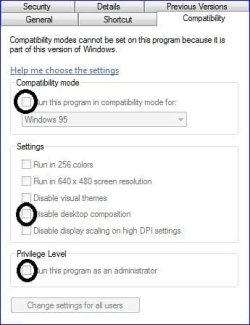
Right click on a game you wish to play (the .exe file or shortcut on the desktop)
Go to Properties
Go to Compatibility tab
Check "disable desktop composition"
Check "run this program as an administrator" (just in case)

If it doesn't work, try checking Compatibility mode and choose either Vista or XP from the list below. Here's an example of what I mean:

comptab.JPG

Not sure if that'll do it, but it may just be worth a shot.
 

My Computer My Computer

At a glance

Windows 7 Home Premium x64Intel Core i5 2500K8GB DDR3nVidia GeForce GTX650 Ti BOOST
Computer type
Laptop
Computer Manufacturer/Model Number
Custom
OS
Windows 7 Home Premium x64
CPU
Intel Core i5 2500K
Motherboard
MSI MS-7750
Memory
8GB DDR3
Graphics Card(s)
nVidia GeForce GTX650 Ti BOOST
Sound Card
Realtek
Monitor(s) Displays
21' Philips
Screen Resolution
Full HD
Hard Drives
1TB
PSU
500W
Gornot:

haha yeah, i use the term 'update' fairly loosely. i realize this can be misleading. the manner of the OS change was something i didnt calculate when assessing this situation and recalling that unstable transition not too long ago reminds me of the issues we had to deal with, both during and for a short time after. its been a while since and 7 has been running quite beautifully, so i didnt think to make that connection xD

anyway, running as admin and changing compatibility modes is actually something i used very recently when i had issues with Raptor: Call of the Shadows! so im quite familiar with it and use it regularly (usually checking 'run as admin' fixes it).

'run as admin' didnt change anything :L HOWEVER, when i checked 'disable desktop composition' (never tried checking this box before) and ran it in compatibility mode for Vista, XP (i tried both service pack 2 and 3) SOMETHING happened! the screen blinked and blacked out for a split second, then went back to normal. there were a few black spaces left but refreshing the desktop and moving my windows got rid of them.

sorry to say, but thats all i got xD

ps: i tried with all the compatibility modes i have available, and the only thing that would change is the duration of the black screen, and the number of times my screen would blink...
 
Last edited:

My Computer My Computer

At a glance

Windows 7 Ultimate 32bitAMD Athlon(tm) 64 X2 Dual-Core Processor TK-5...2.87GBATI Radeon X1200 Series
Computer Manufacturer/Model Number
TOSINV SB600
OS
Windows 7 Ultimate 32bit
CPU
AMD Athlon(tm) 64 X2 Dual-Core Processor TK-55, 1800Mhz
Memory
2.87GB
Graphics Card(s)
ATI Radeon X1200 Series
Sound Card
Microsoft HD Audio Device
Monitor(s) Displays
ATI Radeon X1200 Series
Screen Resolution
1280x800x59 hertz
Hard Drives
74.53GB total/14GB free
volume serial number: E40F9319
Cooling
standard laptop fan; USB powered fan (under laptop)
Keyboard
Standard PS/2 Keyboard
Mouse
Logitech M305 wireless mouse
Updating DirectX won't really help as its using the Shockwave runtime, not DirectX, but updating it won't hurt.

I know, but it's a start. ;)

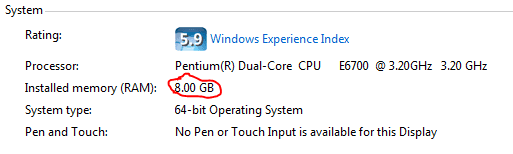
however, i had a bit of a problem figuring out how much RAM i have:

Hit Win+Pause Break/Pause and that should tell you how much memory you have. Look at the screenshot if you need help.

Capture.PNG


Also try uninstalling and then installing Shockwave.
Games | FREE Online Games & Download Games | Play Games on Shockwave

Could you also try opening Firefox and playing a flash game? This game for example. If you don't have Firefox, download it from one of the links below.
Get More From Your Firefox
Mozilla Firefox - Free software downloads and software reviews - CNET Download.com
 

My Computer My Computer

At a glance

Windows 7 Ultimate x64/Windows 8 Consumer Pre...Intel Pentium Dual Core E6700 3.2GHzStrontium 8192MB DDR3 1333Mhzmsi GeForce N560GTX-M2D1GD5 1GB
Computer Manufacturer/Model Number
Custom Build
OS
Windows 7 Ultimate x64/Windows 8 Consumer Preview x64/Ubuntu 11.04
CPU
Intel Pentium Dual Core E6700 3.2GHz
Motherboard
ASUS P5G41T-M LX
Memory
Strontium 8192MB DDR3 1333Mhz
Graphics Card(s)
msi GeForce N560GTX-M2D1GD5 1GB
Sound Card
Realtek HD Audio
Monitor(s) Displays
CHIMEI CMV 221D 22"
Screen Resolution
1680x1050
Hard Drives
Seagate Barracuda LP Green 3.5'' 2TB Internal HDD 5900RPM + WD Elements Desktop 1TB External HDD 7200RPM
PSU
SHAW Viper-1500w Gaming PSU
Case
Black eMaxx ATX Mini Tower Case
Keyboard
Microsoft Wireless Keyboard 1000
Mouse
Microsoft Wireless Optical Mouse 2000
Internet Speed
100GB @ 4.76Mbps
just had an interesting discovery!

after a quick call to my boyfriend, he confirmed that i should have 3GBs of RAM. he then suggested i boot with each stick separately to figure out which stick was which (the labels on the stick dont have the RAM capacity, wtf?!) and then putting the larger stick (1.87GB) in the first slot and the smaller stick (875MB) in the next slot. NOW im getting a 2.87GB RAM reading. interesting how switching slots made that difference... and i actually feel quite foolish for not noticing this before! does that mean my extra RAM wasnt being used all this time?!

sadly, this did not change the situation with the game :L


JaidynM:

uninstalling/reinstalling Shockwave didnt make a difference, sadly :L

also, that game, and several other browser games work fine. in both Google Chrome (which i use most often) and Firefox i have no problems.
 

Attachments

  • ramramram.jpg
    ramramram.jpg
    122.4 KB · Views: 8
Last edited:

My Computer My Computer

At a glance

Windows 7 Ultimate 32bitAMD Athlon(tm) 64 X2 Dual-Core Processor TK-5...2.87GBATI Radeon X1200 Series
Computer Manufacturer/Model Number
TOSINV SB600
OS
Windows 7 Ultimate 32bit
CPU
AMD Athlon(tm) 64 X2 Dual-Core Processor TK-55, 1800Mhz
Memory
2.87GB
Graphics Card(s)
ATI Radeon X1200 Series
Sound Card
Microsoft HD Audio Device
Monitor(s) Displays
ATI Radeon X1200 Series
Screen Resolution
1280x800x59 hertz
Hard Drives
74.53GB total/14GB free
volume serial number: E40F9319
Cooling
standard laptop fan; USB powered fan (under laptop)
Keyboard
Standard PS/2 Keyboard
Mouse
Logitech M305 wireless mouse
just thought id throw in a few more words before shutting down for the night (holy crap, its 1AM!!!)


ive been forum diving all day and it seems this issue is not new, nor has it been resolved in many cases.

the users afflicted range from Windows 7 users, XP users, Vista users to Windows '98 users. they are also getting this error with other download games from BigFish and other sites.

there are also a range of users who say that they only experience this issue on one OS and not on another OS. one person i spoke with said that their Windows 7 machine works fine but the laptop running Vista was getting the error. from my own personal experience, i didnt have this problem until getting Windows 7, and my moms laptop currently running Vista Home Premium also has no issues.

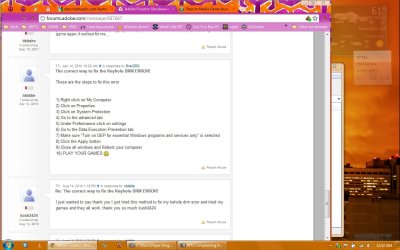
i found this interesting solution on one forum, and while it has worked for a few people, its not solved my issue:

Untitled.jpg

actually for me, this was already set that way and i made no changes :P


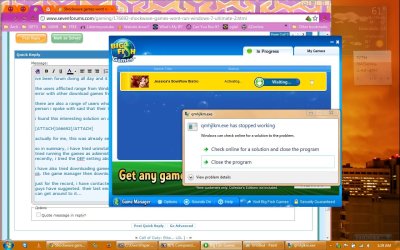
i tried downloading games from BigFish. the games download fine, and the game manager installs and opens ok. the game manager then downloads and installs the games, which finishes ok. however, when the game manager says its in the activation process this error pops up, and pops up repeatedly (even when one error window is still open):

bigfish.jpg

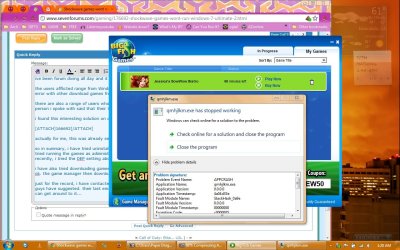
i wait for the activation process to finish and when the 'play now' option appears and i click it, the same error appears, and the game will not play:

bigfish2.jpg

sorry if im being redundant, i just want to cover all the bases.

i have contacted Shockwave. the solutions they replied with are just reiterations of everything you guys have suggested. their last email simply said that this issue has not been solved and they dont know when they can get around to fixing it...

i also want to clarify that its not the browser games im having difficulty with. i have no issues loading games or anything in my internet browsers. its the games downloaded, install onto my computer and run from my games folder that are being troublesome.


so in summary, i have tried uninstalling and reinstalling DirectX, Shockwave, Flash and the games in question. i have tried running the games as administrator and i have tried running them in several compatibility modes. and most recently, i tried the DEP setting above (actually didnt change anything but its worth mentioning).

while some folks in the forums i have visited have found these methods to successfully solve their problems, other threads merely die out with no resolution. i understand that if this issue has no real solution at this time, that it cant be helped. i wont give up, it just means ill have to find ways around it by using other machines and occasionally trying again with mine.

in the case that this thread does die, i just want to thank you guys for your help! youve been really understanding and patient with me (some people on forums are just plain mean </3) and i really appreciate it!
 

My Computer My Computer

At a glance

Windows 7 Ultimate 32bitAMD Athlon(tm) 64 X2 Dual-Core Processor TK-5...2.87GBATI Radeon X1200 Series
Computer Manufacturer/Model Number
TOSINV SB600
OS
Windows 7 Ultimate 32bit
CPU
AMD Athlon(tm) 64 X2 Dual-Core Processor TK-55, 1800Mhz
Memory
2.87GB
Graphics Card(s)
ATI Radeon X1200 Series
Sound Card
Microsoft HD Audio Device
Monitor(s) Displays
ATI Radeon X1200 Series
Screen Resolution
1280x800x59 hertz
Hard Drives
74.53GB total/14GB free
volume serial number: E40F9319
Cooling
standard laptop fan; USB powered fan (under laptop)
Keyboard
Standard PS/2 Keyboard
Mouse
Logitech M305 wireless mouse
Don't worry, as long as you post back with your discoveries, the thread won't die, there will always be someone to reply ;)

Now I am thinking that, since running Shockwave in a web browser works fine, that the issue may be with the BigFish download manager instead of the game. Now some of aforementioned methods (such as running the app as admin) applies to the download manager, too; not that I want to waste your time or anything, but it might be worth something using some of the compatibility tab options on the download manager itself.
 

My Computer My Computer

At a glance

Windows 7 Home Premium x64Intel Core i5 2500K8GB DDR3nVidia GeForce GTX650 Ti BOOST
Computer type
Laptop
Computer Manufacturer/Model Number
Custom
OS
Windows 7 Home Premium x64
CPU
Intel Core i5 2500K
Motherboard
MSI MS-7750
Memory
8GB DDR3
Graphics Card(s)
nVidia GeForce GTX650 Ti BOOST
Sound Card
Realtek
Monitor(s) Displays
21' Philips
Screen Resolution
Full HD
Hard Drives
1TB
PSU
500W
GPU= Graphics Card. You have an AMD graphics card, so go check for the latest update here: AMD Graphics Drivers & Software

Also, a solution to this, (albeit a bit drastic) is to completely start fresh and install Windows 7 again. You most likely won't need to do this, but if all our suggestions don't help, this would be the most likely solution to work...
 

My Computer My Computer

At a glance

Ubuntu 12.10Intel Core i7 720QM4GB RAMNVIDIA GeForce 230M
Computer Manufacturer/Model Number
HP Pavilion dv6-2020ev
OS
Ubuntu 12.10
CPU
Intel Core i7 720QM
Motherboard
Its a HP secret...
Memory
4GB RAM
Graphics Card(s)
NVIDIA GeForce 230M
Sound Card
IDT
Screen Resolution
1366x768
Hard Drives
500 GB
Mouse
HP
Internet Speed
4 Mbps
Gornot:

yeah, im keeping my eyes out on here and several other forums for solutions. if/when i find one i will surely post it here to end the thread, and also to share for anyone who has the same issues :)

i found out that even though the Bigfish game shortcuts on the desktop open the game manager (supposed to, all i get is errors on mine), right clicking on them to get to the properties doesnt yield the same options as right clicking on the Shockwave games:

properties.jpg

meaning i cant change compatibility modes. i did find the Bigfish Game Manager, as you suggested, and fiddled with those options with no luck. the game manager will open and show me the games, but when i try to play them its back to square one.


SlasherIT:

i went there and got the driver... i dont notice a difference between the new one and the one i had but it installed ok and everything. still no go, though :L

restarting fresh with 7 is something i considered. i wouldnt want to go that far just to get a game running. if it were a program i needed to work with for school or work then yeah, but a game can be done without. so for now, that option stays open.
 

My Computer My Computer

At a glance

Windows 7 Ultimate 32bitAMD Athlon(tm) 64 X2 Dual-Core Processor TK-5...2.87GBATI Radeon X1200 Series
Computer Manufacturer/Model Number
TOSINV SB600
OS
Windows 7 Ultimate 32bit
CPU
AMD Athlon(tm) 64 X2 Dual-Core Processor TK-55, 1800Mhz
Memory
2.87GB
Graphics Card(s)
ATI Radeon X1200 Series
Sound Card
Microsoft HD Audio Device
Monitor(s) Displays
ATI Radeon X1200 Series
Screen Resolution
1280x800x59 hertz
Hard Drives
74.53GB total/14GB free
volume serial number: E40F9319
Cooling
standard laptop fan; USB powered fan (under laptop)
Keyboard
Standard PS/2 Keyboard
Mouse
Logitech M305 wireless mouse
Applying compatibility mode's to the Bigfish Manager will actually do nothing to help run the game any better, as all the Bigfish Manager does is launch the games.

Slasher
 

My Computer My Computer

At a glance

Ubuntu 12.10Intel Core i7 720QM4GB RAMNVIDIA GeForce 230M
Computer Manufacturer/Model Number
HP Pavilion dv6-2020ev
OS
Ubuntu 12.10
CPU
Intel Core i7 720QM
Motherboard
Its a HP secret...
Memory
4GB RAM
Graphics Card(s)
NVIDIA GeForce 230M
Sound Card
IDT
Screen Resolution
1366x768
Hard Drives
500 GB
Mouse
HP
Internet Speed
4 Mbps
yeah, i didnt think so. but everything is worth trying at this point. theres no way to use compatibility mode on the games themselves either... :L
 

My Computer My Computer

At a glance

Windows 7 Ultimate 32bitAMD Athlon(tm) 64 X2 Dual-Core Processor TK-5...2.87GBATI Radeon X1200 Series
Computer Manufacturer/Model Number
TOSINV SB600
OS
Windows 7 Ultimate 32bit
CPU
AMD Athlon(tm) 64 X2 Dual-Core Processor TK-55, 1800Mhz
Memory
2.87GB
Graphics Card(s)
ATI Radeon X1200 Series
Sound Card
Microsoft HD Audio Device
Monitor(s) Displays
ATI Radeon X1200 Series
Screen Resolution
1280x800x59 hertz
Hard Drives
74.53GB total/14GB free
volume serial number: E40F9319
Cooling
standard laptop fan; USB powered fan (under laptop)
Keyboard
Standard PS/2 Keyboard
Mouse
Logitech M305 wireless mouse
Back
Top