
how to dual boot win7 plus winxp

corduroy33

New member
Local time
6:00 PM
Messages
19
hi guys i need some help hear, i want to dual boot with win7 with win xp, i have windows 7 ultimate installed now and i want to install winxp pro with out screwing my windows 7 install thanks
 

My Computer My Computer

At a glance

cogecoAmd phenom IIx4 920 2.8ghz/ Amd phenom II x4 ...6gb kit pc6400 Patriot extreme/ 8gb kit pc850...Evga ssc 8800gt 512mb/ Evga ssc 8800gt 512mb
Computer Manufacturer/Model Number
custom made
OS
cogeco
CPU
Amd phenom IIx4 920 2.8ghz/ Amd phenom II x4 940be 3.0ghz
Motherboard
Asus m2n sli-deluxe/ Asus m4a79 deluxe amd 790fx
Memory
6gb kit pc6400 Patriot extreme/ 8gb kit pc8500 Ocz platnuim
Graphics Card(s)
Evga ssc 8800gt 512mb/ Evga ssc 8800gt 512mb
Sound Card
onboard/onboard
Monitor(s) Displays
Acer 20" widescreen/ 19" Samsung widescreen
Screen Resolution
max 1600x1200 60hz/ max 1440x900 75hz
Hard Drives
Seagate 500gb, seagate 160gb/ 2nd comp WD 500gb, WD raptor 76gb
PSU
OCZ ModXStream Pro 600W Modular/ Corsair vx550 550watt
Case
Cooler master elite 330/ enermax charka
Cooling
to much to list
Internet Speed
10mb download, 1.7mb upload
Other Info
windows 7 ultimate 64bit/ windows 7 premium 64bit
Hello corduroy33, welcome to Seven Forums!


Start by having a look at Method Two of this tutorial at the link below and be sure to post back with any further questions you may have and to keep us informed.


My Computer My Computer

At a glance

W 7 64-bit UltimateIntel Q9550 Yorkfield8GB Dominator 8500C5DATI : XFX 5870
Computer Manufacturer/Model Number
* BFK Customs *
OS
W 7 64-bit Ultimate
CPU
Intel Q9550 Yorkfield
Motherboard
ASUS P5Q Pro
Memory
8GB Dominator 8500C5D
Graphics Card(s)
ATI : XFX 5870
Sound Card
Realtek HD Audio 7-1
Monitor(s) Displays
1x 47" LCD HDMI & 3x 26" LCD HDMI
Screen Resolution
1920x1080P & 1920x1200
Hard Drives
1x 80GB Intel X25-M G2 SSD : 1x 500GB & 1x 640GB WD Caviar Black(s)
PSU
Corsair 620HX
Case
Cooler Master RC-690
Cooling
Tuniq Tower 120, 2x 140mm and 3x 120mm case fans
Keyboard
Microsoft 500
Mouse
Razer Diamondback 3G
Internet Speed
14 Mb/s
Other Info
1x Koutech 3Gb/s SATA HDD Hot Swap Rack
I have been trying to do this all day today, but my computer crashes every time when I try installing XP. I have followed the tutorial step by step but it still happens every time. I don't think it is a SATA driver issue because it never makes it far enough to matter before it crashes. I don't know what to do at this point, XP won't even install alone as the only OS at this point.
 

My Computer My Computer

At a glance

Windows 7 Ultimate x64
OS
Windows 7 Ultimate x64
First check for all the Win XP drivers for your hardware on the manufacturer's web site.
If your Win XP CD, does not support your Sata Controller, you will need to load drivers to uses at F6.
Load Sata Controller drivers with a floppy disk is the best way.
http://www.sevenforums.com/tutorials/66010-sata-drivers-load-windows-xp-setup-dual-boot.html
OR
http://www.sevenforums.com/tutorials/72185-sata-drivers-slipstream-into-windows-xp-cd.html

http://www.sevenforums.com/tutorials/8057-dual-boot-installation-windows-7-xp.html?ltr=D

A bit more reading.
System Restore Points - Stop XP Dual Boot Delete - Vista Forums

http://www.sevenforums.com/tutorials/8247-windows-xp-mode-install-setup.html?ltr=W
 

My Computer My Computer

At a glance

ME/XP/Vista/Win7
OS
ME/XP/Vista/Win7
First check for all the Win XP drivers for your hardware on the manufacturer's web site.
If your Win XP CD, does not support your Sata Controller, you will need to load drivers to uses at F6.
Load Sata Controller drivers with a floppy disk is the best way.http://


Thanks for the reply. My motherboard manual says it supports XP SP3 which is waht I have. I made a disk with the SATA drivers slip streamed in and it still didn't work. But I don't think drivers are the problem because all it should do if the drivers are not there is not be able to see any drives. Mine crashes all the way to the blue screen of death right after the part where the files load. Floppy disk is not an option as my system cannot support a floppy drive at all.

Thanks
 

My Computer My Computer

At a glance

Windows 7 Ultimate x64
OS
Windows 7 Ultimate x64
First check for all the Win XP drivers for your hardware on the manufacturer's web site.
If your Win XP CD, does not support your Sata Controller, you will need to load drivers to uses at F6.
Load Sata Controller drivers with a floppy disk is the best way.


Thanks for the reply. My motherboard manual says it supports XP SP3 which is waht I have. I made a disk with the SATA drivers slip streamed in and it still didn't work. But I don't think drivers are the problem because all it should do if the drivers are not there is not be able to see any drives. Mine crashes all the way to the blue screen of death right after the part where the files load. Floppy disk is not an option as my system cannot support a floppy drive at all.

Thanks


thanks for over riding my thread
 

My Computer My Computer

At a glance

cogecoAmd phenom IIx4 920 2.8ghz/ Amd phenom II x4 ...6gb kit pc6400 Patriot extreme/ 8gb kit pc850...Evga ssc 8800gt 512mb/ Evga ssc 8800gt 512mb
Computer Manufacturer/Model Number
custom made
OS
cogeco
CPU
Amd phenom IIx4 920 2.8ghz/ Amd phenom II x4 940be 3.0ghz
Motherboard
Asus m2n sli-deluxe/ Asus m4a79 deluxe amd 790fx
Memory
6gb kit pc6400 Patriot extreme/ 8gb kit pc8500 Ocz platnuim
Graphics Card(s)
Evga ssc 8800gt 512mb/ Evga ssc 8800gt 512mb
Sound Card
onboard/onboard
Monitor(s) Displays
Acer 20" widescreen/ 19" Samsung widescreen
Screen Resolution
max 1600x1200 60hz/ max 1440x900 75hz
Hard Drives
Seagate 500gb, seagate 160gb/ 2nd comp WD 500gb, WD raptor 76gb
PSU
OCZ ModXStream Pro 600W Modular/ Corsair vx550 550watt
Case
Cooler master elite 330/ enermax charka
Cooling
to much to list
Internet Speed
10mb download, 1.7mb upload
Other Info
windows 7 ultimate 64bit/ windows 7 premium 64bit

My Computer My Computer

At a glance

ME/XP/Vista/Win7
OS
ME/XP/Vista/Win7
hi guys i need some help hear, i want to dual boot with win7 with win xp, i have windows 7 ultimate installed now and i want to install winxp pro with out screwing my windows 7 install thanks

Let us know how it goes. We're ready to help you.
 
ok i installed window 7 under ide mode in bios, then i installed win xp pro 32bit, now when i restart the pc i don't get a boot list giving me the options to pick what os i want to go into, it just automatically loads into win xp pro, now where do i go from hear to make win 7 reappear, also i should of stated i have both win 7 and win xp installed on separate physical drives
 

My Computer My Computer

At a glance

cogecoAmd phenom IIx4 920 2.8ghz/ Amd phenom II x4 ...6gb kit pc6400 Patriot extreme/ 8gb kit pc850...Evga ssc 8800gt 512mb/ Evga ssc 8800gt 512mb
Computer Manufacturer/Model Number
custom made
OS
cogeco
CPU
Amd phenom IIx4 920 2.8ghz/ Amd phenom II x4 940be 3.0ghz
Motherboard
Asus m2n sli-deluxe/ Asus m4a79 deluxe amd 790fx
Memory
6gb kit pc6400 Patriot extreme/ 8gb kit pc8500 Ocz platnuim
Graphics Card(s)
Evga ssc 8800gt 512mb/ Evga ssc 8800gt 512mb
Sound Card
onboard/onboard
Monitor(s) Displays
Acer 20" widescreen/ 19" Samsung widescreen
Screen Resolution
max 1600x1200 60hz/ max 1440x900 75hz
Hard Drives
Seagate 500gb, seagate 160gb/ 2nd comp WD 500gb, WD raptor 76gb
PSU
OCZ ModXStream Pro 600W Modular/ Corsair vx550 550watt
Case
Cooler master elite 330/ enermax charka
Cooling
to much to list
Internet Speed
10mb download, 1.7mb upload
Other Info
windows 7 ultimate 64bit/ windows 7 premium 64bit
You should have told us beforehand you have separate HD's as we would have had you unplug the Win7 HD during install so each would retain its own boot files.

Then after install plug back in the other OS HD, set the preferred one to boot first in BIOS setup, boot the other using the Asus F8 one-time BIOS boot manager.

See if you can trigger Win7 HD now to boot by tapping the F8 key at bootup and accessing the one-time BIOS Boot Menu.

If not, look in Disk mgmt to see which OS partitions are labeled System Active, which means they retain their own boot files.

If Win7 no longer has the System flag on its partition, mark it Active in XP Disk Mgmt, then power down to unplug XP HD, boot the Win7 DVD Repair console or Repair CD to run Startup Repair - Run 3 Separate Times until Win7 starts on its own. Then plug it back in and Set first to boot in BIOS setup, boot XP using F8 key at boot.

If you prefer a Windows managed Dual Boot which will interlock the HD's rather than remain independent as with a BIOS-managed Dual boot, then follow Steps 7-12 in Method Two of tutorial: Dual Boot Installation with Windows 7 and XP
 
The process and what happens when installed in either order is explained here: Dual Boot Installation with Windows 7 and XP

In this case with separate HD's, the OP has the chance to keep them independent to come and go as he pleases by not interlocking them with a Windows-managed boot menu, but using the BIOS Boot menu instead.
 
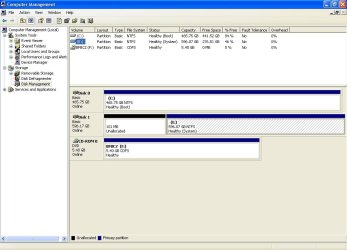
i posted a pic, when i right click on c:\ drive it gives me the option to make partition active, for drive E:\ in which windows 7 is installed on the option to mark active is grayed out
 

Attachments

  • Capture001.jpg
    Capture001.jpg
    74.2 KB · Views: 6

My Computer My Computer

At a glance

cogecoAmd phenom IIx4 920 2.8ghz/ Amd phenom II x4 ...6gb kit pc6400 Patriot extreme/ 8gb kit pc850...Evga ssc 8800gt 512mb/ Evga ssc 8800gt 512mb
Computer Manufacturer/Model Number
custom made
OS
cogeco
CPU
Amd phenom IIx4 920 2.8ghz/ Amd phenom II x4 940be 3.0ghz
Motherboard
Asus m2n sli-deluxe/ Asus m4a79 deluxe amd 790fx
Memory
6gb kit pc6400 Patriot extreme/ 8gb kit pc8500 Ocz platnuim
Graphics Card(s)
Evga ssc 8800gt 512mb/ Evga ssc 8800gt 512mb
Sound Card
onboard/onboard
Monitor(s) Displays
Acer 20" widescreen/ 19" Samsung widescreen
Screen Resolution
max 1600x1200 60hz/ max 1440x900 75hz
Hard Drives
Seagate 500gb, seagate 160gb/ 2nd comp WD 500gb, WD raptor 76gb
PSU
OCZ ModXStream Pro 600W Modular/ Corsair vx550 550watt
Case
Cooler master elite 330/ enermax charka
Cooling
to much to list
Internet Speed
10mb download, 1.7mb upload
Other Info
windows 7 ultimate 64bit/ windows 7 premium 64bit
wish me luck, going to reboot with win 7 repair disk
 

My Computer My Computer

At a glance

cogecoAmd phenom IIx4 920 2.8ghz/ Amd phenom II x4 ...6gb kit pc6400 Patriot extreme/ 8gb kit pc850...Evga ssc 8800gt 512mb/ Evga ssc 8800gt 512mb
Computer Manufacturer/Model Number
custom made
OS
cogeco
CPU
Amd phenom IIx4 920 2.8ghz/ Amd phenom II x4 940be 3.0ghz
Motherboard
Asus m2n sli-deluxe/ Asus m4a79 deluxe amd 790fx
Memory
6gb kit pc6400 Patriot extreme/ 8gb kit pc8500 Ocz platnuim
Graphics Card(s)
Evga ssc 8800gt 512mb/ Evga ssc 8800gt 512mb
Sound Card
onboard/onboard
Monitor(s) Displays
Acer 20" widescreen/ 19" Samsung widescreen
Screen Resolution
max 1600x1200 60hz/ max 1440x900 75hz
Hard Drives
Seagate 500gb, seagate 160gb/ 2nd comp WD 500gb, WD raptor 76gb
PSU
OCZ ModXStream Pro 600W Modular/ Corsair vx550 550watt
Case
Cooler master elite 330/ enermax charka
Cooling
to much to list
Internet Speed
10mb download, 1.7mb upload
Other Info
windows 7 ultimate 64bit/ windows 7 premium 64bit
What happens when you use the F8 Boot Menu to try to boot Win7 HD?

I'm not sure what happened to your 100 mb Win7 System Reserved boot partition but it appears to have been wiped out. The System flag only appears on Win7 partition itself so that appears to hold the boot files for both.

In that case, I'd run Win7 Startup Repair to see if Win7 can sort the Dual Boot.

If not, follow Steps 7-12 in Method Two of the Dual Boot tutorial posted earlier.
 
Floppy disk is not an option as my system cannot support a floppy drive at all.
All PC support a floppy drive. ( may need a USB one)

I made a disk with the SATA drivers slip streamed in and it still didn't work.
Are using the right drivers?

ok i installed window 7 under ide mode in bios, then i installed win xp pro 32bit, now when i restart the pc i don't get a boot list giving me the options to pick what os i want to go into, it just automatically loads into win xp pro, now where do i go from hear to make win 7 reappear, also i should of stated i have both win 7 and win xp installed on separate physical drives

NO, need to reset BIOS.
 

My Computer My Computer

At a glance

ME/XP/Vista/Win7
OS
ME/XP/Vista/Win7
Back
Top