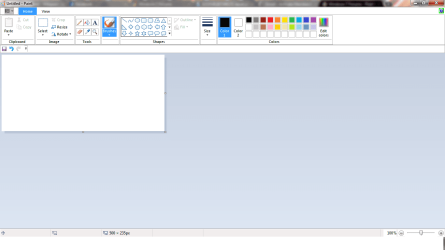
My paints ribbon has gone all strange.

Hydranoid1996

New member
Local time
10:05 PM
Messages
10
Location
Leeds, UK
Here's a screenshot of my paint

Can you help me fix it

 

Attachments

  • paint screenshot.png
    paint screenshot.png
    20.1 KB · Views: 41

My Computer My Computer

At a glance

Windows 7 Home Premium 64bit
OS
Windows 7 Home Premium 64bit
Hi,
did you by any chance patch some system files to enable third-party themes to be used in Windows 7? Cause this surely looks like it.
 

My Computer My Computer

At a glance

Windows 7 Home Premium x64Intel Core i5 2500K8GB DDR3nVidia GeForce GTX650 Ti BOOST
Computer type
Laptop
Computer Manufacturer/Model Number
Custom
OS
Windows 7 Home Premium x64
CPU
Intel Core i5 2500K
Motherboard
MSI MS-7750
Memory
8GB DDR3
Graphics Card(s)
nVidia GeForce GTX650 Ti BOOST
Sound Card
Realtek
Monitor(s) Displays
21' Philips
Screen Resolution
Full HD
Hard Drives
1TB
PSU
500W
I'm not sure, I'm not exactly an expert in this area which is why I've asked for some help.
 

My Computer My Computer

At a glance

Windows 7 Home Premium 64bit
OS
Windows 7 Home Premium 64bit
Here's a screenshot of my paint

Can you help me fix it

Which one to fix ?
Send the access toolbar to the top instead at the bottom ?

The Shapes section ?
 

My Computer My Computer

At a glance

Windows 7 Home Premium 64-bit, SP1Intel Pentium P6200, Cores 2, 2.13 GHz4 GBIntel HD
Computer Manufacturer/Model Number
Acer Aspire 7741Z
OS
Windows 7 Home Premium 64-bit, SP1
CPU
Intel Pentium P6200, Cores 2, 2.13 GHz
Memory
4 GB
Graphics Card(s)
Intel HD
Sound Card
unknown
Monitor(s) Displays
17.3 inches
Screen Resolution
1600 x 900
Hard Drives
640 GB, 5400 PRM
This is how mine looks like ....

Image 25.png
 

My Computer My Computer

At a glance

Windows 7 Home Premium 64-bit, SP1Intel Pentium P6200, Cores 2, 2.13 GHz4 GBIntel HD
Computer Manufacturer/Model Number
Acer Aspire 7741Z
OS
Windows 7 Home Premium 64-bit, SP1
CPU
Intel Pentium P6200, Cores 2, 2.13 GHz
Memory
4 GB
Graphics Card(s)
Intel HD
Sound Card
unknown
Monitor(s) Displays
17.3 inches
Screen Resolution
1600 x 900
Hard Drives
640 GB, 5400 PRM
Thats how It used to be but I don't know what happened to it :S
 

My Computer My Computer

At a glance

Windows 7 Home Premium 64bit
OS
Windows 7 Home Premium 64bit
Thats how It used to be but I don't know what happened to it :S

Can you be specific ?

What is wrong with your Paint.

Your screenshot looks ok to me. It looks almost like mine except the Shapes section.
 

My Computer My Computer

At a glance

Windows 7 Home Premium 64-bit, SP1Intel Pentium P6200, Cores 2, 2.13 GHz4 GBIntel HD
Computer Manufacturer/Model Number
Acer Aspire 7741Z
OS
Windows 7 Home Premium 64-bit, SP1
CPU
Intel Pentium P6200, Cores 2, 2.13 GHz
Memory
4 GB
Graphics Card(s)
Intel HD
Sound Card
unknown
Monitor(s) Displays
17.3 inches
Screen Resolution
1600 x 900
Hard Drives
640 GB, 5400 PRM

My Computer My Computer

At a glance

Windows 7 Home Premium 64-bit, SP1Intel Pentium P6200, Cores 2, 2.13 GHz4 GBIntel HD
Computer Manufacturer/Model Number
Acer Aspire 7741Z
OS
Windows 7 Home Premium 64-bit, SP1
CPU
Intel Pentium P6200, Cores 2, 2.13 GHz
Memory
4 GB
Graphics Card(s)
Intel HD
Sound Card
unknown
Monitor(s) Displays
17.3 inches
Screen Resolution
1600 x 900
Hard Drives
640 GB, 5400 PRM

My Computer My Computer

At a glance

Windows 7 Home Premium 64-bit, SP1Intel Pentium P6200, Cores 2, 2.13 GHz4 GBIntel HD
Computer Manufacturer/Model Number
Acer Aspire 7741Z
OS
Windows 7 Home Premium 64-bit, SP1
CPU
Intel Pentium P6200, Cores 2, 2.13 GHz
Memory
4 GB
Graphics Card(s)
Intel HD
Sound Card
unknown
Monitor(s) Displays
17.3 inches
Screen Resolution
1600 x 900
Hard Drives
640 GB, 5400 PRM
Thanks, Im just doing the sfc /scannow thing, I'll let you know if it works or not
 

My Computer My Computer

At a glance

Windows 7 Home Premium 64bit
OS
Windows 7 Home Premium 64bit
Thanks, Im just doing the sfc /scannow thing, I'll let you know if it works or not

I have a feeling you skipped system restore suggestion. Yes ?
 

My Computer My Computer

At a glance

Windows 7 Home Premium 64-bit, SP1Intel Pentium P6200, Cores 2, 2.13 GHz4 GBIntel HD
Computer Manufacturer/Model Number
Acer Aspire 7741Z
OS
Windows 7 Home Premium 64-bit, SP1
CPU
Intel Pentium P6200, Cores 2, 2.13 GHz
Memory
4 GB
Graphics Card(s)
Intel HD
Sound Card
unknown
Monitor(s) Displays
17.3 inches
Screen Resolution
1600 x 900
Hard Drives
640 GB, 5400 PRM
Yes, ii Always forget to set restore points and I know that I've had this problem for a long time.
 

My Computer My Computer

At a glance

Windows 7 Home Premium 64bit
OS
Windows 7 Home Premium 64bit
Yes, ii Always forget to set restore points and I know that I've had this problem for a long time.

How long is long time ?

For your information only .....
The system also creates restore points periodically.
Why don't you start a system restore, and have a look at the list of restore points ?
If there are more restore points than shown on the list, check the box that says " Show more restore points ".
As long as you pick a date BEFORE the problem started, that will be your restore point.

P.S. If you cannot find the proper restore point, you don't have to go through the system restore routine.
Just click Cancel.
 

My Computer My Computer

At a glance

Windows 7 Home Premium 64-bit, SP1Intel Pentium P6200, Cores 2, 2.13 GHz4 GBIntel HD
Computer Manufacturer/Model Number
Acer Aspire 7741Z
OS
Windows 7 Home Premium 64-bit, SP1
CPU
Intel Pentium P6200, Cores 2, 2.13 GHz
Memory
4 GB
Graphics Card(s)
Intel HD
Sound Card
unknown
Monitor(s) Displays
17.3 inches
Screen Resolution
1600 x 900
Hard Drives
640 GB, 5400 PRM
There is no restore point before the problem started :(
 

My Computer My Computer

At a glance

Windows 7 Home Premium 64bit
OS
Windows 7 Home Premium 64bit

My Computer My Computer

At a glance

Windows 7 Home Premium 64-bit, SP1Intel Pentium P6200, Cores 2, 2.13 GHz4 GBIntel HD
Computer Manufacturer/Model Number
Acer Aspire 7741Z
OS
Windows 7 Home Premium 64-bit, SP1
CPU
Intel Pentium P6200, Cores 2, 2.13 GHz
Memory
4 GB
Graphics Card(s)
Intel HD
Sound Card
unknown
Monitor(s) Displays
17.3 inches
Screen Resolution
1600 x 900
Hard Drives
640 GB, 5400 PRM

Sorry to hear that. I don't know how to fix your Paint issue.

2 suggestions :

1. Move on to Snipping Tool which is included in your Win 7 Home Premium.
Paint is a rudimentary program anyway.
How to use Snipping Tool
How to Use the Snipping Tool in Vista - Vista Forums

2. Install a FREE software called Picpick. I use it and I love it.
It is the " free " version of the SnagIt 10 which will cost $50.
Pickpic works almost like SnagIt .... very versatile .
PicPick - Download

How to use Picpick
How to Capture Screens with PicPick - Associated Content from Yahoo! - associatedcontent.com
 

My Computer My Computer

At a glance

Windows 7 Home Premium 64-bit, SP1Intel Pentium P6200, Cores 2, 2.13 GHz4 GBIntel HD
Computer Manufacturer/Model Number
Acer Aspire 7741Z
OS
Windows 7 Home Premium 64-bit, SP1
CPU
Intel Pentium P6200, Cores 2, 2.13 GHz
Memory
4 GB
Graphics Card(s)
Intel HD
Sound Card
unknown
Monitor(s) Displays
17.3 inches
Screen Resolution
1600 x 900
Hard Drives
640 GB, 5400 PRM
Thanks for your help anyway
 

My Computer My Computer

At a glance

Windows 7 Home Premium 64bit
OS
Windows 7 Home Premium 64bit

My Computer My Computer

At a glance

Windows 7 Home Premium 64-bit, SP1Intel Pentium P6200, Cores 2, 2.13 GHz4 GBIntel HD
Computer Manufacturer/Model Number
Acer Aspire 7741Z
OS
Windows 7 Home Premium 64-bit, SP1
CPU
Intel Pentium P6200, Cores 2, 2.13 GHz
Memory
4 GB
Graphics Card(s)
Intel HD
Sound Card
unknown
Monitor(s) Displays
17.3 inches
Screen Resolution
1600 x 900
Hard Drives
640 GB, 5400 PRM
Back
Top
