Losing Hard Drive space

You can use CCleaner. try please, because advanced this new version.
 

My Computer

OS
Win Xp
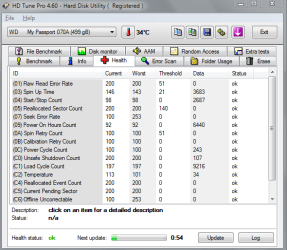
Download HD Tune Here : Download HDTunePro.exe

and make sure your HD health status reads fine. If theres any errors your drive is mosy likely failing
 

Attachments

  • Capture.PNG
    Capture.PNG
    23.6 KB · Views: 18

My Computer

Computer Manufacturer/Model Number
Custom
OS
Windows 7 Ultimate 64bit
CPU
Intel Core i7 920
Motherboard
GA-EX58-UD3R Rev 1 F11 Bios
Memory
8 Gigs DDR3 RAM @ 1600mhz per stic
Graphics Card(s)
GTX 285
Sound Card
Realtek HD Audio
Monitor(s) Displays
Dell 19inch 16:10
Screen Resolution
1440x900
Hard Drives
Western Digital x2 500gig 7200rpm in Raid 0
PSU
OCZ Modular Extreme 700W PSU
Case
Antec 1200
Internet Speed
15mbps down 2 up
Other Info
Coolermaster V8 Cpu Cooler
System Volume Information isn't included since it is not accessible. Did you disable Hibernation? Using it sometimes cause file corruptions.

Type cmd in Start Search, right click cmd, Run as Admin, then type in powercfg -h off. Reboot and check your used space. This turns hibernation off and deletes the hiberfil.sys file.

hiberfile.sys while large is also not increasing. I can delete it but that's really not what I am after.

You are saying that Sys Volume Info isn't included in TreeSize.

Is Sys Volume Info strictly restore points? Is it also true that Computer does include it and that is the difference between the 120.8GB and 149GB that I see? Would almost work except for the slight difference in numbers as explained above.

Mainly. Other volume shadow copies are put in there besides system restore. For example if you make a backup a volume shadow copy is made temporarily, it is removed after the backup.

Like I suggested earlier, it is clear your increase is from restore points and the amount it can grow is limited and under your control.
 

My Computer

Computer type
PC/Desktop
Computer Manufacturer/Model Number
Home built (GeneO industries)/Model 4
OS
Windows 10 Pro. EFI boot partition, full EFI boot
CPU
i7 4770k 4.4GHz (44-44-43-43 turbo) @ 1.248V
Motherboard
ASUS Maximus VI Hero
Memory
16GB (8GBx2) @2200 MHz G.skill Sniper 10-11-10-30-1, 1.6V
Graphics Card(s)
MSI GTX 970 Gaming 4G
Sound Card
Onboard SupremeFX Audio
Monitor(s) Displays
NEC Spectraview 2490WUXi-SV
Screen Resolution
1920 x 1200
Hard Drives
Samsung 850 Pro 256GB (OS), Samsung 2x 128GB 840 Pro SSD in RAID0, 3x WD Blue 6Gb/s 1TB RAID0, WD 2TB Black external USB 3.0, 2TB WD20EARS Green external USB 3.0, 2x 500GB Seagate and 1 750 GB external USB, 1x 350GB external USB3
PSU
Seasonic X-850 (2012 KM3 model)
Case
Fractal Design Define R4
Cooling
NH-D14, NF-F12, NF-A15; NF-P14, NF-P12,NF-A14, S12A PWM
Keyboard
Cooler Master Storm Quickfire Rapid - Brown
Mouse
Logitech G602
Internet Speed
126.4 Mb/s down, 24.3 Mb/s up
Other Info
USB 3.0 x8 , SATA III x8, eSATA, USB 2.0 x6. Samsung DVD R/W drive.

WEI: CPU 7.8, Memory 7.9, Graphics 7.9, Disk 7.9
I Know Whats Taking Some Hard Drive Space, Its The Shadow Copy, is a technology included in Microsoft Windows that allows taking manual or automatic backup copies or snapshots of data. You Can Probably Stop The Service..
 

My Computer

Computer Manufacturer/Model Number
Antec
OS
Windows 7 Ultimate x64
CPU
AMD Phenom II X6 1090T Black Edition
Memory
Corsair 4Gb Ram - Vengeance
Graphics Card(s)
Nvidia Gts 450 - 1 Gb Gddr5
Monitor(s) Displays
BenQ G2222HDL - 1920 x 1080
Hard Drives
Seagate 500 Gb Hdd
PSU
OCZ PowerSupply (PSU) 500W ModXStream Pro
Case
Antec Three Hundred Gamer Case - Black
Cooling
rear 120 x 25 mm TriCool™ Fan with 3-speed switch control.
I Know Whats Taking Some Hard Drive Space, Its The Shadow Copy, is a technology included in Microsoft Windows that allows taking manual or automatic backup copies or snapshots of data. You Can Probably Stop The Service..

Why would you do that? It is necessary for backups and restore points. The only space that can grow with volume shadow copy is restore points and that is limited by the user. This is a very good feature of Windows and you are out of hand saying turn it off to save a few GB?
 
Last edited:

My Computer

Computer type
PC/Desktop
Computer Manufacturer/Model Number
Home built (GeneO industries)/Model 4
OS
Windows 10 Pro. EFI boot partition, full EFI boot
CPU
i7 4770k 4.4GHz (44-44-43-43 turbo) @ 1.248V
Motherboard
ASUS Maximus VI Hero
Memory
16GB (8GBx2) @2200 MHz G.skill Sniper 10-11-10-30-1, 1.6V
Graphics Card(s)
MSI GTX 970 Gaming 4G
Sound Card
Onboard SupremeFX Audio
Monitor(s) Displays
NEC Spectraview 2490WUXi-SV
Screen Resolution
1920 x 1200
Hard Drives
Samsung 850 Pro 256GB (OS), Samsung 2x 128GB 840 Pro SSD in RAID0, 3x WD Blue 6Gb/s 1TB RAID0, WD 2TB Black external USB 3.0, 2TB WD20EARS Green external USB 3.0, 2x 500GB Seagate and 1 750 GB external USB, 1x 350GB external USB3
PSU
Seasonic X-850 (2012 KM3 model)
Case
Fractal Design Define R4
Cooling
NH-D14, NF-F12, NF-A15; NF-P14, NF-P12,NF-A14, S12A PWM
Keyboard
Cooler Master Storm Quickfire Rapid - Brown
Mouse
Logitech G602
Internet Speed
126.4 Mb/s down, 24.3 Mb/s up
Other Info
USB 3.0 x8 , SATA III x8, eSATA, USB 2.0 x6. Samsung DVD R/W drive.

WEI: CPU 7.8, Memory 7.9, Graphics 7.9, Disk 7.9

My Computer

Computer type
PC/Desktop
Computer Manufacturer/Model Number
76~2.0
OS
Windows 7 Ult x64 - SP1/ Windows 8 Pro x64
CPU
Intel Core i5-3570K 4.6GHz
Motherboard
Gigabyte GA-Z77X UD3H, f18
Memory
8GB (2X4GB) DDR3 1600 Corsair Vengeance CL8 1.5v
Graphics Card(s)
Sapphire HD 7770 Vapor-X OC 1GB DDR5
Sound Card
Onboard VIA VT2021
Monitor(s) Displays
22" LCD Dell
Screen Resolution
1680x1050
Hard Drives
Samsung 840Pro 128GB SSD,
Seagate Barracuda 500GB SATA2 7200rpm 32MB cache, Seagate Barracuda 1TB SATA2 7200rpm 32MB cache,
PSU
Corsair HX650W
Case
Cooler Master Storm Scout
Cooling
Corsair H80 2x12cm Noctua NF P12 , 2x14cm case fans
Keyboard
Logitech Wave
Mouse
CM Sentinel
Internet Speed
Dismal
Antivirus
Avast
Browser
Opera Next
Other Info
Haswell laptop: HP Envy 17t-j, i7-4700MQ, GeForce 740M 2GB DDR3, 17.3" Full HD 1920x1080, 16GB RAM, Samsung 840 Pro 128GB, 1TB Hitachi 7200 HDD,
Desktop: eSATA ports,
External eSATA Seagate 500GB SATA2 7200rpm,
External WD USB 500GB
There is nothing wrong with your disk drive that is causing this. It is restore points.
 

My Computer

Computer type
PC/Desktop
Computer Manufacturer/Model Number
Home built (GeneO industries)/Model 4
OS
Windows 10 Pro. EFI boot partition, full EFI boot
CPU
i7 4770k 4.4GHz (44-44-43-43 turbo) @ 1.248V
Motherboard
ASUS Maximus VI Hero
Memory
16GB (8GBx2) @2200 MHz G.skill Sniper 10-11-10-30-1, 1.6V
Graphics Card(s)
MSI GTX 970 Gaming 4G
Sound Card
Onboard SupremeFX Audio
Monitor(s) Displays
NEC Spectraview 2490WUXi-SV
Screen Resolution
1920 x 1200
Hard Drives
Samsung 850 Pro 256GB (OS), Samsung 2x 128GB 840 Pro SSD in RAID0, 3x WD Blue 6Gb/s 1TB RAID0, WD 2TB Black external USB 3.0, 2TB WD20EARS Green external USB 3.0, 2x 500GB Seagate and 1 750 GB external USB, 1x 350GB external USB3
PSU
Seasonic X-850 (2012 KM3 model)
Case
Fractal Design Define R4
Cooling
NH-D14, NF-F12, NF-A15; NF-P14, NF-P12,NF-A14, S12A PWM
Keyboard
Cooler Master Storm Quickfire Rapid - Brown
Mouse
Logitech G602
Internet Speed
126.4 Mb/s down, 24.3 Mb/s up
Other Info
USB 3.0 x8 , SATA III x8, eSATA, USB 2.0 x6. Samsung DVD R/W drive.

WEI: CPU 7.8, Memory 7.9, Graphics 7.9, Disk 7.9
537GB free of 686GB. So that's 149GB used somewhere.

Looking at properties for the drive shows the entire drive using the 149GB (or 148GB some rounding going on).

TreeSize says C:\(OS) is 120.8GB. So that's my question where is the ~28GB? Computer shows it all accounted for on C:\(OS) but TreeSize does not.

Is it restore points? Are restore points included in the Computer's properties but not in TreeSize? That could explain it but as mentioned I have 30GB and I'm "missing" 28GB.

I'm not necessarily trying to reclaim lost space just trying to understand where it is and most importantly why I seem to be losing 1-2GB a day. And the 1-2GB a day is not going to C:\(OS) as that number (currently 120.8GB) doesn't increase by 1-2GB a day.

If the above 30GB is what your restore points are set for just wait and see if the 'Lost Space' exceeds 30GB. Should be able to see it today.
Depending on the size of your data, 1-2GB per restore point is within the expected range.

You have a lot of free space so that isn't going to cause you any problems.

Or you can reduce your system restore capacity to 15GB and see if you get the 13GB back, and then you can see if it keeps expanding.

If you don't need the space you can set it back to 30GB after you find out if this is where the space is going.


It will not do any harm testing the drive first as recommended by myself and others previously.
Better to know if your HDD is in good health than suddenly finding out wasn't, later.
It is a known fact that HDDs can and do fail at any time, even when new.

Let us know what you decide to do.
 

My Computer

Computer type
PC/Desktop
Computer Manufacturer/Model Number
76~2.0
OS
Windows 7 Ult x64 - SP1/ Windows 8 Pro x64
CPU
Intel Core i5-3570K 4.6GHz
Motherboard
Gigabyte GA-Z77X UD3H, f18
Memory
8GB (2X4GB) DDR3 1600 Corsair Vengeance CL8 1.5v
Graphics Card(s)
Sapphire HD 7770 Vapor-X OC 1GB DDR5
Sound Card
Onboard VIA VT2021
Monitor(s) Displays
22" LCD Dell
Screen Resolution
1680x1050
Hard Drives
Samsung 840Pro 128GB SSD,
Seagate Barracuda 500GB SATA2 7200rpm 32MB cache, Seagate Barracuda 1TB SATA2 7200rpm 32MB cache,
PSU
Corsair HX650W
Case
Cooler Master Storm Scout
Cooling
Corsair H80 2x12cm Noctua NF P12 , 2x14cm case fans
Keyboard
Logitech Wave
Mouse
CM Sentinel
Internet Speed
Dismal
Antivirus
Avast
Browser
Opera Next
Other Info
Haswell laptop: HP Envy 17t-j, i7-4700MQ, GeForce 740M 2GB DDR3, 17.3" Full HD 1920x1080, 16GB RAM, Samsung 840 Pro 128GB, 1TB Hitachi 7200 HDD,
Desktop: eSATA ports,
External eSATA Seagate 500GB SATA2 7200rpm,
External WD USB 500GB
3GB more gone in three days. According to TreeSize it did not go to C:\(OS). It did not go to System Restore. System Restore size did not increase by 3GB. This is getting concerning.
 

My Computer

Computer Manufacturer/Model Number
HP p6608f
OS
Win 7 Home Premium x64
CPU
Intel Core i3-540 3.07 GHz
Motherboard
MS-7613 (Iona-GL8E)
Memory
4 GB (2 X 2) Dual-Channel PC-10600 DDR3 @ 665MHz (9-9-9-24)
Graphics Card(s)
Integrated Intel H57
Sound Card
Integrated Realtek ALC888S Audio
Monitor(s) Displays
17" SDM-HS73 (a vestige from my old computer)
Screen Resolution
1280 X 1024
Hard Drives
750GB SATA 7200 RPM
PSU
250W
Keyboard
HP USB keyboard
Mouse
HP USB optical mouse
Internet Speed
15Mbps/1Mbps
Check your HDD manufacturer and run there disk check utility, run both short and long versions of the test.

If you're not sure of your HDD manufacturer D/L: SIW - System Information for Windows

For example:
Western Digital Lifeguard – Quick Test and Extended Test
Seagate SeaTools – Short Drive Self Test and Long Drive Self Test
Samsung ES tools – Drive Diagnostic test

This should be your first step.

I have a Seagate drive. ST3750528AS.

It seems Seagate SeaTools is not working for the internal drive. Short Drive Self Test says unavailable when I try to run it. Long Drive Self Test is not even listed under basic tests. When I try to run the Short generic it starts and says "outer scan" but neverprogresses any further.

I happen to have a Seagate external drive and the tests are available for it and the one Short self test I did passes. So why wouldn't the tool work for my internal drive? I imagine that can't be good.

The other tool posted HDTunePro.exe. Is that ok for me to download?
 

My Computer

Computer Manufacturer/Model Number
HP p6608f
OS
Win 7 Home Premium x64
CPU
Intel Core i3-540 3.07 GHz
Motherboard
MS-7613 (Iona-GL8E)
Memory
4 GB (2 X 2) Dual-Channel PC-10600 DDR3 @ 665MHz (9-9-9-24)
Graphics Card(s)
Integrated Intel H57
Sound Card
Integrated Realtek ALC888S Audio
Monitor(s) Displays
17" SDM-HS73 (a vestige from my old computer)
Screen Resolution
1280 X 1024
Hard Drives
750GB SATA 7200 RPM
PSU
250W
Keyboard
HP USB keyboard
Mouse
HP USB optical mouse
Internet Speed
15Mbps/1Mbps
Yes HD Tune is OK. You can use the trial version.
 

My Computer

Computer type
PC/Desktop
Computer Manufacturer/Model Number
Home Built Desktop By DataTech
OS
Windows 7 Ultimate X64 SP1
CPU
Intel i5-2550K, Differing ~4.4-4.8GHz No built in GPU
Motherboard
ASUS P8Z68-V PRO/GEN3
Memory
16GB G.Skill Sniper 1866MHz @ 2133MHz 2x8GB
Graphics Card(s)
ASUS GTX650TIB-DC2OC-2GD5, (650TI Boost)
Sound Card
Onboard Realtek 5-1
Monitor(s) Displays
Samsung P2570HD
Screen Resolution
1920x1080
Hard Drives
Samsung 840 Pro 256GB SSD for OS, 500GB Seagate Constellation (Enterprise drive) for Data
PSU
Corsair HX650W
Case
Inwin Dragon Rider
Cooling
Hyper 212 EVO w/two Noctua fans, push-pull, @1300 RPM
Keyboard
E-Z Eyes, bright yellow keys with large characters
Mouse
steelseries SENSEI Laser Pro Gaming
Internet Speed
48-51Mbs Mbs down, 11 Mbs up Xfinity Cable
Antivirus
Norton Internet Security 2013
Browser
IE 10, Opera, Pale Moon if needed
Other Info
4 case fans, LG BluRay-RE, ASUS DVD-RW, Mr. Fusion power supply, 1.21 gigawatts.
As Britton30 said try HD Tune.
If that doesn't work then download SeaTools for DOS and run it from a CD, this will run from its own OS and take your system's OS out of the scenario.

The fact that SeaTools ran on the external HDD and not the internal HDD indicates a issue, check that both power and SATA cables are firmly attached and not pinched anywhere. Switch them out for different cables if you have any spares.

Let us know how the tests go.
 

My Computer

Computer type
PC/Desktop
Computer Manufacturer/Model Number
76~2.0
OS
Windows 7 Ult x64 - SP1/ Windows 8 Pro x64
CPU
Intel Core i5-3570K 4.6GHz
Motherboard
Gigabyte GA-Z77X UD3H, f18
Memory
8GB (2X4GB) DDR3 1600 Corsair Vengeance CL8 1.5v
Graphics Card(s)
Sapphire HD 7770 Vapor-X OC 1GB DDR5
Sound Card
Onboard VIA VT2021
Monitor(s) Displays
22" LCD Dell
Screen Resolution
1680x1050
Hard Drives
Samsung 840Pro 128GB SSD,
Seagate Barracuda 500GB SATA2 7200rpm 32MB cache, Seagate Barracuda 1TB SATA2 7200rpm 32MB cache,
PSU
Corsair HX650W
Case
Cooler Master Storm Scout
Cooling
Corsair H80 2x12cm Noctua NF P12 , 2x14cm case fans
Keyboard
Logitech Wave
Mouse
CM Sentinel
Internet Speed
Dismal
Antivirus
Avast
Browser
Opera Next
Other Info
Haswell laptop: HP Envy 17t-j, i7-4700MQ, GeForce 740M 2GB DDR3, 17.3" Full HD 1920x1080, 16GB RAM, Samsung 840 Pro 128GB, 1TB Hitachi 7200 HDD,
Desktop: eSATA ports,
External eSATA Seagate 500GB SATA2 7200rpm,
External WD USB 500GB
I spent some time with HP customer support. They really can't comment on why SeaTools may not work as they have their own ways to check the drive.

They have a standard test which I had run many times and it always says the HDD is fine. Again today everything passed.

They had me create a diagnostic disk that when launched provides more in depth diagnostic tools. We used it to test the hard drive. HP says it uses the same industry standard tests that SeaTools would use. Not sure about that but the four tests it ran did seem very similar to what SeaTools has (short, etc.). All four tests passed. There is also a long test and I will run it soon.

So in HP's eye the HDD is fine.

Prior to calling HP I contacted Seagate and they agreed that because SeaTools wasn't working on the internal drive while it worked on the external meant there was probably a problem. But HP pointed out perhaps the internal drive isn't configured to allow the testing. Seems a bit far fetched but who knows.

HP also didn't seem concerned about my missing drive space.

So is my internal drive bad? The diagnostics run through the PC manufacturer says no. Other tools have given me a problem that may indicate yes. I can go further and try even more tools but at this point I think I will just see how things behave for a while.
 
Last edited:

My Computer

Computer Manufacturer/Model Number
HP p6608f
OS
Win 7 Home Premium x64
CPU
Intel Core i3-540 3.07 GHz
Motherboard
MS-7613 (Iona-GL8E)
Memory
4 GB (2 X 2) Dual-Channel PC-10600 DDR3 @ 665MHz (9-9-9-24)
Graphics Card(s)
Integrated Intel H57
Sound Card
Integrated Realtek ALC888S Audio
Monitor(s) Displays
17" SDM-HS73 (a vestige from my old computer)
Screen Resolution
1280 X 1024
Hard Drives
750GB SATA 7200 RPM
PSU
250W
Keyboard
HP USB keyboard
Mouse
HP USB optical mouse
Internet Speed
15Mbps/1Mbps
I would run HD Tune and SeaTools for DOS.

Always a good idea to get confirmation in a situation like this, a HP test may be a little more forgiving than the others.

As for the statement 'perhaps the internal drive isn't configured to allow the testing' might, repeat might, apply if it is a very old HDD.
Sounds to me that HP is trying to down play the issue, as all OEMs do.

Let us know what you decide to do.
 

My Computer

Computer type
PC/Desktop
Computer Manufacturer/Model Number
76~2.0
OS
Windows 7 Ult x64 - SP1/ Windows 8 Pro x64
CPU
Intel Core i5-3570K 4.6GHz
Motherboard
Gigabyte GA-Z77X UD3H, f18
Memory
8GB (2X4GB) DDR3 1600 Corsair Vengeance CL8 1.5v
Graphics Card(s)
Sapphire HD 7770 Vapor-X OC 1GB DDR5
Sound Card
Onboard VIA VT2021
Monitor(s) Displays
22" LCD Dell
Screen Resolution
1680x1050
Hard Drives
Samsung 840Pro 128GB SSD,
Seagate Barracuda 500GB SATA2 7200rpm 32MB cache, Seagate Barracuda 1TB SATA2 7200rpm 32MB cache,
PSU
Corsair HX650W
Case
Cooler Master Storm Scout
Cooling
Corsair H80 2x12cm Noctua NF P12 , 2x14cm case fans
Keyboard
Logitech Wave
Mouse
CM Sentinel
Internet Speed
Dismal
Antivirus
Avast
Browser
Opera Next
Other Info
Haswell laptop: HP Envy 17t-j, i7-4700MQ, GeForce 740M 2GB DDR3, 17.3" Full HD 1920x1080, 16GB RAM, Samsung 840 Pro 128GB, 1TB Hitachi 7200 HDD,
Desktop: eSATA ports,
External eSATA Seagate 500GB SATA2 7200rpm,
External WD USB 500GB

My Computer

Computer type
PC/Desktop
Computer Manufacturer/Model Number
Home Built Desktop By DataTech
OS
Windows 7 Ultimate X64 SP1
CPU
Intel i5-2550K, Differing ~4.4-4.8GHz No built in GPU
Motherboard
ASUS P8Z68-V PRO/GEN3
Memory
16GB G.Skill Sniper 1866MHz @ 2133MHz 2x8GB
Graphics Card(s)
ASUS GTX650TIB-DC2OC-2GD5, (650TI Boost)
Sound Card
Onboard Realtek 5-1
Monitor(s) Displays
Samsung P2570HD
Screen Resolution
1920x1080
Hard Drives
Samsung 840 Pro 256GB SSD for OS, 500GB Seagate Constellation (Enterprise drive) for Data
PSU
Corsair HX650W
Case
Inwin Dragon Rider
Cooling
Hyper 212 EVO w/two Noctua fans, push-pull, @1300 RPM
Keyboard
E-Z Eyes, bright yellow keys with large characters
Mouse
steelseries SENSEI Laser Pro Gaming
Internet Speed
48-51Mbs Mbs down, 11 Mbs up Xfinity Cable
Antivirus
Norton Internet Security 2013
Browser
IE 10, Opera, Pale Moon if needed
Other Info
4 case fans, LG BluRay-RE, ASUS DVD-RW, Mr. Fusion power supply, 1.21 gigawatts.
Back
Top