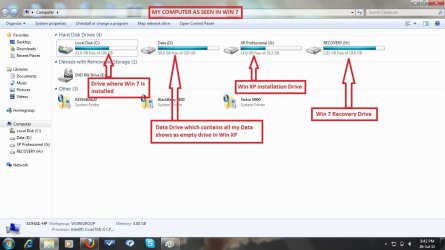
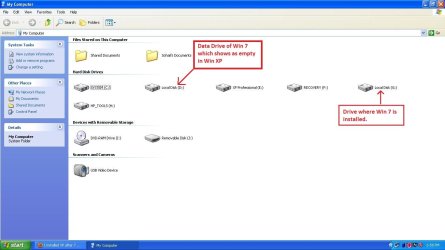
I installed XP after 7 successfully .. but there is just one problem

dyedcorduroy

New member
Local time
9:02 PM
Messages
7
Hi,

I installed XP after 7 successfully .. but there is just one problem that just doesnt go away ... In 7 (basic OS of my laptop) windows is installed on Drive 'C', all my data is on Drive 'D', next is recovery Drive 'F', and Windows XP on Drive 'G' .. but when i log into Windows XP, all partitions work fine .. only the Drive 'D' (of windows 7) shows as an empty drive .. i have over 250 gb data on this partition .. but nothing shows .. i am able to open it but cant see anything (when logged into windows XP) .. when i hover the mouse over it, it doesnt even show the partition size and used and free space etc .. Plz help with this ..
 

My Computer My Computer

At a glance

7 x 64bit, Xp x 32bit
Computer Manufacturer/Model Number
Hp Pavilion DV6-3140se
OS
7 x 64bit, Xp x 32bit
Hello dyedcorduroy, welcome to Seven Forums!


Does the partition have a drive letter in XP?


Before we make any specific recommendations will you please post a snip/screen-shot of the entire Windows disk management drive map with a full description as to which drive/partition is which, so we can see what you have going on as there may be a fairly simple way to resolve the situation.

In the Windows start menu right click computer and click manage, in the left pane of the "Computer Management" window that opens click disk management and post a maximized snip of that.


My Computer My Computer

At a glance

W 7 64-bit UltimateIntel Q9550 Yorkfield8GB Dominator 8500C5DATI : XFX 5870
Computer Manufacturer/Model Number
* BFK Customs *
OS
W 7 64-bit Ultimate
CPU
Intel Q9550 Yorkfield
Motherboard
ASUS P5Q Pro
Memory
8GB Dominator 8500C5D
Graphics Card(s)
ATI : XFX 5870
Sound Card
Realtek HD Audio 7-1
Monitor(s) Displays
1x 47" LCD HDMI & 3x 26" LCD HDMI
Screen Resolution
1920x1080P & 1920x1200
Hard Drives
1x 80GB Intel X25-M G2 SSD : 1x 500GB & 1x 640GB WD Caviar Black(s)
PSU
Corsair 620HX
Case
Cooler Master RC-690
Cooling
Tuniq Tower 120, 2x 140mm and 3x 120mm case fans
Keyboard
Microsoft 500
Mouse
Razer Diamondback 3G
Internet Speed
14 Mb/s
Other Info
1x Koutech 3Gb/s SATA HDD Hot Swap Rack
Justa cautionary note. I believe that if your XP installation "sees" your Windows 7 installation and gives it a drive letter, XP will remove or delete or in some mysterious way, screw up your Windows 7 system restore points.

Windows 7 recognizes and respects XP's system restore points, and the XP drive can be safely given a drive letter as seen from Windows 7, but XP does not respect Windows 7's. At least, this has been my experience.

http://www.vistax64.com/tutorials/127417-system-restore-points-stop-xp-dual-boot-delete.html

The above link applies to Win7 as well as Vista...
 

My Computer My Computer

At a glance

Windows 7 Enterprise x64 SP1, Ubuntu 11.04 x64Core2Quad Q6700 - 2.66 GHz8 Gig Mushkin DDR2 800 MHzEVGA NVIDIA 9800GT - 512MB DDR3
Computer Manufacturer/Model Number
Dell E520
OS
Windows 7 Enterprise x64 SP1, Ubuntu 11.04 x64
CPU
Core2Quad Q6700 - 2.66 GHz
Motherboard
Whatever the heck Dell put in there...
Memory
8 Gig Mushkin DDR2 800 MHz
Graphics Card(s)
EVGA NVIDIA 9800GT - 512MB DDR3
Monitor(s) Displays
2 x 19" ViewSonic LCD
Screen Resolution
2560x1024
Hard Drives
1 Intel X25-M 120G SSD, 1 300G VelociRaptor, 1 WD Caviar Black 1TB
PSU
PCPower & Cooling Silencer 500 Watt
Internet Speed
15/2 Roadrunner Cable
Other Info
NOD32 AV - Malwarebytes
Justa cautionary note. I believe that if your XP installation "sees" your Windows 7 installation and gives it a drive letter, XP will remove or delete or in some mysterious way, screw up your Windows 7 system restore points.

Windows 7 recognizes and respects XP's system restore points, and the XP drive can be safely given a drive letter as seen from Windows 7, but XP does not respect Windows 7's. At least, this has been my experience.

System Restore Points - Stop XP Dual Boot Delete - Vista Forums

The above link applies to Win7 as well as Vista...

System Restore Points - Stop XP Dual Boot Delete - Vista Forums
 

My Computer My Computer

At a glance

ME/XP/Vista/Win7
OS
ME/XP/Vista/Win7
Hello dyedcorduroy, welcome to Seven Forums!


Does the partition have a drive letter in XP?


Before we make any specific recommendations will you please post a snip/screen-shot of the entire Windows disk management drive map with a full description as to which drive/partition is which, so we can see what you have going on as there may be a fairly simple way to resolve the situation.

In the Windows start menu right click computer and click manage, in the left pane of the "Computer Management" window that opens click disk management and post a maximized snip of that.

Yup, the partition has a drive letter 'D' in XP.

I am uploading 2 snapshots each from XP and 7. One is of Disk Management and the other is My computer View.

I hope this helps u finding a solution for my problem ..

Another problem : There is no SOUND/AUDIO when i log into Win XP. I cant hear anything and neither does the sound icon appear. Looking into the Device Manager i found a yellow icon with "IDT High Definition Audio CODEC" .. No drivers are available on Hp site for Win XP for my Laptop .. Did many hit & trial methods but to no avail .. no matter which driver i try it always comes up with this "This Device Cannot Start. (Code 10)" ... :(
 

Attachments

  • Computer Management Win 7.jpg
    Computer Management Win 7.jpg
    110.6 KB · Views: 13
  • My Computer Win 7.jpg
    My Computer Win 7.jpg
    89 KB · Views: 7
  • Disk Management XP.JPG
    Disk Management XP.JPG
    110.7 KB · Views: 9
  • My Computer XP.JPG
    My Computer XP.JPG
    68.3 KB · Views: 5
Last edited:

My Computer My Computer

At a glance

7 x 64bit, Xp x 32bit
Computer Manufacturer/Model Number
Hp Pavilion DV6-3140se
OS
7 x 64bit, Xp x 32bit

My Computer My Computer

At a glance

7 x 64bit, Xp x 32bit
Computer Manufacturer/Model Number
Hp Pavilion DV6-3140se
OS
7 x 64bit, Xp x 32bit
Justa cautionary note. I believe that if your XP installation "sees" your Windows 7 installation and gives it a drive letter, XP will remove or delete or in some mysterious way, screw up your Windows 7 system restore points.

Windows 7 recognizes and respects XP's system restore points, and the XP drive can be safely given a drive letter as seen from Windows 7, but XP does not respect Windows 7's. At least, this has been my experience.

System Restore Points - Stop XP Dual Boot Delete - Vista Forums

The above link applies to Win7 as well as Vista...


Thanx for the heads up .. already took care of it .. :)
 

My Computer My Computer

At a glance

7 x 64bit, Xp x 32bit
Computer Manufacturer/Model Number
Hp Pavilion DV6-3140se
OS
7 x 64bit, Xp x 32bit
Trace the exact sound device make/model to then search it's XP driver using this tool: Hardware Identification

When you made space for the XP partition you must have converted to Logical which means the HP Recovery will not boot if needed to run full Factory Recovery from boot. Logical should be used for data partitions only as only Primary can be marked Active to host System boot files.

This may be one of the anomalies we see sometimes from Dual Boot via System Reserved where XP requires it to have a letter.

Try fully permissioning and sharing D from within 7: Take Ownership Shortcut
 
Trace the exact sound device make/model to then search it's XP driver using this tool: Hardware Identification

When you made space for the XP partition you must have converted to Logical which means the HP Recovery will not boot if needed to run full Factory Recovery from boot. Logical should be used for data partitions only as only Primary can be marked Active to host System boot files.

This may be one of the anomalies we see sometimes from Dual Boot via System Reserved where XP requires it to have a letter.

Try fully permissioning and sharing D from within 7: Take Ownership Shortcut


Hi,

Thanx for all the help .. I got it done Finally .. Here's what i did:

- I needed to re-install Win XP on a primary partition ..
- I already had 3 primary partitions .. so i had to delete one of them which turned out to be HP Tools ..
- And i also deleted the recovery partition ..
- Then i re-installed XP creating a Primary partition .. and it actually worked like magic .. :) ..
- And for the drivers for XP on my system (Hp Pavilion DV6-3140se) i found few of working drivers using 'Driver Genius' and for the rest i took help of 'www.driveridentifier.com' .. specially for the audio drivers ..
- Now I have a dual boot of Win 7 with Win XP .. :) .. everything in perfect order ..

Once again thanks for all the help u guys extended for my problem .. Cheers.
 

My Computer My Computer

At a glance

7 x 64bit, Xp x 32bit
Computer Manufacturer/Model Number
Hp Pavilion DV6-3140se
OS
7 x 64bit, Xp x 32bit
With the loss of the HP TOols and Recovery, you can now consider when ready clean reinstalling Win7 without the boatload of corrupting HP bloatware and useless factory Utilities (some residing on "Tools") which have much better versions built into Win7.

Here are tips to get a perfect clean reinstall of factory OEM: Reinstalling Windows 7. Win7 will reconfigure the Dual Boot when reinstalled last.

With HP any preinstalled apps you want for clean reinstall can be extracted from Recovery Disks using this method: Extract HP 3rd Party Software from RecovCD

I would also uninstall any driver finder software from HP and not use such software on Win7, which is driver-complete and quickly updated via optional Windows Updates. These are very dated tools and not needed past XP. Even for XP I would search for newer drivers by Googling exact device make/model + XP driver.
 
Hello again mate,


There's a lot of useful information in this tutorial at the link below and be sure to post back with any further questions you may have and to keep us informed.


My Computer My Computer

At a glance

W 7 64-bit UltimateIntel Q9550 Yorkfield8GB Dominator 8500C5DATI : XFX 5870
Computer Manufacturer/Model Number
* BFK Customs *
OS
W 7 64-bit Ultimate
CPU
Intel Q9550 Yorkfield
Motherboard
ASUS P5Q Pro
Memory
8GB Dominator 8500C5D
Graphics Card(s)
ATI : XFX 5870
Sound Card
Realtek HD Audio 7-1
Monitor(s) Displays
1x 47" LCD HDMI & 3x 26" LCD HDMI
Screen Resolution
1920x1080P & 1920x1200
Hard Drives
1x 80GB Intel X25-M G2 SSD : 1x 500GB & 1x 640GB WD Caviar Black(s)
PSU
Corsair 620HX
Case
Cooler Master RC-690
Cooling
Tuniq Tower 120, 2x 140mm and 3x 120mm case fans
Keyboard
Microsoft 500
Mouse
Razer Diamondback 3G
Internet Speed
14 Mb/s
Other Info
1x Koutech 3Gb/s SATA HDD Hot Swap Rack
With the loss of the HP TOols and Recovery, you can now consider when ready clean reinstalling Win7 without the boatload of corrupting HP bloatware and useless factory Utilities (some residing on "Tools") which have much better versions built into Win7.

Here are tips to get a perfect clean reinstall of factory OEM: Reinstalling Windows 7. Win7 will reconfigure the Dual Boot when reinstalled last.

With HP any preinstalled apps you want for clean reinstall can be extracted from Recovery Disks using this method: Extract HP 3rd Party Software from RecovCD

I would also uninstall any driver finder software from HP and not use such software on Win7, which is driver-complete and quickly updated via optional Windows Updates. These are very dated tools and not needed past XP. Even for XP I would search for newer drivers by Googling exact device make/model + XP driver.


Thanx again for such useful tips .. i tried for almost 3 days googling to find the drivers for Xp (whenever i cud find time) but in vain .. this was the last option and it did the job .. and no i did not try the software on Win 7 but only on Win Xp .. Thanx again .. u guys r awesome .. Cheers.
 

My Computer My Computer

At a glance

7 x 64bit, Xp x 32bit
Computer Manufacturer/Model Number
Hp Pavilion DV6-3140se
OS
7 x 64bit, Xp x 32bit

My Computer My Computer

At a glance

7 x 64bit, Xp x 32bit
Computer Manufacturer/Model Number
Hp Pavilion DV6-3140se
OS
7 x 64bit, Xp x 32bit
Back
Top