I'm making videos of my model stunt airplane with a Samsung camera that records pretty good 720P AVI files. It moves very fast so I have to have decent quality just to follow the action. I tried
Free Video Joiner and it's easy to use but it severely degrades the quality. Their home page says "
Quickly join and without any quality loss... join AVI, WMV, MOV, MPEG, MPG files." But the output file is severely degraded. For example, I joined a 438 MB and a 330 MB AVI movie and the output file was a blurry 62 MB AVI. It wasn't worth using, especially after converting it to Flash for Youtube. Maybe I need a better program for that too.
Just in passing, I happen to own a license for the two Briz products "Video Joiner" and "AVI Splitter". I hadn't installed them in my latest Win7 reinstall, but your comment pushed me to try this out to see if your observations were correct. I had previously used the "joiner" program to join AVI files and it did exactly what it claimed to be able to do.
Note that there is a prerequisite for no re-compression, as stated on their product description:
MPEG and AVI files with identical parameters (such as frame size, frame rate) can be joined without recompression quickly and without quality loss.
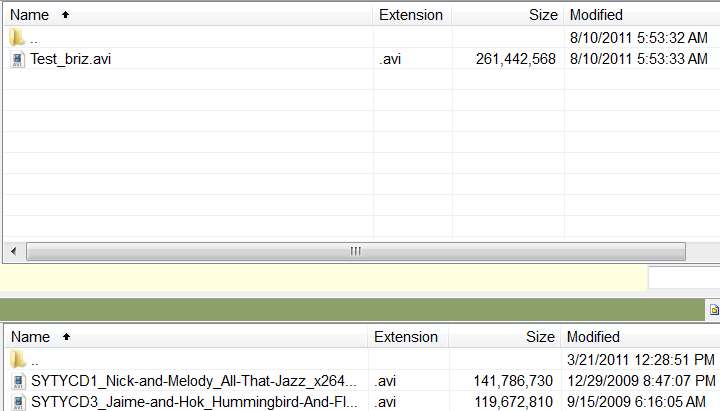
So, I experimented by joining two H.264 AVI's: (1) about 142MB, and (2) about 120MB. These both are 1280x720p HD video clips, so they have the identical frame size and frame rate as required.
Sure enough, when I then pushed the "join files" function the dialog that asked me to specify the output file target location also had the "join without recompression" box checked, and all of the items below it (that could specify a new frame size, frame rate, compression codec, etc.) were all grayed out since it had pre-populated the "join without compression" checkbox. Obviously this could be done because the two AVI's satisfied the requirement that they were identical frame size/rate.
I then pushed the "join" button and the two AVI's were literally joined together with NO RE-COMPRESSION. The output file is about 262MB in size, and is absolutely the identical original two 1280x720p HD AVI clips now joined perfectly back-to-back with zero re-compression. Took about 3 seconds to do the whole thing.
I suspect your situation perhaps involved attempting to join two clips that did not have identical frame size/rate values, or perhaps you'd un-checked the "join without compression" checkbox so that the lower re-size/compress parameters now were active. Since the default new frame size is 320x240 and who knows what compression codec, this seems like the only explanation for why your output was so small and crummy. I can't imagine that the "free" version can't do this, but maybe that's how they get you to buy it.
Actually, I didn't think they offered a "free" version anyway. Were you trying it out via the 7-day trial period? Perhaps they disable the "join without compression" feature in the trial version so that you'll buy it, but it seems like unless the user could actually see that it would really work he wouldn't likely buy it anyway! So I'm puzzled about what you ran, what you did, whether you un-checked that box (if it was even available), and why you got the results you did.
Now granted, I have a paid license to the product and am not using the "free" version, so maybe that's the difference. But I can absolutely attest to the fact that this "Video Joiner" works perfectly, and exactly as advertised. The result IS a back-to-back input AVI files 1 and 2 with zero re-compression in the resulting output AVI file. And the program can do this because the two input files have identical frame size/rates.
I'm just reporting my results using this product.